Windows Powershell Training in Coimbatore | Best Powershell Course | Updated 2025
Home » Microsoft Courses Tamil Nadu » Windows Powershell Training in Coimbatore

Windows Powershell Training in Coimbatore

Rated #1 Recoginized as the No.1 Institute for Windows Powershell Training in Coimbatore

Our Windows PowerShell Training in Coimbatore offers an interactive, practical learning experience designed to help you master the automation and management of IT systems using PowerShell.

Essential subjects covered in the course include PowerShell basics, cmdlet usage, automation of administrative tasks, error handling and debugging, system management, and PowerShell integration with other technologies, along with real-world use cases and hands-on exercises to reinforce learning.

  • Gain hands-on experience by working on real-time scripting projects.
  • Obtain a Windows PowerShell certification to advance your career.
  • Connect with 350+ hiring companies and 13,898+ successful graduates.
  • Unlock job opportunities in IT automation, DevOps, and cloud management.
  • Get industry-recognized training with expert support and placement assistance.
  • Enroll in our Windows PowerShell training and enhance your automation skills!

Job Assistance

1,200+ Enrolled

In collaboration with

65+ Hrs.

Duration

Online/Offline

Format

LMS

Life Time Access

Quality Training With Affordable Fee

⭐ Fees Starts From

INR 38,000
INR 18,500
Get Training Quote for Free

      Our Hiring Partners

      Learn From Experts, Practice On Projects & Get Placed in IT Company

      • 100% Guaranteed Placement Support for Freshers & Working Professionals.
      • You will not only gain knowledge of Windows Powershell and advanced concepts, but also gain exposure to Industry best practices.
      • Experienced Trainers and Lab Facility.
      • Microsoft Certified Solutions Associate (MSCA) for Windows Powershell Guidance Support with Exam Dumps.
      • Practical oriented / Job oriented Training. Practice on Real Time project scenarios.
      • We have designed an in-depth course so meet job requirements and criteria.
      • Resume & Interviews Preparation Support.
      • Concepts: Windows Operating System, Active Directory, DNS, DHCP, WSUS and WSD, TS Licensing, OS upgrade, Virtualization, Hyper-V, Citrix Xenapp 6.5.
      • START YOUR CAREER WITH WINDOWS POWERSHELL COURSE THAT GETS YOU A JOB OF UPTO 5 TO 12 LACS IN JUST 60 DAYS!

      Your IT Career Starts Here

      550+ Students Placed Every Month!

      Get inspired by their progress in the Career Growth Report.

      Other Categories Placements
      • Non-IT to IT (Career Transition) 2371+
      • Diploma Candidates3001+
      • Non-Engineering Students (Arts & Science)3419+
      • Engineering Students3571+
      • CTC Greater than 5 LPA4542+
      • Academic Percentage Less than 60%5583+
      • Career Break / Gap Students2588+

      Upcoming Batches For Classroom and Online

      Weekdays
      01 - Dec - 2025
      08:00 AM & 10:00 AM
      Weekdays
      03 - Dec - 2025
      08:00 AM & 10:00 AM
      Weekends
      06 - Dec - 2025
      (10:00 AM - 01:30 PM)
      Weekends
      07 - Dec - 2025
      (09:00 AM - 02:00 PM)
      Can't find a batch you were looking for?
      INR 18,500
      INR 38,000

      OFF Expires in

      What’s included ?

      Convenient learning format

      📊 Free Aptitude and Technical Skills Training

      • Learn basic maths and logical thinking to solve problems easily.
      • Understand simple coding and technical concepts step by step.
      • Get ready for exams and interviews with regular practice.
      Dedicated career services

      🛠️ Hands-On Projects

      • Work on real-time projects to apply what you learn.
      • Build mini apps and tools daily to enhance your coding skills.
      • Gain practical experience just like in real jobs.
      Learn from the best

      🧠 AI Powered Self Interview Practice Portal

      • Practice interview questions with instant AI feedback.
      • Improve your answers by speaking and reviewing them.
      • Build confidence with real-time mock interview sessions.
      Learn from the best

      🎯 Interview Preparation For Freshers

      • Practice company-based interview questions.
      • Take online assessment tests to crack interviews
      • Practice confidently with real-world interview and project-based questions.
      Learn from the best

      🧪 LMS Online Learning Platform

      • Explore expert trainer videos and documents to boost your learning.
      • Study anytime with on-demand videos and detailed documents.
      • Quickly find topics with organized learning materials.

      Curriculum

      Syllabus of Windows PowerShell Course in Coimbatore
      Module 1 : Windows Operating System
      • What is an Operating system?
      • Types of Windows operating system
      • Difference between client and server OS
      • Editions of Server Operating system
      • Features of Server Operating system
      • Prerequisites and hardware requirements of OS installation
      • Installation of Windows Operating systems
      • Post installation configurations
      • Applying Group policy, Security policy and MMC
      • User Management, Resource management
      • Types of HDD, Disk Management
      • Partition of Disks, Drive mapping
      • Shares and Folder permissions
      • Installation of Roles and Features in server
      Module 2 : Active Directory
      • Introduction to AD, DNS, DHCP, Domain, Forest etc
      • Active Directory installation and configuration
      • Roaming profile configuration
      Module 3 : DNS
      • DNS installation and configuration
      Module 4 : DHCP
      • DHCP installation and configuration
      Module 5 : WSUS and WSD
      • WSUS installation and configuration
      • WSD installation and deployment
      Module 6 : TS Licensing
      • Planning for TS license server installation
      • Installation and configuration of Terminal License server
      Module 7 : OS upgrade
      • Considerations for upgrading from OS version to the other
      • Upgrading servers from Windows server 2003 to 2008
      • Upgrading servers from Windows server 2008 to 2012
      Virtualization
      Module 8 : Hyper-V
      • Hyper-V installation prerequisites
      • Hardware requirements
      • Installation and configuration of Hyper-V
      • Configuration of Network Adapter
      • Virtual machine creation
      • VHD creation and addition for VMs
      • Pass through disk addition
      • Troubleshooting hyper-V issues
      Module 9 : Citrix Xenapp 6.5
      • Citrix Xenapp 6.5 installation prerequisites
      • Hardware requirements
      • Installation and configuration of Citrix Xenapp
      • Configuration of Datastore and Licensing server
      • Publishing application in Citrix Appcentre
      Show More
      Show Less

      About Window Powershell Training Course in Coimbatore

      Windows PowerShell online training course at ACTE will teach you how to use this task-based command-line shell and scripting language, built on the .NET framework, designed especially for systems administration. This course is designed for the absolute beginner, meaning no prior experience with Windows PowerShell is needed.Start Learning with us ACTE Window PowerShell Classroom and Online Training Course.

      Most Job Oriented Windows Powershell Topics Covered
      • Windows OS

        Active Directory

        DNS

      • DHCP

        WSUS & WD

        TS Licensing

      • OS upgrade

        Hyper V

        Xenapp Citrix

      PowerShell being a systems administration language first and foremost I would strongly encourage a DevOps/Automation Route. Learn PowerShell DSC, Chef,Puppet and cloud management modules from AWS and Azure. You may never write customer facing app in PowerShell but you may be able to write the code that deploys the infrastructure in PowerShell. Find a company that has or needs an automation strategy around their Microsoft environment. Automate basic tasks on your pc via powershell. However, as with most everything, PowerShell is tool in the bag probably not the only scripting language that you need to learn over the course of your career.

      When Microsoft open-sourced PowerShell and announced its availability for other operating systems, it was not yet foreseeable what this would mean for Windows PowerShell. It is now clear the future belongs to PowerShell Core on all operating systems.

      Though Windows PowerShell can be used for a wide range of different applications, for a beginner, the primary utility of PowerShell scripts will be in regard to systems automation related to:

      • Working with batches of files, whether this be to automate backups or to control access to large numbers of files at once.
      • PowerShell scripts are also very useful when adding and removing new users. With a carefully designed script, you can automate the process of adding network drives, updating security software, and granting a new user access to shared files.
      • In order to perform these tasks, you’ll make use of several key features of PowerShell, such as cmdlets and aliases (which I will cover below).

      We are happy and proud to say that we have strong relationship with over 700+ small, mid-sized and MNCs. Many of these companies have openings for Window Powershell. Moreover, we have a very active placement cell that provides 100% placement assistance to our students. The cell also contributes by training students in mock interviews and discussions even after the course completion.

      PowerShell is also used to automate processes, and tedious work as updating properties on SharePoint items. Currently I'm changing all my Pages libraries to pages libraries. All 2600+ of them. It can be done with Site Settings as well, but it will take a month to do it. My customer are not willing to pay for a month of work that can be done in ten hours. That's business value

      You can use PowerShell from the command line for simple things (eg password reset) without having programming skills. So if you mean learning PowerShell for simple things from the command line, then no you need no programming background.

      The uses of PowerShell include adding and deleting accounts, editing groups, and creating listings to view specific types of users or groups. You can also choose to use the Windows PowerShell Integrated Scripting Environment (ISE), a graphic user interface that lets you run commands and create or test scripts

      Our courseware is designed to give a hands-on approach to the students in Window Powershell. The course is made up of theoretical classes that teach the basics of each module followed by high-intensity practical sessions reflecting the current challenges and needs of the industry that will demand the students’ time and commitment.

      Yes, The future is here! Microsoft has integrated PowerShell functionality into almost all of their products. On top of that, .NET Core is now open source and cross-platform capable. I have run PowerShell on Linux distributions for a test; while it has some maturing to do it is already a promising idea that a single language with the capabilites of PowerShell could be used to manage your enterprise infrastructure regardless of what OS it is running. Third-party software companies are now creating PowerShell modules to ship with their products. The old days of cmd/batch scripts are nearing their end for most use cases, although there are times where older commands are better for the task at hand. I still call them from PowerShell because dealing with string manipulation is easier there too.

      we would say in 3-6 months you could be pretty well versed in Powershell... But that requires that you actually use it. In my opinion it's not something you can just read a book and know, it's something that you have to make work... The longer your scripts get, the more functions you create and call, the more you dig for cmdlets and certain syntax etc etc. Eventually it all just comes second nature.

      3 reasons why you should learn how to use PowerShell?

        PowerShell is the built-in CLI for Microsoft Windows used by IT administrators and help desk workers to:

      • Automate redundant tasks
      • Manage IT environments at scale
      • Access hard-to-find user information

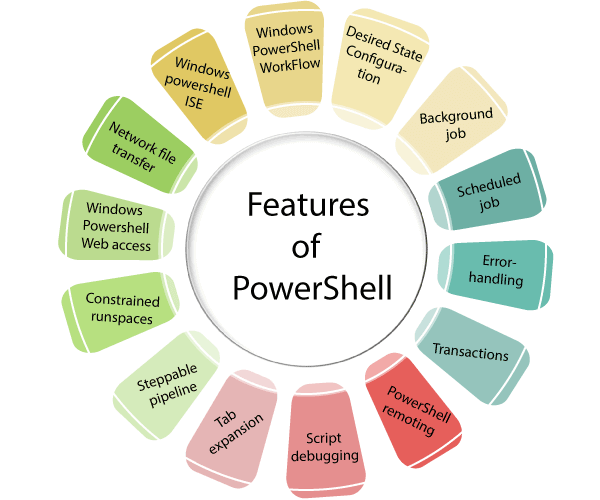
      Features of PowerShell

      Before beginning with the deeper concept of PowerShell, let's take a look at the significant features of PowerShell scripting language that makes it different from other scripting languages.

      1. Windows PowerShell Workflow 

      • Workflow capabilities have been introduced in Windows PowerShell version 3.0. It is designed particularly to help us by performing long-time and effort-consuming complex tasks across different and multiple devices at different locations.

      2. Desired State Configuration

      • DSC is the feature of a Windows PowerShell which provides a collection of language extensions, resources, and cmdlets that can be used to configure the software declaratively.

      3. Background job

      • Windows PowerShell introduced the concept of background jobs that run scripts and cmdlets asynchronously on the remote and local machines in the background without affecting the user interface or interacting with the console.

      4. Scheduled job

      • It is similar to the background job. Both the jobs execute asynchronously in the background without affecting the interface, but the main difference is that the background jobs are started manually.

      5. Error-handling

      • Windows PowerShell provides the error-handling mechanism through the Try{ }, Catch { }, and Finally {} blocks as in .NET language.
                            Features of PowerShell

      6. PowerShell remoting

      • This feature of Windows PowerShell allows the execution of cmdlets on remote systems which help to manage the set of remote computers from one single machine.

      7. Script debugging

      • It is a feature of PowerShell to examine the script, function, command, or expressions while PowerShell is running. PowerShell script debugger includes the set of cmdlets which allow to set and manage breakpoints and view the call stack.

      8. Tab expansion

      •  Tab expansion is an implementation of auto-completion, which completes the cmdlets, properties, and parameter names by pressing the Tab key once.

      9. Steppable pipeline

      • This feature allows the splitting of script blocks into a steppable pipeline. And then it gives the option to call the begin(), process(), and end() methods of script block to control the execution sequence.

      10. Constrained runspaces

      •  It allows the creation of PowerShell runspaces with the set of constraints which includes the ability to access and execution of scripts, cmdlets, and language elements.

      11. Windows PowerShell web access

      •  PowerShell console introduced a web-based version in Windows Server 2012. Here, we can run PowerShell cmdlets from any web browser which is not available on desktops but also on any tablet or mobile devices.

      12. Network file transfer

      • This feature provides the native support for prioritized, and asynchronous transfer of files between the machines using BITS (Background Intelligent Transfer Service).

      13. Windows PowerShell Integrated Scripting Environment (ISE)

      •  It is the host GUI based application for the Windows PowerShell. This feature provides tab completion, multiline editing, syntax coloring, context-sensitive help, selective execution, and support for right-to-left languages.

      14. Transactions

      •  This feature of Windows PowerShell enables us to start a transaction, to indicate which command is a part of it, and to either rollback or commit a transaction.

      How does PowerShell make working so easy?

      • The reason for the popularity is that it adds power, functionality, and flexibility to Windows Command Prompt. As everything cannot be done by using GUI, the command line is very important.
      • By using it, you can easily update the active directory attributes for a thousand users. By using it user can easily complete the task by using a single line of code. It is a mechanism which provides interactive mechanism between the server and the products. The PowerShell command is interactive, and the console enables you to run different commands in real time.
      • It is easier and quicker as there is no need to edit any script in notepad and then run it separately. The addition to this is that the user can invoke all small scripts, bat files or procedures.
      • All these can be invoked from PowerShell. It is said to be a powerful tool. This power that it gets is not feasible or practical to remember all the commands. With this in place, it is built right into the editor where multiple tools can help you in getting a proper solution.

      Why do we need PowerShell?

      • This is a task-based command line shell scripting language.
      • It provides both command line along with scripting language. It can interact with many numbers of technologies together at once.
      • In addition to this, it is object based. Once you understand this you can work on the Microsoft ecosystem.
      Show More
      Need customized curriculum?

      Our Top Hiring Partner for Placements

      ACTE Coimbatore offers placement opportunities as add-on to every student / professional who completed our classroom or online training. Some of our students are working in these companies listed below.

      • We are associated with top organizations like HCL, Wipro, Dell, Accenture, Google, CTS, TCS, IBM etc. It make us capable to place our students in top MNCs across the globe
      • We have separate student’s portals for placement, here you will get all the interview schedules and we notify you through Emails.
      • After completion of 70% Windows Powershell training course content, we will arrange the interview calls to students & prepare them to F2F interaction
      • Windows Powershell Trainers assist students in developing their resume matching the current industry needs
      • We have a dedicated Placement support team wing that assist students in securing placement according to their requirements
      • We will schedule Mock Exams and Mock Interviews to find out the GAP in Candidate Knowledge

      Get Certified By Window Power Shell & Industry Recognized ACTE Certificate

      Acte Certification is Accredited by all major Global Companies around the world. We provide after completion of the theoretical and practical sessions to fresher's as well as corporate trainees.

      Our certification at Acte is accredited worldwide. It increases the value of your resume and you can attain leading job posts with the help of this certification in leading MNC's of the world. The certification is only provided after successful completion of our training and practical based projects.

      Complete Your Course

      a downloadable Certificate in PDF format, immediately available to you when you complete your Course

      Get Certified

      a physical version of your officially branded and security-marked Certificate.

      Get Certified

      About Experienced Windows Powershell Trainer

      • Our Windows Powershell Training in Coimbatore. Trainers are certified professionals with 7+ years of experience in their respective domain as well as they are currently working with Top MNCs.
      • As all Trainers are Windows Powershell domain working professionals so they are having many live projects, trainers will use these projects during training sessions.
      • All our Trainers are working with companies such as Cognizant, Dell, Infosys, IBM, L&T InfoTech, TCS, HCL Technologies, etc.
      • Trainers are also help candidates to get placed in their respective company by Employee Referral / Internal Hiring process.
      • Our trainers are industry-experts and subject specialists who have mastered on running applications providing Best Windows Powershell training to the students.
      • We have received various prestigious awards for Windows Powershell Training in Coimbatore from recognized IT organizations.

      Authorized Partners

      ACTE TRAINING INSTITUTE PVT LTD is the unique Authorised Oracle Partner, Authorised Microsoft Partner, Authorised Pearson Vue Exam Center, Authorised PSI Exam Center, Authorised Partner Of AWS .

      Get Training Quote for Free

            Career Support

            Placement Assistance

            Exclusive access to ACTE Job portal

            Mock Interview Preparation

            1 on 1 Career Mentoring Sessions

            Career Oriented Sessions

            Resume & LinkedIn Profile Building

            We Offer High-Quality Training at The Lowest Prices.

            Affordable, Quality Training for Freshers to Launch IT Careers & Land Top Placements.

            What Makes ACTE Training Different?

            Feature

            ACTE Technologies

            Other Institutes

            Affordable Fees

            Competitive Pricing With Flexible Payment Options.

            Higher Fees With Limited Payment Options.

            Industry Experts

            Well Experienced Trainer From a Relevant Field With Practical Training

            Theoretical Class With Limited Practical

            Updated Syllabus

            Updated and Industry-relevant Course Curriculum With Hands-on Learning.

            Outdated Curriculum With Limited Practical Training.

            Hands-on projects

            Real-world Projects With Live Case Studies and Collaboration With Companies.

            Basic Projects With Limited Real-world Application.

            Certification

            Industry-recognized Certifications With Global Validity.

            Basic Certifications With Limited Recognition.

            Placement Support

            Strong Placement Support With Tie-ups With Top Companies and Mock Interviews.

            Basic Placement Support

            Industry Partnerships

            Strong Ties With Top Tech Companies for Internships and Placements

            No Partnerships, Limited Opportunities

            Batch Size

            Small Batch Sizes for Personalized Attention.

            Large Batch Sizes With Limited Individual Focus.

            LMS Features

            Lifetime Access Course video Materials in LMS, Online Interview Practice, upload resumes in Placement Portal.

            No LMS Features or Perks.

            Training Support

            Dedicated Mentors, 24/7 Doubt Resolution, and Personalized Guidance.

            Limited Mentor Support and No After-hours Assistance.

            Windows Powershell Course FAQs

            Looking for better Discount Price?

            Call now: +91-7669 100 251 and know the exciting offers available for you!
            • ACTE is the Legend in offering placement to the students. Please visit our Placed Students List on our website
            • We have strong relationship with over 700+ Top MNCs like SAP, Oracle, Amazon, HCL, Wipro, Dell, Accenture, Google, CTS, TCS, IBM etc.
            • More than 3500+ students placed in last year in India & Globally
            • ACTE conducts development sessions including mock interviews, presentation skills to prepare students to face a challenging interview situation with ease.
            • 85% percent placement record
            • Our Placement Cell support you till you get placed in better MNC
            • Please Visit Your Student Portal | Here FREE Lifetime Online Student Portal help you to access the Job Openings, Study Materials, Videos, Recorded Section & Top MNC interview Questions
              ACTE Gives Certificate For Completing A Course
            • Certification is Accredited by all major Global Companies
            • ACTE is the unique Authorized Oracle Partner, Authorized Microsoft Partner, Authorized Pearson Vue Exam Center, Authorized PSI Exam Center, Authorized Partner Of AWS
            • The entire Windows Powershell training has been built around Real Time Implementation
            • You Get Hands-on Experience with Industry Projects, Hackathons & lab sessions which will help you to Build your Project Portfolio
            • GitHub repository and Showcase to Recruiters in Interviews & Get Placed
            All the instructors at ACTE are practitioners from the Industry with minimum 9-12 yrs of relevant IT experience. They are subject matter experts and are trained by ACTE for providing an awesome learning experience.
            No worries. ACTE assure that no one misses single lectures topics. We will reschedule the classes as per your convenience within the stipulated course duration with all such possibilities. If required you can even attend that topic with any other batches.
            We offer this course in “Class Room, One to One Training, Fast Track, Customized Training & Online Training” mode. Through this way you won’t mess anything in your real-life schedule.

            Why Should I Learn Windows Powershell Course At ACTE?

            • Windows Powershell Course in ACTE is designed & conducted by Windows Powershell experts with 10+ years of experience in the Windows Powershell domain
            • Only institution in India with the right blend of theory & practical sessions
            • In-depth Course coverage for 60+ Hours
            • More than 50,000+ students trust ACTE
            • Affordable fees keeping students and IT working professionals in mind
            • Course timings designed to suit working professionals and students
            • Interview tips and training
            • Resume building support
            • Real-time projects and case studies
            Yes We Provide Lifetime Access for Student’s Portal Study Materials, Videos & Top MNC Interview Question.
            You will receive ACTE globally recognized course completion certification Along with project experience, job support, and lifetime resources.
            We have been in the training field for close to a decade now. We set up our operations in the year 2009 by a group of IT veterans to offer world class IT training & we have trained over 50,000+ aspirants to well-employed IT professionals in various IT companies.
            We at ACTE believe in giving individual attention to students so that they will be in a position to clarify all the doubts that arise in complex and difficult topics. Therefore, we restrict the size of each Windows Powershell batch to 5 or 6 members
            Our courseware is designed to give a hands-on approach to the students in Windows Powershell. The course is made up of theoretical classes that teach the basics of each module followed by high-intensity practical sessions reflecting the current challenges and needs of the industry that will demand the students’ time and commitment.
            You can contact our support number at +91 76691 00251 / Directly can do by ACTE.in's E-commerce payment system Login or directly walk-in to one of the ACTE branches in India
            Show More

            Job Opportunities in Windows powershell

            Over 35% of Developers Opt for Teradata, Acknowledging It As the Foremost and Highly Sought-After Programming Tool in the Tech Industry, Especially in the Realm of Windows PowerShell.