Best Power BI Training in Gurgaon ⭐Power BI Course in Gurgaon. | Updated 2026
Home » Bi & Data Warehousing Courses India » Power BI Training in Gurgaon

Power BI Training in Gurgaon

Rated #1 Recoginized as the No.1 Institute for Power BI Training in Gurgaon

Recognized as the leading institute for Power BI training in Gurgaon, we equip students with the skills to transform data into actionable insights, perfect for careers in data analytics and business intelligence.

Join the best Power BI course in Gurgaon, where you will learn the ins and outs of data visualization, reporting, and analysis. Our expert instructors provide hands-on training to ensure you’re ready to excel in real-world analytics challenges in Power BI Certification.

  • Top-Rated Power BI Training with Placement
  • Affordable Fees with Certification Upon Completion
  • Access to 400+ Hiring Partners for Guaranteed Placement Support
  • Gain Practical Experience by Working on Real-World Industry Projects
  • Enhance Your Resume with Mock Interviews and Career Guidance to Secure Top Jobs
  • Master Power BI and Reporting Techniques from Experts through Power BI Certification course
  • Join A Leading Power BI Training Institute In Gurgaon To Start Your Learning Journey.
  • The Power BI Course Includes Key Concepts, Tools, And Syllabus For Practical Industry Skills.
  • Boost Your Career With Flexible Timings, Certification, And Dedicated Placement Assistance.
  • Gain Practical Experience Through Live Projects And Hands-On Sessions Built For Industry.

Job Assistance

1,200+ Enrolled

In collaboration with

65+ Hrs.

Duration

Online/Offline

Format

LMS

Life Time Access

Quality Training With Affordable Fee

⭐ Fees Starts From

INR 36,000
INR 16,500
100% Placements | Get Hired in Top MNC

Our Hiring Partners

Build Professional Expertise Through Power BI Training in Gurgaon

  • Power BI Training in Gurgaon helps learners develop practical business intelligence and data analytics skills by connecting, transforming, analyzing, visualizing, and presenting business data. The course focuses on real-world reporting, data-driven insights, and improved organizational decision-making.
  • The program covers Power BI development, dashboard design, data modeling, Power Query, DAX, data integration, and report creation. Learners understand how to build accurate, interactive, scalable, and user-friendly dashboards for different business processes and analytical requirements.
  • Gain practical experience by creating business reports, transforming datasets, developing interactive dashboards, and analyzing workplace requirements through real-time projects that strengthen technical expertise, analytical thinking, visualization, and problem-solving skills.
  • Experienced Power BI instructors provide practical training through industry examples, case studies, and demonstrations. Learners work on data visualization, report development, data modeling, DAX calculations, dashboard creation, testing, publishing, and Power BI implementation techniques.
  • Power BI Training in Gurgaon provides project-based learning aligned with industry practices. Learners develop accurate, interactive, and maintainable reports while gaining knowledge of data analytics, business intelligence, data visualization, reporting, and digital transformation methods.
  • The course provides career assistance through resume preparation, interview practice, mock assessments, communication training, and professional mentoring. Learners enhance Power BI capabilities, build confidence, and prepare for Microsoft Power BI career opportunities.

Essential Skills You Will Develop Through Power BI Training

Learn Power BI for data analytics, business intelligence, data transformation, and report development through practical projects and structured training.

Create real-time business dashboards, transform datasets, and develop interactive visual reports through hands-on assignments and practical learning sessions.

Integrate Power BI with Excel, Power Query, SQL Server, and Microsoft services to develop connected and insightful business intelligence solutions efficiently.

Build career-ready expertise with professional training, certification support, practical projects, hands-on assignments, interview preparation, and placement guidance.

Your IT Career Starts Here

550+ Students Placed Every Month!

Get inspired by their progress in the Career Growth Report.

Other Categories Placements
  • Non-IT to IT (Career Transition) 2371+
  • Diploma Candidates3001+
  • Non-Engineering Students (Arts & Science)3419+
  • Engineering Students3571+
  • CTC Greater than 5 LPA4542+
  • Academic Percentage Less than 60%5583+
  • Career Break / Gap Students2588+

Tools Covered For Power BI Training

Power BI Desktop Power BI Service Power BI Data Gateway Power BI Mobile Apps Power BI Report Builder Power BI Report Server Power Query Power Pivot

Upcoming Batches For Classroom and Online

Weekdays
02 - Nov - 2026
08:00 AM & 10:00 AM
Weekdays
04 - Nov - 2026
08:00 AM & 10:00 AM
Weekends
07 - Nov - 2026
(10:00 AM - 01:30 PM)
Weekends
08 - Nov - 2026
(09:00 AM - 02:00 PM)
Can't find a batch you were looking for?
INR 16,500
INR 36,000

OFF Expires in

Who Should Take a Power BI Training

IT Professionals

Non-IT Career Switchers

Fresh Graduates

Working Professionals

Diploma Holders

Professionals from Other Fields

Salary Hike

Graduates with Less Than 60%

Show More

Job Roles For Power BI Training

Power BI Developer

Business Intelligence (BI) Analyst

Data Analyst

Data Engineer

Power BI Consultant

BI Architect

Data Scientist

Reporting Analyst

Show More

What’s included ?

Convenient learning format

📊 Free Aptitude and Technical Skills Training

  • Learn basic maths and logical thinking to solve problems easily.
  • Understand simple coding and technical concepts step by step.
  • Get ready for exams and interviews with regular practice.
Dedicated career services

🛠️ Hands-On Projects

  • Work on real-time projects to apply what you learn.
  • Build mini apps and tools daily to enhance your coding skills.
  • Gain practical experience just like in real jobs.
Learn from the best

🧠 Launch Your Career in Top MNC Companies

  • Master technical and HR interview rounds.
  • Gain confidence with expert mock interview practice.
  • Improve your chances of getting hired faster.
Learn from the best

🎯 Interview Preparation For Freshers

  • Practice company-based interview questions.
  • Take online assessment tests to crack interviews
  • Practice confidently with real-world interview and project-based questions.
Learn from the best

🧪 LMS Self Learning Platform

  • Explore expert trainer videos and documents to boost your learning.
  • Study anytime with on-demand videos and detailed documents.
  • Top MNC interview questions & self coding practice.
 

Curriculum

Syllabus of Power BI Course in Gurgaon
Module 1: Quick Start Power BI Service
  • Get Power BI Tools
  • Introduction to Tools and Terminology
  • Dashboard in Minutes
  • Refreshing Power BI Service Data
  • Interacting with your Dashboards
  • Sharing Dashboards and Reports
  • Recap and What's Next
Module 2: Getting and Transforming Data with Power BI Desktop
  • Introduction to Power BI Desktop
  • Getting Data: Excel vs Power BI Desktop & Service
  • Data Structure for Q&A
  • DirectQuery vs Import Data
  • Recap and What's Next
Module 3: Modeling with Power BI
  • Introduction to Modeling
  • Setup and Manage Relationships
  • Cardinality and Cross Filtering
  • Default Summarization & Sort by
  • Creating Calculated Columns
  • Creating Measures & Quick Measures
  • Recap and What's Next
Module 4: Power BI Desktop Visualisations
  • Creating Visualisations
  • Color Formatting
  • Setting Sort Order
  • Scatter & Bubble Charts & Play Axis
  • Tooltips
  • Slicers, Timeline Slicers & Sync Slicers
  • Cross Filtering and Highlighting
  • Visual, Page and Report Level Filters
  • Drill Down/Up
  • Hierarchies
  • Reference/Constant Lines
  • Tables, Matrices & Conditional Formatting
  • KPI's, Cards & Gauges
  • Map Visualizations
  • Custom Visuals
  • Managing and Arranging
  • Drillthrough
  • Custom Report Themes
  • Grouping and Binning
  • Selection Pane, Bookmarks & Buttons
  • Recap and What's Next
Module 5: Power BI Service Visualisation Tools
  • ntroduction
  • Standalone Tiles
  • Data Driven Alerts
  • Quick and Related Insights
  • custom Q&A questions
Module 6: Publishing and Sharing
  • Introduction
  • Sharing Options Overview
  • Publish from Power BI Desktop x
  • Publish to Web
  • Share Dashboard with Power BI Service
  • Workspaces and Apps (Power BI Pro)
  • Content Packs (Power BI Pro)
  • Print or Save as PDF
  • Row Level Security (Power BI Pro)
  • Export Data from a Visualization
  • Publishing for Mobile Apps
  • Export to PowerPoint
  • Sharing Options Summary
Module 7: Refreshing Datasets
  • Understanding Data Refresh
  • Personal Gateway (Power BI Pro and 64-bit Windows)
  • Replacing a Dataset
  • Troubleshooting Refreshing
Module 8: Power BI and Excel Together
  • Options for Publishing from Excel
  • Pin Excel Elements to Power BI
  • connect to Data using Power BI Publisher/Analyze in Excel
  • Excel 2016 Publish: Upload and Export to Power BI
  • Sharing Published Excel Dashboards
Show More
Show Less

Power BI Training Learning Goals

Yes, beginners can learn Power BI through structured lessons, guided exercises, and project-based practice. The training begins with basic concepts and gradually advances toward professional data analysis and reporting.
The training is suitable for students, analysts, developers, business users, IT professionals, and working professionals seeking skills in data visualization, business intelligence, reporting, and Microsoft technologies.
  • Business intelligence and report development
  • Interactive dashboard and visualization creation
  • Power Query and data transformation
  • DAX calculations and analytical expressions
  • Data modeling and relationship management
  • Report publishing and workspace deployment
Yes, participants work on practical projects involving data preparation, dashboard creation, report development, visualization, and business scenarios to build useful analytical and problem-solving skills.
  • Power BI and business intelligence fundamentals
  • Interactive dashboard and report development
  • Power Query and data transformation techniques
  • DAX formulas and analytical calculations
  • Data modeling and relationship fundamentals
  • Report publishing and workspace management
  • Microsoft service and data source integration
Advanced programming knowledge is not required. Basic computer skills, logical thinking, and familiarity with spreadsheets or business data are helpful. Knowledge of Microsoft applications can provide additional support.
  • Microsoft Power BI
  • Microsoft Power Query
  • Microsoft Excel
  • Microsoft SQL Server
  • Microsoft SharePoint
  • Microsoft Teams
Power BI helps organizations analyze business information, create interactive reports, monitor key metrics, identify trends, and support informed decision-making through centralized and accessible data insights.
  • Power BI Developer
  • Business Intelligence Analyst
  • Data Analyst
  • Business Intelligence Consultant
  • Reporting Specialist
  • Power BI Data Analyst
Power BI skills are increasingly used as organizations adopt business intelligence tools for data analysis, interactive reporting, performance tracking, data visualization, and digital transformation initiatives across business functions.
Power BI provides career opportunities as organizations use business intelligence platforms for data analysis, reporting, visualization, performance management, and data-driven business process improvement.
Yes, the Power BI Training provides practical exposure through projects covering data preparation, visualization, dashboard development, reporting, and business-focused use cases for workplace implementation.
Show More

Detailed Overview of Power BI Course in Gurgaon

Power BI is a powerful business intelligence platform that enables users to transform business data into meaningful reports and interactive dashboards with minimal programming knowledge. The Power BI Course in Gurgaon provides practical knowledge of data analysis, data transformation, visualization, reporting, and Microsoft service connectivity through structured training sessions. The curriculum focuses on creating business reports using visual analytics tools, data connectors, Power Query, DAX capabilities, and interactive dashboards. Participants receive hands-on practice through real-time projects, data analysis, dashboard development, and responsive report creation. The Power BI Course in Gurgaon also includes a Power BI Training Internship, allowing learners to gain industry exposure, apply analytical concepts, and understand practical business intelligence methodologies. The Power BI Internship course program is suitable for beginners and professionals seeking to improve reporting skills, support data-driven decision-making, and build careers in Microsoft Power BI and business intelligence technologies. Learners also understand data modeling, performance analysis, data connectivity, and scalable reporting solutions. Through practical exercises and expert mentoring, participants develop valuable skills and industry-focused analytical reports.

Additional Info

Career Roles and Responsibilities in Power BI

  • Power BI Consultant : Develops Power BI solutions, designs analytical reports, supports data-driven initiatives, and connects business intelligence solutions with goals to improve decision-making.
  • Business Intelligence Analyst : Analyzes business data, evaluates reporting requirements, identifies useful trends, and collaborates with teams to develop effective Power BI dashboards and reports.
  • Data Analyst : Creates interactive Power BI reports with meaningful visualizations, reliable calculations, optimized performance, and analytical features designed around business and reporting requirements.
  • BI Support Analyst : Supports Power BI reports, troubleshoots technical issues, assists users, monitors dashboard performance, and maintains reliable business intelligence operations.
  • Data Integration Specialist : Connects Power BI with databases, APIs, and organizational data sources, manages data connections, supports reporting, and enables dependable data-driven analysis.
  • Power BI Solutions Developer : Develops customized dashboards, creates analytical reports, integrates business information, and business intelligence solutions that improve reporting and productivity.

Widely Used Tools in Power BI Training in Gurgaon

  • Power BI : A business intelligence platform for creating interactive reports and dashboards, connecting information, analyzing datasets, and developing scalable solutions that support business decisions.
  • Power Query : Transforms and cleans business data, combines multiple sources, removes inconsistencies, and prepares reliable datasets for analysis, reporting, and visualization.
  • Microsoft Excel : A widely used spreadsheet solution for organizing and analyzing business information, preparing datasets, and connecting structured data with Power BI reports.
  • SQL Server : A database platform for storing and managing structured information, enabling secure data access, efficient querying, and reliable connections with Power BI solutions.
  • SharePoint : A collaboration service for managing documents, lists, and organizational information, while connecting with Power BI to support centralized and efficient business reporting.
  • Microsoft Teams : A collaboration platform for chats, meetings, document sharing, and report integration, helping teams communicate effectively and access business insights centrally.

Professional Skills You Gain from a Power BI Course

  • Report Development : Create customized business reports with Power BI using interactive visualizations, reusable elements, and practical features designed to meet organizational reporting requirements.
  • Data Transformation : Clean, combine, and transform datasets through Power Query to improve data quality, increase accuracy, and prepare information for effective business analysis.
  • Dashboard Design : Design interactive and user-friendly dashboards using charts, tables, cards, filters, and professional layouts to deliver effective and engaging data experiences.
  • Data Integration : Connect Power BI with Excel, SQL Server, SharePoint, APIs, and external sources to enable smooth information exchange and support connected business reporting.
  • DAX Calculations : Use measures, calculated columns, functions, and expressions to manage analytical requirements and develop reports that effectively satisfy business intelligence needs.
  • Data Analytics : Organize business information through data models and develop reports, dashboards, and visualizations that convert datasets into valuable insights for informed business decisions.

Career Scope of Power BI Internship in Gurgaon

  • Industry Demand : Growing Power BI Internship in Gurgaon opportunities for can analyze, visualize, publish, and maintain business intelligence reports addressing real organizational requirements.
  • Career Opportunities : Power BI knowledge supports Power BI Internship in Gurgaon, data analysis, consulting, reporting, business intelligence, and digital transformation across multiple industry sectors.
  • Improved Productivity : Power BI professionals simplify reporting activities, automate data refreshes, reduce manual analysis, and develop solutions that improve organizational productivity.
  • Platform Expertise : Power BI connects with Excel, Teams, SharePoint, SQL Server, and other Microsoft services, enabling professionals to develop integrated and scalable business intelligence solutions.
  • Skill Advancement : Ongoing Power BI updates help professionals expand skills in data analytics, visualization, DAX, data modeling, AI features, and advanced business intelligence capabilities.
  • Remote Careers : Power BI enables professionals to collaborate with distributed teams, contribute to remote analytics projects, and explore opportunities with organizations across international markets.
Show More

Need customized curriculum?

Hands-on Real Time Power BI Projects

Our Trusted Hiring Partners for Power BI Placement Assistance

  • Strengthen analytical Power BI Placement Assistance skills through practical exercises and workplace scenarios, developing the expertise needed to create effective Power BI reports and dashboards for requirements.
  • Receive Power BI Placement Support with resume development, aptitude preparation, and mock interview sessions. Power BI Placement assistance helps candidates understand requirements and skills confidently.
  • Develop practical expertise through live projects involving dashboard creation, data analysis, and report development while strengthening your ability to solve real-world business intelligence challenges.
  • Improve your professional profile with expert guidance in resume writing, communication skills, and interview preparation. Power BI training helps candidates approach professional with greater confidence.
  • Identify career opportunities by connecting with recruiters and hiring partners seeking data, intelligence professionals, helping you explore relevant roles and plan your professional career development.
  • Explore opportunities with companies such as HCL, Wipro, Dell, Accenture, Google, CTS, TCS, IBM BigFix, and others through our industry connections and placement assistance network.

Develop Career-Ready Expertise with Power BI Certification

Power BI Certification helps learners build practical expertise in business intelligence, data analysis, and interactive report development. The program covers data visualization, Power Query, DAX, data modeling, dashboards, data connectivity, and effective report design. Through hands-on projects and industry-focused use cases, Power BI Certification enables participants to create insightful dashboards, improve reporting efficiency, strengthen analytical capabilities, and prepare for career opportunities across the Microsoft data and business intelligence ecosystem in Gurgaon.

Complete Your Course

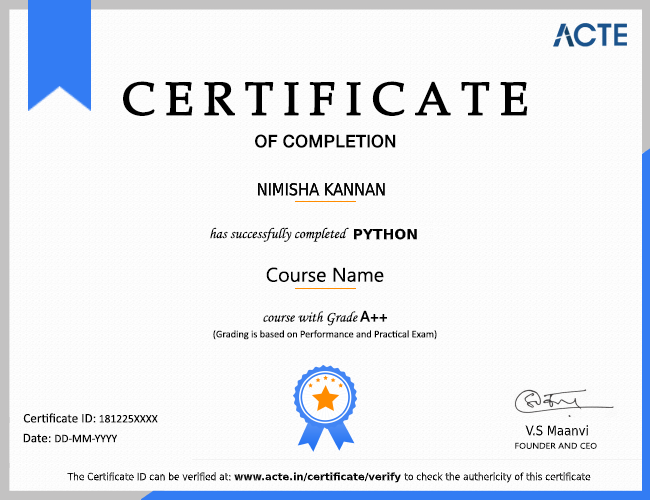
a downloadable Certificate in PDF format, immediately available to you when you complete your Course

Get Certified

a physical version of your officially branded and security-marked Certificate.

Get Certified

Learn from Experienced Power BI Trainers in Gurgaon

  • Practical projects and hands-on exercises help learners strengthen analytical skills, build confidence, interpret business data, and prepare for professional Microsoft Power BI career opportunities.
  • The training progresses from Power BI fundamentals to advanced concepts, covering data preparation, visualization, dashboard creation, DAX calculations, and business intelligence report development.
  • Experienced trainers demonstrate practical techniques and analytical approaches, helping learners understand business requirements, resolve data challenges, and create effective Power BI reports.
  • Power BI Trainers provide career-focused mentoring, helping learners build relevant expertise, understand career paths, identify job opportunities, and prepare for enterprise business intelligence roles.
  • Industry professionals provide placement assistance, real-time project exposure, role-based knowledge, and guidance from experienced Power BI Trainers with strong practical industry expertise.
  • Trainers conduct practical sessions based on current enterprise requirements, supported by industry insights, project experience, placement guidance, and career-oriented learning assistance.

Authorized Partners

ACTE TRAINING INSTITUTE PVT LTD is the unique Authorised Oracle Partner, Authorised Microsoft Partner, Authorised Pearson Vue Exam Center, Authorised PSI Exam Center, Authorised Partner Of AWS .

100% Placements | Get Hired in Top MNC

    Career Support

    Placement Assistance

    Exclusive access to ACTE Job portal

    Mock Interview Preparation

    1 on 1 Career Mentoring Sessions

    Career Oriented Sessions

    Resume & LinkedIn Profile Building

    We Offer High-Quality Training at The Lowest Prices.

    Affordable, Quality Training for Freshers to Launch IT Careers & Land Top Placements.

    What Makes ACTE Training Different?

    Feature

    ACTE Technologies

    Other Institutes

    Affordable Fees

    Competitive Pricing With Flexible Payment Options.

    Higher Fees With Limited Payment Options.

    Industry Experts

    Well Experienced Trainer From a Relevant Field With Practical Training

    Theoretical Class With Limited Practical

    Updated Syllabus

    Updated and Industry-relevant Course Curriculum With Hands-on Learning.

    Outdated Curriculum With Limited Practical Training.

    Hands-on projects

    Real-world Projects With Live Case Studies and Collaboration With Companies.

    Basic Projects With Limited Real-world Application.

    Certification

    Industry-recognized Certifications With Global Validity.

    Basic Certifications With Limited Recognition.

    Placement Support

    Strong Placement Support With Tie-ups With Top Companies and Mock Interviews.

    Basic Placement Support

    Industry Partnerships

    Strong Ties With Top Tech Companies for Internships and Placements

    No Partnerships, Limited Opportunities

    Batch Size

    Small Batch Sizes for Personalized Attention.

    Large Batch Sizes With Limited Individual Focus.

    LMS Features

    Lifetime Access Course video Materials in LMS, Online Interview Practice, upload resumes in Placement Portal.

    No LMS Features or Perks.

    Training Support

    Dedicated Mentors, 24/7 Doubt Resolution, and Personalized Guidance.

    Limited Mentor Support and No After-hours Assistance.

    FAQs

    Looking for better Discount Price?

    Call now: +91-7669 100 251 and know the exciting offers available for you!
    • ACTE is the Legend in offering placement to the students. Please visit our Placed Students List on our website
    • We have strong relationship with over 700+ Top MNCs like SAP, Oracle, Amazon, HCL, Wipro, Dell, Accenture, Google, CTS, TCS, IBM etc.
    • More than 3500+ students placed in last year in India & Globally
    • ACTE conducts development sessions including mock interviews, presentation skills to prepare students to face a challenging interview situation with ease.
    • 85% percent placement record
    • Our Placement Cell support you till you get placed in better MNC
    • Please Visit Your Student Portal | Here FREE Lifetime Online Student Portal help you to access the Job Openings, Study Materials, Videos, Recorded Section & Top MNC interview Questions
    The ACTE certification validates abilities and knowledge in specific domains, which can support career advancement. However, its recognition may vary based on employer preferences, industry standards, and relevance to particular roles.
    Yes, the Power BI training includes practical project work. These projects provide hands-on experience, improve employability, strengthen understanding of business scenarios, and help learners develop practical data analysis and visualization skills.
    The ACTE trainers are industry practitioners with relevant professional experience in Power BI and Microsoft technologies. They provide practical instruction, subject knowledge, project guidance, and an effective learning experience.
    If you cannot attend a class at ACTE, you can request make-up lessons or access recorded sessions. Course materials and learning resources are also provided to help you cover missed Power BI topics.
    You can manage the Power BI course alongside your daily commitments because it is available in classroom, one-on-one, fast-track, customised, and online training modes in Gurgaon.
    Learn Power BI at ACTE through structured training, an industry-focused curriculum, experienced instructors, practical projects, certification, placement assistance, and a supportive learning environment designed for career development.
    You will receive the ACTE course completion certification after successfully completing the Power BI training program.
    Yes, we provide lifetime access to the Student’s Portal, including Power BI study materials, videos, and top MNC interview questions.
    Yes, the Power BI course provides practical training through interactive sessions, real-world projects, and hands-on exercises. It also includes group discussions and mock interviews to strengthen technical skills and prepare learners for professional opportunities.
    Yes We Provide Lifetime Access for Student’s Portal Study Materials, Videos & Top MNC Interview Question.
    We provide recorded video lessons for Power BI training. After completing payment and enrolling in the course, you can access the pre-recorded sessions through our course platform and learn at your own pace.
    Yes, we offer job assistance after completing the Power BI course. This includes resume-building support, interview preparation, career guidance, and connecting learners with potential employers to support their job search.
    Show More

    Job Opportunities in Power BI

    More Than 35% Of Developers Prefer Power BI. Power BI Is The Most Popular And In-Demand In The Tech World.