Best Power BI Training In Texas ⭐ Power BI Course In Texas | Updated 2026
Home » Bi & Data Warehousing Courses India » Power BI Training in Texas

Power BI Training in Texas

Rated #1 Recoginized as the No.1 Institute for Power BI Training in Mumbai

Enroll in Power BI Training in Mumbai, guided by industry experts, to sharpen your skills in data analytics and business intelligence. Gain hands-on experience and propel your career forward!

Upon completing the Power BI course in Mumbai, students will gain an in-depth understanding of Power BI tools, data visualization, report building, and dashboard creation. You’ll also gain practical experience in transforming raw data into valuable insights for strategic business decisions.

  • Enhance your career with placement assistance in Power BI roles.
  • Explore job opportunities with 400+ hiring companies in Mumbai.
  • Join over 15,648 trained professionals and kickstart your data career!
  • Gain hands-on experience in creating impactful reports and dashboards.
  • Enroll in Power BI training today and advance your data analytics career!
  • Master Power BI with affordable, industry-recognized training in Mumbai.
  • Choose A Power BI Training Institute In Texas To Master Dashboard Design And Business Reporting.
  • Obtain Power BI Certification With Career Placement Assistance To Boost Your Professional Growth.
  • Gain Industry Skills Through Practical Projects Mentored By Qualified And Experienced Trainers.
  • Develop A Strong Portfolio, Improve Interview Skills, And Expand Your Career Opportunities.

Job Assistance

1,200+ Enrolled

In collaboration with

65+ Hrs.

Duration

Online/Offline

Format

LMS

Life Time Access

Quality Training With Affordable Fee

⭐ Fees Starts From

INR 36,000
INR 16,500
100% Placements | Get Hired in Top MNC

Our Hiring Partners

Develop Hands-On Skills with Professional Power BI Training in Texas

  • Power BI Training enables participants to build strong knowledge of business intelligence, data analysis, dashboard development, and reporting practices. Learn to examine complex datasets, create meaningful visual representations, and communicate useful business insights through structured reports.
  • Our Power BI Course in Texas explores data preparation, Power Query, data modeling, DAX functions, interactive dashboards, report development, and visualization techniques. Understand how to transform unprocessed data into actionable insights and create solutions for business intelligence needs.
  • Understand essential Power BI features, including data connectivity, table relationships, calculated columns, measures, DAX expressions, visual components, and report development. Strengthen your skills in creating, modifying, organizing, and managing interactive dashboards and analytical reports.
  • Power BI Training in Texas explores data preparation, modeling techniques, DAX calculations, dashboard creation, and Power BI Service tools. Strengthen report reliability, streamline analytical workflows, preserve data consistency, and contribute to informed business decisions.
  • Hands-on Power BI Training focuses on data cleaning, transformation, modeling, dashboard creation, and business analytics practices. Apply learned concepts to practical business situations, develop analytical reasoning, refine visualization techniques, and improve professional reporting skills.
  • Power BI Training in Texas features practical exercises, industry-oriented projects, and business case studies to strengthen your analytical knowledge. Build confidence in designing interactive dashboards, examining business datasets, communicating findings, and resolving reporting difficulties.

Explore the Skills You Will Develop in Our Power BI Course in Texas

Gain a strong foundation in Power BI basics, data visualization, business intelligence, reporting, and analytics to convert complex datasets into understandable and actionable business information.

Understand how to connect multiple data sources, organize information, define table relationships, build reliable data models, and manage Power BI reports for business reporting needs.

Build hands-on expertise in Power Query, DAX formulas, data modeling, interactive dashboards, advanced visualizations, analytical reports, and essential Power BI tools and features.

Strengthen your Power BI capabilities with instructor-led practice, hands-on assignments, and industry-oriented analytics projects designed to prepare you for real workplace requirements.

Your IT Career Starts Here

550+ Students Placed Every Month!

Get inspired by their progress in the Career Growth Report.

Other Categories Placements
  • Non-IT to IT (Career Transition) 2371+
  • Diploma Candidates3001+
  • Non-Engineering Students (Arts & Science)3419+
  • Engineering Students3571+
  • CTC Greater than 5 LPA4542+
  • Academic Percentage Less than 60%5583+
  • Career Break / Gap Students2588+

Tools Covered For Power BI Training

Power BI Desktop Power BI Service Power BI Data Gateway Power BI Mobile Apps Power BI Report Builder Power BI Report Server Power Query Power Pivot

Upcoming Batches For Classroom and Online

Weekdays
09 - Nov - 2026
08:00 AM & 10:00 AM
Weekdays
11 - Nov - 2026
08:00 AM & 10:00 AM
Weekends
14 - Nov - 2026
(10:00 AM - 01:30 PM)
Weekends
15 - Nov - 2026
(09:00 AM - 02:00 PM)
Can't find a batch you were looking for?
INR 16,500
INR 36,000

OFF Expires in

Who Should Take a Power BI Certification Course

IT Professionals

Non-IT Career Switchers

Fresh Graduates

Working Professionals

Diploma Holders

Professionals from Other Fields

Salary Hike

Graduates with Less Than 60%

Show More

Job Roles For Power BI Certification Training

Power BI Developer

BI Analyst

Data Analyst

Data Engineer

Power BI Consultant

BI Architect

Data Scientist

Reporting Analyst

Show More

What’s included ?

Convenient learning format

📊 Free Aptitude and Technical Skills Training

  • Learn basic maths and logical thinking to solve problems easily.
  • Understand simple coding and technical concepts step by step.
  • Get ready for exams and interviews with regular practice.
Dedicated career services

🛠️ Hands-On Projects

  • Work on real-time projects to apply what you learn.
  • Build mini apps and tools daily to enhance your coding skills.
  • Gain practical experience just like in real jobs.
Learn from the best

🧠 Launch Your Career in Top MNC Companies

  • Master technical and HR interview rounds.
  • Gain confidence with expert mock interview practice.
  • Improve your chances of getting hired faster.
Learn from the best

🎯 Interview Preparation For Freshers

  • Practice company-based interview questions.
  • Take online assessment tests to crack interviews
  • Practice confidently with real-world interview and project-based questions.
Learn from the best

🧪 LMS Self Learning Platform

  • Explore expert trainer videos and documents to boost your learning.
  • Study anytime with on-demand videos and detailed documents.
  • Top MNC interview questions & self coding practice.
 

Curriculum

Syllabus of Power BI Course in Texas
Module 1: Quick Start Power BI Service
  • Get Power BI Tools
  • Introduction to Tools and Terminology
  • Dashboard in Minutes
  • Refreshing Power BI Service Data
  • Interacting with your Dashboards
  • Sharing Dashboards and Reports
  • Recap and What's Next
Module 2: Getting and Transforming Data with Power BI Desktop
  • Introduction to Power BI Desktop
  • Getting Data: Excel vs Power BI Desktop & Service
  • Data Structure for Q&A
  • DirectQuery vs Import Data
  • Recap and What's Next
Module 3: Modeling with Power BI
  • Introduction to Modeling
  • Setup and Manage Relationships
  • Cardinality and Cross Filtering
  • Default Summarization & Sort by
  • Creating Calculated Columns
  • Creating Measures & Quick Measures
  • Recap and What's Next
Module 4: Power BI Desktop Visualisations
  • Creating Visualisations
  • Color Formatting
  • Setting Sort Order
  • Scatter & Bubble Charts & Play Axis
  • Tooltips
  • Slicers, Timeline Slicers & Sync Slicers
Module 5: Power BI Service Visualisation Tools
  • ntroduction
  • Standalone Tiles
  • Data Driven Alerts
  • Quick and Related Insights
  • custom Q&A questions
Module 6: Publishing and Sharing
  • Introduction
  • Sharing Options Overview
  • Publish from Power BI Desktop x
  • Publish to Web
  • Share Dashboard with Power BI Service
  • Workspaces and Apps (Power BI Pro)
Module 7: Refreshing Datasets
  • Understanding Data Refresh
  • Personal Gateway (Power BI Pro and 64-bit Windows)
  • Replacing a Dataset
  • Troubleshooting Refreshing
Module 8: Power BI and Excel Together
  • Options for Publishing from Excel
  • Pin Excel Elements to Power BI
  • connect to Data using Power BI Publisher/Analyze in Excel
  • Excel 2016 Publish: Upload and Export to Power BI
  • Sharing Published Excel Dashboards
Show More
Show Less

Power BI of Course Objectives

  • Business Intelligence Analysis.
  • Interactive Dashboard Development.
  • DAX Formulas and Data Modeling.
  • Advanced Visualization Skills.
  • Analytical Reporting Expertise.
Graduates, beginners, technology professionals, business analysts, and data specialists can participate in the course to strengthen their Power BI knowledge and analytical abilities.
  • Power BI Solutions Developer.
  • Data Analytics Specialist.
  • Business Intelligence Consultant.
  • BI Dashboard Designer.
  • Data Visualization Professional.
  • Power BI Core Concepts.
  • Data Import and Preparation.
  • Data Relationships and Modeling.
  • DAX Measures and Functions.
  • Interactive Reports and Dashboards.
  • Microsoft Power BI Desktop.
  • Power BI Cloud Service.
  • Power Query Transformation Tool.
  • DAX Studio Application.
  • Microsoft Excel Platform.
Power BI Training in Texas includes guided practical sessions, industry projects, expert mentoring, certification preparation, career counselling, and placement assistance for aspiring professionals.
Yes. Learners complete hands-on assignments involving data preparation, modeling, DAX calculations, dashboard design, report creation, and business analytics applications.
  • Power Query and Data Cleaning.
  • DAX Expressions and Modeling.
  • Interactive Visual Analytics.
  • Dashboard and Report Design.
  • Power BI Service and Sharing.
The course develops workplace capabilities through practical assignments, analytical exercises, dashboard projects, certification preparation, interview coaching, and placement support.
  • Strengthen Power BI Proficiency.
  • Improve Data Interpretation Skills.
  • Master Interactive Dashboard Design.
  • Prepare for Relevant Certifications.
  • Discover Suitable Job Opportunities.
Participants gain experience in data extraction, cleansing, transformation, modeling, DAX calculations, dashboard development, report preparation, and visualization using business datasets.
  • Interactive Business Dashboards.
  • Comprehensive Analytical Reports.
  • Organized Data Models.
  • Advanced DAX-Based Measures.
  • Professional Data Visualizations.
Show More

Explore the Power BI Course in Texas

The Power BI Course in Texas enables learners to acquire practical capabilities in business intelligence and data analytics through comprehensive lessons, guided exercises, and industry-relevant training. Delivered by experienced Power BI instructors, the program covers data preparation, Power Query, data modeling, DAX, dashboard creation, report development, visualization methods, and Power BI Service. The Power BI Course in Texas follows contemporary analytical practices and organizational requirements, helping participants strengthen their technical expertise for data-driven workplaces. Learners develop valuable experience through practical assignments, industry-based projects, business scenarios, and a Power BI Training Internship, improving their reporting, visualization, analytical reasoning, and problem-solving abilities. Professional trainers provide continuous mentoring, project guidance, and career assistance throughout the learning process. The updated curriculum also introduces advanced Power BI functions, analytical strategies, dashboard design, reporting techniques, and business intelligence applications, preparing participants to handle professional Power BI projects effectively.

Course Details and Career Insights

Professional Roles and Responsibilities in Power BI

  • Power BI Developer : Creates interactive dashboards, develops analytical reports, manages data models, and implements business intelligence solutions that help organizations understand information.
  • Power BI Analyst : Analyzes business datasets, prepares detailed reports, identifies emerging trends, and presents meaningful insights that strengthen organizational decisions and business performance.
  • Business Intelligence Analyst : Examines organizational data, produces performance reports, evaluates business trends, and recommends improvements that contribute to effective planning.
  • Data Visualization Specialist : Designs informative dashboards, applies visualization principles, and transforms complex datasets into clear and accessible graphical representations.
  • Power BI Reporting Consultant : Builds reporting frameworks, develops interactive dashboards, resolves analytical reporting issues, and helps organizations improve their business intelligence processes.
  • Data Analytics Consultant : Applies analytical techniques, transforms organizational datasets, and delivers actionable findings that support operational improvements and strategic decisions.

Popular Technologies and Applications in Power BI

  • Expanding Career Opportunities : Growing adoption of business intelligence solutions creates for Power BI professionals across industries, enterprises, and analytics-oriented business environments.
  • Increasing Analytics Requirements : Businesses seek Power BI specialists to analyze information, develop dashboards and deliver actionable insights for informed organizational decisions.
  • Enterprise Project Exposure : Power BI professionals participate in reporting, visualization, business analysis, dashboard development, and intelligence projects across multiple organizational environments.
  • Broader Career Options : Power BI knowledge creates opportunities in business analytics, intelligence reporting, data visualization, dashboard development, and related technology-focused roles.
  • Valuable Technical Skills : Learners strengthen their understanding of data modeling, reporting, visualization, and analytical methods, improving their technical capabilities and business.
  • Professional Career Progression : Experienced Power BI specialists can pursue advanced positions such as BI Team Lead, Analytics Manager, Power BI Architect, or Business Intelligence Manager.

Career Opportunities After Power BI Training

  • Power BI Desktop : Import information from multiple sources, prepare datasets, create analytical reports, and develop interactive dashboards for effective business monitoring and evaluation.
  • Power Query : Collect, clean, transform, and organize information from different sources to prepare accurate, consistent, and analysis-ready datasets for professional reporting requirements.
  • Data Modeling : Configure table relationships, organize business datasets, build analytical models, and structure information to produce dependable reports and meaningful business insights.
  • DAX : Develop calculated columns, measures, and expressions using DAX to perform advanced calculations, analyze business information, and generate valuable analytical findings.
  • Power BI Service : Publish reports, share dashboards, manage workspaces, coordinate team activities, schedule dataset refreshes, and maintain appropriate access to business information.
  • Reporting and Visualization : Create interactive charts, dashboards, analytical reports, and visual presentations that simplify complex datasets and support informed organizational decision-making.

Professional Benefits of Power BI Internship

  • Improved Data Analysis : Power BI enhances analytical workflows, dashboard development, helping internship participants examine organizational datasets efficiently across business functions.
  • Consistent Business Insights : Reliable data models and structured reports help organizations maintain information accuracy and generate meaningful findings for business evaluation and planning.
  • Efficient Reporting Activities : Automated reporting features and interactive, improve information accessibility, and help interns complete analytical assignments more efficiently.
  • Effective Business Decisions : Integrated analytics make complicated information easier to interpret, improve organizational visibility, and provide useful insights for strategic and operational planning.
  • Enhanced Reporting Skills : Interactive dashboards and practical experience in monitoring performance, identifying patterns, evaluating business trends, and presenting analytical findings.
  • Scalable Analytics Knowledge : Power BI helps learners understand adaptable, integrated, and solutions that address expanding organizational data requirements and business development needs.
Show More

Need customized curriculum?

Hands-on Real Time Power BI Projects

Our Corporate Recruitment for Power BI Placement Support

  • Power BI Placement Support provides career guidance, job notifications, and suitable recruitment leads based on applicants' skills, educational backgrounds, interests, and goals.
  • Resume-building workshops help applicants showcase their Power BI expertise in dashboard creation, DAX, Power Query, report generation, data visualization, and business intelligence projects.
  • Interview simulations, technical screening exercises, and aptitude assessments prepare learners for hiring procedures while improving confidence, analytical thinking, and interview skills.
  • Participants can explore recruitment drives and placement programmes after completing essential training modules, helping them identify suitable openings in data analytics and business.
  • Companies such as HCL, Wipro, Dell, Accenture, Google, CTS, TCS, and IBM BigFix are listed as potential hiring connections, offering exposure to recruitment possibilities with established organizations.
  • Our Power BI Placement Support assists candidates in locating relevant job vacancies and prospective recruiters while offering structured support throughout their employment search.

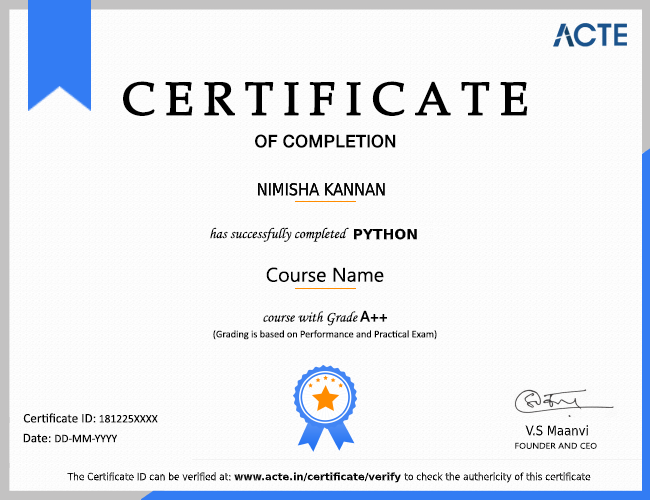
Get Industry-Focused Power BI Certification in Texas

The Power BI certification through comprehensive instruction combining essential principles with hands-on project experience. The Power BI certification highlights your knowledge of Microsoft Power BI, covering data visualization, Power Query, DAX, data modeling, dashboard creation, business intelligence reporting, and practical analytical assignments. It enhances your career portfolio and demonstrates your capability to design reliable, interactive, and efficient reporting solutions that address contemporary business needs.

SAP HR HCM Certification

Complete Your SAP HR/HCM Course

Receive a downloadable SAP HR/HCM course certificate in PDF format after successfully completing the training program.

Get SAP HR/HCM Certified

Receive a physical version of your officially branded and security-marked SAP HR/HCM course completion certificate.

Get Certified

Get Trained by Expert Power BI Trainers

  • Structured lessons and instructor-led activities simplify advanced Power BI concepts, enabling participants to apply analytical techniques to practical business scenarios.
  • Skilled Power BI Trainers explain data modeling, Power Query, DAX, dashboard creation, visualization, and reporting through interactive exercises and practical project assignments.
  • Industry-based case studies and realistic business scenarios help participants explore Power BI applications, implementation strategies, and analytical demands across different organizations.
  • Our Power BI syllabus incorporates updated features, technologies, and industry practices, helping participants acquire relevant capabilities for contemporary analytics and reporting assignments.
  • Interactive training sessions demonstrate dashboard development, visualization, reporting, and business intelligence principles through practical examples and guided learning exercises.
  • Qualified Power BI Trainers offer 7+ years of experience, practical project knowledge, industry insights, technical expertise, career counselling, and placement guidance.

Authorized Partners

ACTE TRAINING INSTITUTE PVT LTD is the unique Authorised Oracle Partner, Authorised Microsoft Partner, Authorised Pearson Vue Exam Center, Authorised PSI Exam Center, Authorised Partner Of AWS .

100% Placements | Get Hired in Top MNC

    Career Support

    Placement Assistance

    Exclusive access to ACTE Job portal

    Mock Interview Preparation

    1 on 1 Career Mentoring Sessions

    Career Oriented Sessions

    Resume & LinkedIn Profile Building

    We Offer High-Quality Training at The Lowest Prices.

    Affordable, Quality Training for Freshers to Launch IT Careers & Land Top Placements.

    What Makes ACTE Training Different?

    Feature

    ACTE Technologies

    Other Institutes

    Affordable Fees

    Competitive Pricing With Flexible Payment Options.

    Higher Fees With Limited Payment Options.

    Industry Experts

    Well Experienced Trainer From a Relevant Field With Practical Training

    Theoretical Class With Limited Practical

    Updated Syllabus

    Updated and Industry-relevant Course Curriculum With Hands-on Learning.

    Outdated Curriculum With Limited Practical Training.

    Hands-on projects

    Real-world Projects With Live Case Studies and Collaboration With Companies.

    Basic Projects With Limited Real-world Application.

    Certification

    Industry-recognized Certifications With Global Validity.

    Basic Certifications With Limited Recognition.

    Placement Support

    Strong Placement Support With Tie-ups With Top Companies and Mock Interviews.

    Basic Placement Support

    Industry Partnerships

    Strong Ties With Top Tech Companies for Internships and Placements

    No Partnerships, Limited Opportunities

    Batch Size

    Small Batch Sizes for Personalized Attention.

    Large Batch Sizes With Limited Individual Focus.

    LMS Features

    Lifetime Access Course video Materials in LMS, Online Interview Practice, upload resumes in Placement Portal.

    No LMS Features or Perks.

    Training Support

    Dedicated Mentors, 24/7 Doubt Resolution, and Personalized Guidance.

    Limited Mentor Support and No After-hours Assistance.

    FAQs

    Looking for better Discount Price?

    Call now: +91-7669 100 251 and know the exciting offers available for you!
    • ACTE is the Legend in offering placement to the students. Please visit our Placed Students List on our website
    • We have strong relationship with over 700+ Top MNCs like SAP, Oracle, Amazon, HCL, Wipro, Dell, Accenture, Google, CTS, TCS, IBM etc.
    • More than 3500+ students placed in last year in India & Globally
    • ACTE conducts development sessions including mock interviews, presentation skills to prepare students to face a challenging interview situation with ease.
    • 85% percent placement record
    • Our Placement Cell support you till you get placed in better MNC
    • Please Visit Your Student Portal | Here FREE Lifetime Online Student Portal help you to access the Job Openings, Study Materials, Videos, Recorded Section & Top MNC interview Questions
    ACTE certification recognizes your Power BI training and acquired skills. Its relevance may vary depending on employer expectations, industry standards, and the position you pursue.
    Yes, participants complete hands-on projects involving data visualization, interactive dashboards, reporting, analytics, and essential business intelligence applications.
    Skilled Power BI professionals lead the training sessions and offer practical instruction, industry insights, and continuous learning assistance throughout the program.
    Learners can revisit available recorded sessions and course resources to understand missed concepts and continue their Power BI learning without losing progress.
    Training options include classroom sessions, online classes, individual coaching, accelerated programs, and customized learning formats based on personal schedules and preferences.

    Why Select ACTE for Power BI Training in Texas?

    ACTE offers organized lessons, knowledgeable instructors, practical projects, certification guidance, career counselling, and placement assistance for eligible participants.
    Yes, eligible learners receive lifetime access to the Student’s Portal for available study materials, recorded videos, and top MNC interview questions.
    Yes, the program includes practical exercises, interactive classes, projects, discussions, and mock interviews to improve Power BI expertise and professional readiness.
    Contact the admissions team at enquiry@acte.in or complete the enrollment process through the official ACTE online platform.
    Yes, recorded classes may be available after enrollment, enabling participants to revisit lessons and revise essential Power BI concepts at convenient times.
    Yes, career guidance can include resume preparation, interview coaching, professional counselling, and assistance in identifying relevant Power BI employment opportunities.
    After successfully completing the program, participants receive an ACTE course completion certificate, subject to the applicable course requirements.
    Show More

    Job Opportunities in Power BI

    More Than 35% Of Developers Prefer Power BI. Power BI Is The Most Popular And In-Demand In The Tech World.