SharePoint Training in Bangalore | Best SharePoint Course | ACTE | Updated 2025
Home » Microsoft Courses Bangalore » SharePoint Training in Bangalore

SharePoint Training in Bangalore

Rated #1 Recoginized as the No.1 Institute for SharePoint Training in Bangalore

Our SharePoint Training in Bangalore offers a comprehensive, hands-on learning experience designed to help you create and manage collaborative workspaces and document management solutions.

Essential subjects covered in the course include SharePoint architecture, site creation, content management, security and permissions, workflow automation, integrating SharePoint with other tools, customize SharePoint for enterprise use with hands-on exercises, applying concepts in real-world scenarios.

  • Work on hands-on projects to gain practical experience.
  • Join 350+ hiring companies and 13,898+ successful learners.
  • Obtain a SharePoint certification to boost your career growth.
  • Get 100% placement support with a cost-effective curriculum.
  • Build your career in SharePoint development and administration.
  • Enroll in our SharePoint training and become a collaboration expert!

Job Assistance

1,200+ Enrolled

In collaboration with

65+ Hrs.

Duration

Online/Offline

Format

LMS

Life Time Access

Quality Training With Affordable Fee

⭐ Fees Starts From

INR 38,000
INR 18,500
Get Training Quote for Free

      Our Hiring Partners

      Learn From Experts, Practice On Projects & Get Placed in IT Company

      • 100% Guaranteed Placement Support for Freshers & Working Professionals.
      • You will not only gain knowledge of SharePoint and advanced concepts, but also gain exposure to Industry best practices.
      • Experienced Trainers and Lab Facility.
      • Microsoft Certified Solutions Expert (MCSE): SharePoint certification Guidance Support with Exam Dumps.
      • Practical oriented / Job oriented Training. Practice on Real Time project scenarios.
      • We have designed an in-depth course so meet job requirements and criteria.
      • Resume & Interviews Preparation Support.
      • Concepts: SharePoint 2013 Fundamentals, SharePoint 2013 Development, Server Object Model, Developing SharePoint Solutions, SharePoint 2013 Features Framework, Event Receivers, Developing WebParts, SharePoint Pages, Custom Timer Jobs, Reusable Type Definitions and Templates, Client Side Object Model and REST in SharePoint 2013, UI Customization, Customizing the SharePoint Rendering with JSLink, Developing Apps for SharePoint, Remote Event Receivers, SharePoint Security, Developing Workflows, Business Connectivity Services.
      • START YOUR CAREER WITH SharePoint COURSE THAT GETS YOU A JOB OF UPTO 5 TO 12 LACS IN JUST 60 DAYS!

      Your IT Career Starts Here

      550+ Students Placed Every Month!

      Get inspired by their progress in the Career Growth Report.

      Other Categories Placements
      • Non-IT to IT (Career Transition) 2371+
      • Diploma Candidates3001+
      • Non-Engineering Students (Arts & Science)3419+
      • Engineering Students3571+
      • CTC Greater than 5 LPA4542+
      • Academic Percentage Less than 60%5583+
      • Career Break / Gap Students2588+

      Upcoming Batches For Classroom and Online

      Weekdays
      08 - Dec - 2025
      08:00 AM & 10:00 AM
      Weekdays
      10 - Dec - 2025
      08:00 AM & 10:00 AM
      Weekends
      13 - Dec - 2025
      (10:00 AM - 01:30 PM)
      Weekends
      14 - Dec - 2025
      (09:00 AM - 02:00 PM)
      Can't find a batch you were looking for?
      INR 18,500
      INR 38,000

      OFF Expires in

      What’s included ?

      Convenient learning format

      📊 Free Aptitude and Technical Skills Training

      • Learn basic maths and logical thinking to solve problems easily.
      • Understand simple coding and technical concepts step by step.
      • Get ready for exams and interviews with regular practice.
      Dedicated career services

      🛠️ Hands-On Projects

      • Work on real-time projects to apply what you learn.
      • Build mini apps and tools daily to enhance your coding skills.
      • Gain practical experience just like in real jobs.
      Learn from the best

      🧠 AI Powered Self Interview Practice Portal

      • Practice interview questions with instant AI feedback.
      • Improve your answers by speaking and reviewing them.
      • Build confidence with real-time mock interview sessions.
      Learn from the best

      🎯 Interview Preparation For Freshers

      • Practice company-based interview questions.
      • Take online assessment tests to crack interviews
      • Practice confidently with real-world interview and project-based questions.
      Learn from the best

      🧪 LMS Online Learning Platform

      • Explore expert trainer videos and documents to boost your learning.
      • Study anytime with on-demand videos and detailed documents.
      • Quickly find topics with organized learning materials.

      Curriculum

      Syllabus of SharePoint Course in Bangalore
      Module 1: SharePoint 2013 Fundamentals
      • Office 365 versus SharePoint Foundation 2013 versus SharePoint Server 2013
      • SharePoint 2013 architecture
      • SharePoint Farms
      • SharePoint Service Applications
      • SharePoint Web applications
      • Site Collections and Sites
      • Lists and Document Libraries
      • Site Columns and Content Types
      • Site Templates and Site Definitions
      Module 2: Introducing SharePoint 2013 Development
      • What is SharePoint development all about?
      • What are the skills needed?
      • Your development environment
      • Windows PowerShell and SharePoint
      Module 3: Server Object Model
      • Server-Side API overview
      • Server-Side Data Access
      • CAML queries
      • LINQ Primer
      • LINQ for SharePoint
      Module 4: Developing SharePoint Solutions
      • Introducing SharePoint Solutions
      • Farm Solutions vs Sandboxed solutions
      • Creating a SharePoint Solution
      • Adding and Deploying SharePoint Solutions with Visual Studio
      • Deploying SharePoint Solution packages using Powershell
      Module 5: SharePoint 2013 Features Framework
      • Introducing Features
      • Building Features using Visual Studio
      • Installing, Activating, Deactivating and Uninstalling Features
      • Feature Receivers
      • Working with the Property Bag
      • Feature Stapling
      • Feature and Solution Dependencies
      • Upgrading Features and Solutions
      Module 6: Event Receivers
      • Handling Web Related Events
      • Handling List Related Events
      • Handling Item Related Events
      Module 7: Developing WebParts
      • Introduction to Web Parts
      • Creating Custom Web Parts
      • Visual Web Parts
      • Exposing Web Part Properties
      • Connectable Web Parts
      Module 8: SharePoint Pages
      • Web Part Pages vs Wiki Pages vs Application Pages
      • Provisioning Pages with Modules and Features
      • Developing Application Pages
      Module 9: Custom Timer Jobs
      • Job Definition Object Model
      • Developing, deploying and debugging a Custom Job Definition
      Module 10: Reusable Type Definitions and Templates
      • Field Types and Field Controls
      • Site Columns and Content Types
      • List Definitions and Templates
      • Site Definitions
      • Web Templates
      Module 11: Client Side Object Model and REST in SharePoint 2013
      • Introducing SharePoint 2013 Client API
      • SharePoint 2013 Client Side Object Model
      • Programming with CSOM in .NET, JavaScript and Silverlight
      • REST and OData Fundamentals
      • SharePoint 2013 REST API
      • Programming with REST
      Module 12: UI Customization
      • Programming SharePoint Navigation
      • Extending the Ribbon User Interface
      • Dialog and Notification Framework
      Module 13: Customizing the SharePoint Rendering with JSLink
      • Basic JSLink syntax
      • Using JSLink in Web Parts, Content Types, Fields and Lists
      • Using JSLink in Features and code
      • Performance impact
      Module 14: Developing Apps for SharePoint
      • Why apps?
      • SharePoint 2010 Development Challenges
      • App Principles
      • App web & host web
      • SharePoint 2013 developer tools in Visual Studio
      • Provider-hosted and SharePoint-Hosted Apps
      • Design considerations
      • Developing App Parts and Custom actions
      • Deployment of SharePoint apps
      Module 15: Remote Event Receivers
      • Remote Event Receivers scenarios
      • Developing Remote Event Receivers
      • Remote Event Receivers in SharePoint apps
      • Upgrading apps with Remote Event Receivers
      Module 16: SharePoint Security
      • Authentication & Authorization
      • Claims Based Authentication
      • Programming Security
      • Securing Apps
      Module 17: Developing Workflows
      • Understanding the Workflow Architecture
      • Creating Workflows with SharePoint Designer 2013
      • Creating Workflows with Visual Studio 2012
      Module 18: Business Connectivity Services
      • BCS Architecture
      • Creating & Using External Content Type Models
      • BCS Apps
      • .NET Assembly Connectors
      • Authentication Options
      Show More
      Show Less

      About SharePoint Training Course in Bangalore

      As a Microsoft SharePoint training provider, ACTE offers the full range of SharePoint curriculum to help you on your path to certification. Our courses teach you to compose no-code solutions that encompass a variety of common scenarios—from collaborative sites and web publishing to Line-Of-Business data integration, business intelligence solutions, and human workflows—all leveraging the building blocks available in SharePoint in an easy-to-use environment.Start Learning with us ACTE Sharepoint Classroom and Online Training Course.

      Most Job Oriented SharePoint Development Topics Covered
      • SharePoint farm

        SharePoint Web applications

        Site collection

      • Sites, Lists

        Document libraries

        Workflows

      • Out of the box Webparts

        Object Models

        SharePoint Rest API

      The careers in SharePoint initially starts as a SharePoint Designer, who will be doing configurations, Site Columns, Lists, manages libraries and views on SharePoint. A SharePoint Designer also manages content types and SharePoint workflows.
      • A SharePoint Designer also manages InfoPath, branding, search centers etc. in SharePoint.
      • The next level of careers in SharePoint comes as Developer and Admin.
      • The SharePoint tasks include the SharePoint applications development on Visual Studio Development environment and the development of client applications.
      • The SharePoint Admin roles and responsibilities include the central administration on SharePoint server, user profile management, installations and migrations of different applications and searching on SharePoint server.
      • SharePoint is a product from Microsoft Office. The product is rich and being used in thousands of companies as internal and external content sharing portals/ websites. Along with a large list of built-in features it has capability to integrate with other Microsoft Office and third party products.
      • A company can use SharePoint for an internal content (images,text, documents) sharing, website building and as a centralized portal for team collaboration, and communication. It’s built-in sites collection, web-parts, workflows and collection of list & libraries can help atomizing business processes.
      • As developer I would suggest to be SharePoint career. With the SharePoint online and Office 365 in cloud, administrator role getting trimmed down as MS controls most of the stuff.
      • As developer you need to on lookout for new features of SharePoint versions and cloud capabilities. Expand your role across the project like, planning, architecture, design and deployment.
      We are happy and proud to say that we have strong relationship with over 700+ small, mid-sized and MNCs. Many of these companies have openings for SharePoint. Moreover, we have a very active placement cell that provides 100% placement assistance to our students. The cell also contributes by training students in mock interviews and discussions even after the course completion.
      The main role of a SharePoint is to develop custom web parts and components for SharePoint Development. A SharePoint should have experience in The Official Microsoft ASP.NET Site,c#.net, master pages, web parts and deeper knowledge of SharePoint 2007 object model, SharePointscript experience etc.
      • Bachelor’s degree in Computer Science or Software Engineering.
      • MOSS or WSS certification..
      • Previous experience as a SharePoint..
      • Extensive knowledge of C#, ASP.NET, and .NET Frameworks..
      • Familiarity with SharePointScript, HTML5, CSS, XML, jQuery, SQL Server, and Web Services.
      • High-level coding skills..
      • Ability to solve complex software issues..
      • Ability to project manage..
      • Detail orientated..
      • Self motivated..
      • Start using it. ...
      • Become a SharePoint junkie. ...
      • Attend Free SharePoint Webinars. ...
      • Join SharePoint User Group in your city. ...
      • Enroll in SharePoint Training.
      Our courseware is designed to give a hands-on approach to the students in SharePoint. The course is made up of theoretical classes that teach the basics of each module followed by high-intensity practical sessions reflecting the current challenges and needs of the industry that will demand the students’ time and commitment.
      Yes, So the SharePoint must have the knowledge of Office 365 including SharePoint Online and how these services can be integrated with On Premise SP environment. Its mandatory skills to have “DevOps” and its related technologies like git and TFS. With up skill on automation scripts like Windows PowerShell and Package Managers like npm,docker and other famous containerization technologies. If you have these skills along with SharePoint skill, definitely it gives edge on your SharePoint career.
      It is technical. It takes little while to get hands on experience.need to learn programming and take some time 3–6 months.

      What are best 5 reason to learn SharePoint?

      • Having the skills of using Microsoft SharePoint can increase your career opportunities.
      • Learning how to use Microsoft SharePoint can boost your creativity and skills when it comes to brainstorming.
      • SharePoint can help you widen your knowledge.
      • Microsoft SharePoint can provide you with a lot of business opportunities.
      • Microsoft SharePoint has one of the biggest support communities.

      Careers in SharePoint

      SharePoint is a proprietary licensed product developed by Microsoft Corporation. SharePoint can be integrated with Microsoft Office and is being used by millions of users across different organizations. In SharePoint, there are a lot of career opportunities in the India for the candidates. SharePoint is primarily required for many small or larger businesses in the form of document management and storage system.  This enables the users to manage the different important documents easily across the large users over a common server accessible to every user. This will reduce the usage of shared paths or confusion among the huge users and manages concurrent access also. SharePoint was initially released 17 years ago. SharePoint is a type of Content Management System and this product is available in many countries in the world.

      Education

      SharePoint plays a key role in the education sector as well. Most of the education sectors run on the basis of the requirement of large documents and content management. Large universities, colleges, schools are digitalized now and most of the examination systems have been digitalized in the developed countries and being adopted in developing countries as well.

      • In the education sector, the content management system plays a major role and requires large documents to be stored and shared across large users such as Professors, Teachers, Students, and Office management staff to organize the day to day activities in the educational organizations to run the system successfully without any hassles and errors.
      • In SharePoint management products, there will be different features apart from storage and content management such as email alerts and approval request systems for different utilities.
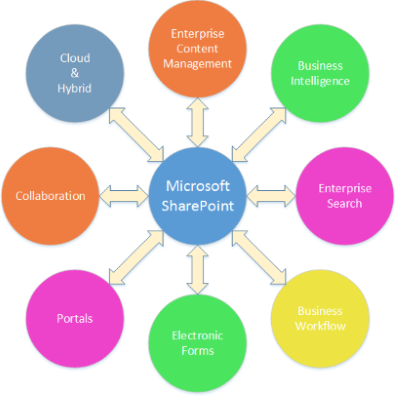
                                             Careers of Share point ACTE

      Career Path in Sharepoint

      There are a lot of requirements for SharePoint professionals in the area of Information Technology Industry across the world, especially in the USA. SharePoint provides multiple features causing it to be the most sought-after technology in most of the utilities. The careers in SharePoint initially starts as a SharePoint Designer, who will be doing configurations, Site Columns, Lists, manages libraries, and views on SharePoint. A SharePoint Designer also manages content types and SharePoint workflows.

      • A SharePoint Designer also manages InfoPath, branding, search centers etc. in SharePoint.
      • The next level of careers in SharePoint comes as Developer and Admin.
      • The SharePoint developer tasks include the SharePoint applications development on Visual Studio Development environment and the development of client applications.
      • The SharePoint Admin roles and responsibilities include the central administration on SharePoint server, user profile management, installations and migrations of different applications and searching on SharePoint server.
      • The next level of careers in SharePoint is Architect who will be a SharePoint Architect who can manage all the types of development or administration and understands the complete end to end flows.

      Job Positions or Application Areas

      In the area of SharePoint, there are different roles to take up such as SharePoint Administrator / Engineer, SharePoint Developer, SharePoint Full Stack Developer, SharePoint Engineer, SharePoint Specialist, SharePoint Consultant, SharePoint Business Analyst, SharePoint Project or Program Manager, SharePoint Power User, SharePoint Architect (Solution or Infrastructure Architect), Stack Talent SharePoint Administrator, Cipher Staff SharePoint Administrator.

      • In addition to this, there will be designers and trainers too. The SharePoint architects also possess some of the known technologies such as Microsoft .NET knowledge and Microsoft SQL Server Database Administration as well.
      • The SharePoint developer or administrator requires skills such as strong experience with MS Office administration as it can be integrated with this and works in synchronization as per the requirement for different applications.
      • SharePoint Developer or Admin also requires support style ticket services for the user or client support systems.
      • A SharePoint is also responsible for transforming complex customer business requirements into efficient and effective enterprise solutions which should be easily adaptable for maintenance and changes in the future.

      Salary

      The average salary pay of the SharePoint Developer in the United States is $80,136 per year as per the top American website that provides salary and compensation information about different companies Payscale.com. The average median salaries for the different SharePoint and career paths in SharePoint are as:

      • SharePoint Admin: (US$24000 – US$30000)
      • SharePoint Developer: (US$18000 – US$24000)
      • Business Analyst BA or Project Manager PM: (US$24000 – US$30000).
      • SharePoint Architect: (US$30000 – US$36000) and with
      • Expert with multiple stacks in SharePoint usually gets: (US$30000 – US$42000).

      The most famous website Indeed.com also mentions that an average salary for a career in the area of SharePoint is $95,819 per year. This salary estimate is based on more than 9000 employees’ salaries submitted online in the United States. The national average salary as mentioned in another top salary information website Glassdoor.com is $95,000 in the United States. From the above statistics, we can clearly come to the conclusion that the average salary is in the bracket of around USD 95,000 in the United States.

      Show More
      Need customized curriculum?

      Hands-on Real Time SharePoint Projects

      Our Top Hiring Partner for Placements

      ACTE Bangalore offers placement opportunities as add-on to every student / professional who completed our classroom or online training. Some of our students are working in these companies listed below.
      • We are associated with top organizations like HCL, Wipro, Dell, Accenture, Google, CTS, TCS, IBM etc. It make us capable to place our students in top MNCs across the globe
      • We have separate student’s portals for placement, here you will get all the interview schedules and we notify you through Emails.
      • After completion of 70% SharePoint training course content, we will arrange the interview calls to students & prepare them to F2F interaction
      • SharePoint Trainers assist students in developing their resume matching the current industry needs
      • We have a dedicated Placement support team wing that assist students in securing placement according to their requirements
      • We will schedule Mock Exams and Mock Interviews to find out the GAP in Candidate Knowledge

      Get Certified By Sharepoint & Industry Recognized ACTE Certificate

      Acte Certification is Accredited by all major Global Companies around the world. We provide after completion of the theoretical and practical sessions to fresher's as well as corporate trainees. Our certification at Acte is accredited worldwide. It increases the value of your resume and you can attain leading job posts with the help of this certification in leading MNC's of the world. The certification is only provided after successful completion of our training and practical based projects.

      Complete Your Course

      a downloadable Certificate in PDF format, immediately available to you when you complete your Course

      Get Certified

      a physical version of your officially branded and security-marked Certificate.

      Get Certified

      About Experienced SharePoint Trainer

      • Our SharePoint Training in Bangalore. Trainers are certified professionals with 7+ years of experience in their respective domain as well as they are currently working with Top MNCs.
      • As all Trainers are SharePoint domain working professionals so they are having many live projects, trainers will use these projects during training sessions.
      • All our Trainers are working with companies such as Cognizant, Dell, Infosys, IBM, L&T InfoTech, TCS, HCL Technologies, etc.
      • Trainers are also help candidates to get placed in their respective company by Employee Referral / Internal Hiring process.
      • Our trainers are industry-experts and subject specialists who have mastered on running applications providing Best SharePoint training to the students.
      • We have received various prestigious awards for SharePoint Training in Bangalore from recognized IT organizations.

      Authorized Partners

      ACTE TRAINING INSTITUTE PVT LTD is the unique Authorised Oracle Partner, Authorised Microsoft Partner, Authorised Pearson Vue Exam Center, Authorised PSI Exam Center, Authorised Partner Of AWS .
      Get Training Quote for Free

            Career Support

            Placement Assistance

            Exclusive access to ACTE Job portal

            Mock Interview Preparation

            1 on 1 Career Mentoring Sessions

            Career Oriented Sessions

            Resume & LinkedIn Profile Building

            We Offer High-Quality Training at The Lowest Prices.

            Affordable, Quality Training for Freshers to Launch IT Careers & Land Top Placements.

            What Makes ACTE Training Different?

            Feature

            ACTE Technologies

            Other Institutes

            Affordable Fees

            Competitive Pricing With Flexible Payment Options.

            Higher Fees With Limited Payment Options.

            Industry Experts

            Well Experienced Trainer From a Relevant Field With Practical Training

            Theoretical Class With Limited Practical

            Updated Syllabus

            Updated and Industry-relevant Course Curriculum With Hands-on Learning.

            Outdated Curriculum With Limited Practical Training.

            Hands-on projects

            Real-world Projects With Live Case Studies and Collaboration With Companies.

            Basic Projects With Limited Real-world Application.

            Certification

            Industry-recognized Certifications With Global Validity.

            Basic Certifications With Limited Recognition.

            Placement Support

            Strong Placement Support With Tie-ups With Top Companies and Mock Interviews.

            Basic Placement Support

            Industry Partnerships

            Strong Ties With Top Tech Companies for Internships and Placements

            No Partnerships, Limited Opportunities

            Batch Size

            Small Batch Sizes for Personalized Attention.

            Large Batch Sizes With Limited Individual Focus.

            LMS Features

            Lifetime Access Course video Materials in LMS, Online Interview Practice, upload resumes in Placement Portal.

            No LMS Features or Perks.

            Training Support

            Dedicated Mentors, 24/7 Doubt Resolution, and Personalized Guidance.

            Limited Mentor Support and No After-hours Assistance.

            SharePoint Course FAQs

            Looking for better Discount Price?

            Call now: +91-7669 100 251 and know the exciting offers available for you!
            • ACTE is the Legend in offering placement to the students. Please visit our Placed Students List on our website
            • We have strong relationship with over 700+ Top MNCs like SAP, Oracle, Amazon, HCL, Wipro, Dell, Accenture, Google, CTS, TCS, IBM etc.
            • More than 3500+ students placed in last year in India & Globally
            • ACTE conducts development sessions including mock interviews, presentation skills to prepare students to face a challenging interview situation with ease.
            • 85% percent placement record
            • Our Placement Cell support you till you get placed in better MNC
            • Please Visit Your Student Portal | Here FREE Lifetime Online Student Portal help you to access the Job Openings, Study Materials, Videos, Recorded Section & Top MNC interview Questions
              ACTE Gives Certificate For Completing A Course
            • Certification is Accredited by all major Global Companies
            • ACTE is the unique Authorized Oracle Partner, Authorized Microsoft Partner, Authorized Pearson Vue Exam Center, Authorized PSI Exam Center, Authorized Partner Of AWS
            • The entire SharePoint training has been built around Real Time Implementation
            • You Get Hands-on Experience with Industry Projects, Hackathons & lab sessions which will help you to Build your Project Portfolio
            • GitHub repository and Showcase to Recruiters in Interviews & Get Placed
            All the instructors at ACTE are practitioners from the Industry with minimum 9-12 yrs of relevant IT experience. They are subject matter experts and are trained by ACTE for providing an awesome learning experience.
            No worries. ACTE assure that no one misses single lectures topics. We will reschedule the classes as per your convenience within the stipulated course duration with all such possibilities. If required you can even attend that topic with any other batches.
            We offer this course in “Class Room, One to One Training, Fast Track, Customized Training & Online Training” mode. Through this way you won’t mess anything in your real-life schedule.

            Why Should I Learn SharePoint Course At ACTE?

            • SharePoint Course in ACTE is designed & conducted by SharePoint experts with 10+ years of experience in the SharePoint domain
            • Only institution in India with the right blend of theory & practical sessions
            • In-depth Course coverage for 60+ Hours
            • More than 50,000+ students trust ACTE
            • Affordable fees keeping students and IT working professionals in mind
            • Course timings designed to suit working professionals and students
            • Interview tips and training
            • Resume building support
            • Real-time projects and case studies
            Yes We Provide Lifetime Access for Student’s Portal Study Materials, Videos & Top MNC Interview Question.
            You will receive ACTE globally recognized course completion certification Along with project experience, job support, and lifetime resources.
            We have been in the training field for close to a decade now. We set up our operations in the year 2009 by a group of IT veterans to offer world class IT training & we have trained over 50,000+ aspirants to well-employed IT professionals in various IT companies.
            We at ACTE believe in giving individual attention to students so that they will be in a position to clarify all the doubts that arise in complex and difficult topics. Therefore, we restrict the size of each SharePoint batch to 5 or 6 members
            Our courseware is designed to give a hands-on approach to the students in SharePoint. The course is made up of theoretical classes that teach the basics of each module followed by high-intensity practical sessions reflecting the current challenges and needs of the industry that will demand the students’ time and commitment.
            You can contact our support number at +91 76691 00251 / Directly can do by ACTE.in's E-commerce payment system Login or directly walk-in to one of the ACTE branches in India
            Show More

            Job Opportunities in Android

            More than 35% of developers favor SharePoint. SharePoint is the most popular and in-demand collaboration platform in the tech world.
































