LMS
LMS
Last updated on 18th Aug 2026| 13054

- Introduction to Becoming a UI/UX Designer
- Understanding UI/UX Design Fundamentals
- Learning User Research and User Personas
- Creating Wireframes and User Flows
- Designing Prototypes and Interactive Experiences
- Developing Visual Design and UI Principles
- Learning Essential UI/UX Design Tools
- Building a Strong UI/UX Design Portfolio
- Preparing for UI/UX Designer Jobs and Interviews
- Conclusion: Starting Your UI/UX Design Career
Introduction to Becoming a UI/UX Designer
Becoming a UI/UX Designer is a rewarding career path for individuals interested in combining creativity, technology, user research, and problem-solving to create useful and engaging digital experiences. UI (User Interface) design focuses on the visual appearance and interactive elements of websites, applications, and digital products, while UX (User Experience) design focuses on improving usability, accessibility, and the overall experience of users. A successful UI/UX Designer should understand design principles, user research, information architecture, wireframing, prototyping, interaction design, visual design, and usability testing. Beginners can start by learning essential concepts and practicing with popular design tools such as Figma, Adobe XD, Photoshop, and Illustrator. Creating practical projects, developing case studies, building a professional portfolio, and understanding user-centered design processes can help freshers demonstrate their skills to potential employers. Aspiring professionals can also strengthen their practical knowledge through a UI/UX Design Course and gain the skills required to start and grow a successful career as a UI/UX Designer. With continuous practice and knowledge of current design trends, aspiring professionals can develop the skills required to start and grow a successful career as a UI/UX Designer.

Understanding UI/UX Design Fundamentals
Understanding the fundamentals of UI/UX design is an essential step for anyone planning to become a professional UI/UX Designer. UI design focuses on the visual and interactive elements of a digital product, including colors, typography, buttons, icons, layouts, and navigation. UX design focuses on the overall user experience by understanding user needs, improving usability, organizing information, and creating simple and effective user journeys. Beginners should learn important concepts such as user-centered design, information architecture, visual hierarchy, accessibility, interaction design, responsive design, and usability. It is also important to understand how UI and UX work together throughout the product design process. Beginners can explore a UI vs UX Design Tutorial to gain a clearer understanding of the differences and relationship between these two disciplines. Practicing these fundamentals through small website and mobile application projects can help beginners develop their design thinking and problem-solving abilities. A strong understanding of these concepts provides a foundation for creating intuitive, accessible, and visually appealing digital experiences.
Learning User Research and User Personas
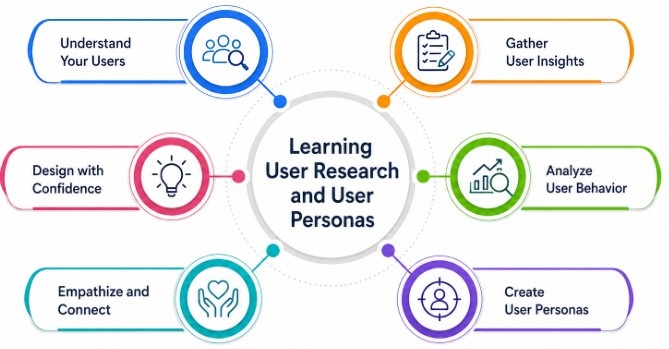
Learning user research is an important step in becoming an effective UI/UX Designer because it helps designers understand the needs, behaviors, goals, and challenges of their target users. Beginners should learn how to conduct basic research methods such as user interviews, surveys, observations, competitor analysis, and usability testing. The information collected through research can be organized to identify common user problems and patterns.
Get Your UI/UX Design Certification by Learning from Industry-Leading Experts and Advancing Your Career with ACTE’s UI/UX Design Course.
Creating Wireframes and User Flows
- Understanding Wireframes: Wireframes are simple visual layouts that represent the structure and content of a website or application before detailed visual design begins. Beginners can use wireframes to plan page layouts, navigation, content placement, and important interface elements.
- Designing User Flows: User flows show the steps users take to complete a specific task within a digital product. Creating clear user flows helps designers understand navigation paths and reduce unnecessary steps, confusion, and friction during the user journey.
- Improving Designs Through Feedback: Review wireframes and user flows with users, designers, or stakeholders to identify navigation issues and usability problems. Applying feedback at an early stage helps create clearer layouts and more effective user experiences. Beginners can also learn how to document and present their design work through a UI/UX Portfolio Creation Tutorial, which can help showcase wireframes, user flows, and design decisions effectively.
- Planning Information Architecture: Organize content, features, menus, and navigation in a logical structure so users can easily find the information or functionality they need. A well-planned information architecture provides a strong foundation for intuitive digital experiences.
- Creating Low-Fidelity Wireframes: Start with basic sketches or digital wireframes to focus on structure, functionality, and user flow without spending time on colors, images, or detailed styling. Tools such as Figma can be used to create and modify wireframes efficiently.

Designing Prototypes and Interactive Experiences
- Understanding Prototyping: Prototyping helps UI/UX Designers create an interactive representation of a website, mobile application, or digital product before development begins. Prototypes allow designers to demonstrate layouts, navigation, interactions, and overall functionality.
- Creating Low and High-Fidelity Prototypes: Beginners can start with low-fidelity prototypes to test basic concepts and user flows before developing high-fidelity prototypes with detailed layouts, colors, typography, images, and interactive elements.
- Using Prototyping Tools: Beginners can practice creating interactive prototypes using tools such as Figma, Adobe XD, and other prototyping platforms. Regular practice with these tools helps develop practical UI/UX design skills and improves the ability to communicate design ideas. Learning through a How to Get an Online Internship can also help aspiring designers explore opportunities to gain practical experience with prototyping and other UI/UX skills.
- Adding Interactive Elements: Designers can connect screens and add interactions such as button clicks, navigation, menus, forms, scrolling, overlays, and transitions. These interactions help demonstrate how users will experience the final product.
- Testing Prototype Usability: Prototypes can be tested with potential users to identify navigation problems, confusing interactions, and usability issues. Feedback from testing helps designers refine the experience before the product moves into development.
Developing Visual Design and UI Principles
- Learning Visual Hierarchy: Visual hierarchy helps designers organize interface elements so users can quickly understand important information. Beginners should learn how size, spacing, contrast, alignment, and positioning guide user attention.
- Understanding Typography: Typography plays an important role in readability and interface consistency. Learn how to select suitable fonts, establish heading and body text styles, manage font sizes, and maintain appropriate spacing across different screen sizes.
- Using Color Effectively: UI Designers should understand color theory and learn how to use colors to communicate meaning, establish visual identity, highlight actions, and create appropriate contrast. Color choices should also consider accessibility requirements.
- Practicing Responsive and Accessible Design: Visual designs should work effectively across desktops, tablets, and mobile devices. Beginners can strengthen these practical skills through a UI/UX Design Course while learning accessibility, readable text, sufficient contrast, clear navigation, and inclusive design practices when developing interfaces.
- Designing Consistent UI Elements: Create consistent buttons, forms, icons, cards, menus, and other interface components. Consistency makes digital products easier to understand and helps users interact with different sections more confidently.

Get JOB Oriented UI/UX Design Course for Beginners By MNC Experts
- Instructor-led Sessions
- Real-life Case Studies
- Assignments
Learning Essential UI/UX Design Tools
- Learning Figma for UI/UX Design: Figma is a popular tool for creating wireframes, user interfaces, prototypes, design systems, and collaborative design projects. Beginners can use Figma to practice creating complete website and mobile application designs.
- Using Adobe XD for Prototyping: Adobe XD can be used to create interface designs, wireframes, interactive prototypes, and user flows. Learning its design and prototyping features can help beginners understand how digital product concepts are translated into interactive experiences.
- Practicing Visual Design With Photoshop: Photoshop is useful for editing images, creating visual assets, preparing graphics, and supporting UI design projects. Understanding basic image editing and visual composition can strengthen a designer’s overall design skills.
- Creating Graphics With Illustrator: Illustrator helps designers create vector graphics, icons, illustrations, logos, and other scalable visual elements. Learning basic vector design can be useful when developing custom assets for websites and applications.
- Building Practical Design Projects: Instead of learning tools only through tutorials, beginners should apply them to practical projects such as landing pages, mobile applications, dashboards, and website redesigns. Regular practice helps improve design workflow, tool proficiency, and confidence. Aspiring designers can strengthen these skills by following a Internship Opportunities During College guide to explore ways of gaining practical experience and applying their UI/UX knowledge to real-world projects.
Want to Master UI/UX Design? Explore the UI/UX Design Master Program Offered at ACTE Today!
Building a Strong UI/UX Design Portfolio
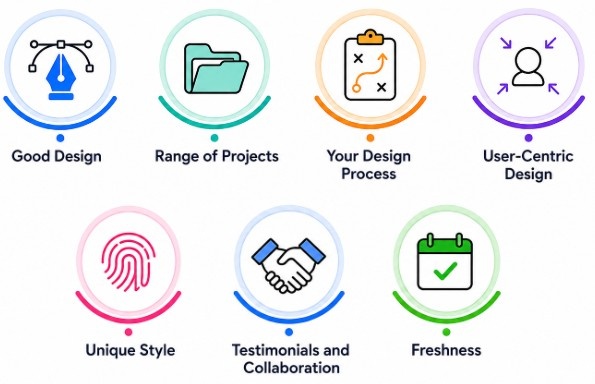
- Choosing Relevant UI/UX Projects: Build projects that demonstrate different UI/UX skills, such as website design, mobile application design, dashboard interfaces, redesign projects, and user-centered solutions. Select projects that clearly demonstrate your design abilities and problem-solving approach.
- Creating Detailed Case Studies: Document each project by explaining the problem, research process, user requirements, design decisions, wireframes, prototypes, testing, and final solution. A well-structured case study helps recruiters understand how you approach and solve design problems.
- Showing the Design Process: Include sketches, user flows, wireframes, prototypes, iterations, and feedback instead of showing only the final interface. Demonstrating the complete design process can highlight your research, creativity, reasoning, and ability to improve designs.
- Updating Your Portfolio Regularly: Continuously improve your portfolio by adding new projects, refining existing case studies, and removing outdated work. Keeping your portfolio updated helps demonstrate current UI/UX skills and prepares you for internships, freelance opportunities, and full-time design roles. You can also explore Secure an Internship Effective Strategies to learn practical ways to present your portfolio and improve your chances of gaining relevant industry experience.
- Presenting Projects Professionally: Organize your portfolio with clear project descriptions, high-quality visuals, readable layouts, and easy navigation. Make sure each project explains your specific contribution and the skills or tools used during the design process.
Preparing for UI/UX Designer Jobs and Interviews
Preparing for UI/UX Designer jobs requires a combination of design knowledge, practical experience, communication skills, and a strong portfolio. Beginners should revise important concepts such as user research, wireframing, user flows, prototyping, visual design, interaction design, usability testing, accessibility, and responsive design. A well-organized portfolio with relevant case studies can help demonstrate how you identify user problems, develop solutions, and improve designs based on feedback. Candidates should also practice explaining their design decisions, research findings, design process, and project outcomes during interviews. Familiarity with commonly used design tools and the ability to collaborate with developers, product managers, and other designers can further strengthen a candidate’s profile. Freshers can gain practical experience through personal projects, internships, freelance assignments, redesign challenges, and collaborative projects. Candidates can also review Internship Request Email Tips to learn how to approach internship opportunities professionally and gain relevant industry experience. Regularly improving design skills, following industry trends, and practicing common UI/UX interview questions can help aspiring designers become better prepared for entry-level job opportunities.
Conclusion: Starting Your UI/UX Design Career
Becoming a UI/UX Designer requires a combination of creativity, user-centered thinking, design knowledge, technical skills, and practical experience. Beginners can start by learning UI/UX fundamentals, understanding user research, creating wireframes and user flows, developing prototypes, and strengthening visual design principles. Gaining proficiency in tools such as Figma and other relevant design applications can help transform ideas into professional digital experiences. Building practical projects and documenting them as detailed case studies is essential for creating a strong portfolio that demonstrates both design skills and problem-solving abilities. Aspiring designers should also practice usability testing, accessibility, responsive design, and effective collaboration with developers and product teams. Enrolling in a UI/UX Design Course can help beginners gain structured knowledge and practical skills for their career journey. Internships, freelance projects, design challenges, and personal projects can provide valuable hands-on experience. With continuous learning, regular practice, portfolio development, and preparation for UI/UX interviews, freshers can build the skills and confidence needed to begin a successful career in UI/UX design.