LMS
LMS
Last updated on 19th Mar 2026| 1319

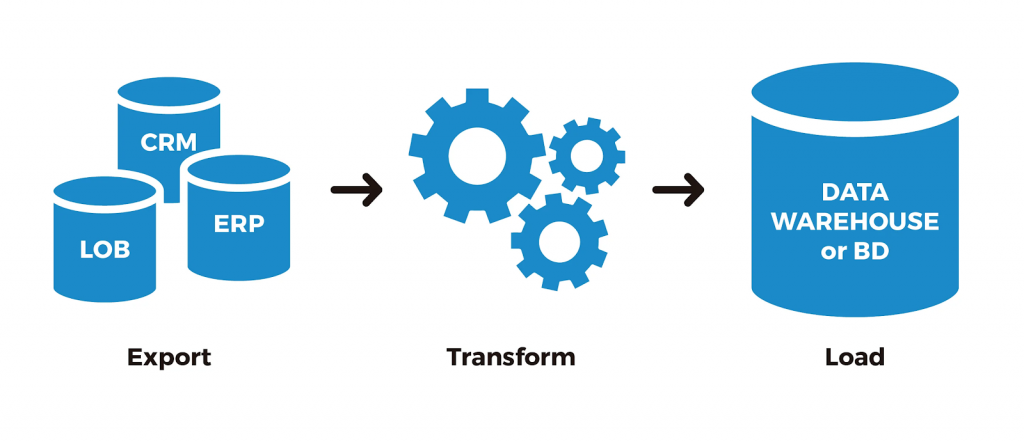
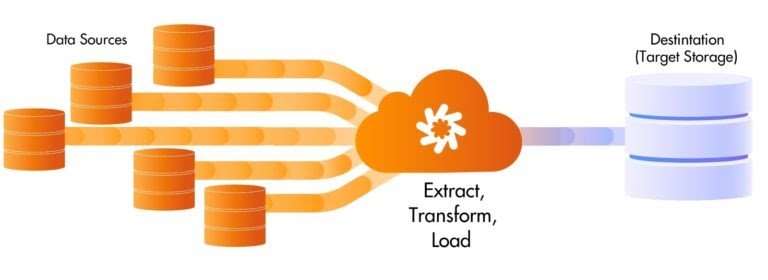
ETL is a type of data integration that refers to the three steps (extract, transform, load) used to blend data from multiple sources. It’s often used to build a data warehouse. During this process, data is taken (extracted) from a source system, converted (transformed) into a format that can be analyzed, and stored (loaded) into a data warehouse or other system. Extract, load, transform (ELT) is an alternate but related approach designed to push processing down to the database for improved performance.
ETL PROCESS WORK
- Extract: The extract step covers the data extraction from multiple source systems and the preparation of the data for the next steps. The main objective of this step is to retrieve all the required data from the source systems with as little resources as possible. The extract step is supposed to be designed in such a way that it does not negatively affect the source system in terms of performance and response time.
- Transform: The transform step applies a set of rules to transform the data from the source to the target. This includes converting all extracted data to the same dimension using the same units so that they can later be joined together. The transformation step also gathers data from several sources, generating new calculated values and applying advanced validation rules.
- Load: During the loading step, it is necessary to ensure that the load is performed correctly and with as little resources as possible. During the loading process the data is written into the target database.
ETL Process in Data Warehouses
- ETL is a 3-step process
Step 1) Extraction
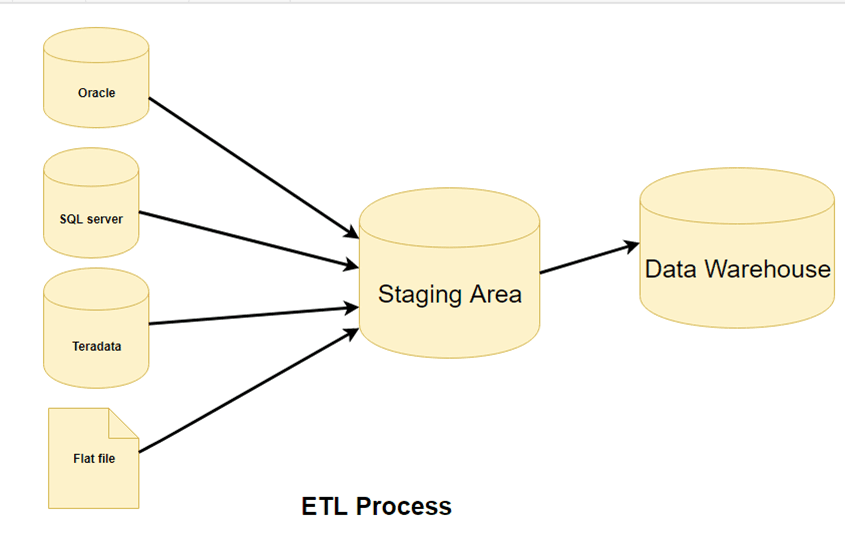
- In this step, data is extracted from the source system into the staging area. Transformations if any are done in staging area so that performance of source system in not degraded. Also, if corrupted data is copied directly from the source into Data warehouse database, rollback will be a challenge. Staging area gives an opportunity to validate extracted data before it moves into the Data warehouse.
- Data warehouse needs to integrate systems that have different
- DBMS, Hardware, Operating Systems and Communication Protocols. Sources could include legacy applications like Mainframes, customized applications, Point of contact devices like ATM, Call switches, text files, spreadsheets, ERP, data from vendors, partners among others.
- Hence one needs a logical data map before data is extracted and loaded physically. This data map describes the relationship between sources and target data.
Three Data Extraction methods:
- Full Extraction
- Partial Extraction- without update notification.
- Partial Extraction- with update notification
- Irrespective of the method used, extraction should not affect performance and response time of the source systems. These source systems are live production databases. Any slow down or locking could effect company’s bottom line.
Some validations are done during Extraction:
- Reconcile records with the source data
- Make sure that no spam/unwanted data loaded
- Data type check
- Remove all types of duplicate/fragmented data
- Check whether all the keys are in place or not
Step 2) Transformation
- Data extracted from source server is raw and not usable in its original form. Therefore it needs to be cleansed, mapped and transformed. In fact, this is the key step where ETL process adds value and changes data such that insightful BI reports can be generated.
- In this step, you apply a set of functions on extracted data. Data that does not require any transformation is called as direct move or pass through data.
- In transformation step, you can perform customized operations on data. For instance, if the user wants sum-of-sales revenue which is not in the database. Or if the first name and the last name in a table is in different columns. It is possible to concatenate them before loading.

Following are Data Integrity Problems:
- Different spelling of the same person like Jon, John, etc.
- There are multiple ways to denote company name like Google, Google Inc.
- Use of different names like Cleveland, Cleveland.
- There may be a case that different account numbers are generated by various applications for the same customer.
- In some data required files remains blank
- Invalid product collected at POS as manual entry can lead to mistakes.
Validations are done during this stage
- Filtering – Select only certain columns to load
- Using rules and lookup tables for Data standardization
- Character Set Conversion and encoding handling
- Conversion of Units of Measurements like Date Time Conversion, currency conversions, numerical conversions, etc.
- Data threshold validation check. For example, age cannot be more than two digits.
- Data flow validation from the staging area to the intermediate tables.
- Required fields should not be left blank.
- Cleaning ( for example, mapping NULL to 0 or Gender Male to “M” and Female to “F” etc.)
- Split a column into multiples and merging multiple columns into a single column.
- Transposing rows and columns,
- Use lookup to merge data
- Using any complex data validation (e.g., if the first two columns in a row are empty then it automatically reject the row from processing)

Enhance Your Career with ETL Testing Taining from Real Time Experts
- Instructor-led Sessions
- Real-life Case Studies
- Assignments
Step 3) Loading
- Loading data into the target data warehouse database is the last step of the ETL process. In a typical Data warehouse, huge volume of data needs to be loaded in a relatively short period (nights). Hence, load process should be optimized for performance.
- In case of load failure, recover mechanisms should be configured to restart from the point of failure without data integrity loss. Data Warehouse admins need to monitor, resume, cancel loads as per prevailing server performance.
Types of Loading:
- Initial Load — populating all the Data Warehouse tables
- Incremental Load — applying ongoing changes as when needed periodically.
- Full Refresh —erasing the contents of one or more tables and reloading with fresh data.
Load verification
- Ensure that the key field data is neither missing nor null.
- Test modeling views based on the target tables.
- Check that combined values and calculated measures.
- Data checks in dimension table as well as history table.
- Check the BI reports on the loaded fact and dimension table
Data Extraction and Data Cleaning
- Data Source: It is very important to understand the business requirements for ETL processing. The source will be the very first stage to interact with the available data which needs to be extracted. Organizations evaluate data through business intelligence tools which can leverage a diverse range of data types and sources.
The most common of these data types are:
- Databases
- Flat Files
- Web Services
- Other Sources such as RSS Feeds
- First, analyze how the source data is produced and in what format it needs to be stored. Traditional data sources for BI applications include Oracle, SQL Server, MySql, DB2, Hana, etc.
Evaluate any transactional databases (ERP, HR, CRM, etc.) closely as they store an organization’s daily transactions and can be limiting for BI for two key reasons:
- Querying directly in the database for a large amount of data may slow down the source system and prevent the database from recording transactions in real time.
- Data in the source system may not be optimized for reporting and analysis.
Analyzing Data Extraction
- The main objective of the extraction process in ETL is to retrieve all the required data from the source with ease. Therefore, care should be taken to design the extraction process to avoid adverse effects on the source system in terms of performance, response time, and locking.
Steps to Perform Extraction
- Push Notification: It’s always nice if the source system is able to provide a notification that the records have been modified and provide the details of changes.
- Incremental/Full Extract: Some systems may not provide the push notification service, but may be able to provide the detail of updated records and provide an extract of such records. During further ETL processing, the system needs to identify changes and propagate it down.
- There are times where a system may not be able to provide the modified records detail, so in that case, full extraction is the only choice to extract the data. Make sure that full extract requires keeping a copy of the last extracted data in the same format to identify the changes.
Set Up ETL Workspace
- In this step you will import a pre-configured workspace in which to develop ETL processes. There is nothing mandatory about the way this tutorial workspace has been put together — your own ETL workspace may be different, depending on the needs of your project. This particular workspace has been configured especially for this tutorial as a shortcut to avoid many set up steps, steps such as connecting to source datasets, adding an empty dataset to use as the target of ETL scripts, and adding ETL-related web parts.
- You now have a workspace where you can develop ETL scripts. It includes:
- A LabKey Study with various datasets to use as data sources
- An empty dataset named Patients to use as a target destination
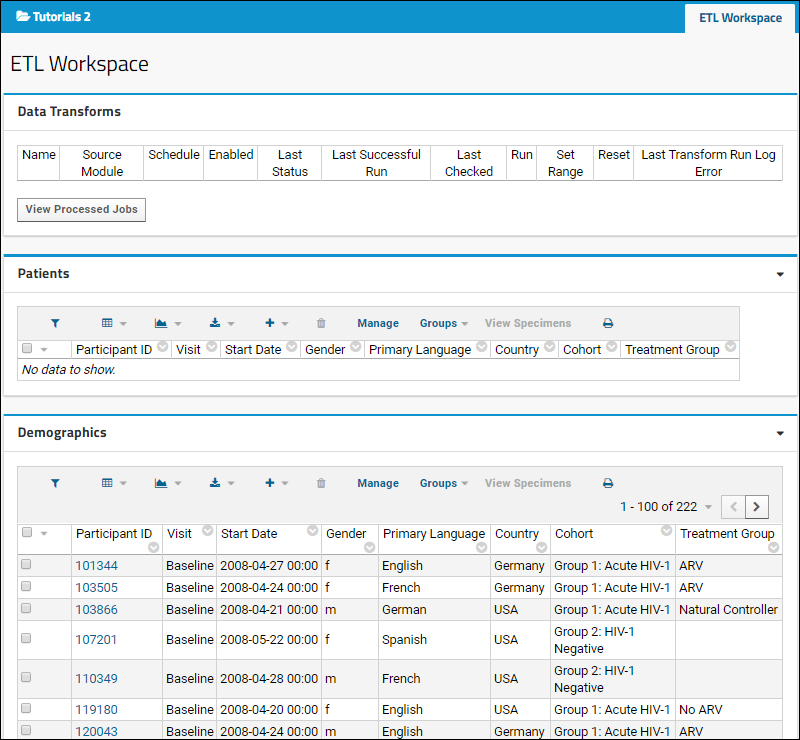
- The ETL Workspace tab provides an area to manage and run your ETL processes.
- Notice that this tab contains three web parts:
- Data Transforms shows the available ETL processes. Currently it is empty because there are none defined.
- The Patients dataset (the target dataset for the process) is displayed, also empty because no ETL process has been run yet. When you run an ETL process in the next step the the empty Patients dataset will begin to fill with data.
- The Demographics dataset (the source dataset for this tutorial) is displayed with more than 200 records.
Create an ETL
- Click the ETL Workspace tab to ensure you are on the main folder page.
- Select (Admin) > Folder > Management.
- Click the ETLs tab. If you don’t see this tab, you may not have the data integration module enabled on your server. Check on the Folder Type tab, under Modules.
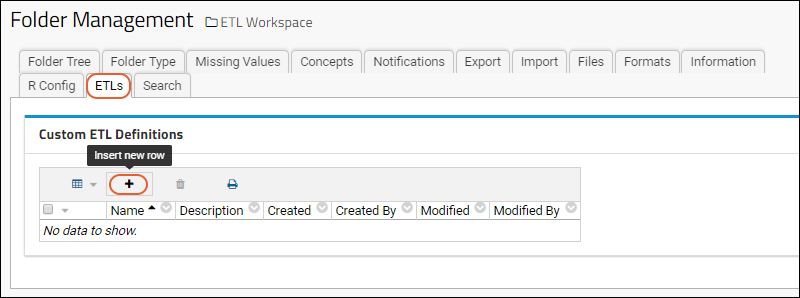
Click (Insert new row) under Custom ETL Definitions. Replace the default XML in the edit panel with the following code:
- <?xml version=”1.0″ encoding=”UTF-8″?>
- <etl xmlns=”http://labkey.org/etl/xml”>
- <name>Demographics >>> Patients (Females)</name>
- <description>Update data for study on female patients.</description>
- <transforms>
- <transform id=”femalearv”>
- <source schemaName=”study” queryName=”FemaleARV”/>
- <destination schemaName=”study” queryName=”Patients” targetOption=”merge”/>
- </transform>
- </transforms>
- <schedule>
- <poll interval=”1h”/>
- </schedule>
- </etl>

Enroll in ETL Testing Certification Course to Build Your Skills & Kick Start Your Career
Weekday / Weekend BatchesSee Batch Details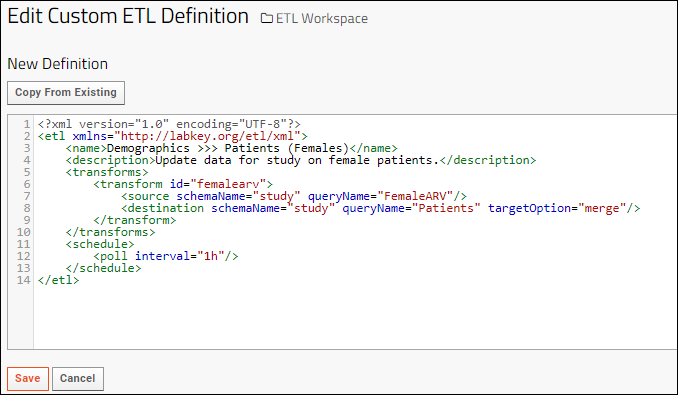
- Click Save.
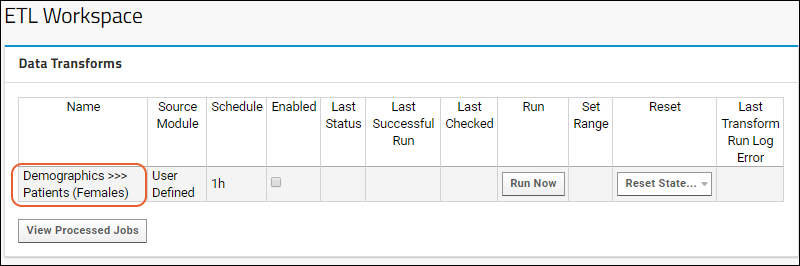
- Click the ETL Workspace tab to return to the main dashboard.
- The new ETL named “Demographics >>> Patients (Females)” is now ready to run. Notice it has been added to the list under Data Transforms.
To install the ETL Services Server:
- Launch the installer as an administrative user (see above for details), entering the password when prompted
- Select Custom from the Setup Type window
- Click Next
- Select the ETL Services Server option
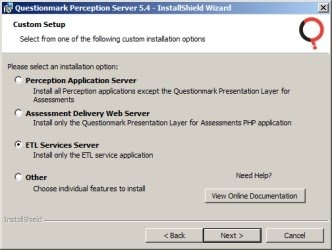
- Click Next
- Choose where you would like to install Perception and the application data, including repository files (please note that the Repository files folder will not actually be created on this server, as it is only needed on the Business Logic tier)You can keep the default locations or click Browse to indicate an alternative path.
- Click Next
- Click Install
ETL TOOLS LIST
- Oracle Warehouse Builder (OWB)
- SAP Data Services
- IBM Infosphere Information Server
- SAS Data Management
- PowerCenter Informatica
- Elixir Repertoire for Data ETL
- Data Migrator (IBI)
- SQL Server Integration Services (SSIS)
- Talend Studio for Data Integration
- Sagent Data Flow
- Alteryx
- Actian DataConnect
- Open Text Integration Center
- Oracle Data Integrator (ODI)
- Cognos Data Manager
- Microsoft SQL Server Integration Services (MSSIS)
- CloverETL
- Centerprise Data Integrator
- IBM Infosphere Warehouse Edition
- Pentaho Data Integration
- Adeptia Integration Server
- Syncsort DMX
- QlikView Expressor
- Relational Junction ETL Manager (Sesame Software)
Advantages
- Ease of Use through Automated Processes: As already mentioned in the beginning, the biggest advantage of ETL tools is the ease of use. After you choose the data sources, the tool automatically identifies the types and formats of the data, sets the rules how the data has to be extracted and processed and finally, loads the data into the target storage. This makes coding in a traditional sense where you have to write every single procedure and code unnecessary.
- Visual flow: ETL tools are based on graphical user interface (GUI) and offer a visual flow of the system’s logic. The GUI enables you to use the drag and drop function to visualize the data process.
- Operational resilience: Many data warehouses are fragile during operation. ETL tools have a built-in error handling functionality which help data engineers to develop a resilient and well instrumented ETL process.
- Good for complex data management situations: ETL tools are great to move large volumes of data and transfer them in batches. In case of complicated rules and transformations, ETL tools simplify the task and assist you with data analysis, string manipulation, data changes and integration of multiple data sets.
- Advanced data profiling and cleansing: The advanced functions refer to the transformation needs which are common to occur in a structurally complex data warehouse.
- Enhanced business intelligence: Data access is easier/better with ETL tools as it simplifies the process of extracting, transforming and loading. Improved access to information directly impacts the strategic and operational decisions that are based on data driven facts. ETL tools also enable business leaders to retrieve information based on their specific needs and make decisions accordingly.
- High return on investment (ROI): ETL tools helps business to save costs and thereby, generate higher revenues. In fact, a study that was conducted by the International Data Corporation has revealed that the implementation of ETL resulted in a median 5-year ROI of 112% with a mean payback of 1.6 years.
- Performance: ETL tools simplify the process of building a high-quality data warehouse. Moreover, several ETL tools come with performance enhancing technologies. For example, like Cluster Awareness applications which are actually software applications designed to call cluster APIs in order to determine its running state, in case a manual fail over is triggered between cluster nodes for planned technical maintenance, or an automatic fail over is required, if a computing cluster node encounters hardware.