LMS
LMS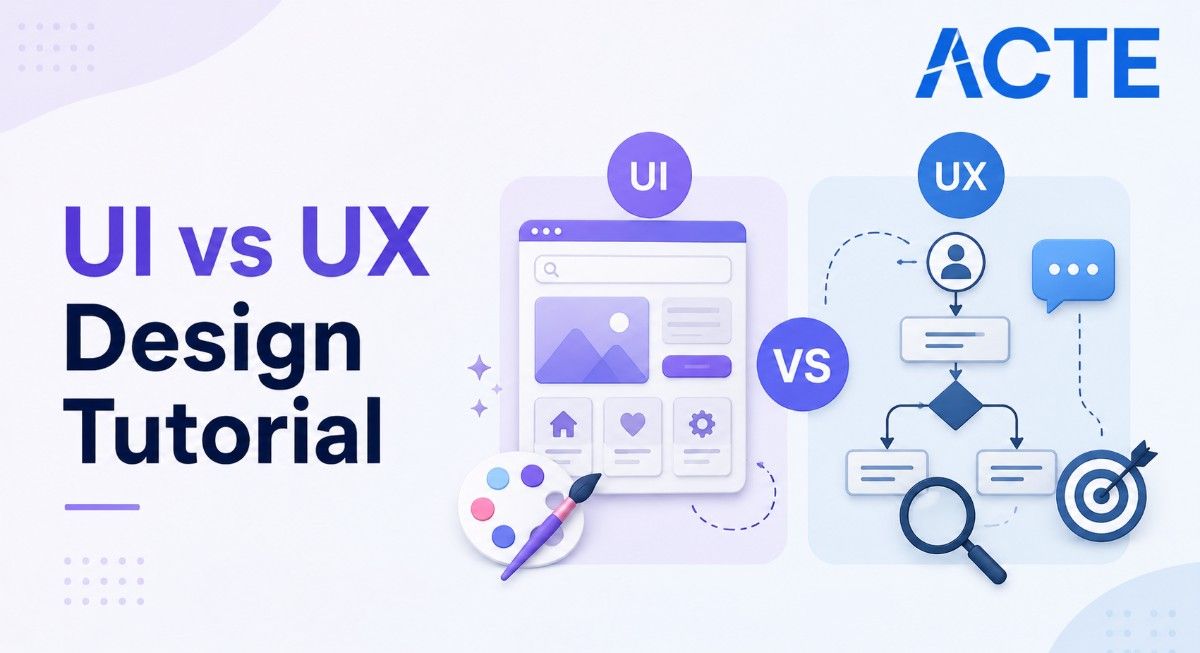
Last updated on 18th Aug 2026| 13074

- Introduction to UI vs UX Design
- What is UI Design and How Does It Work?
- What is UX Design and How Does It Work?
- Key Differences Between UI and UX Design
- UI vs UX Design Process and Workflow
- Essential Skills and Tools for UI and UX Designers
- UI vs UX Design Career Opportunities and Roles
- UI vs UX Design: Which Career Path Should You Choose?
- Conclusion: Understanding UI vs UX Design
Introduction to UI vs UX Design
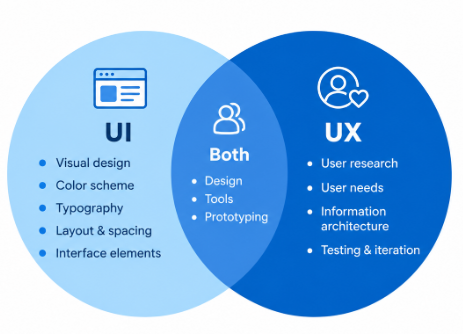
UI and UX design are two closely connected areas of digital product design, but they focus on different aspects of the user experience. UI (User Interface) design focuses on the visual and interactive elements of a website, application, or digital product, including layouts, colors, typography, buttons, icons, and visual consistency. UX (User Experience) design focuses on the overall experience users have while interacting with a product, including usability, navigation, user research, information architecture, and problem-solving. Although UI and UX designers often work together, their responsibilities and objectives can differ. Beginners looking to build practical skills in this field can also explore the UI/UX Design Course to develop their understanding of UI and UX concepts. Understanding the difference between UI and UX can help beginners choose the right career path and develop relevant design skills. This tutorial explains the key differences between UI and UX design, their processes, essential skills and tools and how to choose the right career path.

What is UI Design and How Does It Work?
UI (User Interface) design focuses on creating the visual appearance and interactive elements of a digital product. UI designers determine how screens, buttons, menus, icons, typography, colors, images, and other interface components should look and behave. The goal is to create an interface that is visually appealing, consistent, accessible, and easy for users to interact with. UI design typically involves creating visual layouts, selecting suitable typography and color schemes, developing design systems, and defining consistent spacing and component styles. Designers may also explore technologies such as 3D Printing Tutorial to understand how digital designs can be developed into physical product concepts. Designers may create high-fidelity mockups and interactive prototypes to demonstrate how an interface will function. UI designers also collaborate with UX designers, developers, and product teams to ensure that the final interface accurately reflects the intended user experience across different devices and screen sizes.
Get Your UI/UX Design Certification by Learning from Industry-Leading Experts and Advancing Your Career with ACTE’s UI/UX Design Course.
What is UX Design and How Does It Work?
UX (User Experience) design focuses on improving how users interact with a digital product and ensuring that the overall experience is useful, simple, and satisfying. UX designers study user needs, behaviors, and challenges to understand how a product should be structured and organized. The UX design process may include user research, user personas, information architecture, user flows, wireframing, prototyping, and usability testing. These activities help designers identify problems and develop solutions that make digital products easier to navigate and use. Beginners who want to develop practical UX design skills can explore this UI/UX Design Course to build a strong foundation in user-centered design. UX designers work closely with UI designers, product managers, developers, and other stakeholders to transform user requirements into practical product experiences. The primary goal of UX design is to create products that solve real user problems while providing a smooth, efficient, and meaningful experience.
Key Differences Between UI and UX Design
- Primary Focus UI design focuses mainly on the visual appearance and interactive elements of a product, while UX design focuses on the overall user experience, usability, and satisfaction.
- Design Responsibilities UI designers work with colors, typography, layouts, icons, components, and visual elements. UX designers work with user research, information architecture, user flows, wireframes, prototypes, and usability testing. Building a strong UI/UX Portfolio Creation Tutorial can help designers present these skills and demonstrate their practical design experience.
- User Interaction UI design determines how an interface looks and responds visually to user actions, whereas UX design focuses on making the complete user journey logical, efficient, and easy to navigate.
- Research and Testing UX design generally involves more user research and usability testing to identify user problems and validate solutions. UI design focuses more heavily on visual consistency, interface quality, and interaction details.
- Relationship Between UI and UX UI and UX are different but complementary disciplines. A successful digital product needs both an attractive interface and a smooth, useful user experience.

UI vs UX Design Process and Workflow
- User Research and Requirement Analysis UX designers collect information about users, business requirements, goals, expectations, and existing problems before defining the product experience. For beginners looking to gain practical experience, learning Internship Effective Strategies and Tips can provide useful guidance on finding opportunities to apply these skills.
- Information Architecture and User Flows Designers organize content and create user flows to determine how users can navigate through different screens, features, and tasks.
- Wireframing and Prototyping UX designers create wireframes and prototypes to represent the structure and functionality of the product before detailed visual design begins.
- UI Design and Visual Development UI designers transform wireframes into detailed interfaces by applying typography, colors, spacing, imagery, icons, components, and visual hierarchy.
- Testing and Iteration Designers test prototypes and interfaces, collect feedback, identify usability or visual problems, and make improvements before the product is finalized.

Get JOB Oriented UI/UX Design Course for Beginners By MNC Experts
- Instructor-led Sessions
- Real-life Case Studies
- Assignments
Essential Skills and Tools for UI and UX Designers
- UI Design Skills Typography, color theory, visual hierarchy, layout design, responsive design, branding, component design, accessibility, and design systems.
- UX Design Skills User research, wireframing, information architecture, user flows, usability testing, problem-solving, user personas, and interaction design.
- Design and Prototyping Tools Figma, Adobe XD, Sketch, Adobe Photoshop, Adobe Illustrator, and other interface design and prototyping tools can support different stages of the design process. Beginners can strengthen these practical skills through a UI/UX Design Course focused on modern design tools and workflows.
- Communication and Collaboration Designers should be able to explain design decisions, present ideas, receive feedback, and collaborate effectively with developers, product managers, researchers, and other stakeholders.
- Portfolio Development Practical case studies, redesign projects, personal projects, prototypes, and usability research can demonstrate a designer’s ability to identify problems and develop effective solutions.
UI vs UX Design Career Opportunities and Roles
- UI Designer Creates visual interfaces, layouts, components, typography, colors, and interactive elements for websites and applications.
- UX Designer Focuses on user needs, usability, information architecture, user flows, wireframes, prototypes, and overall product experience.
- Product Designer Combines UI, UX, research, interaction design, and product thinking to solve user and business problems throughout the product lifecycle. Professionals can also explore Become a UI/UX Designer to understand the skills, career path, and opportunities available in this field.
- UX Researcher Conducts user interviews, surveys, usability studies, and research analysis to provide insights that support product and design decisions.
- Interaction Designer Focuses on user interactions, navigation, behaviors, transitions, and how users complete tasks within digital products.
- Visual Designer Concentrates on visual communication, branding, typography, imagery, color, and visual consistency across digital experiences.
- Design Systems Designer Creates and maintains reusable components, patterns, guidelines, and design standards to improve consistency across products.
Want to Master UI/UX Design? Explore the UI/UX Design Master Program Offered at ACTE Today!
UI vs UX Design: Which Career Path Should You Choose?
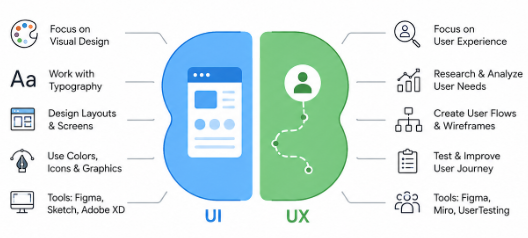
Choosing between UI and UX design depends on your interests, strengths, creativity, problem-solving abilities, and preferred way of working. UI design may be a better choice for individuals who enjoy visual creativity, typography, color combinations, layouts, icons, branding, and creating attractive digital interfaces. UI designers focus on how a product looks and how users interact with its visual elements. UX design may be more suitable for those who enjoy understanding user behavior, conducting research, identifying problems, organizing information, creating user flows, and improving usability. UX designers focus on making products simple, useful, accessible, and enjoyable to use.
Conclusion: Understanding UI vs UX Design
UI and UX design are different but complementary disciplines that work together to create effective, engaging, and user-friendly digital products. UI design focuses on the visual appearance and interactive elements of an interface, including colors, typography, layouts, buttons, icons, and visual consistency. UX design focuses on usability, user needs, research, information architecture, navigation, and the complete user journey. Understanding these differences can help beginners identify their interests and choose a suitable career direction. Building skills in visual design, user research, wireframing, prototyping, interaction design, usability testing, accessibility, communication, and modern design tools can provide a strong foundation for entering the industry. Whether choosing UI design, UX design, or a broader product design role, practical projects, real-world problem-solving exercises, and a well-structured portfolio can demonstrate creativity and design ability. Beginners interested in developing practical industry skills can explore the UI/UX Design Course to strengthen their foundation and gain hands-on experience. Continuous learning, feedback, industry exposure, and hands-on experience can further support professional growth and help designers adapt to changing technologies, user expectations, and emerging trends in the UI/UX design industry.