Best Workday Training In Sydney⭐ Workday Course In Sydney | Updated 2026
Home » Others Courses Online » Workday Training in Sydney

Workday Training in Sydney

Rated #1 Recognized as the No.1 Institute for Dayforce Training

Our Dayforce Training offers a comprehensive, hands-on learning experience designed to help you master the administration and management of Dayforce, a leading human capital management solution.

The Dayforce program focuses on key topics such as employee data management, payroll processing, time and attendance, performance management, and integrating Dayforce with other business.you will gain the practical skills needed to deploy, configure, and workforce management efficiently.

  • Sign up now for our Dayforce Training.
  • Gain hands-on experience with real-world Dayforce projects.
  • Affordable, industry-recognized curriculum with 100% placement support.
  • Explore new career opportunities in human resources and HCM solutions.
  • Connect with over 350 hiring companies and join 13,898+ successful graduates.
  • Become certified in Dayforce to advance your career in HR and workforce management.

  • Build Career Skills With Workday Learning Training In Sydney.
  • Learn Workday Learning, Course Management, And Reporting Through Practical Training.
  • Explore Career Opportunities With Placement Guidance And Career Support.
  • Gain Practical Experience Through Real-Time ProjectsAnd Flexible Learning.

Job Assistance

1,200+ Enrolled

In collaboration with

65+ Hrs.

Duration

Online/Offline

Format

LMS

Life Time Access

Quality Training With Affordable Fee

⭐ Fees Starts From

INR 36,000
INR 16,500
100% Placements | Get Hired in Top MNC

Our Hiring Partners

Advance Your Career with Workday Learning Training in Sydney

  • Workday Learning Training in Sydney helps learners understand learning management, course administration, employee training programs, and workplace learning processes used by modern organizations. Develop knowledge of how businesses manage employee learning activities.
  • Explore Workday Learning features such as course creation, learning content management, learner enrollment, training assignments, and learning program administration. Gain practical knowledge through examples and exercises while understanding how organizations deliver training content.
  • Develop practical Workday Learning skills by managing learning activities, monitoring employee progress, maintaining training records, and supporting employee development initiatives. Gain exposure to real-world learning management tasks and understand how learning administrators coordinate training.
  • Learn to organize training schedules, track course completion, review learner progress, and generate learning reports. Understand how effective learning management practices help organizations monitor training activities, maintain accurate records, identify pending courses.
  • Gain knowledge of Workday Learning configuration, learning campaigns, content delivery, reporting tools, and HR system integration concepts. Understand how these features help organizations manage employee training, track learning progress, organize learning resources, and support workplace learning.
  • Prepare for career opportunities with resume-building guidance, interview preparation, practical exercises, and career support. Explore roles such as Workday Learning Consultant, Workday Learning Administrator, and HR Learning Specialist while building knowledge of learning administration.

Core Skills Developed Through Workday Learning Training

Learn course administration, learning content management, employee enrollment, and training program management through practical scenarios.

Understand learning assignments, course completion tracking, employee development, and learning campaign management through structured exercises.

Explore Workday Learning reports, learning configuration, content delivery, and integration concepts to support workplace training operations.

Develop career-focused skills through practical exercises, project-based learning, interview preparation, and career guidance.

please give inside content little big

Workday HCM Training Program

Workday

Workday Integration Training Program

36k Learners Weekend / Weekday Live Class
  • Workday Integration
  • Real-Time Workday Projects
  • Certification & Interview Guidance
Module 1: Core Concepts and Basic Navigation of Workday
  • Overview of Workday Concepts
  • Workday Framework
  • Working in Workday
  • Workday Tools
  • Business Objects
  • Basic Navigation
  • Additional Navigation Topics
  • Inbox Bulk Approvals
  • Notifications
  • Worklets
  • Landing Page Configuration
  • Related Action Menus
  • Search Functionality
  • Actionable Reports
  • Dashboards
  • Module 2: Organizations
  • Organization Types
  • Supervisory Organizations
  • Setup of Supervisory Organizations
  • Managing Supervisory Organizations
  • Organization Hierarchies
  • Location Hierarchies
  • Reorganization
  • Organization Reports
  • Module 3: Staffing Models
  • Defining Staffing Models
  • Hiring Restrictions
  • Differentiating Staffing Models
  • Maintaining Staffing Models
  • Module 4: Jobs and Positions
  • Job Profiles
  • Distinguishing Job Profiles, Job Families, and Job Family Groups
  • Creating Jobs and Positions
  • Job Requisitions
  • Managing Filled and Unfilled Positions and Jobs
  • Module 5: Compensation
  • Compensation Overview
  • Compensation Eligibility Rules
  • Compensation Grades
  • Compensation Plans and Packages
  • Compensation Events
  • Compensation Reports
  • Module 6: Hiring Workers
  • Hiring Overview
  • Hiring and Supervisory Organizations
  • Hiring Process Overview
  • Hire Process
  • Module 7: Security Configuration
  • Security Platform
  • Security Groups
  • Advanced Security Groups
  • Module 8: Reporting
  • Overview of Report Writer
  • Types of Reports
  • Standard Reports
  • Developing Simple Reports
  • Developing Advanced Reports
  • Advanced Field Calculations
  • Custom Reports
  • Creating Custom Reports
  • Custom Report Types
  • Calculated Fields
  • Sharing Reports
  • Data Sources
  • Business Objects
  • Scheduling Reports
  • Working with Report Writer
  • Module 9: Business Process
  • Business Process Overview
  • Business Processes and Subprocesses
  • Editing Business Processes
  • Business Process Step Configuration
  • Business Process Notifications
  • Module 10: Calculated Fields
  • Concepts of Calculated Fields
  • System-wide vs. Report-Specific Calculated Fields
  • Global Calculated Fields (e.g., Constants)
  • Calculated Field Dependencies
  • Available Functions
  • Date Calculation and Formatting Functions
  • String and Text Functions
  • True/False Conditions
  • Evaluate Expression
  • Lookup Functions for Hierarchies
  • Functions for Related Business Objects
  • Lookup Value as of Date
  • Arithmetic Calculations
  • Key Reports and Resources
  • Module 11: Core Connectors
  • Core Connectors Overview
  • Integration Architecture Overview
  • Integration Cloud Connect
  • Integration System Templates
  • Core Connector: Worker
  • Integration Services in Core Connectors
  • Change Deduction Procedures in Core Connectors
  • Integration Business Process
  • Module 12: iLoads
  • Introduction to iLoads
  • Data Push
  • Data Extraction
  • Types of Data Loads
  • Foundation Data
  • Master Data
  • Implementation Suites
  • Implementation Areas
  • Implementation Tasks
  • Module 13: Transactions in Workday
  • Creating Applicants
  • Hiring in Supervisory Organizations
  • Assigning User-Based Security Groups
  • Hiring into Position, Job, and Headcount Management
  • Staffing Movements
  • Termination
  • Request Delegation and Rescind
  • Move Workers and Inactivate Supervisory Organizations
  • Workday Accounts
  • Viewing Personal Data
  • Module 14: Additional Staffing Transactions (EIB & Integrations)
  • Overview of Enterprise Interface Builder (EIB)
  • EIB Design Patterns
  • Limitations of EIB
  • Overview of Workday Public Web Services
  • Workday Reports-as-a-Service (RaaS)
  • Developing an Inbound EIB
  • Developing an Outbound EIB
  • Custom XSLT
  • Core Connector: Worker
  • Custom Report Transformation
  • Features of EIB
  • Loading Customer Transactional Data into Workday Using EIB
  • Module 15: Workday Studio
  • Introduction to Workday Studio
  • Installing Workday Studio
  • Workday Studio Navigation Tips
  • Studio Runtime Architecture
  • Features and Navigation of Workday Studio
  • Workday Studio Assemblies (Integration Systems)
  • Components of Workday Studio
  • Basic Flow of Control Between Assembly Components
  • Basics of Web Services
  • XSLT in Workday Studio
  • MVEL in Workday Studio
  • Workday

    Workday Payroll Training Program

    39k Learners Weekend / Weekday Live Class
    • Workday Payroll Configuration & Processing
    • Payroll Integrations, Reporting & Security
    • Hands-on Projects with Certification Support
    Module 1: Introduction to Workday Payroll
  • Overview of Workday Payroll and HCM Integration
  • Payroll Framework and Business Process Flow
  • Key Payroll Concepts and Terminology
  • Payroll Security and Access Roles
  • Module 2: Payroll Setup and Configuration
  • Setting Up Company and Pay Group Structures
  • Payroll Period Schedules and Calendars
  • Earnings, Deductions, and Pay Component Setup
  • Payment Election Rules and Validation
  • Module 3: Earnings and Deductions
  • Creating Earnings and Deduction Elements
  • Calculation Rules and Eligibility Criteria
  • Managing Bonuses, Allowances, and Retro Pay
  • Pay Component Groups and Compensation Elements
  • Module 4: Payroll Processing
  • Payroll Input and Validation
  • On-Cycle and Off-Cycle Payroll Processing
  • Manual Payroll Adjustments and Reversals
  • Loan Configuration and Repayment Process
  • Module 5: Payroll Accounting and Reporting
  • Payroll Accounting Setup
  • Reviewing Payroll Results and Pay Slips
  • Custom Payroll Reports and Dashboards
  • Payroll Audit and Compliance Checks
  • Module 6: Banking and Payments
  • Bank Account Configuration for Payroll
  • Payment Elections and Direct Deposit Setup
  • Check Layouts, Settlement Rules, and Pre-Notes
  • Payment File Generation and Reconciliation
  • Module 7: Tax and Withholding Management
  • Federal, State, and Local Tax Configuration
  • Worker Tax Elections and Multi-Jurisdiction Processing
  • Withholding Orders and Garnishment Management
  • Tax Reporting and Year-End Processing
  • Module 8: Roles, Security, and Business Processes
  • Payroll Security Groups and Roles
  • Pay Component-Based Security
  • Payroll Business Process Configuration
  • Security Testing and Change Management
  • Module 9: Integrations and Troubleshooting
  • Overview of Payroll Integrations (PECI, PICOF)
  • Integration with External Payroll Vendors
  • Testing Payroll Integrations
  • Troubleshooting Common Payroll Issues
  • Payroll Interface Monitoring
  • Module 10: Real-Time Project
  • End-to-End Workday Payroll Implementation
  • Real-World Payroll Scenarios
  • Case Studies and Practical Exercises
  • Payroll Configuration and Testing
  • Final Project and Best Practices
  • Workday

    Workday Techno Functional Training Program

    34k Learners Weekend / Weekday Live Class
    • Workday HCM Functional & Technical Concepts
    • Real-Time Workday Integration Projects
    • Certification & Interview Preparation
    Module 1: Introduction to Human Capital Management (HCM)
  • What is HCM, HR, HRMS, and HRIM?
  • Google Trends Analysis of HCM and HRMS
  • Importance of HCM and HRMS
  • Global HRMS Market and Customer Base
  • Future Scope of HCM and Human Capital Management
  • Module 2: Introduction to Workday
  • What is Workday?
  • How Workday Differs from Other HCM Solutions
  • Workday Cloud Architecture
  • Downtime and Version Upgrades
  • Workday Product Suite (HCM, Payroll, Finance, Absence, Studio, etc.)
  • Most Commonly Used Workday Modules
  • HCM Market Comparison and Industry Trends
  • Google Trends Analysis for Workday
  • Workday vs. SAP SuccessFactors vs. Oracle HCM
  • Module 3: Core Concepts and Navigation
  • Workday Overview
  • Core Concepts
  • Business Objects
  • Worklets
  • Basic Navigation
  • Advanced Navigation Features
  • Module 4: Organizations in Workday
  • Organization Types
  • Supervisory Organizations
  • Reorganization
  • Setting Up Supervisory Organization Structure
  • Managing Supervisory Organizations
  • Creating Subordinate Organizations
  • Dividing Supervisory Organizations
  • Additional Organization Types
  • Organization Hierarchies
  • Organizational Assignments
  • Organization Reports
  • Module 5: Staffing Models
  • Types of Staffing Models
  • Configuring Staffing Models
  • Hiring Restrictions
  • Position Management
  • Job Management
  • Differences Between Staffing Models
  • Maintaining Staffing Models
  • Module 6: Jobs and Positions
  • Job Profiles
  • Job Profile Localization
  • Job Profiles and Compensation Grades
  • Management Level Hierarchy
  • Job Families and Job Family Groups
  • Creating Job Profiles
  • Positions
  • Managing Filled and Unfilled Positions
  • Creating Positions
  • Editing Position Restrictions
  • Position Management
  • Module 7: Compensation
  • Compensation Overview
  • Compensation Components
  • Compensation Elements
  • Compensation Plans
  • Compensation Grades, Grade Profiles, and Steps
  • Compensation Packages
  • Compensation Eligibility Rules
  • Module 8: Security Groups
  • Introduction to Security
  • Security Group Types
  • Configurable Security
  • Functional Areas
  • Securable Items
  • Security Policies
  • Module 9: Business Process Configuration
  • Business Process Overview
  • Business Process Definitions
  • Supervisory Organizations and Business Processes
  • Creating Business Processes
  • Editing Business Processes
  • Condition Rules
  • Custom Notifications
  • Copying Business Processes
  • Module 10: Workday Transactions
  • Creating Applicants
  • Hiring Workers
  • Assigning User-Based Security Groups
  • Hiring into Position and Job Management
  • Staffing Movements
  • Worker Termination
  • Moving Workers
  • Inactivating Supervisory Organizations
  • Workday Accounts
  • Viewing Personal Data
  • Rescinding Business Processes
  • Compensation Changes
  • Module 11: Recruitment
  • Recruitment Process
  • Job Requisitions
  • Job Applications
  • Module 12: Time and Absence Management
  • Time Calculations
  • Time Calculation Groups
  • Time Calculation Eligibility Rules
  • Time Tags
  • Time Tracking Templates
  • Time Off Requests
  • Time Off Types and Plans
  • Time Off Calendar
  • Holiday Calendar
  • Module 13: Workday Reporting
  • Data Sources
  • Business Objects
  • Report Fields
  • Report Writer Overview
  • Types of Reports
  • Standard Reports
  • Simple Reports
  • Advanced Reports
  • Sharing Reports
  • Scheduling Reports
  • Module 14: Calculated Fields
  • Calculated Field Concepts
  • System-Wide vs. Report-Specific Calculated Fields
  • Global Calculated Fields
  • Calculated Field Dependencies
  • Date Calculation Functions
  • Arithmetic Functions
  • String and Text Functions
  • True/False Conditions
  • Evaluate Expression
  • Lookup Functions
  • Module 15: Enterprise Interface Builder (EIB)
  • EIB Overview
  • EIB Design Patterns
  • EIB Limitations
  • Workday Public Web Services
  • Reports-as-a-Service (RaaS)
  • Inbound EIB Development
  • Outbound EIB Development
  • Custom Report Transformation
  • EIB Features
  • Loading Transactional Data Using EIB
  • Module 16: Core Connectors
  • Core Connector Overview
  • Integration Architecture
  • Core Connector: Worker
  • Integration System Services
  • Field Attributes and Overrides
  • Integration Maps
  • Transaction Logs
  • Integration Attributes and Sequence Generators
  • Integration Business Processes
  • Launching Integrations
  • Document Transformation
  • Introduction to Workday Studio
  • Module 17: Workday Studio
  • Introduction to Workday Studio
  • Installing Workday Studio
  • Studio Navigation
  • Runtime Architecture
  • Studio Features
  • Studio Assemblies (Integration Systems)
  • Assembly Components
  • Control Flow Between Components
  • Web Services
  • XSLT
  • MVEL in Workday Studio
  • Module 18: Resume and Interview Guidance
  • Resume Preparation
  • Building an ATS-Friendly Resume
  • Common Resume Mistakes
  • LinkedIn Profile Optimization
  • Workday Interview Questions
  • Functional and Technical Interview Scenarios
  • HR Interview Preparation
  • Mock Interviews
  • Career Guidance and Job Search Strategies
  • Workday

    Workday Finance Training Program

    41k Learners Weekend / Weekday Live Class
    • Workday Financial Management
    • Real-Time Finance Implementation Projects
    • Certification & Interview Preparation
    Module 1: Core Concepts and Navigation
  • Workday Core Concepts
  • Workday Tenant
  • Basic Navigation
  • Functional Areas
  • Module 2: Organizations and Worktags
  • Organizations Overview
  • Security Policies
  • Organization Setup
  • Reorganization
  • Creating a Company
  • Bank Setup
  • Creating Bank Routing Rules
  • Organization Hierarchy
  • Cost Center Organization
  • Worktags
  • Module 3: Financial Accounting Setup
  • Currency Setup
  • Fiscal Schedule Configuration
  • Account Sets
  • Account Control Rule Sets
  • Accounting Posting Rule Sets
  • Account Translation Rule Sets
  • Default Reporting Book
  • Journal Reversal Options
  • Company Accounting Details
  • Creating Ledgers
  • Ledger Period Configuration
  • Maintaining Ledger Periods
  • Custom Validations
  • Module 4: Accounting Journals
  • Accounting Overview
  • Financial Accounting Flow
  • Financial Transaction Flow
  • Accounting Journals
  • Creating Journals
  • Copying, Reposting, and Canceling Journals
  • Journal Approval Process
  • Creating Recurring Journal Entry Templates
  • Journal Configuration
  • Module 5: Journal EIB Processing
  • Journal EIB Overview
  • Creating Journal EIB
  • Populating Journal Information
  • Loading Journal EIB
  • Processing Journal EIB
  • Module 6: Period Close Activities
  • Allocation
  • Revaluation
  • Consolidation
  • Translation
  • Balance Carry Forward
  • Period-End Review
  • Module 7: Security Configuration
  • Functional Areas
  • Domain Security Policies
  • Business Process Security Policies
  • Creating Security Groups
  • Viewing Security Groups
  • Security Analysis for Workday Accounts
  • Module 8: Supplier Management
  • Supplier Overview
  • Supplier Setup
  • Creating Suppliers
  • Spend Categories
  • Purchase Items
  • Module 9: Supplier Invoice Management
  • Supplier Invoice Overview
  • Security Policies
  • Creating Supplier Invoices
  • Supplier Invoice Adjustments
  • Module 10: Customer Management
  • Customer Overview
  • Customer Setup
  • Creating Customers
  • Revenue Categories
  • Sales Items
  • Customer Validation
  • Module 11: Customer Invoices and Receipts
  • Customer Invoice Overview
  • Creating Customer Invoices
  • Customer Invoice Adjustments
  • Recording Customer Payments
  • On-Account Payments
  • Short Payments
  • Creating Customer Refunds
  • Module 12: Settlement Management
  • Settlement Overview
  • Creating Settlement Runs
  • Cash Flow Management
  • Module 13: Financial Close and Reporting
  • Financial Close Overview
  • Period Close Process
  • Bank Reconciliation
  • Financial Reporting
  • Module 14: Workday Reporting
  • Reporting Overview
  • Workday Reporting Terminology
  • Standard Reports
  • Custom Reports
  • Financial Dashboards
  • Module 15: Expense Management
  • Creating Expense Reports
  • Expense Report Settlement
  • Creating Travel Expense Reports
  • Creating Spend Authorizations
  • Workday

    Workday Studio Training Program

    29k Learners Weekend / Weekday Live Class
    • Workday Studio & Integration Development
    • REST APIs, Web Services & RaaS
    • Certification Preparation with Real-Time Projects
    Module 1: Introduction to Workday Studio
  • Introduction to Workday Studio
  • Features and Benefits of Workday Studio
  • Workday Integration Architecture Overview
  • Studio Components and Use Cases
  • Module 2: Workday Studio IDE Fundamentals
  • Workspace Overview
  • Project Explorer
  • Cloud Explorer
  • Connecting to the Cloud
  • Working Area
  • Viewing Area
  • Help and Documentation
  • Deploying Studio Code
  • Importing Source Code from Cloud Explorer
  • Workday Studio Terminology
  • Module 3: Studio Components and Development
  • Workday-In Transport
  • Connecting Components
  • Synchronous and Asynchronous Mediation Components
  • Write Step
  • Log Component
  • Building a Simple Studio Integration
  • CSV to XML Transformation
  • Local-In and Local-Out Components
  • Splitter Component
  • Aggregator Component
  • Copy Step
  • Store Component
  • Integration Event Storage
  • Put Integration Message
  • Eval Component
  • MVEL Functions
  • Category Lookup by Type
  • String Buffer
  • Validate Expression
  • Route Component
  • Hands-on Activity: Generate separate output files for successful and failed records based on marks.
  • Module 4: Workday REST API and RaaS
  • Introduction to REST API
  • Reports-as-a-Service (RaaS)
  • Creating Custom Reports
  • Integrating RaaS with Workday Studio
  • Workday-Out REST Transport
  • Identifying Report Extra Paths
  • Splitting REST Report Output
  • Accessing Values Using Properties (Props)
  • Module 5: Aggregator Component
  • Aggregator Component Overview
  • Merging Multiple Files
  • Aggregation Best Practices
  • Hands-on Implementation
  • Module 6: Workday Public Web Services
  • Overview of Workday Public Web Services
  • Response Filters
  • Page and Count Parameters
  • Get Workers Web Service
  • Response Groups
  • Testing Web Services Using Workday Web Service Tester
  • Module 7: Web Service Operations
  • GET vs. PUT Web Service Operations
  • Payroll Deduction and Earning Codes
  • Submit Payroll Input Web Service
  • Testing Payroll Web Services
  • Hands-on Activity: Execute the Submit_Payroll_Input Web Service and Validate Updates in Workday
  • Module 8: Inbound Integrations
  • Introduction to Inbound Integrations
  • Understanding Integration Requirements
  • Selecting the Right Integration Approach
  • Integration Best Practices
  • Integration IDs and Reference IDs
  • Retrieval Service
  • Retrieving Files Using Retrieval Service
  • Get Event Documents
  • Document Iterator
  • Processing Multiple Files
  • Integration Attribute Services
  • Creating Integration Attributes
  • Integration Maps
  • Your IT Career Starts Here

    550+ Students Placed Every Month!

    Get inspired by their progress in the Career Growth Report.

    Other Categories Placements
    • Non-IT to IT (Career Transition) 2371+
    • Diploma Candidates3001+
    • Non-Engineering Students (Arts & Science)3419+
    • Engineering Students3571+
    • CTC Greater than 5 LPA4542+
    • Academic Percentage Less than 60%5583+
    • Career Break / Gap Students2588+

    Upcoming Batches For Classroom and Online

    Weekdays
    02 - Nov - 2026
    08:00 AM & 10:00 AM
    Weekdays
    04 - Nov - 2026
    08:00 AM & 10:00 AM
    Weekends
    07 - Nov - 2026
    (10:00 AM - 01:30 PM)
    Weekends
    08 - Nov - 2026
    (09:00 AM - 02:00 PM)
    Can't find a batch you were looking for?
    INR 16,500
    INR 36,000

    OFF Expires in

    Who Should Take a Workday Certification Training

    IT Professionals

    Non-IT Career Switchers

    Fresh Graduates

    Working Professionals

    Diploma Holders

    Professionals from Other Fields

    Salary Hike

    Graduates with Less Than 60%

    Show More

    Job Roles For Workday Certification Course

    Workday Consultant

    Workday Payroll Specialist

    Workday HRIS Analyst

    Workday Benefits Analyst

    Workday Workforce Analyst

    Workday Talent Analyst

    Workday Security Analyst

    Workday Solution Architect

    Show More

    What’s included ?

    Convenient learning format

    📊 Free Aptitude and Technical Skills Training

    • Learn basic maths and logical thinking to solve problems easily.
    • Understand simple coding and technical concepts step by step.
    • Get ready for exams and interviews with regular practice.
    Dedicated career services

    🛠️ Hands-On Projects

    • Work on real-time projects to apply what you learn.
    • Build mini apps and tools daily to enhance your coding skills.
    • Gain practical experience just like in real jobs.
    Learn from the best

    🧠 Launch Your Career in Top MNC Companies

    • Master technical and HR interview rounds.
    • Gain confidence with expert mock interview practice.
    • Improve your chances of getting hired faster.
    Learn from the best

    🎯 Interview Preparation For Freshers

    • Practice company-based interview questions.
    • Take online assessment tests to crack interviews
    • Practice confidently with real-world interview and project-based questions.
    Learn from the best

    🧪 LMS Self Learning Platform

    • Explore expert trainer videos and documents to boost your learning.
    • Study anytime with on-demand videos and detailed documents.
    • Top MNC interview questions & self coding practice.

    Curriculum

    Syllabus of Workday Training in Sydney
    Module 1: WorkdayBasics
    • Workday overview
    • Workday user interface
    • Core HCM concepts
    • Employee lifecycle
    • HR business processes
    Module 2: Worker Administration
    • Worker profiles
    • Employee onboarding
    • Employee termination
    • Organization management
    • Worker data management
    • Business processes
    Module 3: Compensation Management
    • Compensation setup
    • Salary structures
    • Compensation plans
    • Pay processing
    • Compensation reviews
    Module 4: Absence & Time Management
    • Time tracking
    • Work schedule setup
    • Absence management
    • Leave policies
    • Time-off rules
    • Time reports
    Module 5: Benefits Management
    • Benefits configuration
    • Open enrollment
    • Benefit plans
    • Eligibility rules
    • Insurance benefits
    Module 6: Workday Reporting
    • Report creation
    • Data analysis
    • Dashboard design
    • Business metrics
    • Data extraction
    • Custom reporting
    Module 7: Workday Integrations
    • Integration concepts
    • Workday integrations
    • Data synchronization
    • External systems
    • Integration security
    Module 8: Real-Time Workday Projects
    • Core HCM project
    • Absence configuration
    • HR business process
    • Reporting project
    • Integration project
    • Project documentation
    Show More
    Show Less

    Workday Learning Training Course Objectives in Sydney

    Develop practical skills in course management, learning content administration, employee enrollment, training assignments, and learning progress tracking.
    Build knowledge of learning management processes, course administration, training content, reporting, and employee development activities.
    Learners can practice course setup, learning assignments, content management, enrollment tracking, and training administration through practical exercises.
    • Course creation and learning content management
    • Employee enrollment and learning assignments
    • Training programs and learning campaigns
    • Learning progress tracking and reporting
    Gain an understanding of learning administration, training coordination, course completion tracking, and employee development processes.
    • Reviewing learning progress and course completion
    • Tracking employee training activities
    • Monitoring learning participation
    • Using reports to support training decisions
    Explore learning setup, course configuration, content organization, training assignments, and learning administration concepts within Workday.
    Develop relevant skills for roles involving learning administration, training coordination, employee development, and Workday Learning support.
    Learn Workday Learning navigation, course administration, content management, learning assignments, progress tracking, and reporting fundamentals.
    The main objective is to build practical knowledge of learning management, course administration, employee training, and learning progress reporting.
    Practical exercises may cover course setup, employee enrollment, learning assignments, content administration, and training progress reports.
    Career support may include resume guidance, interview preparation, career advice, and placement assistance, depending on the training provider's offerings.
    Show More

    Overview of Workday Learning Course in Sydney

    The Workday Learning course in Sydney helps learners understand learning management solutions used by organizations to manage employee training and professional development. The program covers course administration, learning content management, employee enrollment, training assignments, learning campaigns, and course completion tracking. Participants explore how organizations use Workday Learning to organize training activities, improve learning accessibility, and support employee skill development. Learners gain practical knowledge of course creation, training program management, learning content delivery, and employee learning records. The course also introduces learning reports and analytics to help monitor participation, review completion rates, and evaluate training outcomes. Through practical exercises and workplace scenarios, participants develop skills in learning administration, training coordination, and employee development processes using Workday Learning.

    Workday Learning Course Details

    Career Roles After Workday Learning Training in Sydney

    • Workday Learning Consultant : Supports learning management configuration, course administration, and training processes within enterprise environments. Helps organizations manage learning activities.
    • Learning Management Administrator : Manages course details, learning content, employee enrollments, and training assignments within the learning platform. Supports daily learning administration activities.
    • Learning and Development Specialist : Supports employee development initiatives, training programs, and workplace learning activities across different teams. Helps coordinate learning opportunities.
    • Learning Reporting Analyst : Reviews learning data, tracks course completion, and prepares reports to evaluate training participation and outcomes. Helps maintain accurate learning records.
    • Training Coordinator : Assists with training schedules, course assignments, employee participation, and learning program administration. Coordinates training activities, communicates course requirements.
    • Workday Learning Support Specialist : Helps users with learning platform queries, course access, enrollment issues, and learning administration tasks. Provides guidance on common learning-related.

    Popular Tools and Features Covered in Workday Learning Training

    • Workday Learning : Explore learning management features for course administration, employee enrollment, training assignments, and learning content delivery. Understand how these capabilities .
    • Learning Content Management : Understand how learning materials and digital content are organized and made available to learners. Explore how course resources are maintained.
    • Learning Campaigns : Learn how organizations coordinate learning initiatives and assign relevant training activities to employees. Understand how learning campaigns support employee awareness.
    • Workday Reporting : Explore learning reports to monitor course completion, employee participation, and training progress. Develop an understanding of how learning information can be reviewed, organized.
    • Workday Security : Understand user access concepts and permissions relevant to learning information and administrative activities. Learn why appropriate access controls are important for protecting employee.
    • Workday Business Processes : Learn how structured workflows support learning assignments, approvals, notifications, and related employee development activities. Understand how organized business processes .

    Career Advancement Scope After Workday Learning Training

    • Growing Workplace Learning Needs : Develop skills relevant to organizations that use digital learning platforms to support employee training and development. Understand how learning management systems.
    • Learning Administration Careers : Explore opportunities in learning management, training coordination, learning operations, and employee development support. Build foundational knowledge.
    • Professional Growth : Build relevant knowledge for learning and development roles across industries that use enterprise learning solutions. Strengthen your understanding of digital learning processes.
    • Specialized Skill Development : Strengthen skills in learning content management, course administration, reporting, and training program coordination. Develop familiarity with common learning.
    • Enterprise Learning Projects : Develop knowledge relevant to workplace learning initiatives and learning platform implementation projects. Understand key learning administration requirements.
    • Continuous Career Development : Expand your expertise by learning new platform features and digital learning management approaches. developing your understanding of employee training requirements.

    Benefits of Workday Learning Training in Sydney

    • Practical Learning Management : Understand course administration, employee enrollment, assignments, and training coordination through practical exercises. Develop familiarity learning management tasks.
    • Digital Learning Knowledge : Explore how Workday Learning supports employee development and organized workplace training activities. Understand the role of digital learning platforms.
    • Stronger Administrative Skills : Develop knowledge of course setup, content management, learning records, and training program administration. Learn how these administrative activities.
    • Improved Career Readiness : Build familiarity with learning management terminology, platform navigation, and common workplace learning processes. Strengthen your understanding.
    • Enhanced Reporting Skills : Learn to review learning progress, monitor course completion, and understand training participation reports. Develop an understanding of how learning data.
    • Learning and Development Foundation : Establish a foundation for exploring careers in learning administration, training coordination, and Workday Learning support. Build knowledge of digital learning.
    Show More

    Need customized curriculum?

    Real-Time Hands-on Projects in Workday

    Build Your for WORKDAY Placement Support Training in Sydney

    • The WORKDAY Placement Support in Vadapalani offers career-oriented guidance, practical HR platform training, communication development, and interview preparation for HCM roles.
    • Develop practical Workday expertise through worker administration, business processes, absence management, reporting, compensation, and workforce administration activities.
    • Strengthen career-ready Workday skills by studying employee lifecycle processes, HR workflows, reporting, security concepts, and system practices used across enterprise organizations.
    • Work on realistic HR scenarios covering employee onboarding, organizational updates, absence administration, compensation changes, reporting, and business process approval workflows.
    • Prepare for roles such as Workday Consultant, Functional Analyst, Reporting Analyst, HRIS Specialist, Workday Administrator, and HCM Support Professional across diverse industries.
    • Build interview confidence through resume guidance, mock interviews, technical discussions, practical case studies, and structured exercises focused on Workday business processes.
    • Our WORKDAY Placement Support helps learners explore career opportunities with reputed organizations while developing practical skills for enterprise HR technology and consulting positions.

    Advance Your Career with Workday Learning Training

    The Workday Learning training program helps learners develop practical knowledge of learning management, course administration, training content, and employee development processes. It strengthens your understanding of digital learning platforms and supports professional growth in the learning and development field. This Workday Learning training in Sydney covers course management, learning assignments, progress tracking, and reporting to help prepare learners for roles such as Workday Learning Consultant, Learning Administrator, and Training Coordinator.

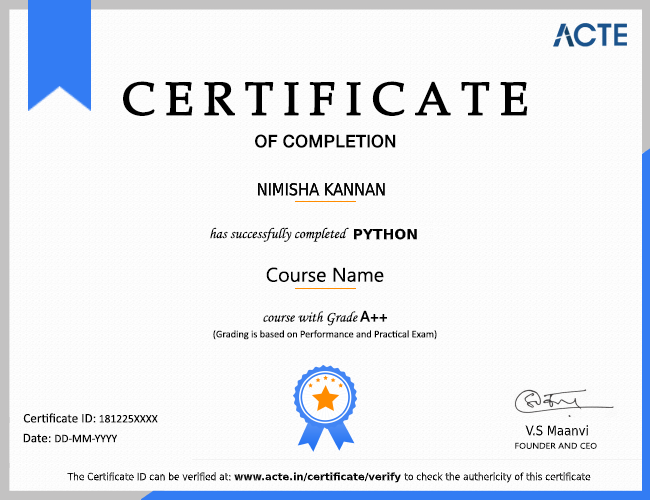
    Workday Learning training certificate

    Complete Your Training

    Receive your course completion certificate in downloadable PDF format after successfully completing the training program.

    Receive Your Certificate

    Check with the training provider for certificate availability, format, and delivery options after completing the course.

    Get Certified

    Learn from Expert Industry of Workday Trainers

    • Experienced Workday trainers in Vadapalani provide practical knowledge of core HCM, business processes, reporting, security, and cloud HR administration.
    • Industry experts guide learners through worker management, organisational structures, business process configuration, and enterprise HR implementation methods.
    • Interactive learning sessions simplify Workday concepts, including employee lifecycle management, compensation activities, and HR workflow configuration processes.
    • Study advanced Workday concepts through scenarios covering reporting, calculated fields, security, integrations, and data-driven HR decision-making activities.
    • Practical sessions cover worker information, organisational changes, business approvals, reporting tasks, and system navigation through realistic Workday workplace scenarios.
    • Hands-on activities develop expertise in HCM workflows, cloud HR operations, reporting techniques, system configuration, and enterprise implementation practices.
    • Workday trainers in Vadapalani prepare learners for roles such as HCM Consultant, Functional Analyst, Reporting Analyst, HRIS Specialist, and Administrator.

    Authorized Partners

    ACTE TRAINING INSTITUTE PVT LTD is the unique Authorised Oracle Partner, Authorised Microsoft Partner, Authorised Pearson Vue Exam Center, Authorised PSI Exam Center, Authorised Partner Of AWS .
    100% Placements | Get Hired in Top MNC

      Career Support

      Placement Assistance

      Exclusive access to ACTE Job portal

      Mock Interview Preparation

      1 on 1 Career Mentoring Sessions

      Career Oriented Sessions

      Resume & LinkedIn Profile Building

      We Offer High-Quality Training at The Lowest Prices.

      Affordable, Quality Training for Freshers to Launch IT Careers & Land Top Placements.

      What Makes ACTE Training Different?

      Feature

      ACTE Technologies

      Other Institutes

      Affordable Fees

      Competitive Pricing With Flexible Payment Options.

      Higher Fees With Limited Payment Options.

      Industry Experts

      Well Experienced Trainer From a Relevant Field With Practical Training

      Theoretical Class With Limited Practical

      Updated Syllabus

      Updated and Industry-relevant Course Curriculum With Hands-on Learning.

      Outdated Curriculum With Limited Practical Training.

      Hands-on projects

      Real-world Projects With Live Case Studies and Collaboration With Companies.

      Basic Projects With Limited Real-world Application.

      Certification

      Industry-recognized Certifications With Global Validity.

      Basic Certifications With Limited Recognition.

      Placement Support

      Strong Placement Support With Tie-ups With Top Companies and Mock Interviews.

      Basic Placement Support

      Industry Partnerships

      Strong Ties With Top Tech Companies for Internships and Placements

      No Partnerships, Limited Opportunities

      Batch Size

      Small Batch Sizes for Personalized Attention.

      Large Batch Sizes With Limited Individual Focus.

      LMS Features

      Lifetime Access Course video Materials in LMS, Online Interview Practice, upload resumes in Placement Portal.

      No LMS Features or Perks.

      Training Support

      Dedicated Mentors, 24/7 Doubt Resolution, and Personalized Guidance.

      Limited Mentor Support and No After-hours Assistance.

      FAQ

      Looking for a better discount price?

      Contact ACTE to learn about available offers and course fees for Workday Learning Training in Sydney.
      • ACTE provides career guidance and placement assistance to help learners explore relevant job opportunities.
      • Resume preparation and interview guidance can help learners prepare for recruitment processes.
      • Participants can explore roles related to Workday Learning, learning administration, and employee development.
      • Mock interviews and communication practice can help improve interview readiness.
      • Placement outcomes depend on individual qualifications, skills, and employer requirements.
      • Visit the Placed Students List to learn more about placement-related information.
      • Access available learning resources through the Student Portal.

      Who Can Join Workday Learning Course In Sydney?

      Students, graduates, HR professionals, training coordinators, learning and development specialists, IT professionals, and career changers can consider this course.

      Do I Need Coding Knowledge To Learn Workday Learning?

      Coding is generally not required for basic Workday Learning administration. Technical roles involving integrations or advanced development may require additional technical knowledge.

      Is Workday Learning Course Management Included?

      The course covers learning management concepts such as course administration, learning content, employee enrollment, training assignments, and learning progress tracking.

      What Happens If I Miss a Workday Learning Training Session?

      Contact the training provider to check whether recorded sessions or alternative learning resources are available to review missed topics.

      Which Training Formats Are Available For Workday Learning In Sydney?

      Contact ACTE to confirm available training formats, including online classes, instructor-led sessions, and flexible learning options.
      The course focuses on learning management concepts, course administration, employee training processes, learning reports, and practical exercises to help learners build relevant professional skills.
      Check with ACTE about access to online study materials, recorded sessions, and other learning resources through the Student Portal.

      Does The Workday Learning Program Provide Hands-On Practice?

      Practical exercises can help learners understand course setup, learning assignments, content management, employee enrollment, and training progress tracking. Confirm the specific hands-on activities included in the course with ACTE.

      Which Certificate Is Provided After Completing The Training?

      Learners who meet the course requirements may receive an ACTE course completion certificate. This is separate from an official Workday certification, which has its own eligibility requirements.

      What Is The Process For Enrolling In Workday Learning Training?

      Contact ACTE at enquiry@acte.in to ask about course availability, fees, admission requirements, and enrollment options for Workday Learning Training in Sydney.
      If recorded sessions are included in your course, the training provider can explain how to access them and review lessons according to your schedule.
      Career assistance may include resume guidance, interview preparation, and advice on exploring relevant opportunities in learning administration, training coordination, and employee development. Confirm the available support with ACTE.
      Show More

      Job Opportunities in Workday

      More Than 35% Prefer Workday. Workday Is One of the Most Popular and In-Demand Technologies in the Tech World.