LMS
LMS
Last updated on 20th Apr 2026| 7499

TCS Manual Testing Interview Questions and Answers is a practical guide for candidates preparing for software testing roles at Tata Consultancy Services. It covers commonly asked questions on manual testing concepts such as SDLC, STLC, test case design, defect lifecycle, testing types, and bug tracking, along with clear and easy-to-understand answers. This resource helps freshers strengthen their testing knowledge, understand the interview process, and build the confidence needed to perform well in technical and QA interview rounds.
1. What is Manual Testing?
Ans:
Manual Testing is the process of verifying software functionality by executing test cases without automation tools. Testers interact with the application directly to identify defects, usability issues, and requirement gaps carefully. This method helps evaluate real user behavior, navigation flow, and business logic accuracy effectively. Manual testing is widely used during early development stages and exploratory scenarios frequently. It is a fundamental topic in fresher interviews.
2. What are key concepts of Manual Testing basics?
Ans:
- Learning core testing terminology such as defect, bug, test case, and test scenario builds strong fundamentals quickly. These terms are commonly asked in interviews and daily projects. Strong basics improve confidence greatly.
- Understanding why manual testing is used before automation creates practical interview clarity significantly. It helps validate early features and changing requirements easily. This gives real project understanding.
- Studying real examples of login pages and forms improves concept retention effectively. Practical examples connect theory with application behavior clearly. Real cases are easier to remember.
- Practicing clear explanations of testing workflow increases fresher confidence naturally. Good communication helps present answers in interviews smoothly. Clear speaking creates better impressions.
3. What is Software Testing?
Ans:
Software Testing is the process of evaluating software to ensure it meets expected requirements correctly. It helps identify defects, missing functionality, and performance or usability issues before release. Testing improves product quality, reliability, and customer satisfaction across business environments greatly. Different testing types are used during each phase of development lifecycle. This topic is commonly asked in interviews.
4. What are core concepts of Quality Assurance?
Ans:
- Testing helps detect defects early, reducing later fixing cost and business risks significantly. Early issue detection saves time and development effort. Prevention is always better than correction.
- It ensures delivered software matches functional and non-functional requirements accurately. Proper validation confirms expected business outcomes clearly. This improves release quality.
- Quality assurance through testing increases trust, reputation, and customer satisfaction effectively. Stable products create stronger user confidence over time. Good quality supports business growth.
- Strong testing processes support stable releases and long-term maintenance naturally. Organized testing reduces production surprises greatly. Maintenance also becomes easier later.
5. What is Quality Assurance?
Ans:
Quality Assurance is a process-focused approach used to prevent defects during software development stages. It emphasizes standards, reviews, process improvement, and disciplined engineering practices continuously. QA ensures teams follow correct methods to build quality products consistently. Unlike testing alone, QA focuses on prevention rather than only defect detection. QA basics are valuable for fresher interviews.
6. What are characteristics of strong Test Cases?
Ans:
- Understanding prevention versus detection difference creates immediate clarity for beginners strongly. QA prevents defects while testing finds them later. This distinction is important in interviews.
- Learning process reviews, standards, and audits improves technical maturity significantly. These activities maintain disciplined software development practices. Strong processes improve consistency.
- Comparing QA with QC and testing adds practical interview value effectively. Such comparisons are frequently asked by recruiters. Clear differences improve answers.
- Revising software lifecycle quality activities strengthens confidence naturally. Repetition helps remember where QA fits in projects. Consistent study gives better retention.
7. What is Quality Control?
Ans:
Quality Control is a product-focused activity used to identify defects in completed work outputs. It includes testing, inspections, and validations to ensure required standards are achieved. QC checks whether the final software behaves as expected under conditions. It supports QA by verifying actual implementation quality levels effectively. QC is often asked with QA differences.
8. What are important components of a Bug Report?
Ans:
- QA focuses on improving process quality, while QC focuses on checking product quality directly. One is preventive and the other is verification based. This is the key difference.
- QA aims at defect prevention, whereas QC aims at defect detection effectively. Preventive actions reduce future problems greatly. Detection confirms final quality.
- QA includes audits and standards, while QC includes testing and inspections significantly. Their activities differ though both support quality goals. Together they improve products.
- This comparison creates strong interview clarity naturally. Simple contrasts are easier to explain confidently. Structured answers impress interviewers.
9. What is Test Case?
Ans:
A Test Case is a documented set of steps, inputs, and expected results. It is used to verify whether specific software functionality works correctly. Well-written test cases improve consistency, traceability, and coverage during execution greatly. They are reused during regression and future release validations frequently. Test case knowledge is essential for testing interviews.
10. What is difference between Severity and Priority?
Ans:
- Include clear test objective, preconditions, data, steps, and expected results carefully. Complete information helps anyone execute tests correctly. Clarity prevents confusion.
- Use simple language so any tester can execute consistently without confusion. Easy wording improves repeatability across teams. Simple writing is more effective.
- Cover positive, negative, and boundary scenarios for stronger quality assurance significantly. Different scenarios reveal hidden defects quickly. Broad coverage increases reliability.
- Maintain traceability with requirements for effective coverage management naturally. Linking cases to requirements avoids missing validations. Traceability supports audits too.
11. What is Test Scenario?
Ans:
A Test Scenario is a high-level statement describing what functionality needs verification. It does not contain detailed execution steps like a test case document. Scenarios help organize broad coverage areas before creating detailed cases. Examples include login validation, payment processing, or user registration flow checks. This concept is common in fresher interviews.
12. What are key features of Smoke Testing?
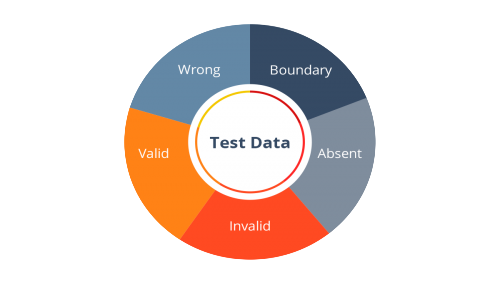
Ans:
- Understand scenarios as broad testing conditions rather than detailed execution steps clearly. Scenarios define what to test at a high level. They guide case creation later.
- Use modules like login, search, and checkout for practical examples significantly. Common modules make concepts easier to understand. Real examples improve retention.
- Learn relationship between scenarios and detailed test cases effectively. One scenario may contain multiple detailed cases. This improves planning skills.
- Practicing scenario creation improves analytical interview responses naturally. It shows logical thinking and requirement understanding. Practice builds speed and confidence.
13. What is Bug in Testing?
Ans:
A Bug is an error causing software to behave differently from expected results. Bugs may arise from coding mistakes, logic flaws, or misunderstood requirements. They can impact functionality, security, usability, or performance of applications seriously. Proper bug tracking helps teams resolve issues systematically and efficiently. Bug terminology is basic interview knowledge.
14. How to report Bug effectively?
Ans:
- Include clear title, module name, and short summary of the defect precisely. A good summary helps quick understanding. Clear reports save time.
- Mention reproduction steps, expected result, actual result, and environment details carefully. These details help developers reproduce issues accurately. Better information speeds fixing.
- Attach screenshots or logs whenever possible for faster developer analysis significantly. Visual proof explains defects clearly and quickly. Evidence reduces back-and-forth discussion.
- Use proper severity and priority for efficient resolution naturally. Correct classification helps teams plan fixes effectively. This supports release decisions.
15. What is Defect Life Cycle?
Ans:
Defect Life Cycle describes stages a bug passes through from discovery to closure. Typical statuses include New, Assigned, Open, Fixed, Retest, Reopened, and Closed. It ensures proper ownership, tracking, communication, and accountability across teams. Structured lifecycle management reduces confusion during release timelines effectively. This topic is highly common in testing interviews.
16. What are key aspects of Functional Testing?
Ans:
- Memorize common statuses from creation to final closure for interview readiness strongly. Typical states include New, Open, Fixed, and Closed. Sequence knowledge is important.
- Understand retesting and reopened conditions after defect fixes significantly. Some issues fail again after fixes and reopen. This happens often in projects.
- Learn ownership movement between tester and developer effectively. Defects pass through multiple responsible people during resolution. Good tracking avoids confusion.
- Use simple flow explanation for confident responses naturally. Step-by-step answers are easier to remember and present. Structured responses create impact.
17. What is Severity in Testing?
Ans:
Severity indicates the impact level of a defect on system functionality. Critical severity bugs may crash systems or block major operations completely. Low severity defects may involve cosmetic or minor UI inconsistencies only. Severity helps teams understand technical seriousness of reported issues clearly. It is often paired with priority questions.
18. What are features of Exploratory Testing?
Ans:
- Severity measures business or functional impact of the defect technically. It shows how badly the system is affected. High severity issues may stop operations.
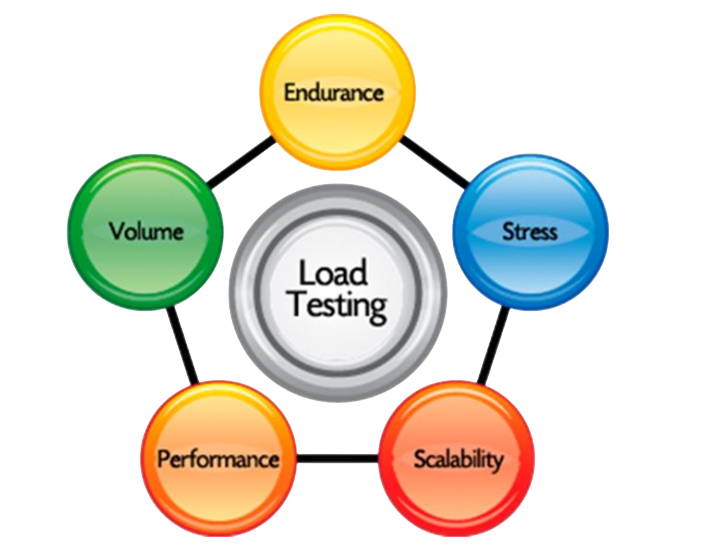
- Priority measures urgency of fixing the defect from release perspective significantly. It tells which issue should be solved first. Business deadlines influence priority.
- A cosmetic homepage issue may have low severity but high priority effectively. Visible issues can still need quick correction. Examples improve clarity.
- Clear examples improve interviewer understanding naturally. Real scenarios are easier to remember than theory alone. Examples strengthen answers.
19. What is Priority in Testing?
Ans:
Priority defines how soon a defect should be fixed by the team. It is based on release timelines, customer impact, and business urgency factors. High priority issues are resolved before lower urgency defects generally. Priority helps plan defect resolution workload effectively across sprints. This is a frequent interview concept. It also helps teams focus on critical defects that affect deliveries first. Proper priority management improves product quality and timely releases.
20. How to assign bug priority properly?
Ans:
- Evaluate whether the issue blocks business flow or important customer usage strongly. Critical workflow defects usually need urgent fixes. Impact drives priority.
- Check release deadlines and production risk before deciding urgency significantly. Near releases often require faster decisions. Timing matters greatly.
- Coordinate with product owners or leads when needed effectively. Priority decisions may need business input. Team alignment is useful.
- Maintain consistency in classification across projects naturally. Similar issues should receive similar priorities. Consistency improves management trust.
21. What is Smoke Testing?
Ans:
Smoke Testing is a basic level test performed to verify major functions quickly. It checks whether the build is stable enough for detailed testing phases. Core modules like login, launch, and navigation are validated first. If smoke testing fails, deeper testing is usually postponed immediately. Smoke testing is common in fresher interviews. It helps in saving testing time by identifying critical issues early. Smoke testing ensures the application is ready for further validation.
22. What is Smoke Testing basics?
Ans:
- Learn smoke testing as build verification before extensive testing begins clearly. It checks whether the build is stable enough for further testing. This saves effort.
- Understand focus on critical paths like launch and login significantly. Core functions must work first before detailed checks begin. This is the main purpose.
- Compare smoke testing with sanity testing for interview depth effectively. Smoke is broader, sanity is narrower after changes. Comparison questions are common.
- Use practical examples to improve retention naturally. Examples make testing concepts easier to explain. Real cases stay in memory longer.
23. What is Sanity Testing?
Ans:
Sanity Testing is a focused check performed after minor fixes or changes. It verifies whether specific functionality works correctly after recent updates. This testing is narrower than smoke testing in most situations. It saves time before starting complete regression execution cycles. Sanity testing is a popular interview topic. It helps testers quickly decide whether the build is stable for further testing. Good understanding of sanity testing improves software quality assurance knowledge.
24. What is the difference between Smoke Testing and Sanity Testing?
Ans:
| Criteria | Smoke Testing | Sanity Testing |
|---|---|---|
| Meaning | Basic testing of major functions in new build. | Focused testing after minor fixes or changes. |
| Scope | Broad coverage of critical modules. | Narrow coverage of changed functionality. |
| When Used | Performed on fresh build before detailed testing. | Performed after bug fixes or updates. |
| Purpose | Checks build stability. | Checks correctness of recent changes. |
25. What are final beginner tips for Manual Testing interviews?
Ans:
Strong success depends on understanding core testing terms and real project workflow clearly. Candidates should know bugs, test cases, severity, priority, and lifecycle thoroughly. Simple examples create stronger answers than memorized textbook definitions alone. Regular revision of testing concepts improves confidence significantly before interviews. Consistent preparation creates better fresher selection chances.
26. What is Regression Testing?
Ans:
Regression Testing is performed to ensure recent code changes have not broken existing functionality anywhere. Previously working modules are rechecked after fixes, enhancements, or environment updates carefully. This testing helps maintain product stability across continuous releases and iterations greatly. Regression suites may contain reusable test cases covering critical business flows. Regression testing is a major interview topic.
27. What is the difference between Retesting and Regression Testing?
Ans:
| Criteria | Retesting | Regression Testing |
|---|---|---|
| Meaning | Checks whether reported defect is fixed. | Checks existing features after code changes. |
| Scope | Focused only on failed defect area. | Covers related old modules broadly. |
| Purpose | Confirms defect resolution. | Finds side effects from new changes. |
| When Used | After developer fixes a bug. | After fixes, updates, or enhancements. |
28. What is Retesting?
Ans:
Retesting is the process of verifying a specific defect after developers provide a fix. The same failed steps are executed again to confirm issue resolution correctly. Retesting focuses only on defect-related functionality rather than full application coverage. Successful retesting may move defect status toward closure stages. Retesting is commonly asked with regression testing.
29. What are key feature of Retesting and Regression difference?
Ans:
- Retesting checks one fixed defect, while regression checks related old functionalities broadly. Retesting confirms a specific issue is solved. Regression ensures other areas still work.
- Retesting confirms issue resolution, regression ensures no side effects significantly. Both are important after code changes. They serve different purposes clearly.
- Retesting scope is narrow, regression scope is usually wider effectively. One focuses on a defect, the other on system stability. Scope difference is commonly asked.
- Clear examples improve fresher interview responses naturally. Practical comparisons are easier to explain confidently. Structured answers create better impact.
30. What is Black Box Testing?
Ans:
Black Box Testing validates software behavior without examining internal source code structure. Inputs are provided and outputs are checked against expected requirements carefully. The tester focuses on functionality, usability, and external behavior only. It is widely used in system testing and acceptance testing phases. Black box testing is basic interview knowledge.
31. What is prepare Black Box Testing basics?
Ans:
- Learn that internal coding knowledge is not required for black box testing clearly. Testers validate features from the user perspective. This makes it widely used.
- Focus on validating inputs, outputs, and requirement behavior significantly. Expected results are compared with actual system behavior. Requirement coverage is important here.
- Use login page examples for practical understanding effectively. Entering valid and invalid credentials is a common case. Examples improve clarity.
- Compare with white box testing for stronger concept retention naturally. Black box checks functionality, white box checks logic. Comparison helps memory.
32. What is White Box Testing?
Ans:
White Box Testing verifies software by examining internal code logic and structure directly. It includes path coverage, branch testing, and statement verification methods commonly. Developers or technically skilled testers often perform this testing activity. The goal is to validate implementation quality and hidden logic defects. White box basics are useful interview topics.
33. Explain Black Box and White Box difference?
Ans:
- Black box focuses on functionality, while white box focuses on internal logic clearly. One views software externally, the other internally. This is the key difference.
- Black box requires requirements knowledge, white box often needs coding understanding significantly. Technical depth is higher in white box testing. Skills differ accordingly.
- White box checks paths and conditions, black box checks user behavior effectively. Each method finds different defect types. Both are valuable together.
- Comparison answers are frequently asked in interviews naturally. Clear contrasts improve response quality greatly. Simple structure helps confidence.
34. What is Functional Testing?
Ans:
Functional Testing verifies whether application features work according to business requirements properly. Each module is validated using expected inputs, outputs, and workflows carefully. Examples include login, registration, search, and payment processing functions. This testing ensures software performs intended tasks for users reliably. Functional testing is essential for fresher interviews.
35. What are the Functional Testing concepts?
Ans:
- Understand functional testing as requirement-based validation of system behavior clearly. It checks whether features work as expected. Business rules are important here.
- Learn module examples like forms, transactions, and navigation significantly. Common features make the concept easier to understand. Examples improve interview answers.
- Focus on positive and negative test scenarios effectively. Valid and invalid cases reveal different defects. Balanced coverage improves quality.
- Practice clear business-oriented explanations for interviews naturally. Functional testing is closely linked with user needs. Clear wording creates better impact.
36. What is Non Functional Testing?
Ans:
Non Functional Testing validates attributes beyond core functionality of the software system. It includes performance, usability, security, compatibility, and reliability evaluations commonly. This testing ensures the product works efficiently under practical conditions. Strong non-functional quality improves user satisfaction and business trust greatly. This topic appears often in interviews.
37. What are the and Non Functional difference?
Ans:
- Functional testing checks what the system does according to requirements clearly. It validates features like login or payment. It focuses on behavior.
- Non functional testing checks how well the system performs significantly. Speed, security, and usability are common examples. It focuses on quality attributes.
- Examples include login success versus page speed and security effectively. One checks correctness, the other checks efficiency. Examples make answers stronger.
- Simple comparisons create stronger interviewer understanding naturally. Clear differences are easy to remember. Structured responses improve confidence.
38. What is the concept of checking whether a number is prime?
Ans:
Checking whether a number is prime involves determining if it has only two distinct positive divisors, which are one and the number itself. This concept is fundamental in mathematics and programming for understanding divisibility and logical conditions. It requires testing whether the number can be divided evenly by any value other than one and itself. Prime number logic is widely used in algorithms, encryption systems, and problem-solving scenarios. A strong understanding of this concept improves logical thinking and supports better performance in technical interviews.
39. Explain about Exploratory Testing basics?
Ans:
- Learn that predefined test cases are not mandatory in exploratory testing clearly. Testers explore the system while learning it. Flexibility is a key advantage.
- Understand simultaneous learning, execution, and defect discovery significantly. Testing happens dynamically during exploration. This can reveal hidden issues quickly.
- Use mobile app navigation examples for practical clarity effectively. Real usage flows help explain exploratory methods well. Examples improve retention.
- Emphasize tester creativity and analytical thinking naturally. Observation skills matter greatly in this approach. Strong testers perform well here.
40. What is Ad Hoc Testing?
Ans:
Ad Hoc Testing is an informal testing method performed without formal documentation. The tester uses intuition and experience to identify defects quickly. It is commonly used for quick checks under limited time constraints. Although unstructured, it can reveal hidden issues effectively. Ad hoc testing is frequently asked in fresher interviews. It helps testers discover unexpected bugs that scripted testing may miss. Good knowledge of Ad Hoc Testing improves practical testing skills.

Enroll in Manual Testing Training and UPGRADE Your Skills
Weekday / Weekend BatchesSee Batch Details41. Differentiate Exploratory Testing and Ad Hoc Testing.
Ans:
- Exploratory testing is structured learning-based investigation, ad hoc is informal random checking clearly. Exploratory has intent, ad hoc is less planned. This is the main difference.
- Exploratory often follows goals, ad hoc may not use planned objectives significantly. Goal-driven testing gives better direction. Ad hoc is faster but looser.
- Both can discover hidden defects when time is limited effectively. Experienced testers often use both methods smartly. Practical value remains high.
- Clear distinction improves interview confidence naturally. Comparison questions are common in fresher rounds. Good structure helps responses.
42. What is Boundary Value Analysis?
Ans:
Boundary Value Analysis is a test design technique focusing on edge input values. Defects often occur at minimum, maximum, and nearby boundary conditions frequently. For accepted range one to hundred, values around limits are tested carefully. This method improves efficiency by targeting high-risk data points strongly. Boundary analysis is a common manual testing topic.
43. What are key concepts and practices in Boundary Value Analysis?
Ans:
- Learn that many defects occur at edges rather than middle values clearly. Boundary inputs often create failures. This is why edge testing matters.
- Practice ranges like age, quantity, and percentage fields significantly. Numeric fields are common examples in applications. Practice builds understanding.
- Test minimum, maximum, below minimum, and above maximum effectively. These values provide strong coverage with fewer tests. It is an efficient technique.
- Use numeric examples to strengthen interview responses naturally. Examples make theory simple and memorable. Clear explanation creates impact.
44. What is Equivalence Partitioning?
Ans:
Equivalence Partitioning divides input data into groups expected to behave similarly. One representative value from each partition is tested to save effort. Valid and invalid partitions are created based on requirements carefully. This technique reduces redundant testing while maintaining useful coverage greatly. It is often asked with boundary testing.
45. What are the core principles of Equivalence Partitioning?
Ans:
- Understand grouping of similar inputs into classes for efficient testing clearly. One value can represent many similar values. This reduces extra effort.
- Learn valid and invalid partition concepts significantly. Both accepted and rejected ranges should be tested. This improves coverage quality.
- Use examples like marks from zero to hundred effectively. Different ranges can form separate partitions easily. Examples improve understanding.
- Compare with boundary testing for deeper interview answers naturally. Partitioning groups data, boundary checks edges. Together they are powerful techniques.
46. What is Test Plan?
Ans:
A Test Plan is a formal document describing scope, strategy, resources, and schedule. It guides testing activities throughout the project lifecycle systematically. The document may include objectives, environments, roles, risks, and deliverables. Strong planning improves coordination and quality execution greatly across teams. Test plans are important interview concepts.
47. What are the key components of a Test Plan?
Ans:
- Learn test plan purpose as roadmap for testing activities clearly. It guides scope, schedule, and responsibilities. Planning improves control greatly.
- Understand common sections like scope, timeline, resources, and risks significantly. These elements organize project execution properly. Complete plans reduce confusion.
- Explain how planning reduces confusion and delays effectively. Clear direction saves time and effort during projects. Teams work more smoothly.
- Use project examples for stronger responses naturally. Real planning scenarios improve interview quality. Practical answers feel stronger.
48. What is Test Strategy?
Ans:
Test Strategy is a high-level document defining overall testing approach for the organization or project. It describes standards, tools, testing levels, and quality objectives broadly. Unlike detailed plans, strategy remains more stable across releases generally. It helps teams align execution with business quality expectations effectively. This topic is useful in interviews.
49. What is the difference between Test Plan and Test Strategy?
Ans:
| Criteria | Test Plan | Test Strategy |
|---|---|---|
| Meaning | Project-specific document for testing execution. | High-level approach for overall testing. |
| Scope | Includes schedule, resources, and deliverables. | Includes standards, methods, and objectives. |
| Usage | Prepared for specific project or release. | Used across projects or organization. |
| Nature | Detailed and changeable. | Broad and relatively stable. |
50. How to build long term career in Manual Testing?
Ans:
- Strengthen fundamentals in testing concepts, documentation, and defect management continuously for stable growth. Strong basics support every future role in QA. Fundamentals never lose value.
- Learn domain knowledge such as banking, healthcare, or ecommerce for better opportunities significantly. Domain expertise increases job relevance and salary potential. It adds practical strength.
- Upgrade skills toward automation, API testing, and Agile practices effectively over time. Modern testing careers benefit from multi-skill profiles. Continuous learning creates growth.
- Maintain communication skills and quality mindset for long-term success naturally. Clear communication improves teamwork and leadership chances. Professional attitude supports career stability.
51. What is Test Environment?
Ans:
Test Environment is the configured setup where software testing activities are executed systematically. It includes hardware, software, network settings, databases, tools, and test data resources. A stable environment helps reproduce defects and validate behavior accurately. Mismatch between environments may cause inconsistent testing results frequently. Test environment knowledge is common in interviews.
52. What are the important aspects of Test Environment setup?
Ans:
- Learn that testing requires controlled setup including servers, browsers, and databases clearly. These components help execute test cases in a stable manner. Proper setup improves testing accuracy greatly.
- Understand why production and testing environments may differ significantly. Configuration differences can create unexpected issues during validation. Awareness helps reduce environment-related defects.
- Study environment readiness before execution for better project flow effectively. Missing access, tools, or data may delay testing schedules. Readiness checks save valuable time.
- Use examples like browser versions to strengthen clarity naturally. Different versions may display features differently across systems. Real examples improve interview explanations.
53. What is Test Data?
Ans:
Test Data is the input information used to execute test cases properly. It may include usernames, passwords, transactions, records, and sample business values. Good test data should cover valid, invalid, and boundary conditions carefully. Poor test data can hide defects and reduce coverage quality significantly. Test data is an essential interview topic.
54. What are the key methods for Test Data creation?
Ans:
- Learn to create positive, negative, and edge-case datasets clearly for interviews. These data types validate normal and abnormal behavior properly. Broad coverage improves defect detection.
- Understand masking sensitive production data before reuse significantly. Private customer details should be protected carefully. Masking supports security and compliance needs.
- Include realistic business values for stronger defect discovery effectively. Real-world data reveals issues hidden by random values. Practical datasets improve testing quality.
- Organized datasets improve repeatable execution naturally. Structured data can be reused in future cycles easily. This saves effort and increases consistency.
55. What is Test Execution?
Ans:
Test Execution is the process of running prepared test cases on the application. Actual results are compared with expected outcomes during execution carefully. Passed, failed, blocked, or deferred statuses may be recorded systematically. Accurate execution helps reveal defects and release readiness effectively. Execution process knowledge is frequently asked.
56. What are the important aspects of Test Execution?
Ans:
- Learn execution as practical running of approved test cases clearly. It is the stage where planned validations are actually performed. Proper execution reveals real defects.
- Compare expected versus actual result recording significantly. Differences between them indicate failures or unexpected behavior. Accurate comparison is essential.
- Understand status values like pass, fail, and blocked effectively. These statuses communicate progress and issues clearly. Good tracking improves reporting quality.
- Strong documentation during execution improves reporting naturally. Notes, screenshots, and logs support defect analysis later. Documentation adds professionalism.
57. What is Test Closure?
Ans:
Test Closure is the final phase where testing activities are formally completed. Reports, metrics, lessons learned, and unresolved risks are documented carefully. The team reviews whether planned objectives were achieved successfully. Closure supports future process improvement and audit readiness greatly. This topic appears in lifecycle interviews.
58. What are the key activities involved in Test Closure?
Ans:
- Learn closure as formal completion of planned testing tasks clearly. It marks the end of testing activities for a release. Proper closure keeps projects organized.
- Understand summary reports and metrics preparation significantly. Final reports show pass rates, defects, and pending risks. These metrics help management decisions.
- Study lessons learned for continuous improvement effectively. Teams review successes and mistakes after project completion. This improves future processes.
- Explain business signoff importance during final stages naturally. Stakeholder approval confirms readiness and acceptance. Signoff supports controlled release decisions.
59. What is STLC?
Ans:
STLC stands for Software Testing Life Cycle containing structured testing phases. Common phases include requirement analysis, planning, design, execution, and closure. Each phase has entry and exit criteria for better control. STLC improves quality management and organized delivery significantly. It is one of the most common testing interview topics.
60. What are the phases of STLC?
Ans:
- Memorize major phases from analysis to closure for fresher readiness clearly. Knowing sequence helps explain testing lifecycle confidently. Structured answers impress interviewers.
- Instructor-led Sessions
- Real-life Case Studies
- Assignments
- Understand deliverables produced in each stage significantly. Documents like plans, cases, reports, and metrics are important outputs. Deliverables show progress clearly.
- Learn how STLC supports systematic defect prevention effectively. Planned activities reduce confusion and improve quality control. Process discipline matters greatly.
- Use phase flow explanation for confident answers naturally. Step-by-step responses are easier to understand and remember. Clear communication creates better impact.

Learn Manual Testing Training with Advanced Concepts By Industry Experts
61. What is SDLC?
Ans:
SDLC stands for Software Development Life Cycle used to build software products systematically. Typical phases include requirements, design, development, testing, deployment, and maintenance. Testing is one important part within the larger SDLC framework. SDLC helps teams manage timelines, quality, and resources effectively. SDLC basics are often asked with STLC.
62. What is the difference between SDLC and STLC?
Ans:
| Criteria | SDLC | STLC |
|---|---|---|
| Meaning | Complete software development lifecycle. | Software testing lifecycle only. |
| Scope | Includes planning, design, coding, testing, deployment. | Includes planning, test design, execution, closure. |
| Focus | Builds software product. | Validates software quality. |
| Users | Developers, analysts, testers, operations. | Mainly QA and testing teams. |
63. What are the key aspects of Defect Density?
Ans:
- Learn defect density as defects divided by measured software size clearly. It shows quality relative to application size. This metric helps comparison.
- Understand it helps compare module quality significantly. Modules with higher density may need extra review. It highlights weak areas.
- Use examples like defects per thousand lines effectively. Such measurements simplify technical reporting and analysis. Numeric examples improve clarity.
- Mention trend analysis for stronger responses naturally. Tracking density over time shows whether quality is improving. Trends support management decisions.
64. What are the key concepts of the Waterfall Model?
Ans:
- Learn sequential flow from requirement to maintenance clearly for interviews. Each stage is completed before the next begins. This is the core Waterfall concept.
- Understand benefits in stable and regulated projects significantly. Fixed scope projects often suit this model well. Planning becomes easier with clear requirements.
- Study limitations when requirements change frequently effectively. Late changes may increase cost and delay schedules. Flexibility is lower here.
- Compare with Agile model for stronger responses naturally. Waterfall is sequential, while Agile is iterative and flexible. This comparison is commonly asked.
65. What is Agile Testing?
Ans:
Agile Testing is testing performed continuously within iterative Agile development cycles. Testers collaborate closely with developers, analysts, and product owners regularly. Frequent releases require quick feedback and repeated regression validation. Agile testing emphasizes flexibility, communication, and customer value strongly. This topic is highly relevant in TCS interviews.
66. What are the key principles of Agile Testing?
Ans:
- Learn testing occurs in sprints instead of late project stages clearly. Quality checks happen continuously during development. Early testing reduces risk.
- Understand continuous collaboration across cross-functional teams significantly. Testers work closely with developers and product owners regularly. Teamwork is central in Agile.
- Study frequent release cycles and regression importance effectively. Regular releases need repeated validation of old features. Fast delivery requires strong discipline.
- Compare Agile with Waterfall for interview strength naturally. Agile is adaptive and iterative, while Waterfall is linear. This contrast gives clarity.
67. What is Sprint in Agile?
Ans:
A Sprint is a short time-boxed development cycle in Agile methodology. During each sprint, selected features are designed, built, and tested. Sprint durations commonly range from one to four weeks. The goal is delivering usable increments quickly and consistently. Sprint basics are common interview topics. Sprints help teams track progress and improve collaboration regularly. They also support faster feedback and continuous product improvement.
68. What are the important aspects of a Sprint in Agile?
Ans:
- Learn sprint as fixed duration iteration for delivering features clearly. Teams complete planned work within a short time-box. Sprints improve focus and speed.
- Understand planning, execution, review, and retrospective activities significantly. These events guide work and improvement every cycle. Sprint structure is important.
- Study tester role inside sprint cycles effectively. Testers validate stories and support quick feedback continuously. QA involvement is active throughout.
- Use examples from product releases for better clarity naturally. Mobile app updates often follow sprint-based delivery models. Real examples improve answers.
69. What is User Story?
Ans:
A User Story is a short requirement statement describing user needs simply. It helps Agile teams understand expected value from product features clearly. Stories often include acceptance criteria for validation and testing. They guide planning, development, and testing tasks effectively. User stories are common in Agile interviews.
70. What are the key aspects of User Story testing?
Ans:
- Learn story structure focused on role, need, and benefit clearly. User stories describe who wants what and why. This format keeps requirements simple.
- Understand acceptance criteria as basis for test cases significantly. Conditions define what must be validated before completion. They guide proper coverage.
- Review stories early to identify missing details effectively. Early discussion prevents confusion during development and testing. Clarification saves rework.
- Collaboration around stories improves product quality naturally. Shared understanding among teams reduces mistakes greatly. Better teamwork creates stronger outcomes.
71. What is Acceptance Criteria?
Ans:
Acceptance Criteria are specific conditions a feature must satisfy before approval. They define boundaries of expected behavior and business rules clearly. Testers use these criteria to design validations systematically. Well-written criteria reduce ambiguity and requirement misunderstandings greatly. This concept is valuable in Agile interviews.
72. What are the important components of Acceptance Criteria?
Ans:
- Learn criteria as measurable completion conditions for each feature clearly. They define when a story can be accepted successfully. Clear criteria avoid confusion.
- Understand role in test case creation significantly. Testers convert criteria into validations systematically. This ensures requirement coverage.
- Use examples like successful login and error handling effectively. Practical cases make criteria easier to understand quickly. Examples improve memory retention.
- Strong criteria reduce rework and confusion naturally. Clear expectations help developers and testers align properly. This saves time and effort.
73. What is UAT?
Ans:
UAT stands for User Acceptance Testing performed by business users or clients. It verifies whether software meets real business needs before release. UAT usually occurs after system testing and major defect fixes. Successful UAT often leads to deployment approval decisions. UAT is frequently asked in testing interviews. It helps ensure the software is ready for real-world usage. Proper UAT increases customer satisfaction and reduces post-release issues.
74. What are final success tips for TCS Manual Testing interviews?
Ans:
Strong success depends on clear fundamentals, practical examples, and confident communication skills. Candidates should know lifecycle models, defect handling, techniques, and Agile terminology thoroughly. Simple structured answers often create better impressions than memorized textbook lines alone. Regular revision improves speed, clarity, and technical confidence significantly. Consistent preparation creates stronger fresher selection opportunities greatly.
75. What are final tips after advanced Manual Testing preparation stage?
Ans:
Candidates should now understand lifecycle models, Agile terms, and execution stages thoroughly. Knowledge of STLC, SDLC, UAT, and defect workflows creates stronger readiness. Practical examples make answers more professional than memorized definitions alone. Consistent revision improves clarity, speed, and confidence significantly. Strong fundamentals increase fresher selection opportunities greatly.
76. What is the difference between Waterfall Model and Agile Model?
Ans:
| Criteria | Waterfall Model | Agile Model |
|---|---|---|
| Approach | Sequential phase-by-phase development. | Iterative sprint-based development. |
| Flexibility | Difficult to change requirements later. | Easy to adapt changing requirements. |
| Delivery | Final product delivered at end. | Frequent releases in small increments. |
| Best For | Stable and fixed scope projects. | Dynamic and evolving projects. |
77. What are the key concepts of Compatibility Testing?
Ans:
- Learn cross-browser, cross-device, and cross-platform validation basics clearly for interviews. These checks ensure software works properly in different technical environments. Strong understanding improves practical testing knowledge.
- Understand why different environments may show different defects significantly. Browser engines, screen sizes, and operating systems can behave differently. This knowledge helps identify real compatibility risks.
- Study examples like Chrome versus Firefox behavior effectively. Layout, fonts, and JavaScript execution may vary between browsers. Real examples make interview answers stronger.
- Mention customer experience impact for stronger answers naturally. Smooth performance across devices improves satisfaction and trust greatly. Compatibility directly supports product success.
78. What is Usability Testing?
Ans:
Usability Testing evaluates how easy and convenient the software is for users. Navigation, clarity, accessibility, and task completion efficiency are reviewed carefully. This testing helps improve user satisfaction and product adoption rates greatly. Even functionally correct software may fail if usability is poor. Usability is an important interview topic.
79. What are the important aspects of Usability Testing?
Ans:
- Learn focus on ease of use rather than backend functionality clearly. Usability testing checks how comfortable users feel while using software. Simplicity is the main objective here.
- Review menu flow, labels, readability, and navigation significantly. Clear design helps users complete tasks quickly without confusion. Good navigation increases satisfaction strongly.
- Understand user feedback importance during product improvement effectively. Real user suggestions reveal pain points missed internally. Feedback helps refine product quality.
- Use website checkout examples for stronger clarity naturally. Difficult checkout flows can cause cart abandonment quickly. Practical examples improve interview explanations.
80. What is Performance Testing?
Ans:
Performance Testing measures speed, responsiveness, and stability under workload conditions. It helps identify bottlenecks affecting user experience during heavy usage periods. Metrics may include response time, throughput, and resource utilization values. Strong performance ensures systems remain efficient during demand spikes. Performance basics are often discussed in interviews.
81. What are the basics of Performance Testing?
Ans:
- Learn that performance testing checks speed and stability clearly. It measures whether software responds efficiently under workload. This is essential for smooth user experience.
- Understand metrics like response time and throughput significantly. These values show how fast and how much traffic a system handles. Metrics guide optimization decisions.
- Study scenarios such as festival sale traffic effectively. High-demand periods often create heavy load on systems. Such examples explain real business importance.
- Compare with functional testing for better understanding naturally. Functional testing checks features, while performance checks behavior under load. This comparison gives clarity in interviews.
82. What is Load Testing?
Ans:
Load Testing evaluates application behavior under expected user traffic levels. The system is tested with normal or peak planned workloads carefully. It verifies whether response times remain acceptable during regular business operations. Results help teams size infrastructure appropriately before release. Load testing is common interview knowledge.
83. What are the key concepts of Load Testing?
Ans:
- Learn load testing as checking expected user volume performance clearly. It verifies whether systems manage planned traffic levels smoothly. This helps confirm release readiness.
- Understand business peak scenarios like salary day traffic significantly. Certain dates create predictable high usage in many applications. Load testing prepares systems for such demand.
- Measure stability and response time effectively. Stable systems should remain responsive during normal and peak usage. These checks prevent customer frustration.
- Compare with stress testing for stronger interview clarity naturally. Load testing uses expected traffic, while stress testing exceeds limits. This difference is commonly asked.
84. What is Stress Testing?
Ans:
Stress Testing checks system behavior beyond normal expected capacity limits. It determines breaking points and recovery capability under extreme conditions. The goal is understanding resilience during unusual traffic spikes or failures. Results help improve reliability and disaster preparedness significantly. Stress testing appears often in interviews.
85. What are the key concepts of Stress Testing?
Ans:
- Learn stress testing means pushing system beyond safe limits clearly. It helps identify breaking points under extreme demand. This supports resilience planning.
- Understand crash handling and recovery importance significantly. Systems should recover properly after overload conditions. Recovery capability is critical for business continuity.
- Study examples like sudden viral traffic effectively. Unexpected popularity can create massive spikes quickly. Real examples make concepts easier to remember.
- Compare with load testing for stronger answers naturally. Load testing checks expected usage, while stress testing checks extreme usage. This distinction improves interview responses.
86. What is the difference between UAT and System Testing?
Ans:
| Criteria | UAT | System Testing |
|---|---|---|
| Performed By | Business users or clients. | QA or testing team. |
| Purpose | Checks business readiness. | Checks complete system functionality. |
| Stage | Usually after system testing. | Before UAT stage. |
| Focus | Real user requirements. | Technical and functional validation. |
Ans:
- Learn security testing focuses on risk reduction and data protection clearly. It helps prevent unauthorized access and cyber threats. Security protects business reputation strongly.
- Understand login control, permissions, and encryption significance greatly. Proper access management keeps sensitive data safe. These controls are vital in modern systems.
- Study examples like SQL injection awareness effectively. Common attacks show why secure coding and testing matter. Practical examples strengthen technical answers.
- Mention trust and compliance benefits naturally. Strong security increases customer confidence and supports regulations. It creates long-term business value.
88. What is Test Summary Report?
Ans:
Test Summary Report is a final document describing overall testing outcomes. It usually includes executed cases, pass rates, defects, risks, and recommendations. Stakeholders use this report to evaluate release readiness decisions carefully. Strong reporting improves transparency and communication across teams greatly. This topic is useful for fresher interviews.
89. What are the important components of a Test Summary Report?
Ans:
- Learn report purpose as final status communication clearly. It informs stakeholders about testing progress and outcomes. Good reports support decisions effectively.
- Include metrics like pass percentage and open defects significantly. Numbers make project quality easier to understand quickly. Metrics improve transparency.
- Understand management decision support role effectively. Leaders use reports to approve release or delay deployment. Clear reporting reduces confusion.
- Use concise and factual reporting examples naturally. Short accurate summaries are more valuable than lengthy unclear reports. Professional reporting leaves strong impressions.
90. What is Traceability Matrix?
Ans:
Traceability Matrix is a document mapping requirements to test cases systematically. It ensures every requirement has corresponding validation coverage clearly. This matrix helps identify missing tests or unnecessary duplicates quickly. It is valuable during audits, changes, and release reviews greatly. RTM is commonly asked in interviews.
91. What are the key aspects of a Traceability Matrix?
Ans:
- Learn RTM as link between requirements and test cases clearly. It ensures every requirement is properly validated. This improves overall coverage.
- Understand coverage tracking benefits significantly. Missing requirements or tests become easier to identify quickly. RTM supports organized testing.
- Use examples where missing requirement tests are detected effectively. Traceability helps prevent unnoticed gaps before release. Real cases improve understanding.
- Mention audit usefulness for stronger responses naturally. RTM is valuable during compliance checks and project reviews. It shows process maturity.
92. What is Bug Leakage?
Ans:
Bug Leakage occurs when defects are missed during testing and reach production users. It indicates gaps in coverage, execution quality, or requirement understanding stages. Serious leakages may impact customers, revenue, and brand reputation negatively. Root cause analysis helps prevent repeated leakage issues effectively. Bug leakage is a common interview concept.
93. What are effective ways to reduce Bug Leakage?
Ans:
- Improve test coverage across positive, negative, and edge scenarios clearly. Broad coverage reduces chances of hidden defects reaching users. Balanced testing is essential.
- Strengthen regression testing before releases significantly. Old features may break after new changes are added. Regression checks maintain stability.
- Review requirements and risky modules carefully effectively. Misunderstood requirements often create escaped defects later. Extra focus reduces production issues.
- Use defect analysis for continuous improvement naturally. Root cause review helps teams avoid repeating similar mistakes. Learning from defects improves quality.
94. What is Bug Release?
Ans:
Bug Release means software is delivered with known defects intentionally accepted. This decision may happen when defects are minor and deadlines are strict. Business teams evaluate impact, workaround availability, and release urgency carefully. Proper documentation and risk approval are essential in such cases. This concept may appear in interviews.
95. What is the difference between Bug Leakage and Bug Release?
Ans:
| Criteria | Bug Leakage | Bug Release |
|---|---|---|
| Meaning | Unknown defects reach production users. | Known defects released with approval. |
| Reason | Missed during testing process. | Accepted due to business deadlines. |
| Impact | Unexpected user issues and complaints. | Managed risk with known workaround. |
| Nature | Testing gap. | Business decision. |
96. What is Alpha Testing?
Ans:
Alpha Testing is internal testing performed before releasing product to external users. It is usually conducted by internal teams in controlled environments carefully. The goal is finding defects before beta or market exposure. Feedback from alpha testing improves stability and quality significantly. Alpha testing is useful interview knowledge.
97. What are the key concepts of Alpha Testing?
Ans:
- Learn alpha as internal pre-release validation clearly. It is usually done by employees before public exposure. This stage catches early issues.
- Understand controlled environment and employee feedback significantly. Internal teams test under managed conditions for better observation. Controlled testing improves fixes.
- Study defect fixing before beta stage effectively. Problems found in alpha are corrected before external users test it. This raises product quality.
- Compare with beta testing naturally. Alpha is internal testing, while beta uses selected real users. This difference is common in interviews.
98. What is Beta Testing?
Ans:
Beta Testing is limited release testing performed by selected external users. Real users test software in actual environments before full launch carefully. This stage gathers usability feedback and uncovers practical defects quickly. Beta insights help refine product readiness significantly. Beta testing is common in interviews.
99.What are the important components of Alpha and Beta Testing difference?
Ans:
- Alpha testing is internal, beta testing involves external users clearly. Company teams usually perform alpha before public access. Beta gathers outside feedback.
- Alpha occurs earlier, beta occurs closer to launch significantly. These stages happen in sequence before release. Timing difference is important.
- Controlled environment versus real environment difference matters effectively. Alpha happens internally, while beta happens in actual user conditions. Real usage reveals practical issues.
- Clear comparisons improve interview answers naturally. Structured differences are easier to remember and explain confidently. This creates stronger impressions.
100. What are final tips after expert Manual Testing preparation stage?
Ans:
Candidates should now understand advanced quality concepts and release controls thoroughly. Knowledge of RTM, reports, security, compatibility, and leakage improves readiness strongly. Real project examples create stronger impressions than theoretical memorization alone. Frequent revision increases confidence, accuracy, and response speed significantly. Strong preparation improves fresher hiring opportunities greatly.
101. What is Production Testing?
Ans:
Production Testing is validation performed after deployment in the live production environment carefully. It confirms major features work correctly with real configurations and integrations active. Only limited and safe checks are usually executed to avoid business disruption. This testing helps detect environment-specific issues missed earlier significantly. Production testing is useful interview knowledge.
102. What are the important aspects of Production Testing?
Ans:
- Learn production testing as post-deployment validation in live systems clearly. It confirms important features work after release. This reduces business risk.
- Understand need for safe and minimal checks significantly. Live systems must not be disturbed by heavy testing activity. Careful validation is necessary.
- Study examples like login and transaction smoke verification effectively. Small checks quickly confirm system health after deployment. These are common production tests.
- Mention environment mismatch detection for stronger answers naturally. Some issues appear only in live configurations and integrations. Production testing helps identify them.
103. What is Defect Density?
Ans:
Defect Density is a metric showing number of defects relative to software size. It may be measured per module, feature, or lines of code. Higher defect density can indicate weak quality or complex unstable areas. Teams use this metric for process improvement decisions frequently. Defect density appears in some interviews.
104. What are the key aspects of Maintenance Testing?
Ans:
- Learn maintenance testing occurs after go-live during support stages clearly. It happens when software is already used by customers. Ongoing quality checks remain important.
- Understand fixes and enhancements as common triggers significantly. Bug fixes or feature updates often require fresh testing. Every change carries some risk.
- Include regression importance after every update effectively. Existing features must continue working after modifications. Regression testing protects stability.
- Use banking app patch examples for clarity naturally. Updates in financial apps require careful validation due to user impact. Practical examples improve explanations.
105. What is Risk Based Testing?
Ans:
Risk Based Testing prioritizes testing effort according to business and technical risks. Critical modules receive deeper coverage than low-impact functionalities generally. This approach helps optimize time when deadlines or resources are limited. Payment, security, and core workflows often get highest attention. Risk-based testing is valuable interview knowledge.
![Top Informatica Interview Questions & Answers – [UPDATED] Interview Question](https://www.acte.in/wp-content/uploads/2020/05/4-img-acte-1-400x218.jpeg)