LMS
LMS
Last updated on 06th Jun 2026| 11295

- SAP Project Overview
- Requirement Gathering<
- Solution Blueprint
- System Setup
- Data Migration
- SAP Configuration
- System Integration
- Testing & Validation
- Go-Live Execution
- Conclusion and Best Practices
SAP Project Overview
SAP projects are strategic initiatives that help organizations streamline business processes, improve operational efficiency, and support digital transformation. A typical SAP implementation involves deploying SAP solutions to manage key business functions such as finance, procurement, sales, manufacturing, human resources, and supply chain operations. The primary goal of an SAP project is to integrate business processes into a unified system that provides real-time visibility, accurate reporting, and improved decision-making in SAP MM Training . SAP projects generally follow a structured methodology that includes planning, requirement analysis, solution design, configuration, testing, deployment, and post-implementation support. Successful implementation requires collaboration between business stakeholders, project managers, consultants, and technical teams to ensure that the solution aligns with organizational objectives. Depending on the project scope, SAP implementations can range from small module deployments to large enterprise-wide transformations. Understanding the overall project lifecycle, key deliverables, stakeholder responsibilities, and implementation challenges is essential for achieving project success and maximizing the return on investment from SAP technologies.

Requirement Gathering
Requirement gathering is one of the most critical phases of an SAP project because it establishes the foundation for the entire implementation. During this stage, project teams work closely with business users, department heads, and process owners to understand existing workflows, business challenges, compliance needs, and future objectives. Information is collected through workshops, interviews, questionnaires, and process analysis sessions. The goal is to identify both functional and technical requirements that the SAP solution must address in SAP MM Training. Requirements are documented, validated, and prioritized to ensure that business expectations are clearly defined before system design begins. Effective requirement gathering helps reduce project risks, prevent scope creep, and minimize costly changes during later phases. It also enables consultants to map business processes to standard SAP functionality and identify areas where customization or integration may be required. Clear and comprehensive requirements contribute significantly to a successful SAP implementation by ensuring that the final solution meets business needs and delivers measurable value.
Ready to earn your SAP MM Professional Certification? Discover the SAP MM Training now available at ACTE!
Solution Blueprint
- Business Process Mapping: Business process mapping identifies how current workflows will operate within SAP. Existing procedures are analyzed and aligned with SAP best practices to improve efficiency, standardization, and process transparency across departments.
- Functional Requirements: Functional requirements define the specific business needs that SAP must support and Learn More inSAP ABAP Tutorial with Examples For Beginners. These requirements guide configuration decisions and ensure the system delivers the expected functionality for users and stakeholders.
- Gap Analysis: Gap analysis compares standard SAP capabilities with business requirements. Any differences are documented to determine whether process changes, custom developments, or additional integrations are necessary.
- Solution Design: Solution design outlines the structure of the SAP system, including modules, workflows, reports, and approvals. It acts as a blueprint that guides consultants and developers throughout implementation.
- Blueprint Approval: Once the blueprint is completed, stakeholders review and approve the document. This approval confirms that all requirements are captured accurately and provides the foundation for the next project phases.
Get Your SAP MM Certification by Learning from Industry-Leading Experts and Advancing Your Career with ACTE’s SAP MM Training.
System Setup
- Environment Preparation: Environment preparation involves setting up development, testing, and production systems. Proper planning ensures a stable infrastructure that supports project activities and future business operations.
- SAP Installation: SAP software is installed according to technical requirements and organizational standards. This step establishes the core system needed for configuration, testing, and deployment activities.
- Organizational Structure Configuration: Consultants configure organizational elements such as company codes, plants, sales organizations, and business units. These settings reflect the company’s operational structure within SAP.
- Security and Authorizations: User roles, permissions, and security controls are established to protect sensitive information and ensure employees have access only to relevant business functions and SAP SD Tutorial for Freshers.
- Initial Validation: After setup and configuration, the system is validated to confirm that components are functioning correctly and ready for further development and testing activities.

Data Migration
- Data Assessment: The migration process begins with evaluating existing data sources. Teams identify the data that must be transferred and assess its quality, completeness, and relevance.
- Data Cleansing: Data cleansing removes duplicate, outdated, and inaccurate records. Clean data improves system performance and helps maintain reliable reporting after implementation.
- Data Mapping: Data mapping defines how legacy system fields correspond to SAP fields and SAP MM Tutorial from Scratch For Freshers. Accurate mapping ensures information is transferred correctly and maintains business consistency.
- Migration Execution: Migration execution involves loading prepared data into SAP using approved tools and methodologies. Multiple test migrations are often performed before the final transfer.
- Data Validation: After migration, data is validated to verify accuracy, completeness, and integrity. This step ensures business users can rely on the information for daily operations and decision-making.
SAP Configuration
SAP configuration is the process of setting up the SAP system to meet specific business requirements without modifying the core application code. During this phase, consultants configure organizational structures, business rules, workflows, master data settings, and module-specific parameters based on the approved solution blueprint.
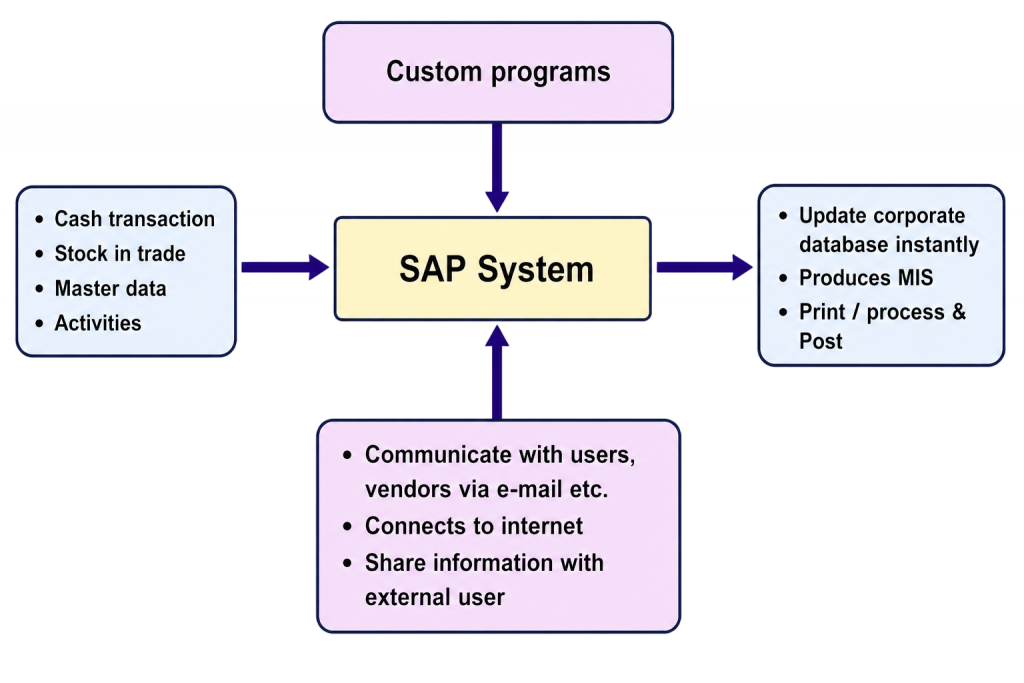
following industry best practices. Configuration activities may include defining company codes, plants, sales organizations, chart of accounts, pricing procedures, approval workflows, and reporting structures in SAP FICO Tutorial Step by Step For Freshers. Proper configuration ensures that business transactions are processed accurately, efficiently, and consistently across departments. Thorough documentation and validation are essential to maintain system stability and support future enhancements. A well-configured SAP environment helps organizations maximize system performance, improve user productivity, and achieve their business objectives effectively.

Get JOB Oriented SAP MM Training for Beginners By MNC Experts
- Instructor-led Sessions
- Real-life Case Studies
- Assignments
System Integration
System integration ensures that SAP communicates seamlessly with internal and external applications used across the organization. Modern businesses often rely on multiple systems for functions such as customer relationship management, payroll, banking, e-commerce, logistics, and third-party services. During the integration phase, interfaces are designed and implemented to enable secure and accurate data exchange between SAP and these systems in SAP MM Training. Integration technologies such as APIs, middleware platforms, IDocs, and web services are commonly used to facilitate communication. Effective system integration eliminates data silos, reduces manual effort, improves process automation, and enhances real-time visibility across business operations. Extensive testing is performed to verify data accuracy, system performance, and error handling before deployment. Successful integration creates a connected business environment that supports efficient decision-making and streamlined operational workflows.
Set to Ace Your SAP MM Job Interview? Check Out Our Blog on SAP MM Interview Questions & Answer
Testing & Validation
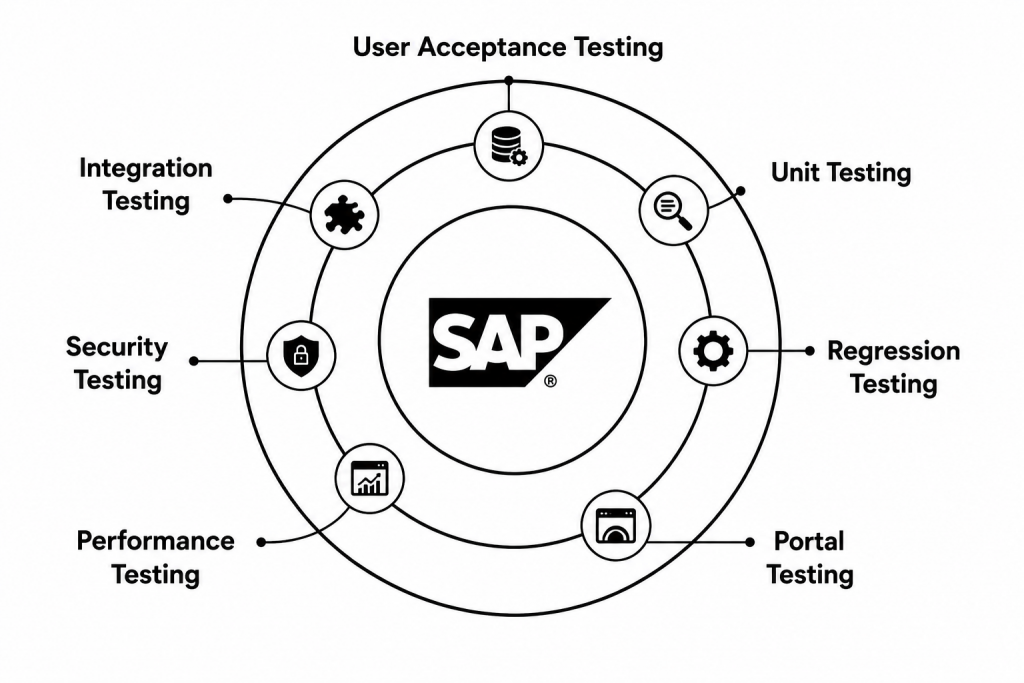
- Unit Testing: Unit testing is the first level of testing performed during an SAP implementation. Individual configurations, custom developments, reports, forms, and enhancements are tested separately to verify that they work according to the defined requirements. The objective is to identify and fix issues early before they affect other components. Successful unit testing provides a strong foundation for subsequent testing phases.
- Integration Testing: Integration testing verifies that different SAP modules and external systems work together correctly. Business processes often span multiple modules such as Finance, Sales, Materials Management, and Production Planning inSAP HCM Tutorial for Beginners In Human Resource Management . This testing ensures that data flows accurately between systems, transactions are processed without errors, and end-to-end business scenarios function as expected across the entire solution landscape.
- User Acceptance Testing (UAT): User Acceptance Testing is conducted by business users who validate the SAP solution against real-world operational requirements. Users execute day-to-day business processes and confirm that the system supports their activities effectively. UAT helps identify any remaining gaps between business expectations and system functionality, ensuring that the solution is ready for production deployment.
- Defect Resolution: During testing, defects and system issues are documented, analyzed, and prioritized based on their impact. Consultants and developers work together to correct configuration errors, functional issues, and technical problems inSAP Simple Finance Tutorial . After fixes are implemented, retesting is performed to confirm that the defects have been resolved successfully and no new issues have been introduced into the system.
- Final Validation: Final validation is the last testing checkpoint before go-live. The project team reviews all testing results, confirms that critical business processes operate correctly, and verifies that outstanding issues have been addressed. This phase ensures that the SAP system meets quality standards, business requirements, and project objectives before it is released to production users.
Want to Master SAP MM? Explore the SAP MM Master Program Offered at ACTE Today!
Go-Live Execution
- Cutover Planning: Cutover planning is the process of preparing detailed activities required to transition from the legacy system to SAP. The plan includes timelines, task ownership, risk management, data migration schedules, and communication procedures. A well-structured cutover plan minimizes disruption to business operations and ensures that all deployment activities are executed in a coordinated and controlled manner.
- Final Data Migration: Final data migration involves transferring cleansed, validated, and approved business data into the SAP production environment. This includes master data, transactional records, financial balances, and other critical business information. Careful execution and verification of the migration process are essential to maintain data integrity and support uninterrupted business operations after go-live.
- Production Deployment: Production deployment is the official activation of the SAP system for daily business use. Configurations, developments, integrations, and migrated data are moved into the production environment. The deployment process follows predefined procedures to ensure system stability, minimize risks, and provide users with access to a fully functional SAP solution that supports business activities and learn more inSAP Security Tutorial .
- User Support: Following go-live, project teams provide dedicated support to help users adapt to the new system. Support activities include answering questions, resolving issues, monitoring transactions, and offering guidance on SAP processes. Effective user support helps improve system adoption, reduces operational disruptions, and ensures employees can perform their responsibilities efficiently.
- Post-Go-Live Monitoring: Post-go-live monitoring focuses on tracking system performance, transaction processing, interface functionality, and user activities after deployment. The project team continuously reviews system behavior, identifies potential issues, and implements corrective actions when necessary. This monitoring period is critical for ensuring long-term system stability, performance optimization, and successful business operations.
Conclusion and Best Practices
A successful SAP project requires careful planning, strong stakeholder involvement, clear business requirements, and effective project management throughout the implementation lifecycle. From requirement gathering and solution design to system configuration, testing, data migration, and go-live execution, each phase plays a critical role in achieving project objectives. Organizations that follow structured methodologies and industry best practices are more likely to complete projects on time, within budget, and with minimal business disruption inSAP MM Training . Key best practices include maintaining clear communication among project teams, ensuring active user participation, conducting thorough testing, prioritizing data quality, and providing adequate training and post-go-live support. Continuous monitoring and process improvement after deployment help organizations maximize the value of their SAP investment. By focusing on business goals, risk management, and user adoption, companies can successfully leverage SAP solutions to improve operational efficiency, enhance decision-making, and support long-term business growth.