LMS
LMS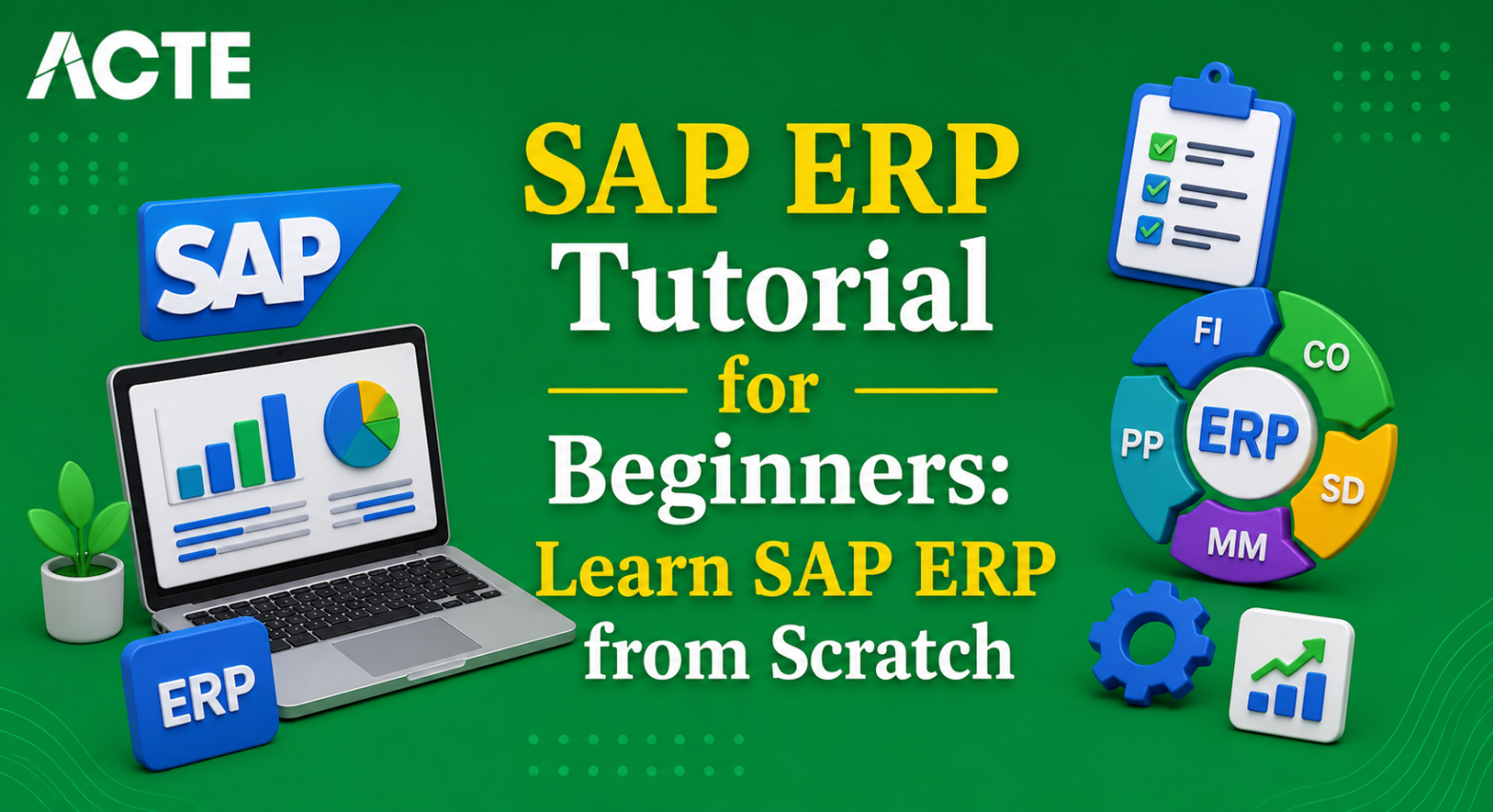
Last updated on 10th Jun 2026| 11293

- Introduction to SAP ERP Tutorial for Beginners
- SAP ERP System Architecture Overview
- Core SAP ERP Modules Explained
- Business Processes in SAP ERP
- Master Data Management in SAP ERP
- Executing Transactions in SAP ERP
- SAP ERP Security and User Roles
- Reporting and Analytics in SAP ERP
- Integration of SAP ERP with Other Systems
- Conclusion and Career Path in SAP ERP
Introduction to SAP ERP Tutorial for Beginners
SAP ERP Tutorial for Beginners (Enterprise Resource Planning) is one of the most widely used systems for managing business processes across industries. It integrates core functions such as finance, logistics, sales, procurement, and human resources into a single unified platform. For beginners, SAP ERP Modules provides a structured way to understand how organizations streamline operations and ensure accuracy in data management. This tutorial introduces SAP ERP from scratch, explaining its importance in modern enterprises. Freshers learn how ERP systems reduce redundancy, improve efficiency, and support decision-making through real-time reporting in our SAP EP Training . The section highlights SAP’s role in connecting departments, ensuring that information flows seamlessly across modules. Beginners are guided through the SAP GUI, learning how to navigate menus, transaction codes, and shortcuts. The tutorial emphasizes the difference between end-users, who perform daily tasks, and consultants, who configure and customize Quality Management. Examples of real-world applications, such as processing purchase orders or generating financial reports, are provided to show ERP’s impact. Security and authorization concepts are introduced to explain why different users have different access levels. Integration with other systems is also discussed, showing how ERP connects with CRM and SCM. Finally, learners are motivated with career opportunities, as SAP ERP skills are highly valued globally. By the end of this section, beginners understand the scope of ERP and the importance of mastering its basics for professional growth.

Core SAP ERP Modules Explained
- FI (Financial Accounting): Handles company financials. Beginners learn how transactions are recorded. Quality Management explains balance sheets and ledgers. Examples show vendor invoice posting.
- CO (Controlling): Focuses on cost management. Beginners learn cost centers and profit centers. The tutorial explains budgeting and reporting. Examples show expense tracking.
- MM (Materials Management): Manages procurement and inventory. Beginners learn purchase orders and goods receipts. The tutorial explains stock management. Examples show vendor interactions.
- SD (Sales and Distribution): Handles sales processes. Beginners learn sales orders and billing in our SAP EP Training . The tutorial explains delivery management. Examples show customer transactions.
- PP (Production Planning): Supports manufacturing. Beginners learn material requirements planning. SAP ERP Modules explains scheduling. Examples show production orders.
- HR (Human Resources): Manages employee data. Beginners learn payroll and attendance. The tutorial explains recruitment processes. Examples show employee records.
- QM (Quality Management Management): Ensures product quality. Beginners learn inspection processes and SAP FICO Tutorial Step by Step For Freshers. The tutorial explains compliance. Examples show quality checks in production.
Ready to earn your SAP HANA Professional Certification? Discover the SAP EP Training now available at ACTE!
Business Processes in SAP ERP
SAP ERP is designed to support end-to-end business processes across different departments. Beginners learn how procurement, sales, finance, and HR workflows are interconnected within the system. For example, a purchase order created in Materials Management automatically updates inventory and triggers financial postings in FI and SAP HCM Tutorial for Beginners In Human Resource Management . Similarly, a sales order in SD flows into delivery, billing, and revenue recognition. This section emphasizes how SAP ERP ensures consistency and transparency by integrating processes. Freshers are guided through real-world scenarios, such as procure-to-pay and order-to-cash cycles.
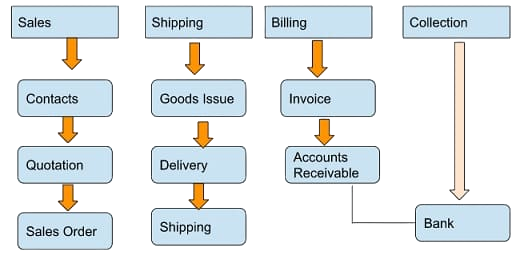
The tutorial explains how automation reduces manual effort and improves accuracy. Beginners also learn how ERP supports compliance by enforcing business rules and approval workflows. Reporting and analytics are highlighted as tools for monitoring process efficiency. By mastering business processes, learners understand how SAP ERP drives operational excellence and supports decision-making across the enterprise. This knowledge prepares them to handle practical tasks and appreciate the system’s holistic approach to managing organizational workflows.
Get Your SAP EP Certification by Learning from Industry-Leading Experts and Advancing Your Career with ACTE’s SAP HANA Training.
Master Data Management in SAP ERP
- Customer Master: Stores customer details like name, address, and payment terms. Beginners learn how accurate data ensures smooth sales processes. The tutorial explains mandatory fields and validation checks. Examples show sales order creation.
- Vendor Master: Contains vendor information such as bank details and tax codes. Beginners learn how vendor records support procurement. The tutorial explains approval workflows. Examples show purchase order processing.
- Material Master: Defines product specifications including descriptions, units, and pricing and SAP Simple Finance Tutorial . Beginners learn how materials integrate with inventory and production. The tutorial explains mandatory fields. Examples show stock management.
- Employee Master: Stores HR data like personal details and payroll information. Beginners learn how employee records support HR processes. The tutorial explains integration with attendance and recruitment. Examples show payroll runs.
- Chart of Accounts: Defines financial structures. Beginners learn how accounts support FI postings. The tutorial explains grouping and hierarchy. Examples show ledger entries.
- Work Centers: Used in Production Planning. Beginners learn how work centers define resources. The tutorial explains scheduling and capacity planning. Examples show production orders.
- Importance of Accuracy: Master data errors can disrupt processes. Beginners learn validation techniques. The tutorial explains periodic reviews. Examples show correcting vendor details.

Executing Transactions in SAP ERP
Transactions are the backbone of SAP ERP System, enabling users to perform daily business tasks. Beginners learn how transaction codes (T-codes) act as shortcuts to specific functions, such as creating purchase orders (ME21N) or sales orders (VA01) and SAP Security Tutorial. SAP ERP Modules section explains how transactions capture business events and update relevant modules. Freshers are guided through step-by-step processes, including entering data, validating fields, and saving entries. The tutorial highlights error messages and how to resolve them. Beginners also learn how transactions trigger integration across modules, ensuring consistency. For example, posting a goods receipt updates inventory in MM and financial records in FI. The section emphasizes the importance of accuracy, as incorrect entries can disrupt workflows. Beginners practice common transactions to build confidence. By mastering transaction execution, learners gain practical skills that are directly applicable in real-world SAP environments. This prepares them to handle routine tasks efficiently and contribute to organizational success.
SAP ERP Security and User Roles
- User Roles: Define access levels. Beginners learn how roles are assigned based on job responsibilities. The tutorial explains segregation of duties. Examples show sales clerk vs. finance manager roles.
- Authorizations: Control access to transactions and data. Beginners learn how authorization objects work. The tutorial explains error messages. Examples show restricted access to financial reports.
- Profiles: Group authorizations together. Beginners learn how profiles simplify role management. The tutorial explains assignment to users. Examples show HR profiles.
- Compliance: Security ensures compliance with policies. Beginners learn importance of audit trails. The tutorial explains monitoring tools. Examples show tracking user activity.
- Password Policies: Enforce strong security. Beginners learn rules for password creation. The tutorial explains expiry and resets. Examples show login procedures.
- System Monitoring: Tools track unauthorized access. Beginners learn how administrators monitor logs and SAP HANA Administration Tutorial. The tutorial explains alerts. Examples show intrusion detection.
- Best Practices: Always follow security guidelines. Beginners learn importance of training. The tutorial explains avoiding misuse. Examples show safe data handling.

Get JOB Oriented SAP EP Training for Beginners By MNC Experts
- Instructor-led Sessions
- Real-life Case Studies
- Assignments
Reporting and Analytics in SAP ERP
Reporting is a critical feature of SAP ERP System, enabling organizations to monitor performance and make informed decisions. Beginners learn how to generate standard reports using transaction codes and menu paths. This section explains how selection criteria filter data for specific needs. Freshers practice running reports such as vendor balances, customer aging, and material stock levels. The tutorial highlights how reports integrate across modules, ensuring consistency. Beginners also learn how to export reports to Excel or PDF for analysis. Real-time reporting is emphasized, showing how managers rely on accurate data for decision-making and SAP-Business Objects Tutorial. Dashboards and analytics tools are introduced to provide visual insights. The section explains how scheduled reports automate updates. By mastering reporting, learners contribute to better business insights and operational efficiency. This prepares them to support managers and decision-makers with reliable information.
Set to Ace Your SAP ERP Job Interview? Check Out Our Blog on SAP ERP Interview Questions & Answer
Integration of SAP ERP with Other Systems
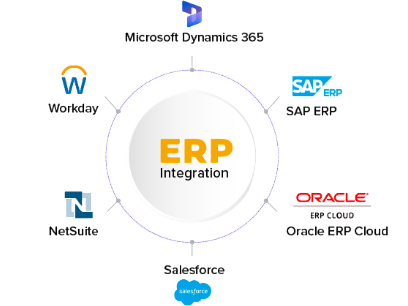
- CRM Integration: Connects customer relationship management with ERP. Beginners learn how sales data flows. The tutorial explains synchronization. Examples show customer orders.
- SCM Integration: Links supply chain management. Beginners learn how procurement connects with logistics and SAP ABAP Programming Basics Tutorial for Freshers . The tutorial explains inventory updates. Examples show vendor collaboration.
- BI Tools: Integrates business intelligence. Beginners learn how ERP data supports analytics. The tutorial explains dashboards. Examples show performance tracking.
- Third-Party Systems: ERP connects with external apps. Beginners learn APIs and middleware in our SAP EP Training. The tutorial explains data exchange. Examples show payroll systems.
- Cloud Integration: ERP integrates with cloud platforms. Beginners learn hybrid models. The tutorial explains scalability and SAP End-User Tutorial for Freshers . Examples show remote access.
- Mobile Access: ERP supports mobile apps. Beginners learn how managers approve tasks. The tutorial explains convenience. Examples show mobile reporting.
- Best Practices: Integration requires accuracy. Beginners learn importance of testing. The tutorial explains error handling. Examples show seamless workflows.
Conclusion and Career Path in SAP ERP
Learning SAP ERP Tutorial for Beginners equips beginners with essential skills to manage enterprise processes. By mastering navigation, transactions, reporting, and integration, learners gain practical knowledge that is directly applicable in organizations. This tutorial emphasizes accuracy, efficiency, and compliance, which are critical for success in our SAP EP Training. Career opportunities for SAP ERP professionals are vast, ranging from end-user roles to consultant positions. With experience, learners can specialize in modules like FI, MM, or SD, or move into advanced roles such as solution architects. Continuous learning is essential, as SAP evolves with new technologies like HANA, Fiori, and cloud integration. The global demand for SAP expertise ensures long-term career growth. Ultimately, this tutorial provides a strong foundation for building a rewarding career in SAP ERP System, where dedication and practice lead to professional excellence and expanded opportunities.