LMS
LMS
Last updated on 28th Apr 2026| 11538

- Introduction to SAP ABAP
- ABAP Basics (Data Types & Variables)
- Control Statements & Loops in ABAP
- Internal Tables & Work Areas
- Modularization Techniques (Forms, Function Modules)
- Reports & ALV (ABAP List Viewer)
- Data Dictionary (DDIC) & Database Tables
- Debugging & Error Handling in ABAP
- Conclusion
Introduction to SAP ABAP
SAP ABAP (Advanced Business Application Programming) is a high-level programming language developed by SAP for building applications within the SAP environment. is mainly used to develop reports, interfaces, forms, enhancements, and workflows that support business processes. ABAP works closely with the SAP database, allowing developers to retrieve, process, and display data efficiently. It is an event-driven language, meaning programs execute based on user actions or system events. This SAP ABAP Training provides strong integration with SAP modules like Finance (FI), Sales and Distribution (SD), and Human Resources (HCM), making it essential for customizing and extending SAP applications. Control Statements syntax is relatively easy to learn for beginners, and it supports structured programming concepts, making it a powerful tool for developing enterprise-level applications.
ABAP Basics (Data Types & Variables)
- Data Types: Define what kind of data a variable can store, such as integer, character, string, or date. Ensure correct data usage in programs, help in memory allocation and data handling, improve accuracy, and reduce errors. Used in all ABAP programs for defining variables.
- Predefined Types: Built-in types such as I (integer), C (character), STRING, and D (date). Provided by the ABAP system by default, easy to use, and commonly used in programs. Help in quick development without custom definitions and support standard data operations.
- User-Defined Types: Custom data types created using the TYPES statement. Used to create structures and internal tables, providing flexibility for complex data handling. Help organize data in a structured way and are useful in large and complex programs.
- Variables: Used to store data values in a program and declared using DATA in SAP. Variables can hold different types of values during execution, and their values can be changed as needed. They are essential for performing operations, calculations, and are widely used throughout the program logic.
- Constants: Fixed values that do not change during program execution. Declared using the CONSTANTS keyword, they improve readability, maintain consistency, and prevent accidental changes in important values. Useful for storing fixed configurations.
- Initialization: Assigning values to variables at the start or during execution. Can be done during declaration or later, ensuring variables have valid starting values. Helps avoid unexpected errors and improves program reliability.
- Scope: Defines where a variable can be used (local or global). Local variables are used within a block or function, while global variables are accessible throughout the program. Helps control data access and security, improving program structure and maintainability.
Ready to earn your SAP ABAP Professional Certification? Discover the SAP ABAP Training now available at ACTE!
Control Statements & Loops in ABAP
Control statements and loops in ABAP are important concepts covered that help control program flow and execute code based on conditions or repeatedly. In SAP ABAP Training, control statements like IF, ELSEIF, ELSE, and CASE are used for decision-making, allowing different actions based on specific conditions, while loops such as DO, WHILE, and LOOP AT are used to repeat a set of statements multiple times until a condition is met. DO executes code a fixed number of times, WHILE runs until a condition becomes false, and LOOP AT is used for internal table processing. Overall, these concepts help build logical, efficient, and dynamic ABAP programs by supporting both decision-making and repetitive processing.
Get Your Gen AI Certification by Learning from Industry-Leading Experts and Advancing Your Career with ACTE’s Gen AI Course.
Internal Tables & Work Areas
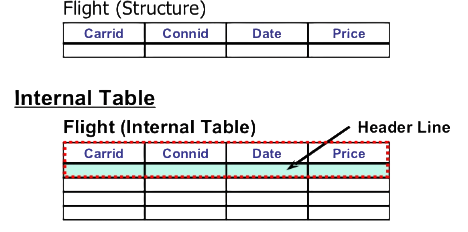
- Internal Tables: Used to store multiple records in memory during program execution, similar to database tables but temporary. Help in processing large amounts of data efficiently. Common types include Standard, Sorted, and Hashed tables.
- Purpose of Internal Tables: Store and manipulate data fetched from the database. Used for calculations, filtering, and data processing, reducing repeated database access and improving program performance.
- Creating Internal Tables: Declared using the DATA statement and can be defined with or without a header line. Example: DATA itab TYPE TABLE OF structure. Supports both structured and unstructured data.
- Work Areas: Temporary variables in SAP ABAP are used to hold one row of an internal table. In SAP ABAP, they help process data row by row and act like a single record buffer, making it easier to read and modify table data efficiently within programs.
- Using Work Areas: Commonly used with LOOP AT or READ TABLE statements. Example: LOOP AT itab INTO wa. Allows operations on individual records and improves clarity in coding.
- Operations on Internal Tables: Includes INSERT, APPEND, MODIFY, and DELETE statements. Used to manage records dynamically and support efficient data manipulation.
- Benefits: Improves performance by reducing database calls, enables fast data processing in memory, provides flexibility in handling large datasets, and is essential for most ABAP programs.

Modularization Techniques (Forms, Function Modules)
- Modularization in ABAP: Divides a large program into smaller reusable modules, improving readability and maintainability of code. Makes debugging and testing easier while reducing code duplication.
- Forms (Subroutines): Reusable blocks of code within the same program, defined using FORM and ended with ENDFORM. Called using the PERFORM statement and mainly used for simple and local tasks.
- Features of Forms: Can pass parameters using USING and CHANGING. Executes sequentially when called, easy to create and use, but limited to the same program and not reusable globally.
- Function Modules:Predefined reusable procedures stored in Function Groups, which can be called from any ABAP program. Defined using Function Builder (SE37), they support input, output, and exception parameters. In scenarios involving SAP HANA Administration roles, these function modules can be optimized to work efficiently with HANA-based systems and data processing.
- Features of Function Modules: Highly reusable across multiple programs, support error handling through exceptions, can be remote-enabled (RFC), and provide a better modular structure than forms.
- Difference between Forms and Function Modules: Forms are local, while Function Modules are global. Function Modules support exceptions, whereas Forms do not. Function Modules are more structured and reusable, while Forms are simpler and suited for small tasks.
- Benefits of Modularization: Improves code organization and clarity, makes maintenance and updates easier, enhances reusability of code, and reduces development time and effort.

Get JOB Oriented SAP ABAP Training for Beginners By MNC Experts
- Instructor-led Sessions
- Real-life Case Studies
- Assignments
Reports & ALV (ABAP List Viewer)
- ABAP Reports: Programs used to display data from the database, commonly used for business reporting and analysis. Created using Report Programming in ABAP, they can be executed to view output on the screen, and with SAP FIORI, these reports can also be presented through modern, user-friendly interfaces for better accessibility and user experience..
- Types of Reports: Includes Classical Reports for simple lists, Interactive Reports for user interaction, and ALV Reports for advanced features. The type is selected based on business requirements.
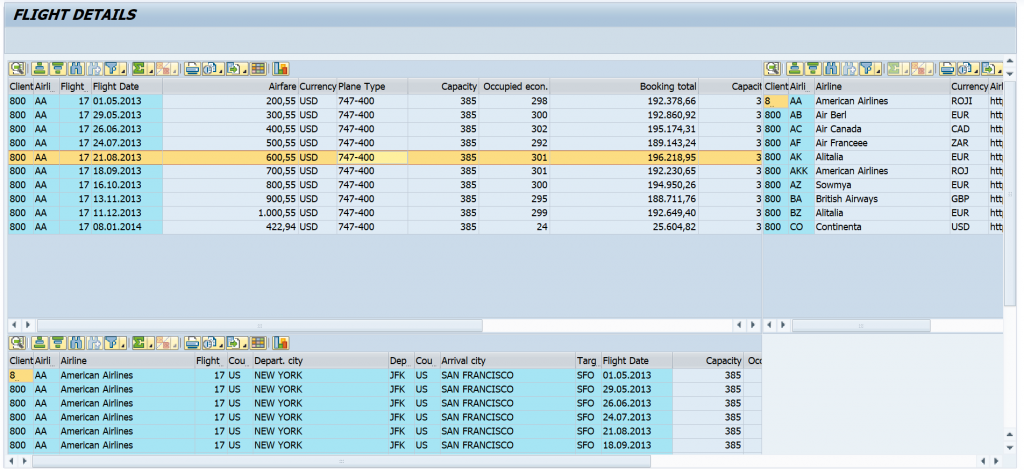
- ALV (ABAP List Viewer): A tool used to display data in a structured table format with user-friendly output and better visualization. Supports sorting, filtering, and searching, and is widely used in modern SAP reporting.
- Features of ALV: Allows easy sorting and filtering of data, supports column customization and layout changes, enables data export to Excel, and provides an interactive user interface.
- Types of ALV Reports: Includes Simple ALV (list display), Grid ALV (table format with full features), and Hierarchical ALV (for structured data), each used for different reporting needs. In SAP Simple Finance Tutorial, these ALV formats help present financial data clearly, supporting detailed analysis and efficient reporting.
- Advantages of ALV: Improves readability of reports, saves development time with built-in features, enhances user experience, and reduces manual coding effort.
- Usage in Business: Used in finance, sales, HR, and logistics reports. Helps in decision-making with clear data display, supports real-time data analysis, and is essential for business reporting in SAP.
Want to Master Gen AI? Explore the SAP ABAP Master Program Offered at ACTE Today!
Data Dictionary (DDIC) & Database Tables
The Data Dictionary (DDIC) in ABAP is a central repository used to define and manage data structures in the SAP system and is an important concept in SAP ABAP Training. It contains definitions of database tables, views, data elements, domains, and indexes, ensuring consistency and standardization across applications. DDIC helps maintain data integrity by enforcing rules such as data types, field lengths, and validations. Database tables are physical storage structures where application data is stored in rows and columns. These tables are created and maintained using the Data Dictionary and are directly accessed by ABAP programs to retrieve, insert, update, or delete data. DDIC also supports reusability, as data definitions can be shared across multiple programs. Overall, the Data Dictionary and database tables play a crucial role in managing and organizing data efficiently within the SAP system.
Debugging & Error Handling in ABAP
- Debugging in ABAP: The process of identifying and fixing errors in a program. Helps understand program flow and logic, ensures correct output and performance, and is done using the ABAP Debugger tool.
- Breakpoints: Used to stop program execution at a specific line, helping analyze variable values step by step. Can be set in the code editor and are useful for testing and troubleshooting.
- Step-by-Step Execution:Allows execution of code line by line, helping track how data changes during execution. This makes it easier to find logical errors and understand program flow. In SAP MM, debugging is especially useful for analyzing issues in material management processes and ensuring accurate data handling.
- Watchpoints: Monitor specific variables during execution and stop the program when a variable value changes. Useful for tracking unexpected behavior and finding hidden issues.
- Error Handling in ABAP: Used to manage runtime errors and exceptions, preventing program crashes and ensuring smooth execution. Improves the reliability of applications.
- Exception Handling: Handles errors using TRY, CATCH, and CLEANUP blocks. Captures and manages runtime exceptions, provides controlled error handling, and improves program stability.
- System Fields for Errors: Fields like SY-SUBRC are used to check the success or failure of operations. Help identify errors after statement execution, are widely used in conditional checks, and ensure proper program control.
Want to Learn About SAP ABAP? Explore Our SAP ABAP Interview Questions and Answers Featuring the Most Frequently Asked Questions in Job Interviews.
Conclusion
SAP ABAP is a powerful programming language used for developing and customizing applications within the SAP environment and is a core part of SAP ABAP Training. By understanding key concepts such as data types, control statements, internal tables, modularization, reports, Data Dictionary, and debugging techniques, beginners can build a strong foundation in ABAP development. These concepts help in creating efficient, structured, and error-free programs that support various business processes. With its strong integration across SAP modules and wide usage in enterprises, learning ABAP opens up excellent career opportunities in the SAP domain. Overall, mastering ABAP enables developers to build scalable and reliable applications, making it an essential skill for anyone starting a career in SAP.