LMS
LMS
Last updated on 25th Jul 2026| 8210

- Introduction to ATS-Friendly Resumes
- What Is an Applicant Tracking System (ATS)?
- Why ATS-Friendly Formatting Matters
- Essential Elements of an ATS-Friendly Resume Format
- Step-by-Step Guide to Creating an ATS-Friendly Resume
- Using Keywords Effectively for ATS Optimization
- Common ATS Formatting Mistakes to Avoid
- Tips to Test and Improve Your ATS Score
- ATS-Friendly Resume Templates and Structure
- Conclusion: Building a Resume That Passes ATS Scans
Introduction to ATS-Friendly Resumes
In today’s digital hiring landscape, the majority of medium and large organizations use software systems to manage the overwhelming volume of applications they receive for every open position, and understanding how these systems work has become essential for job seekers who want their resumes to actually reach a human recruiter. An ATS-friendly resume is one that is structured, formatted, and written in a way that allows automated screening software to accurately parse, categorize, and rank the document based on its relevance to a specific job posting. Without this compatibility, even highly qualified candidates risk having their resumes misread, misclassified, or rejected outright before a hiring manager ever sees them, simply because of formatting choices that confuse the parsing software. This is particularly important for freshers and early-career professionals, who often compete against hundreds of applicants for a single internship or entry-level role, making every advantage in the screening process meaningful. Candidates applying for creative and technical positions, such as those pursuing UI/UX Design Training, should ensure that their resumes clearly highlight relevant design skills, tools, projects, and qualifications using simple, ATS-compatible formatting. Building an ATS-friendly resume does not mean sacrificing visual appeal or professionalism; rather, it means understanding the underlying mechanics of how these systems extract and organize information so that formatting choices support rather than hinder that process. As recruitment continues to become increasingly automated across industries, mastering the principles of ATS compatibility has shifted from being a nice-to-have skill to a fundamental requirement for anyone actively searching for employment opportunities in a competitive market.

What Is an Applicant Tracking System (ATS)?
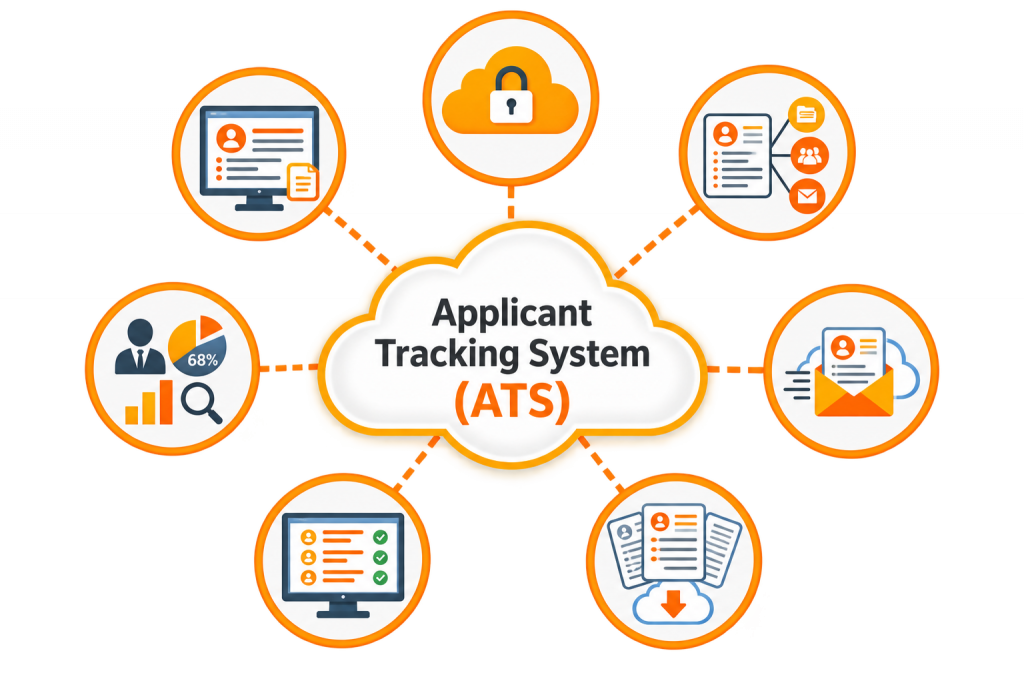
An Applicant Tracking System, commonly abbreviated as ATS, is a software application used by companies to manage the recruitment process by collecting, sorting, scanning, and ranking resumes submitted through job portals, company career pages, or email applications. These systems are designed to reduce the manual workload of recruiters by automatically filtering out resumes that do not meet the minimum qualifications or that lack keywords relevant to the job description, allowing human reviewers to focus their attention on a shortlist of the most promising candidates. When a resume is submitted, the ATS extracts text from the document and attempts to organize it into predefined categories such as contact information, work experience, education, and skills, before comparing this extracted content against the requirements specified for the role.
Get Your UI/UX Design Certification by Learning from Industry-Leading Experts and Advancing Your Career with ACTE’s UI/UX Design Course.
Why ATS-Friendly Formatting Matters
The consequences of submitting a resume that is not ATS-friendly can be severe, since a poorly formatted document may be rejected or ranked poorly even if the candidate possesses exactly the skills and experience the employer is seeking. Studies and industry reports have consistently suggested that a significant percentage of resumes are eliminated at the ATS stage before any human review takes place, which means formatting mistakes can silently sabotage an application without the candidate ever realizing why they were not selected. ATS-friendly formatting matters because it ensures that all the effort put into crafting compelling content, from a strong summary to detailed project descriptions, actually reaches the eyes of a recruiter rather than being lost due to a parsing error. For candidates pursuing creative and technology-focused careers, such as those completing a UI/UX Design Training, maintaining a simple and readable resume structure is especially important for presenting design skills, tools, projects, and qualifications clearly to both automated systems and recruiters. It also matters because different companies use different ATS platforms, each with varying levels of sophistication, meaning a resume that works well with one system might still cause issues with another if it relies on overly creative or unconventional formatting choices. For freshers in particular, who may not yet have a strong professional network to bypass automated screening through referrals, having an ATS-optimized resume becomes one of the most reliable ways to ensure their application is seen and evaluated fairly. Ultimately, ATS-friendly formatting is not about gaming the system but about presenting information in a clear, structured, and universally readable manner that both software and human recruiters can process efficiently.

Essential Elements of an ATS-Friendly Resume Format
- Simple, Standard Fonts: Using widely recognized fonts such as Calibri, Arial, or Times New Roman in a readable size ensures that both ATS software and human reviewers can process the text without rendering issues or misinterpretation.
- Standard Section Headings: Labeling sections with conventional titles like “Work Experience,” “Education,” and “Skills” rather than creative alternatives helps the ATS correctly categorize information into its expected fields.
- Single-Column Layout: Multi-column layouts, text boxes, and tables can confuse ATS parsers, causing information to be read out of order or skipped entirely, so a clean single-column structure is generally the safest choice.
- Additional ATS Guidelines: Candidates who want to understand these formatting principles in greater detail can refer to the ATS Resume Guide for additional guidance on creating a resume that remains readable and compatible with automated screening systems.
- Avoiding Images, Icons, and Graphics: Since most ATS software cannot read text embedded in images or icons, any information conveyed visually rather than textually risks being completely invisible to the system.
- Standard File Formats: Saving the resume as a .docx or a simple, text-based PDF rather than an image-based PDF ensures the content remains fully extractable by parsing software.
- Consistent Date Formatting: Using a uniform date format throughout the document, such as “MM/YYYY,” helps the ATS accurately calculate experience duration and avoid confusion during automated ranking.

Get JOB Oriented UI/UX Design Course for Beginners By MNC Experts
- Instructor-led Sessions
- Real-life Case Studies
- Assignments
Step-by-Step Guide to Creating an ATS-Friendly Resume
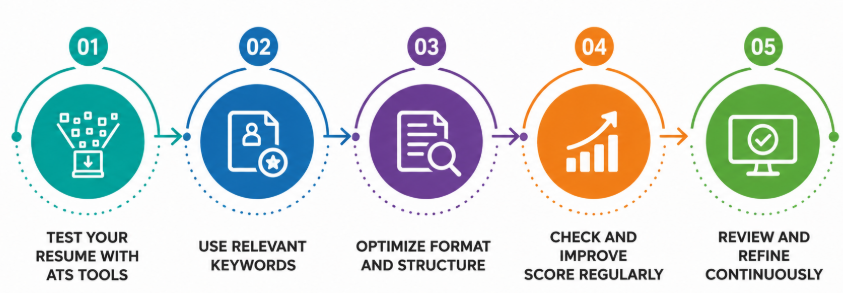
Creating an ATS-friendly resume begins with selecting a clean, simple template that avoids decorative elements such as borders, graphics, and multiple columns, since these features often disrupt how parsing software reads the document from top to bottom. The next step involves carefully reviewing the target job description and identifying the specific skills, tools, certifications, and phrases the employer has emphasized, as these will later be incorporated naturally throughout the resume to improve keyword matching. Once this groundwork is complete, the candidate should structure the resume using standard section headings in a logical order, typically beginning with contact information, followed by a summary and projects, ensuring each section is clearly labeled and easy to distinguish. Within each section, information should be presented using simple bullet points rather than complex nested formatting, and every bullet point should begin with a strong action verb followed by specific, quantifiable details wherever possible. Candidates can also strengthen this process by following Resume Writing Tips , which provides additional guidance on presenting relevant information effectively. After drafting the content, the candidate should save the resume in a widely accepted file format and, if possible, run it through an online ATS compatibility checker to identify any parsing issues before submission. Finally, the resume should be tailored slightly for each specific application by adjusting keywords and priority skills to match the particular job posting, since a generic resume sent to multiple companies without customization is significantly less likely to perform well across different ATS platforms and hiring criteria.
Using Keywords Effectively for ATS Optimization
Keywords form the backbone of ATS matching algorithms, since these systems are fundamentally designed to compare the language used in a resume against the language used in the corresponding job description, ranking candidates based on the degree of overlap between the two. Effective keyword optimization begins with carefully reading the job posting multiple times and identifying recurring terms related to required skills and responsibilities, since these are the phrases most likely to be weighted heavily by the system. Rather than simply listing keywords in isolation, candidates should integrate them naturally into the context of their experience, skills, and project descriptions, since many modern ATS platforms are sophisticated enough to detect keyword stuffing and may penalize resumes that appear artificially manipulated. For example, candidates pursuing UI/UX Design Training should naturally incorporate relevant terms such as user research, wireframing, prototyping, usability testing, Figma, and interaction design when these skills match the target job description. It is also important to include both the full term and its common abbreviation where relevant, such as mentioning “Search Engine Optimization (SEO)” rather than only one version, since different systems and recruiters may search for either form. Industry-specific terminology, software names, programming languages, and certification titles should be reproduced exactly as they appear in the job posting whenever accurate, since even minor variations in wording can sometimes prevent a match within stricter parsing systems. Ultimately, effective keyword usage strikes a balance between optimizing for automated screening and maintaining natural, readable language that continues to make sense and demonstrate genuine expertise to any human recruiter who eventually reviews the document.
Want to Master UI/UX Design? Explore the UI/UX Design Master Program Offered at ACTE Today!
Common ATS Formatting Mistakes to Avoid
- Using Tables and Text Boxes: Many ATS platforms struggle to read content placed inside tables or text boxes, often skipping this information entirely or reading it in an incorrect, jumbled order.
- Embedding Text Within Images: Any critical information placed inside a graphic, logo, or image, including contact details or skill icons, becomes completely invisible to most parsing software.
- Overusing Creative Section Titles: Replacing standard headings like “Experience” with unconventional alternatives such as “My Journey” can prevent the ATS from correctly categorizing that section’s content.
- Choosing an Appropriate Resume Structure: Candidates should also select a straightforward and readable format that makes important information easy for both ATS software and recruiters to identify. Reviewing Resume Formats for Freshers can provide additional guidance on choosing a suitable structure and presentation.
- Including Headers and Footers for Key Information: Some ATS systems fail to scan header and footer sections properly, so placing contact details or other essential information there risks it being missed entirely.
- Using Unusual Fonts or Special Characters: Decorative fonts, excessive symbols, or non-standard bullet characters can be misread by parsing software, resulting in garbled or unreadable extracted text.
Tips to Test and Improve Your ATS Score
Before submitting a resume to any job application, candidates can take several proactive steps to evaluate and improve its compatibility with applicant tracking systems, reducing the risk of being filtered out due to avoidable formatting issues. One effective approach involves copying the entire resume text and pasting it into a plain text editor to check whether the content remains logically ordered and readable without its original formatting, since this closely mimics how many ATS platforms extract information. Numerous free and paid online tools are also available that scan a resume against a specific job description, providing a compatibility score along with suggestions for missing keywords or formatting concerns that may hinder successful parsing.
Preparing for UI/UX Design Job Interviews? Have a Look at Our Blog on UI/UX Design Interview Questions and Answers To Ace Your Interview!
ATS-Friendly Resume Templates and Structure
| Section | Recommended Order | ATS Best Practice |
|---|---|---|
| Contact Information | Top of resume, main body | Avoid placing in header or footer |
| Resume Summary | Directly below contact details | Keep concise, keyword-rich |
| Skills | Early, before or after summary | Use simple bullet list, standard terms |
| Work Experience | Reverse chronological order | Use consistent date formatting |
| Education | After experience or early for freshers | Include degree, institution, year |
| Projects | After education or experience | List tools and outcomes clearly |
| Certifications | Near the end | Use full certification names |
Conclusion: Building a Resume That Passes ATS Scans
Creating an ATS-friendly resume has become an essential skill for job seekers navigating a hiring landscape increasingly shaped by automation, and understanding the principles behind these systems can make the difference between an application that reaches a recruiter and one that is silently filtered out before ever being seen. By choosing simple, standard formatting, using conventional section headings, incorporating relevant keywords naturally, and avoiding common pitfalls such as tables, images, and unconventional templates, candidates can significantly improve their chances of successfully passing automated screening at nearly any organization. This process does not require sacrificing professionalism or visual clarity, but rather demands a thoughtful balance between readability for software and readability for human recruiters who will ultimately make the final hiring decisions. Candidates pursuing creative technology careers can also ensure that their resumes clearly showcase relevant skills and project experience, such as those gained through UI/UX Design Training, while maintaining an ATS-compatible structure. As more companies across industries continue to adopt applicant tracking systems as a standard part of their recruitment process, investing time in optimizing resume formatting and content for ATS compatibility is no longer optional but a fundamental requirement for anyone serious about maximizing their chances of securing interviews and advancing their career in a competitive job market.