LMS
LMS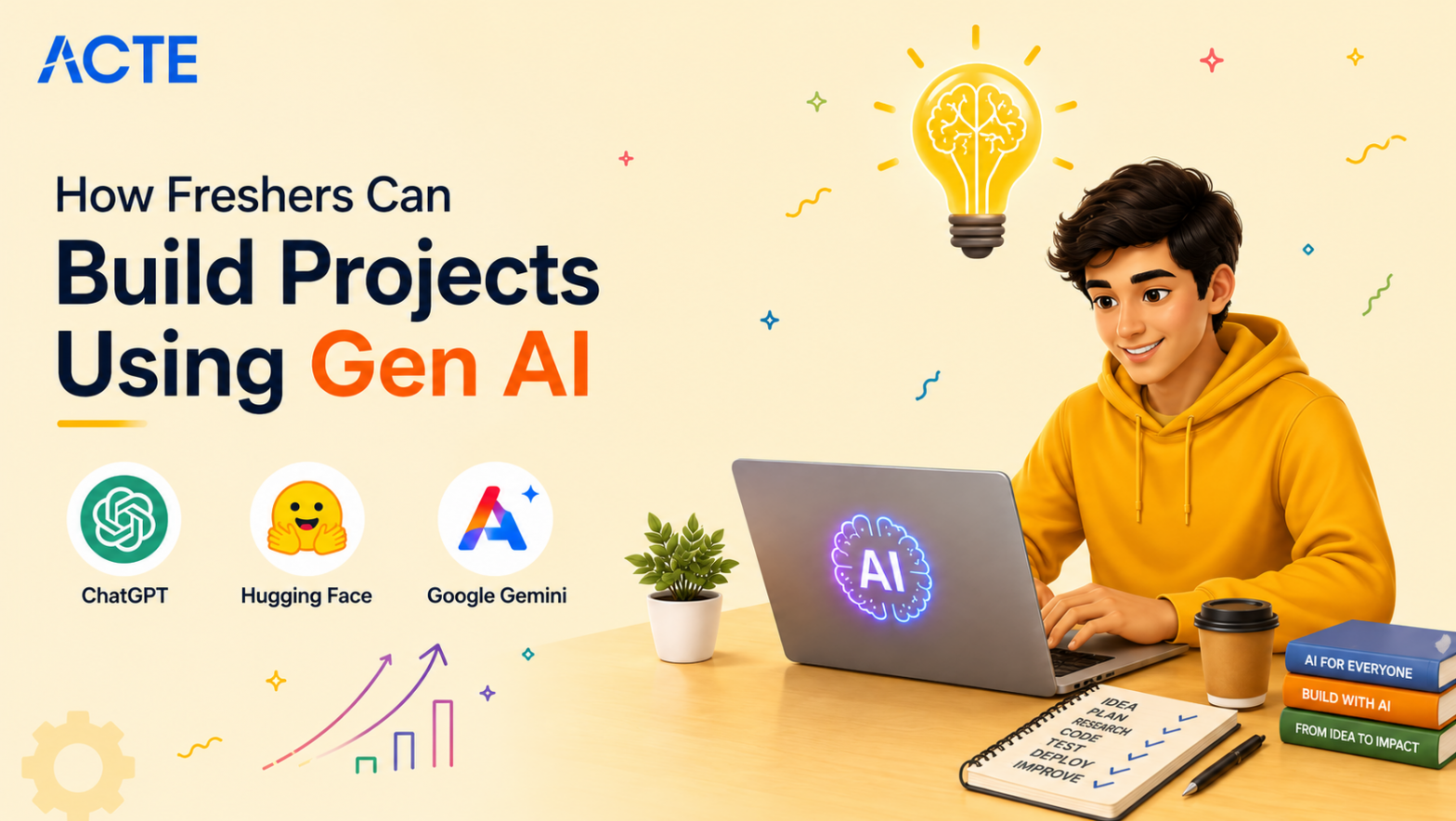
Last updated on 09th May 2026| 4637

- Introduction Freshers Build Projects Using Gen AI
- AI Resume Builder
- Smart Text Summarizer
- Social Media Content Generator
- Custom Chatbot using RAG
- Code Generation Assistant
- AI Image Generation App
- Automated Blog Post Writer
- Conclusion
Introduction Freshers Build Projects Using Gen AI
In today’s tech landscape, generative AI is completely changing how we build software, create content, and solve everyday problems. For Freshers Build Projects Using Gen AI looking to break into the tech industry, just watching tutorials or reading about GenAI is not going to cut it anymore. You need to actually build things Using Gen AI Course. Working on genai projects for freshers gives you the perfect chance to take powerful models and turn them into practical, working applications. Instead of starting from scratch, you are learning how to prompt, integrate APIs, and fine-tune existing models to solve specific challenges. This hands-on experience teaches you how real products are made. Whether you want to work in marketing, software development, or data science, knowing how to build with generative AI gives you a massive edge. Below are some beginner-friendly projects that cover different sides of generative AI, from text and code to images. These will help you build a strong portfolio and move from a complete beginner to a confident builder.

AI Resume Builder
Building an AI resume builder is an excellent generative AI project that helps job seekers create tailored, professional resumes in minutes. The core idea is to take a user’s raw work history, skills, and education, and use a large language model to format and optimize that information for specific job descriptions. The application parses the user’s input and connects to an Gen AI API to rewrite bullet points so they sound more impactful and action-oriented. It can also analyze a target job posting to ensure the right keywords are included, helping the applicant get past automated screening tools. Getting Started With Gen AI is a great way for freshers to understand the fundamentals of AI-powered applications, prompt engineering, and real-world automation use cases. Freshers building this will learn how to work with API keys, handle user inputs securely, and structure prompts that give consistent, professional outputs. This project solves a real problem for job seekers and shows employers that you understand how to apply language models to practical, everyday productivity tasks.
Ready to Pursue Your Gen AI Certificate? View The Gen AI Course Offered By ACTE Right Now!
Smart Text Summarizer
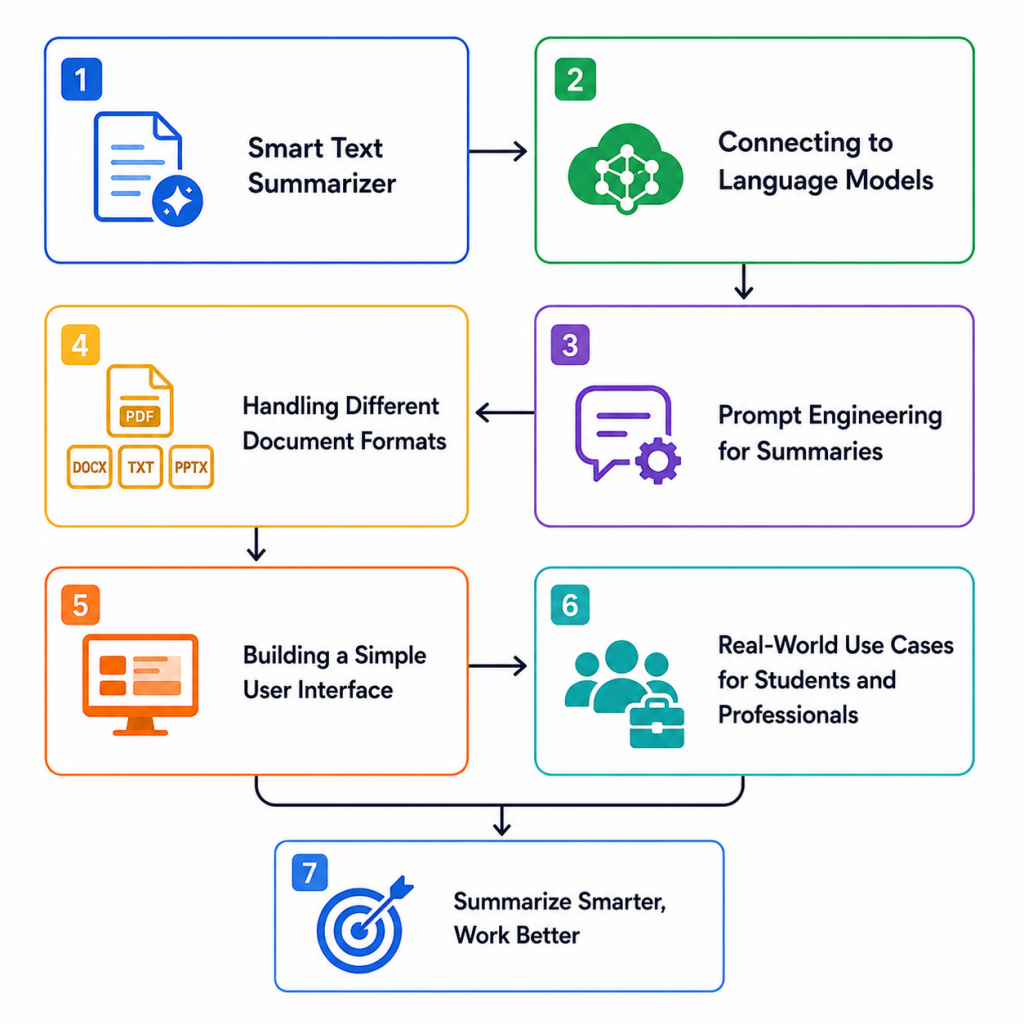
- Connecting to Language Models: Building a text summarizer starts by connecting your application to a generative AI model via an API. You send long pieces of text, like articles or reports, to the model. This step teaches you how to handle API authentication and send payloads. It is the foundation of any GenAI app.
- Prompt Engineering for Summaries: The quality of your summary depends entirely on the instructions you give the AI. You need to write clear prompts that tell the model to extract key points, maintain a specific tone, and keep it under a certain word count. This teaches you how to control AI output effectively.
- Handling Different Document Formats: A good summarizer should not just handle typed text. You will need to write code that can read PDF files or extract text from Word documents. Learning how to parse these formats makes your tool much more useful for students and professionals who read long reports daily. Understanding real-world limitations and Challenges in Generative AI also helps you design more reliable and scalable summarization systems that work effectively across different file types and use cases.
- Building a Simple User Interface: Users need an easy way to upload their documents and read the results. Building a basic web interface using tools like Streamlit or Gradio lets you turn your backend code into a real app. This makes your project look professional and is easy to show in a portfolio.
- Real-World Use Cases for Students and Professionals: This tool is highly practical for researchers, students, and business analysts who need to quickly understand long documents. It saves hours of reading time and helps people make faster decisions. Building this shows you know how to create tools that improve daily workflow efficiency.

Social Media Content Generator
- Understanding Platform-Specific Needs: Social media platforms require very different types of content. A LinkedIn post needs a professional tone, while an Instagram caption needs to be catchy and casual. Your app needs to ask the user which platform they are targeting so the AI can adjust its writing style.
- Generating Hooks and Captions: The main job of this tool is to take a basic topic and turn it into an engaging post. The AI generates multiple options for opening lines or hooks to grab attention. This helps marketers and creators overcome writer’s block quickly.
- Adding Hashtag Suggestions: A social media post is incomplete without the right hashtags. Your GenAI project can analyze the generated caption and suggest relevant hashtags to increase reach. This adds extra functionality to your app and makes it a complete package for social media managers.
- Tone and Voice Customization: Brands have specific voices, like humorous, serious, or inspiring. You can add a feature where users select the desired tone before the AI generates the text. This teaches you how to use dynamic variables in your prompts to customize outputs. Artificial Intelligence also plays a key role in enabling these intelligent, context-aware content generation systems that adapt to user preferences in real time.
- Value for Digital Marketing: This project is incredibly valuable for digital marketing and small business owners who need to post daily but lack the time. By automating content creation, you solve a real business problem. It proves you understand how GenAI can drive marketing efforts.
- Integrating Image Models: This project involves connecting your app to image generation models like Stable Diffusion or DALL-E APIs. You take a text prompt from a user and send it to the API to receive an image file in return. This teaches you how to handle different types of media data in your code.
- Crafting Effective Image Prompts: Writing prompts for images is very different from writing for text. You learn how to add details like lighting, art style, and camera angles to get the best results. AI Image Tools help creators generate visually stunning artwork, realistic designs, and creative concepts with minimal effort. You can program your app to automatically enhance the user’s basic prompt with these artistic keywords.
- Building a Gallery Interface: Since your app creates visual content, you need a clean gallery layout to display the generated images. Users should be able to view, download, or regenerate images easily. Building this frontend gives you practice with handling image URLs and file downloads.
- Applying Filters and Styles: You can add a feature that lets users pick a specific art style, like watercolor, 3D render, or pixel art, from a dropdown menu. Your code then injects this style into the background prompt. Learning these advanced customization techniques through a Gen AI Course can help developers and designers create more interactive, user-friendly AI-powered applications. This also demonstrates how to build intuitive controls for managing complex AI settings effectively.
- Use Cases for Designers and Creators: This tool is incredibly useful for graphic designers, content creators, and marketers who need quick visual concepts. It speeds up the brainstorming process for logos, blog thumbnails, and ad creatives. Building this proves you can integrate GenAI into creative workflows.
Excited to Obtaining Your Gen AI Certificate? View The Gen AI Course Offered By ACTE Right Now!
Custom Chatbot using RAG
Creating a custom chatbot using Retrieval-Augmented Generation, or RAG, takes AI conversations to the next level by letting the model answer questions based on your own private documents. Standard chatbots sometimes make up answers, but a RAG system first searches through a database of uploaded documents like a company handbook or college syllabus and feeds only that relevant information to the AI to generate an answer. Learning these advanced concepts through AI skills to master can help freshers and professionals build more accurate, reliable, and intelligent AI-powered applications.
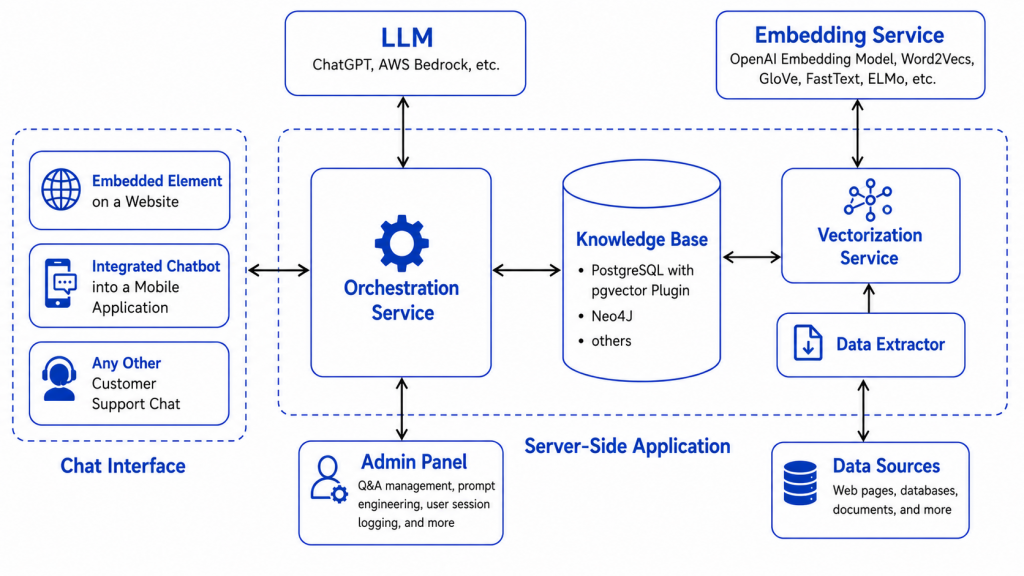
As a fresher, building this project introduces you to key concepts like vector databases, text embeddings, and document chunking. You learn Caht Gpt Basics and how to convert text into numbers so the system can mathematically find the most relevant paragraphs based on a user’s question. This is highly sought after by companies that want to build AI assistants trained on their own internal data without spending a fortune on custom model training.
Code Generation Assistant
A code generation assistant is a tool where a user types a plain English description of what they want their program to do, and the GenAI model writes the corresponding code. This project teaches you how to interact with AI models that are specifically fine-tuned for programming languages like Python or JavaScript. You will build an interface where a user might type “write a Python script to sort a list of dictionaries,” and the app returns clean, working code. To make it a strong project, you can add features like syntax highlighting or a button to copy the code directly. Generative AI Tools For Coding help developers automate repetitive programming tasks, improve coding efficiency, and accelerate software development workflows. Building this helps you understand the limitations of AI coding, such as logic errors or bugs that the AI might miss. It is a great portfolio piece for freshers aiming for software engineering roles, showing you can build developer tools.
Are You Considering Pursuing a Gen AI Master’s Degree? Enroll For Gen AI Expert Masters Program Training Course Today!
AI Image Generation App
Set to Ace Your AWS Job Interview? Check Out Our Blog on Gen AI Interview Questions & Answer
Automated Blog Post Writer
An automated blog post writer is a GenAI application designed to help content creators outline and draft long-form articles based on a single topic idea. Instead of just generating a single block of text, a well-built writer app breaks the process into steps. First, it generates a catchy title and an outline. Then, it writes the introduction, fleshes out the body paragraphs section by section, and finally creates a conclusion. As a fresher, building this teaches you how to chain multiple AI prompts together in a specific sequence to create a cohesive, long document. Gen AI Course helps learners understand prompt engineering, AI workflow automation, and content generation strategies in a practical way. You learn about token limits and how to manage the context window so the AI remembers what it wrote in previous sections. This project is highly relevant for SEO agencies and bloggers who need to scale their content production without sacrificing structure or readability.
Conclusion
Freshers Build Projects Using Gen AI is one of the smartest ways to enter the current tech job market. Projects like creating a custom RAG chatbot or an automated blog writer show employers that you do not just know how to chat with AI, but you actually know how to build real software around it. By completing these projects, you gain practical experience with API integration, prompt engineering, and handling user data. Each project teaches you a different technical skill some focus on text manipulation, others on working with images, and others on organizing complex workflows. Enrolling in a Gen AI Course can further strengthen your practical understanding of AI tools, real-world applications, and modern development techniques. Having these working applications in your portfolio makes you stand out from candidates who only have theoretical knowledge. It bridges the gap between watching AI demos and actually engineering them. Ultimately, getting your hands dirty by building generative AI tools is the best way to grow from a beginner into a hirable tech professional.