LMS
LMS
Last updated on 20th Apr 2026| 7543

TCS SAP FICO and ABAP Interview Questions and Answers for Freshers is a specialized guide designed to help candidates prepare for SAP-related roles at Tata Consultancy Services. It includes commonly asked questions on SAP FICO concepts such as financial accounting, controlling, and configuration, along with ABAP programming basics, data dictionary, reports, and modules, all explained in a simple manner. This resource helps freshers build strong SAP fundamentals, understand the interview process, and gain the confidence needed to perform well in technical interview rounds.
1. What is SAP?
Ans:
SAP is an enterprise software system used by organizations to manage business processes efficiently across departments. It integrates finance, sales, purchasing, production, human resources, and reporting functions in one platform. SAP helps companies improve accuracy, transparency, and operational decision-making significantly. Large organizations worldwide use SAP for scalable and standardized business management solutions. SAP basics are commonly asked in fresher interviews.
2. What are key SAP modules?
Ans:
SAP consists of multiple functional and technical modules designed to manage different business processes efficiently. Major modules include FICO for finance and controlling, MM for materials management, SD for sales and distribution, HR for human resources, and ABAP for technical development. Each module handles specific operations but integrates with others for seamless data flow across the organization. This integration ensures better coordination, accuracy, and decision-making in enterprise environments. Understanding core SAP modules is essential for fresher interviews and practical implementation knowledge.
3. What is ERP?
Ans:
ERP stands for Enterprise Resource Planning and refers to integrated software used for managing business operations. It connects multiple departments through a common database and standardized workflows. ERP systems improve planning, reporting, resource usage, and organizational productivity efficiently. They reduce duplication of data and support faster business decisions significantly. ERP fundamentals are essential for SAP fresher preparation.
4. What are the key features of ERP systems?
Ans:
ERP systems provide integrated solutions that connect multiple business functions through a centralized database. They support real-time data processing, standardized workflows, and improved coordination across departments. ERP ensures better resource planning, accurate reporting, and reduced data duplication in business operations. It enhances organizational efficiency by automating routine processes and improving transparency. ERP systems are widely used to support scalable and structured business growth strategies.
5. What is SAP FICO?
Ans:
SAP FICO is a major SAP functional module combining Financial Accounting and Controlling processes together. It manages accounting entries, reporting, cost control, budgeting, and profitability analysis tasks. Organizations use SAP FICO for accurate financial records and management decisions. The module supports compliance, transparency, and internal cost monitoring effectively. SAP FICO basics are highly important for freshers.
6. What are important features of SAP CO module?
Ans:
- Learning that FI handles external accounting while CO handles internal controlling builds strong clarity quickly. This difference is one of the most common interview questions. Clear basics are important.
- Understanding business use cases like invoices, reports, budgets, and costing improves relevance significantly. Real examples connect concepts with company operations. Practical knowledge improves answers.
- Studying integration between finance and other SAP modules adds practical technical depth effectively. FICO often works with sales, purchasing, and production modules. Integration knowledge is valuable.
- Revising important terminology regularly helps fresher confidence naturally. Terms like GL, AP, AR, and Cost Center are useful. Revision supports smooth communication.
7. What is SAP ABAP?
Ans:
SAP ABAP stands for Advanced Business Application Programming and is SAP’s programming language. It is used to develop reports, forms, interfaces, enhancements, and custom applications. ABAP helps organizations customize SAP according to unique business requirements effectively. Developers use ABAP within SAP environments for backend logic and processing tasks. ABAP basics are frequently asked in fresher interviews.
8. How to prepare SAP ABAP basics?
Ans:
- Learning ABAP as SAP’s core programming language creates immediate understanding for beginners quickly. It is used for technical development inside SAP systems. This is the starting point.
- Studying common uses like reports, forms, and interfaces improves practical relevance significantly. These are common business development tasks. Examples strengthen responses.
- Understanding data dictionary and modular programming adds technical depth effectively. These topics are important in ABAP fundamentals. They improve fresher readiness.
- Revising common syntax concepts helps interview confidence naturally. Basic commands and logic improve technical discussions. Practice builds comfort.
9. What is SAP FI?
Ans:
SAP FI stands for Financial Accounting and manages external accounting transactions of organizations. It includes general ledger, accounts payable, accounts receivable, and asset accounting functions. FI helps generate balance sheets, profit statements, and statutory financial reports accurately. This module ensures reliable accounting records and audit readiness significantly. SAP FI is a core topic for FICO freshers.
10. What is the concept of finding sum of two numbers?
Ans:
Finding the sum of two numbers is a basic arithmetic operation used to combine values and produce a total result. This concept is fundamental in programming and logical problem solving across many applications. It helps build understanding of variables, data handling, and simple operations within algorithms. Addition is widely used in calculations such as financial totals, data aggregation, and reporting tasks. Strong clarity in basic arithmetic operations supports better performance in technical interviews and problem-solving scenarios.
11. What is SAP CO?
Ans:
SAP CO stands for Controlling and focuses on internal cost management processes. It supports budgeting, cost center accounting, profitability analysis, and planning activities. CO helps management track expenses and improve resource efficiency effectively. This module works closely with SAP FI for complete financial visibility. SAP CO basics are important for fresher interviews.
12. What are characteristics of Company Code in SAP?
Ans:
- Defining CO as internal management accounting creates clear conceptual understanding immediately. It focuses on planning and controlling company costs. This is the core meaning.
- Mentioning cost centers, budgets, and profit analysis improves practical relevance significantly. These are everyday controlling activities in organizations. Real examples improve answers.
- Explaining relation between FI and CO adds stronger interview depth effectively. FI records transactions while CO analyzes internal costs. Their integration is important.
- Using business control examples strengthens memory naturally. Examples from departments or projects are easy to remember. Practical learning improves retention.
13. What is General Ledger in SAP FI?
Ans:
General Ledger is the central record of all financial transactions in an organization. It stores balances for assets, liabilities, income, and expenses systematically. Every accounting entry eventually impacts general ledger accounts through postings. It supports financial statements and legal reporting requirements effectively. General Ledger is a foundational SAP FI topic.
14. What are important features of Posting Period in SAP?
Ans:
- Understanding ledger as master financial record creates strong clarity for beginners quickly. It stores the balances of all important accounts. This is a foundation topic.
- Learning account categories improves accounting awareness significantly during interviews. Assets, liabilities, income, and expenses are key groups. These basics are useful.
- Studying transaction posting flow adds practical relevance effectively. Daily entries eventually affect ledger balances. Posting knowledge improves business understanding.
- Revising examples of expense and revenue accounts helps memory naturally. Real account names are easier to remember. Examples strengthen confidence.
15. What is the difference between Accounts Payable and General Ledger?
Ans:
| Criteria | Accounts Payable | General Ledger |
|---|---|---|
| Meaning | Handles vendor dues and payments. | Central record of all accounts. |
| Focus | Supplier invoices and settlements. | Assets, liabilities, income, expenses. |
| Usage | Used for payable transactions. | Used for financial statements. |
| Relation | Posts entries into ledger. | Receives postings from submodules. |
16. What are key functions of Posting Key in SAP?
Ans:
- Defining payable as amounts owed to vendors creates immediate clarity strongly. It refers to supplier bills waiting for payment. This is the basic meaning.
- Mentioning invoice entry and payment processing improves practical understanding significantly. These are common accounts payable tasks. Examples improve interview quality.
- Explaining due date management adds business relevance effectively. Timely payments avoid penalties and maintain supplier trust. This shows real business value.
- Connecting payable with procurement strengthens answer quality naturally. Purchases often create vendor liabilities in the system. Integration understanding is helpful.
17. What is Accounts Receivable in SAP?
Ans:
Accounts Receivable manages money owed to an organization by customers. It records customer invoices, incoming payments, and outstanding balances accurately. Receivable management supports cash flow monitoring and collection efficiency significantly. This process integrates closely with sales and billing functions in SAP. Accounts Receivable is commonly asked in interviews.
18. What are key aspects of Depreciation in SAP?
Ans:
- Defining receivable as customer dues creates strong understanding quickly. It means money customers must pay to the company. This is the core concept.
- Learning invoice and payment receipt flow improves practical relevance significantly. Billing creates dues and receipts reduce balances. This reflects real operations.
- Understanding aging reports adds useful business depth effectively. Aging shows overdue customer payments clearly. It supports collection decisions.
- Revising sales integration helps fresher confidence naturally. Sales transactions often generate receivables automatically. Integration knowledge improves answers.
19. What is Cost Center in SAP CO?
Ans:
A Cost Center is an organizational unit where costs are collected and monitored internally. Examples include departments such as HR, IT, production, and administration areas. Cost centers help management analyze spending and control budgets effectively. They improve accountability and internal reporting significantly across organizations. Cost Center is a key SAP CO topic.
20. What are main components of Customer Master Data?
Ans:
- Defining cost center as place where expenses are tracked creates clarity immediately. Departments like HR or IT can be cost centers. This is a common SAP CO topic.
- Using department examples improves practical understanding significantly for interviewers. Real examples make theory easier to understand. Examples create stronger answers.
- Explaining budgeting and control value adds business relevance effectively. Cost centers help monitor spending against budgets. This supports management decisions.
- Connecting with CO reporting strengthens final answer naturally. Reports analyze departmental expenses clearly. This shows internal control benefits.
21. What is Profit Center in SAP?
Ans:
A Profit Center is an internal unit used to measure revenue and profitability separately. It can represent product lines, branches, or business segments strategically. Profit centers help management compare performance across units effectively. They support better planning and responsibility accounting significantly. Profit Center is important for SAP FICO interviews.
22. What are key features of Work Area in ABAP?
Ans:
- Understanding profit center as unit measuring profit creates immediate clarity strongly. It tracks revenue and costs separately for a segment. This supports performance analysis.
- Learning branch or product examples improves practical relevance significantly. Stores, divisions, or product lines can be profit centers. Examples improve understanding.
- Studying management reporting benefits adds stronger interview value effectively. Separate profitability reports help compare business units. This supports strategic planning.
- Comparing with cost center improves conceptual memory naturally. Cost centers track cost, profit centers track profit. Clear comparison is useful.
23. What is Company Code in SAP?
Ans:
Company Code is the smallest organizational unit for which financial statements are prepared. It represents a legal entity within SAP financial accounting structure. Transactions are posted under company codes for statutory reporting purposes. Large groups may maintain multiple company codes for different regions. Company Code is a basic SAP FI concept.
24. What are benefits of Modularization in ABAP?
Ans:
- Defining company code as legal accounting unit creates strong understanding quickly. Financial statements are prepared at this level. It is a key SAP FI structure.
- Mentioning separate reporting for regions improves practical clarity significantly. Large companies may use multiple company codes globally. This reflects real organizations.
- Explaining role in postings adds technical relevance effectively. Transactions are recorded under the relevant company code. This supports correct reporting.
- Revising organizational hierarchy helps memory naturally. Company code fits within larger SAP enterprise structures. Hierarchy knowledge is valuable.
25. What are final beginner tips for SAP FICO and ABAP interviews?
Ans:
Strong beginner preparation should focus on SAP modules, business processes, and key terminology clearly. Candidates should understand differences between FI, CO, and ABAP responsibilities thoroughly. Simple examples of accounting flow and customization create stronger interview impact significantly. Regular revision improves confidence and communication during fresher discussions effectively. Consistent preparation gives better chances of selection success.
26. What is the difference between Accounts Payable and Accounts Receivable?
Ans:
| Criteria | Accounts Payable | Accounts Receivable |
|---|---|---|
| Meaning | Money owed by company to vendors. | Money owed to company by customers. |
| Related To | Purchases and supplier invoices. | Sales and customer invoices. |
| Cash Flow | Represents outgoing payments. | Represents incoming collections. |
| Purpose | Manage vendor dues on time. | Track customer outstanding amounts. |
27. What are key features of Smart Forms in SAP?
Ans:
- Learning difference between calendar year and business fiscal year creates strong conceptual clarity quickly. Calendar year follows January to December, while fiscal year may vary by company. This distinction is common in interviews.
- Understanding fiscal year variants in SAP improves technical interview readiness significantly. Different organizations configure year periods based on reporting needs. SAP supports flexible setups.
- Studying impact on postings and reports adds practical business relevance effectively. Financial entries and statements depend on correct fiscal periods. This knowledge improves real-world understanding.
- Revising examples from organizations strengthens memory naturally for discussions. Practical company cases are easier to remember than theory alone. Examples improve confidence.
28. What is Posting Period in SAP?
Ans:
Posting Period is the specific time range during which accounting entries are allowed. Organizations open and close periods to control financial transaction recording carefully. This helps prevent incorrect postings into completed reporting months significantly. Posting periods support disciplined accounting governance and audit readiness effectively. It is an important SAP FI interview concept.
29. What are important aspects of SELECT statement in ABAP?
Ans:
- Defining posting period as allowed transaction time window creates immediate clarity strongly. It specifies when accounting entries can be recorded. Controlled periods improve discipline.
- Mentioning month-end closing controls improves practical understanding significantly. Closed periods prevent accidental postings in completed months. This supports accurate reporting.
- Explaining prevention of backdated errors adds business relevance effectively. Wrong date postings can disturb final accounts. Period control reduces such risks.
- Revising finance process examples strengthens confidence naturally. Real accounting examples make the concept easier to explain. Practice improves recall.
30. What is Document Type in SAP FI?
Ans:
Document Type classifies accounting entries based on business transaction nature in SAP. Examples include vendor invoices, customer invoices, payments, and journal postings. It controls numbering ranges and posting rules systematically within finance processes. Proper document types improve reporting and transaction traceability significantly. Document Type is commonly asked in fresher interviews.
31. What are main characteristics of Join in ABAP SQL?
Ans:
- Understanding transaction classification purpose creates strong SAP FI clarity quickly. Document types identify the nature of postings clearly. This helps organized accounting.
- Learning invoice and payment examples improves practical relevance significantly. Vendor invoices and customer payments are common cases. Examples improve retention.
- Studying numbering control adds technical depth effectively for interviews. Document types often manage number ranges systematically. This is useful interview knowledge.
- Revising finance posting flows helps memory naturally. Real transaction flows connect concepts with business use. Practice builds confidence.
32. What is Posting Key in SAP?
Ans:
Posting Key is a two-digit control key used in SAP financial postings. It determines account type, debit or credit indicator, and field behavior settings. Posting keys help standardize entry creation across accounting transactions efficiently. They are essential in vendor, customer, and general ledger postings significantly. Posting Key is a basic SAP FI topic.
33. What are important concepts in SAP MM and FICO integration?
Ans:
- Defining posting key as transaction control code creates immediate understanding strongly. It controls how entries are recorded in SAP. This is a core FI concept.
- Mentioning debit and credit behavior improves accounting relevance significantly. Posting keys determine whether the line item is debit or credit. This supports correct accounting.
- Learning account type determination adds stronger technical depth effectively. Different keys are used for vendor, customer, or G/L accounts. This improves practical knowledge.
- Revising common examples helps interview confidence naturally. Frequent practice with sample postings improves recall speed. Confidence grows with repetition.
34. What is Debit and Credit in SAP FI?
Ans:
Debit and Credit are accounting entry sides used to record financial transactions correctly. Debits may increase assets or expenses depending on account category rules. Credits may increase liabilities, equity, or revenue based on accounting principles. SAP FI uses these concepts in every financial document posting consistently. This topic is fundamental for fresher interviews.
35. What is the concept of generating multiplication tables?
Ans:
Generating a multiplication table involves repeatedly multiplying a number with a sequence of values to display patterned results. This concept is commonly used to understand loops, iteration, and repeated execution of logic in programming. It helps build a strong foundation for control structures such as for-loops and while-loops. Multiplication tables are useful in mathematical computations, learning patterns, and algorithm design. Understanding this improves logical thinking and strengthens basic programming skills for interviews.
36. What is Asset Accounting in SAP?
Ans:
Asset Accounting manages fixed assets such as machinery, vehicles, computers, and buildings. It records acquisition, depreciation, transfer, retirement, and valuation transactions accurately. This module supports compliance and long-term financial asset visibility significantly. Asset data integrates with general ledger reporting smoothly in SAP. Asset Accounting is important for SAP FI freshers.
37. What are important aspects of SAP Fiori?
Ans:
- Defining fixed assets as long-term business resources creates immediate conceptual clarity strongly. Assets include buildings, machinery, and vehicles. They support operations over many years.
- Mentioning acquisition and depreciation processes improves practical relevance significantly. Asset purchase and yearly depreciation are common finance activities. These are important in SAP FI.
- Explaining integration with finance reports adds stronger interview depth effectively. Asset values flow into financial statements and ledgers. Integration improves reporting accuracy.
- Revising company examples helps confidence naturally. Real asset examples make explanations more professional. Practice improves interview answers.
38. What is Depreciation in SAP?
Ans:
Depreciation is the gradual allocation of asset cost over useful life periods. It reflects wear, usage, obsolescence, and accounting expense recognition requirements. SAP automatically calculates depreciation using configured methods and schedules efficiently. This supports accurate profit reporting and asset valuation significantly. Depreciation is a common SAP FI topic.
39. What are characteristics of T Code in SAP?
Ans:
- Learning depreciation as cost spread over years creates strong understanding quickly. Asset cost is allocated during useful life systematically. This follows accounting principles.
- Understanding methods like straight-line improves practical accounting relevance significantly. Equal yearly expense is a common method. Interviewers often ask such basics.
- Studying SAP automatic calculation benefits adds technical value effectively. SAP can calculate depreciation through configured rules. Automation saves time and reduces errors.
- Revising asset examples strengthens memory naturally. Machinery or vehicle examples make the topic easy to remember. Examples support confidence.
40. What is Vendor Master Data in SAP?
Ans:
Vendor Master Data stores all important information about suppliers in SAP systems. It includes name, address, payment terms, tax details, and banking information. This data supports purchasing, invoice processing, and vendor payment transactions efficiently. Accurate vendor records improve operational speed and control significantly. Vendor Master is frequently asked in interviews.

41. What are characteristics of Primary Key?
Ans:
- Defining vendor master as supplier information record creates immediate clarity strongly. It stores all important supplier details centrally. Central data improves efficiency.
- Mentioning payment and bank details improves practical relevance significantly. These details are needed for invoice and payment processing. Accurate records prevent delays.
- Explaining role in procurement cycle adds business depth effectively. Vendor data supports purchasing, invoicing, and payments smoothly. It is important for operations.
- Revising examples of supplier onboarding helps confidence naturally. Real onboarding steps make answers stronger and clearer. Practice improves delivery.
42. What is Customer Master Data in SAP?
Ans:
Customer Master Data stores all relevant information related to business customers. It contains names, addresses, payment terms, credit data, and sales details. This data supports sales orders, billing, collections, and receivable management processes. Accurate customer records improve service quality and reporting significantly. Customer Master is an important SAP concept.
43. What are main aspects of ABAP Events?
Ans:
- Understanding customer records as central data source creates strong clarity quickly. Customer master stores essential client information in one place. This supports business processes.
- Learning billing and collection linkage improves practical relevance significantly. Sales invoices and payment follow-up depend on correct data. Accurate records improve cash flow.
- Mentioning credit and payment terms adds business value effectively. Credit limits and due dates are important for receivables control. This is useful interview knowledge.
- Revising sales cycle examples strengthens memory naturally. Order-to-cash examples make concepts easier to explain. Practical examples improve recall.
44. What is SAP Data Dictionary in ABAP?
Ans:
SAP Data Dictionary is a central repository for database definitions in SAP. It stores tables, views, data elements, domains, and structures systematically. ABAP developers use dictionary objects for consistent data design and reuse. This improves integrity, maintenance, and development productivity significantly. Data Dictionary is a key ABAP fresher topic.
45. What is the difference between SAP Data Dictionary and Internal Table?
Ans:
| Criteria | SAP Data Dictionary | Internal Table |
|---|---|---|
| Meaning | Central repository for database definitions. | Temporary memory table in ABAP. |
| Storage | Stored in SAP system metadata. | Stored during program execution. |
| Use | Defines tables, fields, domains. | Processes rows of data. |
| Purpose | Supports reusable data structure design. | Supports program logic and reporting. |
46. What is Internal Table in ABAP?
Ans:
Internal Table is a temporary memory table used in ABAP programs. It stores multiple rows of structured data during program execution efficiently. Developers use internal tables for processing, sorting, filtering, and reporting tasks. They are essential for handling large datasets in ABAP logic significantly. Internal Table is frequently asked in interviews.
47. What are applications of SAP Script?
Ans:
- Understanding memory-based temporary table purpose creates strong clarity quickly. Internal tables store data during program execution only. They are heavily used in ABAP.
- Learning row processing and reporting usage improves practical relevance significantly. Developers use them for sorting, filtering, and display logic. This is common in reports.
- Studying standard, sorted, and hashed types adds technical depth effectively. Different table types serve different performance needs. This strengthens interview answers.
- Revising coding examples strengthens confidence naturally. Practice with loops and data handling improves understanding. Examples help memory.
48. What is Work Area in ABAP?
Ans:
Work Area is a single record structure used to hold one row of data. It is commonly used with internal tables for reading and processing records. Work areas improve clarity and row-level manipulation within ABAP programs. They help structured movement of values during logic execution significantly. Work Area is a common fresher topic.
49. What are applications of loops in ABAP?
Ans:
- Defining work area as one-row structure creates immediate understanding strongly. It temporarily holds a single record of data. This is common with internal tables.
- Mentioning usage with internal tables improves practical coding relevance significantly. Rows are read into work areas for processing. This simplifies logic.
- Explaining row processing benefits adds technical depth effectively. Developers can update or display one row at a time. It improves clarity.
- Revising sample loops strengthens interview confidence naturally. Practical coding examples make the topic easier to explain. Repetition builds speed.
50. What are final tips after second SAP preparation stage?
Ans:
Candidates should now understand postings, master data, periods, and ABAP basics clearly. Strong preparation requires linking SAP terms with actual business processes logically. Simple examples from purchasing, accounting, and reporting improve discussion quality significantly. Regular revision builds confidence and faster recall during interviews effectively. Consistent learning improves fresher selection chances strongly.
51. What is ABAP Report Program?
Ans:
ABAP Report Program is a type of executable program used to display processed business data. It is commonly used for lists, summaries, statements, and operational reporting requirements. Report programs read tables, apply logic, and present results in structured formats. They help organizations make faster decisions through useful business information significantly. Report programs are frequently asked in fresher interviews.
52. What are benefits of SAP MM and FICO integration?
Ans:
- Understanding report programs as output-generating applications creates strong technical clarity quickly. Reports display processed business data clearly. They are widely used in SAP.
- Learning usage in statements, lists, and summaries improves practical relevance significantly. Many business teams depend on such outputs daily. Reports support decisions.
- Studying table reading and output formatting adds coding depth effectively. ABAP reports fetch data and present it neatly. This is key technical knowledge.
- Revising common report examples strengthens interview confidence naturally. Sales or stock report examples improve explanation quality. Practice helps recall.
53. What is Modularization in ABAP?
Ans:
Modularization is the technique of dividing large ABAP programs into smaller reusable units. It improves readability, maintenance, testing, and development productivity significantly. Common modularization methods include forms, function modules, and methods in classes. Well-structured code reduces duplication and supports easier enhancements later. Modularization is an important ABAP fresher topic.
54. What are advantages of SAP HANA?
Ans:
- Defining modularization as splitting programs into manageable sections creates immediate clarity strongly. Smaller units are easier to understand and maintain. This improves code quality.
- Mentioning reuse and maintenance benefits improves practical understanding significantly. Common logic can be reused in many programs. Maintenance becomes faster.
- Learning forms and function modules adds technical interview relevance effectively. These are common modularization methods in ABAP. Interviewers often ask them.
- Revising structured coding examples strengthens memory naturally. Practice with modular code improves confidence greatly. Examples make learning easier.
55. What is Function Module in ABAP?
Ans:
Function Module is a reusable program unit stored centrally in SAP systems. It performs specific business or technical tasks through defined input and output parameters. Different programs can call the same module repeatedly for standard functionality. This improves consistency, reuse, and faster development productivity significantly. Function Modules are commonly asked in interviews.
56. What are advantages of SAP Fiori?
Ans:
- Understanding centralized reusable logic creates strong ABAP clarity for beginners quickly. Function modules store reusable tasks in one place. This reduces duplicate coding.
- Learning import and export parameter purpose improves technical readiness significantly. Parameters help pass data in and out systematically. This is basic ABAP knowledge.
- Studying common examples like date or currency conversion adds relevance effectively. Real examples make the concept practical and memorable. Examples strengthen answers.
- Revising modular reuse benefits strengthens confidence naturally. Repetition helps explain advantages clearly during interviews. Confidence improves with practice.
57. What is BDC in ABAP?
Ans:
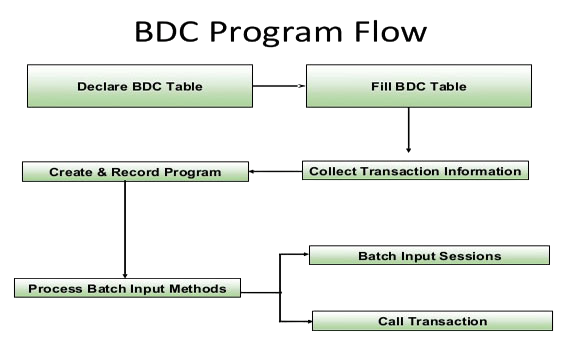
BDC stands for Batch Data Communication and is used for mass data upload processes. It simulates manual screen entries into SAP transactions automatically and systematically. BDC helps migrate legacy data into SAP during implementations efficiently. Methods include session method and call transaction processing techniques. BDC is a classic ABAP interview topic.
58. What are uses of T Codes in SAP?
Ans:
- Defining BDC as automated screen-based data upload creates immediate clarity strongly. It is commonly used for mass data entry into SAP systems. This gives quick conceptual understanding.
- Mentioning migration from old systems improves practical relevance significantly. Many businesses use BDC while shifting legacy data into SAP. Real examples strengthen answers.
- Learning session and call transaction methods adds technical depth effectively. These are the two common approaches used in BDC processing. Knowing them helps in interviews.
- Revising bulk upload examples strengthens interview confidence naturally. Examples like customer or material master upload are useful. Practical answers create better impact.
59. What is ALV Report in ABAP?
Ans:
ALV stands for ABAP List Viewer and provides advanced formatted report outputs. It supports sorting, filtering, totals, layouts, and user-friendly grid displays. ALV reports improve business usability compared with simple classical reports significantly. Organizations widely use ALV for operational and analytical reporting needs. ALV is a popular ABAP fresher topic.
60. What is the concept of printing numbers in reverse order using loops?
Ans:
Printing numbers in reverse order is a logical operation that demonstrates how loops can control iteration in decreasing sequence. This concept helps understand loop conditions, initialization, and decrement operations clearly. It is widely used in scenarios where reverse traversal or countdown logic is required. Such operations improve understanding of control flow and structured programming techniques effectively. Mastery of loop-based logic is essential for solving many interview problems confidently.

Learn SAP FICO Training with Advanced Concepts By Industry Experts
- Instructor-led Sessions
- Real-life Case Studies
- Assignments
61. What is Smart Form in SAP ABAP?
Ans:
Smart Form is a SAP tool used for designing formatted output documents. It is commonly used for invoices, purchase orders, delivery notes, and letters. Smart Forms allow layout control with text, tables, logos, and dynamic fields. They improve professional document generation and printing efficiency significantly. Smart Forms are frequently asked in fresher interviews.
62. What are uses of ABAP Events?
Ans:
- Defining Smart Form as document design tool creates immediate clarity strongly. It is used to generate formatted business outputs professionally. This is the core purpose.
- Mentioning invoices and purchase orders improves practical relevance significantly. These are common real-time uses in organizations. Examples make answers stronger.
- Learning dynamic fields and logos adds technical interview depth effectively. Smart Forms can display changing values with branding layouts. This improves document quality.
- Revising printing workflow strengthens confidence naturally. Understanding output generation and spool process helps practical knowledge. It supports fresher interviews well.
63. What is SAP Script?
Ans:
SAP Script is an older SAP tool used for creating formatted print documents. It was widely used before Smart Forms and Adobe Forms became common. SAP Script supports text elements, windows, pages, and layout controls. Many legacy systems still use SAP Script documents significantly. This topic remains relevant for fresher interviews.
64. What are benefits of Authorization in SAP?
Ans:
- Understanding SAP Script as legacy form tool creates strong historical clarity quickly. It was widely used before newer form technologies arrived. This background is useful.
- Learning invoices and document printing usage improves practical relevance significantly. Many older SAP systems still print through SAP Script. Real usage adds value.
- Comparing with Smart Forms adds stronger interview depth effectively. Smart Forms are newer and easier to maintain than SAP Script. Comparison questions are common.
- Revising legacy support examples strengthens memory naturally. Existing enterprise systems may still depend on SAP Script forms. This keeps the topic relevant.
65. What is SELECT Statement in ABAP?
Ans:
SELECT Statement is used in ABAP to retrieve data from database tables. It can fetch single records, multiple rows, or filtered result sets efficiently. Proper SELECT usage improves performance and clean data processing significantly. Conditions and joins help obtain accurate business information quickly. SELECT syntax is fundamental for ABAP freshers.
66. What are functions of SAP Tables?
Ans:
- Defining SELECT as database retrieval command creates immediate coding clarity strongly. It is used to fetch records from SAP tables. This is a fundamental ABAP concept.
- Learning filters with WHERE conditions improves technical relevance significantly. Conditions help retrieve only required records efficiently. This improves query accuracy.
- Mentioning performance-conscious selection adds practical value effectively. Selecting only needed fields reduces load and improves speed. Performance is important in SAP.
- Revising simple query examples strengthens interview confidence naturally. Examples using customer or material tables are helpful. Practice improves syntax memory.
67. What is Loop in ABAP?
Ans:
Loop is a control structure used to process repeated records or actions in ABAP. It is commonly used with internal tables to read each row sequentially. Loops help apply calculations, validations, and output logic efficiently. Proper loop design improves readable and effective program behavior significantly. Loops are commonly asked in fresher interviews.
68. What are advantages of Foreign Key?
Ans:
- Understanding repetition logic creates strong programming clarity for beginners quickly. Loops help process repeated records or actions easily. This is basic coding knowledge.
- Learning internal table processing improves practical coding relevance significantly. LOOP statements are often used with internal tables in ABAP. This is common in projects.
- Mentioning calculations inside loops adds technical depth effectively. Totals, validations, and formatting are often done during looping. Examples improve understanding.
- Revising loop syntax examples strengthens confidence naturally. Practice with LOOP AT and ENDLOOP statements helps memory. Coding confidence increases greatly.
69. What is Join in SAP ABAP SQL?
Ans:
Join is used to combine related data from multiple database tables together. It links tables through common fields for meaningful business reporting outputs. Joins reduce separate queries and improve integrated data retrieval significantly. Inner join and outer join are common types used frequently. Join concepts are important for ABAP interviews.
70. What are uses of Message Class in ABAP?
Ans:
- Defining join as combining related tables creates immediate technical clarity strongly. It merges data using common key fields. This is essential in reporting.
- Mentioning customer and sales examples improves practical relevance significantly. Joining master and transaction data is common in SAP. Real examples improve answers.
- Learning inner and outer join types adds interview depth effectively. Different joins return different result combinations. Knowing types is useful.
- Revising SQL scenarios strengthens memory naturally. Practice with sample tables helps understand joins better. This improves coding confidence.
71. What is Debugging in ABAP?
Ans:
Debugging is the process of finding and correcting errors in ABAP programs. SAP debugger allows step-by-step execution and variable value inspection clearly. Developers use debugging to understand logic flow and fix issues efficiently. It improves code quality and reduces production problems significantly. Debugging is a valuable fresher interview topic.
72. What is the difference between Debugging and Testing?
Ans:
| Criteria | Debugging | Testing |
|---|---|---|
| Meaning | Finding and fixing code errors. | Checking software quality and functionality. |
| Performed By | Mainly developers. | Testers and developers. |
| Purpose | Remove defects from program. | Detect defects before release. |
| Result | Corrected working code. | Validated software behavior. |
73. What is Transport Request in SAP?
Ans:
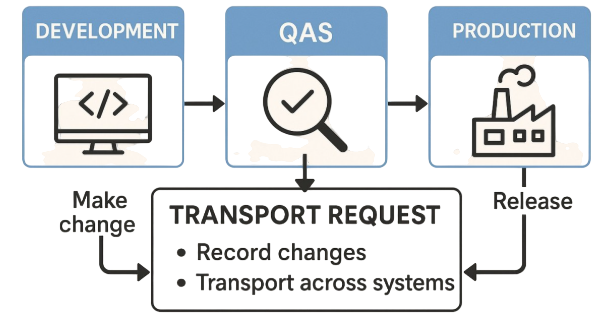
Transport Request is used to move SAP developments or configurations across systems. Changes typically move from development to quality and then production environments. This ensures controlled deployment and proper approval management significantly. Transport management supports secure and organized SAP change processes effectively. Transport Request is commonly asked in interviews.
74. What are functions of Transport Request in SAP?
Ans:
- Defining transport request as change movement package creates immediate clarity strongly. It carries developments or settings between SAP systems. This is the main purpose.
- Learning development to production path improves practical relevance significantly. Changes usually move through DEV, QA, and PROD systems. This supports controlled deployment.
- Mentioning approval control adds governance value effectively. Authorized approvals reduce risky direct production changes. Governance is important in enterprises.
- Revising deployment examples strengthens interview confidence naturally. Examples of report or form movement make answers stronger. Practical knowledge creates impact.
75. What are final tips after third SAP preparation stage?
Ans:
Candidates should now understand ABAP reports, forms, data retrieval, and debugging clearly. Linking technical ABAP tools with business usage creates stronger interview impact significantly. Simple examples of reports, uploads, and transports improve communication quality effectively. Regular revision helps retain commands, concepts, and SAP terminology strongly. Consistent practice improves fresher selection chances greatly.
76. What is SAP MM integration with FICO?
Ans:
SAP MM integration with FICO connects procurement activities directly with financial accounting processes automatically. Purchase orders, goods receipts, and vendor invoices create corresponding accounting impacts systematically. This integration improves inventory valuation, payable tracking, and cost visibility significantly. Organizations gain faster reconciliation and stronger internal controls through connected workflows. Integration topics are important in fresher interviews.
77. What are features of SAP HANA?
Ans:
- Understanding procurement transactions flowing into finance entries creates strong conceptual clarity quickly.
- Learning goods receipt and invoice verification relevance improves practical interview readiness significantly.
- Studying inventory valuation impact adds business depth effectively during discussions.
- Revising end-to-end purchase cycle examples strengthens memory naturally.
78. What is SAP SD integration with FICO?
Ans:
SAP SD integration with FICO connects sales activities with billing and accounting postings efficiently. Sales orders, deliveries, invoices, and receipts update financial records systematically. This improves revenue recognition, receivable tracking, and customer account management significantly. Integrated flows reduce manual work and reporting delays strongly. SD integration is commonly asked in interviews.
79. What are uses of SAP Fiori?
Ans:
- Defining sales-to-finance linkage creates immediate conceptual understanding strongly.
- Mentioning billing postings and customer receivables improves practical relevance significantly.
- Studying revenue flow examples adds stronger business depth effectively.
- Revising order-to-cash scenarios strengthens interview confidence naturally.
80. What is the concept of identifying and printing odd numbers in a range?
Ans:
Identifying and printing odd numbers in a range involves checking numbers based on divisibility conditions and filtering required outputs. This concept introduces conditional logic combined with iteration for selective processing. It helps in understanding operators like modulus and decision-making structures within loops. Such logic is widely used in data filtering, validation, and algorithm design tasks. Strong knowledge of conditional operations improves problem-solving ability during technical interviews.
81. What are uses of T Codes in SAP?
Ans:
- Understanding in-memory database concept creates strong technical clarity quickly.
- Learning real-time reporting advantages improves practical relevance significantly.
- Mentioning faster processing compared with disk-heavy systems adds depth effectively.
- Revising SAP modernization examples strengthens confidence naturally.
82. What is SAP S4HANA?
Ans:
SAP S4HANA is the next-generation ERP suite built on SAP HANA technology. It offers simplified data models, faster processes, and modern user experiences. Organizations adopt S4HANA for digital transformation and better operational efficiency significantly. Many traditional SAP modules continue with improved architecture inside S4HANA. S4HANA basics are valuable interview topics.
83. What are benefits of Primary Key?
Ans:
- Defining S4HANA as modern SAP ERP creates immediate clarity strongly.
- Mentioning simplified processes and speed benefits improves practical relevance significantly.
- Learning relation with HANA database adds technical depth effectively.
- Revising transformation examples strengthens memory naturally.
84. What is SAP Fiori?
Ans:
SAP Fiori is a modern user interface design system for SAP applications. It provides simple, responsive, and role-based screens across devices efficiently. Fiori improves user productivity compared with traditional SAP GUI environments significantly. Many organizations use Fiori apps for approvals, analytics, and transactions. Fiori basics are useful for freshers.
85. What are functions of ABAP Events?
Ans:
- Understanding Fiori as modern SAP interface creates strong conceptual clarity quickly.
- Learning mobile-friendly and responsive design benefits improves relevance significantly.
- Mentioning role-based apps adds business practicality effectively.
- Revising user experience comparisons strengthens confidence naturally.
86. What is Reconciliation Account in SAP FI?
Ans:
Reconciliation Account is a general ledger account linked to subledger accounts automatically. Customer and vendor postings update reconciliation accounts without direct manual entries. This ensures consistency between subledgers and general ledger balances significantly. It improves control, transparency, and faster financial closing processes effectively. This is an important SAP FI topic.
87. What are functions of Authorization in SAP?
Ans:
- Defining reconciliation account as subledger-linked ledger account creates immediate clarity strongly.
- Mentioning customer and vendor balances improves practical understanding significantly.
- Explaining automatic updates adds accounting control relevance effectively.
- Revising payable and receivable examples strengthens memory naturally.
88. What is T Code in SAP?
Ans:
T Code means Transaction Code used to access functions quickly in SAP systems. Users enter short codes instead of navigating long menu paths repeatedly. Examples include finance, reporting, master data, and development transactions widely. T Codes improve productivity and faster system navigation significantly. This topic is common in fresher interviews.
89. What is T Code basics?
Ans:
- Understanding transaction codes as shortcuts creates strong SAP clarity quickly.
- Learning common module examples improves practical interview readiness significantly.
- Mentioning speed and navigation benefits adds relevance effectively.
- Revising frequently used codes strengthens confidence naturally.
90. What is the difference between Primary Key and Foreign Key?
Ans:
| Criteria | Primary Key | Foreign Key |
|---|---|---|
| Meaning | Uniquely identifies each record. | Links one table with another. |
| Duplicates | Duplicate values not allowed. | Duplicate values may exist. |
| Purpose | Ensures unique rows. | Maintains relational integrity. |
| Example | Customer ID in customer table. | Customer ID in orders table. |
91. Define SAP Table concepts properly?
Ans:
- Defining table as structured data storage creates immediate technical clarity strongly.
- Mentioning business record examples improves practical relevance significantly.
- Learning role in ABAP retrieval adds development depth effectively.
- Revising rows and fields examples strengthens memory naturally.
92. What is Primary Key in SAP Table?
Ans:
Primary Key is the field or combination of fields uniquely identifying each record. It prevents duplicate entries and supports accurate retrieval operations efficiently. Primary keys are essential for relationships between connected business tables. Good key design improves data integrity and performance significantly. This concept is frequently asked in interviews.
93. What are the Primary Key basics?
Ans:
- Understanding unique identification purpose creates strong database clarity quickly.
- Learning duplicate prevention benefits improves practical relevance significantly.
- Mentioning table relationships adds stronger technical depth effectively.
- Revising customer or invoice examples strengthens confidence naturally.
94. What is Foreign Key in SAP Table?
Ans:
Foreign Key is a field used to connect one table with another related table. It references a primary key from another master or transaction table. Foreign keys maintain relational consistency across SAP database structures significantly. They help generate meaningful joined business information efficiently. Foreign Key is an important fresher topic.
95. What is the use of Foreign Key clearly?
Ans:
- Defining foreign key as relationship field creates immediate understanding strongly.
- Mentioning customer master linked to transactions improves practical relevance significantly.
- Learning consistency benefits adds database depth effectively.
- Revising join examples strengthens interview confidence naturally.
![Top Informatica Interview Questions & Answers – [UPDATED] Interview Question](https://www.acte.in/wp-content/uploads/2020/05/4-img-acte-1-400x218.jpeg)