LMS
LMS
Last updated on 09th May 2026| 6679

Accenture ReactJS coding interviews focus on testing a candidate’s knowledge of frontend development, JavaScript concepts, component architecture, and problem-solving abilities. These interviews are designed to evaluate how well candidates can build interactive and responsive web applications using ReactJS. Freshers and experienced professionals are often asked coding questions related to components, props, state management, hooks, routing, API integration, and event handling. Interviewers may also assess debugging skills, logical thinking, and understanding of reusable code practices. Candidates should prepare by practicing real-time coding problems, understanding React lifecycle methods, and learning modern React features like hooks and context API.
1. What is ReactJS?
Ans:
ReactJS is a popular JavaScript library used for building user interfaces, especially single-page applications. It was developed by Meta Platforms to create fast and interactive web applications. React uses component-based architecture, which helps developers reuse code efficiently. It improves application performance through the Virtual DOM concept. React allows developers to create dynamic web pages with better user experience. It supports one-way data binding for predictable application behavior. React is widely used in modern frontend development because it is flexible, scalable, and easy to maintain
2. What is a component in React?
Ans:
A component is the building block of a React application. It represents a reusable piece of UI that can contain its own logic and design. Components help developers divide applications into smaller manageable parts. React mainly provides Functional Components and Class Components. Functional components are widely used because they are simple and support hooks. Components improve code readability and maintenance in large applications. They can receive data through props and manage internal data using state. Reusability of components helps developers save development time and effort.
3. What is JSX in React?
Ans:
JSX stands for JavaScript XML and is used to write HTML-like syntax inside JavaScript. It makes React code easier to understand and write. JSX allows developers to create UI elements in a simple and readable way. Browsers cannot understand JSX directly, so it is converted into JavaScript using Babel. JSX supports embedding JavaScript expressions inside curly braces. It improves code readability compared to traditional JavaScript DOM manipulation. React applications mainly use JSX for creating user interface components efficiently. JSX also helps developers visualize UI structure clearly during coding.
4. What is Virtual DOM?
Ans:
- Virtual DOM is a lightweight copy of the real DOM used by React to improve performance. When changes occur in the application, React first updates the Virtual DOM instead of the actual DOM.
- It compares the new Virtual DOM with the previous one using a process called diffing. Only the changed elements are updated in the real DOM. This minimizes unnecessary DOM operations and improves speed.
- Virtual DOM helps React applications become faster and more efficient. It provides a smoother user experience in dynamic web applications. This concept is one of the major advantages of ReactJS.
5. What are props in React?
Ans:
- Props are short for properties and are used to pass data from one component to another. They help components communicate with each other in a React application.
- Props are read-only, meaning child components cannot modify them. They improve reusability and flexibility of components. Data passed through props can include strings, numbers, arrays, objects, or functions. Props make React applications more dynamic and interactive.
- Developers commonly use props to customize component behavior and appearance. Proper use of props helps maintain clean and organized code structure in React projects.
6. What is state in React?
Ans:
- State is an object used to store dynamic data within a component. It allows React components to update and re-render when data changes. State is managed inside the component itself. Functional components use the useState hook to manage state.
- State helps create interactive applications such as forms, counters, and dynamic content. Updating state automatically refreshes the user interface.
- State management improves application responsiveness and user experience. Proper handling of state is important for maintaining predictable application behavior in React applications.
7. Difference between props and state?
Ans:
| FEATURE | PROPS | STATE |
|---|---|---|
| DEFINITION | Props Are Inputs Passed To Components. | State Stores Component Data Internally |
| MUTABILITY | Props Are Read-Only | State Can Be Updated |
| CONTROL | Controlled By Parent Component | Controlled By Same Component. |
| PURPOSE | Used To Pass Data | Used To Manage Dynamic Data. |
| UPDATE METHOD | Cannot Be Modified Directly | Updated Using setState Or Hooks. |
8. How Does Create A Functional Component In ReactJS?
Ans:
A Functional Component In ReactJS Is A JavaScript Function That Returns JSX. It Is Simple, Reusable, And Easy To Maintain. Functional Components Are Widely Used In Modern React Applications Because They Support Hooks Like useState And useEffect. They Improve Readability And Reduce Complexity Compared To Class Components. Developers Use Them To Build User Interfaces Efficiently. They Also Help In Creating Modular And Reusable Code Structure.
- function Welcome() {
- return Hello, ReactJS!;
- }
- export default Welcome;
9. What is a class component?
Ans:
A class component is a React component created using ES6 classes. It extends the React.Component class and includes a render method. Class components can manage state and lifecycle methods. Earlier React applications mainly used class components before hooks were introduced. They provide more advanced functionality compared to simple functional components. However, class components are more complex and require more code. Modern React applications prefer functional components, but understanding class components is still important. They are useful for understanding older React projects and legacy application
10. How Does Render A List Using map() In ReactJS?
Ans:
The map() function is used to render multiple elements dynamically.Each array item is converted into a list element.React efficiently updates lists when data changes.This method is commonly used in dynamic UI rendering
- const names = [“Ram”, “Sam”];
- names.map((name) =>
- {name} );
11. What is useEffect hook?
Ans:
The useEffect hook is used to handle side effects in React functional components. Side effects include API calls, timers, subscriptions, and DOM updates. It replaces lifecycle methods such as componentDidMount and componentDidUpdate. useEffect runs after component rendering. Developers can control execution using dependency arrays. It improves code organization and simplifies lifecycle management. Proper use of useEffect prevents unnecessary rendering and performance issues. It is an important hook in modern React applications for managing asynchronous operations and external interactions.
12. What is conditional rendering in React?
Ans:
Conditional rendering means displaying UI elements based on certain conditions. React allows developers to render components using if statements, ternary operators, or logical operators. It helps create dynamic and interactive user interfaces. Conditional rendering improves user experience by showing relevant content only when needed. Developers commonly use it for authentication, loading screens, and form validations. It makes applications more responsive and user-friendly. Proper implementation keeps code organized and easy to understand. This feature is widely used in modern React applications.
13. What is event handling in React?.
Ans:
- Event handling in React is used to respond to user actions such as clicks, typing, and form submissions. React events are written using camelCase naming conventions. Developers pass functions as event handlers inside JSX.
- Event handling helps create interactive and dynamic web applications. React uses Synthetic Events for better browser compatibility.
- Common events include onClick, onChange, and onSubmit. Proper event handling improves user interaction and application functionality. It is an essential concept in frontend development using ReactJS.
14. What is React Router?
Ans:
React Router is a library used for navigation in React applications. It enables developers to create single-page applications with multiple views. React Router allows users to navigate without reloading the entire page. It provides components such as BrowserRouter, Route, and Link. Dynamic routing improves user experience and application performance. It supports nested routing and URL parameters. React Router simplifies navigation management in large applications. It is widely used in modern React projects for handling application routes efficiently
15. What is lifting state up in React?
Ans:
Lifting state up is the process of moving state from child components to a common parent component. It allows multiple components to share the same data. This approach improves data consistency across components. Parent components manage the shared state and pass it down through props. Lifting state up helps avoid duplicate data management. It improves communication between components in React applications. This concept is important for maintaining centralized data flow. It helps developers build scalable and maintainable React applications.
16. What is a key in React?
Ans:
A key is a special attribute used in React lists to identify unique elements. Keys help React efficiently update and re-render list items. They improve performance by minimizing unnecessary DOM changes. Keys should be unique and stable for accurate rendering. Developers commonly use IDs as keys instead of array indexes. Proper use of keys prevents rendering issues and warnings. Keys are important when displaying dynamic lists in React applications. They help React track changes efficiently during updates.
17. What is controlled component in React?
Ans:
- A controlled component is a form element whose data is managed by React state. React controls the input values through state variables. Changes in form fields update the state using event handlers.
- Controlled components improve form validation and data management. They provide better control over user inputs.
- This approach is commonly used in forms, login pages, and search fields. Controlled components make debugging easier and improve predictability. They are widely preferred in modern React applications for handling forms efficiently.
18. What is uncontrolled component?
Ans:
An uncontrolled component manages form data using the DOM instead of React state. Developers use refs to access form values directly. Uncontrolled components require less code compared to controlled components. They are useful for simple forms or integrating non-React libraries. However, they provide less control over form behavior. Controlled components are generally preferred in React applications. Understanding uncontrolled components helps developers choose the right approach. They can improve performance in specific scenarios with minimal form management requirements.
19. What are hooks in React?
Ans:
Hooks are special functions introduced in React to use state and lifecycle features in functional components. They simplify React development by reducing dependency on class components. Common hooks include useState, useEffect, useContext, and useReducer. Hooks improve code readability and reusability. They allow developers to organize logic efficiently. Custom hooks can also be created for reusable functionality. Hooks make React applications cleaner and easier to maintain. They are an important feature in modern React development.
20. What is useContext hook?
Ans:
The useContext hook is used to access data from React Context API in functional components. It helps avoid prop drilling by sharing data globally. useContext simplifies state sharing between deeply nested components. It improves code readability and maintainability. Developers commonly use it for themes, authentication, and language settings. The hook works with Context Providers in React applications. It reduces unnecessary prop passing across components. useContext is widely used in medium and large-scale React projects.

21. What is useReducer hook?
Ans:
- The useReducer hook is used for managing complex state logic in React applications. It works similarly to reducers in Redux. useReducer accepts a reducer function and an initial state value. It returns the current state and a dispatch function.
- Developers use it when state updates involve multiple conditions or actions. It improves state management and keeps logic organized.
- useReducer is useful in large applications with complex workflows. It provides better predictability and maintainability compared to multiple useState hooks.
22. What is prop drilling?
Ans:
Prop drilling refers to passing data from parent components to deeply nested child components through multiple intermediate components. This process can make the code difficult to manage in large applications. It increases complexity and reduces maintainability. React developers often avoid prop drilling using Context API or state management libraries. Prop drilling may still be acceptable in small applications with limited component hierarchy. Understanding this concept helps developers design cleaner architectures. Reducing unnecessary prop passing improves readability and scalability. Proper state management prevents prop drilling issues effectively.
23. What is Context API in React?
Ans:
Context API is a feature in React used for sharing data globally across components. It eliminates the need for passing props manually through every component level. Developers commonly use Context API for authentication, themes, and language settings. It improves code organization and reduces complexity. Context consists of Provider and Consumer components. Functional components access context using the useContext hook. Context API is suitable for medium-sized applications with shared data requirements. It simplifies data flow and improves application maintainability.
24. What is Redux?
Ans:
Redux is a state management library commonly used with React applications. It helps manage application state in a centralized store. Redux follows a predictable unidirectional data flow. It uses concepts such as actions, reducers, and store for state management. Redux improves debugging and state tracking in large applications. It is especially useful when multiple components share complex data. Middleware like Redux Thunk supports asynchronous operations. Redux helps developers maintain scalable and organized React applications efficiently..
25. What is the difference between Context API and Redux?
Ans:
| FEATURE | CONTEXT API | REDUX |
|---|---|---|
| PURPOSE | Used For Simple Global State Management | Used For Complex Application State Management |
| COMPLEXITY | Easy To Learn And Implement | Requires More Setup And Boilerplate |
| PERFORMANCE | Can Cause Re-Renders In Large Apps | Optimized For Better Performance |
| MIDDLEWARE SUPPORT | Does Not Support Middleware Directly | Supports Middleware Like Thunk And Saga |
26. What is a higher-order component (HOC)?
Ans:
- A Higher-Order Component is a function that takes a component and returns a new enhanced component. HOCs help reuse component logic across multiple components. They are commonly used for authentication, logging, and authorization features.
- HOCs improve code reusability and reduce duplication. They follow the concept of component composition in React. Examples include React Redux connect function.
- Higher-Order Components make applications modular and maintainable. Understanding HOCs is important for advanced React development concepts.
27. What is React Fragment?
Ans:
React Fragment is used to group multiple elements without adding extra nodes to the DOM. It helps keep the DOM structure clean and efficient. Developers use fragments instead of unnecessary div elements. Fragments improve performance and readability in React applications. They can be written using <React.Fragment> or shorthand syntax <> </>. Fragments are useful when returning multiple elements from components. They help maintain semantic HTML structure. React Fragment is widely used in modern frontend development.
28. What is reconciliation in React?
Ans:
Reconciliation is the process React uses to update the DOM efficiently. React compares the current Virtual DOM with the previous Virtual DOM. It identifies changes and updates only the affected elements. This process minimizes expensive DOM operations. Reconciliation improves application performance and rendering speed. React uses diffing algorithms to detect differences between elements. Efficient reconciliation helps create smooth user experiences. It is a core concept behind React’s fast rendering capabilities.
29. What is lazy loading in React?
Ans:
Lazy loading is a technique used to load components only when required. It improves application performance by reducing initial loading time. React provides React.lazy and Suspense for implementing lazy loading. This technique is useful in large applications with many components. Lazy loading optimizes resource usage and improves user experience. It helps applications load faster on slower internet connections. Developers commonly use it for routes and heavy components. Proper lazy loading improves overall application efficiency.
30. What is Suspense in React?
Ans:
Suspense is a React feature used for handling asynchronous component loading. It works with React.lazy for lazy loading components. Suspense displays fallback content while components are loading. Developers commonly use loading spinners as fallback UI. Suspense improves user experience during asynchronous operations. It simplifies code for handling dynamic imports. React applications become faster and more responsive with Suspense. It is an important feature in performance optimization techniques.
31. What is memoization in React?
Ans:
- Memoization is an optimization technique used to improve React application performance. It prevents unnecessary recalculations and re-rendering of components.
- React provides React.memo, useMemo, and useCallback for memoization. It is useful when components process expensive calculations. Memoization improves efficiency in large applications.
- Developers should use it carefully to avoid unnecessary complexity. Proper memoization reduces rendering overhead. It helps applications perform smoothly with optimized resource usage.
32. What is React.memo?
Ans:
- React.memo is a Higher-Order Component used to optimize functional components. It prevents unnecessary re-rendering when props remain unchanged. React.memo improves performance in applications with many components.
- It works by memoizing component output. Developers commonly use it for pure functional components. It helps reduce rendering overhead in large applications.
- Proper use of React.memo enhances application responsiveness. It is an important optimization technique in React development.
33. What is useMemo hook?
Ans:
- The useMemo hook is used to memoize expensive calculations in React applications. It prevents recalculating values on every render. useMemo improves performance by caching computed results.
- It only recalculates when dependencies change. Developers use it for filtering, sorting, and complex computations. Proper use of useMemo reduces unnecessary processing.
- It helps optimize large React applications efficiently. useMemo improves rendering speed and application responsiveness.
34. What is useCallback hook?
Ans:
The useCallback hook is used to memoize functions in React components. It prevents unnecessary recreation of functions during re-rendering. useCallback improves performance when passing functions to child components. It is commonly used with React.memo. The hook only recreates functions when dependencies change. Proper use of useCallback reduces unnecessary rendering overhead. It helps optimize applications with complex component structures. useCallback improves performance and code efficiency in React development.
35. What is form handling in React?
Ans:
Form handling in React involves managing user input through components and state. React forms use controlled or uncontrolled components. Controlled components manage input values using React state. Form handling helps validate user data efficiently. Developers use event handlers such as onChange and onSubmit. React forms improve user interaction and application functionality. Proper form handling ensures accurate data collection. It is an important concept in frontend application development.
36. What is two-way data binding?
Ans:
Two-way data binding means synchronizing UI elements with application data automatically. React mainly follows one-way data binding for better predictability. However, controlled components create a similar effect by updating state from inputs. This improves form handling and user interaction. Two-way binding simplifies synchronization between UI and data. React developers manage it manually using state and event handling. It helps create responsive applications. Understanding data binding improves frontend development knowledge.
37. What is one-way data binding in React?
Ans:
One-way data binding means data flows in a single direction from parent to child components. React follows this approach to maintain predictable application behavior. Changes in state update the UI automatically. One-way binding improves debugging and application control. It makes data flow easier to understand. React applications become more maintainable and scalable with this concept. Developers can track state changes efficiently. One-way data binding is one of React’s important architectural principles.
38. What is DOM?
Ans:
DOM stands for Document Object Model and represents HTML elements as objects. Browsers use the DOM to display and manipulate web pages. JavaScript can access and modify DOM elements dynamically. Direct DOM manipulation can be slow in large applications. React improves performance using Virtual DOM instead of updating the real DOM directly. Understanding DOM is essential for frontend development. It forms the foundation of interactive web applications. React simplifies DOM updates efficiently.
39. What is Babel in React?
Ans:
Babel is a JavaScript compiler used in React applications. It converts modern JavaScript and JSX into browser-compatible JavaScript code. Browsers cannot understand JSX directly without Babel. Babel helps developers use the latest JavaScript features safely. It improves compatibility across different browsers. React applications rely on Babel during development and build processes. It simplifies frontend development with modern syntax support. Babel is an important tool in the React ecosystem.
40. What is webpack?
Ans:
- Webpack is a module bundler used in React applications. It combines JavaScript, CSS, images, and other files into optimized bundles. Webpack improves application performance and loading speed. It supports code splitting and lazy loading techniques
- Developers use loaders and plugins for customization. Webpack simplifies dependency management in modern frontend development.
- It is commonly integrated with React build tools. Efficient bundling improves scalability and maintainability of applications.

Enroll in ReactJs Certification Course and UPGRADE Your Skills
Weekday / Weekend BatchesSee Batch Details41. What is npm?
Ans:
- npm stands for Node Package Manager and is used to install JavaScript libraries and packages. React developers use npm to manage dependencies in projects.
- It provides access to thousands of open-source packages. npm simplifies package installation, updates, and version management. It improves development speed and productivity.
- Developers use commands like npm install and npm start frequently. npm is an important tool in the React ecosystem. It helps maintain organized project dependencies efficiently.
42. What is create-react-app?
Ans:
Create React App is a tool used to set up React projects quickly. It provides a preconfigured development environment. Developers can start React applications without manual configuration. It includes tools like Babel, Webpack, and ESLint by default. Create React App simplifies project setup for beginners and professionals. It improves development productivity and saves time. Developers can focus on coding instead of configuration. It is widely used for creating React applications efficiently.
43. What is prop validation in React?
Ans:
Prop validation is the process of checking the type and validity of props passed to components. React uses PropTypes for validating props. Validation helps prevent bugs caused by incorrect data types. It improves code reliability and maintainability. Developers can specify required props and expected data types. Prop validation provides warnings during development. It improves component documentation and readability. Proper validation ensures safer and more predictable React applications.
44. What are default props?
Ans:
Default props are predefined values assigned to component props in React. They are used when no value is passed from the parent component. Default props help prevent undefined values and runtime errors. They improve component reliability and flexibility. Developers use them to provide fallback values. Default props make components easier to reuse. They simplify component behavior in different situations. Proper use improves application stability and user experience.
45. What is the significance of keys in lists?
Ans:
Keys help React identify individual elements in a list efficiently. They improve rendering performance during updates and reordering. React uses keys to track which elements changed, added, or removed. Stable and unique keys prevent rendering issues. Developers should avoid using array indexes as keys when possible. Proper key usage improves UI consistency and performance. Keys are especially important in dynamic lists. They help React optimize DOM updates effectively.
46. What is synthetic event in React?
Ans:
Synthetic Events are React’s wrapper around native browser events. They provide consistent behavior across different browsers. React uses Synthetic Events for better performance and compatibility. Developers interact with events similarly to normal JavaScript events. Synthetic Events normalize event handling in React applications. They support methods like preventDefault and stopPropagation. This feature simplifies cross-browser event management. Synthetic Events improve frontend application reliability and maintainability.
47. What is StrictMode in React?
Ans:
StrictMode is a React tool used for identifying potential problems in applications. It helps developers detect unsafe lifecycle methods and deprecated APIs. StrictMode improves code quality and future compatibility. It does not affect production builds. Developers wrap components inside <React.StrictMode> during development. It highlights issues such as unexpected side effects. StrictMode encourages best coding practices. It is useful for maintaining robust React applications.
48. What is React Portal?
Ans:
React Portal allows rendering child components outside the parent DOM hierarchy. It is commonly used for modals, popups, and tooltips. Portals help avoid CSS overflow and z-index issues. React Portals maintain event bubbling despite separate DOM placement. They improve UI flexibility and structure. Developers use ReactDOM.createPortal for implementation. Portals enhance user interface design in complex applications. They are an advanced but useful React feature.
49. What is server-side rendering in React?
Ans:
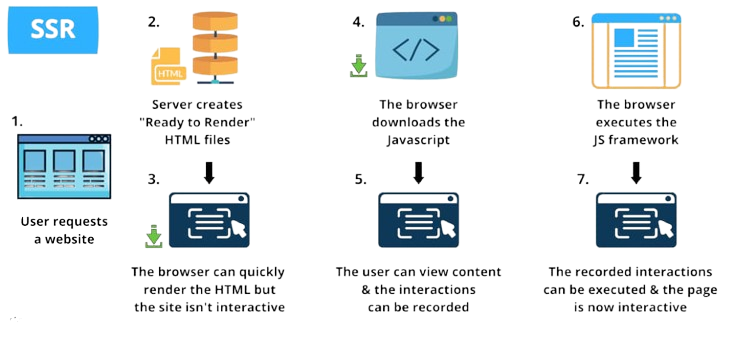
- Server-side rendering means rendering React components on the server before sending HTML to the browser. It improves SEO and initial page loading speed. SSR helps search engines index web pages more effectively.
- Frameworks like Next.js support server-side rendering in React. SSR improves performance for content-heavy applications.
- It enhances user experience on slower networks. However, SSR increases server complexity. It is widely used in modern React web applications.
50. What is client-side rendering?
Ans:
- Client-side rendering means rendering application content in the browser using JavaScript. React mainly uses client-side rendering for dynamic applications.
- The browser downloads JavaScript and builds the UI. CSR provides smooth user interactions after initial loading.
- It reduces server load and improves frontend flexibility. However, initial page loading may be slower compared to SSR. React applications commonly use CSR for interactive web experiences. It is suitable for modern single-page applications.
51. What is hydration in React?
Ans:
Hydration is the process of attaching React functionality to HTML generated on the server. It allows server-rendered pages to become fully interactive in the browser. React matches the server-rendered HTML with the Virtual DOM during hydration. This process improves performance and SEO in React applications. Hydration is commonly used with server-side rendering frameworks like Next.js. It ensures faster initial page loading while maintaining interactivity. Proper hydration improves user experience in modern web applications. It is an important concept in React performance optimization.
52. What is React Fiber?
Ans:
React Fiber is the internal rendering engine introduced in React to improve rendering performance. It allows React to pause, resume, and prioritize rendering tasks efficiently. Fiber improves responsiveness in large and complex applications. It supports features like concurrent rendering and better scheduling. React Fiber enhances smooth user interactions during heavy UI updates. Developers benefit from improved rendering efficiency and flexibility. It helps React manage updates incrementally instead of blocking the browser. Fiber is a major architectural improvement in modern React.
53. What is concurrent rendering in React?
Ans:
Concurrent rendering is a React feature that allows rendering tasks to be interrupted and prioritized. It improves application responsiveness during complex updates. React can work on multiple rendering tasks simultaneously without blocking the UI. Concurrent rendering helps maintain smooth user experiences in dynamic applications. It enables features like Suspense and transitions. Developers can create faster and more interactive applications using this feature. Concurrent rendering improves performance under heavy workloads. It is an advanced capability introduced in newer React versions.
54. What is useRef hook?
Ans:
The useRef hook is used to create mutable references in React functional components. It allows direct access to DOM elements without re-rendering the component. Developers commonly use useRef for focusing inputs and storing previous values. The reference value persists across renders. useRef improves performance by avoiding unnecessary state updates. It is useful for timers, animations, and DOM manipulations. Proper use of useRef simplifies interaction with browser elements. It is an important hook in React development.
55. What is forwardRef in React?
Ans:
- forwardRef is a React feature used to pass refs from parent components to child components. It allows parent components to access child DOM elements directly. forwardRef improves component reusability and flexibility.
- Developers commonly use it in reusable UI libraries and form components. It works well with functional components and hooks.
- This feature helps manage focus and animations efficiently. Proper use of forwardRef improves component integration. It is useful in advanced React component design.
56. What is useImperativeHandle hook?
Ans:
- The useImperativeHandle hook customizes the value exposed through refs in React. It works together with forwardRef.
- Developers use it to expose specific methods or properties to parent components. This hook improves encapsulation and control over component behavior. It helps avoid exposing unnecessary internal logic.
- useImperativeHandle is useful in reusable component libraries. It enhances flexibility in component communication. Understanding this hook is important for advanced React development.
57. What is error boundary in React?
Ans:
- Error Boundaries are React components used to catch JavaScript errors in child components. They prevent the entire application from crashing due to component errors.
- Error boundaries display fallback UI when errors occur. They improve application stability and user experience. Developers implement them using lifecycle methods in class components. Error boundaries are useful for handling unexpected runtime issues.
- They help isolate failures within specific parts of the UI. Proper error handling improves reliability in React applications
58. What is code splitting in React?
Ans:
Code splitting is a technique used to divide application code into smaller bundles. It improves loading performance by loading only required code. React supports code splitting using dynamic imports and React.lazy. This reduces initial bundle size significantly. Code splitting improves user experience, especially in large applications. Developers commonly apply it to routes and feature modules. It optimizes resource usage and loading speed. Proper implementation enhances scalability and application efficiency.
59. What is dynamic import in React?
Ans:
Dynamic import is a JavaScript feature used to load modules asynchronously. React uses it for lazy loading and code splitting. Dynamic imports improve application performance by reducing initial bundle size. They load components only when needed. Developers commonly combine dynamic imports with Suspense. This technique improves loading speed in large applications. Dynamic imports help optimize resource management. They are widely used in modern frontend development with React.
60. What is React testing?
Ans:
- React testing is the process of verifying React components and application functionality. Testing ensures applications work correctly and reliably. Developers use tools like Jest and React Testing Library for testing React applications.
- Testing includes unit testing, integration testing, and UI testing. Proper testing improves code quality and reduces bugs. It helps developers maintain stable applications during updates.
- Automated testing saves debugging time in large projects. React testing is essential for professional frontend development

Learn ReactJs Training with Advanced Concepts By Industry Experts
- Instructor-led Sessions
- Real-life Case Studies
- Assignments
61. What is Jest?
Ans:
Jest is a JavaScript testing framework commonly used with React applications. It is developed by meta platform and provides simple testing capabilities. Jest supports unit testing, mocking, and snapshot testing. It improves application reliability and debugging efficiency. Developers use Jest to automate testing processes. It works well with React Testing Library. Jest provides fast execution and detailed test reports. It is widely used in modern React development environments.
62. What is React Testing Library?
Ans:
React Testing Library is a tool used for testing React components from the user’s perspective. It focuses on testing application behavior instead of implementation details. This approach improves maintainability of test cases. Developers use it together with Jest for efficient testing. React Testing Library encourages best testing practices. It helps simulate user interactions like clicks and typing. Proper testing ensures reliable user experiences. It is widely adopted in professional React projects.
63. What is snapshot testing?
Ans:
Snapshot testing is a testing technique used to capture the rendered output of React components. Jest compares future outputs with saved snapshots. It helps detect unintended UI changes during development. Snapshot testing improves consistency in user interfaces. Developers use it for reusable UI components. It simplifies regression testing in React applications. However, snapshots should be maintained carefully to avoid unnecessary updates. Snapshot testing enhances frontend application stability.
64.What is React lifecycle?
Ans:
React lifecycle refers to different stages in a component’s existence. These stages include mounting, updating, and unmounting. Lifecycle methods allow developers to execute code during these phases. Class components use methods like componentDidMount and componentWillUnmount. Functional components achieve similar behavior using useEffect. Lifecycle management helps handle API calls, subscriptions, and cleanup tasks. Understanding lifecycle improves component behavior control. It is a fundamental concept in React development.
65.What is componentDidMount?
Ans:
componentDidMount is a lifecycle method in React class components. It executes after the component is rendered to the DOM. Developers commonly use it for API calls and initialization tasks. This method runs only once during component mounting. It helps load external data efficiently. componentDidMount improves separation of logic from rendering. Understanding this method is important for working with legacy React code. It is equivalent to useEffect with an empty dependency array in functional components..
66. What is componentDidUpdate?
Ans:
componentDidUpdate is a lifecycle method executed after a component updates. It runs when props or state values change. Developers use it for API calls and side effects after updates. Proper use prevents infinite rendering loops. This method helps synchronize UI with updated data. It improves control over component behavior after re-rendering. Understanding componentDidUpdate is useful for maintaining older React applications. Functional components achieve similar behavior using useEffect with dependencies.
67. What is componentWillUnmount?
Ans:
componentWillUnmount is a lifecycle method called before a component is removed from the DOM. Developers use it for cleanup tasks such as clearing timers and subscriptions. Proper cleanup prevents memory leaks in React applications. It improves application performance and stability. This method is important for managing resources effectively. Functional components use cleanup functions inside useEffect for similar behavior. Understanding unmounting helps developers manage component lifecycles properly. It is an essential part of React lifecycle management.
68. What is routing in React?
Ans:
Routing in React is the process of navigating between different pages or views in an application. React applications mainly use React Router for routing functionality. Routing enables single-page applications to change views without full page reloads. It improves user experience and performance. Developers define routes using components like Route and BrowserRouter. Dynamic routing supports URL parameters and nested routes. Proper routing structure improves application organization. Routing is essential for modern web applications.
69. What is BrowserRouter?
Ans:
BrowserRouter is a component provided by React Router for handling navigation in web applications. It uses the browser history API to manage routes. BrowserRouter enables clean and user-friendly URLs. It wraps the main application to provide routing functionality. Developers commonly use it in single-page applications. BrowserRouter improves navigation performance and user experience. It is one of the core components of React Router. Proper implementation ensures smooth application navigation.
70. What is Link component in React Router?
Ans:
The Link component is used for navigation between routes in React applications. It prevents full page reloads during navigation. Link improves application speed and user experience. Developers specify target routes using the “to” attribute. It works similarly to anchor tags but uses client-side routing. Link helps maintain SPA behavior efficiently. Proper use of Link ensures smooth navigation across pages. It is an essential feature in React Router applications.
71. What is useNavigate hook?
Ans:
The useNavigate hook is used for programmatic navigation in React Router. It allows developers to redirect users dynamically using JavaScript logic. Developers commonly use it after form submissions or authentication. useNavigate improves flexibility in navigation handling. It replaces older navigation methods in newer React Router versions. This hook supports forward and backward navigation as well. Proper use enhances user flow in applications. It is widely used in modern React routing systems.
72.What is API integration in React?
Ans:
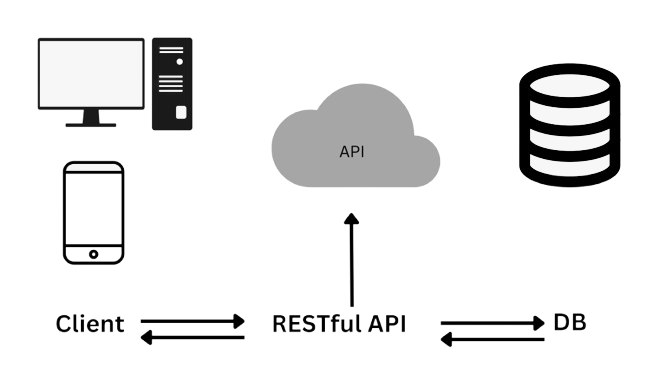
- API integration in React involves connecting applications with backend services to fetch or send data. Developers commonly use fetch or Axios for API calls. API integration enables dynamic and real-time application functionality.
- It helps applications communicate with servers efficiently. Proper API handling improves user experience and data accuracy. Developers manage loading states and error handling during API requests.
- API integration is essential in modern web development. React applications rely heavily on APIs for data-driven functionality.
73. What is Axios?
Ans:
Axios is a popular JavaScript library used for making HTTP requests in React applications. It simplifies API communication with cleaner syntax. Axios supports GET, POST, PUT, and DELETE requests. It provides automatic JSON data transformation and error handling. Developers prefer Axios for its simplicity and flexibility. It supports request interception and timeout configuration. Axios improves API integration efficiency in React applications. It is widely used in frontend development projects.
74. What is fetch API?
Ans:
Fetch API is a built-in JavaScript feature used for making network requests. React developers use it to communicate with backend services. Fetch supports promises for handling asynchronous operations. It allows sending and receiving JSON data efficiently. Developers use fetch for API integration without external libraries. Proper error handling is important when using fetch. It improves application interactivity with server communication. Fetch API is widely supported in modern browsers.
75. What is asynchronous programming in React?
Ans:
Asynchronous programming allows tasks to run without blocking the main application flow. React applications use asynchronous operations for API calls and timers. JavaScript promises and async-await simplify asynchronous handling. This improves application responsiveness and user experience. React developers manage asynchronous data using hooks like useEffect. Proper asynchronous handling prevents UI freezing and delays. It is important for real-time and dynamic applications. Understanding asynchronous programming improves frontend development skills.
76.What is promise in JavaScript?
Ans:
A Promise is an object representing the result of an asynchronous operation. It can be in pending, fulfilled, or rejected states. Promises simplify handling asynchronous tasks compared to callbacks. Developers use .then() and .catch() methods for handling results and errors. Promises improve code readability and maintainability. React applications use promises frequently for API calls. Async-await syntax is built on top of promises. Understanding promises is essential for modern JavaScript and React development.
77. What is async-await?
Ans:
- Async-await is a modern JavaScript syntax used for handling asynchronous operations. It simplifies promise-based code and improves readability.
- The async keyword defines asynchronous functions, while await pauses execution until the promise resolves. Async-await reduces callback nesting and complexity. React developers commonly use it for API calls inside useEffect.
- Proper error handling with try-catch improves reliability. Async-await makes asynchronous code cleaner and easier to maintain. It is widely used in modern frontend development.
78. What is CORS?
Ans:
CORS stands for Cross-Origin Resource Sharing and is a browser security feature. It controls communication between different domains. Browsers block unauthorized cross-origin requests for security reasons. Servers must allow CORS through specific headers. React applications often encounter CORS issues during API integration. Developers configure backend servers to handle CORS properly. Understanding CORS improves frontend-backend communication. It is an important web security concept in modern applications.
79. What is authentication in React?
Ans:
Authentication is the process of verifying user identity in React applications. Developers implement authentication using login forms, tokens, and APIs. Common methods include JWT and OAuth authentication. Authentication helps protect sensitive user data and application resources. React applications manage authentication state using Context API or Redux. Proper authentication improves application security and user trust. Developers also implement protected routes for restricted access. Authentication is essential for secure web applications.
80. What is authorization in React?
Ans:
Authorization determines what actions or resources a user can access after authentication. It controls permissions based on user roles and privileges. React applications implement authorization using protected routes and conditional rendering. Authorization improves security by restricting unauthorized actions. Developers commonly use role-based access control systems. Proper authorization protects sensitive application features and data. It works together with authentication for secure systems. Authorization is important in enterprise-level applications.
81. What is JWT?
Ans:
JWT stands for JSON Web Token and is used for secure authentication. It stores user information in an encoded token format. Servers generate JWT after successful login. Clients store and send the token with future requests. JWT enables stateless authentication in modern applications. It improves scalability and security. React applications commonly use JWT for user authentication systems. Understanding JWT is important for secure frontend-backend communication.
82. What is protected route in React?
Ans:
A protected route restricts access to certain pages based on authentication status. React applications use protected routes for dashboards and private content. Developers implement them using React Router and authentication logic. Unauthorized users are redirected to login pages. Protected routes improve application security and user management. They ensure only authenticated users access sensitive information. Proper route protection enhances overall application reliability. It is widely used in modern React applications.
83. What is environment variable in React?
Ans:
Environment variables store configuration values outside the application code. React applications use them for API URLs, keys, and environment settings. Developers define variables in .env files. Environment variables improve security and flexibility across environments. React requires variables to start with REACT_APP_ in Create React App projects. They simplify deployment and configuration management. Proper use prevents hardcoding sensitive values. Environment variables are important in professional development workflows.
84. What is ESLint?
Ans:
- ESLint is a tool used for identifying and fixing code quality issues in JavaScript and React applications. It helps maintain consistent coding standards.
- ESLint detects syntax errors and bad coding practices. Developers configure rules based on project requirements. It improves code readability and maintainability.
- ESLint integrates with editors and build tools easily. Proper linting reduces bugs during development. It is widely used in modern React projects.
85. What is Prettier?
Ans:
- Prettier is a code formatting tool used in React and JavaScript projects. It automatically formats code according to predefined rules.
- Prettier improves code readability and consistency among team members. Developers use it with ESLint for better code quality.
- Automatic formatting saves development time and reduces style conflicts. It supports multiple programming languages and frameworks. Proper formatting improves project maintainability. Prettier is commonly integrated into modern development workflows.
86. What is TypeScript in React?
Ans:
TypeScript is a superset of JavaScript that adds static typing features. React developers use TypeScript for better type safety and error detection. It improves code maintainability in large applications. TypeScript helps catch bugs during development instead of runtime. Developers define interfaces and types for components and props. It enhances editor support and code autocomplete. React with TypeScript improves scalability and collaboration. It is widely adopted in enterprise frontend development.
87. What is state management?
Ans:
State management refers to handling and controlling application data efficiently. React applications use state for dynamic UI updates. Small applications use local component state, while larger applications use Redux or Context API. Proper state management improves predictability and maintainability. It helps synchronize data across components effectively. Good state management enhances application performance and scalability. Developers must avoid unnecessary state duplication. It is a critical concept in React application architecture.
88. What is immutable data in React?
Ans:
Immutable data means data cannot be modified directly after creation. React encourages immutability for predictable state updates. Developers create new copies of objects instead of modifying existing ones. Immutable updates improve debugging and performance optimization. React efficiently detects changes with immutable data structures. This approach prevents accidental side effects in applications. Proper immutability practices improve application stability. It is an important principle in React and Redux development.
89. What is shallow comparison in React?
Ans:
Shallow comparison checks whether object references have changed instead of comparing deep values. React uses shallow comparison for performance optimization. It helps determine whether components should re-render. React.memo and PureComponent rely on shallow comparison. This technique improves rendering efficiency in large applications. Developers should understand object references for proper optimization. Shallow comparison reduces unnecessary DOM updates. It is an important concept in React performance tuning.
90. What is PureComponent in React?
Ans:
- PureComponent is a special type of React class component that performs shallow comparison of props and state. It prevents unnecessary re-rendering when values do not change.
- PureComponent improves performance in complex applications. Developers use it for optimization in class-based React projects. It automatically implements shouldComponentUpdate logic.
- Functional components achieve similar optimization using React.memo. Proper usage reduces rendering overhead. PureComponent is useful for understanding React optimization strategies.
91. What is React DevTools?
Ans:
React DevTools is a browser extension used for debugging React applications. It allows developers to inspect component hierarchy, props, and state values. React DevTools improves debugging efficiency during development. Developers can track component rendering and performance issues easily. It supports Chrome and Firefox browsers. The tool helps analyze application structure visually. Proper use improves troubleshooting and optimization. React DevTools is widely used by frontend developers.
92.What is dependency array in useEffect?
Ans:
The dependency array controls when the useEffect hook executes in React. It contains variables that trigger the effect when changed. An empty dependency array runs the effect only once after mounting. Omitting the array runs the effect after every render. Proper dependency management prevents unnecessary executions and bugs. Developers must include all required dependencies carefully. Correct usage improves application performance and reliability. Understanding dependency arrays is important for effective React hook usage.
93. What is cleanup function in useEffect?
Ans:
A cleanup function is used inside useEffect to remove side effects before component unmounting or re-running effects. Developers use cleanup functions for clearing timers and unsubscribing listeners. Cleanup prevents memory leaks in React applications. It improves application stability and performance. React automatically executes cleanup before the next effect runs. Proper cleanup management is important in asynchronous operations. It helps maintain efficient resource handling. Cleanup functions are essential in hook-based lifecycle management.
94. What is callback function in React?
Ans:
- A callback function is a function passed as an argument to another function or component. React applications commonly use callbacks for event handling and parent-child communication. Callback functions improve interactivity and dynamic behavior.
- Parents can pass callback functions through props to child components. This allows children to send data back to parents.
- Proper callback usage improves code organization. It helps manage component interactions efficiently. Callback functions are widely used in React development.
95. What is debouncing in React?
Ans:
Debouncing is a technique used to limit how often a function executes. React developers use debouncing in search inputs and API calls. It delays function execution until the user stops typing or triggering events. Debouncing improves performance and reduces unnecessary operations. It helps optimize network requests in dynamic applications. Developers commonly implement debouncing using setTimeout or utility libraries. Proper debouncing improves responsiveness and user experience. It is useful in performance-sensitive applications
96.What is throttling in React?
Ans:
Throttling is a technique that limits function execution to specific time intervals. It ensures functions run at controlled rates during repeated events. Developers use throttling for scroll, resize, and mouse movement events. Throttling improves application performance and responsiveness. It reduces unnecessary rendering and processing overhead. Proper throttling prevents browser performance issues. It is useful for handling frequent event triggers efficiently. Throttling is an important optimization technique in frontend development.
97. What is responsive design in React?
Ans:
Responsive design ensures React applications adapt to different screen sizes and devices. Developers use CSS media queries, Flexbox, and Grid for responsive layouts. Responsive applications improve user experience across mobiles, tablets, and desktops. React developers often use frameworks likeBootstrap orTailwind CSS for responsive styling. Proper responsive design increases accessibility and usability. It is important for modern web applications. Responsive interfaces improve customer satisfaction significantly. It is a key requirement in frontend development.
98. What is SPA in React?
Ans:
SPA stands for Single Page Application and is a web application that loads a single HTML page dynamically. React is widely used for building SPAs. SPAs update content without refreshing the entire page. This improves speed and user experience. React Router enables smooth navigation within SPAs. SPAs reduce server load and provide faster interactions. They are commonly used in modern web platforms. React makes SPA development efficient and scalable.
99. What are advantages of ReactJS?
Ans:
- ReactJS provides several advantages for frontend development. It improves performance using Virtual DOM technology. React supports reusable components, reducing code duplicatio
- It offers fast rendering and smooth user experiences. React has strong community support and a rich ecosystem. It supports both web and mobile development through React Native.
- React applications are scalable and maintainable for large projects. These advantages make React one of the most popular frontend technologies today.
100. Why should we use ReactJS?
Ans:
ReactJS should be used because it simplifies development of dynamic and interactive user interfaces. It provides component-based architecture for reusable code. React improves performance through efficient DOM updates. It supports modern frontend practices and strong ecosystem integration. Developers can build scalable applications with better maintainability. React has high industry demand and extensive community support. Many companies use React for enterprise applications and modern web platforms. It is an excellent choice for professional frontend development.

![25+Top React JS Interview Questions & Answers [UPDATED] Interview Questions](https://www.acte.in/wp-content/uploads/2020/06/4-img-acte.jpeg.webp)