LMS
LMS
Last updated on 23rd May 2026| 7475

IBM Node.js Interview Preparation For Beginners Helps Freshers Understand Core JavaScript Concepts, Backend Development, APIs, Asynchronous Programming, And Server-Side Application Development. Node.js Is A Popular Runtime Environment Used For Building Fast, Scalable, And Real-Time Applications. Beginners Preparing For IBM Node.js Interviews Should Focus On Topics Like Event Loop, Modules, Express.js, File Handling, NPM, Callbacks, Promises, And REST APIs. Interview Questions Often Include Coding Problems, Debugging Tasks, And Scenario-Based Discussions To Test Practical Knowledge. Candidates Should Practice Simple Programs, API Creation, Database Connectivity, And Error Handling Techniques. Strong Understanding Of JavaScript Fundamentals, Problem-Solving Skills, And Backend Logic Can Increase Confidence During Technical Interviews. Regular Practice With Real-Time Projects And Mock Interviews Helps Freshers Perform Better And Secure Opportunities In Top IT Companies Like IBM.
1. What Is Node.js?
Ans:
Node.js Is An Open Source JavaScript Runtime Environment Used To Execute JavaScript Outside The Browser. It Uses The V8 Engine Developed By Google Chrome For Fast Execution And Better Performance. Node.js Helps Developers Build Scalable And High Performance Applications Easily. It Is Widely Used For Backend Development, APIs, And Real Time Applications. The Event Driven Architecture Makes It Lightweight And Efficient For Multiple Requests. Node.js Supports Asynchronous Programming Using Callbacks, Promises, And Async Await. It Is Popular For Web Servers, Microservices, And Modern Web Application Development.
2. What Is NPM In Node.js?
Ans:
NPM Stands For Node Package Manager And Comes Installed With Node.js Automatically. It Is Used To Install, Update, And Manage External Packages And Libraries Efficiently. Developers Use NPM To Simplify Dependency Management In Applications. The Package.json File Stores Project Information And Dependency Details. NPM Helps Developers Reuse Existing Modules Instead Of Writing Code From Scratch. It Also Provides Scripts For Running Applications And Automation Tasks Easily. NPM Is One Of The Largest And Most Popular Software Registries In The World.
3. What Is The HTTP Module In Node.js?
Ans:
The HTTP Module Helps Developers Create Web Servers And Handle Client Requests Easily. It Is A Built In Module Available Directly In The Node.js Environment. Developers Use It To Manage Communication Between Clients And Servers Efficiently. HTTP Methods Like GET, POST, PUT, And DELETE Are Supported Properly. The Module Handles Incoming Requests And Sends Responses Quickly And Efficiently. It Is Commonly Used For Building APIs, Web Servers, And Backend Applications. The HTTP Module Provides High Performance Networking Capabilities In Node.js.
4. What Is Event Driven Architecture In Node.js?
Ans:
- Event Driven Architecture Means Program Execution Depends On Events And Actions Triggered During Runtime. Node.js Uses Events To Handle User Requests And System Operations Efficiently.
- The Event Loop Continuously Monitors And Executes Pending Tasks In The Queue. This Architecture Improves Performance And Scalability In Applications. The EventEmitter Class Is Commonly Used For Creating And Managing Custom Events.
- It Helps Build Real Time Applications Like Chat Systems And Notifications. Node.js Handles Multiple Connections Efficiently Using Non Blocking Operations.
5. What Is The Event Loop In Node.js?
Ans:
The Event Loop Is The Core Mechanism Responsible For Handling Asynchronous Operations In Node.js. It Continuously Monitors The Call Stack And Callback Queue During Execution. When The Call Stack Becomes Empty, Pending Tasks Are Executed From The Queue. This Allows Node.js To Perform Non Blocking Operations Efficiently And Quickly. The Event Loop Helps Applications Handle Thousands Of Requests Simultaneously. It Plays A Major Role In The High Performance Of Node.js Applications. Understanding The Event Loop Is Important For Backend And Server Side Development.
6. What Is A Callback Function?
Ans:
A Callback Function Is A Function Passed As An Argument To Another Function. It Is Executed After A Task Or Operation Completes Successfully. Callbacks Are Widely Used In Asynchronous Programming In Node.js Applications. They Help Handle File Operations, Database Queries, And API Requests Efficiently. Excessive Nested Callbacks Can Create Callback Hell And Reduce Readability. Promises And Async Await Are Better Alternatives For Managing Complex Tasks. Callback Functions Play An Important Role In Event Driven Applications.
7. What Are Promises In Node.js?
Ans:
Promises Are Objects That Represent The Result Of An Asynchronous Operation In JavaScript. A Promise Can Be In Pending, Fulfilled, Or Rejected State During Execution. Promises Improve Code Readability Compared To Deeply Nested Callbacks. The Then Method Handles Successful Operations And Returned Values Properly. The Catch Method Is Used To Handle Errors And Exceptions Gracefully. Promises Help Manage Multiple Asynchronous Tasks More Efficiently In Applications. They Are Commonly Used In APIs, Databases, And Network Requests.
8. What Is Async Await In Node.js?
Ans:
Async Await Is A Modern Syntax Used For Handling Asynchronous Operations In JavaScript. The Async Keyword Declares That A Function Will Perform Async Tasks. The Await Keyword Waits For Promise Completion Before Continuing Further Execution. It Makes Code Look Similar To Synchronous Programming And Improves Readability. Async Await Simplifies Error Handling Compared To Traditional Callback Methods. Try Catch Blocks Are Commonly Used To Handle Errors In Async Functions. It Is Widely Preferred In Modern Node.js Application Development.
9. What Is Middleware In Node.js?
Ans:
Middleware Is A Function That Executes Between Request And Response Cycles In Applications. It Is Commonly Used In Frameworks Like Express.js For Request Processing. Middleware Can Modify Requests, Responses, Or Execute Additional Application Logic Efficiently. Examples Include Authentication, Logging, Validation, And Error Handling Middleware. The Next Function Passes Control To The Next Middleware In The Sequence. Middleware Helps Organize Application Logic In A Clean And Structured Way. It Improves Security, Performance, And Maintainability In Backend Applications.
10. What Is Express.js?
Ans:
xpress.js Is A Popular And Lightweight Web Framework Built On Top Of Node.js. It Simplifies Backend Development By Providing Useful Features And Tools For Developers. Express.js Is Widely Used To Build APIs And Web Applications Quickly. It Supports Middleware, Routing, And Request Handling Efficiently In Applications. Express.js Reduces Boilerplate Code In Server Side Development Projects. It Is Flexible, Easy To Learn, And Suitable For Beginners And Professionals. Many Modern Applications Use Express.js For Backend And API Services.
11. What Is Routing In Node.js?
Ans:
Routing Refers To Defining Application Endpoints And Handling Client Requests Properly. Routes Decide How The Server Responds To Different URLs And HTTP Methods. Express.js Provides Methods Like GET, POST, PUT, And DELETE For Routing. Each Route Is Associated With A Specific URL Path And Function. Routing Helps Organize APIs And Application Navigation More Efficiently. Dynamic Routing Supports URL Parameters And Flexible Data Handling In Applications. Proper Routing Improves Application Structure, Readability, And User Experience.
12. What Is REST API?
Ans:
- REST API Is An Architectural Style Used For Communication Between Applications Over The Internet. It Uses HTTP Methods Like GET, POST, PUT, And DELETE For Operations.
- REST APIs Allow Different Applications To Exchange Data Efficiently And Securely. JSON Format Is Commonly Used For Sending And Receiving Information Between Systems. REST APIs Are Stateless And Improve Scalability In Web Applications.
- Node.js And Express.js Are Commonly Used Technologies For Building REST APIs. They Are Widely Used In Web, Mobile, And Cloud Based Applications.
13. What Is JSON In Node.js?
Ans:
- JSON Stands For JavaScript Object Notation And Is Used For Structured Data Storage. It Is Lightweight, Human Readable, And Easy For Machines To Process Efficiently.
- Node.js Uses JSON Frequently For APIs And Configuration Files In Applications. Data Can Be Converted Using JSON.stringify And JSON.parse Methods Easily.
- JSON Helps Exchange Information Between Client And Server Efficiently Over Networks. Most REST APIs Use JSON As The Standard Data Communication Format. It Is Faster, Simpler, And More Flexible Than XML In Many Cases.
14. What Is File System Module In Node.js?
Ans:
The File System Module Allows Developers To Work With Files And Directories Easily. It Provides Methods For Reading, Writing, Updating, And Deleting Files Efficiently. The Fs Module Supports Both Synchronous And Asynchronous File Operations. Developers Use It For Managing Logs, Data Files, And Application Resources. Streams Can Be Combined With File Operations For Better Performance And Speed. Proper Error Handling Is Important During File Processing And Data Management Tasks. The File System Module Is Built Into Node.js By Default.
15. Write A Program To Create A Simple HTTP Server In Node.js
Ans:
This Program Creates A Simple HTTP Server Using The Built In HTTP Module In Node.js. The CreateServer Method Is Used To Handle Client Requests And Send Responses Back To The Browser. The Res.write Method Sends Data To The Client While Res.end Ends The Response Process. The Listen Method Starts The Server On Port 3000 Successfully. When Users Access The Server Through The Browser, The Welcome Message Is Displayed Properly. This Example Helps Beginners Understand Basic Server Creation In Node.js Applications.
- const http = require(“http”);
- const server = http.createServer((req, res) => {
- res.write(“Welcome To Node.js Server”);
- res.end();
- });
- server.listen(3000, () => {
- console.log(“Server Running On Port 3000”);
- });
16. What Is Stream In Node.js?
Ans:
Streams Are Objects Used To Handle Continuous Data Processing Efficiently In Applications. They Process Data Piece By Piece Instead Of Loading Everything Into Memory. Streams Improve Performance And Reduce Memory Usage Significantly In Large Applications. Readable, Writable, Duplex, And Transform Are Common Types Of Streams. Streams Are Commonly Used In File Handling, Video Streaming, And Data Transfer. Pipes Connect Multiple Streams Together For Efficient Data Processing Operations. Node.js Streams Support High Speed And Real Time Data Handling.
17. What Is Package.json File?
Ans:
Package.json Is The Main Configuration File Used In Node.js Projects And Applications. It Stores Project Name, Version, Scripts, Dependencies, And Metadata Information. NPM Uses This File To Manage Packages And Install Required Dependencies Automatically. Developers Can Define Start, Build, And Test Commands Inside Package.json Easily. The File Helps Share And Maintain Projects Across Development Teams Efficiently. Semantic Versioning Is Commonly Used For Dependency Management In Applications. Package.json Is Usually Created Using The NPM Init Command.
18. What Is Module In Node.js?
Ans:
A Module Is A Reusable Block Of Code Used In Node.js Applications. Modules Help Organize Code Into Smaller, Structured, And Manageable Components Efficiently. Built In Modules Include HTTP, FS, PATH, And EVENTS Modules In Node.js. Developers Can Create Custom Modules Using Export And Require Statements Easily. Modules Improve Code Reusability, Maintainability, And Application Scalability Significantly. They Help Developers Follow Modular Programming Principles In Large Projects. Node.js Uses The CommonJS Module System By Default.
19. What Is Require Function In Node.js?
Ans:
The Require Function Is Used To Import Modules Into Node.js Applications Easily. It Loads Built In, External, And Custom Modules Dynamically During Execution. Require Helps Reuse Existing Code Across Multiple Files And Components Efficiently. Node.js Caches Loaded Modules To Improve Application Performance And Speed. The Function Simplifies Dependency Management In Large Scale Applications Significantly. Require Is A Core Feature Of The CommonJS Module System In Node.js. It Is Widely Used In Traditional Node.js Backend Development Projects.
20. What Is The Difference Between Synchronous And Asynchronous Programming?
Ans:
| Feature | Synchronous Programming | Asynchronous Programming |
|---|---|---|
| Execution Style | Tasks Execute One After Another In Sequence | Multiple Tasks Can Run Without Waiting |
| Blocking Behavior | Blocks Execution Until Task Completes | Does Not Block Other Operations |
| Performance | Slower For Large Applications | Faster And More Efficient |
| Waiting Time | Program Waits For Current Task To Finish | Program Continues While Task Runs In Background |

21. What Is REPL In Node.js?
Ans:
REPL Stands For Read Eval Print Loop And Is An Interactive Environment In Node.js. It Allows Developers To Execute JavaScript Code Directly From The Command Line. REPL Reads Input, Evaluates The Code, Prints The Result, And Repeats The Process Continuously. It Is Commonly Used For Testing Small Code Snippets Quickly And Easily. Developers Use REPL For Debugging And Learning JavaScript Concepts Efficiently. It Supports Variables, Functions, And Expressions During Runtime Execution. REPL Improves Productivity During Development And Testing Activities
22. What Is Global Object In Node.js?
Ans:
The Global Object Contains Variables And Functions Available Everywhere In Node.js Applications. Developers Can Access Global Features Without Importing Any Additional Modules. Examples Include Console, Process, Buffer, And SetTimeout Functions In Node.js. The Global Object Simplifies Access To Common Utilities And System Features. It Helps Developers Manage Application Level Functionalities Efficiently Across Different Files. Unlike Browsers, Node.js Uses Global Instead Of Window Object. Understanding Global Objects Is Important For Backend Development And Debugging.
23. What Is Process Object In Node.js?
Ans:
The Process Object Provides Information About The Current Node.js Application Process. It Helps Developers Access Environment Variables, Command Line Arguments, And Process Details. The Process Object Supports Event Handling For Application Lifecycle Management. Developers Use It To Monitor Memory Usage And Application Performance Efficiently. It Also Allows Applications To Exit Gracefully Using Exit Methods. The Process Object Is A Global Feature Available In Node.js By Default. It Plays An Important Role In System Level Operations.
24. What Is Cluster Module In Node.js?
Ans:
The Cluster Module Helps Node.js Applications Utilize Multiple CPU Cores Efficiently. It Creates Child Processes That Share The Same Server Port Simultaneously. Clustering Improves Application Performance And Scalability For Large Systems. It Allows Applications To Handle More Client Requests Concurrently Without Blocking. Each Worker Process Runs Independently For Better Reliability And Stability. Developers Commonly Use Clustering In Production Level Backend Applications. The Cluster Module Enhances High Availability And Resource Utilization.
25. What Is Child Process In Node.js?
Ans:
- The Child Process Module Allows Node.js Applications To Execute External Commands And Scripts. It Helps Developers Run System Commands And Perform Heavy Operations Separately.
- Child Processes Improve Performance By Offloading CPU Intensive Tasks Efficiently. Methods Like Exec, Spawn, And Fork Are Commonly Used In Applications. Each Child Process Runs Independently Without Affecting The Main Event Loop.
- Developers Use Child Processes For Automation And Background Task Execution. It Enhances Scalability And Multitasking In Node.js Applications.
26. What Is Error Handling In Node.js?
Ans:
Error Handling Refers To Managing Runtime Errors And Unexpected Situations In Applications. Node.js Provides Mechanisms Like Try Catch Blocks And Error Objects For Handling Issues. Proper Error Handling Prevents Application Crashes And Improves Reliability Significantly. Developers Commonly Use Callbacks, Promises, And Async Await For Error Management. Centralized Error Handling Middleware Is Popular In Express.js Applications. Logging Errors Helps Identify Problems And Improve Application Stability Efficiently. Effective Error Handling Improves User Experience And Application Performance.
27. What Is CORS In Node.js?
Ans:
CORS Stands For Cross Origin Resource Sharing And Controls Resource Access Policies. It Allows Servers To Define Which Domains Can Access Application Resources Securely. Browsers Restrict Cross Origin Requests By Default For Security Reasons. Node.js Applications Commonly Use CORS Middleware In Express.js Projects. Proper CORS Configuration Helps Prevent Unauthorized Access And Security Risks. It Is Widely Used In API Development And Frontend Backend Communication. CORS Ensures Safe Interaction Between Different Domains And Applications.
28. Write A Program To Read A File In Node.js
Ans:
This Program Uses The File System Module To Read Data From A File Efficiently. The ReadFile Method Reads The Content Of The File Asynchronously Without Blocking Execution. If An Error Occurs During Reading, The Error Message Is Displayed Properly. Otherwise, The File Content Is Printed In The Console Successfully. The UTF8 Encoding Converts File Data Into Readable Text Format. This Example Demonstrates File Handling Operations In Node.js Applications Clearly. File Reading Is Commonly Used In Backend And Data Processing Applications
- const fs = require(“fs”);
- fs.readFile(“sample.txt”, “utf8”, (err, data) => {
- if (err) {
- console.log(“Error Reading File”);
- } else {
- console.log(data);
- }
- });
29. What Is Authentication In Node.js?
Ans:
Authentication Is The Process Of Verifying The Identity Of A User Or System. Node.js Applications Use Authentication To Protect Sensitive Data And Resources. Common Authentication Methods Include JWT, OAuth, And Session Based Authentication. Users Usually Provide Credentials Like Username And Password For Verification. Authentication Ensures Only Authorized Users Access The Application Securely. Middleware Is Often Used To Validate User Identity In Applications. Strong Authentication Improves Security And Prevents Unauthorized Access.
30. What Is Authorization In Node.js?
Ans:
Authorization Determines What Actions And Resources A User Can Access In Applications. It Occurs After Successful User Authentication In Secure Systems. Node.js Applications Use Roles And Permissions To Control User Access Efficiently. Authorization Helps Protect Sensitive Features And Application Data Securely. Middleware Is Commonly Used To Verify User Permissions During Requests. Proper Authorization Prevents Unauthorized Operations And Improves Application Security. It Plays A Major Role In Enterprise And Web Based Applications.
31. What Is Session In Node.js?
Ans:
A Session Stores User Information Across Multiple Requests In Web Applications. Sessions Help Maintain User Login State During Application Usage Efficiently. Node.js Applications Commonly Use Express Session Middleware For Session Management. Session Data Is Usually Stored On The Server For Better Security. Cookies Are Often Used To Store Session Identifiers In Browsers. Sessions Improve User Experience By Preserving User Activity And Preferences. Proper Session Handling Enhances Security And Authentication Management.
32. What Is Cookie In Node.js?
Ans:
- A Cookie Is A Small Piece Of Data Stored In The User Browser. Cookies Help Applications Remember User Preferences And Login Information Efficiently.
- Node.js Applications Use Cookies For Authentication And Session Tracking Purposes. Cookies Are Sent Between Client And Server During HTTP Requests Automatically.
- Developers Use Cookie Parser Middleware To Manage Cookies In Express.js Applications. Secure Cookies Protect Sensitive Information From Unauthorized Access And Attacks. Cookies Improve Personalization And User Experience In Applications.
33. What Is Express Router In Node.js?
Ans:
- Express Router Is A Mini Middleware And Routing System In Express.js Applications. It Helps Organize Routes Into Separate Files For Better Code Structure.
- Developers Use Routers To Manage Large Applications More Efficiently. Router Methods Support GET, POST, PUT, DELETE, And Other HTTP Requests.
- Middleware Can Also Be Applied Directly To Specific Routers Easily. Express Router Improves Readability, Scalability, And Maintainability Of Applications. It Is Commonly Used In REST API Development Projects.
34. What Is Template Engine In Node.js?
Ans:
A Template Engine Helps Generate Dynamic HTML Pages In Web Applications Efficiently. It Combines HTML Templates With Data To Produce User Friendly Output. Popular Template Engines Include EJS, Pug, And Handlebars In Node.js. Template Engines Simplify Frontend Rendering In Server Side Applications Significantly. They Help Separate Application Logic From User Interface Components Clearly. Developers Use Template Engines For Dynamic Websites And Dashboard Applications. They Improve Productivity And Code Maintainability In Projects.
35. What Is EJS In Node.js?
Ans:
EJS Stands For Embedded JavaScript And Is A Popular Template Engine. It Allows Developers To Embed JavaScript Code Directly Inside HTML Templates. EJS Helps Generate Dynamic Web Pages Based On Server Side Data Efficiently. It Supports Loops, Conditions, And Reusable Layout Components Easily. EJS Is Simple, Flexible, And Beginner Friendly For Web Development Projects. Developers Commonly Use EJS With Express.js Applications For Rendering Views. It Improves Dynamic Content Management In Node.js Applications.
36. What Is MongoDB In Node.js?
Ans:
MongoDB Is A NoSQL Database Commonly Used With Node.js Applications Efficiently. It Stores Data In Flexible JSON Like Documents Instead Of Tables. MongoDB Is Scalable, Fast, And Suitable For Modern Web Applications. Node.js Connects With MongoDB Using Drivers Or ODM Libraries Like Mongoose. It Supports High Performance Data Storage And Retrieval Operations Efficiently. MongoDB Is Widely Used In APIs, Real Time Apps, And Cloud Systems. It Simplifies Database Management For Developers And Enterprises.
37. What Is Mongoose In Node.js?
Ans:
Mongoose Is An Object Data Modeling Library Used With MongoDB In Node.js. It Provides Schema Based Data Modeling For Better Structure And Validation. Developers Use Mongoose To Simplify Database Operations And Query Handling Efficiently. It Supports Validation, Middleware, Relationships, And Population Features Easily. Mongoose Improves Code Organization And Database Interaction In Applications. It Helps Developers Manage MongoDB Collections More Effectively And Securely. Mongoose Is Widely Used In MERN Stack Development Projects.
38. What Is CRUD Operation In Node.js?
Ans:
CRUD Stands For Create, Read, Update, And Delete Database Operations. These Operations Are Used To Manage Data In Applications Efficiently And Securely. Node.js Applications Perform CRUD Operations Using Databases Like MongoDB Or MySQL. REST APIs Often Use CRUD Functionalities For Data Management Processes. Developers Use GET, POST, PUT, And DELETE Methods For CRUD Actions. CRUD Operations Form The Foundation Of Most Web And Enterprise Applications. Proper CRUD Implementation Improves Data Management And User Experience.
39. What Is API In Node.js?
Ans:
API Stands For Application Programming Interface And Enables System Communication Efficiently. APIs Allow Different Applications To Exchange Data And Functionalities Securely. Node.js Is Commonly Used To Build Fast And Scalable APIs For Applications. APIs Usually Use JSON Format For Sending And Receiving Data Efficiently. REST And GraphQL Are Popular API Architectures Used In Modern Applications. APIs Simplify Integration Between Frontend, Backend, And Third Party Services. They Play A Vital Role In Web And Mobile Development.
40. What Is WebSocket In Node.js?
Ans:
WebSocket Is A Communication Protocol Used For Real Time Data Transfer Efficiently. It Creates A Persistent Connection Between Client And Server Applications. WebSockets Support Two Way Communication Without Repeated HTTP Requests Continuously. Node.js Commonly Uses Socket.IO Library For WebSocket Implementation Easily. Real Time Applications Like Chats And Gaming Systems Use WebSockets Frequently. WebSockets Improve Performance And Reduce Network Communication Delays Significantly. They Are Essential For Interactive And Live Updating Applications

Enroll in NodeJs Certification Training and UPGRADE Your Skills
Weekday / Weekend BatchesSee Batch Details41.Write A Program To Create A Basic API Using Express.js
Ans:
This Program Creates A Basic API Using The Express.js Framework In Node.js. The Express Package Simplifies Backend Development And API Creation Processes Efficiently. The Get Method Defines A Route For The Home URL Path Properly. When Users Access The Root URL, The API Sends A Welcome Message Successfully. The Listen Method Starts The Express Server On Port 3000 Correctly. Express.js Reduces Boilerplate Code And Improves Application Development Speed. This Example Helps Beginners Understand Basic Routing In Node.js Applications.
- const express = require(“express”);
- const app = express();
- app.get(“/”, (req, res) => {
- res.send(“Welcome To Express API”);
- });
- app.listen(3000, () => {
- console.log(“Server Running On Port 3000”);
- });
42. What Is DNS Module In Node.js?
Ans:
The DNS Module Provides Functions For Performing Domain Name System Operations Efficiently. It Helps Convert Domain Names Into IP Addresses During Network Communication. Node.js Applications Use DNS Module For Network Related Functionalities Frequently. The Module Supports Lookup, Resolve, And Reverse DNS Query Operations Easily. Developers Use It To Manage Server Connectivity And Internet Communication Processes. DNS Module Is Built Into Node.js And Requires No Additional Installation. It Improves Networking Capabilities In Backend And Cloud Applications.
43. What Is Path Module In Node.js?
Ans:
- The Path Module Helps Developers Work With File And Directory Paths Efficiently. It Provides Utilities For Joining, Resolving, And Normalizing File Paths Easily.
- Node.js Applications Use The Path Module For Cross Platform File Handling Operations. The Module Ensures Correct File Path Formatting Across Different Operating Systems.
- Developers Use Methods Like Join, Resolve, And Basename Frequently In Applications. Path Module Simplifies File System Operations And Directory Management Processes. It Is A Built In Module Available In Node.js Environment.
44. What Is OS Module In Node.js?
Ans:
The OS Module Provides Information About The Operating System Running The Application. It Helps Developers Access System Details Like CPU, Memory, And Platform Information. Node.js Applications Use The OS Module For System Monitoring And Diagnostics. The Module Supports Functions Related To User Information And Network Interfaces Efficiently. Developers Use It To Build Platform Independent Applications More Effectively. OS Module Is Built Into Node.js And Requires No External Packages. It Improves System Level Programming And Resource Management.
45. What Is URL Module In Node.js?
Ans:
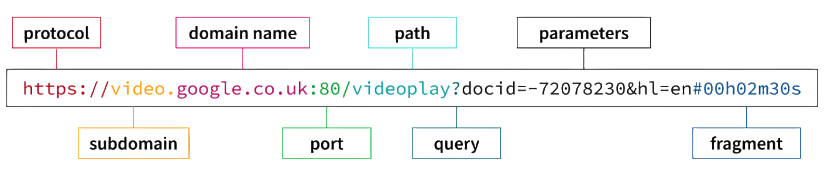
The URL Module Helps Parse And Manage URLs In Node.js Applications Efficiently. It Allows Developers To Extract Hostname, Query Parameters, And Protocol Information Easily. Node.js Applications Use URL Module For Web Routing And API Handling Frequently. The Module Simplifies URL Manipulation And Data Extraction Processes Significantly. Developers Commonly Use It In Web Servers And Networking Applications. URL Module Is Built Into Node.js And Supports Modern URL Standards. It Improves Request Handling And Web Application Development.
46. What Is Crypto Module In Node.js?
Ans:
The Crypto Module Provides Cryptographic Functionalities For Secure Application Development Efficiently. It Helps Developers Encrypt Data And Generate Secure Hash Values Easily. Node.js Applications Use Crypto Module For Authentication And Data Protection Processes. The Module Supports Algorithms Like SHA, AES, And RSA For Security Operations. Developers Use It To Protect Passwords And Sensitive User Information Securely. Crypto Module Is Built Into Node.js And Requires No External Installation. It Improves Security In APIs, Web Applications, And Enterprise Systems.
47. What Is Bcrypt In Node.js?
Ans:
Bcrypt Is A Library Used For Password Hashing In Node.js Applications Securely. It Converts Plain Text Passwords Into Encrypted Hash Values For Protection. Bcrypt Helps Prevent Unauthorized Access And Password Theft In Applications. Developers Use Salt Rounds To Improve Password Security And Complexity. Bcrypt Is Commonly Used In Authentication Systems And Login Functionalities. It Enhances User Account Protection In Modern Web Applications Efficiently. Secure Password Storage Is Important For Application Security And Reliability.
48. What Is Environment Variable In Node.js?
Ans:
Environment Variables Store Configuration Information Outside The Application Source Code Securely. They Help Manage Sensitive Data Like API Keys And Database Credentials Safely. Node.js Applications Access Environment Variables Using The Process Object Easily. Developers Commonly Use Dotenv Package For Managing Environment Variables Efficiently. Environment Variables Improve Security And Flexibility In Different Deployment Environments. They Help Separate Application Configuration From Business Logic Properly. Using Environment Variables Is A Best Practice In Modern Development.
49. What Is Dotenv Package In Node.js?
Ans:
- Dotenv Is A Package Used To Load Environment Variables From A File Easily. It Reads Configuration Data From A Dotenv File Into The Application Process. Developers Use Dotenv To Store Sensitive Information Securely Outside The Codebase.
- It Simplifies Configuration Management Across Development And Production Environments Efficiently. Dotenv Helps Improve Security And Maintainability In Node.js Applications.
- It Is Commonly Used In API Development And Cloud Based Projects. The Package Is Lightweight And Easy To Configure In Applications.
50. What Is MVC Architecture In Node.js?
Ans:
MVC Stands For Model View Controller And Is A Design Pattern In Development. The Model Handles Data And Database Related Functionalities In Applications Efficiently. The View Represents User Interface Components And Display Information Properly. The Controller Manages Business Logic And Handles User Requests And Responses. MVC Architecture Improves Code Organization And Application Maintainability Significantly. Developers Use MVC Pattern In Large Scale Web And Enterprise Applications Frequently. It Helps Separate Concerns And Simplify Project Management Processes.
51. What Is Dependency Injection In Node.js?
Ans:
Dependency Injection Is A Design Pattern Used To Manage Dependencies Efficiently In Applications. It Allows Developers To Inject Required Objects Into Components Dynamically. This Pattern Improves Code Reusability And Simplifies Unit Testing Processes Significantly. Dependency Injection Reduces Tight Coupling Between Different Application Modules And Components. Developers Use It To Build Scalable And Maintainable Backend Systems Effectively. It Improves Flexibility And Supports Better Software Architecture Practices. Dependency Injection Is Commonly Used In Enterprise Level Node.js Applications.
52. What Is Helmet In Node.js?
Ans:
Helmet Is A Middleware Library Used To Improve Security In Express.js Applications. It Sets Various HTTP Headers To Protect Applications From Common Vulnerabilities. Helmet Helps Prevent Attacks Like Cross Site Scripting And Clickjacking Efficiently. Developers Use Helmet To Enhance Web Application Security Without Complex Configuration. The Middleware Is Lightweight And Easy To Integrate Into Applications Quickly. Helmet Is Widely Recommended For Secure API And Backend Development Projects. It Improves Overall Application Protection And User Data Safety.
53. What Is Rate Limiting In Node.js?
Ans:
Rate Limiting Restricts The Number Of Requests A User Can Make In Applications. It Helps Protect APIs From Abuse, Spam, And Denial Of Service Attacks Efficiently. Node.js Applications Use Middleware To Implement Rate Limiting Functionalities Easily. Developers Configure Limits Based On Time Duration And User Requests Properly. Rate Limiting Improves Server Stability And Prevents Resource Overloading Issues. It Is Commonly Used In Authentication Systems And Public APIs Frequently. Proper Rate Limiting Enhances Application Security And Performance Significantly.
54. What Is Logging In Node.js?
Ans:
Logging Refers To Recording Application Events, Errors, And Activities During Runtime Execution. Node.js Applications Use Logging For Debugging And Monitoring System Performance Efficiently. Developers Commonly Use Libraries Like Winston And Morgan For Logging Functionalities. Logs Help Identify Errors And Improve Application Reliability And Stability Quickly. Different Log Levels Include Info, Warning, Error, And Debug Messages. Logging Is Essential For Production Applications And Server Maintenance Activities. Proper Logging Improves Troubleshooting And Performance Analysis Processes.
55. What Is Morgan Middleware In Node.js?
Ans:
Morgan Is A Middleware Used For Logging HTTP Requests In Express.js Applications Efficiently. It Records Request Information Like Method, URL, Status, And Response Time Properly. Developers Use Morgan To Monitor Application Traffic And Debug Issues Easily. The Middleware Supports Different Logging Formats Based On Project Requirements Flexibly. Morgan Improves Application Monitoring And Request Tracking During Development And Production. It Is Lightweight And Easy To Configure In Express.js Applications Quickly. Proper Logging Helps Maintain Secure And Stable Backend Systems.
56. What Is Winston In Node.js?
Ans:
Winston Is A Popular Logging Library Used In Node.js Applications Efficiently. It Supports Multiple Logging Levels And Different Output Storage Options Flexibly. Developers Use Winston To Store Logs In Files, Databases, Or Consoles Easily. Winston Improves Application Monitoring, Error Tracking, And Debugging Processes Significantly. It Supports Custom Log Formats And Transport Configurations For Better Flexibility. The Library Is Widely Used In Enterprise Level Backend Development Projects Frequently. Proper Logging With Winston Enhances Application Reliability And Maintenance.
57. What Is PM2 In Node.js?
Ans:
PM2 Is A Process Manager Used To Run And Monitor Node.js Applications Efficiently. It Helps Keep Applications Alive Even After Unexpected Crashes Or Failures Occur. PM2 Supports Load Balancing And Clustering For Better Performance And Scalability. Developers Use PM2 To Monitor CPU Usage And Application Logs Easily. It Simplifies Deployment And Production Management Of Backend Applications Significantly. PM2 Provides Features Like Auto Restart And Zero Downtime Reloads Efficiently. It Is Widely Used In Production Environments For Node.js Applications.
58. What Is Nodemon In Node.js?
Ans:
- Nodemon Is A Development Tool Used To Restart Node.js Applications Automatically. It Monitors File Changes And Refreshes The Server During Development Efficiently.
- Developers Use Nodemon To Save Time And Improve Productivity While Coding Applications. It Eliminates The Need To Restart Servers Manually After Every Code Change. Nodemon Supports Configuration Options And Different File Extensions Flexibly.
- It Is Commonly Used In Backend Development And API Testing Processes Frequently. Nodemon Simplifies The Development Workflow In Node.js Projects.
59. What Is Thread Pool In Node.js?
Ans:
The Thread Pool Is A Collection Of Worker Threads Used By Node.js Internally. It Handles Expensive Operations Like File Handling And Cryptographic Tasks Efficiently. Node.js Uses The Libuv Library To Manage Thread Pool Operations Properly. The Thread Pool Prevents Blocking Of The Main Event Loop During Execution. Developers Can Configure Thread Pool Size Based On Application Requirements Easily. It Improves Performance For CPU Intensive And Asynchronous Operations Significantly. Understanding Thread Pooling Helps Optimize Backend Application Performance.
60. What Is The Difference Between Node.js And JavaScript?
Ans:
| Feature | Node.js | JavaScript |
|---|---|---|
| Definition | Node.js Is A Runtime Environment | JavaScript Is A Programming Language |
| Execution | Runs Outside The Browser | Mainly Runs Inside The Browser |
| Purpose | Used For Backend Development | Used For Frontend Development |
| Purpose | Used For Backend Development | Used For Frontend Development |

Learn NodeJs Certification Training with Advanced Concepts By Industry Experts
- Instructor-led Sessions
- Real-life Case Studies
- Assignments
61. What Is Non Blocking I O In Node.js?
Ans:
Non Blocking Input Output Allows Operations To Run Without Stopping Other Tasks. Node.js Uses Non Blocking I O To Improve Performance And Application Responsiveness Efficiently. Operations Like File Reading And Database Queries Execute In The Background. The Event Loop Continues Handling Other Requests While Tasks Are Processing. Non Blocking Architecture Helps Applications Manage Thousands Of Concurrent Connections Easily. It Improves Scalability And Resource Utilization In Backend Development Projects. This Feature Makes Node.js Suitable For Real Time Applications.
62. What Is Blocking I O In Node.js?
Ans:
Blocking Input Output Stops Program Execution Until The Current Task Completes Fully. The Application Waits For Operations Like File Reading Before Continuing Further Tasks. Blocking I O Can Reduce Performance In Applications Handling Multiple Requests Simultaneously. Node.js Generally Avoids Blocking Operations To Maintain High Scalability And Speed. Developers Use Blocking Methods Only When Simplicity Is More Important Than Performance. Excessive Blocking Operations Can Slow Down Backend And Real Time Applications. Understanding Blocking I O Helps Optimize Application Efficiency Properly.
63. What Is EventEmitter In Node.js?
Ans:
- EventEmitter Is A Core Class Used To Create And Handle Events In Node.js. It Allows Applications To Trigger And Listen For Custom Events Efficiently. Developers Use Methods Like Emit And On For Event Management Properly
- EventEmitter Supports Event Driven Programming In Real Time Applications Effectively. It Helps Build Features Like Notifications, Chats, And System Alerts Easily.
- EventEmitter Is Available Through The Events Module In Node.js Environment. It Improves Flexibility And Communication Between Application Components.
64. Write A Program To Use Callback Function In Node.js
Ans:
This Program Demonstrates The Use Of Callback Functions In Node.js Applications Clearly. The DisplayMessage Function Accepts A Name And Another Function As Parameters. After Displaying The Greeting Message, The Callback Function Is Executed Successfully. Callback Functions Are Important For Asynchronous Programming In Node.js Development. They Help Execute Tasks After Completing Previous Operations Properly And Efficiently. This Example Shows How Functions Can Be Passed As Arguments In JavaScript. Callback Concepts Are Widely Used In APIs, File Handling, And Database Operations.
- function displayMessage(name, callback) {
- console.log(“Hello ” + name);
- callback();
- }
- function done() {
- console.log(“Callback Function Executed”);
- }
- displayMessage(“IBM Candidate”, done);
65. What Is Unit Testing In Node.js?
Ans:
Unit Testing Verifies Individual Components Or Functions In An Application Independently. It Helps Developers Ensure Small Units Of Code Work Correctly And Reliably. Node.js Developers Commonly Use Jest And Mocha For Unit Testing Processes Efficiently. Unit Tests Improve Code Quality And Reduce Bugs During Development Activities. Automated Testing Saves Time And Simplifies Application Maintenance Significantly. Developers Can Refactor Code Confidently With Proper Unit Test Coverage. Unit Testing Is Important For Scalable And Reliable Software Development
66. What Is Integration Testing In Node.js?
Ans:
Integration Testing Verifies Whether Multiple Components Work Together Correctly In Applications. It Ensures Proper Communication Between Modules, Databases, And APIs During Execution. Node.js Developers Use Integration Testing To Detect System Level Issues Efficiently. Testing Helps Validate Data Flow And Application Functionality Across Different Components. Tools Like Jest And Supertest Are Commonly Used For Integration Testing Processes. Integration Testing Improves Reliability And Stability In Backend Development Projects Significantly. It Plays An Important Role In Delivering High Quality Applications.
67. What Is Mocha In Node.js?
Ans:
Mocha Is A Popular Testing Framework Used For Node.js Application Development Efficiently. It Helps Developers Write And Execute Unit And Integration Test Cases Easily. Mocha Supports Asynchronous Testing Using Callbacks, Promises, And Async Await Features. Developers Use Mocha With Assertion Libraries Like Chai For Better Testing Results. It Provides Flexible Configuration And Detailed Reporting During Test Execution Processes. Mocha Improves Code Quality And Simplifies Application Debugging Significantly. It Is Widely Used In Professional Backend And API Development Projects.
68. What Is Chai In Node.js?
Ans:
Chai Is An Assertion Library Commonly Used With Mocha In Node.js Applications. It Helps Developers Verify Expected Results During Testing Processes Efficiently And Clearly. Chai Supports Different Assertion Styles Like Assert, Expect, And Should Methods. Developers Use Chai To Improve Test Readability And Error Identification Processes. It Simplifies Validation Of Functions, APIs, And Application Components Properly. Chai Is Lightweight, Flexible, And Easy To Integrate Into Testing Projects. It Improves Software Quality And Testing Efficiency Significantly.
69. What Is Jest In Node.js?
Ans:
Jest Is A JavaScript Testing Framework Widely Used In Node.js Applications Efficiently. It Supports Unit Testing, Integration Testing, And Mocking Functionalities Properly. Jest Provides Built In Assertions And Test Reporting Features For Developers Easily. It Supports Asynchronous Testing Using Promises And Async Await Methods Efficiently. Developers Use Jest To Improve Code Reliability And Application Stability Quickly. Jest Is Easy To Configure And Suitable For Large Scale Development Projects. It Is Commonly Used In Backend And Frontend Application Testing.
70. What Is Supertest In Node.js?
Ans:
Supertest Is A Library Used For Testing HTTP APIs In Node.js Applications Efficiently. It Helps Developers Send Requests And Validate API Responses Automatically During Testing. Supertest Works Well With Express.js Applications And REST API Development Projects. Developers Use It Alongside Jest Or Mocha For Better Testing Workflows. It Simplifies Validation Of Status Codes, Headers, And Response Data Properly. Supertest Improves API Reliability And Reduces Manual Testing Efforts Significantly. It Is Widely Used In Professional Backend Development Environments.
71. What Is GraphQL In Node.js?
Ans:
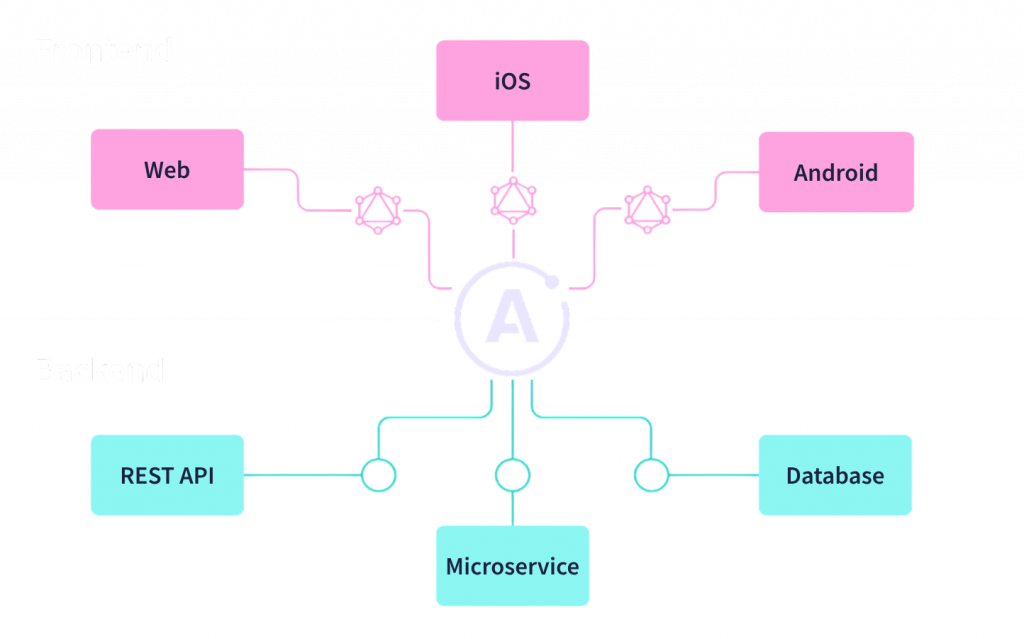
GraphQL Is A Query Language Used For APIs And Data Fetching Efficiently. It Allows Clients To Request Only The Required Data From The Server. Node.js Applications Use GraphQL To Improve Performance And Flexibility In APIs. GraphQL Reduces Over Fetching And Under Fetching Problems In Applications Significantly. Developers Commonly Use Apollo Server For GraphQL Implementation In Node.js Projects. It Supports Strong Typing And Real Time Data Handling Features Properly. GraphQL Is Popular In Modern Web And Mobile Application Development.
72. What Is Apollo Server In Node.js?
Ans:
Apollo Server Is A Library Used To Build GraphQL APIs In Node.js Applications. It Simplifies GraphQL Schema Creation And Resolver Management Efficiently For Developers. Apollo Server Supports Integration With Express.js And Other Frameworks Easily. It Provides Features Like Authentication, Error Handling, And Performance Monitoring Properly. Developers Use Apollo Server To Build Scalable And Flexible Backend Systems Quickly. It Improves API Development Productivity And Simplifies Data Management Processes. Apollo Server Is Widely Used In Modern GraphQL Based Applications.
73. Write A Program To Create A Promise In Node.js
Ans:
This Program Demonstrates How To Create And Use Promises In Node.js Applications. A Promise Represents The Result Of An Asynchronous Operation Efficiently And Clearly. The Resolve Method Executes When The Operation Completes Successfully Without Errors. The Reject Method Executes When An Error Or Failure Occurs During Execution. The Then Method Handles Successful Results While Catch Handles Errors Properly. Promises Improve Code Readability Compared To Nested Callback Functions Significantly. They Are Commonly Used In APIs, Database Queries, And Asynchronous Operations.
- const promise = new Promise((resolve, reject) => {
- let success = true;
- if (success) {
- resolve(“Promise Resolved Successfully”);
- } else {
- reject(“Promise Rejected”);
- }
- });
- promise
- .then(result => console.log(result))
- .catch(error => console.log(error));
74. What Is Koa.js In Node.js?
Ans:
- Koa.js Is A Lightweight Web Framework Developed By The Express.js Team Efficiently. It Uses Modern JavaScript Features Like Async Await For Cleaner Code Structure.
- Koa.js Simplifies Middleware Management And Improves Application Flexibility Significantly. Developers Use Koa.js To Build APIs And Backend Applications Efficiently.
- It Provides Better Error Handling Compared To Traditional Callback Based Frameworks. Koa.js Is Minimalistic And Allows Developers To Add Required Functionalities Flexibly. It Is Popular Among Developers Building Modern Node.js Applications.
75. What Is NestJS In Node.js?
Ans:
- NestJS Is A Progressive Framework Used For Building Scalable Node.js Applications Efficiently. It Is Built With TypeScript And Supports Modern Software Architecture Principles Properly.
- NestJS Uses Dependency Injection And Modular Design For Better Maintainability. Developers Use NestJS To Build APIs, Microservices, And Enterprise Applications Easily. It Supports Express.js And Fastify For Backend Server Management Flexibly.
- NestJS Improves Code Organization And Development Productivity Significantly In Projects. It Is Widely Used In Large Scale Backend Development Applications.
76. What Is TypeScript In Node.js?
Ans:
TypeScript Is A Superset Of JavaScript That Adds Static Typing Features Efficiently. It Helps Developers Detect Errors During Development Before Runtime Execution Processes. Node.js Applications Use TypeScript To Improve Code Quality And Maintainability Significantly. TypeScript Supports Modern JavaScript Features And Object Oriented Programming Concepts Properly. Developers Use Interfaces, Classes, And Types For Better Code Structure. It Improves Scalability And Simplifies Collaboration In Large Development Teams. TypeScript Is Popular In Enterprise And Modern Web Application Development.
77. What Is Microservice Architecture In Node.js?
Ans:
Microservice Architecture Divides Applications Into Smaller Independent Services Efficiently. Each Service Handles A Specific Business Function Separately And Communicates Through APIs. Node.js Is Popular For Microservices Due To Its Lightweight And Fast Performance. Microservices Improve Scalability, Maintainability, And Deployment Flexibility Significantly In Applications. Developers Can Update Individual Services Without Affecting The Entire System Easily. Communication Often Happens Using REST APIs Or Messaging Systems Efficiently. Microservices Are Widely Used In Cloud And Enterprise Applications.
78. What Is Monolithic Architecture In Node.js?
Ans:
Monolithic Architecture Combines All Application Components Into A Single Unified System. The Entire Application Runs As One Codebase And Deployment Unit Efficiently. Monolithic Systems Are Easier To Develop Initially For Small Applications And Projects. However, Scaling And Maintaining Large Monolithic Applications Can Become Difficult Over Time. Node.js Applications Can Be Built Using Both Monolithic And Microservice Architectures. Developers Choose Monolithic Design For Simpler Deployment And Development Processes Frequently. Understanding Architecture Types Helps Build Better Software Systems Efficiently.
79. What Is Redis In Node.js?
Ans:
Redis Is An In Memory Data Store Used For Caching And Fast Data Access. Node.js Applications Use Redis To Improve Performance And Reduce Database Load Efficiently. Redis Supports Data Structures Like Strings, Lists, Hashes, And Sets Properly. Developers Use Redis For Session Management And Real Time Features Frequently. It Improves Response Time And Scalability In High Traffic Applications Significantly. Redis Is Commonly Used In Chat Systems, Queues, And Caching Mechanisms. It Enhances Application Speed And Resource Optimization Processes.
80. Write A Program To Use Async Await In Node.js
Ans:
This Program Demonstrates The Use Of Async Await In Node.js Applications Clearly. The FetchData Function Returns A Promise That Resolves After Two Seconds Successfully. The Async Keyword Declares An Asynchronous Function In JavaScript Applications Properly. The Await Keyword Waits Until The Promise Returns The Expected Result Correctly. Async Await Makes Asynchronous Code Easier To Read And Understand Efficiently. It Reduces Complexity Compared To Traditional Callback And Promise Chains Significantly. Async Await Is Widely Used In Modern Backend Development And API Handling
- function fetchData() {
- return new Promise((resolve) => {
- setTimeout(() => {
- resolve(“Data Received Successfully”);
- }, 2000);
- });
- }
- async function getData() {
- const result = await fetchData();
- console.log(result);
- } getData();
81. What Is Queue In Node.js?
Ans:
A Queue Is A Data Structure Used To Process Tasks In Sequential Order Efficiently. Node.js Applications Use Queues For Background Jobs And Asynchronous Task Management Frequently. Queues Help Handle Email Sending, Notifications, And Data Processing Operations Properly. Developers Use Libraries Like Bull And Kue For Queue Management Easily. Queues Improve Scalability And Prevent Blocking Of The Main Application Flow. They Help Distribute Workloads Efficiently Across Multiple Processes And Systems. Queue Systems Are Important In Large Scale Backend Applications.
82. What Is Bull Queue In Node.js?
Ans:
- Bull Is A Popular Queue Library Used In Node.js Applications Efficiently. It Uses Redis For Storing And Managing Background Jobs And Tasks Properly.
- Developers Use Bull For Email Processing, Notifications, And Scheduled Operations Frequently. Bull Supports Retry Mechanisms And Delayed Jobs For Better Reliability. It Helps Improve Performance By Moving Heavy Tasks To Background Processing Efficiently.
- Bull Simplifies Queue Management In Large Scale Backend Applications Significantly. It Is Widely Used In Real Time And Enterprise Systems.
83. What Is Cron Job In Node.js?
Ans:
A Cron Job Is A Scheduled Task That Runs Automatically At Specific Time Intervals. Node.js Applications Use Cron Jobs For Automation And Background Task Execution Frequently. Developers Use Cron Jobs For Backups, Reports, And Notification Services Efficiently. Libraries Like Node Cron Simplify Scheduling Functionalities In Applications Properly. Cron Jobs Improve Productivity By Automating Repetitive Administrative Operations. They Help Maintain Applications And Perform Periodic Maintenance Tasks Efficiently. Scheduled Tasks Play An Important Role In Backend System Management.
84. What Is Node Cron In Node.js?
Ans:
Node Cron Is A Library Used To Schedule Tasks In Node.js Applications Easily. It Allows Developers To Run Functions Automatically At Specific Time Intervals Properly. Node Cron Uses Cron Syntax For Defining Scheduling Rules Efficiently And Flexibly. Developers Use It For Automated Emails, Data Cleanup, And Reporting Processes Frequently. Node Cron Simplifies Background Task Automation In Backend Applications Significantly. It Is Lightweight And Easy To Configure In Development Projects Quickly. Scheduled Automation Improves Efficiency And System Reliability Properly.
85. What Is Middleware Chaining In Node.js?
Ans:
Middleware Chaining Refers To Executing Multiple Middleware Functions Sequentially In Applications. Each Middleware Performs A Specific Task Before Passing Control To The Next Function. Node.js Applications Use Middleware Chaining For Authentication And Request Processing Efficiently. The Next Function Is Used To Continue Execution In Express.js Applications Properly. Middleware Chaining Improves Code Organization And Simplifies Backend Logic Significantly. It Helps Separate Concerns And Manage Functionalities More Effectively In Applications. Middleware Chaining Is A Core Feature Of Express.js Development.
86. What Is Reverse Proxy In Node.js?
Ans:
A Reverse Proxy Is A Server That Forwards Client Requests To Backend Servers Efficiently. It Helps Improve Performance, Security, And Load Balancing In Applications Properly. Node.js Applications Commonly Use Nginx As A Reverse Proxy Server Frequently. Reverse Proxies Hide Backend Infrastructure From Clients For Better Security. They Support SSL Termination And Traffic Distribution Across Multiple Servers Efficiently. Reverse Proxies Improve Scalability And Reliability In High Traffic Applications Significantly. They Are Important In Production Level Backend System Architectures.
87. What Is Load Balancing In Node.js?
Ans:
- Load Balancing Distributes Incoming Traffic Across Multiple Servers Efficiently And Reliably. It Helps Prevent Server Overload And Improves Application Availability Significantly. Node.js Applications Use Load Balancers For High Traffic And Scalable Systems Frequently.
- Load Balancing Improves Fault Tolerance And Ensures Better Resource Utilization Properly. Developers Use Nginx And PM2 For Load Balancing Functionalities Efficiently.
- It Enhances User Experience By Reducing Downtime And Response Delays Significantly. Load Balancing Is Important In Enterprise And Cloud Based Applications
88. What Is Docker In Node.js?
Ans:
Docker Is A Containerization Platform Used To Package Applications With Dependencies Efficiently. It Allows Node.js Applications To Run Consistently Across Different Environments Properly. Docker Containers Improve Deployment Speed And Simplify Infrastructure Management Significantly. Developers Use Docker For Microservices And Cloud Native Application Development Frequently. Containers Are Lightweight Compared To Traditional Virtual Machines In Systems. Docker Improves Scalability, Portability, And Resource Utilization Efficiently In Applications. It Is Widely Used In Modern DevOps And Deployment Practices.
89. What Is Kubernetes In Node.js?
Ans:
Kubernetes Is A Container Orchestration Platform Used To Manage Docker Containers Efficiently. It Automates Deployment, Scaling, And Monitoring Of Applications Across Multiple Servers. Node.js Applications Use Kubernetes For High Availability And Scalability In Production. Kubernetes Supports Load Balancing, Auto Scaling, And Fault Recovery Features Properly. Developers Use Kubernetes To Simplify Cloud Native Application Management Processes Significantly. It Improves Resource Optimization And Deployment Reliability Across Distributed Systems. Kubernetes Is Widely Used In Enterprise And Cloud Environments.
90. What Is CI CD In Node.js?
Ans:
CI CD Stands For Continuous Integration And Continuous Deployment In Software Development. It Automates Testing, Building, And Deployment Processes For Applications Efficiently. Node.js Projects Use CI CD Pipelines To Improve Development Speed And Reliability. Continuous Integration Helps Detect Errors Early During Code Development Processes Properly. Continuous Deployment Automates Application Releases Into Production Environments Efficiently. Tools Like Jenkins And GitHub Actions Are Commonly Used In CI CD. CI CD Improves Collaboration And Software Delivery Quality Significantly.
91. What Is Jenkins In Node.js?
Ans:
Jenkins Is An Automation Tool Used For Continuous Integration And Deployment Processes Efficiently. It Helps Developers Automate Testing, Building, And Application Deployment Tasks Properly. Node.js Projects Use Jenkins To Improve Development Workflow And Release Management. Jenkins Supports Plugins For Integration With Git, Docker, And Cloud Services Easily. Automated Pipelines Reduce Manual Errors And Improve Productivity In Teams Significantly. Jenkins Is Widely Used In DevOps And Enterprise Software Development Environments. It Enhances Software Delivery Speed And Reliability Efficiently.
92. What Is Git In Node.js Development?
Ans:
- Git Is A Version Control System Used To Track Code Changes Efficiently. Node.js Developers Use Git For Collaboration And Source Code Management Processes Frequently.
- Git Helps Teams Manage Different Versions Of Applications During Development Properly. Developers Use Commands Like Commit, Push, Pull, And Merge Regularly.
- Git Supports Branching For Independent Feature Development And Testing Efficiently. It Improves Collaboration And Prevents Data Loss During Software Development Processes. Git Is Essential In Modern Application And DevOps Workflows.
93. What Is GitHub In Node.js Development?
Ans:
- GitHub Is A Cloud Based Platform Used For Hosting And Managing Git Repositories Efficiently. Node.js Developers Use GitHub For Collaboration And Project Sharing Processes Frequently.
- GitHub Supports Version Control, Pull Requests, And Issue Tracking Functionalities Properly. Developers Can Store, Review, And Deploy Applications Using GitHub Services Easily.
- It Improves Team Collaboration And Simplifies Open Source Contribution Activities Significantly. GitHub Integrates With CI CD And DevOps Tools For Automation Efficiently. It Is Widely Used In Modern Software Development Projects.
94. What Is API Documentation In Node.js?
Ans:
API Documentation Explains How APIs Work And How Developers Can Use Them Properly. It Includes Endpoints, Request Methods, Parameters, And Response Details Clearly. Node.js Developers Use Documentation Tools Like Swagger For Better API Management. Proper Documentation Simplifies Integration Between Different Applications And Teams Efficiently. It Improves Developer Productivity And Reduces Communication Errors Significantly In Projects. API Documentation Helps Maintain Applications And Support Third Party Integrations Properly. Good Documentation Is Important For Professional Software Development Practices.
95. What Is Swagger In Node.js?
Ans:
Swagger Is A Tool Used For Designing And Documenting APIs Efficiently In Applications. It Provides Interactive API Documentation For Developers And Testing Purposes Properly. Node.js Applications Use Swagger To Simplify API Understanding And Integration Processes. Swagger Automatically Generates Documentation Based On API Definitions Efficiently And Clearly. Developers Use Swagger UI To Test Endpoints Directly From The Browser Easily. It Improves Collaboration Between Frontend And Backend Development Teams Significantly. Swagger Is Widely Used In REST API Development Projects.
96. What Is Serverless Architecture In Node.js?
Ans:
Serverless Architecture Allows Developers To Run Applications Without Managing Servers Directly. Cloud Providers Automatically Handle Infrastructure, Scaling, And Resource Allocation Efficiently. Node.js Is Commonly Used For Building Serverless Functions And APIs Frequently. Developers Use AWS Lambda And Azure Functions For Serverless Deployments Properly. Serverless Architecture Reduces Operational Costs And Simplifies Application Deployment Processes. It Improves Scalability And Supports Event Driven Application Development Efficiently. Serverless Systems Are Popular In Modern Cloud Based Applications.
97. What Is AWS Lambda In Node.js?
Ans:
AWS Lambda Is A Serverless Computing Service Provided By Amazon Web Services Efficiently. It Allows Developers To Run Node.js Functions Without Managing Infrastructure Directly. Lambda Automatically Scales Applications Based On Incoming Requests And Events Properly. Developers Use AWS Lambda For APIs, Automation, And Background Task Processing Frequently. It Integrates Easily With Other AWS Services Like S3 And DynamoDB. AWS Lambda Reduces Server Management Complexity And Operational Costs Significantly. It Is Widely Used In Cloud Native And Serverless Architectures.
98. What Is Debugging In Node.js?
Ans:
Debugging Is The Process Of Identifying And Fixing Errors In Applications Efficiently. Node.js Provides Debugging Tools For Monitoring Variables And Execution Flow Properly. Developers Use Console Logs And Debuggers To Detect Application Issues Quickly. Tools Like VS Code And Chrome DevTools Support Node.js Debugging Features. Debugging Helps Improve Code Quality And Application Stability Significantly In Projects. Proper Debugging Reduces Downtime And Simplifies Problem Solving During Development. It Is An Important Skill For Backend And Full Stack Developers.
99. What Is Performance Optimization In Node.js?
Ans:
Performance Optimization Refers To Improving Application Speed And Resource Utilization Efficiently. Node.js Developers Optimize Code, Database Queries, And API Responses Properly. Techniques Include Caching, Load Balancing, And Asynchronous Programming For Better Performance. Developers Monitor CPU Usage, Memory Consumption, And Response Time Regularly. Optimization Improves Scalability And User Experience In High Traffic Applications Significantly. Proper Performance Tuning Reduces Server Costs And Enhances Reliability Efficiently. It Is Important For Building Fast And Scalable Backend Systems
100. Why Is Node.js Popular For Backend Development?
Ans:
Node.js Is Popular Because It Provides High Performance And Scalable Backend Development Features. Its Non Blocking Architecture Helps Handle Multiple Requests Efficiently And Quickly. Developers Use JavaScript For Both Frontend And Backend Development In Applications. Node.js Supports Real Time Applications, APIs, And Microservices Architecture Effectively. It Has A Large Ecosystem Of Libraries And Packages Through NPM. Node.js Improves Development Speed And Simplifies Full Stack Application Development Processes. It Is Widely Used By Startups, Enterprises, And Cloud Based Platforms.

Enroll in Software Testing Traing Course and UPGRADE Your Skills
Weekday / Weekend BatchesSee Batch DetailsLearn Software Testing Traing Course with Advanced Concepts By Industry Experts
- Instructor-led Sessions
- Real-life Case Studies
- Assignments
61. What is test script?
Ans:
- A test script is a set of instructions written in a programming language to automate testing activities and validate application functionality. It helps execute repeated test scenarios without manual intervention clearly. Automation increases productivity significantly.
- It defines steps, inputs, and expected outputs required for executing automated tests effectively. Clear structure ensures consistent validation of software behavior. Well-defined scripts reduce confusion.
- Test scripts improve efficiency by reducing manual effort and ensuring consistent test execution. Repetitive regression tasks can be completed faster using automation tools. This saves time greatly.
- Properly designed test scripts enhance maintainability and reusability in automation testing frameworks. Reusable scripts reduce future effort and improve framework quality naturally. Good design supports scalability.
62. What is defect tracking tool?
Ans:
A defect tracking tool is a software application used to record, track, and manage defects identified during testing. It helps maintain detailed records of bugs and their status throughout the testing lifecycle. Defect tracking tools improve communication between testers and developers. They ensure proper management and resolution of issues in a systematic manner. Understanding defect tracking tools is essential for efficient defect management and quality assurance.
63. What are examples of defect tracking tools?
Ans:
- JIRA is widely used for tracking defects, managing projects, and maintaining workflows in agile development environments. It supports issue assignment, dashboards, and sprint management effectively. Many companies use it extensively.
- Bugzilla is an open-source tool used for defect tracking and reporting in software development processes. It provides strong bug lifecycle management with customization options. It is popular in many teams.
- Mantis is a lightweight defect tracking tool that provides easy management of issues and bugs. Its simple interface helps smaller teams work efficiently. It is easy to learn.
- Redmine is a project management and defect tracking tool that supports collaboration and issue tracking effectively. It combines task handling with bug management features. This improves team coordination.
64. What is version control?
Ans:
Version control is a system used to manage changes to code and documents over time. It helps track modifications, maintain history, and collaborate effectively among team members. Version control ensures that changes are documented and reversible if needed. It improves coordination and reduces conflicts in development processes. Understanding version control is essential for managing code and maintaining consistency in projects.
65. What is the difference between centralized version control and distributed version control?
Ans:
| Criteria | Centralized Version Control | Distributed Version Control |
|---|---|---|
| Repository | Stores code in one central server repository. | Each user has a complete local copy of repository. |
| Internet Need | Often requires server connection for operations. | Many operations can be done offline locally. |
| Examples | SVN, CVS. | Git, Mercurial. |
| Reliability | Higher dependency on central server. | Safer due to multiple local copies. |
66. What is build?
Ans:
A build is a compiled version of software that includes all updated code and features ready for testing or deployment. It is generated after integrating code changes from developers. Builds are tested to ensure functionality and stability before release. Different types of builds are created during development cycles. Understanding builds is essential for effective testing and release management.
67. What are types of builds?
Ans:
- Alpha build is an early version used for internal testing and identifying major defects in the application. It is usually handled by internal teams before wider release. Early feedback improves quality.
- Beta build is released to external users for testing in real-world conditions and gathering feedback. Real user usage helps uncover practical issues effectively. This stage improves readiness.
- Release build is the final version deployed to production after successful testing and validation. It is considered stable for customer use. Final approvals are usually completed.
- Daily build is generated regularly to integrate changes and ensure continuous testing and development. Frequent builds help detect integration problems early. This supports agile workflows.
68. What is release testing?
Ans:
Release testing is the process of validating a software build before it is released to production. It ensures that the application meets all requirements and quality standards. Release testing includes functional, performance, and security validation. It helps ensure that the product is stable and ready for users. Understanding release testing is essential for successful product deployment.
69. What is risk-based testing?
Ans:
- Risk-based testing prioritizes testing efforts based on potential risks and impact of defects on the application. High-risk modules receive deeper attention first. This improves efficiency.
- It helps focus on critical functionalities that are more likely to fail or have higher business impact. Payment, security, and core workflows often get priority. Important areas are protected.
- Risk-based testing improves efficiency by allocating resources effectively to high-risk areas. Limited time can be used more wisely. Planning becomes smarter.
- It ensures better quality by reducing chances of critical defects in production environments. Major failures are less likely after release. This supports business trust.
70. What is test metrics?
Ans:
Test metrics are quantitative measures used to evaluate the effectiveness and efficiency of testing activities. They provide insights into test coverage, defect density, and overall quality of the application. Metrics help in tracking progress and identifying areas for improvement. They support decision-making and improve testing processes. Understanding test metrics is essential for maintaining quality and improving performance in testing activities.
71. What is defect density?
Ans:
Defect density is a metric used to measure the number of defects identified in a software component relative to its size or complexity. It helps evaluate the quality of the code and effectiveness of testing processes. Lower defect density indicates higher quality and fewer issues in the application. This metric is useful for comparing modules and identifying high-risk areas. Understanding defect density is essential for improving software quality and testing efficiency.
72. What are benefits of defect density?
Ans:
- Defect density helps in identifying modules with higher defect rates, enabling teams to focus testing efforts on critical and error-prone areas effectively. This improves defect prevention planning greatly. Teams can prioritize wisely.
- It provides insights into code quality and helps measure effectiveness of development and testing processes over time. Trends reveal whether quality is improving or declining. Metrics support improvement.
- Defect density supports better decision-making by highlighting areas that require improvement or additional testing efforts. Managers can allocate resources more accurately. Data-driven choices become easier.
- It enables comparison between different modules or projects, improving overall quality assurance practices. Comparisons help benchmark standards naturally. Continuous learning becomes possible.
73. What is test summary report?
Ans:
A test summary report is a document that provides an overview of testing activities, results, and outcomes after completion of testing. It includes details such as number of test cases executed, defects identified, and overall test status. This report helps stakeholders understand quality and readiness of the application. It also highlights risks, issues, and areas that need improvement. Understanding test summary reports is essential for effective communication and decision-making.
74. What are contents of test summary report?
Ans:
- Test objectives and scope provide an overview of what was tested and the goals achieved during testing activities. This helps stakeholders understand coverage clearly. Scope visibility is important.
- Test execution results include details of passed, failed, and skipped test cases along with overall progress. These numbers show current product quality effectively. Status reporting becomes easier.
- Defect summary provides information about defects identified, severity, and status during testing cycles. It highlights open risks needing attention significantly. Management decisions improve.
- Recommendations and conclusions help stakeholders understand product readiness and required actions before release. Final guidance supports confident release planning naturally. Clear decisions become possible.
75. What is test closure?
Ans:
Test closure is the final phase of the testing lifecycle where all testing activities are completed and evaluated. It involves documenting results, reviewing processes, and ensuring all defects are resolved or accepted. Test closure ensures that the application meets quality standards and is ready for release. It also includes lessons learned and process improvements for future projects. Understanding test closure is essential for completing testing processes effectively.
76. What are activities in test closure?
Ans:
- Reviewing test cases, execution results, and defect reports ensures that all testing objectives have been achieved successfully. This confirms completion status clearly. Final validation is necessary.
- Documenting lessons learned and challenges helps improve future testing processes and efficiency. Teams avoid repeating old mistakes significantly. Continuous improvement grows.
- Preparing test summary reports provides insights into application quality and readiness for release. Stakeholders receive clear final status effectively. Communication becomes stronger.
- Archiving test artifacts and documentation ensures proper record keeping and future reference. Historical data helps audits and later projects naturally. Organized storage is valuable.
77. What is quality control?
Ans:
Quality control is the process of identifying defects in software products through testing and validation activities. It focuses on verifying that the product meets defined requirements and quality standards. Quality control involves execution of test cases and defect detection. It ensures that the final product is free from critical issues before release. Understanding quality control is essential for maintaining product reliability and performance.
78. What are quality control techniques?
Ans:
- Inspection involves reviewing documents, code, and processes to identify defects early in development. Early detection reduces fixing cost significantly. Prevention saves effort.
- Testing techniques such as functional and non-functional testing help validate application behavior effectively. Multiple testing types improve overall quality coverage. Balanced validation matters.
- Statistical quality control uses metrics and data analysis to evaluate product quality and performance. Numbers help reveal patterns clearly. Data supports decisions.
- Continuous monitoring and feedback help improve processes and maintain consistent quality standards. Ongoing review builds long-term excellence naturally. Improvement never stops.