LMS
LMS
Last updated on 16th May 2026| 4846

Preparing for a Zoho Frontend Developer interview requires a strong understanding of web development fundamentals, including HTML, CSS, JavaScript, React, APIs, and version control tools. Zoho often evaluates candidates on their problem-solving abilities, coding skills, logical thinking, and knowledge of frontend technologies used to build responsive and user-friendly web applications. Freshers should focus on core concepts such as DOM manipulation, event handling, asynchronous programming, React components, state management, and browser performance optimization. In addition to technical knowledge, candidates should be prepared for coding challenges, debugging tasks, and practical application-based questions. This collection of Zoho Frontend Developer Interview Questions and Answers is designed to help freshers strengthen their concepts, improve confidence, and perform successfully in technical and HR interview rounds. With proper preparation and consistent practice, candidates can significantly increase their chances of securing a frontend developer role at Zoho.
1. What is frontend development, and why is it important?
Ans:
Frontend development focuses on creating the user interface of a website or web application. It involves designing and developing the parts that users interact with directly. Frontend developers use technologies like HTML, CSS, and JavaScript. They ensure that web pages are visually appealing and responsive. Good frontend development improves user experience and accessibility. It also helps websites function smoothly across different devices. Frontend development is an essential part of modern web applications.
2. Write A Program To Print Multiplication Table Of 2
Ans:
This Program Uses A Loop To Print The Multiplication Table Of Number 2. The Loop Runs Multiple Times To Generate Each Multiplication Result. During Every Iteration, The Program Multiplies 2 By The Current Value. The Output Displays The Table In A Simple Format. This Program Helps Beginners Understand Loop Execution Clearly.It Also Improves Understanding Of Iteration And Arithmetic Operations Successfully.
- for i in range(1, 6):
- print(“2 x”, i, “=”, 2 * i)
3. What is CSS?
Ans:
CSS stands for Cascading Style Sheets and is used to style web pages. It controls colors, fonts, layouts, spacing, and visual effects. CSS separates design from content, making websites easier to maintain. Developers use CSS to create responsive and attractive interfaces. It supports animations and transitions for better user interaction. Modern CSS features improve design flexibility and efficiency. CSS plays a vital role in enhancing user experience.
4. What is JavaScript?
Ans:
JavaScript is a scripting language used to make web pages interactive and dynamic. It allows developers to handle user actions and update content without reloading pages. JavaScript can manipulate HTML and CSS elements in real time. It supports functions, loops, objects, and event handling. Modern web applications rely heavily on JavaScript functionality. It works in all major browsers and platforms. JavaScript is one of the core technologies of frontend development.
5. What is the difference between HTML, CSS, and JavaScript?
Ans:
HTML provides the structure and content of a web page. CSS is responsible for styling and visual presentation. JavaScript adds interactivity and dynamic behavior to websites. Together, these technologies create complete web applications. HTML defines what appears on the page. CSS determines how the content looks. JavaScript controls how users interact with the content.
6. What are HTML tags?
Ans:
HTML tags are predefined keywords enclosed within angle brackets. They define different elements on a web page such as headings, paragraphs, images, and links. Most tags have opening and closing versions. Browsers read these tags to display content correctly. Tags help organize and structure information effectively. Proper use of tags improves readability and accessibility. HTML tags are essential building blocks of web pages.
7. What is a semantic HTML element?
Ans:
Semantic HTML elements clearly describe their purpose and meaning. Examples include header, footer, article, section, and nav. These elements make web pages more understandable to browsers and developers. Semantic tags improve accessibility for screen readers. They also enhance search engine optimization. Using semantic HTML creates cleaner and more maintainable code. It is considered a best practice in frontend development.
8. What is the Document Object Model (DOM)?
Ans:
The Document Object Model is a programming interface for HTML documents. It represents web page elements as objects in a tree structure. JavaScript can access and modify DOM elements dynamically. Changes made to the DOM are reflected immediately on the page. The DOM enables interactive user experiences. It acts as a bridge between web pages and scripts. Understanding the DOM is essential for frontend developers.
9. What is an HTML form?
Ans:
An HTML form is used to collect input from users. Forms contain elements such as text fields, checkboxes, radio buttons, and submit buttons. Data entered into forms can be sent to servers for processing. Forms are commonly used for login, registration, and search functionality. Validation helps ensure accurate user input. Forms improve interaction between users and applications. They are fundamental components of web development.
10. What is responsive web design?
Ans:
- Responsive web design ensures that websites adapt to different screen sizes and devices. It provides a consistent user experience on desktops, tablets, and smartphones.
- CSS media queries are commonly used for responsiveness. Flexible layouts and images improve adaptability.
- Responsive design reduces the need for separate mobile websites. It enhances accessibility and usability. Modern websites are expected to be responsive.
11. What are CSS selectors?
Ans:
CSS selectors are patterns used to target and style HTML elements on a web page. They help developers apply specific styles to chosen elements without affecting others. Common selectors include element selectors, class selectors, ID selectors, and attribute selectors. CSS selectors improve code organization and maintainability. They allow precise control over webpage design and appearance. Advanced selectors can target elements based on hierarchy and state. Selectors are fundamental for efficient CSS styling.
12. What is the difference between ID and Class?
Ans:
| Feature | ID | Class |
|---|---|---|
| Definition | Used to uniquely identify a single HTML element. | Used to group and style multiple HTML elements. |
| CSS Syntax | Uses the # symbol. Example: #header | Uses the . symbol. Example: .menu |
| Uniquenesss | Must be unique within a webpage. | Must be unique within a webpage. Can be used on multiple elements. |
| Reusability | Cannot be reused for multiple elements. | Can be reused across many elements. |
13. What are CSS media queries?
Ans:
CSS media queries are used to create responsive web designs for different devices and screen sizes. They allow developers to apply specific styles based on conditions such as width, height, and orientation. Media queries help websites adapt to desktops, tablets, and smartphones. They improve user experience across multiple platforms. Responsive layouts reduce the need for separate mobile websites. Media queries are an essential part of modern web development. They ensure consistency and accessibility for all users.
14. What is the CSS Box Model?
Ans:
The CSS Box Model describes how elements are structured and displayed on a webpage. It consists of content, padding, border, and margin. The content area contains the actual text or media. Padding creates space between the content and border. Borders surround the content and padding. Margins provide space between elements. Understanding the Box Model is important for creating accurate layouts and spacing.
15. What is the difference between margin and padding?
Ans:
Margin is the space outside an element’s border, while padding is the space inside the border around the content. Margins separate elements from one another. Padding increases the internal spacing within an element. Both properties affect layout and appearance. Padding contributes to the element’s size, while margins do not. Proper use of margin and padding improves readability and design consistency. They are important concepts in CSS layout management.
16. What is Flexbox in CSS?
Ans:
Flexbox is a CSS layout model designed for arranging elements efficiently within a container. It provides easy alignment, spacing, and distribution of items. Flexbox works in one dimension, either row or column. It simplifies complex layouts compared to traditional methods. Developers can control item order and positioning easily. Flexbox improves responsiveness across different screen sizes. It is widely used in modern web design.
17. What is CSS Grid?
Ans:
- CSS Grid is a powerful layout system used for creating two-dimensional web layouts. It allows developers to organize content into rows and columns.
- Grid provides precise control over positioning and spacing. Complex webpage structures can be created with less code.
- It improves responsiveness and design flexibility. CSS Grid works well for page layouts and dashboards. It is one of the most advanced layout tools in CSS.
18. What is the difference between Flexbox and Grid?
Ans:
- Flexbox is designed for one-dimensional layouts, either rows or columns. CSS Grid is intended for two-dimensional layouts involving rows and columns together.
- Flexbox is ideal for aligning items within a container. Grid is better for designing complete page structures. Both improve responsive web design.
- Flexbox focuses on content alignment, while Grid focuses on layout organization. Developers often use both together in modern applications.
19. What are pseudo-classes in CSS?
Ans:
Pseudo-classes define a special state of an HTML element. They allow styling based on user interaction or element conditions. Examples include hover, focus, active, and first-child. Pseudo-classes enhance user experience by providing visual feedback. They help create interactive and dynamic interfaces. These selectors do not require additional HTML code. Pseudo-classes are commonly used in navigation menus and forms.
20. What are pseudo-elements in CSS?
Ans:
Pseudo-elements are used to style specific parts of an element. Examples include ::before, ::after, ::first-letter, and ::first-line. They allow developers to insert decorative content without modifying HTML. Pseudo-elements improve design flexibility and maintainability. They can be used for icons, effects, and custom styling. These elements help reduce unnecessary markup. Pseudo-elements are useful for enhancing webpage presentation.

21. What is event handling in JavaScript?
Ans:
Event handling is the process of responding to user interactions on a webpage. Events include clicks, keyboard input, mouse movement, and form submissions. JavaScript listens for these events and executes specific functions. Event handling makes web applications interactive and responsive. Developers use event listeners to manage user actions. Proper event handling improves usability and functionality. It is a core feature of JavaScript programming.
22. What are variables in JavaScript?
Ans:
Variables are containers used to store data values in JavaScript. They allow information to be reused and modified throughout a program. Variables can store numbers, strings, objects, arrays, and more. JavaScript provides var, let, and const for variable declaration. Meaningful variable names improve code readability. Variables make applications dynamic and flexible. They are essential for programming and data management.
23. What is the difference between var, let, and const?
Ans:
Var is function-scoped and allows redeclaration and reassignment. Let is block-scoped and allows reassignment but not redeclaration within the same scope. Const is also block-scoped but does not allow reassignment after initialization. Let and const provide better control over variable scope. They help avoid common coding errors. Modern JavaScript development prefers let and const. Choosing the correct declaration improves code quality and maintainability.
24. What are JavaScript data types?
Ans:
JavaScript data types define the kind of values that can be stored and manipulated. Common primitive data types include string, number, boolean, null, undefined, bigint, and symbol. JavaScript also supports non-primitive types such as objects and arrays. Data types influence how operations are performed on values. Understanding data types helps prevent programming errors. They play an important role in application logic. Proper use of data types improves code reliability.
25. What is a function in JavaScript?
Ans:
A function is a reusable block of code designed to perform a specific task. Functions help organize and simplify programs. They can accept input values called parameters. Functions may return results after execution. Reusing functions reduces code duplication. JavaScript supports both named and anonymous functions. Functions are fundamental building blocks of modern applications.
26. Write Count Vowels in a String
Ans:
This program counts the number of vowels in a given string. It reads each character of the string one by one using a loop. Every character is checked to see whether it is a vowel such as a, e, i, o, or u in both uppercase and lowercase. If a vowel is found, a counter variable is increased. After completing the loop, the final count value gives the total number of vowels in the string. This logic is commonly asked in Zoho interviews because it tests string traversal, condition checking, and basic programming skills.
- String s = “Education”;
- int count = 0;
- for(int i = 0; i < s.length(); i++){
- char c = s.charAt(i);
- if(c == ‘a’ || c == ‘e’ || c == ‘i’ || c == ‘o’ || c == ‘u’ ||
- c == ‘A’ || c == ‘E’ || c == ‘I’ || c == ‘O’ || c == ‘U’){
- count++;
- }
- }
- System.out.println(count);
27. What is the difference between == and ===?
Ans:
The == operator compares values after performing type conversion if necessary. The === operator compares both value and data type without conversion. Using === provides more accurate comparisons. It prevents unexpected results caused by automatic type coercion. Most developers prefer strict equality using ===. Understanding this difference helps avoid logical errors. Proper comparison improves application reliability.
28. What are loops in JavaScript?
Ans:
Loops are programming structures used to execute code repeatedly. They help automate repetitive tasks efficiently. Common loops include for, while, and do-while loops. Loops reduce the need for duplicate code. They are often used to process arrays and collections of data. Proper loop control prevents infinite execution. Loops improve productivity and application performance.
29. What is an array in JavaScript?
Ans:
An array is a data structure used to store multiple values in a single variable. Array elements are stored in an ordered sequence. Each element is accessed using an index. Arrays can contain different types of data. JavaScript provides various methods for adding, removing, and modifying elements. Arrays are widely used in web applications. They help manage and organize large amounts of data.
30. What are JavaScript objects?
Ans:
- JavaScript objects are collections of related data stored as key-value pairs. They are used to represent real-world entities and application data. Properties store information, while methods define behavior.
- Objects provide a flexible way to organize complex data. JavaScript heavily relies on objects for application development.
- They support dynamic property addition and modification. Understanding objects is essential for mastering JavaScript.
31. What is the difference between null and undefined?
Ans:
Undefined means a variable has been declared but has not been assigned a value. Null is an intentional assignment that represents the absence of a value. Undefined is the default state of uninitialized variables. Null is explicitly assigned by developers when needed. Both represent empty values but serve different purposes. Understanding their distinction helps avoid logical errors. Proper usage improves code clarity and reliability.
32. What is scope in JavaScript?
Ans:
Scope determines where variables and functions can be accessed within a program. JavaScript has global, function, and block scope. Variables declared inside a scope are only accessible within that scope. Scope helps prevent naming conflicts and accidental data modification. Proper scope management improves code organization. It also enhances security and maintainability. Understanding scope is essential for writing efficient JavaScript code.
33. What is hoisting?
Ans:
Hoisting is JavaScript’s behavior of moving declarations to the top of their scope during execution. Variable and function declarations are processed before code execution. Variables declared with var are hoisted and initialized as undefined. Let and const are hoisted but remain inaccessible until initialization. Hoisting can affect program behavior if misunderstood. Understanding hoisting helps avoid unexpected errors. It is an important concept in JavaScript execution.
34. What are closures?
Ans:
A closure is a function that remembers and accesses variables from its outer scope even after the outer function has finished execution. Closures allow data encapsulation and private variables. They are commonly used in event handlers and callbacks. Closures help maintain state across function calls. They improve flexibility in JavaScript programming. Understanding closures is important for advanced development. They are a powerful feature of the language.
35. What is event bubbling?
Ans:
Event bubbling is the process where an event starts from the target element and propagates upward through its parent elements. It is the default event propagation mechanism in JavaScript. Developers can use bubbling to manage events efficiently. Event delegation often relies on this behavior. Bubbling helps reduce the number of event listeners required. It improves performance in large applications. Understanding bubbling is important for handling user interactions.
36. What is event capturing?
Ans:
- Event capturing is the opposite of event bubbling. In capturing, an event travels from the root element down to the target element.
- It occurs before the bubbling phase. Developers can choose whether to use capturing or bubbling when attaching event listeners.
- Capturing provides greater control over event flow. It is useful in specific event management scenarios. Understanding both phases improves event handling skills.
37. What is a callback function?
Ans:
A callback function is a function passed as an argument to another function. It is executed after a specific task or event is completed. Callbacks are commonly used in asynchronous programming. They help manage operations such as API requests and event handling. Callbacks improve flexibility and code reusability. However, excessive nesting can make code difficult to maintain. They are a fundamental concept in JavaScript.
38. What are promises in JavaScript?
Ans:
Promises are objects used to handle asynchronous operations. They represent a value that may be available now, later, or never. A promise can have pending, fulfilled, or rejected states. Promises simplify asynchronous programming compared to nested callbacks. Methods such as then(), catch(), and finally() are used to handle results. They improve code readability and maintainability. Promises are widely used in modern JavaScript applications.
39. What is async and await?
Ans:
Async and await are JavaScript features used to simplify asynchronous programming. The async keyword makes a function return a promise. The await keyword pauses execution until a promise is resolved. They make asynchronous code look more like synchronous code. Async and await improve readability and reduce complexity. Error handling becomes easier using try-catch blocks. These features are commonly used with API requests.
40. What is AJAX?
Ans:
- AJAX stands for Asynchronous JavaScript and XML. It allows web pages to communicate with servers without reloading the entire page.
- AJAX improves user experience by updating content dynamically. It is commonly used for search suggestions and form submissions.
- Modern applications often use JSON instead of XML for data exchange. AJAX enhances performance and responsiveness. It is a key technology in interactive web applications

Enroll in Frontend Developer Certification Course and UPGRADE Your Skills
Weekday / Weekend BatchesSee Batch Details41. Check Whether A Number Is Armstrong Or Not
Ans:
This program checks whether a number is an Armstrong number or not. An Armstrong number is a number where the sum of the cubes of its digits is equal to the original number. The program extracts each digit using modulus and division operations. Each digit is multiplied three times and added to a sum variable. After processing all digits, the calculated sum is compared with the original number. If both values are equal, the number is an Armstrong number. Armstrong number programs are commonly asked in Zoho interviews because they test number manipulation, loops, and logical thinking skills.
- int n = 153, temp = n, sum = 0;
- while(n > 0){
- int rem = n % 10;
- sum = sum + (rem * rem * rem);
- n = n / 10;
- }
- System.out.println(temp == sum ? “Armstrong Number” : “Not Armstrong Number”);
42. What is local storage?
Ans:
Local storage is a browser feature used to store data permanently on a user’s device. The stored data remains available even after the browser is closed. It allows websites to save user preferences and application settings. Local storage provides a larger storage capacity than cookies. Data is stored as key-value pairs. It is accessible through JavaScript. Local storage improves user experience and performance.
43. What is session storage?
Ans:
Session storage is used to store data for a single browser session. The stored information is removed when the browser tab is closed. It helps maintain temporary data during user interactions. Session storage works similarly to local storage but has a shorter lifespan. Data is stored as key-value pairs. It is commonly used for temporary application states. Session storage improves session-specific functionality.
44. What are cookies?
Ans:
Cookies are small text files stored in a user’s browser by websites. They are used to store user preferences, login information, and session details. Cookies enable personalized user experiences. They are sent to the server with each HTTP request. Cookies have expiration dates and storage limits. Proper management improves security and performance. Cookies play an important role in web applications.
45. What is the difference between local storage and cookies?
Ans:
Local storage stores data only on the client side and provides larger storage capacity. Cookies are stored in the browser and sent to the server with requests. Local storage does not automatically expire unless removed. Cookies can have expiration dates. Local storage is mainly used for client-side data persistence. Cookies are commonly used for authentication and session management. Both help store user-related information.
46. What is API?
Ans:
API stands for Application Programming Interface. It allows different software systems to communicate with each other. APIs define rules and methods for exchanging data. They enable applications to access external services and resources. APIs improve integration and development efficiency. They are widely used in web and mobile applications. Understanding APIs is essential for frontend developers.
47. What is REST API?
Ans:
REST API is an architectural style for designing web services. REST stands for Representational State Transfer. It uses HTTP methods such as GET, POST, PUT, and DELETE. REST APIs exchange data between clients and servers efficiently. They are scalable and easy to maintain. JSON is commonly used as the data format. REST APIs are widely adopted in modern application development.
48. What is Fetch API?
Ans:
- The Fetch API is a modern JavaScript interface used for making HTTP requests. It provides a simpler alternative to XMLHttpRequest.
- Fetch returns promises, making asynchronous programming easier. Developers use it to retrieve and send data to servers.
- It supports various request methods and headers. Error handling can be managed using promise methods. Fetch API is commonly used in modern web applications.
49. What is Cross-Origin Resource Sharing (CORS)?
Ans:
CORS is a security mechanism implemented by browsers. It controls how resources can be requested from different domains. CORS prevents unauthorized access to server resources. Servers specify which origins are allowed to access data. Proper CORS configuration improves security and interoperability. It is commonly encountered during API development. Understanding CORS helps troubleshoot access issues
50. What is browser caching?
Ans:
Browser caching stores website resources locally on a user’s device. Cached files include images, stylesheets, and scripts. It reduces loading times for returning visitors. Caching decreases server load and improves performance. Browsers check whether cached files are still valid before using them. Proper caching strategies enhance user experience. It is an important optimization technique in web development.
51. What is React?
Ans:
React is a JavaScript library used for building user interfaces. It was developed to create fast and interactive web applications. React uses reusable components to organize code efficiently. It updates the user interface using a Virtual DOM. React improves performance and maintainability. It is widely used for single-page applications. React is one of the most popular frontend technologies.
52. What are React components?
Ans:
React components are reusable building blocks of a React application. Each component represents a part of the user interface. Components can contain logic, structure, and styling. They help create modular and maintainable code. React supports functional and class components. Components can communicate using props and state. Reusability makes development faster and more efficient.
53. What is JSX?
Ans:
JSX stands for JavaScript XML. It is a syntax extension used in React to describe user interfaces. JSX allows HTML-like code to be written inside JavaScript. Browsers do not understand JSX directly, so it is transpiled into JavaScript. JSX improves readability and development productivity. It simplifies component creation. JSX is a core feature of React development.
54. What is Virtual DOM?
Ans:
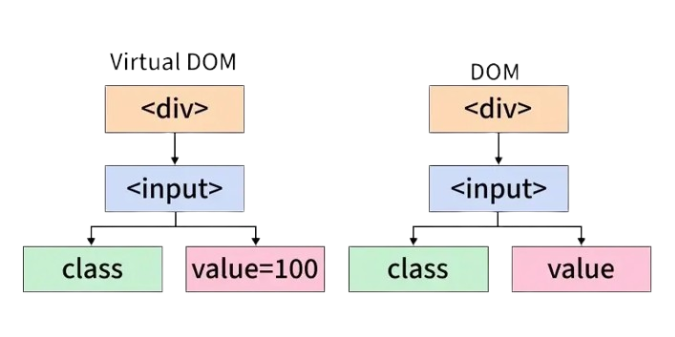
The Virtual DOM is a lightweight copy of the actual DOM maintained by React. React compares changes in the Virtual DOM before updating the real DOM. This process is known as reconciliation. It reduces unnecessary DOM manipulations and improves performance. The Virtual DOM makes applications faster and more efficient. It enhances user experience by minimizing rendering delays. Virtual DOM is a key feature of React.
55. What is React state?
Ans:
State is an object used to store dynamic data within a React component. Changes in state cause the component to re-render automatically. State helps manage user interactions and application behavior. It is mutable and can change during execution. Proper state management improves application performance. State is commonly used for forms, counters, and user data. It is a fundamental concept in React.
56. What are props in React?
Ans:
Props are short for properties and are used to pass data between React components. They allow parent components to send information to child components. Props are read-only and cannot be modified by the receiving component. They improve component reusability and flexibility. Props help maintain a clear data flow within applications. They are essential for component communication. Understanding props is important for React development.
57. What is React lifecycle?
Ans:
React lifecycle refers to the different stages a component goes through during its existence. These stages include mounting, updating, and unmounting. Lifecycle methods allow developers to execute code at specific stages. They are useful for data fetching and cleanup operations. Functional components achieve similar behavior using Hooks. Understanding lifecycle events improves application management. It helps create efficient and reliable React applications.
58. What are React Hooks?
Ans:
React Hooks are functions that allow functional components to use state and lifecycle features. Hooks simplify code and reduce the need for class components. Common Hooks include useState and useEffect. They improve code organization and reusability. Hooks make React development more efficient. They encourage cleaner and more maintainable applications. Hooks are widely used in modern React projects.
59. What is useState Hook?
Ans:
The useState Hook allows functional components to manage state. It returns a state variable and a function to update that state. Updating state causes the component to re-render. useState simplifies state management in React applications. It is commonly used for forms and interactive elements. The Hook improves code readability and efficiency. It is one of the most frequently used React Hooks.
60. What is useEffect Hook?
Ans:
The useEffect Hook is used to perform side effects in React components. Side effects include API calls, subscriptions, and DOM updates. It runs after component rendering. Developers can control when the effect executes using dependency arrays. useEffect replaces many lifecycle methods in class components. It improves code organization and maintainability. The Hook is essential for handling asynchronous tasks in React.

Learn Frontend Developer certification Course with Advanced Concepts By Industry Experts
- Instructor-led Sessions
- Real-life Case Studies
- Assignments
61. Remove Repeated Values From An Array
Ans:
This program removes repeated values from an array and prints only unique elements. The program uses two loops to compare each element with previously checked elements in the array. If the current element already exists, it is treated as a duplicate and skipped. If it is not repeated, the element is printed. This approach helps identify unique values without using extra collections or built-in methods. Array duplicate removal questions are commonly asked in Zoho interviews because they test array traversal, nested loops, and logical problem-solving skills.
- int arr[] = {1, 2, 2, 3, 4, 4, 5};
- for(int i = 0; i < arr.length; i++){
- boolean isDuplicate = false
- for(int j = 0; j < i; j++){
- if(arr[i] == arr[j]){
- isDuplicate = true;
- break;
- }
- }
- if(!isDuplicate){
- System.out.print(arr[i] + ” “);
- }
- }
62. What is list rendering in React?
Ans:
List rendering is the process of displaying multiple items dynamically from an array. React commonly uses the map() method to generate lists of components. It allows efficient display of data-driven content. List rendering reduces repetitive code and improves maintainability. It is useful for displaying tables, menus, and product listings. React updates rendered lists efficiently when data changes. This feature is widely used in modern web applications.
63. What is key in React List?
Ans:
A key is a unique identifier assigned to elements in a React list. It helps React track changes, additions, and removals efficiently. Keys improve rendering performance by minimizing unnecessary updates. They should be unique among sibling elements. Using indexes as keys is generally discouraged when data changes frequently. Proper keys help maintain component state correctly. Keys are essential for effective list rendering.
64. What is a controlled component?
Ans:
A controlled component is a form element whose value is managed by React state. React controls the input data through state updates and event handlers. This approach provides greater control over user input. Validation and data processing become easier to implement. Controlled components improve predictability and consistency. They are commonly used in forms and interactive applications. This method is a recommended practice in React development.
65. What is an uncontrolled component?
Ans:
An uncontrolled component stores its data within the DOM instead of React state. React accesses the value using references when needed. This approach requires less code for simple forms. Uncontrolled components are useful when direct DOM interaction is preferred. They may be simpler for small applications. However, they provide less control compared to controlled components. Understanding both approaches helps developers choose the right solution.
66. What is routing in React?
Ans:
Routing is the process of navigating between different views or pages in a React application. It allows users to move through the application without reloading the browser. Routing creates a smooth and fast user experience. Developers define routes that map URLs to components. It is essential for building single-page applications. Routing improves organization and navigation. It helps create scalable web applications.
67. What is React Router?
Ans:
React Router is a library used for implementing routing in React applications. It enables navigation between components based on URL changes. React Router supports dynamic routes and nested routing. It helps create seamless user experiences in single-page applications. Developers can manage browser history efficiently. The library simplifies application navigation and structure. React Router is widely used in React projects.
68. What is state management?
Ans:
- State management refers to handling and controlling application data efficiently. It ensures that components access and update data consistently. Proper state management improves application performance and maintainability.
- React provides built-in state management features for small applications. Larger applications often require centralized solutions.
- Effective state management simplifies data sharing between components. It is an important aspect of frontend development.
69. What is Redux?
Ans:
- Redux is a state management library commonly used with React applications. It stores application data in a centralized store.
- Components can access and update data through actions and reducers. Redux makes state changes predictable and easier to track.
- It improves scalability in large applications. Developers use Redux for managing complex data flows. It is widely adopted in enterprise-level projects.
70. Find Sum Of Digits Of A Number
Ans:
This program finds the sum of digits of a given number. The digits are extracted one by one using modulus and division operations. The modulus operator retrieves the last digit of the number, and that digit is added to a sum variable. After each step, the number is divided by 10 to remove the last digit. The process continues until the number becomes zero. Finally, the sum variable contains the total of all digits in the number. This program is commonly asked in Zoho interviews because it helps test loops, arithmetic operations, and number manipulation skills.
- int n = 1234;
- int sum = 0;
- while(n > 0){
- int rem = n % 10;
- sum = sum + rem;
- n = n / 10;
- }
- System.out.println(sum);
71. What is version control?
Ans:
Version control is a system used to track and manage changes in source code. It helps developers collaborate effectively on projects. Version control maintains a history of modifications. Developers can revert to previous versions when needed. It improves code management and teamwork. Popular version control systems include Git. Version control is essential in modern software development.
72. What is Git?
Ans:
Git is a distributed version control system used to manage source code changes. It allows developers to track modifications and collaborate efficiently. Git maintains a complete history of project updates. It supports branching and merging for parallel development. Git improves productivity and project management. Developers use Git commands to manage repositories. It is the most widely used version control system today.
73. What is GitHub?
Ans:
GitHub is a cloud-based platform that hosts Git repositories. It provides tools for collaboration, version control, and project management. Developers can store, share, and manage code online. GitHub supports pull requests, issue tracking, and code reviews. It facilitates teamwork among developers worldwide. Many open-source projects are hosted on GitHub. It is one of the most popular development platforms.
74. What is the difference between Git and GitHub?
Ans:
| Feature | Git | GitHub |
|---|---|---|
| Definition | Git is a distributed version control system used to track changes in source code. | GitHub is a cloud-based platform that hosts Git repositories and supports collaboration. |
| Purpose | Manages and tracks code changes locally. | Provides online storage, sharing, and collaboration for Git repositories. |
| Type | Software/Version Control System. | Web-based hosting service and collaboration platform. |
| Internet Requirement | Can work without an internet connection. | Requires an internet connection for remote collaboration and repository access. |
75. What is a Git repository?
Ans:
A Git repository is a storage location that contains project files and version history. It tracks all changes made to the codebase. Repositories can be local or hosted remotely. Developers use repositories to manage project development efficiently. They support collaboration and backup functionality. Git repositories maintain historical records of modifications. They are the foundation of version control workflows.
76. What is branching in Git?
Ans:
Branching is the process of creating separate lines of development within a repository. It allows developers to work on features independently. Changes made in one branch do not affect others immediately. Branches help isolate development tasks and experiments. They improve collaboration and project organization. Once development is complete, branches can be merged. Branching is a key feature of Git workflows.
77. What is merging in Git?
Ans:
Merging is the process of combining changes from one branch into another. It integrates completed work into the main codebase. Git automatically merges changes when possible. Conflicts may occur if the same code sections are modified differently. Developers resolve conflicts before completing the merge. Merging supports collaborative development. It ensures that project updates are consolidated effectively.
78. What is a pull request?
Ans:
A pull request is a mechanism for proposing code changes in a repository. It allows team members to review and discuss modifications before merging. Pull requests improve code quality through peer review. They help identify bugs and maintain coding standards. Developers can provide feedback and suggest improvements. Pull requests encourage collaboration and transparency. They are commonly used on GitHub and similar platforms.
79. What is debugging?
Ans:
Debugging is the process of identifying and fixing errors in software. It helps ensure that applications function correctly. Developers use various tools and techniques to locate issues. Debugging improves software quality and reliability. Common errors include syntax, logical, and runtime issues. Careful testing supports effective debugging. It is a critical skill for every frontend developer.
80. Search An Element In An Array Using Linear Search
Ans:
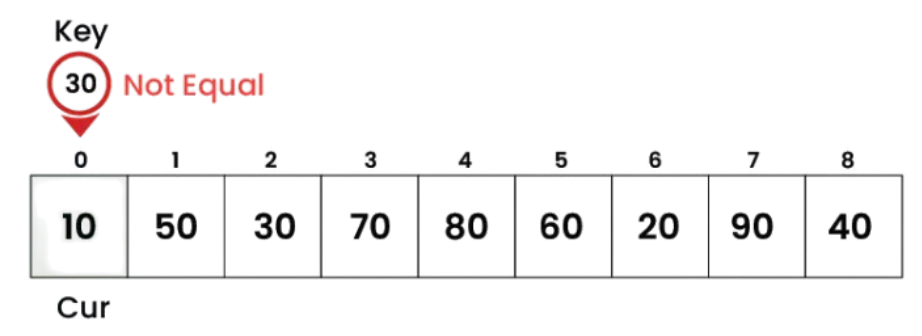
This program searches for an element in an array using the Linear Search algorithm. The program checks each element one by one from the beginning of the array until the required element is found. If the element matches the search value, a flag variable is updated and the loop stops. If no match is found after checking all elements, the element is considered absent from the array. Linear Search is simple and works for both sorted and unsorted arrays. This question is commonly asked in Zoho interviews because it helps test array traversal, loops, and basic searching logic skills.
81. What is website accessibility?
Ans:
Website accessibility ensures that web content can be used by people with disabilities. It includes support for screen readers, keyboard navigation, and alternative text. Accessibility improves usability for all users. Following accessibility guidelines creates inclusive digital experiences. It may also help meet legal and regulatory requirements. Accessible websites reach a wider audience. Accessibility is an important aspect of web development.
82. What is SEO in frontend development?
Ans:
SEO stands for Search Engine Optimization. It involves improving a website’s visibility in search engine results. Frontend developers contribute through semantic HTML, proper headings, and optimized content. Fast loading times also improve SEO performance. Accessibility and mobile responsiveness support better rankings. Effective SEO increases website traffic and discoverability. It is an important consideration in modern web development.
83. What is lazy loading?
Ans:
- Lazy loading is a technique that delays loading resources until they are needed. It improves page performance by reducing initial load time.
- Images, videos, and components are common candidates for lazy loading. This approach conserves bandwidth and system resources.
- Users experience faster page rendering. Lazy loading enhances overall website efficiency. It is widely used in modern web applications.
84. What is code optimization?
Ans:
Code optimization involves improving code efficiency, performance, and maintainability. It reduces unnecessary operations and resource usage. Optimized code executes faster and consumes fewer resources. Developers use techniques such as minification and efficient algorithms. Optimization improves user experience and scalability. It also simplifies future maintenance. Code optimization is an important part of software development.
85. What is a Single Page Application (SPA)?
Ans:
A Single Page Application is a web application that loads a single HTML page and updates content dynamically. It provides a smooth user experience without frequent page reloads. SPAs use JavaScript frameworks such as React for rendering content. They improve responsiveness and speed. Data is typically retrieved through APIs. SPAs are widely used in modern web development. They offer a desktop-like browsing experience.
86. What is a Progressive Web App (PWA)?
Ans:
A Progressive Web App combines features of websites and mobile applications. PWAs can work offline using service workers. They provide fast loading times and improved reliability. Users can install PWAs on their devices without visiting an app store. They support push notifications and background synchronization. PWAs enhance user engagement and accessibility. They are becoming increasingly popular in web development
87. What is web security?
Ans:
Web security refers to protecting websites and applications from cyber threats and unauthorized access. It involves safeguarding data, users, and systems. Security measures include authentication, encryption, and input validation. Secure coding practices reduce vulnerabilities. Web security helps maintain trust and privacy. It is a critical aspect of application development. Strong security protects both businesses and users
88. What is XSS (Cross-Site Scripting)?
Ans:
Cross-Site Scripting is a security vulnerability that allows attackers to inject malicious scripts into web pages. These scripts execute in a user’s browser. XSS can lead to data theft, session hijacking, and unauthorized actions. Input validation and output encoding help prevent attacks. Developers should sanitize user-generated content. Security testing helps identify vulnerabilities. Preventing XSS is essential for secure web applications.
89. What is CSRF (Cross-Site Request Forgery)?
Ans:
- Cross-Site Request Forgery is an attack that tricks users into performing unintended actions on a website where they are authenticated.
- Attackers exploit trust between the user and the application. CSRF can result in unauthorized transactions or data modifications. Security measures include CSRF tokens and same-site cookies. Proper authentication controls reduce risk.
- Awareness of CSRF is important for secure development. Preventing CSRF protects users and applications.
90. Write A Program To Check Whether A Number Is Even Or Odd
Ans:
This Program Checks Whether A Given Number Is Even Or Odd Using An If-Else Condition. The Number Is Divided By 2 Using The Modulus Operator. If The Remainder Is Zero, The Program Prints Even. Otherwise, It Prints Odd As The Output. This Is One Of The Basic Programs Asked In Coding Interviews.It Helps Beginners Understand Conditional Statements And Decision-Making Logic Clearly.
- num = 8
- if num % 2 == 0:
- print(“Even”)
- else:
- print(“Odd”)