Tech Mahindra Technical Interview Questions and Answers | Updated 2026

Capgemini Coding Interview Questions with Solutions

About author

venkatesh (Spring Boot Developer )

Venkatesh is a skilled Spring Boot Developer with expertise in Java and Python. He builds scalable, robust applications and excels at problem-solving with strong attention to detail. A collaborative team player, he is committed to continuous learning and staying updated with industry trends.

Last updated on 10th Aug 2026| 7464

19423 Ratings

Tech Mahindra Technical Interviews For Freshers Generally Focus On Programming Fundamentals, Data Structures, Algorithms, Object-Oriented Programming, DBMS, SQL, Operating Systems, Computer Networks, Software Testing, And Basic Cloud Technologies. Candidates May Also Be Asked Questions Based On Their Resume, Academic Projects, Programming Languages, And Technical Skills. Coding Questions Often Test Problem-Solving Ability Through Common Programs Such As String Reversal, Palindrome Checking, Factorial, Fibonacci Series, Prime Numbers, And Array Operations. Strong Knowledge Of Core Computer Science Concepts Can Help Candidates Explain Technical Answers Clearly And Confidently. Project-Based Questions May Cover Technologies Used, Database Selection, Feature Implementation, Testing Methods, And Possible Improvements. Regular Practice Of Coding Problems, Technical Concepts, And Project Explanations Can Improve Interview Readiness.

1. What Is Object-Oriented Programming?

Ans:

  • Object-Oriented Programming is a programming approach based on objects and classes. It helps organize software into reusable and manageable components. The major concepts include encapsulation, inheritance, polymorphism, and abstraction. 
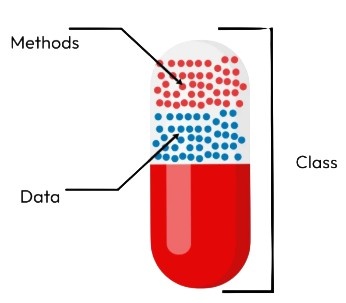
  • Encapsulation combines data and methods within a single unit called a class. Inheritance allows a class to reuse properties and methods from another class. 
  • Polymorphism allows the same method or interface to behave differently in different situations. OOP is widely used in languages such as Java, C++, Python, and C#.

2.What Is White-Box Testing?

Ans:

White-box testing evaluates software using knowledge of its internal structure, logic, and implementation. Testers can examine source code, branches, conditions, loops, and execution paths when designing test cases. The approach is commonly associated with code coverage and structural testing techniques. It can help identify logical errors and untested execution paths. White-box testing is often performed by developers or testers with programming knowledge. Unit testing frequently includes white-box techniques depending on the testing strategy. Combining structural and functional testing can provide broader software quality coverage.

3. What Is Encapsulation?

Ans:

Encapsulation is the process of combining data and methods within a single unit. It also protects internal data from unauthorized or direct access. Access modifiers such as private, public, and protected help implement encapsulation. Private variables can generally be accessed through controlled methods such as getters and setters. This approach improves security and reduces unintended modification of data. Encapsulation also makes software easier to maintain and modify. It is one of the four fundamental principles of object-oriented programming.

4. What Is Inheritance?

Ans:

Inheritance Allows One Class To Acquire Properties And Methods From Another Class. The Existing Class Is Commonly Called The Parent Or Superclass. The New Class Is Commonly Called The Child Or Subclass. Inheritance Promotes Code Reuse And Reduces Duplicate Implementation. Different Languages Support Inheritance Through Different Syntax And Rules. For Example, A Dog Class Can Inherit Common Features From An Animal Class. Inheritance Is An Important Concept In Object-Oriented Programming.

5. What Is Polymorphism?

Ans:

  • Polymorphism Means The Ability Of One Interface Or Method To Represent Different Behaviors. It Allows The Same Operation To Work Differently Depending On The Context. 
  • Compile-Time Polymorphism Is Commonly Achieved Through Method Overloading. Runtime Polymorphism Is Commonly Achieved Through Method Overriding.
  •  Polymorphism Improves Flexibility And Makes Applications Easier To Extend. It Allows Common Interfaces To Work With Different Implementations. This Concept Is Widely Used In Java, C++, C#, And Other OOP Languages.

6. What Is Abstraction?

Ans:

Abstraction Means Hiding Unnecessary Implementation Details And Exposing Essential Functionality. It Helps Users Interact With Functionality Without Understanding Internal Implementation. Abstract Classes And Interfaces Are Common Mechanisms For Abstraction. For Example, A Payment Interface Can Expose A Payment Method Without Revealing Processing Details. Abstraction Reduces Complexity And Improves Application Design. It Also Allows Implementations To Change Without Affecting The User Interface. Abstraction Is One Of The Core Principles Of Object-Oriented Programming.

7. What Is A Constructor?

Ans:

  • A Constructor Is A Special Method Or Mechanism Used To Initialize An Object. It Is Generally Executed Automatically When An Object Is Created. Constructors Can Initialize Variables And Establish The Initial State Of An Object. 
  • Some Programming Languages Provide Default Constructors Automatically. Parameterized Constructors Can Receive Values During Object Creation. 
  • Constructors Usually Have Rules That Differ From Ordinary Methods. They Are Commonly Used In Object-Oriented Programming For Initialization.

8. What Is Method Overloading?

Ans:

Method Overloading Means Defining Multiple Methods With The Same Name But Different Parameters. The Parameter List Can Differ In Number, Type, Or Order Depending On The Language. It Allows Similar Operations To Use A Common Method Name. The Compiler Generally Determines Which Overloaded Method Should Be Called. Therefore, Method Overloading Is Commonly Associated With Compile-Time Polymorphism. It Improves Readability When Methods Perform Related Operations. Java And C++ Commonly Support Method Overloading.

9. What Is Method Overriding?

Ans:

Method Overriding Occurs When A Child Class Provides Its Own Implementation Of A Parent Method. The Overriding Method Generally Follows The Required Method Signature. It Allows Inherited Behavior To Be Customized For A Specific Subclass. Method Overriding Is Commonly Associated With Runtime Polymorphism. The Actual Object Type Can Determine Which Implementation Executes. It Is Useful When Different Subclasses Require Different Behavior. Overriding Is Widely Used In Object-Oriented Application Development.

10. What Is An Interface?

Ans:

An Interface Defines A Contract That Implementing Classes Are Expected To Follow. It Commonly Specifies Methods Or Behaviors That Implementing Classes Must Provide. Interfaces Help Achieve Abstraction And Support Flexible Application Design. Different Classes Can Implement The Same Interface In Different Ways. This Allows Application Components To Depend On Common Contracts Rather Than Specific Implementations. Interfaces Are Widely Used For Loosely Coupled Software Architecture. The Exact Capabilities Of Interfaces Depend On The Programming Language.

11. What Is An Abstract Class?

Ans:

  • An Abstract Class Is A Class Designed To Provide A Common Foundation For Subclasses. It Can Contain Abstract Methods As Well As Implemented Methods In Languages That Support Them. 
  • An Abstract Class Generally Cannot Be Instantiated Directly. Subclasses Can Provide Implementations For Abstract Methods. It Is Useful When Related Classes Share Common State Or Behavior. 
  • Abstract Classes Help Combine Code Reuse With Abstraction. They Are Commonly Used In Object-Oriented Software Design.

12. What Is Exception Handling?

Ans:

Exception Handling Is A Mechanism For Managing Unexpected Conditions During Program Execution. It Prevents Many Runtime Errors From Causing Uncontrolled Application Termination. Common Mechanisms Include Try, Catch, Finally, Throw, And Related Constructs. The Exact Syntax Varies Between Programming Languages. Exception Handling Separates Normal Program Logic From Error-Handling Logic. It Can Also Provide Meaningful Error Messages And Recovery Procedures. Proper Exception Handling Improves Application Reliability And Maintainability.

13. What Is The Difference Between Compile-Time And Runtime Errors?

Ans:

  • Compile-Time Errors Are Detected While Source Code Is Being Compiled. They Can Occur Because Of Syntax Mistakes, Invalid Declarations, Or Incompatible Types. Runtime Errors Occur While The Compiled Program Is Executing. 
  • Examples Include Division By Zero, Invalid Memory Access, Or Missing Resources. Compile-Time Errors Generally Prevent Successful Compilation.
  •  Runtime Errors May Cause Program Failure After Execution Has Started. Both Types Should Be Identified And Handled During Software Development And Testing.

14. What Is A Database?

Ans:

A Database Is An Organized Collection Of Data That Can Be Stored And Managed Efficiently. It Allows Applications To Insert, Retrieve, Update, And Delete Information. Databases Can Be Relational, Document-Oriented, Key-Value, Graph-Based, And Other Types. Relational Databases Organize Information Using Tables, Rows, And Columns. Database Management Systems Provide Tools For Accessing And Controlling Stored Information. Examples Include MySQL, PostgreSQL, Oracle Database, And SQL Server. Databases Are Essential For Most Modern Business Applications.

15. What Is SQL?

Ans:

SQL Stands For Structured Query Language And Is Commonly Used With Relational Databases. It Allows Users To Retrieve And Manipulate Structured Data. SQL Supports Operations Such As SELECT, INSERT, UPDATE, And DELETE. It Also Provides Commands For Creating And Modifying Database Structures. Queries Can Use Conditions, Joins, Grouping, Sorting, And Aggregate Functions. SQL Is Widely Used In Application Development And Data Analysis. Knowledge Of SQL Is Important For Many Technical And Software Roles..

16. What Is A Primary Key?

Ans:

A Primary Key Is A Column Or Combination Of Columns That Uniquely Identifies Each Row In A Table. Primary Key Values Must Be Unique Within The Table. A Primary Key Generally Cannot Contain NULL Values. It Helps Maintain Entity Integrity And Provides A Reliable Row Identifier. A Table Normally Has One Primary Key Constraint, Although It May Contain Multiple Columns. Primary Keys Can Also Be Referenced By Foreign Keys In Related Tables. They Are Fundamental To Relational Database Design.

17. What Is A Foreign Key?

Ans:

A Foreign Key Is A Column Or Group Of Columns That References A Key In Another Table. It Is Commonly Used To Establish Relationships Between Relational Tables. The Referenced Key Is Usually A Primary Key Or Another Suitable Unique Key. Foreign Keys Help Maintain Referential Integrity Between Related Records. For Example, An Orders Table Can Reference A Customer Table Using CustomerID. They Help Prevent Invalid References Between Tables. Foreign Keys Are Important When Designing Normalized Relational Databases.

18. What Is Normalization?

Ans:

  • Normalization Is A Database Design Technique Used To Reduce Unnecessary Data Duplication. It Organizes Data Into Related Tables According To Defined Rules. Normalization Can Improve Consistency And Reduce Update Anomalies. 
  • Common Normal Forms Include First Normal Form, Second Normal Form, And Third Normal Form. Each Normal Form Introduces Additional Requirements For Organizing Data. 
  • Proper Normalization Makes Relational Databases Easier To Maintain. Excessive Normalization Can Sometimes Increase The Number Of Joins Required By Queries.

19. What Is A SQL Join?

Ans:

A SQL Join Combines Related Data From Two Or More Tables. Joins Commonly Use Columns That Have A Logical Relationship Between Tables. INNER JOIN Returns Matching Records From The Participating Tables. LEFT JOIN Returns All Records From The Left Table And Matching Records From The Right Table. RIGHT JOIN And FULL OUTER JOIN Provide Other Ways To Combine Records. Joins Are Essential For Retrieving Information Stored Across Normalized Tables. Choosing The Appropriate Join Improves Query Correctness And Performance.

20. What Is The Difference Between WHERE And HAVING?

Ans:

WHERE Filters Individual Rows Before Grouping And Aggregation Are Performed. HAVING Filters Groups After GROUP BY And Aggregation Have Been Applied. WHERE Can Be Used Without GROUP BY When Row-Level Filtering Is Required. HAVING Is Commonly Used With Aggregate Functions Such As COUNT, SUM, And AVG. For Example, WHERE Can Filter Employees By Department Before Grouping. HAVING Can Filter Departments Whose Average Salary Exceeds A Specified Value. Understanding The Difference Helps Create Accurate And Efficient SQL Queries..

21. What Is An Index In SQL?

Ans:

An index is a database structure used to improve the speed of data retrieval operations. It creates an optimized reference to selected columns in a table. Indexes can reduce the amount of data that the database needs to scan while executing queries. However, indexes require additional storage and can increase the time needed for insert, update, and delete operations. Indexes are commonly created on columns frequently used in searches, joins, and sorting. Primary keys and unique constraints often have associated indexes depending on the database system. Proper indexing can significantly improve database query performance.

22. What Is The Difference Between DELETE, TRUNCATE, And DROP?

Ans:

  • DELETE is used to remove selected rows from a table and can normally include a WHERE condition. TRUNCATE removes all rows from a table while retaining the table structure for future use. DROP removes the database object itself, including its structure and associated definition. 
  • DELETE is generally considered a DML operation, while TRUNCATE and DROP are commonly categorized as DDL operations depending on the database system. 
  • DELETE can provide row-level processing and logging behavior that differs from TRUNCATE. TRUNCATE is generally faster for removing all rows from a table. DROP should be used carefully because the table itself is removed.

23. What Is A Transaction In A Database?

Ans:

A transaction is a logical unit of database operations that should be completed as a consistent whole. A transaction can contain one or more operations such as INSERT, UPDATE, or DELETE. The main transaction properties are commonly represented by ACID, meaning Atomicity, Consistency, Isolation, and Durability. Atomicity ensures that the transaction is completed fully or rolled back. Consistency maintains valid database rules before and after the transaction. Isolation controls how concurrent transactions interact with each other. Durability ensures committed changes are preserved even after certain failures.

24. What Is ACID In DBMS?

Ans:

ACID represents four important properties used to maintain reliable database transactions. Atomicity means that all operations in a transaction succeed or the transaction is rolled back. Consistency ensures that database rules and constraints remain valid after a transaction. Isolation controls the visibility and interaction of changes made by concurrent transactions. Durability ensures that committed data remains available after successful completion. These properties help databases maintain correctness and reliability. ACID principles are particularly important for applications that process critical business transactions.

25. What Is A DBMS?

Ans:

A Database Management System is software used to create, store, organize, retrieve, and manage data in databases. It provides mechanisms for users and applications to interact with stored information. A DBMS can manage tasks such as data insertion, updating, deletion, querying, security, and transaction processing. It can also provide backup, recovery, concurrency control, and access management features. Relational DBMS products commonly use SQL for interacting with structured data. Examples include MySQL, PostgreSQL, Oracle Database, and Microsoft SQL Server. DBMS technology is widely used in enterprise and application development.

26. What Is The Difference Between DBMS And RDBMS?

Ans:

Feature DBMS RDBMS
Data Organization Stores data using different structures Stores data mainly in related tables
Relationships Relationships may not be strictly defined Relationships are established using keys
Data Integrity Provides basic data management Provides stronger integrity through constraints
Examples File-based DBMS, some NoSQL systems MySQL, Oracle, PostgreSQL, SQL Server

27. What Is Data Structure?

Ans:

  • A data structure is a method of organizing and storing data so that it can be accessed and manipulated efficiently. Different data structures are designed for different types of operations and requirements. 
  • Common examples include arrays, linked lists, stacks, queues, trees, graphs, hash tables, and heaps. The selection of an appropriate data structure can affect program performance and memory usage. 
  • Data structures are closely related to algorithms because algorithms operate on organized data. Understanding data structures helps developers solve programming problems efficiently. They are commonly tested in technical interviews and coding assessments.

28. What Is An Array?

Ans:

An array is a data structure used to store multiple elements of the same or compatible type in an organized manner. Elements are generally stored in indexed positions that allow direct access to individual values. In many programming languages, array indexing begins at zero. Arrays provide efficient access when the required element position is known. Their size may be fixed in languages or implementations where traditional arrays are used. Arrays are useful for storing collections such as numbers, characters, or objects. They are commonly used as building blocks for more complex data structures.

29. What Is A Linked List?

Ans:

A linked list is a linear data structure consisting of nodes connected through references or pointers. Each node generally contains data and a reference to another node. A singly linked list contains a reference to the next node, while a doubly linked list can contain references in both directions. Linked lists can grow or shrink dynamically without requiring contiguous memory locations for all elements. Insertion and deletion can be efficient when the appropriate node position is already known. However, accessing an arbitrary element generally requires traversal from another known node. Linked lists are useful when frequent structural modifications are required.

30. What Is A Stack?

Ans:

A stack is a linear data structure that follows the Last In, First Out principle. The most recently inserted element is the first element removed from the stack. Common stack operations include push, which adds an element, and pop, which removes an element. A peek or top operation can inspect the most recent element without removing it. Stacks are commonly used in function calls, expression evaluation, undo operations, and backtracking. Stack implementations can be created using arrays or linked lists. Understanding stacks is important for algorithm design and technical coding interviews.

31. What Is A Queue?

Ans:

A queue is a linear data structure that follows the First In, First Out principle. The element inserted first is generally the first element removed from the queue. Common operations include enqueue for adding an element and dequeue for removing an element. A front operation can be used to inspect the element at the beginning without removing it. Queues are commonly used in scheduling, task processing, buffering, and resource management. They can be implemented using arrays, linked lists, or other suitable data structures. Queues are frequently discussed in programming and technical interviews.

32. What Is A Binary Tree?

A binary tree is a hierarchical data structure in which each node can have at most two children. The two children are commonly referred to as the left child and right child. A node without children is called a leaf node. Binary trees are useful for representing hierarchical information and solving various searching and sorting problems. Different types include full binary trees, complete binary trees, and binary search trees. Tree traversal methods include preorder, inorder, and postorder traversal. Binary trees are important concepts in data structures and algorithm development.

33. What Is A Binary Search Tree?

Ans:

  • A Binary Search Tree is a binary tree organized according to a specific ordering rule. Values smaller than a node are generally stored in its left subtree, while larger values are stored in its right subtree. 
  • This arrangement can make searching, insertion, and deletion efficient when the tree remains reasonably balanced. An inorder traversal of a valid binary search tree produces values in sorted order. A highly unbalanced tree can reduce the performance of these operations.
  •  Balanced tree structures can help maintain better performance. Binary Search Trees are commonly used in searching and ordered data applications.

34. What Is A Graph In Data Structures?

Ans:

A graph is a non-linear data structure consisting of vertices and edges. Vertices represent entities, while edges represent relationships or connections between those entities. Graphs can be directed or undirected depending on whether connections have a specific direction. They can also be weighted when edges contain values such as distance or cost. Graphs are commonly used to represent networks, routes, social relationships, and communication systems. Popular graph traversal algorithms include Breadth-First Search and Depth-First Search. Graph concepts are important for solving many real-world computational problems..

35. What Is Recursion?

Ans:

Recursion is a programming technique in which a function calls itself to solve a problem. A recursive function generally contains a base condition that stops further recursive calls. Without an appropriate base condition, recursion can continue indefinitely and cause a stack overflow. Recursion is useful for problems that can naturally be divided into smaller versions of the same problem. Tree traversal, factorial calculation, and certain searching algorithms commonly use recursion. Recursive solutions can sometimes be simpler than iterative solutions. However, memory usage and execution depth should be considered when using recursion.

36. What Is An Algorithm?

Ans:

An algorithm is a finite sequence of well-defined steps used to solve a particular problem. It receives input, processes the required operations, and produces an expected output. A good algorithm should be clear, correct, and efficient for the intended problem. Algorithm efficiency is commonly evaluated using time complexity and space complexity. Sorting, searching, graph traversal, and optimization algorithms are common examples. Different algorithms can solve the same problem with different performance characteristics. Understanding algorithms is essential for programming, problem solving, and technical interviews.

37. What Is Time Complexity?

Ans:

Time complexity describes how the execution time of an algorithm grows as the input size increases. It is commonly represented using Big O notation. Examples include O(1), O(log n), O(n), O(n log n), and O(n²). An O(1) operation generally takes constant time regardless of input size. An O(n) algorithm generally requires work proportional to the number of input elements. Understanding time complexity helps developers select efficient algorithms for large datasets. It is an important concept in coding interviews and software development.

38. What Is Space Complexity?

Ans:

  • Space complexity describes how much additional memory an algorithm requires as the input size increases. It considers memory used by variables, data structures, recursive calls, and other temporary resources. 
  • Big O notation is commonly used to represent space complexity. An algorithm using constant additional memory may have O(1) auxiliary space. An algorithm that creates a structure proportional to the input size may require O(n) additional space.
  •  Space and time complexity often involve trade-offs during algorithm design. Understanding space complexity helps create memory-efficient application

39. What Is Big O Notation?

Ans:

Big O notation is a mathematical notation used to describe the upper-bound growth of an algorithm’s resource requirements. It is commonly used to express time or space complexity as input size increases. Common complexities include O(1), O(log n), O(n), O(n log n), and O(n²). Big O focuses on growth behavior rather than exact execution time on a specific machine. It helps compare algorithms and estimate scalability. An algorithm with lower growth complexity is generally preferable for large inputs when other factors are similar. Big O is widely used in programming and technical interviews.

40. What Is The Difference Between Stack And Queue?

Ans:

A stack follows the Last In, First Out principle, while a queue generally follows the First In, First Out principle. In a stack, insertion and removal commonly occur at the same end called the top. In a queue, insertion generally occurs at the rear and removal occurs from the front. Stacks are commonly used for function calls, undo operations, and expression processing. Queues are commonly used for scheduling, buffering, and task management. Both structures can be implemented using arrays or linked lists. The appropriate structure depends on the order in which data needs to be processed.

41. What Is Searching In Data Structures?

Ans:

Searching is the process of finding a specific element or value within a collection of data. Linear Search checks elements sequentially until the required value is found or the collection ends. Binary Search works on sorted data by repeatedly dividing the search range into smaller sections. Linear Search generally has O(n) time complexity in the worst case. Binary Search generally has O(log n) time complexity when the data is appropriately sorted and randomly accessible. The choice of searching technique depends on the data structure and organization. Efficient searching improves application performance when working with large datasets.

42. What Is Sorting?

Ans:

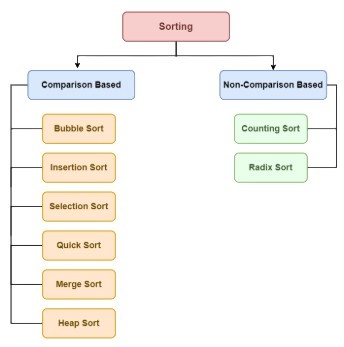
Sorting is the process of arranging data according to a specified order, such as ascending or descending order. Common sorting algorithms include Bubble Sort, Selection Sort, Insertion Sort, Merge Sort, Quick Sort, and Heap Sort. Different algorithms have different time and space complexity characteristics. Simple algorithms can be useful for small datasets, while efficient algorithms are preferred for larger datasets. Sorting can make searching, reporting, and data analysis easier. The appropriate sorting algorithm depends on factors such as input size, memory constraints, and data characteristics. Sorting is a fundamental topic in programming and technical interviews.

43. What Is Bubble Sort?

Ans:

Bubble Sort is a simple comparison-based sorting algorithm that repeatedly compares adjacent elements. When two adjacent elements are in the wrong order, they are exchanged. Repeated passes gradually move larger elements toward the end of the collection. The algorithm generally has O(n²) time complexity in average and worst-case scenarios. An optimized implementation can detect whether the collection is already sorted and reduce unnecessary passes. Bubble Sort requires very little additional memory when implemented in place

44. What Is Binary Search?

Ans:

  • Binary Search is an efficient searching algorithm used primarily on sorted data. It compares the target value with the middle element of the current search range. If the target is smaller or larger, half of the search range can be eliminated. 
  • This process continues until the target is found or no search range remains. Binary Search generally has O(log n) time complexity. 
  • It can be implemented iteratively or recursively depending on the programming approach. Binary Search is widely used to demonstrate efficient problem-solving techniques in technical interviews.

45. What Is The Difference Between Linear Search And Binary Search?

Ans:

Linear Search examines elements sequentially from the beginning until the required value is found. Binary Search repeatedly divides a sorted search range into two parts to reduce the search space. Linear Search generally works on both sorted and unsorted collections. Binary Search generally requires the data to be sorted before searching. The worst-case time complexity of Linear Search is O(n), while Binary Search generally operates in O(log n). Linear Search is simpler to implement, while Binary Search can be much faster for large sorted datasets. The appropriate method depends on data organization and application requirements.

46. What Is Git?

Git is a distributed version control system used to track changes in source code and other project files. It allows multiple developers to work on the same project while maintaining a history of modifications. Developers can create branches to develop features or fixes independently. Changes can be committed locally and later shared with remote repositories. Git also supports operations such as merging, branching, cloning, pulling, and pushing. It helps teams collaborate and manage different versions of software efficiently. Git is widely used in modern software development and DevOps environments.

47. What Is GitHub?

Ans:

GitHub is a platform that provides hosting and collaboration features for Git repositories. It allows developers to store source code and work together on software projects. GitHub provides features such as repositories, branches, pull requests, issues, and code reviews. Developers can use pull requests to propose changes and allow other team members to review them. It can also integrate with automated testing and continuous integration workflows. GitHub is widely used for both open-source and private software development. Git and GitHub are related but represent different concepts.

48. What Is A Git Branch?

Ans:

A Git branch is an independent line of development within a Git repository. It allows developers to work on features, fixes, or experiments without directly modifying another development line. A common workflow uses a main branch along with separate feature branches. After development and testing, changes can be merged into the appropriate branch. Branches make parallel development easier and reduce interference between different tasks. Developers can create, switch, merge, and delete branches using Git commands. Effective branching practices help maintain organized development workflows.

49. What Is A Pull Request?

Ans:

A pull request is a mechanism used to propose changes from one development branch to another repository branch. It allows team members to review proposed code before it becomes part of the target branch. Reviewers can examine modifications, add comments, and request changes. Automated tests and quality checks can also run as part of the review process. After approval, the changes can be merged according to the project’s workflow. Pull requests encourage collaboration and improve code quality. They are commonly used with Git-based development platforms.

50. What Is Version Control?

Ans:

  • Version control is a system for tracking and managing changes to files over time. It allows developers to maintain different versions of source code and recover previous states when necessary. 
  • Version control also supports collaboration among multiple developers working on the same project. Developers can review changes, identify contributors, and compare different versions of files. Git is one of the most widely used distributed version control systems. 
  • Version control is important for maintaining project history and managing software releases. It is a fundamental practice in professional software development.

51. What Is SDLC?

Ans:

SDLC stands for Software Development Life Cycle and represents a structured process for developing software applications. It generally includes stages such as planning, requirements analysis, design, development, testing, deployment, and maintenance. Each stage has specific objectives and deliverables that help organize the development process. Following SDLC can improve software quality, project visibility, and coordination among team members. Different development models such as Waterfall, Agile, and Spiral can organize these stages differently.

52. What Is Agile Methodology?

Ans:

Agile is a software development approach that emphasizes iterative development, collaboration, continuous feedback, and adaptability. Software is generally developed and delivered in smaller increments rather than waiting until the entire project is completed. Requirements can be reviewed and adjusted as business needs change. Agile teams commonly communicate frequently through meetings, planning sessions, reviews, and retrospectives. Scrum is one widely used framework within Agile development.

53. What Is Scrum?

Ans:

Scrum is an Agile framework used to manage software development through short, iterative development cycles. These cycles are called Sprints and commonly have a fixed duration. Scrum includes roles such as Product Owner, Scrum Master, and Developers. Common activities include Sprint Planning, Daily Scrum, Sprint Review, and Sprint Retrospective. The team works toward completing selected items from the product backlog during each Sprint. Regular reviews and feedback help improve the product incrementally. Scrum encourages collaboration, transparency, inspection, and adaptation throughout development.

54. What Is A Sprint?

Ans:

A Sprint is a fixed period during which a Scrum team works to complete a selected set of product backlog items. The team plans the work at the beginning of the Sprint and focuses on delivering a usable increment. Sprint duration is usually consistent within a project to create predictable development cycles. Daily Scrum meetings help the team coordinate progress and identify obstacles. At the end of the Sprint, completed work can be reviewed with stakeholders. A retrospective helps the team identify improvements for future Sprints. Sprints support iterative development and continuous delivery of value.

55. What Is Software Testing?

Ans:

Software testing is the process of evaluating software to determine whether it meets specified requirements and behaves as expected. Testing can identify defects, incorrect behavior, usability problems, performance issues, and other quality concerns. Different testing levels include unit testing, integration testing, system testing, and acceptance testing. Testing can be performed manually, automatically, or through a combination of both approaches. Test cases are designed based on requirements and expected behavior. Early and continuous testing can reduce the cost and impact of defects. Software testing is an essential part of the software development lifecycle.

56. What Is Unit Testing?

Ans:

  • Unit testing is the process of testing individual components or units of software in isolation. A unit can be a function, method, class, or other small piece of application logic. The purpose is to verify that each unit performs according to its expected behavior. 
  • Unit tests are commonly automated and executed frequently during development. They can help identify defects early before components are integrated with other parts of the application. 
  • Frameworks such as JUnit, NUnit, and pytest are commonly used for unit testing. Effective unit tests improve confidence in code quality and support easier maintenance.

57. What Is Integration Testing?

Ans:

Integration testing evaluates whether multiple software components work correctly when combined. Individual components may work independently but can still experience problems when interacting with other components. Integration testing can identify issues involving interfaces, data exchange, APIs, databases, and external services. Different strategies can be used, including top-down, bottom-up, and incremental integration. Automated integration tests can be included in continuous integration pipelines

58. What Is Regression Testing?

Ans:

Regression testing verifies that existing functionality continues to work after software changes are introduced. Changes can include new features, bug fixes, configuration updates, or dependency modifications. A regression test suite typically contains previously validated scenarios that are executed again. Automated regression testing can reduce repetitive manual effort and provide faster feedback..

59. What Is Black-Box Testing?

Ans:

Black-box testing evaluates software functionality without requiring knowledge of the internal implementation or source code. Testers focus on inputs, outputs, requirements, and observable system behavior. Test cases can be designed using techniques such as equivalence partitioning and boundary value analysis. This approach helps verify whether the application behaves according to specified requirements. Black-box testing can be applied at different testing levels.

60.  What Is The Difference Between A Class And An Object?

Ans:

Aspect Class Object
Definition A blueprint that defines properties and behaviors. An actual instance created from a class.
Memory Generally does not represent a specific instance in memory. Occupies memory when created.
Example Car can be a class. A specific BMW car can be an object

61. What Is API Testing?

Ans:

API testing is the process of validating application programming interfaces to ensure that they work correctly. It mainly focuses on requests, responses, data formats, authentication, status codes, and business logic. API testing can verify whether an API returns the expected response for valid and invalid inputs. It can also check error handling, response time, security, and data consistency. Tools such as Postman, SoapUI, and automated testing frameworks are commonly used for API testing.

62. What Is REST API?

Ans:

  • REST API is an application programming interface that follows principles commonly associated with Representational State Transfer. It typically uses HTTP methods such as GET, POST, PUT, PATCH, and DELETE to perform operations on resources. 
  • REST APIs commonly exchange data using formats such as JSON. GET is generally used to retrieve data, while POST is commonly used to create resources. PUT or PATCH can be used to modify resources, and DELETE can remove resources. 
  • REST APIs are generally designed to be stateless, meaning each request contains the information required to process it. REST is widely used for communication between web applications, mobile applications, and backend services

63. What Is JSON?

Ans:

JSON stands for JavaScript Object Notation and is a lightweight format for representing structured data. It uses objects and arrays to organize information in a readable format. JSON data is commonly represented using key-value pairs, strings, numbers, Boolean values, arrays, and nested objects. It is widely used for communication between clients and servers through web APIs. JSON is supported by many programming languages and can be easily parsed and generated. Its relatively simple structure makes it suitable for data exchange between different systems. REST APIs commonly use JSON for request and response data.

64. What Is HTTP?

Ans:

HTTP stands for Hypertext Transfer Protocol and is a communication protocol used for transferring information between clients and servers. A client sends an HTTP request to a server, and the server returns an HTTP response. HTTP methods such as GET, POST, PUT, PATCH, and DELETE indicate the intended operation. HTTP status codes communicate the result of a request, such as successful processing or an error. HTTP headers provide additional information about requests and responses..

65. What Are HTTP Status Codes?

Ans:

HTTP status codes are numerical responses sent by a server to indicate the result of an HTTP request. The 2xx category generally represents successful requests, such as 200 OK and 201 Created. The 3xx category generally indicates redirection or additional action. The 4xx category represents client-side errors, such as 400 Bad Request, 401 Unauthorized, and 404 Not Found. The 5xx category represents server-side errors, such as 500 Internal Server Error. Understanding status codes helps developers and testers diagnose API and web application behavior. They are commonly checked during API testing and troubleshooting..

66. What Is Cloud Computing??

Ans:

Cloud computing is the delivery of computing resources and services over a network, commonly the internet. These resources can include servers, storage, databases, networking, software, and computing platforms. Cloud services can provide resources on demand without requiring organizations to maintain all physical infrastructure themselves. Common cloud service models include Infrastructure as a Service, Platform as a Service, and Software as a Service. Public, private, and hybrid cloud environments are common deployment approaches.

67. What Is AWS?

Ans:

AWS stands for Amazon Web Services and is a cloud computing platform that provides many infrastructure and application services. Common AWS services include EC2 for virtual servers and S3 for object storage. Other services provide databases, networking, monitoring, serverless computing, security, and application integration capabilities. AWS resources can be provisioned according to application requirements and workloads. Organizations can use AWS to deploy applications without maintaining all physical infrastructure themselves.

68. What Is Microsoft Azure?

Ans:

Microsoft Azure is a cloud computing platform that provides services for computing, storage, networking, databases, security, analytics, and application development. Azure supports virtual machines, managed databases, containers, serverless computing, and many other cloud capabilities. Organizations can deploy applications and infrastructure using Azure services according to their requirements. Azure also integrates with Microsoft technologies and enterprise development environments.

69. What Is Docker?

Ans:

  • Docker is a platform used to package and run applications in containers. A container includes an application and the dependencies required for it to run consistently across environments. Docker images provide templates from which containers can be created. 
  • Containers are generally lightweight because they share the host operating system kernel rather than requiring a complete guest operating system. 
  • Docker helps reduce differences between development, testing, and production environments. It is commonly used in CI/CD pipelines and microservices architectures. Docker knowledge is useful for modern application deployment and DevOps practices.

70. What Is Kubernetes?

Ans:

Kubernetes is an open-source platform used to orchestrate containerized applications. It can automate deployment, scaling, service discovery, and management of containers across a cluster of machines. Kubernetes uses objects such as Pods, Deployments, Services, and ConfigMaps to manage application workloads. A Pod is the basic deployable unit and can contain one or more containers. Kubernetes can automatically restart failed workloads and distribute application traffic through appropriate services..

71. What Is CI/CD?

Ans:

CI/CD stands for Continuous Integration and Continuous Delivery or Continuous Deployment, depending on the workflow. Continuous Integration involves frequently integrating code changes into a shared repository and automatically building and testing them. Continuous Delivery keeps software in a releasable state, while Continuous Deployment can automatically release validated changes to production. CI/CD pipelines can include stages such as source control, compilation, testing, security checks, packaging, and deployments

72. What Is Jenkins?

Ans:

Jenkins is an automation server commonly used to implement continuous integration and continuous delivery pipelines. It can automatically build applications, execute tests, package software, and perform deployment tasks. Jenkins can integrate with source control systems such as Git and with many testing and deployment tools. Jobs and pipelines can be configured to run manually or automatically based on events such as code changes. Jenkins also supports plugins that extend its functionality for different technologies and workflows

73. What Is Microservices Architecture?

Ans:

Microservices architecture is a software design approach in which an application is divided into small, independently manageable services. Each service generally focuses on a specific business capability and can communicate with other services through defined interfaces such as APIs. Services can often be developed, tested, deployed, and scaled independently. This approach can improve flexibility and allow different services to use technologies appropriate to their requirements

74. What Is Monolithic Architecture?

Ans:

Monolithic architecture is a software design approach in which major application components are developed and deployed as a single application unit. Components such as user interface, business logic, and data access can exist within the same deployable application. This approach can be simpler to develop and deploy for smaller applications. However, changes to one component may require rebuilding and redeploying the entire application. Scaling individual components independently can also be more difficult.

75. What Is The Difference Between Monolithic And Microservices Architecture?

Ans:

  • A monolithic application is generally deployed as one application unit, whereas a microservices application consists of multiple independently deployable services. 
  • In a monolithic design, components are often closely connected within the same application process. Microservices separate functionality into smaller services that communicate through defined interfaces. 
  • Microservices can allow individual services to scale and deploy independently. However, they introduce additional complexity in communication, monitoring, deployment, and distributed data management. 

76. What Is Object-Oriented Programming In Java?

Ans:

Object-Oriented Programming in Java is a programming approach that organizes software around classes and objects. Java supports major OOP concepts such as encapsulation, inheritance, polymorphism, and abstraction. Classes define properties and behaviors, while objects represent instances of those classes. Encapsulation can be implemented using access modifiers and methods that control access to data. Inheritance allows classes to reuse or extend functionality from other classes

77. What Is The JVM?

Ans:

JVM stands for Java Virtual Machine and provides the runtime environment for executing Java bytecode. Java source code is compiled into bytecode, which can be executed by a compatible JVM. The JVM handles tasks such as memory management, bytecode execution, and runtime services. It contributes to Java’s platform-independent execution model because the same bytecode can run on different operating systems with suitable JVM implementations. The JVM also includes mechanisms such as garbage collection and runtime optimization

78. What Is The Difference Between JDK, JRE, And JVM?

Ans:

JVM is the virtual machine responsible for executing Java bytecode and providing the runtime environment. JRE traditionally refers to the JVM together with libraries and other components required to run Java applications. JDK is the development kit that includes tools required for developing Java applications along with the components needed for execution. Developers use the JDK to compile, debug, package, and run Java programs. The JVM forms the execution layer within the Java runtime environment. Understanding these terms helps explain how Java applications are developed and executed.

79. What Is Garbage Collection In Java?

Ans:

Garbage collection is an automatic memory management mechanism provided by the Java runtime environment. It identifies objects that are no longer reachable by the running application and makes their memory available for reuse. Developers generally do not manually free ordinary Java objects in the same way as languages requiring explicit memory management. Garbage collection helps reduce certain types of memory management errors. Different garbage collection algorithms and collectors can have different performance characteristics.

80. What Is Exception Handling In Java?

Ans:

  • Exception handling in Java provides mechanisms for managing abnormal conditions that occur during program execution. Java commonly uses try, catch, finally, throw, and throws for handling and communicating exceptions. 
  • The try block contains code that may generate an exception, while catch can handle a matching exception. The finally block can contain cleanup logic that should generally execute after the try or catch processing. 
  • Java exceptions are broadly categorized into checked and unchecked exceptions. Proper exception handling prevents errors from being handled unpredictably and can provide meaningful failure behavior. It also helps separate normal application logic from error-handling logic.

81. What Is Python?

Ans:

Python is a high-level, general-purpose programming language known for its readable syntax and broad range of applications. It supports multiple programming styles, including object-oriented, procedural, and functional programming. Python provides built-in data structures such as lists, tuples, dictionaries, and sets. It is widely used for web development, automation, data analysis, artificial intelligence, machine learning, and scripting. Python has a large standard library and a wide ecosystem of third-party packages.

82. What Is The Difference Between List And Tuple In Python?

Ans:

A list is an ordered collection that can be modified after creation, while a tuple is an ordered collection that is generally immutable. Lists are commonly used when elements need to be added, removed, or changed during program execution. Tuples are useful when the collection should remain unchanged after creation. Lists are represented using square brackets, whereas tuples are commonly represented using parentheses. Both structures support indexing, slicing, and iteration. Tuples can sometimes be more memory-efficient than lists for fixed collections. The choice depends on whether the data needs to be modified.

83. What Is A Dictionary In Python?

Ans:

A dictionary is a Python data structure that stores information as key-value pairs. Each key is used to identify and retrieve its corresponding value. Dictionaries are useful when data needs to be accessed using meaningful identifiers rather than numeric positions. Keys must satisfy the requirements for dictionary keys, while values can contain different types of objects. Dictionaries support operations such as adding, updating, removing, and retrieving entries

84. What Is A Set In Python?

Ans:

  • A set is a collection designed to store unique elements without maintaining duplicates. Sets are useful when duplicate values need to be eliminated from a collection. They support mathematical operations such as union, intersection, difference, and symmetric difference. 
  • Set elements must be hashable so that they can be stored and managed efficiently. Sets do not provide traditional positional indexing like lists. 
  • They are commonly used for membership testing and removing duplicate values. Python sets are useful for solving problems involving uniqueness and collection comparisons.

85. What Is A Lambda Function In Python?

Ans:

A lambda function is a small anonymous function that can be written using a concise expression. It is commonly used when a simple function is needed temporarily rather than defining a named function. Lambda functions can accept parameters and return the result of an expression. They are frequently used with functions such as map, filter, and sorted. A lambda is generally suitable for simple operations rather than complex business logic. Using named functions can improve readability when the operation becomes complicated

86. What Is The Difference Between Compiler And Interpreter?

Ans:

A compiler generally translates source code into another form, such as machine code or intermediate code, before execution. An interpreter generally executes program instructions through a runtime mechanism rather than producing a traditional standalone executable first. Compiled approaches can provide strong optimization opportunities before execution. Interpreted approaches can offer flexibility and interactive execution depending on the language and implementation.

87. What Is Multithreading?

Ans:

Multithreading is a programming technique in which multiple threads execute within a process. Threads can perform different tasks concurrently and may share resources belonging to the same process. Multithreading can improve responsiveness and resource utilization for suitable workloads. It is commonly used in applications involving background operations, network communication, user interfaces, and concurrent processing. Shared data can create problems such as race conditions if access is not properly controlled. Synchronization mechanisms can help coordinate access to shared resources. The benefits of multithreading depend on the programming language, runtime, workload, and system architecture..

88. What Is A Process?

Ans:

A process is a running instance of a program with its own execution environment and resources. A process generally has its own memory space and operating system-managed resources. Multiple processes can run concurrently on the same computer. Processes can communicate using mechanisms such as pipes, sockets, shared memory, or other inter-process communication techniques. Process isolation can help prevent certain failures in one process from directly affecting another process

89. What Is The Difference Between Process And Thread?

Ans:

A process is an independent execution unit with its own memory space, while a thread is an execution unit within a process. Threads belonging to the same process generally share memory and other process resources. Creating and switching between processes can require more system resources than managing threads. Threads can communicate efficiently through shared memory, but this also creates synchronization challenges. Processes provide stronger isolation because their memory spaces are generally separated

90. What Is Deadlock?

Ans:

  • Deadlock is a situation in which two or more processes or threads become permanently blocked because each is waiting for a resource held by another. A typical deadlock involves a circular waiting relationship between multiple execution units. 
  • Deadlocks can occur when resources are limited and synchronization is not carefully designed. Common conditions associated with deadlock include mutual exclusion, hold and wait, no preemption, and circular wait. 
  • Techniques such as resource ordering, timeout mechanisms, and careful synchronization can help prevent or reduce deadlocks. Deadlock detection and recovery can also be used in some systems. 

91. How Was A Particular Feature Implemented?

Ans:

A particular feature was implemented by first understanding the functional and technical requirements. The feature was divided into smaller components to make development and testing easier. The required programming logic, database operations, and application interfaces were then identified. The feature was developed according to the existing project architecture and coding standards. Appropriate validation and error-handling mechanisms were included to handle unexpected input.

92. What Database Was Used?

Ans:

The database used in the project was selected according to the application’s data storage and retrieval requirements. A relational database such as MySQL, PostgreSQL, Oracle, or SQL Server can be used when structured data and relationships are important. Tables, columns, primary keys, and foreign keys can be designed according to the project requirements. SQL queries can be used to insert, update, retrieve, and delete application data. Proper normalization can help reduce unnecessary duplication and maintain data consistency

93. How Was Testing Performed?

Ans:

Testing was performed by first understanding the expected behavior and requirements of the application. Test cases were prepared to verify both valid and invalid input scenarios. Unit testing was used to verify individual components, while integration testing checked communication between different modules. Functional and regression testing were performed to confirm that existing features continued to work after changes

94. What Improvements Could Be Made?

Ans:

Several improvements could be considered after reviewing the application’s current functionality and performance. Code quality could be improved by removing unnecessary duplication and applying appropriate design principles. Database queries could be optimized by reviewing indexes, joins, and frequently executed operations. Application performance could be improved through caching, efficient algorithms, and better resource management where required.

95. How Does Reverse A String?

Ans:

A string can be reversed by traversing its characters from the last position to the first position. The characters can then be added to a new string to produce the reversed result.

  • text = “Tech”
  • reversed_text = text[::-1]
  • print(reversed_text)

96.Check Whether A String Is A Palindrome?

Ans:

A palindrome is a string or sequence that reads the same forward and backward. The string can be reversed and compared with the original string to determine whether it is a palindrome

  • text = “madam”
  • if text == text[::-1]:
  • print(“Palindrome”)
  • else:
  • print(“Not Palindrome”)

97. Find The Factorial Of A Number?

Ans:

The factorial of a non-negative integer is the product of all positive integers from that number down to one. For example, the factorial of 5 is calculated as 5 × 4 × 3 × 2 × 1, which produces 120

  • n = 5
  • factorial = 1
  • for i in range(1, n + 1):
  • factorial *= i
  • print(factorial)

98. Generate A Fibonacci Series?

Ans:

The Fibonacci series is a sequence in which each number is generally obtained by adding the previous two numbers. A common sequence begins with 0 and 1, followed by 1, 2, 3, 5, 8, and so on.

  • n = 10
  • a, b = 0, 1
  • for i in range(n):
  • print(a, end=” “)
  • a, b = b, a + b

99. Check Whether A Number Is Prime?

Ans:

A prime number is a positive integer greater than 1 that has exactly two positive divisors: 1 and itself. To check whether a number is prime, the number can be tested for divisibility by integers starting from 2.

  • n = 29
  • is_prime = True
  • if n < 2:
  • is_prime = False
  • else:
  • for i in range(2, int(n ** 0.5) + 1):
  • if n % i == 0:
  • is_prime = False
  • break
  • print(“Prime” if is_prime else “Not Prime”)

100. Find The Largest And Smallest Element In An Array?

Ans:

The largest and smallest elements in an array can be found by traversing every element and comparing it with the current maximum and minimum values.

  • numbers = [10, 5, 25, 8, 15]
  • largest = numbers[0]
  • smallest = numbers[0]
  • for num in numbers:
  • if num > largest:
  • largest = num
  • if num < smallest:
  • smallest = num
  • print(“Largest:”, largest)
  • print(“Smallest:”, smallest)

Enroll in Spring Boot Training and UPGRADE Your Skills

Weekday / Weekend BatchesSee Batch Details
Course Curriculum

Learn Spring Boot with Advanced Concepts By Industry Experts

  • Instructor-led Sessions
  • Real-life Case Studies
  • Assignments
Explore Curriculum

Upcoming Batches

Name Date Details
TCS

10 - August - 2026

(Weekdays) Weekdays Regular

View Details
TCS

12 - August - 2026

(Weekdays) Weekdays Regular

View Details
TCS

15 - August - 2026

(Weekends) Weekend Regular

View Details
TCS

16 - August - 2026

(Weekends) Weekend Fasttrack

View Details