 LMS
Last updated on 13th Oct 2026| 7782

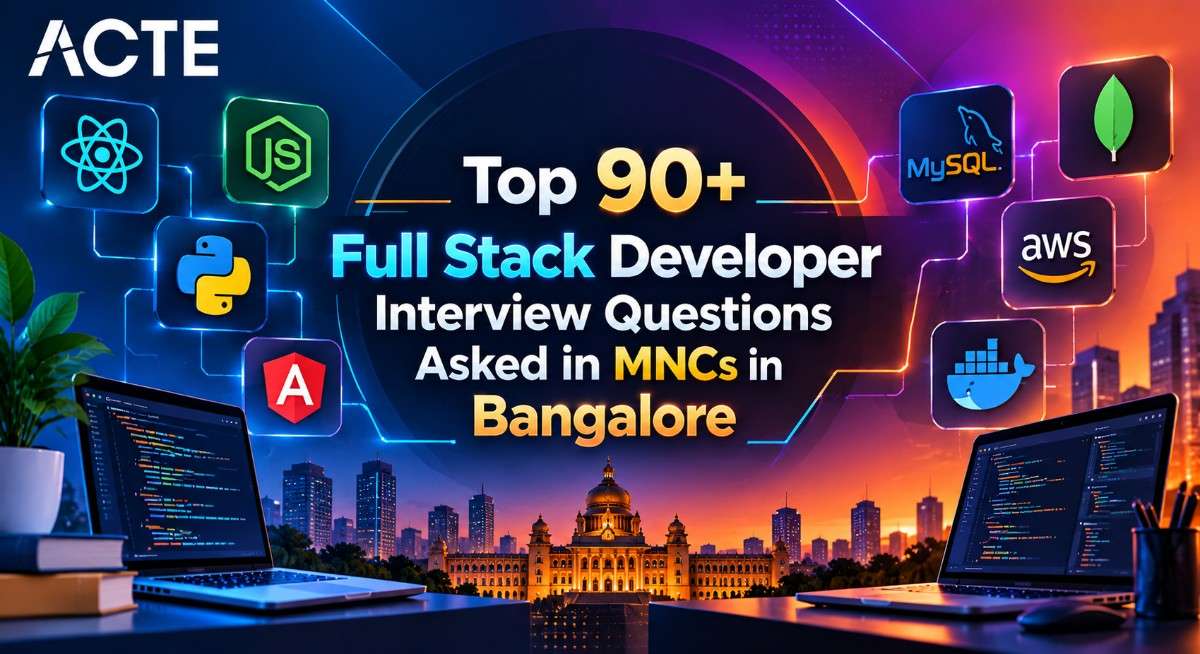
Full Stack Development is one of the most востребed skills in the IT industry, as organizations require developers who can build, manage, and maintain complete web applications. Top 90+ Full Stack Developer Interview Questions Asked in MNCs in Bangalore covers essential topics such as HTML, CSS, JavaScript, React, Angular, Node.js, Express.js, databases, REST APIs, and backend development. These interview questions and answers help freshers and experienced candidates prepare for technical interviews at leading multinational companies in Bangalore. The guide also includes important concepts related to Git, SQL, MongoDB, authentication, application security, debugging, deployment, and performance optimization. Each answer is presented in a clear paragraph format to support easy understanding and revision. Practicing these questions can strengthen programming fundamentals, improve problem-solving abilities, and build confidence for full stack developer interviews. This preparation guide is useful for candidates seeking opportunities as Full Stack Developers, Frontend Developers, Backend Developers, and Software Engineers.
1. What Is Full Stack Development?
Ans:
Full stack development involves building both the frontend and backend of a web application. The frontend handles the user interface, while the backend manages business logic, APIs, and server-side operations. Full stack developers also work with databases, authentication, and application deployment. Common technologies include HTML, CSS, JavaScript, React, Node.js, and SQL.
2. What Are the Responsibilities of a Full Stack Developer?
Ans:
A full stack developer designs, develops, tests, and maintains web applications across different layers. Responsibilities include creating user interfaces, implementing backend services, managing databases, and integrating APIs. Developers also debug errors, optimize performance, and implement security measures. Collaboration with designers, testers, and product teams is an important part of the role
3. What Is the Difference Between Frontend and Backend Development?
Ans:
Frontend development focuses on the parts of an application that users see and interact with. Backend development manages server-side logic, data processing, authentication, and communication with databases. Frontend technologies include HTML, CSS, JavaScript, and React. Backend technologies include Node.js, Java, Python, and server frameworks. Both layers communicate through APIs to deliver a complete application experience.
4. What Is the MERN Stack?
Ans:
- The MERN stack is a collection of technologies used to build full stack JavaScript applications.
- It consists of MongoDB for database management, Express.js for backend web services, React for user interfaces, and Node.js for server-side execution.
- These technologies support the development of dynamic and data-driven applications. JavaScript can be used across much of the application.
5. What Is the MEAN Stack?
Ans:
The MEAN stack includes MongoDB, Express.js, Angular, and Node.js for full stack web development. MongoDB stores application data, while Express.js and Node.js support backend processing. Angular provides a framework for developing structured frontend applications. The stack uses JavaScript and related technologies across multiple application layers. It is suitable for building dynamic web applications with reusable components and organized development practices.
6. What Is the Software Development Life Cycle?
Ans:
The Software Development Life Cycle is a structured process for planning, building, testing, deploying, and maintaining software. Common phases include requirement analysis, design, development, testing, deployment, and maintenance. Each phase defines activities that help teams manage quality, cost, and delivery timelines. Full stack developers contribute to several phases depending on the project.
7. What Is Agile Methodology?
Ans:
Agile is a software development approach that emphasizes iterative delivery, collaboration, and continuous feedback. Projects are divided into smaller increments so teams can develop and validate features regularly. Developers, testers, and product owners communicate frequently to manage changing requirements. Scrum and Kanban are commonly used Agile frameworks or methods.
8. What Is Version Control?
Ans:
Version control is a system for tracking changes to source code and other project files. It allows developers to review previous versions, collaborate, and restore code when necessary. Git is one of the most widely used version control systems. Platforms such as GitHub, GitLab, and Bitbucket support repository hosting and team collaboration. Version control helps prevent conflicting changes and supports reliable software development workflows.
9. What Is Git?
Ans:
Git is a distributed version control system used to manage source code changes. Developers create repositories, commit changes, create branches, and merge work from different contributors. It supports offline work because each developer can maintain a local copy of the repository. Git also helps teams investigate changes and resolve collaboration issues.
10. What Is the Difference Between Git and GitHub?
Ans:
- Git is a version control system that tracks changes to project files. GitHub is a cloud-based platform for hosting Git repositories and collaborating on software projects.
- Git provides commands for committing, branching, and merging code locally. GitHub adds features such as pull requests, issue tracking, code reviews, and project collaboration.
- Developers often use Git locally and GitHub to share and manage code with their teams.
11. What Is HTML?
Ans:
HTML stands for HyperText Markup Language and defines the structure of web pages. It uses elements and tags to organize headings, paragraphs, images, links, forms, and tables. HTML provides semantic elements such as header, nav, main, and footer. Browsers interpret HTML to display webpage content. It works with CSS for styling and JavaScript for interactive behavior.
12. What Is CSS?
Ans:
CSS stands for Cascading Style Sheets and controls the presentation of web pages. It defines colors, fonts, spacing, borders, layouts, and responsive behavior. CSS selectors target HTML elements, while properties determine their appearance. Flexbox and Grid help developers create modern layouts. CSS improves consistency, accessibility, and user experience across different screen sizes.
13. What Is the Difference Between HTML and HTML5?
Ans:
| Aspect | HTML | HTML5 |
|---|---|---|
| Definition | HTML Is A Markup Language Used To Structure Content On Web Pages. | HTML5 Is An Advanced Version Of HTML That Supports Modern Web Features And Multimedia. |
| Multimedia Support | Requires External Plugins Such As Flash To Play Audio And Video. | Provides Built-In Audio And Video Elements Without Requiring External Plugins. |
| Semantic Elements | Primarily Uses Generic Elements Such As Div And Span To Structure Content. | Introduces Semantic Elements Such As Header, Footer, Article, Section, And Nav. |
| Form And Graphics Support | Offers Basic Form Controls And Relies More On External Technologies For Graphics. | Supports New Input Types, Form Validation, Canvas, And SVG For Interactive Graphics. |
14. What Is the CSS Box Model?
Ans:
The CSS box model describes how the browser calculates the space occupied by an element. It consists of content, padding, border, and margin. Content contains the actual text or image, while padding adds space around it inside the border. The border surrounds the padding and content, and margin creates external spacing. The box-sizing: border-box property includes padding and border within the specified width and height..
15. What Is Responsive Web Design?
Ans:
JResponsive web design ensures that a website adapts to different screen sizes and devices. It uses flexible layouts, relative units, responsive images, and CSS media queries. Developers commonly use Flexbox and Grid to create adaptable page structures. The viewport meta tag helps browsers display pages appropriately on mobile devices. Responsive design improves usability on smartphones, tablets, laptops, and desktop computers.
16. What Is Flexbox in CSS?
Ans:
Flexbox is a CSS layout model designed to arrange elements efficiently along a row or column. It allows developers to control alignment, spacing, ordering, and the distribution of available space. The parent element becomes a flex container using display: flex. Properties such as justify-content, align-items, and flex-wrap control layout behavior. Flexbox is especially useful for navigation bars, card layouts, and responsive interface components.
17. What Is CSS Grid?
Ans:
CSS Grid is a two-dimensional layout system for arranging elements into rows and columns. Developers define a grid container and specify column sizes, row sizes, gaps, and item placement. It supports complex page layouts with precise alignment and spacing. Grid works well for dashboards, galleries, and complete webpage structures. Unlike Flexbox, which primarily manages one dimension at a time, Grid is designed to manage both rows and columns together.
18. What Is JavaScript?
Ans:
- JavaScript is a programming language used to create interactive and dynamic web applications. It can respond to user events, validate forms, update page content, and communicate with APIs.
- JavaScript runs in browsers and can also run on servers through environments such as Node.js.
- It supports functions, objects, arrays, classes, and asynchronous programming. Full stack developers use JavaScript to implement both frontend interactions and backend functionality.
19. What Is the Difference Between var, let, and const?
Ans:
var, let, and const are JavaScript declarations used to create variables. var is function-scoped, while let and const are block-scoped. A let variable can be reassigned, whereas a const binding cannot be reassigned after initialization. A const object can still have its properties modified unless additional measures prevent it. Modern JavaScript generally favors const by default and let when reassignment is required.
20. What Is Hoisting in JavaScript?
Ans:
Hoisting describes how JavaScript processes declarations before executing code within their scope. Function declarations can generally be called before their written position in the code. Variables declared with var are initialized with undefined during this process. Variables declared with let and const remain inaccessible before initialization because of the temporal dead zone.
21. What Is a Closure in JavaScript?
Ans:
A closure occurs when a function retains access to variables from its surrounding lexical scope. This access remains available even when the outer function has finished executing. Closures are useful for creating private state, callbacks, and function factories. For example, a counter function can preserve a count between repeated calls. They are widely used in event handlers, asynchronous programming, and reusable JavaScript utilities.
22. What Is the Difference Between == and ===?
Ans:
- The == operator compares values after performing type coercion when necessary. The === operator compares values without converting their types.
- For example, 5 == “5” evaluates to true, while 5 === “5” evaluates to false.
- Strict equality usually makes comparisons more predictable and easier to understand. Developers generally prefer === unless type coercion is specifically intended.
23. What Is the DOM?
Ans:
The Document Object Model represents an HTML document as a structured tree of objects. JavaScript can use the DOM to access, modify, create, and remove page elements. It also allows developers to respond to events such as clicks, input changes, and form submissions. DOM manipulation enables interactive user interfaces without requiring a complete page reload. Frameworks such as React provide abstractions that help manage interface updates.
24. What Is Event Bubbling in JavaScript?
Ans:
- Event bubbling is the process in which an event triggered on an element propagates upward through its ancestor elements.
- For example, clicking a button inside a container can trigger click handlers on both elements. Developers can use this behavior to implement event delegation.
- The stopPropagation() method prevents an event from continuing through the propagation path.
25. What Is Event Delegation?
Ans:
Authorization Is The Process Of Determining Whether An Authenticated User Has Permission To Perform A Particular Event delegation involves attaching an event listener to a parent element to handle events from its child elements. It works by using event propagation and checking which child triggered the event. This approach reduces the number of individual event listeners required. It is particularly useful for dynamically generated lists and tables. Event delegation can simplify code and improve maintainability when interface elements are frequently added or removed.
26. What Is a Promise in JavaScript?
Ans:
A Promise represents the eventual completion or failure of an asynchronous operation. It has three states: pending, fulfilled, and rejected. Developers can process successful results using .then() and handle errors using .catch(). The .finally() method runs after settlement regardless of the outcome. Promises are commonly used for API requests, file operations, and other tasks that complete asynchronously.
27. What Is Async/Await in JavaScript?
Ans:
Async/await provides syntax for working with Promises in a more readable, sequential style. An async function always returns a Promise, while await pauses that function until a Promise settles. Developers often combine await with try…catch to handle errors clearly. This approach makes asynchronous workflows easier to follow. It does not block the entire JavaScript runtime while an awaited operation is pending.
28. What Is the Difference Between Synchronous and Asynchronous Programming?
Ans:
Synchronous programming executes operations in sequence, with each step generally completing before the next step proceeds. Asynchronous programming allows certain operations to continue without blocking the surrounding execution flow while waiting for completion. It is useful for network requests, timers, and file operations. JavaScript supports asynchronous programming through callbacks, Promises, and async/await.
29. What Is JSON?
Ans:
JSON stands for JavaScript Object Notation and is a lightweight data-interchange format. It represents structured data using objects, arrays, strings, numbers, booleans, and null values. JSON is commonly used to exchange information between frontend applications, backend services, and external APIs. JavaScript provides JSON.stringify() to convert compatible values into JSON text and JSON.parse() to parse JSON text. Its simple structure makes it widely supported across programming languages.
30. What Is the Difference Between Local Storage and Session Storage?
Ans:
Local Storage and Session Storage are browser APIs used to store string-based key-value data. Local Storage generally persists across browser sessions until data is cleared. Session Storage is associated with a particular browser tab’s page session and is normally cleared when that tab or session ends. Both can store application preferences and temporary interface data.
31. What Is React?
Ans:
- React is a JavaScript library for building user interfaces using reusable components. It allows developers to organize complex screens into smaller, manageable pieces.
- React updates the interface when application state or props change. It supports declarative rendering and a component-based development approach.
- React is commonly used to build single-page applications, dashboards, and interactive web platforms.
32. What Is a Component in React?
Ans:
A React component is a reusable unit of interface logic and presentation. Components can represent buttons, navigation bars, forms, product cards, or complete page sections. They are commonly written as JavaScript functions that return JSX. Components can receive data through props and manage changing information through state. Reusing components improves consistency, maintainability, and development efficiency.
33. What Is JSX?
Ans:
JSX stands for JavaScript XML and provides a syntax for describing UI elements within JavaScript code. It resembles HTML but supports JavaScript expressions inside curly braces. JSX is transformed into JavaScript that React can use to create interface elements. It supports component composition and makes UI structures easier to read. Developers must use appropriate syntax, such as className instead of the HTML class attribute.
34. What Is the Difference Between Props and State in React?
Ans:
Props are inputs passed from a parent component to a child component. State represents information managed by a component or its supporting logic that can change over time. A component should not directly modify its props. Updating state through the appropriate React mechanism can trigger a new render. Both props and state help create dynamic interfaces, but they serve different data-management purposes.
35. What Are React Hooks?
Ans:
React Hooks are functions that allow function components to use React features such as state and effects. Common Hooks include useState, useEffect, useContext, and useRef. Hooks must follow the Rules of Hooks, including being called at the top level of components or custom Hooks. They support reusable logic without requiring class components. Proper Hook usage helps keep component behavior organized and predictable.
36. What Is the useState Hook?
Ans:
The useState Hook allows a React function component to maintain state between renders. It returns the current state value and a setter function for requesting an update. When the state changes, React can render the component again to reflect the new value. State updates may be batched, so functional updates are useful when the next value depends on the previous one. useState is commonly used for forms, counters, toggles, and interactive controls.
37. What Is the useEffect Hook?
Ans:
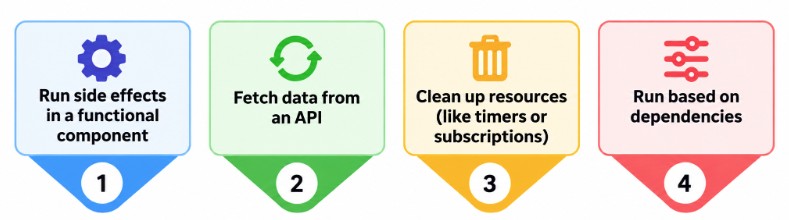
The useEffect Hook lets React components synchronize with external systems after rendering. Common uses include fetching data, subscribing to events, and managing timers. Its dependency array controls when the effect should run again. An effect can return a cleanup function to remove subscriptions or release resources. Developers should avoid unnecessary effects when a value can be calculated directly during rendering.
38. What Is the Virtual DOM?
Ans:
The Virtual DOM is a term commonly used for React’s in-memory representation of UI elements. React uses its rendering and reconciliation process to determine the updates needed to reflect changes in the interface. The resulting changes are applied to the actual DOM as necessary. This model supports declarative UI development and component-based updates. Performance depends on the complete rendering process rather than the Virtual DOM alone.
39. What Is A Transaction?39. What Is React Router?39. What Is A Transaction?
Ans:
- React Router is a routing library used to manage navigation in React applications. It allows developers to associate URL paths with components and display different views without full-page navigation in typical client-side routing setups.
- It supports route parameters, nested routes, and navigation controls. Appropriate route configuration helps organize large applications.
- Developers should also consider server configuration so direct requests to application routes work correctly.
40. What Is State Management in React?
Ans:
- State management is the process of storing, updating, and sharing data used by application components.
- Small applications may rely on component state and React Context. Larger applications may use libraries such as Redux Toolkit or Zustand to manage shared state.
- A good approach separates local interface state from application-wide data. Effective state management improves consistency, maintainability, and debugging across complex user interfaces.

41. What Is Angular?
Ans:
Angular is a TypeScript-based web application framework used to build structured frontend applications. It provides features such as components, dependency injection, routing, forms, and HTTP communication. Angular also supports reactive programming through RxJS. Its integrated architecture can help teams maintain large applications with consistent development patterns. It is commonly used for enterprise dashboards, portals, and data-driven business applications..
42. What Is the Difference Between React and Angular?
Ans:
GitHub Is A Cloud-Based Platform Used For Hosting, Managing, React is a JavaScript library focused primarily on building user interfaces. Angular is a more comprehensive framework that provides integrated solutions for routing, dependency injection, forms, and other application features. React projects typically select additional libraries according to their needs. Angular offers a more standardized framework structure.
43. What Is Node.js?
Ans:
Node.js is a JavaScript runtime that executes JavaScript outside the browser. It uses the V8 JavaScript engine and provides APIs for networking, file operations, and server-side development. Node.js is commonly used to build web servers, REST APIs, and real-time applications. Its event-driven architecture and non-blocking I/O support many concurrent connections.
44. What Is Express.js?
Ans:
- Express.js is a lightweight web framework commonly used with Node.js to build web servers and APIs.
- It provides routing, middleware integration, request handling, and response utilities. Developers can define endpoints for methods such as GET, POST, PUT, and DELETE.
- Express supports integration with databases, authentication libraries, and validation tools.
45. What Is Middleware in Express.js?
Ans:
Middleware is a function that can access a request, a response, and the next middleware function in the request-response cycle. It can perform tasks such as logging, authentication, input validation, and request parsing. Middleware can modify request data, end the response, or pass control onward. The order in which middleware is registered can affect application behavior. Error-handling middleware provides a structured way to handle and report server-side errors.
46. What Is REST API?
Ans:
Docker Is A Containerization Platform Used To Package An REST API refers to an application programming interface designed around REST architectural principles. It exposes resources through URLs and commonly uses HTTP methods to perform operations. GET retrieves data, POST creates or submits data, PUT replaces a resource, PATCH partially updates it, and DELETE removes it. REST APIs typically exchange JSON data.
47. What Is the Difference Between GET and POST?
Ans:
Kubernetes Is An Open-Source Container Orchestration Platform GET is generally used to retrieve information from a server without requesting a state change. POST is commonly used to submit data or create resources, although its exact behavior depends on the API design. GET parameters are often included in the URL, while POST data is commonly sent in the request body. GET requests are intended to be safe and are generally cacheable.
48. What Is the Difference Between PUT and PATCH?
Ans:
AWS Stands For Amazon Web Services And Is A Cloud Computing PUT is generally used to replace a resource with a supplied representation, while PATCH applies partial modifications. A PUT request is intended to be idempotent, meaning repeating the same request should have the same intended effect. PATCH behavior depends on the patch format and API implementation. Both methods are used to update resources through HTTP APIs. Choosing the correct method helps make endpoint behavior clearer and more predictable.
49. What Is API Authentication?
Ans:
API authentication verifies the identity of a user, application, or service requesting access. Common methods include API keys, session-based authentication, and token-based approaches such as OAuth 2.0 and OpenID Connect. Authentication mechanisms determine how credentials are issued, transmitted, and validated. HTTPS should protect credentials and tokens during transmission.
50. What Is JWT?
Ans:
- JWT stands for JSON Web Token and is a compact format for representing claims between systems. A JWT commonly contains a header, payload, and cryptographic signature.
- It is frequently used in token-based authentication and authorization workflows.
- Signed JWTs provide integrity protection but are not automatically encrypted, so their payload should not contain secrets.
51. What Is CORS?
Ans:
CORS stands for Cross-Origin Resource Sharing and is a browser security mechanism that controls certain cross-origin requests. A server uses HTTP response headers to indicate which origins and request types are permitted. Some requests trigger a preflight OPTIONS request before the actual request is sent. CORS configuration should allow only the origins and permissions required by the application.
52. What Is the Difference Between Authentication and Authorization?
Ans:
Authentication verifies who a user or system is. Authorization determines what that authenticated identity is allowed to access or perform. For example, logging in with valid credentials completes authentication, while checking permission to access an administrator dashboard is authorization. Both mechanisms are essential for protecting applications and data.
53. What Is Error Handling in Backend Development?
Ans:
Error handling is the process of detecting, managing, and responding to unexpected conditions in an application. Backend developers validate requests, catch exceptions, and return suitable HTTP status codes and error messages. Centralized error-handling middleware can keep Express applications more consistent. Detailed technical information should be logged securely without exposing secrets to clients.
54. What Is Asynchronous Programming in Node.js?
Ans:
Asynchronous programming allows Node.js applications to manage operations such as network communication and database access without unnecessarily blocking the main event loop while waiting. Node.js supports callbacks, Promises, and async/await. This approach can handle many I/O-bound requests efficiently. However, long-running CPU-intensive operations can block the event loop and reduce responsiveness
55. What Is the Node.js Event Loop?
Ans:
The Node.js event loop coordinates JavaScript execution and the processing of asynchronous callbacks and events. It allows Node.js to handle many I/O operations without creating a separate JavaScript thread for every request. Some operations are handled by the operating system or the libuv worker pool. Long synchronous tasks can block the event loop and delay other requests.
56. What Is a Database?
Ans:
- A database is an organized collection of data that can be stored, accessed, updated, and managed efficiently.
- Web applications use databases to store information such as user accounts, products, orders, and transactions.
- Relational databases organize information into tables, while document databases can store flexible document structures. Databases support querying, indexing, and data integrity
57. What Is the Difference Between SQL and NoSQL Databases?
Ans:
SQL databases store structured data using relational tables and typically support SQL queries. NoSQL databases include document, key-value, column-family, and graph database models. SQL databases are often suitable for structured data and transactional consistency requirements. NoSQL databases can be useful for flexible schemas and particular scalability or data-access patterns.
58. What Is MySQL?
Ans:
MySQL is a relational database management system that stores data in tables and supports SQL queries. Developers use it to create schemas, define relationships, retrieve records, and manage transactions. It supports features such as indexes, constraints, joins, and access controls. MySQL is widely used in content management systems, e-commerce platforms, and web applications.
59. What Is MongoDB?
Ans:
Async/Await Is A JavaScript Feature That Provides A Readable Way MongoDB is a NoSQL database that stores data as BSON documents organized into collections. Documents can contain nested objects and arrays, allowing flexible data structures. MongoDB supports queries, indexes, aggregation pipelines, and replication features. It is commonly used in applications with document-oriented data models. Developers should still design schemas carefully to support efficient queries, data consistency, and maintainable application logic.
60. What Is Database Normalization?
Ans:
Database normalization organizes relational data to reduce unnecessary duplication and prevent update anomalies. It divides information into related tables and defines appropriate relationships between them. Common normal forms include First Normal Form, Second Normal Form, and Third Normal Form. Normalization can improve data integrity and consistency.
61. What Is a Primary Key?
Ans:
A primary key uniquely identifies each row in a relational database table. It must contain unique values and cannot contain NULL values. A primary key may consist of one column or multiple columns forming a composite key. It helps maintain entity integrity and supports relationships with other tables. Common examples include customer IDs, employee IDs, and order IDs.

Get JOB Oriented Full Stack Training for Beginners By MNC Experts
- Instructor-led Sessions
- Real-life Case Studies
- Assignments
62. What Is a Foreign Key?
Ans:
Object-Oriented Programming Is A Programming Approach That A foreign key is a column or group of columns that references a primary key or another suitable unique key in a related table. It helps enforce referential integrity between related records. For example, an orders table may reference a customer ID in the customers table. Foreign keys can restrict invalid relationships and support configured update or delete behavior. They help maintain consistency across relational database structures.
63. What Is an SQL JOIN?
Ans:
- An SQL JOIN combines rows from two or more tables based on a related column or specified condition.
- An INNER JOIN returns matching rows from both tables. A LEFT JOIN returns all rows from the left table and matching rows from the right table, using NULL values when no match exists.
- RIGHT JOIN and FULL OUTER JOIN provide other matching behaviors where supported. JOINs are essential for retrieving related information from normalized databases.
64. What Is an Index in a Database?
Ans:
A database index is a data structure that helps the database locate records without scanning every row in many query scenarios. Indexes can improve filtering, sorting, and join performance when appropriately designed. However, they consume storage and can increase the cost of inserts, updates, and deletes. Index selection should reflect actual query patterns and execution plans. Too many unnecessary indexes can reduce overall database performance.
65. What Is a Database Transaction?
Ans:
A database transaction is a group of operations treated as one logical unit of work. Transactions commonly follow ACID properties: Atomicity, Consistency, Isolation, and Durability. These properties help maintain reliable data when operations succeed or fail. For example, a bank transfer should debit one account and credit another without leaving only half the transfer completed. Proper transaction management is important for payments, orders, and other critical application workflows.
66. What Is Object-Oriented Programming?
Ans:
Object-oriented programming organizes software around objects that combine data and behavior. Its commonly discussed principles include encapsulation, abstraction, inheritance, and polymorphism. Classes can define the properties and methods used to create objects. OOP can improve modularity, code reuse, and maintainability when applied appropriately. Full stack developers may use these principles in Java, C#, Python, and TypeScript projects.
67. What Is the Difference Between a Class and an Object?
Ans:
A class defines a structure and behavior that can be used to create objects. An object is an instance of a class with its own state and access to the class’s behavior. For example, a Car class may define properties such as color and methods such as start(). Individual car objects can have different property values. Classes and objects help organize code into reusable, meaningful units.
68. What Is Inheritance in OOP?
Ans:
Inheritance allows a class to derive or extend behavior from another class where the language supports that relationship. It can help reuse common properties and methods while allowing specialized behavior. For example, a Manager class may extend an Employee class. Inheritance can reduce duplication but should be used when the relationship between types is appropriate
69. What Is Polymorphism?
Ans:
Polymorphism allows different objects or types to be used through a common interface while providing different behavior. In object-oriented languages, it can be achieved through method overriding and, in some languages, method overloading. For example, different payment classes may implement a common pay() operation in different ways. Polymorphism reduces the need for large conditional structures in some designs.
70. What Is Exception Handling?
Ans:
Exception handling manages errors or exceptional conditions that arise during program execution. Languages provide mechanisms such as try, catch, and finally to handle failures and perform cleanup where needed. In JavaScript, throw can raise an exception, and catch can handle it. Developers should handle expected failures appropriately and avoid silently ignoring errors.
71. How Does Reverse a String in JavaScript?
Ans:
A string can be reversed in JavaScript by converting it into an array, reversing the array, and joining its elements. For example, “hello”.split(“”).reverse().join(“”) returns “olleh”. This concise approach works for many ordinary strings. However, some Unicode characters consist of multiple code units or code points, so simple reversal may not preserve every visible character correctly.
72. How Does Find Duplicate Elements in an Array?
Ans:
Duplicate elements can be identified by tracking values already encountered while iterating through an array. A JavaScript Set provides an efficient way to store unique values and check whether a value has appeared before. For example, the array [1, 2, 2, 3] contains the duplicate value 2. The implementation should clarify whether it needs each duplicate only once or every repeated occurrence.
73. What Is Time Complexity?
Ans:
Time complexity describes how an algorithm’s running work grows as the input size increases. It is commonly expressed using Big O notation, such as O(1), O(log n), O(n), and O(n²). Constant-time operations do not grow with input size in the usual model, while linear operations grow proportionally to the input. Nested loops can sometimes produce quadratic complexity. Understanding time complexity helps developers choose efficient algorithms for large datasets.
74. What Is the Difference Between an Array and a Linked List?
Ans:
| Aspect | Array | Linked List |
|---|---|---|
| Definition | An Array Is A Data Structure That Stores Elements In Contiguous Memory Locations And Allows Access Using An Index. | A Linked List Is A Data Structure That Stores Elements In Nodes, Where Each Node Contains Data And Links To Other Nodes. |
| Memory Allocation | Elements Are Stored In Contiguous Memory Locations, Which Can Make Resizing Difficult For Fixed-Size Arrays. | Nodes Can Be Stored In Different Memory Locations And Are Connected Through Pointers Or References. |
| Insertion And Deletion | Inserting Or Deleting Elements In The Middle Often Requires Shifting Other Elements, Which Can Take O(n) Time. | Insertion Or Deletion Can Take O(1) Time When The Required Node Position Is Already Known, Though Finding It May Take O(n) Time. |
| Access And Example | Supports Fast Index-Based Access In O(1) Time. Example: Accessing The Third Element Using Its Index. | Requires Traversing Nodes To Access An Element By Position, Usually Taking O(n) Time. Example: Following Links From The First Node To Reach The Third Node. |
75. What Is Unit Testing in Application Development?
Ans:
Unit testing verifies individual functions, methods, or components independently from the rest of the application. Developers write assertions to confirm that actual results match expected results for selected inputs. Frameworks such as Jest, Vitest, JUnit, and pytest support automated unit tests in different ecosystems. Mocks and stubs can isolate dependencies when needed. Unit testing helps detect defects early and makes future code changes safer.
76. What Is Integration Testing in Full Stack Development?
Ans:
Integration testing checks whether connected application components communicate and work correctly together. It may validate interactions between frontend services, backend APIs, databases, authentication systems, and external services. For example, a test can verify that submitting an order creates the expected database record and returns the correct API response. Integration tests help uncover interface and configuration problems. They complement unit tests by validating component interactions.
77. What Is Debugging?
Ans:
Debugging is the process of identifying, analyzing, and correcting the causes of software defects. Developers reproduce the issue, inspect logs, examine variable values, and use debugging tools to follow program execution. Browser developer tools and IDE debuggers are useful for investigating frontend and backend problems. After correcting the cause, developers should test the fix and check for regressions.
78. What Is Cross-Site Scripting (XSS)?
Ans:
Cross-Site Scripting is a security vulnerability in which an attacker causes malicious scripts to execute in another user’s browser. It can occur when untrusted content is inserted into a page without appropriate handling. XSS may expose session information or enable unauthorized actions in the user’s context. Developers can reduce risk through contextual output encoding, safe rendering APIs, input validation, and suitable Content Security Policy settings.
79. What Is SQL Injection?
Ans:
SQL injection occurs when untrusted input is incorporated into a database query in a way that changes its intended structure. Attackers may exploit it to read, modify, or delete unauthorized data. Parameterized queries and prepared statements are key defenses because they separate data from SQL syntax. Developers should also use least-privilege database accounts and avoid exposing sensitive error details.
80. What Is HTTPS?
Ans:
HTTPS is HTTP communication protected by Transport Layer Security (TLS). It helps protect data in transit against eavesdropping and tampering and authenticates the server through certificate validation. Websites use HTTPS to secure login credentials, API requests, payments, and other sensitive communications. Proper configuration includes valid certificates and secure protocol settings. HTTPS is essential, but it does not replace application-level authorization, input validation, or secure data storage.
81. What Is Docker?
Ans:
- Docker is a platform used to build, distribute, and run applications in containers. Containers package an application with its required dependencies and configuration, helping maintain consistency across environments.
- A Docker image serves as a template for creating containers. Docker can simplify development, testing, and deployment workflows.
- It is widely used alongside CI/CD systems and container orchestration platforms in modern software projects.
82. What Is CI/CD?
Ans:
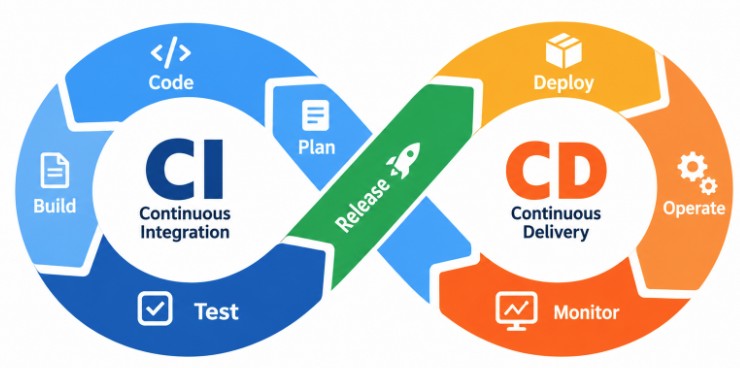
CI/CD stands for Continuous Integration and Continuous Delivery or Continuous Deployment. Continuous Integration involves regularly merging code changes and validating them through automated builds and tests. Continuous Delivery keeps software ready for release, while Continuous Deployment automatically releases qualifying changes to production.
83. What Is Cloud Computing
Ans:
Cloud computing provides computing resources such as servers, databases, storage, and networking through cloud platforms. Services may be provisioned on demand and scaled according to application requirements. Common providers include Amazon Web Services, Microsoft Azure, and Google Cloud. Full stack developers use cloud services to host applications, manage data, and configure deployment pipelines.
84. What Is Web Application Performance Optimization?
Ans:
Web application performance optimization improves loading speed, responsiveness, and resource efficiency. Frontend techniques include reducing unnecessary JavaScript, compressing assets, optimizing images, and using caching appropriately. Backend improvements may include efficient database queries, connection pooling, and caching frequently accessed data.
85. What Is Caching in Web Development?
Ans:
Caching stores reusable data or responses so they can be accessed without repeating expensive operations. Browser caches, content delivery networks, application caches, and database caches serve different purposes. Caching can reduce latency, server load, and repeated database queries. However, stale data and incorrect cache invalidation can create consistency problems
86. How Does Build a Login and Registration System?
Ans:
A login and registration system allows users to create accounts and access protected application features. The frontend collects user details and sends requests to backend authentication endpoints. The backend validates inputs, securely hashes passwords, and stores user records in a database
87. How Does Connect a Frontend Application to a Backend API?
Ans:
- A frontend application connects to a backend API by sending HTTP requests to defined endpoints.
- JavaScript tools such as fetch() or Axios can send requests and process JSON responses. The frontend should handle loading states, successful responses, network errors, and validation messages.
- The backend processes requests, applies business rules, and communicates with databases or other services
88. How Does Deploy a Full Stack Web Application?
Ans:
Deploying a full stack application involves preparing the frontend, backend, database, and required configuration for a production environment. The frontend may be hosted on a static hosting service or CDN, while the backend runs on a server or managed platform. The database must be configured with appropriate access controls, backups, and connectivity
89. How Does Handle Errors in a Full Stack Application?
Ans:
Error handling should be implemented consistently across frontend and backend components. The frontend displays clear messages and provides suitable recovery options when requests fail. The backend validates input, handles exceptions, returns appropriate HTTP status codes, and records useful diagnostic information. Sensitive details such as passwords, tokens, and internal stack traces should not be exposed to users. Centralized logging, automated tests, and monitoring help teams investigate and resolve recurring failures.
90. How Should Freshers Prepare for Full Stack Developer Interviews in MNCs in Bangalore?
Ans:
Freshers should build a strong foundation in HTML, CSS, JavaScript, frontend frameworks, backend development, APIs, and databases. Practicing coding problems, SQL queries, data structures, and object-oriented programming helps prepare for technical assessments. Developing projects such as an e-commerce application, task management system, or employee management portal demonstrates practical skills.