
 LMS

Last updated on 13th Oct 2026| 7786

Software testing is an essential part of the software development life cycle, helping organizations deliver reliable, secure, and high-quality applications. Frequently Asked Software Testing Interview Questions for Freshers in Chennai covers important topics such as manual testing, automation testing, SDLC, STLC, test cases, defect life cycles, and different testing techniques. These interview questions and answers help freshers understand fundamental testing concepts and prepare for technical interviews at IT companies in Chennai. The guide also covers practical topics such as Selenium, SQL testing, API testing, regression testing, and performance testing. Each answer is presented in a clear paragraph format to support easy learning and revision. Practicing these questions can strengthen technical knowledge, improve problem-solving skills, and build confidence for software testing interviews. This preparation guide is useful for candidates seeking entry-level opportunities as Software Testers, QA Engineers, Manual Testers, and Automation Testing Engineers.
1. What Is Software Testing?
Ans:
Software testing is the process of evaluating a software application to identify defects and verify that it meets specified requirements. It helps ensure the application works correctly, securely, and efficiently. Testing compares actual results with expected results. It also improves software quality and user satisfaction. Software testing is an essential activity throughout the software development lifecycle.
2. Why Is Software Testing Important?
Ans:
Software testing helps identify errors before an application reaches end users. It improves reliability, performance, security, and overall product quality. Early defect detection reduces the cost of fixing problems later. Testing also verifies that business requirements are satisfied. In Chennai IT companies, software testing supports the delivery of reliable applications to customers.
3. What Are the Different Types of Software Testing?
Ans:
- Software testing includes manual testing and automation testing, along with functional and non-functional testing. Functional testing verifies application features against requirements.
- Non-functional testing evaluates performance, usability, security, and reliability. Other common types include regression, smoke, integration, and system testing.
- The testing approach depends on project requirements, application complexity, and available resources.
4. What Is Manual Testing?
Ans:
Manual testing involves checking software functionality without using automated test scripts. Testers execute test cases, enter inputs, observe outputs, and compare results with expected behavior. It is useful for exploratory testing, usability checks, and applications that change frequently. Manual testing requires analytical thinking and attention to detail. It also helps testers understand application behavior from the end user’s perspective.
5. What Is Automation Testing?
Ans:
A Test Case Is A Set Of Conditions, Inputs, Steps, And Expected Automation testing uses tools and scripts to execute test cases with minimal manual intervention. It is useful for repetitive tasks, regression testing, and frequent software releases. Popular tools include Selenium, Playwright, and Cypress. Automation can improve execution speed, consistency, and test coverage. However, creating and maintaining automated scripts requires programming knowledge and regular updates.
6. What Is the Software Testing Life Cycle (STLC)?
Ans:
The Software Testing Life Cycle is a structured process used to perform testing activities. Its common phases include requirement analysis, test planning, test case development, test environment setup, test execution, and test closure. Each phase has specific objectives and deliverables. STLC helps teams organize testing activities systematically. It also improves traceability, defect management, and overall testing efficiency..
7. What Is the Software Development Life Cycle (SDLC)?.
Ans:
The Software Development Life Cycle is a process used to plan, develop, test, deploy, and maintain software applications. Its phases commonly include requirement gathering, design, development, testing, deployment, and maintenance. SDLC provides a structured approach to software development. Different methodologies, such as Waterfall and Agile, organize these activities differently. Testing helps verify software quality throughout the development process.
8. What Is the Difference Between SDLC and STLC?
Ans:
SDLC covers the complete software development process, from requirements to maintenance. STLC focuses specifically on testing activities performed to verify software quality. SDLC includes developers, testers, business analysts, and other stakeholders. STLC mainly organizes the responsibilities and deliverables associated with testing. Both processes work together to deliver software that meets business and technical requirements.
9. What Is a Test Case?
Ans:
A test case is a documented set of conditions, inputs, steps, and expected results used to verify a software feature. It typically includes a test case ID, objective, preconditions, test data, execution steps, and expected output. Test cases help testers execute checks consistently. They also support defect identification and regression testing. Well-written test cases are clear, reusable, and easy to understand.
10. What Is a Test Scenario?
Ans:
- A test scenario describes a high-level functionality or situation that needs to be tested. For example, verifying the login feature is a test scenario for an online application.
- Multiple test cases can be created from one scenario to cover different conditions.
- Scenarios help testers identify important business workflows. They also provide a broad overview of the testing scope.
11. What Is the Difference Between a Test Case and a Test Scenario?
Ans:
| Aspect | Test Case | Test Scenario |
|---|---|---|
| Definition | A Detailed Set Of Steps, Inputs, Preconditions, And Expected Results Used To Verify A Specific Functionality. | A High-Level Description Of A Feature Or Functionality That Needs To Be Tested. |
| Details | Includes Test Steps, Test Data, Expected Results, And Actual Results. | Describes What Needs To Be Tested Without Providing Detailed Execution Steps. |
| Coverage | Focuses On Verifying Specific Conditions, Inputs, And Expected Outcomes. | Provides Broad Coverage Of A Feature And Can Include Multiple Test Cases. |
| Example | Verify Login Using A Valid Username And Password, Enter Credentials, Click Login, And Check The Expected Dashboard. | Verify The Login Functionality, Including Successful Login, Invalid Credentials, And Empty Field Validation. |
12. What Is a Bug in Software Testing?
Ans:
A bug is an error or flaw in software that causes incorrect or unexpected behavior. It may occur because of coding mistakes, incorrect requirements, or integration problems. Testers identify bugs by comparing actual application behavior with expected results. Once detected, bugs are documented and reported to the development team. Developers investigate, fix, and submit them for verification.
13. What Is a Defect?
Ans:
A defect is a flaw in a software product that causes it to fail to meet a requirement or expected behavior. Defects can be identified during reviews, testing, or production use. A defect report generally includes steps to reproduce the issue, actual results, expected results, and severity. Developers analyze and correct the problem. Testers then verify the fix and check for related issues.
14. What Is the Difference Between an Error, a Bug, and a Failure?
Ans:
An error is a human mistake made during requirements analysis, design, or coding. A bug or defect is a flaw introduced into a software artifact because of such mistakes or other causes. A failure occurs when the software behaves incorrectly during execution. For example, an incorrect calculation in code may cause a payment total to display incorrectly. Understanding these terms helps teams communicate problems accurately.
15. What Is Verification in Software Testing?
Ans:
Verification checks whether software work products meet specified requirements and design standards. It often involves reviews, inspections, walkthroughs, and static analysis without executing the application. Verification helps detect problems early in development. It focuses on whether the product is being built according to specifications. This process reduces rework and supports software quality before dynamic testing begins.
16. What Is Validation in Software Testing?
Ans:
- Validation checks whether the developed software satisfies user needs and intended business objectives.
- It commonly involves executing the application and evaluating its actual behavior. Functional testing and user acceptance testing are examples of validation activities.
- Validation helps confirm that the product solves the intended problem. It complements verification by focusing on whether the right product has been built.
17. What Is the Difference Between Verification and Validation?
Ans:
Verification evaluates whether work products comply with specifications and design requirements. Validation evaluates whether the application meets user expectations and business needs. Verification often uses reviews and inspections without executing software. Validation frequently involves executing the application under different conditions. Both activities help prevent defects and improve the quality of the final software product..
18. What Is Black Box Testing?
Ans:
Black box testing evaluates software functionality without examining its internal code or implementation. Testers provide inputs and compare actual outputs with expected results. This technique is useful for validating requirements, user workflows, and application interfaces. Common black box techniques include equivalence partitioning and boundary value analysis. It can be performed at multiple testing levels, including system and acceptance testing.
19. What Is White Box Testing?
Ans:
White box testing examines the internal structure, logic, and code of an application. Testers or developers design tests to exercise statements, branches, conditions, and execution paths. It helps identify logical errors and code-level defects. Programming knowledge is generally required to perform it effectively. White box testing is commonly used during unit testing and code-level quality assessments.
20. What Is Grey Box Testing?
Ans:
- Grey box testing combines aspects of black box and white box testing. Testers have partial knowledge of the application’s internal design, architecture, or data flow.
- This knowledge helps them create tests for interfaces, database interactions, and integration points.
- Grey box testing can reveal issues that purely external testing may miss. It is useful when complete source-code access is unnecessary or unavailable.
21. What Is Functional Testing?
Ans:
Functional testing verifies whether software features work according to the specified requirements. It checks inputs, outputs, business rules, user interactions, and error handling. Testers execute test cases using valid and invalid data. Examples include login testing, registration testing, and payment processing checks. Functional testing helps ensure that each application feature performs its intended task correctly.
22. What Is Non-Functional Testing?
Ans:
Non-functional testing evaluates software characteristics such as performance, security, usability, scalability, and reliability. It focuses on how well an application operates rather than only what it does. Examples include load testing, stress testing, and security testing. These activities help identify bottlenecks and usability problems. Non-functional testing is essential for applications expected to serve many users reliably.
23. What Is Smoke Testing?
Ans:
Smoke testing is a preliminary check performed to determine whether a software build is stable enough for further testing. It covers essential features such as application launch, login, navigation, and basic functionality. If critical features fail, the build may be rejected for further testing. Smoke testing helps teams identify major problems early. It is commonly performed whenever a new build becomes available.
24. What Is Sanity Testing?
Ans:
- Sanity testing is a focused check performed to verify that a specific change or defect fix works as expected.
- It concentrates on the affected functionality and closely related areas. For example, after correcting a password reset defect, testers verify the reset workflow.
- Sanity testing is generally narrower than regression testing. It helps determine whether additional testing can proceed confidently.
25. What Is Regression Testing?
Ans:
Regression testing verifies that recent code changes have not negatively affected existing functionality. It is especially important after bug fixes, feature additions, and application updates. Testers rerun relevant existing test cases to detect unintended side effects. Automation tools can make repeated regression testing faster and more consistent. Regression testing helps maintain application stability throughout ongoing development.
26. What Is Retesting?
Ans:
Retesting is the process of executing previously failed test cases again after developers have fixed the reported defects. It confirms whether the specific defect has been resolved successfully. Testers generally use the same steps and conditions that originally exposed the problem. If the issue persists, the defect may be reopened. Retesting differs from regression testing because it focuses on verifying a particular fix.
27. What Is the Difference Between Smoke Testing and Sanity Testing?
Ans:
A Smoke testing checks whether the major functions of a new build work sufficiently for further testing. Sanity testing focuses on a particular feature or area after a change or defect fix. Smoke testing usually has broader initial coverage. Sanity testing is narrower and more targeted. Both help teams identify obvious problems before investing time in extensive testing.
28. What Is the Difference Between Retesting and Regression Testing?
Retesting confirms that a previously reported defect has been fixed correctly. Regression testing checks whether the change has introduced problems into existing functionality. Retesting focuses on the specific failed test case. Regression testing may involve many related or unrelated test cases across the application. Both activities are important after code changes to ensure the fix works without causing new issues.
29. What Is Exploratory Testing?
Ans:
- Exploratory testing involves learning about an application while designing and executing tests. Testers use their experience, observations, and curiosity to investigate unexpected behavior.
- It is particularly useful when documentation is incomplete or time is limited. Exploratory testing can reveal usability issues and unusual defects that scripted tests may overlook.
- Findings should be documented clearly so that important discoveries can be reproduced.
30. What Is Ad Hoc Testing?
Ans:
Ad hoc testing is an informal testing approach performed without detailed predefined test cases. Testers interact with the application based on their experience and intuition. The objective is to discover defects that structured testing might miss. It can be useful for quick investigations and supplementary checks. However, because execution is less structured, documenting findings and reproducing defects is particularly important.
31. What Is Equivalence Partitioning?
Ans:
Equivalence partitioning is a black box testing technique that divides input data into groups expected to behave similarly. Instead of testing every possible input, a representative value is selected from each group. For example, if an age field accepts values from 18 to 60, inputs can be grouped into valid and invalid ranges. This reduces the number of test cases required. It helps achieve efficient coverage without unnecessary repetition.
32. What Is Boundary Value Analysis?
Ans:
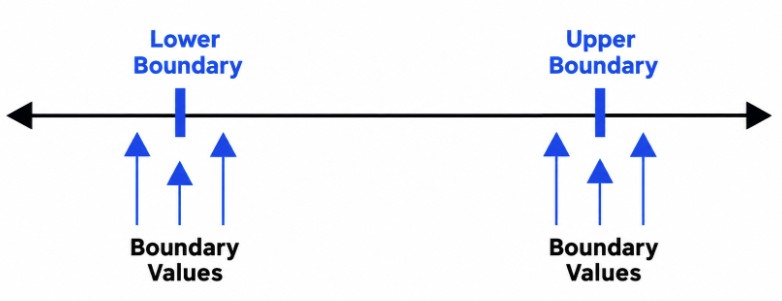
Boundary value analysis tests values at the edges of an accepted input range. Defects frequently occur around minimum and maximum limits. For a field accepting values from 1 to 100, useful test values include 0, 1, 2, 99, 100, and 101. These values check behavior just outside and inside the boundaries. The technique is widely used for validating numeric fields, dates, and character limits.
33. What Is Decision Table Testing?
Ans:
Decision table testing verifies application behavior when multiple conditions influence a result. Conditions and their possible combinations are organized into a table with the expected actions. For example, an online discount may depend on membership status and purchase amount. Each relevant combination becomes a test condition. This technique helps identify missing business rules and ensures that combinations of inputs are tested systematically.
34. What Is State Transition Testing?
Ans:
- State transition testing checks how an application moves from one state to another after specific events. It is useful when system behavior depends on the current state.
- For example, an account may become locked after several unsuccessful login attempts. Testers verify valid transitions, invalid transitions, and resulting actions.
- This technique helps detect problems in workflows, account management, and transaction processing.
35. What Is Use Case Testing?
Ans:
Use case testing verifies complete user workflows based on interactions with an application. A use case describes how a user achieves a specific goal, including possible alternative paths. For example, an online shopping workflow may include searching for a product, adding it to a cart, and completing payment. Testers validate both successful and unsuccessful paths.
36. What Is Positive Testing?
Ans:
Positive testing verifies that an application works correctly when supplied with valid inputs and expected user actions. For example, entering a registered email address and the correct password should allow a user to log in. Testers check whether the application produces the expected result. This approach confirms that normal business workflows operate correctly.
37. What Is Negative Testing?
Ans:
Negative testing checks how an application responds to invalid inputs, unexpected actions, and incorrect conditions. Examples include submitting an empty form, entering an invalid email address, or using an incorrect password. The application should handle these situations appropriately without crashing or exposing sensitive information. Negative testing helps verify validation rules and error handling. It also improves reliability and security..
38. What Is End-to-End Testing?
Ans:
End-to-end testing verifies a complete business workflow across all relevant application components and integrated systems. For example, an e-commerce test may cover login, product selection, payment, order confirmation, and inventory updates. It helps ensure that connected components work together correctly. Testing may involve databases, external services, and user interfaces.
39. What Is User Acceptance Testing (UAT)?
Ans:
- User Acceptance Testing determines whether an application meets business requirements and is suitable for its intended users. Business representatives, clients, or end users commonly perform these tests.
- They validate realistic workflows and expected outcomes before release. UAT can reveal gaps between technical implementation and business expectations.
- Successful acceptance testing supports a release decision but does not replace other testing activities.
40. What Is Alpha Testing?
Ans:
Alpha testing is an early evaluation of software performed before it is widely released to external users. It commonly takes place within the developing organization using internal testers or selected participants. The objective is to identify defects and usability problems in a controlled environment. Findings are used to improve the application before broader testing. Alpha testing is often followed by beta testing
41. What Is Beta Testing?
Ans:
Beta testing involves making a near-complete software product available to selected external users or customers. Participants use the application in realistic environments and provide feedback about defects and usability. This helps identify problems that may not appear during internal testing. Beta testing can improve product readiness before general release. The scope and availability of the beta version depend on the release strategy.

Enroll in Software Testing Course and Upgrade Your Skills
Weekday / Weekend BatchesSee Batch Details42. What Is Integration Testing?
Ans:
Integration testing verifies whether two or more software modules work correctly when connected. It focuses on interfaces, data exchange, communication, and interactions between components. For example, testers may check whether an order service correctly communicates with a payment service. Integration testing helps detect interface mismatches and data-handling defects
43. What Is System Testing?
Ans:
System testing evaluates the complete integrated application against its specified requirements. It can include functional checks, security testing, performance testing, and other relevant quality assessments. Testing is performed on the application as a whole rather than on isolated components. The goal is to identify defects across the complete system. System testing generally takes place before user acceptance testing.
44. What Is Unit Testing?
Ans:
Unit testing checks individual components, functions, or methods in isolation. Developers commonly write unit tests to verify that small pieces of code behave as expected. These tests often use test frameworks and mocks or stubs to isolate dependencies. Unit testing helps identify defects early and makes code changes safer. It forms an important foundation for integration and system testing.
45. What Is the Difference Between Unit, Integration, and System Testing?
Ans:
Unit testing validates individual functions or components independently. Integration testing checks interactions and data exchange between connected components. System testing evaluates the complete integrated application against its requirements. These testing levels focus on different scopes and types of defects. Together, they provide progressively broader coverage and help identify issues throughout the software development process.
46. What Is a Defect Life Cycle?
Ans:
The defect life cycle describes the stages a defect passes through from identification to closure. Common statuses include New, Assigned, Open, Fixed, Retest, Verified, and Closed. If the defect remains unresolved, it may be reopened. The exact workflow depends on the organization’s defect management process. Understanding this life cycle helps testers track issues and communicate progress with developers.
47. What Is a Bug Report?
Ans:
- A bug report is a document that describes a defect discovered during software testing. It typically contains a title, defect ID, environment, reproduction steps, expected result, actual result, severity, and supporting evidence.
- A clear report helps developers understand and reproduce the problem. Screenshots, logs, and videos can provide additional information.
- Good bug reports reduce investigation time and improve collaboration between testing and development team
48. What Is Bug Severity?
Ans:
Bug severity indicates how seriously a defect affects application functionality or system operation. A critical defect might cause a system crash or prevent essential transactions. A major defect may break an important feature, while a minor defect may affect a small visual detail. Severity is generally assessed according to technical and functional impact. It helps teams understand the seriousness of a problem and prioritize appropriate corrective action..
49. What Is Bug Priority?
Ans:
Bug priority indicates how urgently a defect should be fixed. It is influenced by business impact, release schedules, customer expectations, and operational needs. A visually minor defect on a critical business page may receive high priority. A more severe issue in an unused feature may sometimes be scheduled differently, depending on the circumstances. Developers and project stakeholders use priority to plan defect resolution.
50. What Is the Difference Between Severity and Priority?
Ans:
| Aspect | Severity | Priority |
|---|---|---|
| Definition | Severity Indicates The Impact Of A Defect On The Application’s Functionality Or Performance. | Priority Indicates How Urgently A Defect Needs To Be Fixed Based On Business Requirements. |
| Focus | Focuses On The Technical And Functional Impact Of The Defect On The Software. | Focuses On The Urgency Of Fixing The Defect And Its Importance To The Business. |
| Decision Maker | Usually Assessed By The Testing Team Based On The Defect’s Impact And Scope. | Usually Determined By The Team Lead, Product Owner, Or Relevant Stakeholders Based On Business Needs. |
| Example | A Payment Failure That Prevents All Customers From Completing Transactions Is A High-Severity Defect. | A Minor Spelling Error On The Homepage May Have High Priority If It Must Be Corrected Before A Major Product Launch. |
51. What Is a Test Plan?
Ans:
A test plan is a document describing the overall approach, scope, resources, schedule, and responsibilities for testing a software project. It identifies features to be tested, testing methods, environments, risks, and entry and exit criteria. The plan helps stakeholders understand how quality will be evaluated. It also supports resource allocation and progress monitoring. Test plans are updated when project requirements or risks change.
52. What Is a Test Strategy?
Ans:
A test strategy defines the overall approach used to achieve testing objectives. It describes testing levels, techniques, automation principles, environments, tools, and quality standards. A strategy may apply across an organization or to a specific project. It provides consistent direction for testing activities. A test plan typically translates that broader approach into specific project schedules, responsibilities, and deliverables.
53. What Is a Test Data?
Ans:
Test data is the information used to execute test cases and verify application behavior. It may include valid records, invalid inputs, boundary values, user accounts, and transaction details. Good test data covers normal scenarios as well as unusual conditions. Sensitive production information should be protected and appropriately masked when necessary. Properly prepared test data improves test accuracy, repeatability, and coverage
54. What Is a Test Environment?
Ans:
A test environment is the setup in which software testing takes place. It may include hardware, operating systems, databases, browsers, application builds, network settings, and connected services. The environment should be configured to support the planned test activities. Differences between test and production environments can affect results. Maintaining a stable environment helps testers reproduce defects and evaluate application behavior reliably.
55. What Are Entry and Exit Criteria in Testing?
Ans:
Entry criteria define the conditions that must be satisfied before a testing activity begins. Examples include approved requirements, an available build, and a configured test environment. Exit criteria define the conditions for considering testing sufficiently complete. These may include required test execution, acceptable pass rates, and resolution of critical defects. Clear criteria help teams make consistent testing and release decisions.
56. What Is a Test Summary Report?
Ans:
A test summary report presents the results of a completed testing activity. It commonly includes the testing scope, executed test cases, pass and fail counts, outstanding defects, limitations, and quality risks. The report helps stakeholders understand whether the software meets agreed acceptance criteria. It also documents important findings and recommendations.
57. What Is a Requirement Traceability Matrix (RTM)?
Ans:
- A Requirement Traceability Matrix maps requirements to corresponding test cases and testing results.
- It helps ensure that each important requirement has appropriate test coverage. Testers can use it to identify missing tests and track requirement changes.
- RTM also supports impact analysis when new requirements are introduced. Maintaining traceability improves coverage visibility and helps demonstrate that the application has been tested against its specifications.
58. What Is Defect Leakage?
Ans:
Defect leakage occurs when a defect is missed during a testing phase and discovered in a later phase or after release. It can happen because of incomplete test coverage, missing test data, environment differences, or misunderstood requirements. Teams investigate leaked defects to identify weaknesses in the testing process.
59. What Is Defect Density?
Ans:
Defect density measures the number of identified defects relative to the size of a software component or product. The denominator may be measured in thousands of lines of code, function points, or another suitable size metric. It helps teams compare defect concentrations across components when measurement methods are consistent. However, a higher value does not automatically mean poor quality.
60. What Is Root Cause Analysis in Software Testing?
Ans:
Root cause analysis identifies the underlying reason a defect occurred rather than simply correcting its visible symptoms. Testers and developers may review requirements, design decisions, code changes, logs, and reproduction steps. Techniques such as the Five Whys can help investigate contributing factors

Learn Software Testing Training Course with Advanced Concepts By Industry Experts
- Instructor-led Sessions
- Real-life Case Studies
- Assignments
61. What Is Agile Testing?
Ans:
- Agile testing is a continuous testing approach used within iterative software development. Testers collaborate with developers, product owners, and other stakeholders throughout each sprint.
- Testing begins early and continues as features are developed and changed. Feedback helps teams identify defects quickly and adjust to evolving requirements.
- Agile testing supports frequent releases, continuous improvement, and close alignment with business objectives.
62. What Is Scrum in Software Testing?
Ans:
Scrum is an Agile framework that organizes work into time-boxed iterations called sprints. Testing activities are included in sprint planning, daily coordination, development, review, and retrospective discussions. Testers collaborate with developers and product owners to validate completed work. Each sprint aims to deliver a usable product increment that meets the agreed quality expectations.
63. What Is a Sprint?
Ans:
A sprint is a fixed-length development cycle in Scrum during which a team works toward a defined objective. Its activities may include requirement clarification, coding, testing, defect fixing, and review. Testers prepare and execute test cases as features become available. Defects are discussed and prioritized with the team. Sprint-based work helps teams deliver incremental improvements and receive feedback regularly.
64. What Is a User Story?
Ans:
A user story is a short description of a feature from the perspective of the person who needs it. It often follows the format, “As a user, I want a feature so that I can achieve a goal.” Acceptance criteria describe the conditions that must be met for the story to be accepted. Testers use these criteria to design test scenarios and test cases. Clear user stories help connect testing activities to business needs.
65. What Is the Difference Between Agile and Waterfall Testing?
Ans:
Waterfall follows a more sequential approach in which testing typically occurs after defined development phases. Agile testing is iterative and performed continuously as features are developed. Waterfall often works well when requirements are stable and clearly defined. Agile accommodates changing requirements through frequent collaboration and feedback.
66. What Is Selenium?
Ans:
Selenium is an open-source suite of tools used to automate web browser interactions. Selenium WebDriver allows scripts written in supported programming languages to control browsers and verify web application behavior. It supports major browsers and is commonly used for regression and functional testing. Selenium can be integrated with test frameworks and continuous integration tools. It is particularly useful for repetitive browser-based testing tasks..
67. What Is Selenium WebDriver?
Ans:
Selenium WebDriver is a browser automation interface that allows test scripts to interact with web pages. It can locate elements, click buttons, enter text, navigate between pages, and verify displayed information. WebDriver supports multiple programming languages and browsers. Testers use it to automate end-to-end and regression scenarios.
68. What Are Locators in Selenium?
Ans:
Locators identify web elements that automation scripts need to interact with. Common Selenium locator strategies include ID, name, class name, tag name, link text, partial link text, CSS selectors, and XPath. A suitable locator should identify the intended element accurately and consistently. Unique IDs are often preferred when available. Choosing stable locators reduces test failures caused by changes in the user interface.
69. What Is XPath in Selenium?
Ans:
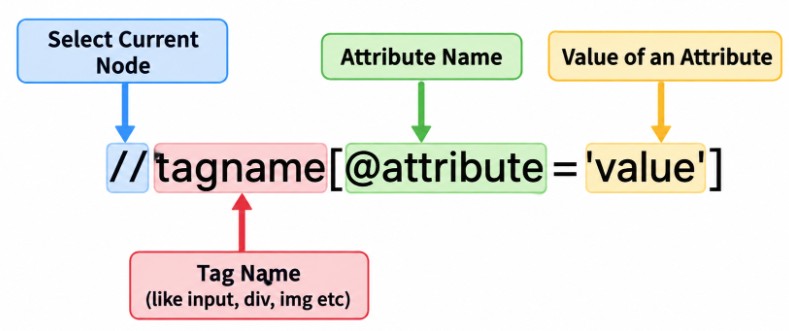
XPath is a query language used to locate elements within an HTML or XML document structure. Selenium supports XPath expressions for identifying elements using attributes, text, relationships, and hierarchical positions. Absolute XPath follows a specific path from the document root, while relative XPath locates elements using flexible expressions. Relative XPath is often easier to maintain.
70. What Is an Assertion in Automation Testing?
Ans:
An assertion checks whether an actual result matches an expected condition during automated test execution. For example, an assertion can verify that a login page displays a welcome message after successful authentication. If the condition fails, the test framework reports a failure. Assertions help determine whether an automated test has passed or failed.
71. What Is TestNG?
Ans:
TestNG is a testing framework for Java that supports organizing, executing, and reporting automated tests. It provides annotations, assertions, parameterization, grouping, and configurable execution. Testers often use it with Selenium WebDriver to develop structured browser automation suites. It can also support parallel execution when configured appropriately. TestNG improves test organization and helps teams manage larger automation projects..
72. What Is JUnit?
Ans:
JUnit is a popular testing framework for Java applications. It provides annotations, assertions, and test execution capabilities for checking expected behavior in individual components and other test scenarios. Developers commonly use it for unit testing, while it can also support broader automated tests. JUnit integrates with many development environments and build tools. It helps teams detect code defects early and maintain confidence during software changes.
73. What Is Postman?
Ans:
APostman is a tool used to send requests to APIs and inspect their responses. Testers can verify HTTP status codes, response bodies, headers, authentication, and response times. Postman also supports test scripts, collections, variables, and automated collection runs. It is useful for validating REST APIs without relying exclusively on the user interface. API testing with Postman helps identify integration and data-handling problems
74. What Is API Testing?
Ans:
- API testing verifies whether an application programming interface behaves according to its specification.
- Testers send requests and examine responses, status codes, headers, data formats, authentication, and error handling.
- API tests can validate business logic independently of the user interface. They are useful for detecting integration problems early.
75. What Is the Difference Between Manual Testing and Automation Testing?
Ans:
Manual testing requires a person to execute test steps and evaluate application behavior. Automation testing uses scripts and tools to perform checks with minimal manual intervention. Manual testing is useful for exploratory checks and subjective usability evaluations. Automation is valuable for repeatable regression tests and frequent releases.
76. What Is SQL Testing?
Ans:
SQL testing verifies that database queries, data operations, and stored information behave as expected. Testers check whether records are inserted, updated, deleted, and retrieved correctly. They may validate joins, filtering conditions, constraints, and data integrity. SQL testing is useful for applications that depend on relational databases. It helps identify discrepancies between the application interface and the underlying database.
77. What Is Database Testing?
Ans:
Database testing evaluates the accuracy, consistency, integrity, and reliability of data stored in a database. It includes checking tables, relationships, constraints, stored procedures, transactions, and data migration results. Testers may compare application outputs with database records using SQL queries. Database testing helps identify missing records, incorrect calculations, and invalid relationships.
78. What Is the Difference Between Front-End and Back-End Testing?
Ans:
Front-end testing evaluates the user interface, layout, navigation, and interactions visible to users. Back-end testing focuses on business logic, databases, APIs, and server-side processing. Front-end checks may include validating forms and responsive layouts. Back-end checks may verify data integrity and API responses. Both areas must work correctly to provide a reliable and consistent application experience.
79. What Is REST API Testing?
Ans:
- REST API testing verifies the behavior of APIs designed around REST architectural principles. Testers commonly examine HTTP methods such as GET, POST, PUT, PATCH, and DELETE.
- They validate response status codes, payloads, headers, authentication, and error handling.
- Tests also check whether requests produce the intended data changes. REST API testing helps ensure reliable communication between applications and service
80. What Are HTTP Status Codes?
Ans:
HTTP status codes indicate the result of a request sent to a web server. Codes in the 200 range generally indicate success, while 300-range codes indicate redirection. The 400 range commonly represents client-side errors, and the 500 range represents server-side errors. Examples include 200 OK, 201 Created, 400 Bad Request, 401 Unauthorized, 404 Not Found, and 500 Internal Server Error
81. What Is Load Testing?
Ans:
Load testing evaluates application performance under an expected or specified workload. Testers simulate concurrent users, requests, or transactions and measure response time, throughput, and error rates. The objective is to determine whether the application meets its performance requirements under anticipated demand. Load testing can reveal bottlenecks in servers, databases, and network communication
82. What Is Stress Testing?
Ans:
- Stress testing evaluates how an application behaves when the workload exceeds its expected operating capacity.
- Testers gradually increase demand or introduce resource constraints to identify performance limits. They observe response times, failures, resource consumption, and recovery behavior.
- The purpose is to understand system resilience under extreme conditions. Stress testing helps teams identify breaking points and improve stability before unexpected demand occurs.
83. What Is Performance Testing?
Ans:
Performance testing measures how quickly, reliably, and efficiently an application operates under specified conditions. Common metrics include response time, throughput, resource utilization, and error rate. Load testing, stress testing, endurance testing, and scalability testing are related performance testing approaches. These activities help identify bottlenecks and capacity limitations
84. What Is Security Testing?
Ans:
Security testing identifies vulnerabilities that could allow unauthorized access, data exposure, or misuse of an application. It examines authentication, authorization, input validation, session handling, and other security controls. Testers may use approved tools and controlled attack simulations to assess weaknesses. Findings should be documented according to risk and potential impact. Security testing helps protect user data and supports safer software releases
85. What Is Usability Testing?
Ans:
- Usability testing evaluates how easily users can learn, navigate, and operate an application. Participants may complete common tasks while testers observe confusion, errors, and difficulties.
- Important factors include clarity, accessibility, consistency, and task completion time. The findings help teams improve interface design and user experience.
- Usability testing is valuable for websites, mobile applications, and business software used by different user groups.
86. How Does Test a Login Page?
Ans:
Root Cause Analysis Is The Process Of Investigating The Login page testing covers valid credentials, invalid credentials, empty fields, and incorrect input formats. It also checks password masking, error messages, account lockout rules, and session behavior where applicable. Testers verify that authorized users can log in and unauthorized users cannot gain access. Security checks should include appropriate handling of repeated failures and sensitive information.
87. How Does Test an E-Commerce Website?
Ans:
E-commerce testing covers registration, login, product search, filtering, cart management, checkout, payment, and order confirmation. Testers verify prices, discounts, shipping charges, inventory updates, and order records. They also examine payment failures, duplicate submissions, and invalid delivery details. Performance, usability, compatibility, and security checks are important.
88. How Does Handle a Defect That a Developer Cannot Reproduce?
Ans:
When a developer cannot reproduce a defect, the first step is to review the reported behavior and reproduction instructions. Additional details such as test data, browser version, environment, timestamps, screenshots, and logs can help isolate the cause. The issue should be retested under the original conditions and, if necessary, on another environment.
89. What Skills Are Required for a Software Tester Fresher in Chennai?
Ans:
A software testing fresher should understand testing fundamentals, SDLC, STLC, test cases, defect reporting, and common testing techniques. Basic SQL, API testing, and knowledge of tools such as Jira and Postman can strengthen practical skills. Selenium and a programming language are useful for candidates interested in automation testing. Communication, analytical thinking, and attention to detail are equally important.
90. How Should Freshers Prepare for Software Testing Interviews in Chennai?
Ans:
Freshers should begin by learning testing fundamentals, testing levels, defect life cycles, and functional testing techniques. Practicing test cases for login pages, registration forms, shopping carts, and payment workflows builds practical understanding. Basic SQL queries, API testing with Postman, and introductory Selenium exercises can provide additional preparation.