 LMS
Last updated on 13th Oct 2026| 7068

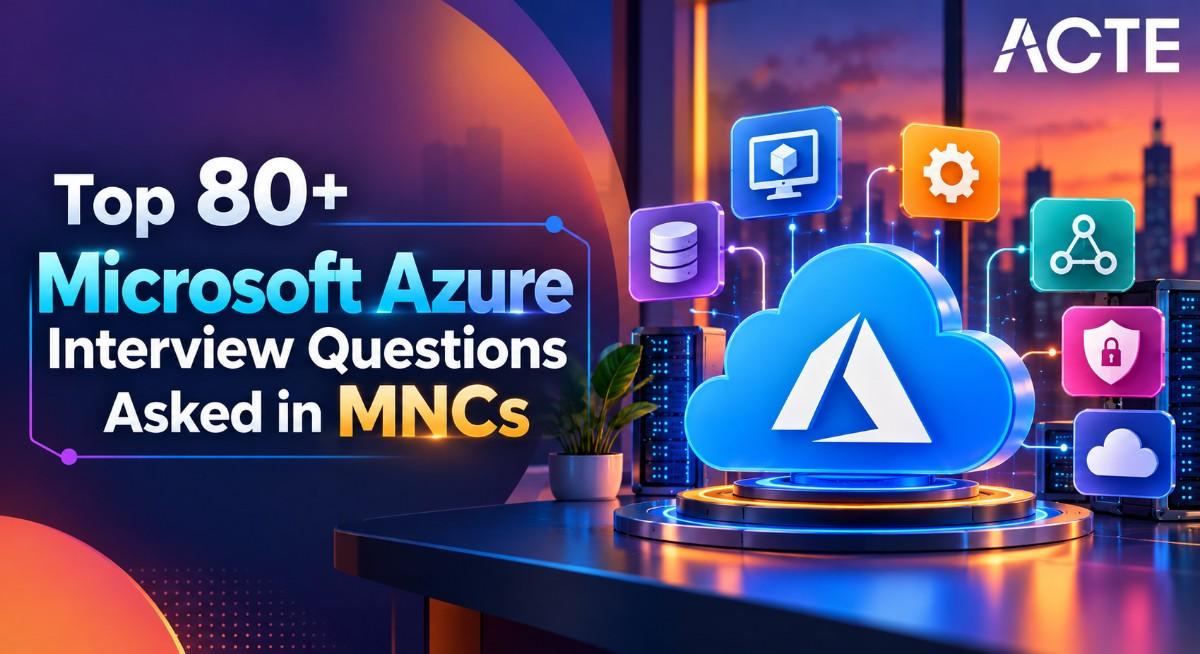
Top 80+ Microsoft Azure Interview Questions Asked in MNCs helps freshers and experienced professionals prepare for cloud computing interviews and technical assessments. Microsoft Azure is a leading cloud computing platform that provides services for virtual machines, storage, networking, databases, security, application development, and data analytics. These interview questions cover essential Azure concepts, cloud deployment models, Azure Virtual Machines, Azure Blob Storage, Azure Active Directory (Microsoft Entra ID), Azure DevOps, and disaster recovery services. The answers also explain important differences between Azure services, including Azure Backup and Azure Site Recovery, Azure Load Balancer and Azure Application Gateway, and Azure SQL Database and SQL Server on Azure Virtual Machines. Practicing these questions helps candidates strengthen technical knowledge, understand real-world cloud scenarios, and prepare confidently for Microsoft Azure interviews at MNCs.
1. What Is Microsoft Azure?
Ans:
Microsoft Azure is a cloud computing platform developed by Microsoft that provides a wide range of cloud services. It supports virtual machines, databases, networking, storage, analytics, and artificial intelligence applications. Azure enables organizations to build, deploy, and manage applications through Microsoft-managed data centers. It offers scalable resources with flexible pricing based on usage. Azure helps businesses reduce infrastructure costs and improve operational efficiency.
2. What Are The Main Benefits Of Microsoft Azure?.
Ans:
- Microsoft Azure provides scalability, flexibility, high availability, and global accessibility for cloud-based applications.
- It allows businesses to increase or decrease resources according to workload requirements.
- Azure offers built-in security features, monitoring tools, backup services, and disaster recovery capabilities.
3. What Is Cloud Computing?
Ans:
Cloud computing is the delivery of computing resources such as servers, storage, databases, and networking over the internet. It allows users to access technology resources without purchasing and maintaining physical infrastructure. Cloud services can be scaled according to business requirements and usage patterns. The major cloud service models are Infrastructure as a Service, Platform as a Service, and Software as a Service.
4. What Are The Different Cloud Deployment Models?
Ans:
The three main cloud deployment models are public cloud, private cloud, and hybrid cloud. Public cloud resources are provided by a cloud service provider and shared across customers through isolated environments. Private cloud infrastructure is dedicated to a single organization. Hybrid cloud combines public cloud services with private infrastructure to support different workloads.
5. What Is The Difference Between IaaS, PaaS, And SaaS?
Ans:
- Infrastructure as a Service provides virtualized resources such as virtual machines, storage, and networking.
- Platform as a Service provides a managed environment for developing and deploying applications without managing the underlying infrastructure.
- Software as a Service delivers complete applications through the internet. Azure Virtual Machines are an example of IaaS, while Azure App Service is an example of PaaS
6. What Is An Azure Region?
Ans:
- An Azure region is a geographical area containing one or more Azure data centers connected through a dedicated network.
- Regions allow organizations to deploy applications closer to their customers and comply with applicable data residency requirements.
- Each region offers a selection of Azure services and resources. Choosing appropriate regions can help reduce latency and improve application performance. Organizations should consider availability, service support, compliance, and cost when selecting a region.
7. What Is An Azure Availability Zone?
Ans:
An Azure Availability Zone is a physically separate location within a supported Azure region. Each zone has independent infrastructure, including power, cooling, and networking, to reduce the impact of localized failures. Applications can distribute resources across zones to improve resilience. Availability Zones support high-availability designs for services that offer zonal or zone-redundant deployment options.
8. What Is An Azure Resource Group?
Ans:
An Azure Resource Group is a logical container used to organize and manage related Azure resources. It can contain resources such as virtual machines, storage accounts, databases, and virtual networks. Resource groups help administrators apply access controls, monitor resources, and manage their lifecycle. Resources within a group can belong to different Azure services, subject to service-specific restrictions
9. What Is An Azure Subscription?
Ans:
An Azure subscription is a logical management and billing boundary for Azure resources. It connects resource usage to billing arrangements and provides a scope for access control and governance. Organizations can use multiple subscriptions to separate development, testing, and production environments. Subscription limits and policies help administrators manage resource deployment and organizational requirements
10. What Is Microsoft Azure Resource Manager?
Ans:
Azure Resource Manager (ARM) is the deployment and management service for Azure resources. It provides a consistent interface for creating, updating, organizing, and deleting resources. ARM templates allow infrastructure to be described declaratively using JSON, while Bicep provides a more readable language for Azure deployments
11. What Is An Azure Virtual Machine?
Ans:
An Azure Virtual Machine is an on-demand computing resource that provides virtualized hardware in the Azure cloud. It can run operating systems such as Windows Server and supported Linux distributions. Virtual machines allow organizations to install applications, configure software, and control the operating system environment. Azure provides options for CPU, memory, disks, networking, and scaling according to workload needss.
12. What Is Azure App Service?
Ans:
Azure App Service is a managed platform for hosting web applications, REST APIs, and supported web-based workloads. It supports development frameworks such as .NET, Java, Node.js, Python, and PHP, depending on the hosting environment. Microsoft manages much of the underlying infrastructure, reducing server administration tasks.
13. What Is Azure Functions?
Ans:
- Azure Functions is a serverless compute service that runs code in response to events or triggers.
- Functions can be triggered by HTTP requests, timers, queues, messages, and other supported events.
- Developers can focus on application logic while the hosting plan manages infrastructure according to its capabilities
14. What Is Serverless Computing In Azure?
Ans:
- Serverless computing allows developers to run application code or services without directly managing the underlying servers.
- Azure handles infrastructure management and provides scaling behavior according to the selected service and hosting plan.
- Azure Functions and Azure Logic Apps are common examples of serverless technologies.
15. What Is Azure Kubernetes Service?
Ans:
Azure Kubernetes Service (AKS) is a managed Kubernetes service used to deploy and operate containerized applications. It simplifies cluster management by handling important control-plane responsibilities. Developers can package applications into containers and orchestrate their deployment across a cluster. AKS supports scaling, rolling updates, service discovery, and integration with Azure monitoring and identity capabilities
16. What Is Azure Container Instances?
Ans:
Azure Container Instances (ACI) is a service for running containers without managing virtual machines or a full Kubernetes cluster. It supports rapid container deployment for suitable workloads that require relatively simple orchestration. Containers can be configured with CPU, memory, networking, and environment settings. ACI is useful for temporary tasks, testing, automation, and isolated container workloads.
17. What Is Azure Virtual Network?
Ans:
Azure Virtual Network (VNet) is a private networking service that allows Azure resources to communicate securely with each other. It supports IP address ranges, subnets, routing, network security groups, and connectivity options. VNets can connect to on-premises networks through supported VPN or private connectivity solutions. Network segmentation helps separate application tiers and restrict unnecessary communication
18. What is Azure Kubernetes Service?
Ans:
The Azure Kubernetes Service (AKS) is an up-and-coming fully managed container service for creating, deploying, and managing business-critical containerized applications in Azure. It provides a single platform for developing, deploying, and scaling applications across hybrid environments. AKS automates the deployment and management of Kubernetes clusters for updates, monitoring, and scaling. With its integration into the Azure ecosystem, including DevOps tools, AKS eases the management of complex, container-based applications.
18. What Is An Azure Subnet?
Ans:
- An Azure subnet is a logical subdivision of an Azure Virtual Network’s IP address space. It allows administrators to organize resources into separate network segments based on application roles or security requirements.
- Different subnets can host web servers, application servers, and database resources.
- Network security groups and routing configurations can help control traffic between subnets. Subnet planning must account for IP capacity, reserved addresses, and the requirements of Azure services being deployed.
19. What Is A Network Security Group?
Ans:
A Network Security Group (NSG) filters network traffic to and from Azure resources using security rules. Each rule specifies properties such as source, destination, port, protocol, and traffic direction. NSGs can be associated with supported network interfaces and subnets. Rules are evaluated according to priority, and the first matching applicable rule determines the result.
20. What Is Azure Load Balancer?
Ans:
- Azure Load Balancer is a Layer 4 load-balancing service that distributes TCP and UDP traffic across backend resources.
- It supports high availability and helps distribute incoming or outbound network connections according to its configuration.
- Azure Load Balancer can operate at regional or cross-region scope through the relevant product offerings. Health probes help determine whether backend instances can receive traffic.
21. What Is Azure Application Gateway?
Ans:
Azure Application Gateway is a web traffic load balancer that operates at Layer 7 of the networking model. It routes HTTP and HTTPS requests based on application-level information, such as hostnames and URL paths. It supports features such as TLS termination, cookie-based session affinity, and Web Application Firewall capabilities in supported configurations.
22. What Is Azure Front Door?
Ans:
Azure Front Door is a global application delivery service designed to improve the performance, availability, and security of web applications. It routes HTTP and HTTPS requests to suitable backend origins using global edge infrastructure. Depending on the selected tier and configuration, it can provide acceleration, caching, health-based routing, and Web Application Firewall protection
23. What Is Azure DNS?
Ans:
- Azure DNS is a hosting service for managing DNS domains and records using Azure infrastructure.
- It supports public DNS zones and private DNS zones for different name-resolution requirements.
- Administrators can configure records such as A, AAAA, CNAME, MX, and TXT according to DNS standards and service support.
24. What Is Azure VPN Gateway?
Ans:
Azure VPN Gateway provides encrypted connectivity between Azure virtual networks and remote networks through supported VPN technologies. It can connect Azure to on-premises infrastructure or establish supported virtual network-to-virtual network connections. VPN connectivity commonly uses IPsec and Internet Key Exchange protocols for site-to-site configurations
25. What Is Azure ExpressRoute?
Ans:
Azure ExpressRoute provides private connectivity between an organization’s network and Microsoft cloud services through a connectivity provider. Traffic does not traverse the public internet along the ExpressRoute private connection path. It can offer predictable connectivity and support enterprise requirements for bandwidth, routing, and network architecture.
26. What Is Azure Blob Storage?
Ans:
Azure Blob Storage is an object storage service designed for large amounts of unstructured data. It can store documents, images, videos, backups, logs, and application-generated files. Blob Storage supports different access tiers to help balance storage costs and data-access patterns. Security options include Microsoft Entra authorization, shared access signatures, and storage account networking controls
27. What Are The Different Azure Blob Access Tiers?
Ans:
Azure Blob Storage offers access tiers designed for different data-access patterns, including Hot, Cool, Cold, and Archive where supported. Hot is intended for frequently accessed data, while Cool and Cold target less frequently accessed data with different cost and retention considerations. Archive is designed for rarely accessed data that may require rehydration before reading.
28. What Is Azure Files?
Ans:
Azure Files is a managed file-sharing service that provides file shares accessible through supported protocols such as SMB and, for eligible configurations, NFS. It allows applications and users to access shared files without maintaining a traditional file server. Azure Files can support cloud-based file shares and hybrid scenarios using Azure File Sync. It is useful for shared application data, user profiles, and file-server migration
29. What Is Azure Disk Storage?
Ans:
- Azure Disk Storage provides persistent block storage for Azure virtual machines. Managed disks simplify storage administration because Azure manages the underlying storage infrastructure.
- Available disk types provide different performance, capacity, and cost characteristics for workloads ranging from development systems to demanding databases.
- Administrators can configure disk size, performance, encryption, and supported redundancy options.
30. What Is The Difference Between Blob Storage, File Storage, And Disk Storage?
Ans:
Azure Blob Storage is object storage primarily used for unstructured files and large datasets accessed through supported APIs. Azure Files provides managed shared file systems that can be accessed using supported file-sharing protocols. Azure Disk Storage provides block devices attached to virtual machines for operating systems and application workloads
31. What Is Azure SQL Database?
Ans:
Azure SQL Database is a fully managed relational database service based on the Microsoft SQL Server database engine. It supports structured data, SQL queries, transactions, indexing, and database security. Microsoft manages many infrastructure tasks, including patching, backups, and supported availability features. It offers purchasing options and compute tiers suited to different application workloads.
32. What Is Azure Cosmos DB?
Ans:
Azure Cosmos DB is a globally distributed database service designed for low-latency access and flexible data models. It supports APIs for workloads such as NoSQL, MongoDB-compatible applications, and other supported database interfaces. Cosmos DB provides configurable consistency levels, automatic indexing, and horizontal scaling capabilities. It is useful for applications that require responsive data access across multiple geographical locations.
33. What Is Azure Database For MySQL?
Ans:
- Azure Database for MySQL is a managed relational database service based on the MySQL database engine.
- It allows developers to deploy MySQL databases without maintaining the underlying database server infrastructure.
- The service provides supported backup, monitoring, security, and availability capabilities. It can be used with web applications, content management systems, and business software that relies on MySQL.
34. What Is Azure Database For PostgreSQL?
Ans:
- Azure Database for PostgreSQL is a managed database service built around the PostgreSQL relational database engine. It supports SQL queries, transactions, relational data models, and PostgreSQL-compatible application development.
- Microsoft manages supported infrastructure operations and provides database administration capabilities through Azure.
- The service can be scaled and configured according to workload requirements. It is suitable for enterprise applications, analytics solutions, and software that requires PostgreSQL features.
35. What Is The Difference Between Azure SQL Database And SQL Server On An Azure VM?
Ans:
| Aspect | Azure SQL Database | SQL Server On An Azure VM |
|---|---|---|
| Definition | A Fully Managed Relational Database Service Where Microsoft Manages Most Of The Underlying Infrastructure And Database Maintenance. | SQL Server Runs On An Azure Virtual Machine, Providing Greater Control Over The Operating System And Database Configuration. |
| Management | Microsoft Handles Many Tasks, Including Patching, Backups, And Supported Availability Features. | The Customer Manages The Operating System, SQL Server Installation, Patching, Backups, And Database Maintenance. |
| Control | Provides Limited Operating-System And Instance-Level Access Because The Database Environment Is Managed By Azure. | Provides Greater Control Over SQL Server Settings, Operating-System Configuration, And Supported Instance-Level Features. |
| Best Use Case | Suitable For Modern Applications Requiring Managed Database Operations, Scalability, And Reduced Administrative Overhead. | Suitable For Legacy Applications Or Workloads Requiring Specific SQL Server Configurations And Greater Infrastructure Control. |
36. What Is Azure Table Storage?
Ans:
Azure Table Storage is a NoSQL key-value store designed for storing large amounts of structured, non-relational data. It organizes data into tables containing entities identified through partition keys and row keys. The service is useful when applications need simple, scalable storage without relational database features. It does not provide the same relational joins and query capabilities as a traditional SQL database.
37. What Is Azure Queue Storage?
Ans:
- Azure Queue Storage is a cloud service used to store messages for asynchronous communication between application components.
- Producers place messages in a queue, and consumers retrieve and process them independently.
- This approach helps separate application components and handle temporary differences in processing speed.
38. What Is Azure Data Lake Storage?
Ans:
Azure Data Lake Storage is a data storage capability built on Azure Blob Storage that supports analytics-oriented workloads. It provides a hierarchical namespace for organizing data into directories and files. Data engineering platforms can use it to store raw, processed, and curated datasets for large-scale analytics. Access controls help manage permissions at appropriate directory and file scopes
39. What Is Azure Storage Redundancy?
Ans:
Azure Storage redundancy maintains multiple copies of data to help protect against hardware failures and other disruptions. Options include locally redundant storage, zone-redundant storage, geo-redundant storage, and read-access geo-redundant storage where supported. Each option provides a different combination of durability, geographic protection, availability, and cost.
40. What Is Azure Storage Explorer?
Ans:
Azure Storage Explorer is a graphical tool for accessing and managing Azure Storage resources. It allows users to work with supported services such as blobs, files, queues, and tables. The tool helps administrators upload, download, inspect, and organize storage data. It supports authentication methods appropriate to the configured account and environment. Storage Explorer is useful for development, troubleshooting, data migration, and routine storage administration.

Get JOB Microsoft Azure Training for Beginners By MNC Experts
- Instructor-led Sessions
- Real-life Case Studies
- Assignments
41. What Is Microsoft Entra ID?
Ans:
- Microsoft Entra ID is Microsoft’s cloud-based identity and access management service. It authenticates users and applications and supports authorization-related identity workflows across Microsoft cloud services.
- Features include single sign-on, multifactor authentication, Conditional Access, and identity integration.
- It helps organizations manage access to applications and resources according to security policies. Microsoft Entra ID was formerly known as Azure Active Directory.
42. What Is Azure Role-Based Access Control?
Ans:
- Azure role-based access control (Azure RBAC) manages who can access Azure resources and what actions they can perform. Administrators assign roles to users, groups, service principals, or managed identities at supported scopes.
- Common built-in roles include Owner, Contributor, and Reader, each with different permissions. Assignments can be made at management group, subscription, resource group, or resource scope.
- Applying least-privilege access helps reduce security risks and prevent unnecessary administrative permissions
43. What Is Multi-Factor Authentication?
Ans:
Multi-factor authentication (MFA) requires users to verify their identity using more than one authentication factor. These factors can include something the user knows, possesses, or is, such as a password and an approved authentication method. MFA helps protect accounts even when passwords are compromised. Microsoft Entra ID supports MFA through supported authentication methods and policy configurations
44. What Is Azure Key Vault?
Ans:
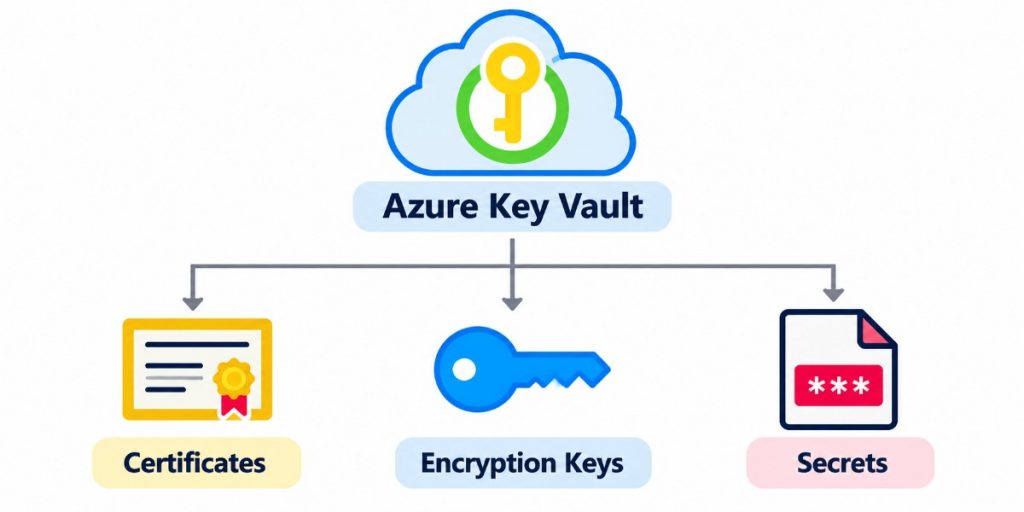
Azure Key Vault is a cloud service for securely storing and managing secrets, encryption keys, and certificates. Applications can retrieve authorized secrets without embedding sensitive values directly in source code. Key Vault supports access control, auditing, and integration with Azure services and managed identities. It helps centralize sensitive information and manage cryptographic operations.
45. What Is A Managed Identity In Azure?
Ans:
- A managed identity provides an Azure-managed identity for an application or resource to authenticate to supported services.
- It avoids the need to store and rotate credentials manually in application configuration.
- System-assigned identities are tied to a specific resource lifecycle, while user-assigned identities can be associated with multiple supported resources.
46. What Is Azure Policy?
Ans:
Azure Policy is a governance service that helps enforce organizational standards and assess resource compliance. Administrators assign policy definitions that evaluate whether resources meet specified requirements. Policies can audit configurations, deny certain deployments, or trigger supported remediation actions. Initiatives group multiple policies to manage broader compliance objectives
47. What Is Azure Resource Lock?
Ans:
An Azure resource lock protects supported resources from accidental deletion or modification. The main lock types are CanNotDelete and ReadOnly, which restrict different management operations. Locks can be applied at subscription, resource group, or resource scope, with applicable inheritance behavior. Authorized administrators must remove or change a lock before performing blocked operations.
48. What Is Azure Key Management?
Ans:
Azure key management involves creating, storing, protecting, and controlling access to cryptographic keys. Azure Key Vault provides key management capabilities, while Managed HSM offers a dedicated hardware security module service for supported requirements. Keys can support encryption, signing, and other cryptographic operations. Organizations must define permissions, rotation schedules, auditing, and recovery procedures
49. What Is Azure Private Link?
Ans:
- Azure Private Link enables private connectivity from a virtual network to supported Azure services and partner services through private endpoints.
- A private endpoint uses a private IP address from the associated virtual network. This can reduce or eliminate the need to expose supported service access through public endpoints.
- DNS configuration is important to ensure applications resolve the service name to the intended private address.
50. What Is Azure Firewall?
Ans:
Azure Firewall is a managed, stateful network security service for controlling and filtering network traffic. Depending on its configuration and SKU, it supports network rules, application rules, and advanced threat-protection capabilities. It can inspect and control traffic flowing between supported network boundaries. Centralized firewall policies help organizations apply consistent security rules
51. What Is Azure DDoS Protection?
Ans:
Azure DDoS Protection helps defend supported public-facing Azure resources against distributed denial-of-service attacks. These attacks attempt to overwhelm services with excessive traffic or network requests. The service monitors network traffic and provides mitigation capabilities according to the selected protection configuration. It can help maintain service availability during qualifying attacks
52. What Is Microsoft Defender For Cloud?
Ans:
Microsoft Defender for Cloud is a cloud security posture management and workload protection service. It helps assess security configurations, identify vulnerabilities, and detect threats across supported cloud environments. It provides recommendations that help teams improve their security posture. Depending on enabled plans and supported resources, it offers additional workload protection capabilities.
53. What Is Azure Monitor?
Ans:
- Azure Monitor is a monitoring platform for collecting and analyzing telemetry from Azure resources and supported applications.
- It works with metrics, logs, alerts, dashboards, and diagnostic data to help teams understand system behavior.
- Administrators can configure alerts for performance issues, failures, and unusual conditions. Log Analytics supports querying collected log data using Kusto Query Language.
54. What Is Azure Application Insights?
Ans:
Azure Application Insights is an application performance monitoring capability within Azure Monitor. It collects telemetry such as requests, dependencies, exceptions, traces, and response times from supported applications. Developers use it to identify slow operations, diagnose errors, and understand application behavior. Distributed tracing helps investigate requests that pass through multiple services.
55. What Is Azure Log Analytics?
Ans:
Azure Log Analytics is a capability used to query and analyze log data stored in a Log Analytics workspace. It uses Kusto Query Language to filter, summarize, and correlate information from supported data sources. Administrators can investigate resource events, troubleshoot issues, and build queries for monitoring scenarios. Log Analytics works with Azure Monitor alerts, workbooks, and other monitoring features.
56. What Is Azure Service Health?
Ans:
Azure Service Health provides personalized information about Azure service incidents, planned maintenance, and other service-impacting events relevant to an organization’s resources. It helps administrators understand whether an Azure platform issue may affect their workloads. Users can configure alerts and review events associated with their subscriptions and services. This information supports incident response and operational planning
57. What Is Azure Advisor?
Ans:
- Azure Advisor analyzes Azure resource configurations and provides recommendations for improving cloud deployments.
- Its recommendations cover areas such as reliability, security, performance, operational excellence, and cost optimization.
- Teams can review suggestions and prioritize changes according to business needs.
58. What Is Azure Cost Management?
Ans:
- Azure Cost Management helps organizations analyze, monitor, and manage spending associated with their Azure usage.
- It provides cost analysis, budgets, alerts, and other tools for tracking cloud expenditure. Teams can examine spending by subscription, resource group, service, or other supported dimensions.
- Budgets help notify stakeholders when spending approaches defined thresholds, but they do not automatically stop all resource usage
59. What Is The Azure Pricing Calculator?
Ans:
The Azure Pricing Calculator estimates the expected cost of Azure services before deployment. Users select services, regions, configurations, and expected usage to calculate an estimated monthly or annual cost. It helps compare deployment options and prepare preliminary cloud budgets. The actual bill may differ because of usage changes, negotiated pricing, discounts, taxes, and other billing factors.
60. What Is Azure Cloud Shell?
Ans:
Azure Cloud Shell is a browser-accessible shell environment for managing Azure resources. It provides command-line tools such as Azure CLI and Azure PowerShell. Users can run scripts, automate administrative tasks, and manage deployments without installing every tool locally. Cloud Shell supports authentication through the Azure environment and can use persistent storage when configured.

Develop Your Skills with Microsoft Azure Certification Training
Weekday / Weekend BatchesSee Batch Details61. What Is Azure CLI?
Ans:
- Azure CLI is a command-line tool for creating, configuring, and managing Azure resources. It supports commands for virtual machines, storage, networking, identity, and many other Azure services.
- Developers and administrators can use it interactively or within automation scripts. Azure CLI is available across supported operating systems and can also be used through Azure Cloud Shell.
- It helps standardize repetitive administrative tasks and infrastructure deployment workflows.
62. What Is Azure PowerShell?
Ans:
Azure PowerShell is a collection of PowerShell modules designed to manage Azure resources. It provides commands, known as cmdlets, for deploying infrastructure, managing permissions, and automating cloud operations. It is particularly useful for administrators already working with PowerShell scripting. Azure PowerShell supports interactive management and repeatable automation workflows
63. What Is Infrastructure As Code In Azure?
Ans:
Infrastructure as Code (IaC) means defining infrastructure through version-controlled files instead of creating every resource manually. Azure supports IaC through ARM templates, Bicep, Terraform, and other compatible tools. IaC makes deployments repeatable and helps reduce configuration differences between environments. Teams can review changes, automate provisioning, and integrate infrastructure deployment into CI/CD pipelines
64. What Is An ARM Template?
Ans:
An Azure Resource Manager template is a JSON-based declarative file that describes Azure resources and their configuration. It can define resource properties, dependencies, parameters, variables, and outputs. ARM templates help deploy infrastructure consistently across development, testing, and production environments. They can be used with deployment automation and source control.
65. What Is Azure Bicep?
Ans:
Azure Bicep is a domain-specific language for declaratively deploying Azure resources. It provides a simpler syntax than writing ARM templates directly in JSON. Bicep supports parameters, variables, modules, resource declarations, and reusable infrastructure definitions. It integrates with Azure Resource Manager and helps teams maintain infrastructure as code. Bicep is useful for repeatable deployments, code reviews, and organizing complex Azure environments.
66. What Is Azure DevOps?
Ans:
Azure DevOps is a set of development tools that supports planning, source control, building, testing, and releasing software. Its services include Azure Boards, Azure Repos, Azure Pipelines, Azure Test Plans, and Azure Artifacts. Teams can use it to manage work items, maintain code repositories, and automate software delivery. Pipelines can deploy applications and infrastructure to Azure environments.
67. What Is Azure Pipelines??
Ans:
Azure Pipelines is a continuous integration and continuous delivery service within Azure DevOps. It automates processes such as compiling code, running tests, packaging applications, and deploying releases. Pipelines can be defined using YAML or supported visual configuration options. They can integrate with source repositories and deploy to Azure or other supported environments.
68. What Is CI/CD In Azure?
Ans:
Continuous Integration and Continuous Delivery or Deployment (CI/CD) automate the process of integrating code changes, testing applications, and releasing software. In Azure, Azure Pipelines and GitHub Actions can support these workflows. CI helps detect integration problems early by building and testing changes regularly. Continuous delivery prepares validated releases, while continuous deployment can release qualifying changes automatically
69. What Is Azure Repos?
Ans:
- Azure Repos is a source control service within Azure DevOps. It supports Git repositories and Team Foundation Version Control for teams using different version-control approaches.
- Developers can manage code changes, branches, pull requests, and collaboration workflows.
- Branch policies and review requirements help maintain code quality before changes are merged.
70. What Is Azure Artifacts?
Ans:
- Azure Artifacts is a package management service in Azure DevOps. It allows teams to create, host, share, and consume packages used by software projects.
- Supported package types include NuGet, npm, Maven, Python packages, and Universal Packages, depending on configuration.
- Feeds can help manage package access and support dependency-sharing workflows.
71. What Is Azure Kubernetes Service Scaling?
Ans:
Azure Kubernetes Service scaling adjusts cluster or application capacity to match workload demands. Kubernetes workload scaling can change the number of application replicas, while cluster autoscaling can adjust the number of supported worker nodes. Horizontal Pod Autoscaler can use configured metrics to increase or decrease pod replicas. Scaling behavior depends on resource requests, limits, available capacity, and autoscaling configuration.
72. What Is Azure Virtual Machine Scale Sets?
Ans:
Azure Virtual Machine Scale Sets allow organizations to deploy and manage a group of load-balanced virtual machines. They support scaling the number of instances according to workload requirements and configured policies. Scale sets help maintain application capacity and simplify management of similar VM instances. They can integrate with load-balancing and monitoring services for resilient deployments
73. What Is Azure Availability Set?
Ans:
- An Azure Availability Set is a logical grouping that helps distribute virtual machines across fault domains and update domains within a data center environment.
- Fault domains reduce the risk of shared hardware failures affecting all grouped VMs. Update domains help coordinate planned maintenance to reduce simultaneous disruption.
- Availability sets can improve availability for workloads using multiple virtual machines.
74. What Is Azure Site Recovery?
Ans:
- Azure Site Recovery is a disaster recovery service that helps replicate supported workloads and coordinate recovery during outages.
- It can support replication between Azure regions and certain on-premises-to-Azure scenarios. Recovery plans help organize failover steps and recovery procedures.
- Organizations should test failover regularly and define appropriate recovery time and recovery point objectives.
75. What Is Azure Backup?
Ans:
Azure Backup is a managed service that protects supported workloads by creating and managing backups. It supports scenarios such as Azure virtual machines, selected on-premises workloads, and other eligible resources. Backup policies define schedules, retention, and applicable protection settings. Recovery options help restore data or workloads after accidental deletion, corruption, or certain security incidents
76. What Is The Difference Between Azure Backup And Azure Site Recovery?
Ans:
| Aspect | Azure Backup | Azure Site Recovery |
|---|---|---|
| Definition | Azure Backup Is A Managed Service Used To Protect Data And Create Recovery Points For Supported Resources. | Azure Site Recovery Is A Disaster Recovery Service Used To Replicate Supported Workloads And Coordinate Failover. |
| Purpose | Designed To Recover Data, Files, And Supported Workloads After Accidental Deletion, Corruption, Or Data Loss. | Designed To Restore Application Availability By Moving Supported Workloads To A Recovery Environment During Disruptions. |
| Capabilities | Supports Backup Scheduling, Retention Policies, Recovery Points, And Restoration Of Supported Resources. | Supports Workload Replication, Recovery Plans, Test Failovers, And Planned Or Unplanned Failover Scenarios. |
| Focus | Focuses On Data Protection, Backup Retention, And Recovery From Data Loss Or Accidental Changes. | Focuses On Business Continuity, Disaster Recovery, And Reducing Application Downtime During Major Outages. |
77. What Is Azure Migrate?
Ans:
Azure Migrate is a service that helps organizations assess and plan the migration of workloads to Azure. It provides tools and integrations for discovering infrastructure, evaluating readiness, and estimating migration requirements. Depending on the scenario, it can support migration planning for servers, databases, and other workloads. Assessment results help identify dependencies, sizing considerations, and potential migration issues
78. What Is Azure Data Box?
Ans:
- Azure Data Box is a family of services and devices designed to transfer large amounts of data to or from Azure when network transfer is impractical.
- Organizations can copy data to supported devices and ship them to a Microsoft facility for transfer into Azure.
- It can help with large-scale data migration, archival projects, and environments with limited bandwidth.
79. What Is Azure Synapse Analytics?
Ans:
Azure Synapse Analytics is an analytics service that combines capabilities for data integration, data warehousing, and large-scale analytics. It supports querying and analyzing data across suitable data sources and processing environments. Organizations can use it to build analytical workflows, integrate data, and support business intelligence solutions. It can connect with data visualization tools such as Power BI.
80. What Is Azure Data Factory?
Ans:
Azure Data Factory is a cloud-based data integration service for orchestrating and moving data between supported systems. It uses pipelines, activities, linked services, and datasets to define data workflows. Organizations can schedule data movement, transform data through supported services, and coordinate complex processing tasks
81. What Is Azure Databricks?
Ans:
Azure Databricks is a cloud-based analytics platform built around the Databricks ecosystem and Apache Spark capabilities. It supports large-scale data processing, data engineering, machine learning, and collaborative analytics. Teams can work with notebooks, jobs, data pipelines, and supported lakehouse technologies.
82. What Is Azure Stream Analytics?
Ans:
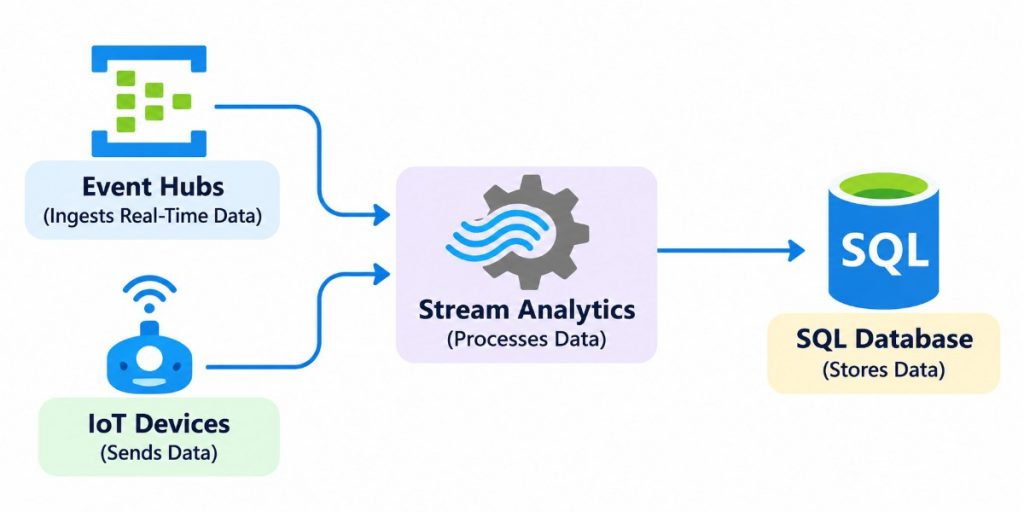
- Azure Stream Analytics is a managed service for processing real-time streams of data. It can analyze incoming events from supported sources and send results to configured destinations
- Users define queries using a SQL-like language to filter, aggregate, and transform streaming data.
- The service is suitable for telemetry analysis, operational dashboards, and event-driven monitoring
83. What Is Azure Event Hubs?
Ans:
Azure Event Hubs is a managed event ingestion service designed to receive large volumes of event data. It can collect telemetry, application logs, clickstreams, and device-generated events. Producers publish events to an event hub, and consumers process them through supported consumer groups and integrations. It works with services such as Azure Stream Analytics and Azure Databricks for downstream analysis
84. What Is Azure Service Bus?
Ans:
Azure Service Bus is a managed enterprise messaging service that supports reliable communication between distributed application components. It provides queues and topics with subscriptions for different messaging patterns. Features such as message sessions, dead-letter queues, and duplicate detection are available in supported configurations. Service Bus helps applications communicate asynchronously and reduces direct dependencies between services.
85. What Is The Difference Between Azure Event Hubs And Azure Service Bus?
Ans:
Azure Event Hubs is designed primarily for high-volume event ingestion and streaming data scenarios. Azure Service Bus focuses on enterprise messaging, including queues, topics, subscriptions, and reliable business-process communication. Event Hubs is suitable for telemetry streams and event analytics, while Service Bus is useful for coordinating application tasks. Their processing models and delivery features differ according to the intended workload.
86. What Is Azure API Management?
Ans:
- Azure API Management is a service for publishing, securing, monitoring, and managing APIs. It provides a gateway through which applications can access backend services according to configured policies.
- Features can include authentication integration, rate limiting, request transformation, caching, and API analytics.
- Developers can organize APIs into products and provide documentation through a developer portal.
87. What Is Azure Logic Apps?
Ans:
Azure Logic Apps is a workflow automation service for integrating applications, data sources, and business processes. It uses triggers and actions to coordinate tasks with minimal custom code. Built-in and managed connectors support integration with many Microsoft and third-party services. Logic Apps can automate notifications, approvals, file processing, and system-to-system workflows.
88. What Is Azure AI Services?
Ans:
Azure AI services provide capabilities for building applications that use artificial intelligence, subject to the current service portfolio and availability. Depending on the service, capabilities may include language processing, speech, vision, document processing, and other AI tasks. Developers can integrate these capabilities through supported APIs, SDKs, and development tools.
89. What Is The Shared Responsibility Model In Azure?
Ans:
The shared responsibility model defines how security and operational responsibilities are divided between Microsoft and the customer. Microsoft manages the cloud infrastructure responsibilities assigned to the provider, while customers remain responsible for areas such as identities, data, access permissions, and application configurations. The exact division depends on whether the workload uses IaaS, PaaS, or SaaS.
90. How Can Azure Costs And Performance Be Optimized In An Enterprise Environment?
Ans:
Azure cost and performance optimization begins with monitoring resource utilization, application latency, and spending trends. Teams can right-size virtual machines, remove unused resources, select suitable storage tiers, and evaluate scaling rules. Azure Monitor, Azure Advisor, and Cost Management provide insights that support optimization decisions. Reserved capacity or savings plans may reduce eligible compute costs when usage patterns justify the commitment