LMS
LMS
Last updated on 20th Aug 2026| 7619

Wipro Software Testing Interviews Assess A Candidate’s Understanding Of Software Testing Concepts, Testing Methodologies, Automation Tools, And Quality Assurance Practices. The Interview May Cover Manual Testing, Test Case Design, Defect Life Cycle, SDLC, STLC, Functional Testing, Regression Testing, Smoke Testing, And Integration Testing. Candidates May Also Be Asked Questions On Selenium, API Testing, SQL, TestNG, Agile Methodology, CI/CD, And Automation Frameworks. Practical Scenario-Based Questions Are Commonly Used To Evaluate Problem-Solving And Debugging Skills. Freshers Should Focus On Testing Fundamentals, While Experienced Candidates Should Also Prepare For Automation, Framework Design, And Real-Time Project Scenarios. This Collection Of Wipro Software Testing Interview Questions And Answers Helps Candidates Prepare Systematically For Technical Rounds And Improve Their Confidence During The Interview.
1. What Is Software Testing?
Ans:
Software Testing Is The Process Of Evaluating Software To Identify Defects And Verify Whether It Meets Specified Requirements. It Helps Ensure That The Application Performs Correctly Under Different Conditions. Testing Can Be Performed Manually Or With The Help Of Automation Tools. Testers Validate Functional Requirements, Performance, Usability, Security, And Reliability Depending On The Project. Testing Also Helps Reduce The Risk Of Failures After Software Is Released To Users. The Main Goal Is To Deliver Reliable, High-Quality, And User-Friendly Software.
2. What Is The Difference Between Verification And Validation?
Ans:
Verification Is The Process Of Checking Whether The Software Development Work Products Meet Specified Requirements And Standards. It Mainly Focuses On Reviewing Documents, Designs, Specifications, And Code Without Necessarily Executing The Application. Validation Focuses On Executing The Software To Confirm That It Meets User Needs And Business Requirements. Verification Helps Prevent Defects During Development, While Validation Helps Detect Problems In The Working Produc.
3. What Is SDLC?
Ans:
- SDLC Stands For Software Development Life Cycle And Represents The Structured Process Used To Develop Software Applications. Common SDLC Phases Include Requirement Gathering, Planning, Design, Development, Testing, Deployment, And Maintenance.
- Each Phase Has Specific Activities, Deliverables, And Quality Requirements. Testing Activities Are Generally Planned Early To Identify Risks And Defects As Soon As Possible.
- Different SDLC Models Include Waterfall, V-Model, Spiral, Agile, And Iterative Models. Following An Appropriate SDLC Process Helps Teams Develop Software In A Controlled And Systematic Manner.
4. What Is STLC?
Ans:
STLC Stands For Software Testing Life Cycle And Describes The Different Activities Performed During Software Testing. Common STLC Phases Include Requirement Analysis, Test Planning, Test Case Development, Test Environment Setup, Test Execution, Defect Reporting, And Test Closure. Testers Analyze Requirements To Identify What Needs To Be Tested And Prepare Appropriate Test Scenarios And Cases. During Execution, Test Results Are Compared With Expected Results And Defects Are Reported.
5. What Is Manual Testing?
Ans:
Manual Testing Is The Process Of Testing Software Without Using Automation Scripts To Execute Test Cases. Testers Interact With The Application Manually And Compare Actual Results With Expected Results. It Is Commonly Used For Exploratory Testing, Usability Testing, Ad-Hoc Testing, And Scenarios That Change Frequently. Manual Testing Helps Testers Understand User Behavior And Identify Issues That May Not Be Easily Detected Through Automation. Test Cases, Test Data, And Defect Reports Are Usually Maintained During The Process. It Remains Important Even In Projects That Use Extensive Automation Testing.
6. What Is Automation Testing?
Ans:
Automation Testing Uses Software Tools And Scripts To Execute Test Cases Automatically. It Reduces Repetitive Manual Effort And Can Improve Test Execution Speed And Consistency. Automation Is Particularly Useful For Regression Testing, Smoke Testing, Data-Driven Testing, And Repeated Test Scenarios. Common Automation Tools Include Selenium, Playwright, Cypress, Appium, And Various API Testing Tools. Automation Requires Initial Development And Maintenance Effort When Applications Change. A Good Automation Strategy Selects Stable, Repetitive, And High-Value Test Cases For Automation.
7. What Is A Test Case?
Ans:
- A Test Case Is A Documented Set Of Conditions, Inputs, Actions, And Expected Results Used To Verify A Specific Software Requirement. It Normally Contains Information Such As Test Case ID, Description, Preconditions, Test Steps, Test Data, Expected Result, And Actual Result.
- Test Cases Help Testers Execute Testing Consistently And Maintain Traceability With Requirements. They Can Be Designed For Positive, Negative, Boundary, Functional, And Regression Scenarios.
- Well-Written Test Cases Should Be Clear, Independent, Reusable, And Easy To Execute. Proper Test Case Design Improves Test Coverage And Reduces Ambiguity.
8. What Is A Test Scenario?
Ans:
A Test Scenario Is A High-Level Description Of A Functionality Or Business Flow That Needs To Be Tested. It Provides Broader Coverage Than An Individual Test Case And Helps Identify Major Testing Areas. For Example, An E-Commerce Application May Have Scenarios Such As User Login, Product Search, Cart Management, Payment, And Order Cancellation. Multiple Test Cases Can Be Created For Each Test Scenario. Scenarios Are Useful During Test Planning And Requirement Analysis. They Help Ensure That Important Business Functions Are Not Missed During Testing.
9. What Is A Test Plan?
Ans:
A Test Plan Is A Document That Describes The Overall Testing Strategy, Scope, Objectives, Resources, Schedule, Risks, And Approach For A Software Project. It Defines What Will Be Tested, What Will Not Be Tested, And Which Testing Techniques Will Be Used. It Can Also Specify Test Environment Requirements, Roles And Responsibilities, Entry Criteria, Exit Criteria, And Defect Management Procedures. The Test Plan Provides Direction To The Testing Team Throughout The Project.
10. What Is A Test Strategy?
Ans:
A Test Strategy Is A High-Level Document Or Approach That Defines How Testing Will Be Performed Across A Project Or Organization. It Covers Testing Objectives, Methodologies, Tools, Automation Approach, Environments, Risk Management, And Quality Standards. Unlike A Detailed Test Plan, A Test Strategy Is Generally More Focused On The Overall Testing Approach. It Helps Teams Make Consistent Decisions About Testing Activities And Resources. The Strategy May Include Functional, Performance, Security, Compatibility, And Automation Testing Approaches. A Strong Test Strategy Helps Align Testing Activities With Business And Technical Risks.
11. What Is Functional Testing??
Ans:
- Functional Testing Verifies Whether Software Functions Behave According To Specified Requirements. Testers Provide Inputs And Check Whether The Application Produces The Expected Outputs And Behaviors.
- Examples Include Login, Registration, Search, Payment, File Upload, And Report Generation Testing. Functional Testing Can Be Performed Manually Or Through Automation Tools.
- It Includes Positive And Negative Test Scenarios To Validate Different Conditions. The Main Objective Is To Confirm That Every Required Function Works Correctly From The User’s Perspective.
12. What Is Non-Functional Testing?
Ans:
Non-Functional Testing Evaluates Quality Attributes Of Software Rather Than Specific Business Functions. It Can Include Performance, Load, Stress, Security, Usability, Compatibility, Reliability, And Scalability Testing. For Example, Performance Testing Can Determine Whether An Application Responds Within Acceptable Time Under Expected User Load. Security Testing Can Identify Vulnerabilities That May Affect Data And System Protection. Non-Functional Testing Helps Determine How Well The Application Performs Under Different Conditions. It Is Important For Delivering Software That Is Not Only Functionally Correct But Also Reliable And Usable.
13. What Is Smoke Testing?
Ans:
Smoke Testing Is A Preliminary Testing Technique Used To Verify Whether The Major Functions Of A New Software Build Are Working. It Is Usually Performed After A New Build Is Deployed To A Test Environment. Testers Execute A Small Set Of Critical Test Cases Such As Application Launch, Login, Navigation, And Major Business Functions. If Smoke Testing Fails, The Build May Be Rejected And Sent Back To Development. This Prevents Testers From Spending Time Testing A Fundamentally Unstable Build. Smoke Testing Is Also Called Build Verification Testing In Some Organizations.
14. What Is Sanity Testing?
Ans:
Sanity Testing Is A Focused Testing Activity Performed After Minor Changes, Bug Fixes, Or Enhancements To Verify That The Specific Functionality Works Correctly. It Is Narrower Than Regression Testing And Usually Covers Related Areas Rather Than The Entire Application. For Example, If A Login Defect Is Fixed, Sanity Testing May Focus On Login And Closely Related Authentication Functions. It Helps Quickly Determine Whether A Change Is Stable Enough For Further Testing. Sanity Testing Can Be Manual Or Automated.
15. What Is Regression Testing?
Ans:
Regression Testing Verifies That Recent Changes, Enhancements, Or Bug Fixes Have Not Broken Existing Functionality. Testers Re-Execute Previously Working Test Cases Against The Modified Application. Regression Testing Is Especially Important In Large Applications Where Changes In One Module Can Affect Other Modules. Automation Is Commonly Used Because Regression Suites May Contain Hundreds Or Thousands Of Test Cases. The Regression Suite Should Be Regularly Reviewed And Updated Based On Application Changes.
16. What Is Retesting?
Ans:
- Retesting Is The Process Of Executing A Previously Failed Test Case Again After The Associated Defect Has Been Fixed.
- Its Purpose Is To Confirm That The Specific Defect Has Been Successfully Resolved. Unlike Regression Testing, Retesting Primarily Focuses On The Exact Functionality Affected By The Defect.
- For Example, If A Payment Calculation Defect Is Fixed, The Failed Payment Test Case Is Executed Again. If The Test Passes, The Defect Can Be Marked As Verified. Retesting Helps Confirm The Effectiveness Of Individual Defect Fixes.
17. What Is Exploratory Testing?
Ans:
Exploratory Testing Is An Approach In Which Testers Simultaneously Learn About The Application, Design Tests, And Execute Them. It Does Not Always Depend On Detailed Pre-Written Test Cases. Testers Use Their Experience, Product Knowledge, And Creativity To Investigate Unexpected Behaviors. It Is Particularly Useful When Requirements Are Incomplete Or When Time Is Limited. Exploratory Testing Can Reveal Usability Problems, Edge Cases, And Unexpected Defects That Structured Testing May Miss.
18. What Is Ad-Hoc Testing?
Ans:
Ad-Hoc Testing Is An Informal Testing Approach Performed Without Detailed Test Case Documentation Or A Formal Testing Plan. Testers Use Their Knowledge And Experience To Randomly Or Intuitively explore The Application. It Can Help Identify Unexpected Defects That May Not Be Covered By Standard Test Cases. Ad-Hoc Testing Is Useful For Quick Validation And Supplementing Formal Testing Techniques. However, Its Coverage Can Be Difficult To Measure And Reproduce. Therefore, It Should Usually Complement Rather Than Replace Structured Testing.
19. What Is Black Box Testing?
Ans:
Black Box Testing Tests Software Functionality Without Requiring Knowledge Of The Internal Source Code Or Implementation Details. Testers Focus On Inputs, Outputs, Requirements, And User-Visible Behavior. Techniques Such As Equivalence Partitioning, Boundary Value Analysis, Decision Table Testing, And State Transition Testing Are Commonly Used. Black Box Testing Can Be Performed By Testers Who Do Not Need To Understand The Programming Logic. It Is Suitable For Functional And Many System-Level Testing Activities..
20. What Is White Box Testing?
Ans:
- White Box Testing Involves Testing The Internal Logic, Code Structure, Paths, Conditions, And Implementation Of A Software Application. It Usually Requires Knowledge Of Programming And The Internal Design Of The System.
- Techniques Include Statement Coverage, Branch Coverage, Condition Coverage, And Path Coverage. Developers Frequently Perform White Box Testing Through Unit Tests.
- It Helps Identify Logical Errors, Uncovered Code Paths, And Condition-Handling Problems. White Box Testing Complements Black Box Testing By Examining Internal Implementation Details.
21. What Is Grey Box Testing?
Ans:
Grey Box Testing Combines Elements Of Black Box And White Box Testing. Testers Have Partial Knowledge Of The Internal Architecture, Database Structure, APIs, Or Design Of The Application. This Knowledge Can Help Create More Effective Test scenarios While Still Focusing On External Behavior. Grey Box Testing Can Be Useful For Web Applications, Integration Testing, And Database-Driven Systems. It Helps Testers Identify Issues That May Not Be Obvious From The User Interface Alone. The Approach Provides A Balance Between External Functional Testing And Internal Technical Understanding.

22. What Is Unit Testing?
Ans:
Unit Testing Is The Testing Of Individual Components Or Units Of Software In Isolation. A Unit May Be A Function, Method, Class, Or Small Module Depending On The Application Architecture. Developers Commonly Create Unit Tests To Verify That Individual Components Produce Expected Results. Unit Tests Are Usually Fast And Can Be Automated As Part Of The Development Process. They Help Detect Defects Early Before Components Are Integrated With Other Parts Of The System. Common Unit Testing Frameworks Include JUnit, NUnit, TestNG, Jest, And PyTest.
23. What Is Integration Testing?
Ans:
Integration Testing Verifies Whether Multiple Modules Or Components Work Correctly When Combined. It Focuses On Interfaces, Data Exchange, Communication, And Dependencies Between Components. For Example, A Payment Service May Need To Integrate With An Order Management System And A Banking Gateway. Integration Testing Can Identify Interface Mismatches, Data Format Issues, Communication Failures, And Incorrect Dependencies.
24. What Is System Testing?
Ans:
- System Testing Evaluates The Complete Integrated Software Application Against Its Functional And Non-Functional Requirements. It Is Generally Performed After Integration Testing And Before User Acceptance Testing.
- Testers Validate End-To-End Business Processes Across Different Modules And Components. Examples Include Complete Purchase, Registration, Payment, And Reporting Workflows.
- System Testing Can Include Functional, Performance, Security, Compatibility, And Usability Testing. The Main Objective Is To Determine Whether The Entire System Meets Its Specified Requirements.
25. What Is Acceptance Testing?
Ans:
Acceptance Testing Determines Whether The Software Is Suitable For Business Or User Acceptance. It Is Usually Performed After System Testing And Before Production Release. Business Users, Customers, Product Owners, Or Other Authorized Stakeholders May Participate In Acceptance Testing. User Acceptance Testing Commonly Focuses On Real-World Business Scenarios Rather Than Internal Technical Implementation. Successful Acceptance Testing Provides Confidence That The Application Meets Business Expectations. The Software Can Then Be Approved For Deployment Based On Defined Acceptance Criteria.
26. What Is Alpha Testing?
Ans:
Alpha Testing Is A Form Of Acceptance-Oriented Testing Performed Before Software Is Released To External Users. It Is Usually Conducted In A Controlled Environment By Internal Teams Or Selected Stakeholders. The Purpose Is To Identify Major Functional, Usability, And Stability Issues Before External Release. Alpha Testing May Combine Structured Test Cases With Exploratory Testing. Developers And Testers Can Work Closely To Resolve Defects Found During This Stage. It Is Typically Performed Before Beta Testing.
27. What Is Beta Testing?
Ans:
Beta Testing Is Performed By A Limited Group Of External Or Real Users Before The Final Product Release. It Allows Organizations To Collect Feedback From Real-World Environments That May Differ From Internal Test Environments. Beta Users Can Identify Usability Issues, Compatibility Problems, And Unexpected Functional Behaviors. The Feedback Can Be Used To Fix Important Issues Before General Availability. Beta Testing Is Particularly Useful For Applications With Diverse User Devices And Environments. It Provides Additional Confidence Before Full Production Release.
28. An Order Is Successfully Placed But Confirmation Is Not Displayed. How Would This Scenario Be Tested?
Place an order using valid test data and observe the application’s response. Verify whether the order is stored in the database. Check if confirmation emails or notifications are received. Refresh the application to confirm the order status. Repeat the test with different payment methods if applicable. Capture screenshots showing the missing confirmation message. Report the issue as a user experience defect.
28. What Is Defect Or Bug?
Ans:
- A Defect Or Bug Is An Error Or Problem In Software That Causes The Application To Behave Differently From The Expected Result. Defects Can Occur Due To Incorrect Requirements, Design Errors, Coding Mistakes, Configuration Problems, Or Integration Issues.
- A Tester Usually Identifies A Defect By Comparing Actual Behavior With Expected Behavior. The Defect Should Be Documented With Clear Steps To Reproduce, Evidence, Environment Details, And Expected And Actual Results.
- Developers Analyze And Fix The Defect Based On Its Severity And Priority. Proper Defect Management Helps Improve Software Quality And Prevent Repeated Problems.
29. What Is Defect Life Cycle?
Ans:
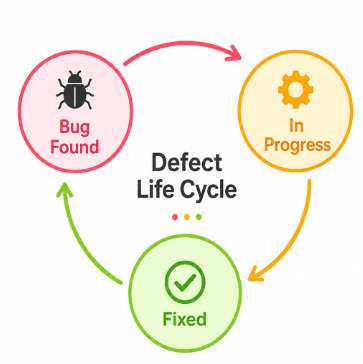
The Defect Life Cycle Describes The Different States Through Which A Defect Passes From Identification To Closure. A Typical Flow Includes New, Assigned, Open, Fixed, Retest, Verified, And Closed. If The Defect Is Not Properly Fixed, It May Be Reopened And Sent Back To Development. Some Organizations Also Use States Such As Deferred, Rejected, Duplicate, Not A Bug, Or Cannot Reproduce. The Exact Workflow Depends On The Organization And Defect Management Tool. A Clearly Defined Defect Life Cycle Helps Teams Track And Control Defect Resolution.
30. What Is Severity And Priority?
Ans:
Severity Describes The Technical Impact Of A Defect On The Software Or Its Functionality. Priority Indicates How Quickly The Defect Should Be Fixed Based On Business Importance And Release Requirements. A High-Severity Defect May Cause An Application Crash Or Data Loss, While A High-Priority Defect May Affect An Important Business Function. Severity Is Generally Assessed From A Technical Perspective, Whereas Priority Is Often Determined From A Business Perspective. A Defect Can Have High Severity And Low Priority In Certain Situations, Or Low Severity And High Priority When It Affects An Important Customer-Facing Feature.
31. What Is Equivalence Partitioning?
Ans:
Equivalence Partitioning Is A Black Box Test Design Technique Used To Divide Input Data Into Groups That Are Expected To Behave Similarly. Instead Of Testing Every Possible Input, Testers Select Representative Values From Each Partition. For Example, If A Field Accepts Ages From 18 To 60, Valid And Invalid Input Groups Can Be Created. Testing Representative Values From Each Group Can Reduce The Number Of Test Cases While Maintaining Useful Coverage. It Is Especially Helpful For Input Validation Testing. The Technique Helps Identify Both Valid And Invalid Input Conditions Efficiently.
32. What Is Boundary Value Analysis?
Ans:
Boundary Value Analysis Is A Test Design Technique That Focuses On Values At The Edges Of Valid And Invalid Input Ranges. Defects Frequently Occur At Boundaries Because Developers May Incorrectly Handle Greater Than, Less Than, Or Equal Conditions. For An Input Range Of 1 To 100, Values Such As 0, 1, 2, 99, 100, And 101 Can Be Tested. This Technique Provides High Defect Detection With A Relatively Small Number Of Test Cases.
33. What Is Decision Table Testing?
Ans:
Decision Table Testing Is A Test Design Technique Used When Application Behavior Depends On Multiple Conditions And Business Rules. Conditions And Their Possible Values Are Organized Into A Table Along With The Expected Actions Or Results. Each Relevant Combination Can Be Used To Create Test Cases. This Technique Is Useful For Complex Rules Such As Discounts, Eligibility, Loan Approval, And Access Control. It Helps Ensure That Important Combinations Of Conditions Are Not Missed. Decision Tables Are Especially Valuable When Multiple Inputs Affect The Final Outcome.
34. What Is State Transition Testing?
Ans:
- State Transition Testing Verifies How An Application Behaves When It Moves Between Different States Based On Events Or Conditions. A State Represents A Particular Condition Of The Application, While A Transition Represents A Change From One State To Another.
- For Example, An Account May Move From Active To Locked After Multiple Failed Login Attempts. Testers Validate Valid And Invalid Transitions To Ensure Correct Behavior.
- This Technique Is Useful For Applications With Workflows, Status Changes, Authentication States, And Transaction Processing. State Transition Testing Can Reveal Errors In Business Rules And State Management.
35. What Is Traceability Matrix
Ans:
A Requirement Traceability Matrix Is A Document That Maps Requirements To Corresponding Test Cases. It Helps Verify That Every Requirement Has Appropriate Test Coverage. The Matrix Can Also Connect Requirements With Defects And Test Results In Some Testing Processes. It Supports Impact Analysis When Requirements Change During Development. Traceability Helps Identify Missing Test Cases And Uncovered Requirements. It Is Particularly Useful In Projects Where Requirement Compliance And Auditability Are Important.
36. What Is Test Data?
Ans:
Test Data Is The Information Used As Input During Software Testing To Validate Different Application Scenarios. It Can Include Valid Values, Invalid Values, Boundary Values, Large Data, Duplicate Records, Special Characters, And Security-Related Inputs. Good Test Data Should Represent Realistic Business Conditions While Also Covering Edge Cases. Test Data May Be Created Manually, Generated Automatically, Or Extracted And Masked From Production-Like Sources
37. What Is Test Environment?
Ans:
A Test Environment Is A Combination Of Hardware, Software, Databases, Networks, Configurations, And Tools Required To Execute Software Tests. It Should Closely Represent The Target Production Environment Where Appropriate. Test Environments Can Include Development, Integration, QA, Staging, And User Acceptance Environments. Incorrect Configuration Can Cause False Failures Or Hide Actual Defects. Environment Details Should Therefore Be Documented And Controlled. Stable And Consistent Test Environments Help Improve The Reliability Of Test Results.
38. What Are Entry And Exit Criteria?
Ans:
Entry Criteria Define The Conditions That Must Be Satisfied Before A Testing Activity Can Begin. Examples Include Availability Of A Stable Build, Approved Requirements, Prepared Test Cases, And A Ready Test Environment. Exit Criteria Define The Conditions That Must Be Met Before Testing Can Be Considered Complete. Examples Include Required Test Execution Percentage, Acceptable Defect Levels, And Completion Of Critical Test Cases. These Criteria Help Teams Make Objective Decisions About Testing Progress. They Also Reduce Ambiguity When Determining Whether A Build Or Release Is Ready For The Next Stage.
39. What Is Risk-Based Testing?
Ans:
- Risk-Based Testing Prioritizes Testing Activities According To The Likelihood And Impact Of Potential Failures. High-Risk Features Receive More Testing Attention Than Low-Risk Features.
- Risk Can Be Assessed Based On Business Importance, Technical Complexity, Change Frequency, Customer Impact, And Historical Defect Patterns.
- This Approach Is Useful When Testing Time And Resources Are Limited. It Helps Teams Focus On Areas Where Defects Could Cause The Greatest Damage. Risk-Based Testing Improves Testing Efficiency Without Ignoring Important Quality Concerns.
40. What Is Positive Testing?
Ans:
Positive Testing Verifies That The Application Works Correctly When Valid And Expected Inputs Are Provided. Testers Use Inputs That Should Be Accepted According To The Requirements. For Example, A Valid Email Address And Correct Password Can Be Used To Test Successful Login. Positive Testing Confirms That Expected Business Flows Produce Correct Results. It Is Important For Verifying Normal User Operations And Required Functionality. Positive Testing Is Usually Combined With Negative Testing For More Complete Coverage.
41. What Is Negative Testing?
Ans:
Negative Testing Checks How An Application Behaves When Invalid, Unexpected, Or Incorrect Inputs Are Provided. It Helps Determine Whether The Application Handles Errors Gracefully And Prevents Incorrect Processing. Examples Include Invalid Passwords, Incorrect File Formats, Empty Mandatory Fields, Special Characters, And Values Outside Allowed Ranges. Negative Testing Can Reveal Validation, Security, And Error-Handling Problems.

Enroll in Software Testing Course and UPGRADE Your Skills
Weekday / Weekend BatchesSee Batch Details42. What Is Compatibility Testing?
Ans:
- Compatibility Testing Verifies Whether Software Works Correctly Across Different Browsers, Operating Systems, Devices, Screen Sizes, Networks, And Hardware Configurations.
- It Is Particularly Important For Web And Mobile Applications With Diverse User Environments. Testers May Validate Functional Behavior, Layout, Performance, And User Interaction Across Supported Platforms.
- Compatibility Testing Helps Identify Browser-Specific And Device-Specific Defects. A Defined Compatibility Matrix Can Help Teams Select The Most Important Environments To Test.
43. What Is Usability Testing?
Ans:
Usability Testing Evaluates How Easily And Effectively Users Can Understand And Use An Application. It Focuses On Navigation, Clarity, Accessibility, User Interface Design, Error Messages, And Overall User Experience. Real Or Representative Users May Be Observed While Performing Common Tasks. Testers And Product Teams Analyze Where Users Experience Confusion, Delays, Or Errors. Usability Issues Can Affect Customer Satisfaction Even When The Software Is Functionally Correct. Improving Usability Can Make Applications More Efficient, Accessible, And User-Friendl
44. What Is Performance Testing?
Ans:
Performance Testing Evaluates How An Application Behaves Under Different Levels Of Workload And User Activity. It Can Measure Response Time, Throughput, Resource Usage, Scalability, And System Stability. Performance Testing Helps Determine Whether The Application Meets Defined Performance Requirements. Common Types Include Load Testing, Stress Testing, Endurance Testing, And Spike Testing. Tools Such As JMeter And LoadRunner Can Be Used For Automated Performance Tests. Performance Testing Helps Identify Bottlenecks And Capacity Limitations Before They Affect Real Users.
45. What Is Load Testing?
Ans:
Load Testing Measures Application Performance Under Expected Or Planned User And Transaction Loads. The Goal Is To Determine Whether The System Can Handle Normal Business Workloads Within Acceptable Performance Limits. Testers Monitor Response Time, Throughput, CPU, Memory, Database Performance, And Other Resources. Load Levels Can Be Gradually Increased To Identify Capacity Limitations. It Helps Teams Validate Performance Before Production Deployment. Load Testing Is Particularly Important For Applications Expected To Handle Large Numbers Of Concurrent Users.
46. What Is Stress Testing?
Ans:
Stress Testing Evaluates How A System Behaves Under Workloads Beyond Its Expected Capacity. The Goal Is To Identify The Breaking Point And Determine How The Application Recovers After Extreme Conditions. Testers May Increase Concurrent Users, Requests, Data Volume, Or Resource Consumption Beyond Normal Levels. Stress Testing Helps Identify Stability, Scalability, And Resource Management Problems. It Can Also Show Whether The System Fails Gracefully Instead Of Producing Data Corruption Or Uncontrolled Errors. The Results Can Help Teams Plan Capacity And Improve System Resilience.
47. What Is Security Testing?
Ans:
- Security Testing Identifies Vulnerabilities And Verifies Whether An Application Protects Data And Resources From Unauthorized Access. It Can Include Authentication, Authorization, Session Management, Input Validation, Encryption, And Access Control Testing.
- Testers May Check For Common Vulnerabilities Such As SQL Injection, Cross-Site Scripting, Broken Access Control, And Insecure Data Exposure.
- Security Testing Should Be Performed According To The Application’s Risk Profile And Security Requirements. Sensitive Information Should Be Handled Carefully During Testing. Security Testing Helps Protect Users, Business Data, And System Infrastructure.
48. What Is API Testing?
Ans:
API Testing Verifies The Functionality, Reliability, Performance, And Security Of Application Programming Interfaces. Testers Send Requests To API Endpoints And Validate Status Codes, Response Data, Headers, Authentication, And Error Handling. Common HTTP Methods Include GET, POST, PUT, PATCH, And DELETE. API Testing Can Be Performed Using Tools Such As Postman, Rest Assured, SoapUI, Or Automated Frameworks. It Can Validate Backend Functionality Without Depending On The User Interface. API Testing Is Useful For Identifying Integration And Service-Level Defects Early.
49. What Is Selenium?
Ans:
Selenium Is An Open-Source Automation Framework Commonly Used To Automate Web Browser Testing. It Supports Multiple Browsers And Programming Languages Such As Java, Python, C#, And JavaScript. Selenium WebDriver Allows Automation Scripts To Interact With Web Elements Such As Buttons, Forms, Links, And Menus. Selenium Can Be Integrated With Testing Frameworks, Build Tools, And CI/CD Pipelines. It Is Widely Used For Functional And Regression Testing Of Web Applications. Selenium Does Not By Itself Provide A Complete Test Management System, So Additional Tools Are Often Used For Reporting And Test Execution.
50. What Is Selenium WebDriver?
Ans:
Selenium WebDriver Is A Component Of Selenium That Provides A Programming Interface For Controlling Web Browsers. It Allows Test Scripts To Open Pages, Locate Elements, Enter Data, Click Buttons, Navigate Between Pages, And Validate Results. WebDriver Communicates With Browser-Specific Drivers Or Browser Automation Interfaces To Perform Actions. It Supports Multiple Browsers And Programming Languages. WebDriver Is Commonly Used For Automated Functional And Regression Testing. Its Ability To Simulate Real Browser Interactions Makes It A Popular Tool For Web Application Automation.
51. What Is XPath In Selenium
Ans:
XPath Is A Query Language Used In Selenium To Locate Elements In A Web Page’s HTML Structure. It Is Useful When Elements Do Not Have Unique IDs, Names, Or Other Convenient Attributes. XPath Can Be Absolute Or Relative, With Relative XPath Generally Preferred Because It Is Less Dependent On The Complete DOM Structure. Functions Such As contains(), starts-with(), And text() Can Help Create Flexible Locators. A Good XPath Should Be Unique, Stable, And Easy To Maintain. Proper XPath Usage Helps Automation Scripts Interact Reliably With Dynamic Web Applications.
52. What Is The Difference Between Absolute XPath And Relative XPath?
Ans:
| Aspect | Absolute XPath | Relative XPath |
|---|---|---|
| Starting Point | Starts From The Root Node Of The HTML Document. | Starts From A Specific Element Or Location In The DOM |
| Stability | More Fragile Because Changes In The DOM Structure Can Break It | More Stable And Flexible When Properly Designed |
| Usage | Used Less Frequently In Selenium Automation. | Commonly Preferred For Selenium Automation. . |
| Syntax | Usually Starts With A Single Slash /. | Usually Starts With Double Slash //. |
53. What Are Locators In Selenium?
Ans:
Locators Are Mechanisms Used By Selenium To Identify And Interact With Web Elements. Common Selenium Locators Include ID, Name, Class Name, Tag Name, Link Text, Partial Link Text, CSS Selector, And XPath. A Stable And Unique Locator Helps Automation Scripts Find Elements Reliably. ID Is Often Preferred When It Is Unique And Stable, While CSS Selectors And XPath Are Useful For More Complex Element Structures. Poorly Designed Locators Can Make Automation Scripts Fragile And Difficult To Maintain. Choosing The Appropriate Locator Depends On The Application’s HTML Structure And Element Attributes.
54. What Is The Difference Between FindElement And FindElements?
Ans:
findElement() Is Used To Locate A Single Web Element Matching A Given Locator. If No Matching Element Is Found, It Generally Throws A NoSuchElementException. findElements() Returns A Collection Of Matching Elements Instead Of A Single Element. If No Elements Are Found, It Usually Returns An Empty List Rather Than Throwing The Same Exception. findElements() Is Useful When Multiple Elements Need To Be Validated Or Processed. The Choice Depends On Whether The Test Requires One Specific Element Or A Collection Of Elements.
55. What Is An Implicit Wait In Selenium?
Ans:
An Implicit Wait Tells Selenium To Wait For A Specified Amount Of Time When Searching For Elements Before Returning An Error. It Applies Globally To Element-Finding Operations During The WebDriver Session. This Can Help When Elements Take Some Time To Appear Because Of Page Loading Or Dynamic Content. However, Excessive Use Of Implicit Waits Can Increase Execution Time And Make Timing Problems Difficult To Diagnose. It Should Be Configured Carefully Based On Application Behavior. For More Specific Synchronization, Explicit Waits Are Often Preferred.
56. What Is An Explicit Wait In Selenium?
Ans:
An Explicit Wait Allows Selenium To Wait For A Specific Condition Before Continuing With The Test. Conditions Can Include Element Visibility, Element Clickability, Presence Of An Element, Or A Particular Page State. Explicit Waits Are More Targeted Than Implicit Waits Because They Apply To Specific Elements Or Conditions. They Are Particularly Useful For Dynamic Applications Where Elements Load Asynchronously. Proper Explicit Waits Reduce Test Failures Caused By Timing Issues. They Also Improve Test Stability Without Adding Unnecessary Delays To Every Element Operation.
57. What Is A Fluent Wait?
Ans:
- A Fluent Wait Is A Flexible Selenium Waiting Mechanism That Allows Configuration Of A Maximum Timeout, Polling Interval, And Exceptions To Ignore.
- Instead Of Checking A Condition Only Once, Selenium Repeatedly Checks It At The Configured Intervals. This Is Useful For Applications Where Elements Appear At Unpredictable Times.
- Fluent Waits Provide More Control Than Basic Implicit Waits. They Can Be Useful For Dynamic Pages, AJAX Requests, And Asynchronous Operations. The Wait Should Be Configured Carefully To Avoid Long Test Execution Times.
58. What Is A Page Object Model?
Ans:
Page Object Model, Or POM, Is A Design Pattern Commonly Used In Selenium Automation Frameworks. It Represents Each Application Page Or Major Component As A Separate Class Containing Locators And Related Actions. Test Scripts Can Then Call Page Methods Instead Of Directly Handling Locators Throughout The Test Code. This Improves Code Reusability, Readability, And Maintainability. When A UI Locator Changes, It Usually Needs To Be Updated In Only One Page Object. POM Is Widely Used To Build Structured And Scalable Selenium Automation Frameworks.
59. What Is Data-Driven Testing?
Ans:
Data-Driven Testing Separates Test Logic From Test Data So That The Same Test Can Run With Multiple Input Values. Test Data Can Be Stored In Excel, CSV, JSON, Databases, Or Other External Sources. The Automation Framework Reads The Data And Executes The Test Repeatedly With Different Values. This Approach Reduces Duplicate Test Scripts And Improves Test Coverage. It Is Especially Useful For Login, Search, Registration, And Form Validation Scenarios. Data-Driven Testing Makes Automated Test Suites More Flexible And Reusable.
60. What Is Keyword-Driven Testing?
Ans:
- Keyword-Driven Testing Uses Predefined Keywords To Represent Test Actions Such As Click, Enter Text, Select, Navigate, And Verify.
- Test Data And Keywords Can Be Maintained Separately From The Automation Implementation. This Approach Allows Test Cases To Be Designed In A Structured And Reusable Format.
- It Can Help Non-Programmers Understand Test Flows More Easily When The Framework Is Well Designed.

Learn Software Testing Training Course with Advanced Concepts By Industry Experts
- Instructor-led Sessions
- Real-life Case Studies
- Assignments
61. What Is A Hybrid Automation Framework?
Ans:
- A Hybrid Automation Framework Combines Two Or More Automation approaches Such As Data-Driven, Keyword-Driven, And Page Object Model Techniques.
- It Is Designed To Take Advantage Of The Benefits Of Different Framework Patterns. For Example, Page Objects Can Manage UI Components While External Files Provide Test Data.
- Reusable Utility Functions Can Handle Common Actions Such As Screenshots, Logging, And Synchronization.
62. What Is TestNG??
Ans:
TestNG Is A Testing Framework Commonly Used With Java-Based Selenium Automation. It Provides Features Such As Annotations, Test Grouping, Parameterization, Assertions, Dependencies, Parallel Execution, And Reporting. Annotations Such As @Test, @BeforeMethod, And @AfterMethod Help Organize Test Execution. TestNG Can Also Read Test Configuration From XML Files And Support Different Test Suites. It Integrates Well With Build And CI Tools. TestNG Helps Teams Manage And Execute Large Selenium Test Suites More Effectively.
63. What Is JUnit?
Ans:
JUnit Is A Popular Java Testing Framework Used Primarily For Unit Testing But Also Useful In Automation Projects. It Provides Annotations, Assertions, Test Organization, And Test Execution Features. Developers Can Use JUnit To Verify Individual Methods And Components During Software Development. Selenium Tests Can Also Be Organized And Executed Using JUnit. Modern Versions Provide Features Such As Parameterized Tests And Improved Test Lifecycle Management. JUnit Supports Test-Driven Development And Automated Regression Testing In Java Projects.
64. What Is An Assertion In Testing?
Ans:
An Assertion Is A Statement Used To Compare An Actual Result With An Expected Result During Test Execution. If The Assertion Condition Is Satisfied, The Test Continues Or Is Marked As Successful Depending On The Framework. If The Condition Fails, The Test Reports A Failure. Assertions Can Validate Text, Values, URLs, Element Visibility, Page Titles, And Other Application Behavior. They Are Essential Because Automation Without Validation May Only Perform Actions Without Confirming Results. Common Testing Frameworks Provide Different Types Of Assertions For Various Validation Requirements.
65. What Is The Difference Between Hard Assertion And Soft Assertion?
Ans:
| Aspect | Hard Assertion | Soft Assertion |
|---|---|---|
| Execution | Stops Test Execution When The Assertion Fails. | Continues Test Execution After An Assertion Fails. |
| Failure Handling\ | Collects Failures And Reports Them Later. | |
| Usage | Suitable For Critical Validations | Suitable For Multiple Independent Validations |
66. What Is A WebElement In Selenium?
Ans:
WebElement Is An Interface In Selenium Used To Represent An HTML Element On A Web Page. It Provides Methods For Performing Actions Such As Click, SendKeys, Clear, GetText, And GetAttribute. Test Scripts Use WebElement Objects To Interact With Forms, Buttons, Links, Checkboxes, Dropdowns, And Other Page Components. Selenium First Locates The Element Using A Locator Before Creating Or Returning The WebElement Reference. Proper Synchronization Is Important Because The Element Must Be Available And Interactable. WebElement Operations Form The Core Of Selenium Web UI Automation.
67. How Does Handle Dropdowns In Selenium??
Ans:
Dropdowns In Selenium Can Be Handled Differently Depending On Whether The HTML Element Is A Standard Select Element Or A Custom UI Component. For A Standard HTML Select Dropdown, Selenium Provides The Select Class With Methods Such As SelectByVisibleText, SelectByValue, And SelectByIndex. Custom Dropdowns Usually Require Clicking The Component And Selecting The Desired Option From The Displayed Elements. Testers Should Verify That The Correct Option Has Been Selected After The Action. Synchronization May Be Required When Dropdown Options Load Dynamically. The Approach Should Match The Actual HTML Implementation Of The Dropdown.
68. How Does Handle Alerts In Selenium?
Ans:
Selenium Provides The Alert Interface For Handling JavaScript Alerts, Confirmation Dialogs, And Prompt Dialogs. The Driver Can Switch To The Alert Using switchTo().alert(). Methods Such As accept() And dismiss() Can Be Used To Handle Confirmation Dialogs. For Prompt Dialogs, sendKeys() Can Enter Text Before Accepting The Alert. The Alert Text Can Also Be Retrieved For Validation. Proper Alert Handling Prevents The Test From Becoming Blocked When A Browser Dialog Appears.
69. How Does Handle Multiple Windows In Selenium?
Ans:
- Multiple Browser Windows Or Tabs Can Be Managed Using Selenium Window Handles. Each Browser Window Has A Unique Window Handle That Can Be Retrieved From The WebDriver.
- The Test Can Store The Current Window Handle And Then Retrieve All Available Handles. Selenium Can Switch Between Windows Using The switchTo().window() Method.
- After Performing Required Actions, The Test Can Switch Back To The Original Window. Proper Window Management Is Important When Applications Open Links Or Workflows In New Tabs Or Windows.
70. What Are Frames In Selenium?
Ans:
Frames Or IFrames Are HTML Elements Used To Embed Another Document Inside A Web Page. Selenium Cannot Directly Interact With Elements Inside A Frame Until The Driver Switches Into That Frame. A Frame Can Be Selected Using Its Name, ID, WebElement, Or Index Depending On The Selenium API. After Completing Actions Inside The Frame, The Driver Can Switch Back To The Main Document. Nested Frames May Require Multiple Switches. Correct Frame Handling Is Essential For Automating Applications That Use Embedded Content.
71. What Is Continuous Integration??
Ans:
Continuous Integration, Or CI, Is A Development Practice In Which Code Changes Are Frequently Integrated Into A Shared Repository And Automatically Built And Tested. Automated Tests Help Identify Integration Problems Early. CI Pipelines Can Execute Unit Tests, API Tests, UI Tests, Code Quality Checks, And Other Validation Activities. Tools Such As Jenkins, GitHub Actions, GitLab CI, And Azure Pipelines Can Support CI. Frequent Feedback Helps Developers Fix Defects Before They Become More Difficult To Resolve. CI Is A Fundamental Practice In Modern Agile And DevOps Environments.
72. What Is Continuous Testing?
Ans:
Continuous Testing Is The Practice Of Executing Automated Tests Throughout The Software Delivery Pipeline. Testing Can Be Performed During Code Commit, Build, Integration, Deployment, And Post-Deployment Stages. It Provides Continuous Feedback About Application Quality And Reduces The Risk Of Releasing Defective Software. Different Test Types Can Be Integrated At Different Pipeline Stages Based On Execution Time And Risk. Automation Is Important Because Frequent Testing Cannot Reliably Depend Only On Manual Execution. Continuous Testing Supports Faster And More Reliable Software Deliver
73. What Is Jenkins?
Ans:
Jenkins Is An Automation Server Commonly Used To Implement CI/CD Pipelines. It Can Automatically Build Applications, Execute Automated Tests, Generate Reports, And Trigger Deployment Processes. Selenium, API, Unit, And Integration Tests Can Be Integrated Into Jenkins Pipelines. Jenkins Can Connect With Source Control Systems Such As Git And Can Run Jobs Based On Commits Or Scheduled Triggers. Test Results Can Be Published For Team Review. Jenkins Helps Automate Repetitive Software Development And Testing Activities.
74. What Is Git?
Ans:
- Git Is A Distributed Version Control System Used To Track Changes In Source Code And Other Project Files. It Allows Multiple Developers And Testers To Collaborate On The Same Project While Maintaining Version History.
- Common Git Operations Include Clone, Pull, Add, Commit, Push, Branch, Merge, And Rebase. Automation Test Scripts Can Also Be Stored And Managed Using Git.
- Branching Allows Teams To Develop Features And Fix Defects Without Directly Modifying The Main Codebase. Git Is Widely Used In Modern Software Development And CI/CD Workflows
75. What Is Agile Testing?
Ans:
Agile Testing Is A Testing Approach That Aligns Testing Activities With Iterative And Incremental Agile Development. Testers Work Closely With Developers, Product Owners, And Other Team Members Throughout The Sprint. Testing Starts Early And Continues As Features Are Developed Instead Of Waiting Until The End Of The Project. Continuous Feedback, Automation, Collaboration, And Frequent Regression Testing Are Important Parts Of Agile Testing. Testers May Participate In Requirement Discussions, Refinement Meetings, Sprint Planning, And Daily Stand-Ups. The Goal Is To Deliver Working, High-Quality Software In Short Development Cycles.
76. What Is A Sprint In Agile?
Ans:
A Sprint Is A Fixed Development Iteration During Which A Team Works On A Selected Set Of Product Backlog Items. A Sprint Commonly Lasts Between One And Four Weeks Depending On The Organization. Testers Participate Throughout The Sprint By Reviewing Requirements, Preparing Test Cases, Testing Completed Features, And Performing Regression Testing. Defects Found During The Sprint Are Discussed And Prioritized With The Team. Sprint Reviews Demonstrate Completed Work To Stakeholders, While Retrospectives Help Improve Team Processes. Agile Sprints Support Frequent Delivery And Continuous Improvement.
77. What Is Scrum?
Ans:
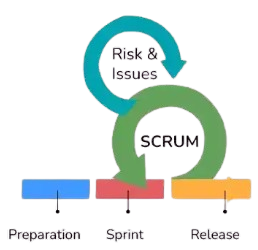
Scrum Is An Agile Framework Used To Manage Complex Software Development Work Through Short Iterative Cycles. Common Scrum Roles Include Product Owner, Scrum Master, And Development Team Members. Scrum Activities Include Sprint Planning, Daily Scrum, Sprint Review, And Sprint Retrospective. Product Backlog Items Are Prioritized And Selected For Development During Sprints. Testers Work As Part Of The Cross-Functional Team And Contribute To Quality Throughout The Sprint. Scrum Promotes Collaboration, Transparency, Frequent Feedback, And Continuous Improvement.
78. What Is The Difference Between Agile And Waterfall Testing?
Ans:
Waterfall Testing Usually Follows A Sequential Development Process In Which Testing Primarily Begins After Development Is Completed. Agile Testing Is Continuous And Happens Alongside Iterative Development During Short Sprints. Waterfall Generally Places Greater Emphasis On Detailed Upfront Requirements And Documentation. Agile Allows Requirements And Priorities To Evolve Based On Feedback And Business Needs. Automation And Continuous Regression Testing Are Particularly Important In Agile Environments. The Appropriate Approach Depends On Project Requirements, Risk, Team Structure, And Organizational Practices.
79. What Is API Status Code?
Ans:
- An API Status Code Is A Numeric HTTP Response Code That Indicates The Result Of An API Request. Codes In The 2xx Range Generally Indicate Successful Requests, Such As 200 For A Successful Response And 201 For Successful Resource Creation.
- Codes In The 4xx Range Usually Indicate Client-Side Problems, Such As 400 For Bad Requests And 401 For Unauthorized Requests.
- Codes In The 5xx Range Generally Indicate Server-Side Errors. Testers Validate Status Codes Along With Response Data, Headers, And Error Messages. Correct Status Codes Help Consumers Understand The Result Of API Requests.
80. What Is SQL Injection Testing?
Ans:
SQL Injection Testing Checks Whether User-Supplied Input Can Manipulate SQL Queries In An Unauthorized Way. It Is A Security Testing Technique Used To Identify Improper Input Validation And Unsafe Database Query Construction. Testers May Use Controlled Security Test Inputs In An Authorized Test Environment To Determine Whether The Application Properly Handles Them. Secure Applications Should Use Parameterized Queries, Prepared Statements, And Appropriate Input Validation. Error Messages Should Not Expose Sensitive Database Information. SQL Injection Testing Helps Protect Applications And Databases From Unauthorized Data Access Or Manipulation.
81. What Is Database Testing?
Ans:
Database Testing Verifies The Accuracy, Integrity, Consistency, And Reliability Of Data Stored In A Database. Testers Validate Tables, Columns, Constraints, Relationships, Stored Procedures, Triggers, And Data Operations. SQL Queries Can Be Used To Compare Application Results With Database Records. Database Testing Can Identify Issues Such As Missing Data, Duplicate Records, Incorrect Relationships, And Data Type Problems. It Is Especially Important For Applications Where Accurate Data Processing Is Critical. Proper Database Testing Helps Ensure That Frontend Operations Correctly Interact With Backend Data.
82. What Is The Difference Between Primary Key And Foreign Key?
Ans:
- A Primary Key Uniquely Identifies Each Record In A Database Table And Normally Cannot Contain Duplicate Or Null Values. A Foreign Key Is A Column Or Set Of Columns Used To Establish A Relationship With A Primary Key Or Candidate Key In Another Table.
- Primary Keys Maintain Entity Uniqueness, While Foreign Keys Help Maintain Relationships Between Tables. A Table Generally Has One Primary Key Constraint, Although It Can Contain Multiple Columns
- As A Composite Key. A Table Can Have Multiple Foreign Keys Depending On Its Relationships. These Keys Are Important For Maintaining Database Integrity And Consistent Data Relationships.
83. What Is Test Automation Maintenance?
Ans:
Test Automation Maintenance Is The Process Of Updating Automated Test Scripts When The Application, Requirements, Data, Or Testing Environment Changes. UI Changes Can Require Updates To Locators, Page Objects, And Test Steps. Test Data, APIs, Browser Versions, Dependencies, And Framework Components May Also Need Maintenance. Poorly Maintained Automation Can Produce Frequent False Failures And Reduce Trust In Test Results. Reusable Functions, Page Object Model, Stable Locators, And Good Coding Practices Can Reduce Maintenance Effort. Regular Review Of The Automation Suite Helps Remove Obsolete Tests And Improve Long-Term Reliability.
84. What Is A Flaky Test?
Ans:
UA Flaky Test Is A Test That Produces Different Results Without Any Relevant Change To The Application Or Test Code. It May Pass During One Execution And Fail During Another Under Similar Conditions. Common Causes Include Timing Problems, Unstable Test Data, Network Issues, Environment Instability, Dependencies Between Tests, And Poor Synchronization. Flaky Tests Can Reduce Confidence In Automation Results And Waste Investigation Time. Proper Explicit Waits, Isolated Test Data, Stable Environments, And Independent Test Design Can Reduce Flakiness.
85. What Is Test Coverage?
Ans:
- Test Coverage Measures How Much Of The Application, Requirements, Code, Or Test Scenarios Are Covered By Testing Activities. Requirement Coverage Checks Whether Business Requirements Have Corresponding Test Cases.
- Code Coverage Measures Areas Such As Statements, Branches, Conditions, Or Paths Executed By Tests. High Coverage Does Not Automatically Guarantee High Software Quality because Tests May Not Validate The Right Behaviors.
- Coverage Metrics Should Therefore Be Combined With Risk Analysis And Defect Information. The Goal Is Meaningful Coverage Of Important Functionality And Risks Rather Than Simply Maximizing A Percentage.
86. What Is Code Coverage?
Ans:
Code Coverage Measures The Portion Of Application Code Executed During Automated Tests. Common Measures Include Statement Coverage, Branch Coverage, Function Coverage, And Condition Coverage. A Higher Coverage Percentage Indicates That More Code Has Been Executed, But It Does Not Guarantee That The Code Has Been Tested Correctly. For Example, A Test May Execute A Statement Without Validating Its Actual Output. Code Coverage Tools Can Help Identify Areas That Have No Automated test coverage. It Is Best Used As A Supporting Quality Metric Along With Functional Coverage And Risk-Based Testing.
87. What Is Defect Leakage?
Ans:
Defect Leakage Occurs When A Defect Is Missed During Testing And Is Discovered Later In A Higher Environment Or By Customers. It Can Indicate Gaps In Requirements, Test Coverage, Test Data, Environment Configuration, Or Testing Techniques. Defect Leakage Metrics Can Help Teams Analyze The Effectiveness Of Their Testing Process. Root Cause Analysis Can Determine Why The Defect Was Not Identified Earlier. Additional Test Cases, Automation, Reviews, Or Process Improvements May Be Introduced To Prevent Similar Defects. Reducing Defect Leakage Improves Product Quality And Customer Satisfaction.
88. What Is Root Cause Analysis In Software Testing?
Ans:
Root Cause Analysis Is The Process Of Identifying The Fundamental Reason Behind A Defect Or Failure Rather Than Only Fixing Its Immediate Symptom. Testers And Developers May Analyze Requirements, Design, Code, Data, Configuration, And Process History To Find The Cause. Techniques Such As The Five Whys And Fishbone Analysis Can Help Structure The Investigation. Understanding Root Causes Helps Prevent Similar Defects From Reappearing. It Can Also Lead To Improvements In Development, Testing, Requirements, And Review Processes. Root Cause Analysis Is Especially Valuable For Repeated Or High-Impact Defects.
89. How Does Prioritize Test Cases?
Ans:
- Test Cases Can Be Prioritized Based On Business Impact, Risk, Customer Usage, Failure Probability, Complexity, And Criticality. Critical Business Functions Such As Login, Payment, Security, And Order Processing Often Receive Higher Priority.
- Smoke And High-Risk Tests Can Be Executed Early To Identify Major Problems Quickly. Frequently Used Features May Also Receive Higher Regression Priority. Automation Can Be Focused On Stable, Repetitive, And High-Value Test Cases.
- Risk-Based Prioritization Helps Teams Achieve Maximum Quality Coverage When Time And Resources Are Limited.
90. How Does Handle A Production Defect?
Ans:
A Production Defect Should First Be Reproduced And Assessed For Its Business And Technical Impact. Relevant Information Such As Error Messages, Logs, Environment Details, User Steps, Screenshots, And Transaction Data Should Be Collected. The Defect Should Be Classified According To Severity And Priority And Communicated To The Appropriate Development And Support Teams. A Fix Should Be Verified In A Controlled Environment Before Production Deployment. Regression Testing Should Also Be Performed To Ensure That The Fix Has Not Introduced New Problems. After Resolution, Root Cause Analysis And Preventive Actions Can Help Reduce The Chance Of Similar Production Defects In The Future.