LMS
LMS
Last updated on 23rd Jul 2026| 7597

Microsoft QA Interviews Are Designed To Evaluate Technical Knowledge, Analytical Thinking, Problem-Solving Skills, And The Ability To Ensure High Software Quality. Candidates Can Expect Questions On Manual Testing, Automation Testing, Selenium, API Testing, SQL, Agile Methodology, Azure DevOps, Programming Basics, And Real-World Testing Scenarios. Interviewers Also Assess Communication Skills, Attention To Detail, And The Ability To Work Effectively In Cross-Functional Teams. Preparing Core Testing Concepts, Practicing Coding And SQL Problems, Understanding Automation Frameworks, And Reviewing Behavioral Questions Can Significantly Improve Interview Performance. Consistent Practice With Mock Interviews And Hands-On Experience Using Modern QA Tools Will Build Confidence And Increase The Chances Of Successfully Cracking A Microsoft QA Interview.
1. What Is Software Testing?
Ans:
Software Testing Is The Process Of Verifying And Validating That A Software Application Works According To The Specified Requirements. It Helps Identify Defects Before The Product Is Released To Users. Testing Improves Software Quality, Reliability, Performance, And Security. Different Testing Techniques Ensure Every Feature Functions Correctly Under Various Conditions. Effective Testing Reduces Maintenance Costs And Enhances Customer Satisfaction. Microsoft QA Engineers Focus On Delivering Stable And High-Quality Software Through Comprehensive Testing.
2. What Is The Software Testing Life Cycle (STLC)?
Ans:
The Software Testing Life Cycle Is A Structured Process Followed During Software Testing. It Includes Requirement Analysis, Test Planning, Test Case Development, Environment Setup, Test Execution, Defect Reporting, And Test Closure. Each Phase Has Specific Deliverables And Objectives. STLC Ensures Testing Activities Are Organized And Efficient. Following STLC Helps Detect Defects Early And Improves Product Quality. Microsoft QA Teams Use STLC To Maintain Consistent Testing Standards Across Projects.
3. What Is Test Coverage?
Ans:
- Test Coverage Measures The Extent To Which Software Requirements, Features, Or Code Have Been Tested. High Test Coverage Reduces The Probability Of Undetected Defects.
- Coverage Can Be Measured Based On Requirements, Test Cases, Code Branches, Or Statements. Achieving One Hundred Percent Coverage Does Not Guarantee Bug-Free Software.
- Effective Test Coverage Focuses On Critical Business Functions And Risk Areas. Microsoft QA Engineers Continuously Monitor Test Coverage To Improve Software Quality And Reliability.
4. What Is The Difference Between SDLC And STLC?
Ans:
Software Development Life Cycle Focuses On Building Software From Requirement Gathering To Maintenance. Software Testing Life Cycle Focuses Only On Testing Activities Throughout Development. SDLC Includes Design, Coding, Deployment, And Maintenance. STLC Includes Test Planning, Test Design, Execution, And Reporting. Testing Is Performed During Different SDLC Phases To Ensure Quality. Microsoft QA Engineers Collaborate With Developers Throughout Both Processes To Deliver Reliable Applications.
5. What Are The Different Levels Of Software Testing?
Ans:
Software Testing Is Performed At Four Main Levels: Unit Testing, Integration Testing, System Testing, And Acceptance Testing. Unit Testing Verifies Individual Components. Integration Testing Ensures Modules Work Correctly Together. System Testing Validates The Complete Application Against Requirements. Acceptance Testing Confirms The Software Meets Customer Expectations Before Release. Microsoft QA Teams Perform These Levels Sequentially To Ensure Complete Product Validation.
6. What Is Functional Testing?
Ans:
Functional Testing Verifies That Every Feature Of An Application Works According To Business Requirements. It Focuses On Inputs, Outputs, User Actions, And Expected Results. Test Cases Are Created Based On Functional Specifications. Functional Testing Does Not Examine Internal Code Structure. It Ensures Users Can Successfully Perform Intended Operations. Microsoft QA Engineers Perform Functional Testing Before Every Major Release To Maintain Product Quality
7. What Is Non-Functional Testing?
Ans:
- Non-Functional Testing Evaluates Software Attributes Such As Performance, Security, Reliability, Scalability, And Usability. It Ensures The Application Performs Well Under Different Conditions.
- Load Testing Measures Performance During Heavy Traffic. Security Testing Identifies Vulnerabilities. Usability Testing Evaluates User Experience.
- Microsoft QA Teams Perform Non-Functional Testing To Deliver Fast, Secure, And Stable Applications That Meet Customer Expectations.
8. What Is Black Box Testing?
Ans:
Black Box Testing Is A Technique Where Testing Is Performed Without Knowledge Of The Internal Code Structure. Test Cases Are Designed Based On Functional Requirements. The Focus Is On Inputs, Outputs, And User Behavior. This Method Simulates Real User Interactions. It Helps Identify Functional Defects Efficiently. Microsoft QA Engineers Frequently Use Black Box Testing During System And Acceptance Testing Phases.
9. What Is White Box Testing?
Ans:
White Box Testing Examines The Internal Structure, Logic, And Code Of An Application. Testers Understand Source Code, Control Flow, And Program Logic. This Technique Verifies Loops, Conditions, Statements, And Branches. White Box Testing Improves Code Coverage And Detects Hidden Errors. Developers Usually Perform This Testing During Unit Testing. Microsoft Teams Combine White Box And Black Box Testing To Achieve Better Software Quality.
10. What Is Gray Box Testing?
Ans:
Gray Box Testing Combines Elements Of Black Box And White Box Testing. Testers Have Partial Knowledge Of Internal System Design While Performing Functional Testing. This Approach Helps Design More Effective Test Cases. It Improves Defect Detection In Integrated Systems. Gray Box Testing Is Useful For Database And Interface Testing. Microsoft QA Professionals Use It For Complex Enterprise Applications.
11. What Is Smoke Testing?
Ans:
Smoke Testing Is A Preliminary Test Performed To Verify That The Basic Features Of An Application Work Correctly. It Determines Whether The Build Is Stable Enough For Detailed Testing. Only Critical Functionalities Are Verified During Smoke Testing. It Saves Time By Preventing Testing On Unstable Builds. Smoke Testing Is Usually Automated In Continuous Integration Pipelines. Microsoft QA Teams Perform Smoke Testing After Every New Build.
12. What Is Sanity Testing?
Ans:
Sanity Testing Is Performed After Minor Changes Or Bug Fixes To Verify That Specific Functionalities Work Correctly. It Is Narrow And Focused Compared To Smoke Testing. The Objective Is To Confirm That The Recent Changes Have Not Introduced New Issues. It Prevents Unnecessary Full Regression Testing. Sanity Testing Saves Testing Time And Resources. Microsoft QA Engineers Frequently Perform Sanity Testing During Maintenance Releases.
13. What Is Regression Testing?
Ans:
- Regression Testing Ensures That Existing Features Continue To Work Correctly After Code Changes Or Enhancements. Previously Executed Test Cases Are Repeated To Detect Unexpected Side Effects.
- Regression Testing Is Essential During Frequent Software Updates. Automation Tools Help Execute Large Regression Suites Efficiently.
- It Reduces The Risk Of Introducing New Defects. Microsoft QA Teams Perform Regression Testing Before Every Production Release.
14. What Is Retesting?
Ans:
Retesting Is The Process Of Verifying That A Previously Reported Defect Has Been Fixed Successfully. Testers Execute The Same Test Cases That Initially Identified The Defect. The Focus Is Only On The Specific Bug Fix. Retesting Confirms That The Problem No Longer Exists. It Is Different From Regression Testing, Which Checks Overall Application Stability. Microsoft QA Engineers Perform Retesting After Developers Resolve Reported Issues.
15. What Is A Test Case?
Ans:
A Test Case Is A Document That Defines Preconditions, Test Steps, Input Data, Expected Results, And Actual Results For Verifying A Software Feature. Well-Written Test Cases Improve Testing Accuracy And Repeatability. They Ensure Consistent Validation Across Multiple Test Cycles. Good Test Cases Cover Positive And Negative Scenarios. Microsoft QA Teams Maintain Detailed Test Cases For Better Traceability And Quality Assurance.
16. What Is A Test Scenario?
Ans:
A Test Scenario Represents A High-Level Description Of What Needs To Be Tested In An Application. It Covers End-To-End Business Functionalities Without Detailed Test Steps. Test Scenarios Help Identify Important Testing Areas. Multiple Test Cases Can Be Derived From A Single Scenario. They Improve Test Planning And Requirement Coverage. Microsoft QA Engineers Create Test Scenarios Before Preparing Detailed Test Cases.
17. What Is Boundary Value Analysis?
Ans:
Boundary Value Analysis Is A Test Design Technique Used To Validate Input Values At Their Minimum, Maximum, And Adjacent Limits. Defects Commonly Occur At Boundary Conditions Rather Than Middle Values. Test Cases Include Valid And Invalid Boundary Inputs. This Technique Improves Test Effectiveness With Fewer Test Cases. It Is Widely Used For Numeric Fields. Microsoft QA Engineers Frequently Apply Boundary Value Analysis During Functional Testing.
18. What Is Equivalence Partitioning?
Ans:
Equivalence Partitioning Divides Input Data Into Valid And Invalid Groups Called Partitions. One Representative Value From Each Partition Is Selected For Testing. This Reduces The Number Of Test Cases Without Losing Coverage. It Saves Time While Maintaining Testing Effectiveness. The Technique Is Commonly Used For Input Validation. Microsoft QA Teams Use Equivalence Partitioning To Optimize Test Design.
19. What Is Error Guessing?
Ans:
- Error Guessing Is An Experience-Based Testing Technique Where Testers Predict Areas That Are More Likely To Contain Defects. It Relies On Knowledge Of Previous Defects, Application Behavior, And Common Programming Mistakes.
- No Formal Rules Exist For This Technique. Experienced Testers Can Identify Hidden Issues Efficiently. Error Guessing Complements Structured Testing Methods.
- Microsoft QA Engineers Combine Experience With Analytical Testing To Improve Defect Detection.
20. What Is A Defect Life Cycle?
Ans:
A Defect Life Cycle Describes The Various Stages A Software Bug Passes Through From Identification To Closure. Common Stages Include New, Assigned, Open, Fixed, Retest, Verified, Closed, And Reopened. Proper Defect Tracking Improves Communication Between Developers And Testers. Every Defect Includes Severity, Priority, And Supporting Evidence. Efficient Defect Management Helps Deliver High-Quality Software. Microsoft QA Teams Use Structured Defect Life Cycles To Ensure Every Reported Issue Is Properly Resolved.

21. What Is The Difference Between Severity And Priority?
Ans:
| Feature | Severity | Priority |
|---|---|---|
| Definition | Severity Indicates How Serious A Defect Is And How Much It Affects The Functionality Of The Application | Priority Indicates How Quickly A Defect Should Be Fixed Based On Business Needs. |
| Determined By | Severity Is Usually Assigned By The QA Engineer Or Tester. | Priority Is Usually Assigned By The Project Manager, Product Owner, Or Business Team. |
| Example | An Application Crash During Login Is A High Severity Defect | A Typo On The Home Page Before A Product Launch Can Be A High Priority Defect Even Though Its Severity Is Low. |
22. What Is A Bug Report?
Ans:
A Bug Report Is A Document That Records A Software Defect Found During Testing. It Includes The Bug Title, Description, Steps To Reproduce, Expected Result, Actual Result, Severity, Priority, Environment, And Supporting Screenshots. A Clear Bug Report Helps Developers Understand The Issue Quickly. It Improves Communication Between Testing And Development Teams. Proper Documentation Speeds Up Defect Resolution. Microsoft QA Engineers Write Detailed And Accurate Bug Reports.
23. What Is Defect Leakage?
Ans:
- Defect Leakage Occurs When A Software Defect Is Missed During Testing And Is Discovered By End Users After Release. It Indicates Gaps In The Testing Process Or Test Coverage.
- Defect Leakage Can Impact Customer Satisfaction And Business Reputation. Improving Test Cases And Regression Testing Helps Reduce Leakage.
- Root Cause Analysis Identifies Why The Defect Was Missed. Microsoft QA Teams Continuously Improve Testing Processes To Minimize Defect Leakage.
24. What Is Defect Removal Efficiency (DRE)?
Ans:
Defect Removal Efficiency Is A Metric That Measures How Effectively Defects Are Identified Before Software Release. It Is Calculated By Comparing Defects Found Before Release With Total Defects Found Before And After Release. A Higher DRE Indicates Better Testing Quality. This Metric Helps Evaluate QA Process Effectiveness. Organizations Use DRE To Improve Testing Strategies. Microsoft QA Teams Monitor DRE To Maintain High Software Quality Standards.
25. What Is Exploratory Testing?
Ans:
Exploratory Testing Is An Unscripted Testing Approach Where Test Design And Test Execution Occur Simultaneously. Testers Explore The Application Based On Experience And Curiosity. It Helps Discover Hidden Defects That Structured Test Cases May Miss. Exploratory Testing Is Useful For New Features And Complex Applications. It Requires Strong Analytical And Observation Skills. Microsoft QA Engineers Frequently Perform Exploratory Testing Alongside Formal Testing..
26. What Is User Acceptance Testing (UAT)?
Ans:
User Acceptance Testing Is The Final Phase Of Testing Before Software Is Released To Production. Business Users Validate That The Application Meets Their Requirements And Expectations. UAT Confirms The Product Is Ready For Real-World Usage. It Focuses On Business Workflows Rather Than Technical Details. Successful UAT Indicates Customer Approval. Microsoft QA Teams Support Business Users During User Acceptance Testing Activities.
27. What Is Automation Testing?
Ans:
Automation Testing Uses Software Tools To Execute Test Cases Automatically Without Manual Intervention. It Improves Testing Speed, Accuracy, And Repeatability. Automation Is Ideal For Regression, Smoke, And Repetitive Test Cases. Common Automation Tools Include Selenium, Playwright, And Cypress. Automated Tests Can Be Integrated Into CI/CD Pipelines. Microsoft QA Engineers Use Automation To Improve Software Quality And Reduce Release Time.
28. What Is Selenium WebDriver?
- Selenium WebDriver Is An Open-Source Automation Tool Used To Test Web Applications Across Different Browsers. It Supports Programming Languages Such As Java, Python, And C#.
- WebDriver Interacts Directly With Browser Elements Through Automation Scripts. It Supports Cross-Browser Testing Efficiently.
- Selenium Integrates With TestNG, Maven, And Jenkins. Microsoft QA Engineers Frequently Use Selenium For Web Application Automation.
29. What Is The Page Object Model (POM)?
Ans:
Page Object Model Is A Design Pattern Used In Selenium Automation Frameworks. Each Web Page Is Represented As A Separate Class Containing Web Elements And Methods. This Improves Code Reusability And Maintainability. Changes To The User Interface Require Updates Only In Page Classes. POM Reduces Code Duplication And Simplifies Automation Scripts. Microsoft QA Teams Prefer POM For Large Automation Projects.
30. What Is A Data-Driven Framework?
Ans:
A Data-Driven Framework Separates Test Data From Automation Scripts. Test Data Is Stored In External Files Such As Excel, CSV, XML, Or Databases. The Same Test Script Executes Multiple Test Scenarios Using Different Input Values. This Approach Improves Reusability And Reduces Maintenance. It Is Suitable For Applications With Large Data Sets. Microsoft QA Engineers Commonly Use Data-Driven Frameworks In Automation Projects.
31. What Is A Keyword-Driven Framework?
Ans:
A Keyword-Driven Framework Executes Test Cases Based On Predefined Keywords Stored In External Files. Keywords Represent User Actions Such As Click, Login, Enter Text, And Verify. Testers Can Create Automation Without Extensive Programming Knowledge. The Framework Improves Reusability And Flexibility. It Separates Test Logic From Test Data. Microsoft QA Teams Use Keyword-Driven Frameworks For Large Enterprise Applications.
32. What Is A Hybrid Framework?
Ans:
A Hybrid Framework Combines Features Of Data-Driven, Keyword-Driven, And Modular Frameworks. It Provides Greater Flexibility, Scalability, And Reusability. Test Data, Test Logic, And Page Objects Are Organized Efficiently. Hybrid Frameworks Reduce Script Maintenance And Improve Execution Speed. They Are Suitable For Complex Automation Projects. Microsoft QA Engineers Frequently Build Hybrid Frameworks For Enterprise-Level Testing.
33. What Is TestNG?
Ans:
TestNG Is A Popular Java Testing Framework Used With Selenium Automation. It Supports Annotations, Test Prioritization, Parallel Execution, Grouping, And Reporting. TestNG Simplifies Test Management And Improves Execution Efficiency. It Generates Detailed Test Reports Automatically. Integration With Maven And Jenkins Supports Continuous Testing. Microsoft QA Teams Use TestNG To Organize And Execute Automation Test Suites.
34. What Is Maven?
Ans:
- Maven Is A Build Automation And Dependency Management Tool Used In Java Projects. It Downloads Required Libraries Automatically Through The POM.xml File.
- Maven Simplifies Project Compilation, Testing, Packaging, And Deployment. It Integrates Easily With Selenium, TestNG, And Jenkins.
- Maven Ensures Consistent Project Structure Across Teams. Microsoft QA Engineers Use Maven To Manage Automation Project Dependencies Efficiently.
35. What Is Jenkins?
Ans:
Jenkins Is An Open-Source Continuous Integration And Continuous Delivery Tool. It Automatically Builds, Tests, And Deploys Applications After Code Changes. Jenkins Integrates With Git, Selenium, Maven, And TestNG. Automated Testing Helps Detect Defects Early In Development. Jenkins Supports Scheduled And Trigger-Based Test Execution. Microsoft QA Teams Use Jenkins To Maintain Continuous Quality Throughout The Development Process.
36. What Is Continuous Integration (CI)?
Ans:
Continuous Integration Is A Development Practice Where Code Changes Are Frequently Merged Into A Shared Repository. Every Code Commit Triggers Automated Builds And Testing. CI Detects Integration Issues Early And Improves Code Quality. It Reduces Manual Errors And Speeds Up Development Cycles. Jenkins, Azure DevOps, And GitHub Actions Support CI. Microsoft QA Engineers Participate In CI By Maintaining Reliable Automated Test Suites.
37. What Is Continuous Delivery (CD)?
Ans:
Continuous Delivery Is A Practice That Ensures Software Is Always Ready For Deployment. Automated Testing, Build Validation, And Release Processes Improve Delivery Speed. Every Successful Build Can Be Released With Minimal Manual Effort. CD Reduces Deployment Risks And Improves Release Reliability. Automation Plays A Key Role In Continuous Delivery. Microsoft QA Teams Validate Every Release Before Production Deployment..
38. What Is Continuous Testing?
Ans:
Continuous Testing Is The Process Of Executing Automated Tests Throughout The Software Development Pipeline. It Provides Immediate Feedback On Product Quality. Functional, Regression, Performance, And API Tests Are Integrated Into CI/CD Pipelines. Continuous Testing Detects Defects Early And Reduces Release Risks. Automation Improves Testing Speed And Consistency. Microsoft QA Engineers Use Continuous Testing To Support Agile Development.
39. What Is Cross-Browser Testing?
Ans:
Cross-Browser Testing Verifies That A Web Application Functions Correctly Across Different Browsers Such As Chrome, Edge, Firefox, And Safari. It Ensures Consistent User Experience Regardless Of Browser Choice. Differences In Rendering And Browser Engines Can Cause Compatibility Issues. Automated Tools Simplify Cross-Browser Validation. Comprehensive Browser Testing Improves Product Reliability. Microsoft QA Teams Perform Cross-Browser Testing Before Product Release.
40. What Is Compatibility Testing?
Ans:
- Compatibility Testing Ensures That Software Works Correctly Across Different Operating Systems, Devices, Browsers, Screen Resolutions, And Network Conditions.
- It Verifies That Users Receive A Consistent Experience Across Various Environments. Compatibility Testing Helps Identify Platform-Specific Defects Early. It Is Essential For Modern Web And Mobile Applications.
- Proper Compatibility Testing Improves Customer Satisfaction And Product Stability. Microsoft QA Engineers Perform Compatibility Testing As Part Of Comprehensive Quality Assurance.
41. What Is API Testing?
Ans:
API Testing Verifies That Application Programming Interfaces Function Correctly And Meet Business Requirements. It Focuses On Request Validation, Response Accuracy, Data Integrity, And Error Handling Without Testing The User Interface. API Testing Is Faster Than UI Testing And Helps Detect Issues Early In Development. Common Tools Include Postman, REST Assured, And Swagger. It Improves Integration Reliability And Application Performance. Microsoft QA Engineers Perform API Testing To Ensure Seamless Communication Between Different Software Components.

Learn Advanced Software Testing Certification Training Course to Build Your Skills
Weekday / Weekend BatchesSee Batch Details42. What Is REST API?
Ans:
REST API Is An Architectural Style Used To Build Web Services That Communicate Over HTTP. It Uses Standard Methods Such As GET, POST, PUT, PATCH, And DELETE To Perform Operations. REST APIs Exchange Data Primarily In JSON Format. They Are Lightweight, Scalable, And Easy To Integrate With Different Applications. REST APIs Follow Stateless Communication Principles. Microsoft QA Teams Frequently Test REST APIs To Validate Backend Services.
43. What Are HTTP Methods?
Ans:
HTTP Methods Define The Type Of Operation Performed On A Resource In A Web Application. GET Retrieves Data Without Changing Server Content. POST Creates New Resources Or Sends Data To The Server. PUT Updates Existing Resources Completely, While PATCH Updates Selected Fields. DELETE Removes Existing Resources From The Server. Microsoft QA Engineers Verify That Each HTTP Method Produces The Expected Results During API Testing.
44. What Are HTTP Status Codes?
Ans:
HTTP Status Codes Indicate The Result Of A Client Request Sent To A Server. Codes In The 200 Series Represent Successful Requests, Such As 200 OK And 201 Created. The 400 Series Indicates Client Errors Like 400 Bad Request And 404 Not Found. The 500 Series Represents Server Errors Such As 500 Internal Server Error. Understanding Status Codes Helps Identify API Issues Quickly. Microsoft QA Teams Validate Status Codes During Every API Test.
45. What Is JSON?
Ans:
- JSON Stands For JavaScript Object Notation And Is A Lightweight Data Exchange Format. It Stores Data Using Key-Value Pairs And Supports Nested Objects And Arrays.
- JSON Is Easy For Humans To Read And Machines To Process. Most Modern REST APIs Exchange Data Using JSON.
- Testers Verify JSON Structure, Data Types, And Field Values During API Testing. Microsoft QA Engineers Frequently Validate JSON Responses To Ensure Accurate Data Exchange.
46. What Is Postman?
Ans:
Postman Is A Popular API Testing Tool Used To Send HTTP Requests And Validate API Responses. It Supports GET, POST, PUT, PATCH, And DELETE Operations. Postman Allows Testers To Create Collections, Write Automated Tests, And Manage Environments. It Simplifies API Validation Without Writing Extensive Code. Reports Can Be Generated Using Newman For Automated Execution. Microsoft QA Teams Widely Use Postman During API Development And Testing.
47. What Is API Authentication?
Ans:
API Authentication Verifies The Identity Of A User Or Application Before Allowing Access To Protected Resources. Common Authentication Methods Include API Keys, Basic Authentication, OAuth 2.0, And Bearer Tokens. Authentication Protects Sensitive Data From Unauthorized Access. Testers Validate Both Successful And Failed Authentication Scenarios. Security Testing Ensures Authentication Mechanisms Work Correctly. Microsoft QA Engineers Verify Authentication During API Testing To Maintain Application Security.
48. What Is SQL?
Ans:
SQL Stands For Structured Query Language And Is Used To Store, Retrieve, Update, And Delete Data In Relational Databases. QA Engineers Use SQL To Verify Database Records After Application Transactions. SQL Helps Validate Backend Data Accuracy During Testing. Basic SQL Knowledge Is Essential For Database Testing. Common Commands Include SELECT, INSERT, UPDATE, And DELETE. Microsoft QA Teams Frequently Use SQL To Verify Data Consistency.
49. What Is The SELECT Statement In SQL?
Ans:
The SELECT Statement Retrieves Data From One Or More Database Tables. It Allows Testers To View Specific Columns Or Entire Records Based On Conditions. The WHERE Clause Filters Data According To Specified Criteria. ORDER BY Sorts Results, While LIMIT Restricts The Number Of Returned Rows. SELECT Is The Most Frequently Used SQL Command During Testing. Microsoft QA Engineers Use SELECT Queries To Validate Database Updates.
50. What Is The Difference Between INNER JOIN And LEFT JOIN?
Ans:
INNER JOIN Returns Only The Matching Records Present In Both Tables. LEFT JOIN Returns All Records From The Left Table And Matching Records From The Right Table, Returning NULL For Non-Matching Values. JOIN Operations Help Retrieve Related Information Across Multiple Tables. Understanding JOINs Is Important For Database Validation. Proper SQL Queries Ensure Accurate Backend Verification. Microsoft QA Teams Regularly Use JOIN Queries During Database Testing.
51. What Is Agile Methodology?
Ans:
- Agile Methodology Is A Software Development Approach That Delivers Small, Incremental Improvements Through Short Development Cycles Called Sprints.
- It Encourages Collaboration Between Developers, Testers, And Business Stakeholders. Agile Supports Continuous Feedback And Frequent Software Releases. QA Activities Begin Early In The Development Process.
- Agile Improves Product Quality And Customer Satisfaction. Microsoft Teams Commonly Follow Agile Practices For Software Development.
52. What Is Scrum?
Ans:
Scrum Is A Popular Agile Framework Used To Manage Software Development Projects. Work Is Divided Into Short Iterations Called Sprints, Usually Lasting Two To Four Weeks. Scrum Includes Roles Such As Product Owner, Scrum Master, And Development Team. Daily Stand-Up Meetings Help Track Progress And Resolve Issues. Scrum Encourages Continuous Improvement Through Sprint Reviews And Retrospectives. Microsoft QA Engineers Actively Participate In Scrum Ceremonies.
53. What Is A Sprint?
Ans:
A Sprint Is A Fixed Time Period During Which A Scrum Team Completes A Set Of Planned Work Items. Sprint Goals Are Defined During Sprint Planning Meetings. Developers Build Features While QA Engineers Prepare And Execute Test Cases. Completed Work Is Demonstrated During Sprint Review Meetings. Sprint Retrospectives Identify Areas For Improvement. Microsoft Teams Use Sprints To Deliver High-Quality Features Incrementally.
54. What Is A User Story?
Ans:
A User Story Is A Short Description Of A Software Feature Written From The End User’s Perspective. It Typically Follows The Format: “As A User, I Want To Perform An Action So That I Can Achieve A Goal.” User Stories Help Developers And Testers Understand Business Requirements Clearly. Acceptance Criteria Define Expected Outcomes. QA Engineers Create Test Cases Based On User Stories. Microsoft Teams Use User Stories In Agile Development.
55. What Are Acceptance Criteria?
Ans:
Acceptance Criteria Define The Conditions That A Feature Must Meet Before It Is Considered Complete. They Clarify Functional Requirements And Expected Behavior. Acceptance Criteria Help Developers Build Correct Features And Testers Create Accurate Test Cases. Clear Criteria Reduce Misunderstandings And Rework. They Are Reviewed During Sprint Planning And User Acceptance Testing. Microsoft QA Teams Validate Every Feature Against Acceptance Criteria Before Release.
56. What Is Azure DevOps?
Ans:
Azure DevOps Is Microsoft’s Cloud-Based Platform For Planning, Developing, Testing, And Deploying Software Applications. It Includes Services Such As Azure Boards, Repositories, Pipelines, Test Plans, And Artifacts. Azure DevOps Supports Continuous Integration And Continuous Delivery. QA Engineers Manage Test Cases And Execute Automated Tests Through The Platform. It Improves Team Collaboration And Release Efficiency. Microsoft Strongly Encourages Knowledge Of Azure DevOps For QA Roles.
57. What Is Git?
Ans:
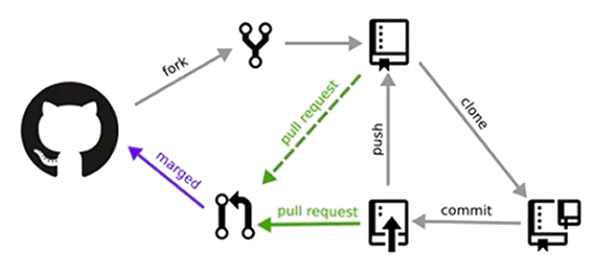
- Git Is A Distributed Version Control System Used To Track Changes In Source Code. It Allows Multiple Developers To Work On The Same Project Simultaneously Without Overwriting Each Other’s Work.
- Git Supports Branching, Merging, And Version History. QA Engineers Use Git To Manage Automation Scripts And Collaborate With Development Teams.
- Popular Git Platforms Include GitHub And Azure Repositories. Microsoft QA Teams Regularly Work With Git During Development.
58. What Is Version Control?
Ans:
Version Control Is The Process Of Tracking And Managing Changes Made To Source Code Or Project Files Over Time. It Enables Teams To Restore Previous Versions And Resolve Code Conflicts Efficiently. Version Control Supports Collaborative Software Development. Git Is One Of The Most Popular Version Control Systems. Proper Version Management Improves Software Stability. Microsoft QA Engineers Use Version Control For Automation Framework Maintenance
59. What Is A Test Plan?
Ans:
A Test Plan Is A Formal Document That Describes The Overall Testing Strategy For A Software Project. It Includes Objectives, Scope, Resources, Schedule, Test Environment, Risks, Entry Criteria, Exit Criteria, And Deliverables. A Well-Prepared Test Plan Ensures Organized Testing Activities. It Helps Allocate Resources Efficiently And Track Progress. Test Plans Improve Communication Among Team Members. Microsoft QA Teams Create Detailed Test Plans Before Starting Major Testing Phases.
60. What Is The Difference Between Verification And Validation
Ans:
| Feature | Verification | Validation |
|---|---|---|
| Definition | Verification Ensures The Software Is Built According To Design Documents And Specifications. | Validation Ensures The Software Meets User Requirements And Business Needs. . |
| Process | It Is A Static Process That Includes Reviews, Inspections, And Walkthroughs Without Executing The Code.. | It Is A Dynamic Process That Involves Executing The Software Through Various Testing Activities. |
| Objective | The Goal Is To Prevent Defects By Checking Whether The Product Is Built Correctly. | The Goal Is To Detect Defects By Confirming The Right Product Has Been Built. |
| Examples | Requirement Reviews, Design Reviews, Code Inspections, And Document Verification | Functional Testing, System Testing, Integration Testing, And User Acceptance Testing (UAT). |
61. What Is Performance Testing?
Ans:
Performance Testing Evaluates How Well A Software Application Performs Under Different Workloads And Conditions. It Measures Response Time, Throughput, Resource Utilization, And System Stability. The Goal Is To Ensure The Application Meets Performance Requirements Before Release. Performance Testing Helps Identify Bottlenecks That Affect User Experience. Common Tools Include Apache JMeter And LoadRunner. Microsoft QA Engineers Perform Performance Testing To Deliver Fast And Reliable Applications.

Get JOB Oriented Software Testing Training for Beginners By MNC Experts
- Instructor-led Sessions
- Real-life Case Studies
- Assignments
62. What Is Load Testing?
Ans:
Load Testing Determines How An Application Performs Under Expected User Traffic And Normal Operating Conditions. It Measures Response Time, Server Performance, And System Stability During Regular Usage. Load Testing Helps Verify That The Application Can Handle Anticipated Workloads Without Performance Degradation. It Is Performed Before Production Deployment. Results Help Optimize System Performance. Microsoft QA Teams Use Load Testing To Ensure Applications Perform Smoothly During Peak Usage
63. What Is Stress Testing?
Ans:
Stress Testing Evaluates How An Application Behaves When Subjected To Workloads Beyond Its Expected Capacity. The Objective Is To Identify The Breaking Point And Observe System Recovery After Failure. Stress Testing Helps Detect Memory Leaks, Performance Bottlenecks, And Resource Limitations. It Ensures The Application Fails Gracefully Under Extreme Conditions. This Testing Improves Overall System Reliability. Microsoft QA Engineers Perform Stress Testing For High-Traffic Applications.
64. What Is Spike Testing?
Ans:
- Spike Testing Measures How An Application Responds To Sudden And Significant Increases Or Decreases In User Traffic. It Simulates Unexpected Workload Changes That May Occur During Product Launches Or Promotional Events.
- The Test Verifies Whether The System Can Recover Quickly After Traffic Spikes. It Helps Identify Scalability Issues And Resource Constraints.
- Stable Performance During Spikes Improves User Satisfaction. Microsoft QA Teams Include Spike Testing In Performance Validation.
65. What Is Volume Testing?
Ans:
Volume Testing Evaluates Application Performance When Processing Large Amounts Of Data. It Determines Whether Databases, File Systems, And Data Processing Components Continue To Function Correctly Under Heavy Data Loads. Volume Testing Helps Identify Data Storage And Retrieval Issues. It Ensures The System Maintains Performance As Data Grows. This Testing Is Important For Enterprise Applications. Microsoft QA Engineers Perform Volume Testing To Validate Large-Scale Data Handling.
66. What Is Scalability Testing?.
Ans:
Scalability Testing Determines Whether An Application Can Handle Increasing Numbers Of Users, Transactions, Or Data Without Performance Loss. It Evaluates The System’s Ability To Scale Horizontally Or Vertically. Scalability Testing Helps Organizations Plan Future Infrastructure Growth. Performance Metrics Are Monitored During Incremental Load Increases. The Results Support Capacity Planning Decisions. Microsoft QA Teams Conduct Scalability Testing For Cloud-Based Applications..
67. What Is Security Testing?
Ans:
Security Testing Identifies Vulnerabilities That Could Allow Unauthorized Access, Data Loss, Or System Compromise. It Verifies Authentication, Authorization, Data Encryption, Session Management, And Input Validation. Security Testing Helps Protect Sensitive Information From Cyber Threats. It Includes Vulnerability Assessment And Penetration Testing. Secure Software Builds Customer Trust. Microsoft QA Engineers Follow Security Best Practices Throughout The Testing Process.
68. What Is Usability Testing?
Ans:
Usability Testing Evaluates How Easily End Users Can Learn And Use An Application. It Focuses On Navigation, Accessibility, User Interface Design, And Overall User Experience. Testers Observe Real Users Performing Common Tasks To Identify Usability Problems. Feedback Helps Improve Product Design And Customer Satisfaction. Usability Testing Ensures Applications Are Intuitive And Efficient. Microsoft QA Teams Consider User Experience An Important Quality Attribute.
69. What Is Accessibility Testing?
Ans:
Accessibility Testing Ensures That Software Can Be Used By People With Disabilities, Including Those With Visual, Hearing, Motor, Or Cognitive Impairments. It Verifies Compliance With Accessibility Standards Such As WCAG. Testing Includes Keyboard Navigation, Screen Reader Compatibility, And Color Contrast Validation. Accessible Applications Provide Equal Access To All Users. Accessibility Improves Product Inclusiveness. Microsoft Places Strong Emphasis On Accessibility Across Its Products.
70. What Is Mobile Testing?
Ans:
Mobile Testing Verifies That Mobile Applications Function Correctly Across Different Devices, Screen Sizes, Operating Systems, And Network Conditions. It Includes Functional, Performance, Security, And Usability Testing. Mobile Testing Ensures Consistent User Experience On Android And IOS Platforms. Device Compatibility Is Carefully Evaluated. Testing Covers Installation, Notifications, And Battery Usage. Microsoft QA Engineers Validate Mobile Applications Before Public Release.
71. What Is Browser Compatibility Testing?
Ans:
- Browser Compatibility Testing Verifies That A Web Application Displays And Functions Correctly Across Different Browsers And Browser Versions. It Identifies Layout, Styling, And JavaScript Compatibility Issues.
- Testing Includes Chrome, Microsoft Edge, Firefox, Safari, And Other Browsers. Consistent User Experience Across Browsers Is Essential.
- Automation Tools Simplify Browser Validation. Microsoft QA Teams Perform Browser Compatibility Testing Before Deployment.
72. What Is End-To-End Testing?
Ans:
End-To-End Testing Validates Complete Business Workflows From Start To Finish Across Integrated Systems. It Simulates Real User Scenarios Covering Multiple Modules And External Services. End-To-End Testing Ensures That Data Flows Correctly Throughout The Entire Application. It Identifies Integration Issues That Unit Testing May Miss. Successful End-To-End Testing Increases Confidence Before Production Release. Microsoft QA Engineers Include Comprehensive Workflow Validation In Testing.
73. What Is Integration Testing?
Ans:
Integration Testing Verifies That Individual Software Modules Work Correctly When Combined. It Focuses On Data Exchange, Communication, And Interface Validation Between Components. Integration Testing Detects Issues Related To APIs, Databases, And External Systems. It Is Performed After Unit Testing And Before System Testing. Proper Integration Ensures Reliable Application Functionality. Microsoft QA Teams Perform Integration Testing Throughout The Development Process.
74. What Is Unit Testing?
Ans:
Unit Testing Verifies Individual Functions, Methods, Or Components In Isolation Before Integration. Developers Usually Write Unit Tests Using Frameworks Such As JUnit, NUnit, Or MSTest. Unit Testing Helps Detect Coding Errors Early In Development. It Improves Code Quality And Simplifies Debugging. Well-Written Unit Tests Support Continuous Integration. Microsoft Encourages Strong Unit Test Coverage For Reliable Software Developmen
75. What Is Test Automation Framework?
Ans:
A Test Automation Framework Is A Structured Set Of Guidelines, Libraries, And Best Practices Used To Develop And Execute Automated Test Scripts. It Organizes Test Data, Configuration Files, Utilities, And Reporting Mechanisms Efficiently. Frameworks Improve Script Reusability And Maintainability. They Reduce Code Duplication And Simplify Test Execution. Popular Framework Types Include Data-Driven And Hybrid Frameworks. Microsoft QA Engineers Build Robust Automation Frameworks For Enterprise Applications.
76. What Is Object Repository In Selenium?
Ans:
An Object Repository Is A Centralized Location Where Web Element Locators Are Stored For Automation Testing. It Contains Identifiers Such As ID, Name, XPath, CSS Selector, And Class Name. Centralizing Locators Makes Maintenance Easier When User Interfaces Change. Object Repositories Improve Script Readability And Reusability. They Are Commonly Used With The Page Object Model. Microsoft QA Teams Use Object Repositories To Simplify Selenium Automation.
77. What Is XPath?
Ans:
XPath Is A Language Used To Locate Elements Within XML And HTML Documents. Selenium Uses XPath Expressions To Identify Web Elements That Cannot Be Located Easily Using ID Or Name Attributes. XPath Can Be Absolute Or Relative. Relative XPath Is Preferred Because It Is More Flexible And Easier To Maintain. Accurate XPath Improves Automation Reliability. Microsoft QA Engineers Frequently Use XPath During Selenium Testing..
78. What Is CSS Selector In Selenium?
Ans:
CSS Selector Is A Locator Strategy Used To Identify Web Elements Based On CSS Syntax. It Is Often Faster Than XPath And Easier To Read. CSS Selectors Can Locate Elements Using IDs, Classes, Attributes, And Hierarchical Relationships. Well-Designed Selectors Improve Automation Stability. CSS Selectors Are Widely Used In Modern Automation Frameworks. Microsoft QA Engineers Use CSS Selectors Whenever Appropriate.
79. What Is Exception Handling In Automation Testing?
Ans:
- Exception Handling Prevents Automation Scripts From Terminating Unexpectedly When Runtime Errors Occur. Programming Constructs Such As Try, Catch, Finally, And Throw Help Handle Unexpected Situations Gracefully.
- Proper Exception Handling Improves Script Stability And Error Reporting. It Helps Continue Test Execution Even After Recoverable Failures.
- Robust Error Handling Simplifies Debugging And Maintenance. Microsoft QA Teams Implement Exception Handling In Automation Frameworks.
80. What Is Logging In Automation Testing?
Ans:
Logging Records Important Events, Execution Steps, Errors, And Test Results During Automation Execution. It Helps Testers Understand Script Behavior And Quickly Identify Failures. Logging Frameworks Such As Log4j Improve Troubleshooting Efficiency. Detailed Logs Simplify Root Cause Analysis And Maintenance. Good Logging Practices Enhance Automation Reliability. Microsoft QA Engineers Maintain Comprehensive Logs To Support Faster Defect Investigation And Continuous Improvement.
81. What Is Root Cause Analysis (RCA)?
Ans:
Root Cause Analysis Is A Structured Process Used To Identify The Actual Reason Behind A Software Defect Instead Of Only Fixing Its Symptoms. It Helps Prevent Similar Issues From Occurring In Future Releases. QA Engineers Analyze Logs, Test Results, Source Code, And Requirements To Determine The Root Cause. Common Techniques Include The Five Whys And Fishbone Diagram. RCA Improves Software Quality And Development Processes. Microsoft QA Teams Perform Root Cause Analysis For Critical Defects To Improve Product Reliability.
82. What Is Risk-Based Testing?
Ans:
Risk-Based Testing Is A Testing Approach That Prioritizes Test Activities Based On The Risk Associated With Different Features. Critical Business Functions, High-Impact Modules, And Frequently Used Components Receive Higher Testing Priority. This Approach Optimizes Testing Effort When Time Or Resources Are Limited. Risk Assessment Considers Business Impact And Probability Of Failure. Risk-Based Testing Improves Overall Test Effectiveness. Microsoft QA Engineers Frequently Apply This Strategy In Agile Projects.
83. What Is Shift Left Testing?
Ans:
Shift Left Testing Means Starting Testing Activities Earlier In The Software Development Life Cycle. QA Engineers Participate During Requirement Analysis, Design Reviews, And Code Reviews To Detect Defects Before Coding Is Completed. Early Testing Reduces Development Costs And Improves Product Quality. Automation And Continuous Integration Support Shift Left Practices. Collaboration Between Developers And Testers Becomes Stronger. Microsoft Encourages Shift Left Testing To Deliver High-Quality Software Faster.
84. What Is Shift Right Testing?
Ans:
Shift Right Testing Focuses On Monitoring And Validating Software After It Has Been Deployed To Production Or Staging Environments. It Includes Performance Monitoring, User Behavior Analysis, Feature Validation, And Real-Time Feedback Collection. This Approach Helps Identify Production Issues That Traditional Testing May Miss. Shift Right Improves Reliability Through Continuous Observation. Customer Experience Is Continuously Evaluated. Microsoft Uses Shift Right Practices To Enhance Product Stability And User Satisfaction.
85. What Is Test Environment?
Ans:
- A Test Environment Is A Dedicated Setup Where Software Testing Is Performed Before Production Deployment. It Includes Hardware, Operating Systems, Databases, Networks, Test Data, And Application Builds Similar To The Production Environment.
- A Proper Test Environment Ensures Accurate Test Results. Environment Stability Reduces False Defects And Testing Delays.
- QA Teams Coordinate With Infrastructure Teams For Environment Readiness. Microsoft QA Engineers Verify Environment Availability Before Executing Test Cases.
86. What Is Test Data?
Ans:
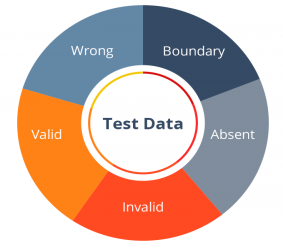
Test Data Refers To The Input Values Used During Software Testing To Validate Different Application Scenarios. It Includes Valid, Invalid, Boundary, And Special Case Data. Well-Prepared Test Data Ensures Comprehensive Test Coverage And Accurate Validation. Sensitive Data Should Be Masked To Protect Privacy. Test Data Management Simplifies Repeated Test Execution. Microsoft QA Teams Maintain Organized Test Data For Functional And Automation Testing.
87. What Is A Test Suite?
Ans:
A Test Suite Is A Collection Of Related Test Cases Grouped Together To Validate A Specific Feature, Module, Or Entire Application. Test Suites Simplify Test Execution And Reporting. They Can Contain Functional, Regression, Smoke, Or Integration Test Cases. Automation Frameworks Execute Test Suites Efficiently During CI/CD Pipelines. Organized Test Suites Improve Maintainability. Microsoft QA Engineers Create Well-Structured Test Suites For Large Applications.
88. What Is Traceability Matrix?
Ans:
A Traceability Matrix Is A Document That Maps Business Requirements To Corresponding Test Cases. It Ensures Every Requirement Is Properly Tested And No Functionality Is Missed. The Matrix Helps Measure Requirement Coverage And Simplifies Impact Analysis. It Also Supports Defect Tracking And Audit Compliance. Traceability Improves Testing Transparency And Project Management. Microsoft QA Teams Use Requirement Traceability Matrices In Enterprise Projects.
89. How Would Test A Login Page?
Ans:
Testing A Login Page Includes Validating Username And Password Fields Using Positive, Negative, Boundary, And Invalid Inputs. Testers Verify Error Messages, Password Masking, Remember Me Functionality, Forgot Password Links, And Account Lockout Policies. Security Checks Include SQL Injection And Brute Force Protection. Compatibility Across Browsers And Devices Is Also Verified. Performance Under Multiple Login Attempts Is Evaluated. Microsoft QA Engineers Ensure Login Features Are Secure, Reliable, And User Friendly.
90. How Would Test A Search Functionality?
Ans:
Testing A Search Feature Includes Validating Exact Matches, Partial Matches, Empty Searches, Invalid Inputs, Special Characters, Filters, Sorting, And Pagination. Testers Verify Response Time And Search Accuracy Across Different Data Sets. Edge Cases Such As Very Long Keywords And Case Sensitivity Are Also Checked. The Search Should Return Relevant Results Consistently. Error Handling And User Experience Are Evaluated. Microsoft QA Teams Thoroughly Test Search Features To Ensure Fast And Accurate Results..
91. Explain A Challenging Defect Have Encountered
Ans:
A Challenging Defect Is One That Is Difficult To Reproduce Or Appears Only Under Specific Conditions. The Investigation Begins By Reviewing Logs, Reproducing The Issue, And Collecting Environment Details. Collaboration With Developers Helps Identify The Root Cause. Additional Test Cases Are Created To Prevent Similar Problems. Proper Documentation Ensures Clear Communication. Microsoft Values Analytical Thinking And Structured Problem Solving When Resolving Complex Defects.
92. How Does Handle Tight Deadlines During Testing?
Ans:
Handling Tight Deadlines Requires Effective Planning, Task Prioritization, And Clear Communication With The Team. Critical Business Features Are Tested First Using Risk-Based Testing Techniques. Automation Is Used Wherever Possible To Save Time. Progress Is Regularly Shared With Stakeholders. Potential Risks And Limitations Are Reported Early. Microsoft QA Engineers Balance Speed And Quality To Deliver Reliable Software Within Project Timelines.
93. How Does Prioritize Test Cases?
Ans:
- Test Cases Are Prioritized Based On Business Impact, Application Risk, Customer Usage, And Critical Functionality. High-Priority Test Cases Cover Core Features, Security, Payment Processing, And Frequently Used Modules.
- Regression Tests For Recently Modified Components Are Also Prioritized. Lower-Risk Features Are Tested Later If Time Is Limited. Risk Assessment Guides Testing Decisions.
- Microsoft QA Teams Focus On Maximizing Product Quality Through Smart Test Prioritization.
94. How Does Work With Developers To Resolve Bug
Ans:
Effective Collaboration Begins With Writing Clear And Detailed Bug Reports Including Steps To Reproduce, Expected Results, Actual Results, And Supporting Evidence. QA Engineers Discuss Issues Respectfully And Verify Fixes After Developers Resolve Them. Open Communication Reduces Misunderstandings. Root Cause Analysis Prevents Similar Defects. Teamwork Improves Product Quality And Delivery Speed. Microsoft Encourages Strong Collaboration Between QA And Development Teams.
95. Why Does Want To Join Microsoft As A QA Engineer?
Ans:
Microsoft Provides Opportunities To Work On Innovative Products Used By Millions Of People Worldwide. The Company Encourages Continuous Learning, Technical Excellence, And Collaboration Across Diverse Teams. A QA Engineer Can Contribute To Delivering High-Quality Software While Learning Modern Testing Technologies. Exposure To Cloud Platforms, Automation, And Agile Practices Supports Career Growth. Microsoft’s Culture Promotes Innovation And Customer Focus. Working At Microsoft Offers Excellent Professional Development Opportunities.
96. Why Should Microsoft Hire ?
Ans:
Strong Knowledge Of Software Testing Principles, Automation Concepts, Problem Solving, And Continuous Learning Makes A Candidate Valuable For A QA Role. Attention To Detail Helps Identify Defects Early And Improve Product Quality. Effective Communication Supports Collaboration Across Teams. Adaptability Enables Quick Learning Of New Tools And Technologies. Commitment To Delivering Reliable Software Matches Microsoft’s Quality Standards. These Skills Contribute Positively To Team Success.
97. What Are Strengths As A QA Engineer?
Ans:
Important Strengths Include Analytical Thinking, Attention To Detail, Patience, Logical Reasoning, And Strong Communication Skills. The Ability To Design Effective Test Cases Improves Defect Detection. Automation Knowledge Increases Testing Efficiency. Adaptability Supports Learning New Technologies Quickly. Team Collaboration Helps Resolve Issues Faster. Microsoft Values QA Engineers Who Continuously Improve Their Technical And Problem-Solving Skills.
98. What Are Career Goals?
Ans:
The Primary Career Goal Is To Build Strong Expertise In Software Testing, Automation, Cloud Technologies, And Quality Engineering. Continuous Learning Helps Develop Advanced Technical Skills Over Time. Taking Ownership Of Complex Testing Projects Improves Leadership Abilities. Contributing To Innovative Products Creates Long-Term Professional Growth. Staying Updated With Industry Trends Supports Career Advancement. Microsoft Provides Excellent Opportunities To Achieve These Goals
99. What Should A Fresher Prepare For A Microsoft QA Interview?
Ans:
- A Fresher Should Build Strong Knowledge Of Manual Testing, SDLC, STLC, Test Case Design, Defect Management, SQL, API Testing, Selenium Basics, Java Or Python Programming, Agile Methodology, And Azure DevOps Fundamentals.
- Coding Practice Improves Problem-Solving Ability. Mock Interviews Build Confidence And Communication Skills.
- Understanding Real-Time Testing Scenarios Is Equally Important. Microsoft Evaluates Both Technical Knowledge And Analytical Thinking During QA Interviews.
100. How Can Successfully Crack A Microsoft QA Interview?
Ans:
Success Requires Consistent Preparation Across Manual Testing, Automation, Programming, SQL, API Testing, Agile, And Behavioral Interview Topics. Practice Writing Test Cases, Solving Coding Problems, And Explaining Testing Scenarios Clearly. Revise Software Testing Concepts Thoroughly And Gain Hands-On Experience With Selenium, Postman, And Git. Prepare Real Project Examples And Communicate Answers Confidently. Demonstrating Problem-Solving Skills, Attention To Detail, And A Learning Mindset Significantly Improves The Chances Of Successfully Cracking A Microsoft QA Interview.
![Top Informatica Interview Questions & Answers – [UPDATED] Interview Question](https://www.acte.in/wp-content/uploads/2020/05/4-img-acte-1-400x218.jpeg)