LMS
LMS
Last updated on 20th Apr 2026| 7478

Infosys HR Manager Interview Questions and Answers is a comprehensive guide designed to help candidates prepare for managerial-level HR roles at Infosys. It includes commonly asked questions on leadership, employee relations, recruitment strategies, performance management, conflict resolution, and organizational behavior, along with clear and structured answers. This resource helps candidates understand the expectations of an HR manager role, enhance their decision-making and communication skills, and build the confidence needed to perform effectively in HR interview rounds.
1. What is role of an HR Manager in Infosys?
Ans:
An HR Manager in Infosys is responsible for managing talent, employee relations, recruitment, and organizational development activities efficiently. The role supports business growth by ensuring skilled workforce availability and strong people management practices across departments. HR Managers also coordinate performance systems, training initiatives, and policy implementation professionally. They act as a bridge between management objectives and employee expectations within the organization. This position is highly important for sustaining culture and productivity.
2. How to prepare for Infosys HR Manager interviews?
Ans:
- Study recruitment strategy, engagement methods, labor compliance, and performance systems. These topics form the core responsibilities of most HR managerial roles. Strong basics improve interview confidence.
- Prepare examples related to leadership, conflict resolution, and workforce planning. Real scenarios make answers practical and convincing during interviews. Examples create stronger impact.
- Research Infosys culture, values, services, and global presence. Company knowledge shows genuine interest and better preparation. Recruiters appreciate informed candidates.
- Practice HR scenario questions with confident communication. Clear speaking and structured responses improve selection chances greatly. Confidence matters in leadership roles.
3. What is importance of leadership in HR management?
Ans:
Leadership is important in HR management because teams depend on guidance, fairness, and strategic direction consistently. An effective HR leader influences culture, motivation, and discipline across organizational levels. Leadership also helps during policy changes, restructuring, and conflict management situations. Recruiters seek candidates who can inspire teams while balancing business priorities carefully. Strong leadership capability greatly increases success in HR roles.
4. How to demonstrate leadership during interviews?
Ans:
- Share examples of guiding teams through hiring drives or initiatives. Practical leadership stories show ownership and coordination skills clearly. Real examples build trust.
- Explain decisions taken during pressure situations. Calm decision-making reflects maturity and management readiness strongly. Interviewers value this quality.
- Mention collaboration with senior management. Cross-level coordination is common in HR leadership positions. It shows professional exposure.
- Present calm and confident communication style. Leadership presence is judged through behavior as well as answers. Confidence creates positive impressions.
5. What is importance of recruitment knowledge for HR Managers?
Ans:
Recruitment knowledge is essential because talent acquisition directly affects company performance and project delivery timelines. HR Managers must understand sourcing channels, screening methods, interview coordination, and offer management processes. Strong recruitment capability helps reduce hiring delays and improve quality of selected candidates. Technology organizations require continuous hiring pipelines for changing business needs regularly. Recruitment expertise is critical for HR managerial success.
6. What is the difference between recruitment and onboarding?
Ans:
| Criteria | Recruitment | Onboarding |
|---|---|---|
| Meaning | Process of hiring candidates. | Process of joining and integrating employees. |
| Stage | Before employee joins. | After candidate accepts offer. |
| Focus | Sourcing and selection. | Training and adaptation. |
| Goal | Fill vacancies. | Ensure smooth start. |
7. What is importance of employee engagement in Infosys?
Ans:
Employee engagement is important because motivated employees usually perform better and remain longer in organizations. Large companies depend on engagement initiatives to maintain morale across diverse teams and locations. HR Managers design recognition programs, feedback systems, and wellness activities regularly. Strong engagement reduces attrition and improves collaboration significantly. This area is highly valuable in service-based organizations.
8. How to improve employee engagement strategies?
Ans:
- Create recognition programs for achievements. Appreciation motivates employees and improves morale significantly. Recognition builds loyalty.
- Conduct regular feedback surveys. Employee opinions help identify workplace improvement areas early. Feedback supports better decisions.
- Support learning opportunities and career growth. Growth paths increase retention and long-term commitment strongly. Employees value development.
- Encourage communication between managers and teams. Open communication builds trust and reduces misunderstandings naturally. Healthy culture improves performance.
9. What is importance of conflict resolution in HR roles?
Ans:
Conflict resolution is important because workplace disagreements can affect morale, productivity, and team stability. HR Managers often mediate issues between employees, teams, or management stakeholders carefully. Balanced handling protects fairness while maintaining policy compliance and organizational trust. Strong resolution skills also reduce escalation and legal risk significantly. Conflict management is a core competency for HR leaders.
10. How to answer conflict handling questions?
Ans:
- Describe impartial listening to all sides. Fair hearing helps understand the complete situation clearly. Neutrality is essential in HR.
- Explain root cause analysis before action. Correct solutions require identifying the real issue first. This shows maturity.
- Mention confidential handling with policy alignment. Sensitive matters need privacy and consistent rule application. Professionalism matters greatly.
- Highlight peaceful resolution outcomes. Positive results show practical conflict management ability clearly. Outcome-based answers impress recruiters.
11. What is importance of communication skills for HR Managers?
Ans:
Communication skills are vital because HR professionals interact with employees, managers, leaders, and candidates daily. Clear communication prevents misunderstandings related to policies, performance, and organizational changes. Strong speaking and writing skills also improve trust and professional image significantly. HR Managers must often explain sensitive topics with tact and clarity. Excellent communication is essential for successful HR leadership.
12. How do you handle pressure or tight deadlines?
Ans:
- I prioritize tasks based on urgency and impact, breaking complex work into manageable steps to stay organized and focused while ensuring critical deadlines are met without compromising quality
- I stay calm under pressure by maintaining a clear mindset, using structured planning and time management techniques to efficiently complete tasks within tight timelines
Here the program prints first employee name.
13. What is importance of labor law awareness in HR interviews?
Ans:
Labor law awareness is important because HR Managers handle compliance, employee rights, and policy implementation. Basic knowledge of employment regulations reduces legal exposure and operational risk significantly. Recruiters often test understanding of attendance, termination, grievance, and statutory obligations. Informed HR professionals support ethical and lawful organizational practices consistently. Compliance knowledge strengthens managerial credibility greatly.
14. How to prepare labor law topics for interviews?
Ans:
- Revise major employment regulations and compliance basics. Core legal knowledge is expected in HR interviews frequently. It builds credibility.
- Understand disciplinary procedures and grievance handling. HR must manage employee issues fairly and professionally. Process knowledge is valuable.
- Study payroll-related statutory concepts. Salary compliance topics are important in many organizations. Practical awareness helps greatly.
- Connect compliance with ethical culture. Good compliance supports trust and responsible management naturally. Ethics strengthens HR leadership.
15. What is importance of performance management systems?
Ans:
Performance management systems are important because organizations need structured evaluation of employee contributions regularly. HR Managers support goal setting, appraisals, feedback cycles, and improvement planning processes. Strong systems help reward performers and develop underperforming employees fairly. They also align workforce effort with business objectives significantly. Performance management is central to organizational growth.
16. How to answer appraisal system questions?
Ans:
- Explain goal alignment with business priorities. Employees perform better when objectives support company growth clearly. Alignment increases productivity.
- Mention continuous feedback instead of yearly-only reviews. Regular guidance helps employees improve faster and stay engaged. Continuous systems are more effective.
- Include development plans for weaker performers. Improvement plans show fairness and growth orientation strongly. Coaching is valuable in HR.
- Link rewards with measurable results. Merit-based recognition motivates stronger performance naturally. Fair systems build trust.
17. What is importance of retention strategies in Infosys?
Ans:
Retention strategies are important because replacing skilled employees can be expensive and time-consuming. IT companies value continuity, client knowledge retention, and experienced team stability greatly. HR Managers analyze attrition reasons and create corrective engagement initiatives regularly. Strong retention improves morale, productivity, and recruitment efficiency significantly. Retention planning is highly valuable in competitive industries.
18. How to improve employee retention?
Ans:
- Provide clear career growth opportunities. Employees stay longer when future progress is visible clearly. Growth improves loyalty.
- Strengthen manager-employee communication. Good relationships reduce dissatisfaction and misunderstandings significantly. Communication builds trust.
- Offer learning programs and recognition. Development and appreciation increase motivation strongly. Skilled employees feel valued.
- Review compensation competitiveness. Fair market pay helps reduce avoidable resignations naturally. Rewards matter greatly.
19. What is importance of workforce planning?
Ans:
Workforce planning is important because business growth requires timely availability of skilled talent. HR Managers forecast hiring needs based on expansion, attrition, and project demand trends. Strong planning reduces sudden shortages and unnecessary surplus hiring significantly. It also improves budget control and recruitment efficiency carefully. Workforce planning supports strategic organizational success greatly.
20. How to answer workforce planning questions?
Ans:
- Explain demand forecasting based on business pipeline. Hiring should reflect future workload and growth plans clearly. Forecasting prevents shortages.
- Mention internal mobility and succession planning. Existing talent can fill roles faster and efficiently. Internal movement saves cost.
- Include hiring timelines and cost efficiency. Planned recruitment improves budget control significantly. Timing matters in workforce strategy.
- Connect workforce plans with productivity. Right staffing levels support smooth operations naturally. Strong planning drives performance.
21. What is importance of diversity and inclusion in organizations?
Ans:
Diversity and inclusion are important because varied teams often generate stronger ideas and perspectives. Inclusive cultures improve belonging, collaboration, and employee satisfaction significantly. Global companies require respect for different backgrounds, experiences, and identities regularly. HR Managers play major role in fair hiring and equal opportunity systems. Diversity initiatives support innovation and culture growth greatly.
22. How to promote diversity and inclusion?
Ans:
- Use unbiased hiring processes. Fair selection expands talent access and trust clearly. Equal opportunity is essential.
- Conduct awareness training. Employees understand respectful behavior and inclusion better significantly. Training improves workplace culture.
- Support inclusive policies and employee groups. Structured support creates belonging strongly. Participation increases engagement.
- Measure diversity outcomes regularly. Tracking progress helps improve future initiatives naturally. Data supports accountability.
23. What is importance of HR analytics in modern companies?
Ans:
HR analytics is important because decisions become stronger when supported by measurable workforce data. Metrics such as attrition, hiring speed, engagement, and productivity reveal improvement opportunities clearly. HR Managers increasingly use analytics for strategic planning and forecasting. Data-driven HR practices improve efficiency and business alignment significantly. Analytics capability adds major value to modern HR roles.
24. How to answer HR analytics questions?
Ans:
- Mention metrics like retention and cost-per-hire. Numbers help measure HR effectiveness clearly. Metrics are valuable indicators.
- Explain how data supports decisions. Evidence-based choices are stronger than assumptions significantly. Analytics improves quality.
- Share examples of dashboards or reports. Visual tools simplify tracking and communication effectively. Examples improve answers.
- Connect analytics with business outcomes. Better HR data supports growth and productivity naturally. Strategy improves through insights.
25. What are final tips for Infosys HR Manager interview success?
Ans:
Success depends on balanced preparation across HR functions, leadership, communication, and compliance awareness. Candidates should prepare real examples involving hiring, retention, conflict resolution, and policy execution thoroughly. Researching Infosys values and business model improves answer relevance significantly. Confident delivery, structured responses, and professional presence create strong impressions consistently. Strategic thinking provides the strongest path toward HR Manager selection success.
26. What is importance of onboarding process in organizations?
Ans:
Onboarding is important because the first employee experience often shapes long-term engagement and productivity levels. A structured onboarding process helps new hires understand culture, policies, tools, and expectations quickly. Strong onboarding also reduces early attrition and confusion during joining periods significantly. HR Managers coordinate documentation, induction, training schedules, and stakeholder alignment carefully. Effective onboarding supports faster employee success and retention greatly.
27. How to improve onboarding experience for employees?
Ans:
- Create clear pre-joining communication. Early guidance reduces anxiety and improves readiness clearly. First impressions matter.
- Design organized induction programs. Structured introductions help employees settle faster significantly. Good starts improve engagement.
- Assign mentors or buddies. Support from peers builds comfort and confidence strongly. Guidance speeds adaptation.
- Collect onboarding feedback. New joiner feedback helps improve future programs naturally. Continuous improvement is valuable.
28. What is importance of policy implementation in HR management?
Ans:
Policy implementation is important because organizations need consistent standards for fairness and discipline. HR Managers ensure policies are communicated, understood, and followed across all levels properly. Well-implemented policies reduce confusion, favoritism, and compliance risks significantly. They also strengthen trust by creating transparent workplace expectations regularly. Strong policy execution is essential for organizational stability.
29. How to answer policy handling questions effectively?
Ans:
- Explain clear communication methods for policies. Employees follow rules better when they understand them clearly. Communication is key.
- Mention training sessions and manager alignment. Leaders must apply policies consistently significantly. Alignment avoids confusion.
- Include monitoring and corrective mechanisms. Follow-up ensures rules are practiced effectively. Monitoring improves discipline.
- Connect policies with fairness and culture. Good policies build trust and stability naturally. Strong culture depends on consistency.
30. What is importance of grievance handling in companies?
Ans:
Grievance handling is important because unresolved employee concerns can damage morale and productivity quickly. HR Managers must create safe channels where issues can be reported professionally. Timely and fair resolution strengthens trust between employees and management significantly. Strong grievance systems also reduce escalation and retention risks carefully. This function is central to healthy workplace culture.
31. How to manage employee grievances professionally?
Ans:
- Listen confidentially and respectfully. Employees need trust before sharing concerns clearly. Respect improves cooperation.
- Investigate facts objectively before conclusions. Fair review prevents bias and wrong actions significantly. Evidence matters greatly.
- Act within policy timelines. Timely responses reduce frustration and escalation effectively. Speed builds confidence.
- Follow up after closure. Checking outcomes ensures lasting resolution naturally. Follow-up shows care.
32. What is importance of training and development in Infosys?
Ans:
Training and development are important because technology businesses require constantly updated workforce capabilities. HR Managers support learning systems that improve technical, behavioral, and leadership competencies regularly. Strong development programs increase engagement and internal growth opportunities significantly. Organizations with learning culture adapt faster to market changes carefully. Training investment drives long-term business success greatly.
33. How to improve training effectiveness?
Ans:
- Conduct skill gap analysis before training. Training should solve real capability gaps clearly. Needs analysis improves results.
- Use blended learning formats. Mixed methods increase learning flexibility significantly. Variety improves participation.
- Measure post-training performance changes. Results show whether learning created business value effectively. Measurement is important.
- Link training with career growth. Employees engage more when learning supports progress naturally. Growth motivates learning.
34. What is importance of succession planning?
Ans:
Succession planning is important because leadership continuity protects operations during role transitions. Organizations need future-ready talent pipelines for critical managerial and specialist positions regularly. HR Managers identify high-potential employees and prepare development pathways strategically. Strong succession systems reduce disruption and external hiring dependency significantly. This practice supports sustainable organizational growth greatly.
35. How to answer succession planning questions?
Ans:
- Explain identification of high-potential talent. Strong future leaders should be recognized early clearly. Planning starts with talent review.
- Mention mentoring, rotation, and leadership training. Development experiences prepare employees significantly. Growth needs structured exposure.
- Include readiness assessments. Organizations should know who can step into roles effectively. Assessment improves continuity.
- Connect succession planning with continuity. Smooth transitions reduce disruption naturally. Stability is the main goal.
36. What is importance of compensation strategy in HR roles?
Ans:
Compensation strategy is important because fair rewards influence attraction, retention, and motivation strongly. HR Managers benchmark salaries, incentives, and benefits against market conditions regularly. Well-designed compensation systems support performance culture and employee satisfaction significantly. Poor reward structures may increase attrition and dissatisfaction quickly. Compensation planning is critical for competitive organizations.
37. How to discuss compensation management in interviews?
Ans:
- Mention market benchmarking. Competitive pay helps attract quality talent clearly. Benchmarking guides fair decisions.
- Explain pay-for-performance philosophy. Rewards linked to results motivate stronger contribution significantly. Merit systems matter.
- Include benefits and wellness programs. Total rewards go beyond salary effectively. Benefits improve satisfaction.
- Balance fairness with budget control. Compensation must remain sustainable naturally. Smart planning is essential.
38. What is importance of employee wellness programs?
Ans:
Employee wellness programs are important because healthy employees often perform better and stay engaged longer. Modern workplaces recognize mental, physical, and emotional wellbeing as productivity drivers increasingly. HR Managers support counseling, health initiatives, and work-life balance policies regularly. Strong wellness systems reduce burnout and absenteeism significantly. Wellness programs enhance culture and retention greatly.
39. How to improve employee wellness initiatives?
Ans:
- Offer health checkups and preventive care. Early care supports healthier employees clearly. Prevention reduces long-term issues.
- Provide counseling and mental health support. Emotional wellbeing improves engagement significantly. Support systems are valuable.
- Encourage flexible work practices. Balance reduces stress and burnout effectively. Flexibility improves morale.
- Measure participation and outcomes. Tracking helps improve programs naturally. Data guides better wellness plans.
40. What is importance of stakeholder management for HR Managers?
Ans:
Stakeholder management is important because HR Managers coordinate with employees, leaders, finance, and operations teams. Successful HR execution often depends on alignment across multiple business functions regularly. Strong stakeholder relationships improve decision speed and policy acceptance significantly. Poor coordination may delay initiatives and create resistance unnecessarily. Stakeholder management is essential for strategic HR success.
41. How to handle multiple stakeholders effectively?
Ans:
- Understand priorities of each stakeholder. Different groups expect different outcomes clearly. Awareness improves alignment.
- Maintain transparent communication. Clear updates reduce misunderstandings significantly. Trust grows through openness.
- Use data and business logic. Evidence supports stronger decisions effectively. Facts improve acceptance.
- Build trust through consistency. Reliable actions strengthen relationships naturally. Consistency creates influence.
42. What is importance of attrition analysis in IT companies?
Ans:
Attrition analysis is important because turnover directly affects productivity, hiring cost, and client continuity. IT companies monitor resignation trends carefully to identify root causes regularly. HR Managers use insights to improve retention strategies and engagement programs significantly. Ignoring attrition patterns can create recurring workforce instability quickly. This analysis is highly valuable for talent management.
43. How to answer attrition management questions?
Ans:
- Mention exit interviews and trend analysis. These methods reveal reasons for resignations clearly. Insights support action.
- Explain manager capability improvement. Better leadership reduces avoidable exits significantly. Managers influence retention.
- Include career growth and recognition solutions. Employees stay when growth feels possible effectively. Appreciation matters too.
- Connect retention with business continuity. Stable teams support stronger operations naturally. Retention has strategic value.
44. What is importance of change management in organizations?
Ans:
Change management is important because businesses regularly adopt new systems, structures, and strategies. Employees may resist change when communication and support are weak significantly. HR Managers guide transitions through engagement, training, and leadership alignment carefully. Strong change management reduces disruption and productivity loss effectively. This skill is highly valuable in dynamic organizations.
45. How to manage organizational change successfully?
Ans:
- Communicate reasons and benefits early. Employees support change better when informed clearly. Early clarity reduces resistance.
- Train employees on new processes. Skills support smooth transitions significantly. Training builds confidence.
- Engage managers as change champions. Leaders influence adoption effectively across teams. Manager support is powerful.
- Track adoption metrics regularly. Measurement shows progress and issues naturally. Data improves implementation.
46. What is importance of confidentiality in HR roles?
Ans:
Confidentiality is important because HR teams handle salaries, grievances, evaluations, and personal employee data. Any misuse of sensitive information can damage trust and legal compliance significantly. HR Managers must demonstrate discretion in every professional interaction carefully. Confidentiality also strengthens credibility with leaders and employees alike. This quality is fundamental in all HR functions.
47. How to demonstrate confidentiality mindset in interviews?
Ans:
- Mention secure handling of employee records. Sensitive data must be protected carefully. Security builds trust.
- Explain need-to-know communication. Information should be shared only when required significantly. Controlled access is essential.
- Avoid discussion of private matters. Professional boundaries protect dignity effectively. Discretion is highly valued.
- Link confidentiality with ethics. Ethical behavior strengthens HR credibility naturally. Integrity is fundamental.
48. What is importance of decision making for HR Managers?
Ans:
Decision making is important because HR leaders regularly balance people concerns with business priorities. Choices related to hiring, policy action, promotions, and conflicts affect many stakeholders directly. Strong decisions require fairness, evidence, and timely judgment significantly. Delayed or weak decisions may increase operational complications quickly. Decision capability is crucial for managerial credibility.
49. How to answer decision-making scenario questions?
Ans:
- Explain data collection before decisions. Facts improve quality of final choices clearly. Evidence-based thinking is valuable.
- Mention fairness and policy consistency. Equal treatment builds trust significantly. Fairness is core to HR.
- Include stakeholder consultation. Important decisions benefit from broader inputs effectively. Consultation reduces mistakes.
- Highlight timely action. Delays can worsen people issues naturally. Speed with judgment matters.
50. what are the need for hr Analytics?
Ans:
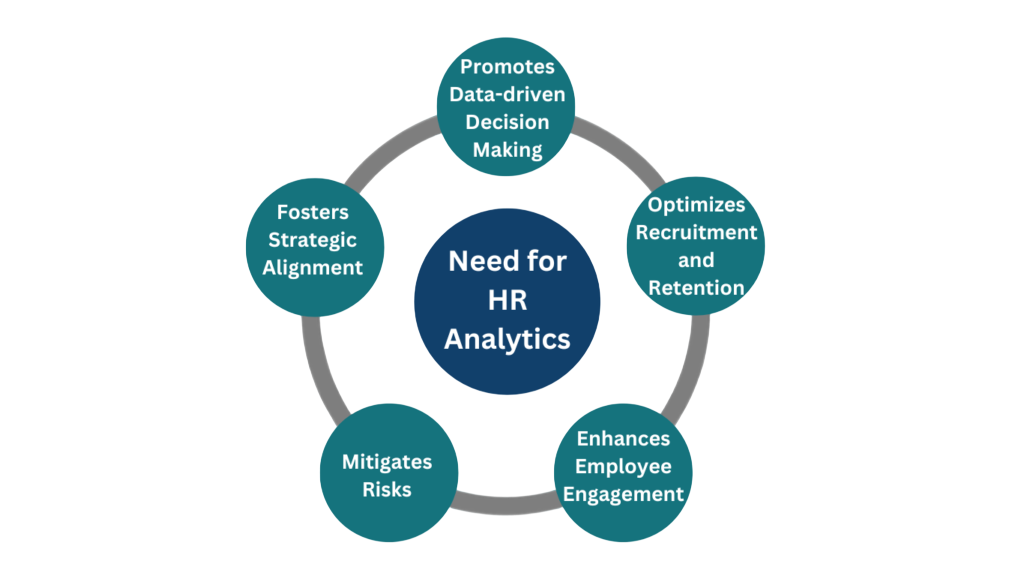
HR Analytics is needed to make data-driven HR decisions, improve hiring quality, reduce turnover, enhance employee performance, and support workforce planning. It helps track HR metrics, boost engagement, ensure compliance, and improve overall organizational efficiency.
51. What is importance of talent acquisition strategy in organizations?
Ans:
Talent acquisition strategy is important because planned hiring creates stronger long-term workforce quality and stability. Organizations with strategic hiring pipelines can meet business expansion needs faster and more efficiently. HR Managers align hiring plans with future skills, budgets, and market realities regularly. Reactive hiring alone often increases cost, delays, and poor fit risks significantly. Strong acquisition strategy supports sustainable organizational growth greatly.
52. How to improve talent acquisition process effectively?
Ans:
- Build strong employer branding. Positive reputation attracts better candidates clearly. Branding improves hiring quality.
- Use data on source effectiveness. Analytics shows which channels perform best significantly. Better sourcing saves cost.
- Strengthen candidate communication. Good experience improves acceptance rates effectively. Communication shapes employer image.
- Create future talent pools. Ready pipelines support faster hiring naturally. Planning improves recruitment success.
53. What is importance of employer branding in hiring?
Ans:
Employer branding is important because talented professionals prefer organizations with strong reputations and cultures. A respected employer image improves application quality and reduces hiring effort significantly. HR Managers help shape branding through candidate experience, employee stories, and workplace culture. Negative perceptions can damage attraction and increase recruitment difficulty quickly. Strong branding creates long-term talent advantages greatly.
54. How to strengthen employer branding initiatives?
Ans:
- Promote employee success stories. Real experiences create trust and attract quality candidates clearly. Positive stories improve reputation.
- Improve candidate interview experiences. Respectful and smooth processes strengthen company image significantly. Candidates remember their experience.
- Highlight learning culture and growth opportunities. Career development attracts ambitious professionals effectively. Growth branding matters greatly.
- Maintain transparent communication. Honest messaging builds credibility naturally. Transparency strengthens trust.
55. What is importance of campus hiring for IT companies?
Ans:
Campus hiring is important because it creates a pipeline of trainable fresh talent regularly. IT companies use campus programs to meet large-scale workforce requirements efficiently. HR Managers coordinate colleges, assessments, offers, and onboarding processes strategically. Fresh graduates often bring adaptability, energy, and learning orientation significantly. Campus hiring remains a valuable long-term talent source.
56. How to manage campus hiring successfully?
Ans:
- Select suitable institutions based on talent quality. Targeted colleges improve hiring outcomes clearly. Planning increases efficiency.
- Design fair assessments. Balanced evaluation helps identify capable candidates significantly. Fairness builds employer trust.
- Maintain strong college relationships. Good partnerships support future hiring pipelines effectively. Networks matter greatly.
- Ensure smooth offer communication. Clear communication improves joining ratios naturally. Timely responses are valuable.
57. What is importance of employee relations in HR management?
Ans:
Employee relations are important because healthy workplace relationships improve morale and collaboration greatly. HR Managers help maintain fairness, trust, and constructive communication across teams regularly. Poor relations may create conflicts, attrition, and productivity decline significantly. Strong employee relations support positive culture and business continuity carefully. This function is central to HR success.
58. How to improve employee relations programs?
Ans:
- Conduct regular listening sessions. Employees feel valued when heard clearly. Listening prevents hidden issues.
- Encourage respectful manager behavior. Leadership behavior shapes culture significantly. Respect improves trust.
- Resolve issues quickly and fairly. Fast action reduces escalation effectively. Fairness strengthens confidence.
- Recognize employee contributions. Appreciation improves morale naturally. Recognition supports engagement.
59. What is importance of organizational culture for Infosys?
Ans:
Organizational culture is important because it influences behavior, ethics, teamwork, and daily decision making. Strong cultures help employees align with shared values and performance expectations regularly. HR Managers protect culture during hiring, onboarding, and leadership transitions carefully. Weak culture can reduce engagement and increase inconsistency significantly. Healthy culture drives sustainable organizational excellence greatly.
60. How to preserve positive organizational culture?
Ans:
- Hire candidates aligned with company values. Value fit supports stronger teamwork clearly. Hiring shapes culture.
- Recognize ethical and collaborative behavior. Rewarded behaviors spread across teams significantly. Recognition reinforces standards.
- Encourage leaders to act as role models. Employees follow visible leadership examples effectively. Leaders influence culture greatly.
- Collect continuous employee feedback. Feedback helps improve workplace experience naturally. Listening keeps culture healthy.
61. What is importance of strategic HR planning?
Ans:
Strategic HR planning is important because workforce decisions must support business direction and growth goals. HR Managers align hiring, development, retention, and structure with future organizational needs. This planning helps prevent talent shortages and unnecessary costs significantly. Reactive HR models often struggle during rapid change or expansion periods. Strategic planning increases organizational readiness greatly.
62. How to answer strategic HR planning questions?
Ans:
- Explain business alignment with workforce needs. HR plans should support company goals clearly. Alignment drives results.
- Mention future skill forecasting. Predicting capability needs improves readiness significantly. Forecasting prevents gaps.
- Include budget and productivity considerations. Smart planning balances cost and performance effectively. Resources must be optimized.
- Connect plans with measurable outcomes. Metrics show planning success naturally. Measurement improves accountability.
63. What is importance of succession readiness metrics?
Ans:
Succession readiness metrics are important because organizations need measurable leadership continuity plans. Metrics help identify whether critical roles have prepared internal successors available regularly. HR Managers use readiness levels to prioritize development investments strategically. Without measurement, succession plans may remain theoretical and weak significantly. Strong metrics improve leadership continuity greatly.
64. How to improve succession readiness systems?
Ans:
- Define critical positions clearly. Important roles need early planning and focus clearly. Prioritization matters.
- Assess internal talent capability. Reviews identify future leaders significantly. Assessment guides development.
- Provide mentoring and rotational exposure. Experience builds readiness effectively. Development must be practical.
- Review readiness data periodically. Regular tracking keeps plans updated naturally. Monitoring improves continuity.
65. What is importance of workforce productivity measurement?
Ans:
Productivity measurement is important because organizations need visibility into performance effectiveness and output quality. HR Managers use metrics to support planning, rewards, and improvement initiatives regularly. Balanced measurement considers efficiency, collaboration, and goal achievement carefully. Weak measurement systems may hide performance gaps significantly. Productivity insights help strengthen business results greatly.
66. How to answer productivity management questions?
Ans:
- Mention clear KPIs and role-based goals. Defined expectations improve accountability clearly. Measurement starts with clarity.
- Include coaching support for improvement. Guidance helps low performers progress significantly. Coaching builds capability.
- Use dashboards and trend reviews. Regular analysis reveals patterns effectively. Data supports decisions.
- Link productivity with engagement. Motivated employees often perform better naturally. Culture affects output.
67. What is importance of employee recognition programs?
Ans:
Recognition programs are important because appreciation often increases motivation and commitment strongly. Employees who feel valued usually contribute with better enthusiasm and consistency regularly. HR Managers design recognition systems that reward both results and positive behaviors carefully. Lack of appreciation may reduce morale over time significantly. Recognition supports stronger retention and culture greatly.
68. How to design effective recognition systems?
Ans:
- Reward achievements quickly. Timely appreciation creates stronger motivation clearly. Delayed rewards lose impact.
- Recognize teamwork and innovation. Collaboration and creativity deserve visibility significantly. Balanced rewards improve culture.
- Use transparent criteria. Fair systems build trust effectively. Employees value clarity.
- Combine monetary and non-monetary rewards. Appreciation can be financial or symbolic naturally. Variety increases effectiveness.
69. What is importance of manager capability development?
Ans:
Manager capability development is important because direct managers strongly influence employee experience and results. Poor managers can create attrition, low morale, and performance issues significantly. HR Managers support leadership coaching, communication skills, and people management training regularly. Strong managers improve engagement and execution quality carefully. Leadership capability drives long-term organizational success greatly.
70. How to improve manager effectiveness programs?
Ans:
- Provide coaching on feedback conversations. Better feedback improves performance clearly. Communication is essential.
- Train managers in conflict handling. Skilled managers resolve issues significantly. Team harmony improves.
- Measure manager engagement scores. Data reveals leadership effectiveness effectively. Metrics guide action.
- Share best leadership practices. Proven methods strengthen management quality naturally. Learning supports growth.
71. What is importance of HR automation in modern companies?
Ans:
HR automation is important because repetitive manual processes consume time and increase errors unnecessarily. Automated systems improve payroll, attendance, recruitment workflows, and reporting efficiency significantly. HR Managers gain more time for strategic people initiatives through automation regularly. Employees also benefit from faster and transparent self-service systems carefully. Automation strengthens modern HR effectiveness greatly.
72. How to implement HR automation successfully?
Ans:
- Identify high-volume repetitive tasks. Automation should begin where impact is highest clearly. Priorities matter.
- Select user-friendly systems. Easy tools improve adoption significantly. Simplicity drives success.
- Train stakeholders properly. Users need confidence to use systems effectively. Training reduces resistance.
- Monitor performance metrics. Tracking ensures value realization naturally. Data supports improvements.
73. What is HRBP roles and responsiblities?
Ans:
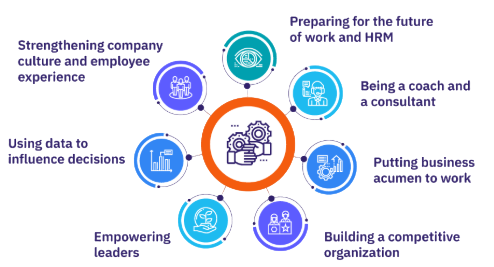
- An HR Business Partner (HRBP) aligns HR strategies with business goals by supporting workforce planning, talent management, employee relations, and performance management while ensuring HR policies and compliance are followed.
- They act as a bridge between employees and leadership, using HR data to provide insights, improve decision-making, enhance engagement, and maintain a positive workplace culture.
74. How to demonstrate HRBP capability in interviews?
Ans:
- Discuss people solutions linked to productivity. HR actions should support measurable results clearly. Business focus matters.
- Mention partnership with business heads. Collaboration improves decision quality significantly. Strong relationships are valuable.
- Use workforce data for decisions. Evidence creates stronger strategies effectively. Analytics adds credibility.
- Balance employee and business goals. Sustainable success needs both naturally. Balanced thinking is essential.
75. What are final tips for Infosys HR Manager interview success?
Ans:
Final success depends on strategic HR knowledge, leadership presence, and practical business understanding. Candidates should prepare examples on hiring, retention, engagement, analytics, and change management thoroughly. Researching Infosys culture and growth priorities improves relevance significantly. Clear communication with confident structure creates strong panel impressions consistently. Balanced preparation offers the best path toward HR Manager selection success.
76. What is importance of attendance management systems?
Ans:
Attendance management systems are important because workforce discipline and scheduling depend on accurate time records daily. Organizations use attendance data for payroll processing, compliance reporting, and productivity planning regularly. HR Managers ensure fair policies for leave, shifts, and punctuality administration carefully. Manual systems often create disputes and administrative errors significantly. Strong attendance management improves operational efficiency greatly.
77. How to improve attendance discipline across teams?
Ans:
- Create transparent attendance policies. Clear rules reduce confusion and disputes clearly. Transparency builds fairness.
- Use automated tracking systems. Accurate systems improve discipline significantly. Technology reduces errors.
- Coach managers on schedule planning. Better planning reduces attendance issues effectively. Managers play key roles.
- Recognize punctual behavior. Positive reinforcement encourages discipline naturally. Recognition motivates consistency.
78. What is importance of leave management in organizations?
Ans:
Leave management is important because employee wellbeing and operational continuity must remain balanced carefully. Proper leave systems ensure fairness while maintaining adequate staffing for business requirements regularly. HR Managers handle approvals, policy clarity, records, and legal compliance professionally. Weak leave practices may create dissatisfaction and workflow disruption significantly. Effective leave management supports trust and productivity greatly.
79. How to manage leave systems efficiently?
Ans:
- Use clear leave categories and approval rules. Defined systems improve fairness clearly. Clarity prevents disputes.
- Adopt digital leave workflows. Automation speeds approvals significantly. Systems improve convenience.
- Plan backup resources during peak absences. Operations remain stable effectively. Planning avoids disruption.
- Review leave trends regularly. Trends reveal policy gaps naturally. Data supports better planning.
80. What is importance of employee satisfaction surveys?
Ans:
Employee satisfaction surveys are important because hidden concerns often surface through anonymous feedback channels. Organizations use survey insights to improve culture, leadership quality, and workplace practices regularly. HR Managers analyze trends and convert feedback into action plans strategically. Ignoring employee voice can increase disengagement and attrition significantly. Survey systems strengthen trust and continuous improvement greatly.
81. How to improve employee satisfaction survey effectiveness?
Ans:
- Use simple and anonymous survey formats. Easy surveys increase participation and honest responses clearly. Anonymity builds trust.
- Communicate purpose clearly before launch. Employees respond better when they know survey value significantly. Transparency improves engagement.
- Act on feedback through visible improvements. Action proves management takes opinions seriously effectively. Results encourage future participation.
- Repeat surveys periodically to track progress. Regular measurement shows trends and improvements naturally. Continuous feedback is valuable.
82. What is importance of payroll accuracy in organizations?
Ans:
Payroll accuracy is important because employee trust depends heavily on timely and correct salary payments. Errors in payroll may create dissatisfaction, complaints, and compliance risks significantly. HR Managers coordinate attendance, benefits, deductions, and final payouts carefully. Accurate payroll systems strengthen credibility and operational discipline greatly. This area is essential for every organization.
83. How to improve payroll management systems?
Ans:
- Use automated payroll software. Automation reduces manual errors and saves processing time clearly. Technology improves efficiency.
- Verify attendance and leave data regularly. Correct inputs are necessary for accurate salary calculations significantly. Validation prevents disputes.
- Maintain updated tax and deduction rules. Legal compliance depends on current rules effectively. Updates avoid penalties.
- Conduct audits before salary release. Final checks help catch mistakes naturally. Reviews improve payroll quality.
84. What is importance of HR compliance audits?
Ans:
HR compliance audits are important because organizations must follow labor laws and internal policies consistently. Audits help detect gaps in documentation, payroll, contracts, and statutory practices regularly. HR Managers use findings to reduce legal and operational risk significantly. Strong compliance systems improve governance and organizational credibility greatly. Audits are valuable preventive controls.
85. How to prepare for HR compliance responsibilities?
Ans:
- Understand major labor law basics. Core legal awareness is essential for HR decisions clearly. Compliance builds credibility.
- Maintain accurate employee records. Proper records support audits and legal needs significantly. Documentation is critical.
- Review statutory deadlines regularly. Timely filings prevent penalties and delays effectively. Tracking deadlines is important.
- Coordinate with finance and legal teams. Cross-functional support improves compliance naturally. Teamwork reduces risk.
86. What is importance of exit interviews in companies?
Ans:
Exit interviews are important because departing employees often provide honest improvement feedback. Organizations use these insights to understand attrition causes and workplace concerns clearly. HR Managers analyze patterns related to leadership, pay, growth, or culture regularly. Strong exit processes support retention strategy improvements significantly. They are useful tools for workforce planning.
87. How to conduct effective exit interviews?
Ans:
- Create respectful and confidential environment. Employees share more honestly when trust exists clearly. Respect improves feedback quality.
- Ask structured but open-ended questions. Balanced questions gather useful insights significantly. Open answers reveal real causes.
- Capture trends instead of isolated opinions. Repeated themes are more valuable than one case effectively. Trend analysis supports action.
- Convert insights into action plans. Feedback creates value only when improvements happen naturally. Action strengthens retention.
88. What is the difference between HR Manager and HR Business Partner?
Ans:
| Criteria | HR Manager | HR Business Partner |
|---|---|---|
| Focus | Manages HR operations and people processes. | Aligns HR strategy with business goals. |
| Role | Handles recruitment, policies, engagement. | Advises leaders on workforce strategy. |
| Approach | Operational and functional. | Strategic and consultative. |
| Value | Ensures smooth HR delivery. | Drives business-oriented people outcomes. |
89. How to demonstrate strategic HR mindset in interviews?
Ans:
- Link people plans with business growth. HR strategy should support company expansion clearly. Alignment shows maturity.
- Use workforce data in decisions. Metrics improve planning and hiring quality significantly. Data-driven thinking is valuable.
- Mention stakeholder partnership examples. Collaboration with leaders shows business influence effectively. Partnerships create results.
- Balance employee and company priorities. Strong HR decisions protect both sides naturally. Balance reflects leadership strength.
90. What are final tips for Infosys HR Manager interview success?
Ans:
Final success depends on balanced HR knowledge, leadership maturity, and strong communication ability. Candidates should prepare examples on hiring, retention, compliance, analytics, and culture building thoroughly. Researching Infosys values and business priorities improves answer relevance significantly. Confident structured responses create stronger panel impressions consistently. Complete preparation gives the best chance of HR Manager selection success.