LMS
LMS
Last updated on 11th Apr 2026| 6319

Getting placed in a reputed IT company like Wipro is a dream for many fresh graduates. With increasing competition, cracking the Wipro interview requires not only academic knowledge but also a smart preparation strategy. The selection process typically includes an online assessment, technical interview, and HR interview, each designed to test different skill sets.Freshers often face challenges such as lack of interview experience, uncertainty about commonly asked questions, and difficulty in presenting answers confidently.
1. Tell me about yourself.
Ans:
I am a recent graduate with a strong academic background. I have developed skills in programming, communication, and problem-solving. I am passionate about learning new technologies. I enjoy working in team environments. I am eager to start my career and contribute to Wipro. I am also a quick learner who adapts easily to new challenges. I always look for opportunities to improve my knowledge.
2. Why do you want to join Wipro?
Ans:
Wipro is a globally recognized IT company that offers excellent learning opportunities for freshers. The company focuses on innovation, growth, and employee development, which inspires me to build my career in such an environment. I admire Wipro’s work culture, values, and commitment to real-time projects. I believe working at Wipro will help me improve my technical and professional skills while contributing positively to the organization. I am excited about the opportunity to grow personally and professionally with the company.
3. What are your strengths?
Ans:
My strengths include quick learning, adaptability, and problem-solving skills. I have strong communication abilities and can work effectively both in a team and independently. I remain positive even under pressure and always try to complete tasks within deadlines. I am disciplined, responsible, and continuously work on improving my skills and knowledge to achieve better results in my career.
4. What are your weaknesses?
Ans:
One of my weaknesses is that I sometimes focus too much on details, which can slow me down slightly. However, I am actively improving my time management and prioritization skills to handle tasks more efficiently. I also practice better decision-making and continuously work on self-improvement. I ensure that my weaknesses do not affect my overall performance and productivity..
5. What is your greatest achievement?
Ans:
My greatest achievement was successfully completing a project during my final year while leading a small team. We completed the project within the deadline, and it received appreciation from our faculty members. This achievement boosted my confidence and improved my leadership, teamwork, and responsibility-handling skills. It also motivated me to take on more challenging tasks in the future.
6. Where do you see yourself in 5 years?
Ans:
In the next five years, I see myself growing within the company by gaining strong technical expertise and taking on more responsibilities. I want to contribute to important projects and gradually move into a leadership role. I also aim to improve both my technical and managerial skills so that I can become a valuable asset to the organization and mentor junior team members in the future..
7. What is a process?
Ans:
A process is a program that is currently in execution. It has its own memory space and includes code, data, and system resources. Processes are managed by the operating system and are independent of one another. Each process follows its own lifecycle to ensure smooth program execution. Processes help computers run multiple applications simultaneously without interference.
8. What is a thread?
Ans:
A thread is the smallest unit of execution within a process. Multiple threads can exist inside a single process, and they share memory and resources. Threads are lightweight, faster, and help improve application performance by enabling multitasking. They reduce CPU idle time and allow programs to perform multiple tasks efficiently at the same time.Threads are widely used in modern applications to improve responsiveness and performance.
9. What is OOP?
Ans:
Object-Oriented Programming, or OOP, is a programming paradigm based on objects and classes. It improves code reusability, scalability, and maintainability by organizing programs into modular structures. OOP includes important concepts such as inheritance, polymorphism, encapsulation, and abstraction. It simplifies complex problems and helps developers create organized and efficient software applications.
10. Explain encapsulation.
Ans:
Encapsulation is the process of combining data and methods into a single unit, usually a class. It hides internal implementation details from users and provides controlled access through methods. Encapsulation improves data security, prevents unauthorized access, and supports abstraction. It also enhances code maintainability and helps protect sensitive data within a program.
11. Explain inheritance.
Ans:
Inheritance is an OOP concept that allows one class to acquire the properties and methods of another class. It promotes code reuse, reduces duplication, and improves the structure of programs. Inheritance supports hierarchical relationships and makes applications easier to maintain and expand. It also helps developers build scalable software efficiently.
12. Explain polymorphism.
Ans:
Polymorphism means one method or function can behave differently in different situations. It supports method overloading and method overriding, which improve flexibility and code readability. Polymorphism simplifies implementation and enhances program efficiency by allowing dynamic behavior in applications. It also makes programs more adaptable and reusable..
13. What is abstraction?
Ans:
Abstraction is the concept of hiding unnecessary details and showing only essential features to the user. It reduces complexity and improves code clarity by focusing on important functionalities. Abstraction is usually achieved using abstract classes and interfaces. It simplifies software design and helps developers create structured and manageable programs.
14. Define database?
Ans:
A database is an organized collection of data that allows easy storage, access, and management of information. It supports queries, updates, and secure data handling. Databases are widely used in applications to ensure consistency and efficient management of large amounts of information. They play an important role in modern software systems and business operations.
15.What is SQL?
Ans:
SQL stands for Structured Query Language, and it is used to manage and manipulate databases. SQL helps in retrieving, inserting, updating, and deleting data using commands such as SELECT, INSERT, UPDATE, and DELETE. It also supports database definition and control operations. SQL is widely used for handling relational databases efficiently and accurately.
16. What is normalization?
Ans:
Normalization is the process of organizing data in a database to reduce redundancy and improve data integrity. It divides large tables into smaller related tables and removes data anomalies. Normalization improves storage efficiency and database performance by following rules known as normal forms, such as 1NF, 2NF, and 3NF. It also simplifies database maintenance and updates.
17. What is a primary key?
Ans:
A primary key is a field that uniquely identifies each record in a database table. It cannot contain null or duplicate values and helps maintain data integrity. Only one primary key is allowed per table, and it plays a major role in indexing and establishing relationships between tables. Primary keys also help retrieve records quickly and accurately.
18. Explain foreign key?
Ans:
A foreign key is a field used to link two database tables together. It references the primary key of another table and ensures referential integrity by preventing invalid data entries. Foreign keys help maintain consistency and establish relationships between related data. They also support structured and organized database management.Foreign keys improve data accuracy and maintain proper relationships between database tables.
19.What is cloud computing?
Ans:
Cloud computing is the delivery of computing services such as storage, servers, and software over the internet. It reduces hardware costs and offers scalability, flexibility, and remote access to resources. Popular cloud platforms include AWS and Azure. Cloud computing also supports business continuity, data backup, disaster recovery, and pay-as-you-go pricing models, improving operational efficiency.
20. What is AI?
Ans:
Artificial Intelligence, or AI, is the simulation of human intelligence by machines. It enables systems to learn, think, and make decisions automatically. AI is widely used in automation, robotics, healthcare, and many industries to improve efficiency and user experience. Technologies like natural language processing and machine learning are part of AI, helping solve complex real-world problems..
21. . What is machine learning?
Ans:
Machine learning is a subset of Artificial Intelligence that allows systems to learn from data and improve performance automatically without explicit programming. It uses algorithms to identify patterns and make predictions. Machine learning includes supervised, unsupervised, and reinforcement learning and is widely used in recommendation systems, fraud detection, and analytics. It helps businesses make accurate data-driven decisions..
22. What is data structure?
Ans:
A data structure is a method of organizing and storing data efficiently for easy access and processing. Examples include arrays, linked lists, stacks, and queues. Data structures improve memory usage and algorithm efficiency, making software applications faster and more scalable. Choosing the right data structure is essential for effective software development.
23. What is an array?
Ans:
An array is a data structure used to store multiple values under a single variable name. It has a fixed size, and elements are stored in contiguous memory locations. Arrays allow fast random access using index positions and improve data handling efficiency. They are widely used in programming to manage and process large amounts of data..
24. How does linked list?
Ans:
A linked list is a dynamic data structure made up of nodes, where each node contains data and a pointer to the next node. It allows flexible memory usage and supports easy insertion and deletion operations. Unlike arrays, linked lists do not require contiguous memory allocation. They are especially useful when the size of data changes frequently.Linked lists are widely used in applications that require dynamic memory management.
25. What is stack?
Ans:
A stack is a linear data structure that follows the LIFO principle, meaning Last In First Out. It supports operations such as push and pop and is widely used in recursion, expression evaluation, and memory management. A stack allows access only to the top element and can be implemented using arrays or linked lists. It is commonly used in function calls and undo operations.
26. What is Queue?
Ans:
A queue is a linear data structure that follows the FIFO principle, meaning First In First Out. It supports enqueue and dequeue operations and is used in scheduling, buffering, and task management systems. Queues ensure ordered processing and are commonly used in real-time applications such as printer queues and CPU scheduling. They help manage tasks in the order they are received.
27. What is OS?
Ans:
An Operating System, or OS, is system software that manages computer hardware and software resources. It controls system operations, provides a user interface, and manages processes, memory, and files. Examples include Windows and Linux. The operating system acts as a bridge between users and computer hardware while ensuring system security, multitasking, and smooth computer functioning.
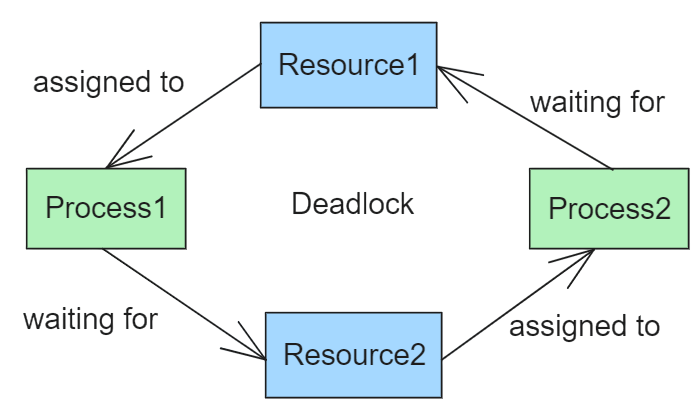
28. What is Deadlock?
Ans:
Deadlock occurs when processes block each other. Each waits for resources held by another. It causes system freeze. It is avoided by proper resource allocation. Prevention techniques are used. It reduces system efficiency. It requires proper handling mechanisms. Common conditions for deadlock include mutual exclusion, hold and wait, no preemption, and circular wait.
29. Define Virtualization?
Ans:
Virtualization creates virtual machines. It allows multiple OS on one system. It improves resource usage. It reduces costs. It is used in cloud computing. It enhances system efficiency. It supports scalability.It is commonly implemented using hypervisors like VMware or VirtualBox.Virtualization helps organizations manage IT infrastructure more effectively.
30. What is SDLC?
Ans:
Software Development Life Cycle is the process of software creation. It includes planning, design, development, testing, and deployment. It ensures quality development. It follows structured phases. It improves efficiency. It reduces development risks. It ensures timely delivery of software.Common SDLC models include Waterfall, Agile, and Spiral.
31. What is a compiler?
Ans:
A compiler translates high-level language into machine code. It checks syntax errors before execution. It converts the entire program at once. It improves program performance. It generates executable files. It helps in faster execution. It is commonly used in languages like C and C++. It performs optimization of code. It reduces runtime errors. It improves overall efficiency.
32. What is an interpreter?
Ans:
An interpreter executes code line by line. It translates high-level language into machine code. It detects errors immediately. It does not generate executable files. It is slower than a compiler. It is used in languages like Python. It helps in debugging easily. It executes instructions directly. It is useful for scripting languages. It allows quick testing of code.
33. Explain algorithm?
Ans:
An algorithm is a step-by-step procedure to solve a problem. It provides a logical solution. It is independent of programming languages. It improves efficiency. It is used in software development. It helps in problem-solving. It ensures accurate results. It can be represented using pseudocode. It improves program design. It helps in optimization.
34. What is a flowchart?
Ans:
A flowchart is a diagram that represents a process or algorithm visually using different symbols and arrows. It helps developers understand the logic and sequence of steps clearly before coding. Flowcharts simplify complex problems, improve planning, and enhance communication among team members. They also help in identifying logical errors and improving documentation. Standard symbols are used to represent processes, decisions, and inputs or outputs. Flowcharts make software design easier and more organized.
35. What is debugging?
Ans:
Debugging is the process of finding and fixing errors or bugs in a program. It helps improve software quality and ensures the program produces correct output. Developers use debugging tools to identify logical and runtime errors effectively. Debugging enhances software reliability, performance, and smooth execution. It is an essential part of the software development process. Proper debugging also helps reduce future software issues.
36. What is testing?
Ans:
Testing is the process of checking whether software functions correctly according to requirements. It helps identify bugs, improve quality, and ensure user satisfaction. Testing can be manual or automated and is important for validating system performance and reliability. It reduces risks and ensures the software works smoothly in real-world situations. Proper testing increases confidence in software deployment.
37. Define unit testing?
Ans:
Unit testing is a testing method where individual components or units of a program are tested separately. It ensures that each module works correctly during development. Unit testing helps in early bug detection, improves code quality, and simplifies debugging. It is usually automated and supports continuous integration practices. This testing method also improves software maintainability and reliability.
38. What is integration testing?
Ans:
Integration testing is the process of combining different modules of a system and testing how they interact with each other. It ensures proper communication and smooth data flow between components. Integration testing helps identify interface and data transfer issues after unit testing is completed. It improves system reliability, stability, and overall performance. This testing ensures all modules work together correctly.
39. What is system testing?
Ans:
System testing is the process of testing the complete integrated system as a whole. It verifies whether the software meets all specified requirements, including functionality, performance, and security. System testing is performed after integration testing and validates end-to-end scenarios. It ensures the software is ready for deployment and compatible with different environments. This testing improves overall software quality and reliability.
40. What is acceptance testing?
Ans:
Acceptance testing is the final testing phase performed to check whether software meets business and user requirements. It is usually conducted by clients or end users before deployment. This testing ensures the software functions correctly in real-world scenarios and satisfies customer expectations. Acceptance testing helps confirm system readiness and business success. It also increases user confidence in the product.
41. What is Agile methodology?
Ans:
Agile methodology is an iterative software development approach that focuses on flexibility, collaboration, and continuous improvement. It delivers software in small updates and involves regular customer feedback throughout development. Agile helps teams adapt quickly to changing requirements and ensures faster product delivery. It promotes teamwork, reduces development risks, and improves software quality. Agile is widely used in modern software projects.
42. Explain Scrum?
Ans:
Scrum is an Agile framework used for managing software development projects efficiently. It divides work into short development cycles called sprints and includes daily meetings to track progress. Scrum improves team coordination, accountability, and productivity. It includes roles such as Scrum Master and Product Owner to manage the workflow effectively. Scrum also ensures transparency and continuous improvement in projects.
43. What is version control?
Ans:
Version control is a system used to manage and track changes made to source code over time. It helps developers collaborate efficiently, maintain code history, and prevent data loss. Tools like Git are commonly used for version control. It supports branching, merging, and rollback of changes when needed. Version control improves teamwork and project management in software development.
44. What is Git?
Ans:
Git is a distributed version control system used to track code changes during software development. It allows multiple developers to collaborate, manage branches, and merge updates efficiently. Git stores the complete history of code changes and helps improve productivity and backup management. It is widely used in software projects because it simplifies project management and collaboration. Git also supports fast and secure code tracking.
45. Describe bug?
Ans:
A bug is an error, flaw, or defect in software that causes incorrect or unexpected results. Bugs can affect software performance, functionality, and user experience. They may occur due to logical, syntax, or runtime errors and are usually found during testing. Bugs must be fixed through debugging to improve software quality and reliability. Proper testing helps reduce the number of bugs in applications.
46. What is API?
Ans:
API stands for Application Programming Interface, and it allows communication between different software systems or applications. APIs help developers connect applications, exchange data, and simplify software development. They are widely used in web services, automation, and integrations. APIs improve scalability, interoperability, and system efficiency. They also enable faster and smoother application development.
47. What is HTTP?
Ans:
HTTP stands for HyperText Transfer Protocol, which is used for communication between web browsers and servers. It transfers data using a request-response model and supports web browsing on the internet. HTTP is stateless, meaning each request is independent. Although it is widely used, HTTP is not secure because data is transferred in plain text. It forms the foundation of web communication.
48. What is HTTPS?
Ans:
HTTPS stands for HyperText Transfer Protocol Secure, and it is the secure version of HTTP. It encrypts data using SSL or TLS protocols to ensure safe communication between client and server. HTTPS protects sensitive information from hacking and unauthorized access. It improves website security, data integrity, and user trust. Secure websites commonly use HTTPS for safe online transactions.
49. What is DNS?
Ans:
DNS stands for Domain Name System, and it converts domain names into IP addresses for easy website access. It acts like an internet directory and helps users browse websites without remembering numeric IP addresses. DNS improves user convenience, speeds up browsing, and ensures proper domain resolution. It is an essential part of internet communication and connectivity. DNS also supports reliable access to online services.
50. Define IP address?
Ans:
An IP address is a unique identifier assigned to devices connected to a network. It helps devices communicate and transfer data over the internet or local networks. IP addresses can be IPv4 or IPv6 and support proper data routing and connectivity. They also help identify device locations and network sources. IP addresses are essential for internet communication.
51. What is LAN?
Ans:
LAN stands for Local Area Network, and it connects devices within a small geographical area such as homes, schools, or offices. LAN provides fast communication, resource sharing, and high-speed connectivity. It is cost-effective, easy to maintain, and supports file and printer sharing. LAN improves collaboration and communication between connected devices. It is commonly used for internal networking purposes.
52. What is WAN?
Ans:
WAN stands for Wide Area Network, and it connects devices and networks over large geographical areas. The internet is the most common example of a WAN. WAN supports global communication, remote access, and connectivity between multiple locations. Although it is slower than LAN, it is widely used for large-scale networking. WAN enables organizations to communicate across different regions effectively.
53 What is a firewall?
Ans:
A firewall is a security system that protects networks and devices from unauthorized access and cyber threats. It monitors incoming and outgoing network traffic and filters suspicious data. Firewalls help prevent attacks, improve network security, and ensure safe communication. They are essential for protecting sensitive information and systems. Firewalls play a major role in cybersecurity management.
54. What is encryption?
Ans:
Encryption is the process of converting readable data into a secure coded format to protect information from unauthorized access. It uses algorithms and keys to ensure data privacy and security during communication. Encryption is widely used in banking, online transactions, and secure communications. It helps prevent data theft and cyber attacks. Encryption is an important part of modern cybersecurity systems.
55. What is decryption?
Ans:
Decryption is the process of converting encrypted data back into its original readable form. It uses keys and algorithms to allow authorized users to access protected information. Decryption is the opposite of encryption and is essential for secure communication systems. It ensures proper understanding and usability of transmitted data. Decryption helps maintain secure and reliable communication.
56. Explain HTML?
Ans:
HTML stands for HyperText Markup Language, and it is used to structure and create web pages. HTML uses tags to define elements such as headings, paragraphs, images, and links. It forms the basic structure of websites and works together with CSS and JavaScript. HTML supports multimedia content and helps developers design organized web layouts. It is one of the core technologies of web development.
57. What is CSS?
Ans:
CSS stands for Cascading Style Sheets, and it is used to style and design web pages. CSS controls layouts, colors, fonts, spacing, and responsiveness of websites. It works together with HTML to improve the appearance and user interface of web applications. CSS enhances user experience by making websites visually attractive and adaptable to different devices. It is essential in modern web design.
58. What is JavaScript?
Ans:
JavaScript is a scripting language used to add interactivity and dynamic behavior to web pages. It runs in web browsers and helps create features such as animations, form validations, and interactive content. JavaScript improves user experience and supports frontend as well as backend development. It also works with APIs and modern web technologies. JavaScript is widely used in web application development.
59. What is a loop?
Ans:
A loop is a programming structure used to repeat a set of instructions multiple times until a condition is met. Common types include for loops and while loops. Loops reduce code repetition, improve efficiency, and automate repetitive tasks. They simplify coding and improve logic flow in programs. Loops can be controlled using conditions and counters, but improper usage may lead to infinite execution.
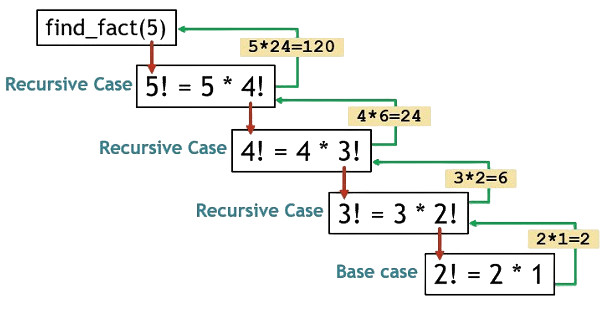
60. What is recursion?
Ans:
Recursion is a programming technique where a function calls itself repeatedly to solve a problem. It requires a base condition to stop execution and prevent infinite calls. Recursion simplifies code and is commonly used in algorithms such as tree traversal and factorial calculations. It reduces code size and improves clarity for complex problems. Recursive solutions are powerful for handling repetitive tasks efficiently.
61. How does exception handling?
Ans:
Exception handling is a mechanism used to manage runtime errors and prevent program crashes. It uses try-catch blocks to handle unexpected situations gracefully. Exception handling improves software stability, reliability, and debugging. It avoids abnormal program termination and ensures smooth execution. Proper exception handling makes applications more robust and user-friendly.
62. What is multithreading?
Ans:
Multithreading is a technique that allows multiple threads to execute simultaneously within a process. It improves performance, CPU utilization, and multitasking capabilities. Threads share memory and resources, enabling faster processing and parallel execution of tasks. Multithreading reduces execution time and enhances application efficiency. It is commonly used in gaming, browsers, and real-time systems.
63. What is a class?
Ans:
A class is a blueprint or template used to create objects in Object-Oriented Programming. It defines properties, methods, and behaviors that objects can have. Classes improve code organization, reusability, and readability. They support OOP concepts such as inheritance and encapsulation. Classes simplify software design and development by creating structured programs.
64. What is an object?
Ans:
An object is an instance of a class that represents real-world entities in Object-Oriented Programming. It contains attributes and behaviors defined by the class. Objects interact with each other and help model real-life scenarios effectively. They improve reusability, simplify software design, and support encapsulation. Objects are fundamental building blocks of OOP-based applications.
65 What is constructor?
Ans:
A constructor is a special method used to initialize objects when they are created. It is called automatically and helps assign initial values to object properties. Constructors simplify object creation and ensure proper initialization of data members. They can also be overloaded to support different initialization methods. Constructors improve code clarity and reduce manual setup tasks in programs.
66. What is a function?
Ans:
- A function is a block of reusable code that performs a specific task.
- It can be called multiple times in a program to avoid repetition. It helps organize programs into smaller, manageable parts.
- This improves code readability and makes debugging easier. A function can take inputs (parameters) and return outputs (results).
- It enhances modularity and makes programs more efficient.
.
67. What is a variable?
Ans:
- A variable is a named storage location used to store data values.
- It acts as a container that holds information during program execution. The value of a variable can change during runtime.
- This allows programs to handle dynamic and changing data efficiently. Variables have a specific data type such as int, float, or string.
- The data type determines the kind of data stored and operations performed.
68. Define constant?
Ans:
- A constant is a value that does not change during program execution.
- It remains fixed once it is defined in the program. Constants are used to store fixed data values.
- They improve code readability and prevent accidental modification. They are declared using specific keywords depending on the language.
- Examples include
constin C/C++ andfinalin Java.
69. What is a pointer?
Ans:
- A pointer is a variable that stores the memory address of another variable.
- It allows direct access to memory locations for efficient data handling. Pointers are mainly used in languages like C and C++.
- They help in dynamic memory allocation and managing complex data structures. Pointers improve performance by reducing memory copying.
- They are useful in arrays, linked lists, and passing arguments to functions.
70. What is memory management?
Ans:
- Memory management is the process of allocating and deallocating memory.
- It ensures efficient utilization of available system memory. It manages how memory is assigned to programs during execution.
- It prevents memory leaks and ensures smooth program performance. It can be handled manually or automatically depending on the language.
- It improves system stability and overall application efficiency.
71. What is garbage collection?
Ans:
- Garbage collection is the process of automatically removing unused or unnecessary memory.It frees memory occupied by objects that are no longer in use.
- It helps in efficient memory management in programs.It prevents memory leaks and improves application performance.
- It is commonly used in languages like Java and Python.It reduces the need for manual memory deallocation by developers.
72. Explain DevOps?
Ans:
- DevOps is a combination of development and operations practices.
- It aims to improve collaboration between developers and IT teams for faster delivery. It focuses on automation of software development processes.
- Tools are used for continuous integration and continuous deployment (CI/CD). DevOps improves software quality and reduces delivery time.
- It ensures faster releases, reliability, and better system performance.
73. What is CI/CD?
Ans:
- CI/CD stands for Continuous Integration and Continuous Deployment/Delivery.
- It is a practice used to automate software development processes. Continuous Integration (CI) involves regularly merging code changes into a shared repository.
- It ensures early detection of errors through automated builds and tests. Continuous Deployment/Delivery (CD) automates the release of software to production.
- It ensures faster, reliable, and frequent delivery of applications.
74. What are microservices?
Ans:
- Microservices is an architectural style that divides an application into small, independent services.Each service handles a specific functionality and can be developed separately.
- Each microservice runs independently and communicates through APIs.This allows different services to be deployed, updated, and scaled without affecting others.
- Microservices improve scalability, flexibility, and faster development.They are widely used in modern applications with cloud and DevOps practices.
75. What is monolithic architecture?
Ans:
- Monolithic architecture is a software design where all components are combined into a single system.
- The application is built as one unified unit with tightly integrated modules. It is simple to develop and deploy in the initial stages.
- All functionalities are managed in one codebase, making it easier for small projects. It becomes difficult to scale and maintain as the application grows.
- Any small change requires redeploying the entire system, increasing complexity.
76. Define load balancing?
Ans:
- Load balancing distributes incoming network traffic across multiple servers.
- It ensures no single server is overloaded and improves system performance. It enhances availability and reliability of applications.
- If one server fails, traffic is redirected to other active servers. It supports efficient handling of high user requests.
- It is widely used in large-scale web applications and cloud systems.
77. What is Big Data?
Ans:
- Big Data refers to extremely large volumes of data generated from various sources.
- It includes structured, semi-structured, and unstructured data like text, images, and videos. It is characterized by the 3Vs: Volume, Velocity, and Variety.
- These define the size, speed of data generation, and different types of data formats. Big Data is used to analyze patterns, trends, and insights.
- It helps organizations make better decisions and improve business strategies.
78. What is Hadoop?
Ans:
- Hadoop is an open-source framework used for storing and processing large datasets.
- It is designed to handle big data across distributed computing environments. It uses distributed storage (HDFS) and parallel processing (MapReduce).
- This allows data to be processed efficiently across multiple machines. Hadoop is scalable and fault-tolerant.
- It ensures data reliability and can handle system failures without data loss.
79. What is data mining?
Ans:
- Data mining is the process of extracting useful information from large datasets.
- It helps identify patterns, trends, and relationships in data. It uses techniques from statistics, machine learning, and databases.
- These techniques help in analyzing and predicting outcomes. Data mining is widely used in business, healthcare, and finance.
- It supports decision-making and improves overall efficiency.
80. Explain Blockchain?
Ans:
- Blockchain is a decentralized digital ledger that records transactions across multiple systems.
- It ensures transparency and data consistency without relying on a central authority. It stores data in blocks that are linked together in a chain using cryptography.
- Each block contains a hash of the previous block, making the data secure and tamper-resistant. Blockchain is widely used in applications like cryptocurrencies, supply chain, and banking.
- It improves security, trust, and traceability in digital transactions.
81. What is IoT?
Ans:
- IoT refers to a network of interconnected physical devices.
- These devices collect and exchange data over the internet. It includes devices like sensors, smart appliances, and wearables.
- These devices communicate with each other without human intervention. IoT improves automation and efficiency in various fields.
- It is widely used in smart homes, healthcare, and industries.
82. What is cybersecurity?
Ans:
- Cybersecurity is the practice of protecting systems, networks, and data from cyber threats.
- It prevents unauthorized access, attacks, and data breaches. It includes tools and techniques like firewalls, encryption, and antivirus software.
- These measures help detect, prevent, and respond to security threats. It ensures confidentiality, integrity, and availability of information.
- It is essential for protecting personal, organizational, and sensitive data.
83. What is ethical hacking?
Ans:
- Ethical hacking is the practice of testing systems for security vulnerabilities.
- It is done by authorized professionals to identify and fix weaknesses. It helps organizations protect their data and systems from cyberattacks.
- Ethical hackers simulate real attacks to improve security measures. It follows legal guidelines and requires proper permission before testing.
- It plays an important role in strengthening cybersecurity and preventing threats.
84. What is data analytics?
Ans:
- Data analytics is the process of examining data to find useful insights.
- It helps in understanding patterns, trends, and relationships in data. It involves techniques like data collection, cleaning, and analysis.
- Tools and algorithms are used to process and interpret large datasets. It is widely used in business decision-making and forecasting.
- It helps organizations improve performance and make informed decisions.
85 How does business intelligence?
Ans:
- Business Intelligence collects data from multiple sources like databases and applications.
- It gathers structured and unstructured data for analysis and decision-making. It processes and analyzes data using tools like reporting, dashboards, and analytics.
- It converts raw data into meaningful insights for better understanding. It presents data visually through charts, graphs, and reports.
- It helps organizations make informed business decisions and improve performance.
86 What is ERP?
Ans:
- ERP stands for Enterprise Resource Planning.
- It is a software system used to manage business processes in an organization. It integrates different departments like finance, HR, and supply chain.
- It provides a centralized system for data and operations management. ERP improves efficiency and decision-making.
- It automates workflows and ensures better resource utilization.
87. What is CRM?
Ans:
- CRM stands for Customer Relationship Management.
- It is a system used to manage interactions with customers and prospects. It helps businesses improve customer relationships.
- It stores customer data, tracks communication, and enhances service quality. CRM systems support sales, marketing, and support teams.
- They improve efficiency, increase customer satisfaction, and drive business growth.
88 What is software maintenance?
Ans:
Software maintenance refers to updating and improving existing systems after deployment. It involves fixing bugs and correcting errors to ensure smooth functioning. It also focuses on improving performance and maintaining system stability. Additionally, it adapts software to new requirements and technologies. Overall, it helps extend the lifespan of the software and keeps it relevant.
89. Define debugging tools?
Ans:
Debugging tools are used to identify and fix errors in programs. They help developers analyze code execution and detect issues efficiently. These tools improve the development process by simplifying error tracking. They also enhance productivity by reducing time spent on troubleshooting. Ultimately, they ensure accurate output and reliable software.
90. What are coding standards?
Ans:
Coding standards are guidelines that define best practices in programming and software development. They help maintain consistency across code written by different developers and improve readability. Coding standards make code easier to understand, debug, and maintain over time. They also reduce errors and improve teamwork among developers working on the same project. Following coding standards ensures high-quality and professional software development. Coding standards also help new developers understand projects more quickly.
91.What is code review?
Ans:
Code review is the process of examining and evaluating code written by developers before it is merged into a project. It helps identify mistakes, improve code quality, and ensure coding standards are followed correctly. Code reviews also improve software performance, maintainability, and security. They encourage collaboration, knowledge sharing, and learning among team members. Regular code reviews help build reliable and efficient software applications. They also reduce the chances of bugs in production environments.
92. What is time complexity?
Ans:
Time complexity measures the amount of time an algorithm takes to execute based on input size. It helps developers analyze and compare the efficiency of different algorithms. Time complexity is commonly represented using Big-O notation such as O(n) or O(log n). Understanding time complexity helps in selecting optimized solutions for better performance. It plays a major role in improving software speed and efficiency. Efficient algorithms help applications handle large datasets effectively.
93. Explain space complexity?
Ans:
Space complexity measures the amount of memory used by a program during execution. It helps evaluate how efficiently memory resources are utilized in an application. Reducing space complexity improves software performance, especially in systems with limited memory resources. It is important for designing scalable and optimized applications. Space complexity also supports better software architecture and resource management. Efficient memory usage improves overall system stability and speed..
94. What is binary search?
Ans:
Binary search is an efficient searching algorithm used on sorted data collections. It works by repeatedly dividing the search space into halves until the required element is found. This approach reduces the number of comparisons and improves searching speed significantly. Binary search is much faster than linear search for large datasets. It follows the divide-and-conquer technique to achieve better performance. Binary search is widely used in computer science for optimized searching operations.
95. What is sorting?
Ans:
Sorting is the process of arranging data in a specific order such as ascending or descending. It improves data organization and makes searching and processing easier. Different sorting algorithms like bubble sort, merge sort, and quick sort are used depending on requirements. Sorting enhances overall system performance and efficiency in handling data. It is an important concept in programming and database management. Proper sorting improves user experience and data accessibility.
96. What is linear search?
Ans:
Linear search is a basic searching technique where elements are checked one by one until the target value is found. It works on both sorted and unsorted datasets and is easy to implement. However, it is slower and less efficient for large datasets compared to advanced algorithms like binary search. Linear search is suitable for small collections of data. It is commonly used when simplicity is more important than speed. Linear search helps beginners understand the basics of searching algorithms.
97. What is a database index?
Ans:
A database index is a data structure used to improve the speed of data retrieval operations in a database. It allows the database system to locate records quickly without scanning the entire table. Indexing improves database performance and efficiency, especially in large databases. However, indexes require additional storage space and maintenance. Database indexes are widely used to optimize query execution and searching operations. Proper indexing significantly improves application response time.
98. Define normalization in DBMS?
Ans:
Normalization is the process of organizing data in a database to reduce redundancy and avoid duplication. It improves data consistency, integrity, and efficiency by dividing large tables into smaller related tables. Normalization follows different normal forms such as 1NF, 2NF, and 3NF. It helps maintain a well-structured database and improves performance. Proper normalization simplifies database maintenance and updates. It also reduces the chances of data anomalies in database systems.
99. What is a transaction in DBMS?
Ans:
A transaction in DBMS is a sequence of database operations treated as a single unit of work. Transactions ensure data consistency, reliability, and integrity during database operations. They follow ACID properties, which include Atomicity, Consistency, Isolation, and Durability. Transactions help prevent data corruption during system failures or unexpected issues. They are essential for safe and reliable database management systems. Transactions are widely used in banking, e-commerce, and financial applications.
100. Why should we hire you?
Ans:
I have strong technical skills, a solid academic background, and a positive attitude toward learning new technologies. I am a quick learner who adapts easily to different environments and challenges. I work effectively in teams and possess good communication and problem-solving skills. I am hardworking, dedicated, and eager to grow professionally while contributing to the success of the organization. I am confident that my skills and enthusiasm will add value to the company. I am also committed to continuously improving my knowledge and performance.
![Top Informatica Interview Questions & Answers – [UPDATED] Interview Question](https://www.acte.in/wp-content/uploads/2020/05/4-img-acte-1.jpeg.webp)