LMS
LMS
Last updated on 23rd Jun 2026| 7525

Artificial Intelligence (AI) and Machine Learning (ML) are among the most important technologies used at Microsoft. Freshers applying for AI, ML, Data Science, and Software Engineering roles are often asked questions related to fundamental concepts, algorithms, data processing, and practical applications. Understanding these topics helps candidates demonstrate their technical knowledge and problem-solving abilities. The following AI/ML interview questions and answers cover essential concepts frequently discussed during Microsoft fresher interviews and can help candidates prepare effectively for technical assessments and interview rounds.
1. What Is Artificial Intelligence (AI)?
Ans:
Artificial Intelligence is a branch of computer science that enables machines to perform tasks that normally require human intelligence. To build practical AI skills, many learners choose AI and Machine Learning Training to understand concepts such as learning, reasoning, problem solving, and decision making. AI systems analyze data and identify patterns to make predictions. AI is used in chatbots, recommendation systems, and self-driving cars. It helps automate complex processes efficiently and continues to transform industries worldwide.
2. What Is Machine Learning (ML)?
Ans:
- Machine Learning Is A Subset Of AI That Allows Computers To Learn From Data Without Explicit Programming. ML Algorithms Improve Their Performance
- Through Experience. They Identify Patterns And Make Predictions Based On Historical Data. Common Applications Include Spam Detection And Recommendation Engines.
- Machine Learning Models Require Training Data To Learn. It Plays A Significant Role In Modern Technology Solutions.
3. Write A Python Program To Calculate The Mean Of A List
Ans:
This Program Calculates The Average Value Of Numbers In A List. The sum() Function Adds All Elements, And len() Returns The Total Count.
- numbers = [10, 20, 30, 40, 50]
- mean = sum(numbers) / len(numbers)
- print(“Mean:”, mean)
4. What Is Deep Learning?
Ans:
Deep Learning Is A Specialized Area Of Machine Learning Based On Artificial Neural Networks. It Uses Multiple Layers To Process Large Volumes Of Data. Deep Learning Excels In Image Recognition, Speech Processing, And Natural Language Processing. These Models Automatically Extract Features From Data. They Require Significant Computational Resources For Training. Deep Learning Has Driven Major Advances In AI Applications.
5. What Is Supervised Learning?
Ans:
Supervised Learning Is A Machine Learning Approach Where Models Are Trained Using Labeled Data. The Algorithm Learns The Relationship Between Inputs And Outputs. It Is Commonly Used For Classification And Regression Problems. Examples Include Predicting House Prices And Email Spam Detection. Training Data Contains Correct Answers For Learning. The Goal Is To Predict Outcomes For New Data Accurately.
6. What Is Unsupervised Learning?
Ans:
Unsupervised Learning Involves Training Models On Unlabeled Data Without Known Outputs. The Algorithm Identifies Hidden Patterns And Structures Within Data. Clustering And Association Rule Mining Are Common Techniques. It Is Useful For Customer Segmentation And Market Analysis. No Correct Labels Are Provided During Training. The Model Discovers Insights Independently From The Dataset.
7. What Is Reinforcement Learning?
Ans:
Reinforcement Learning Is A Machine Learning Technique Where An Agent Learns Through Trial And Error. The Agent Receives Rewards Or Penalties Based On Actions Taken. The Goal Is To Maximize Long-Term Rewards. It Is Used In Robotics, Gaming, And Autonomous Systems. The Learning Process Involves Interaction With An Environment. Successful Actions Are Reinforced Over Time.
8. What Is A Dataset?
Ans:
A Dataset Is A Collection Of Structured Or Unstructured Data Used For Analysis And Model Training. It Contains Records, Features, And Target Variables. Datasets Are Essential For Building Machine Learning Models. High-Quality Data Leads To Better Predictions. Datasets Can Be Collected From Databases, Sensors, Or External Sources. Proper Data Preparation Improves Model Performance.
9. What Are Features In Machine Learning?
Ans:
Features Are Individual Measurable Properties Or Characteristics Of Data Used By Machine Learning Models. They Serve As Input Variables During Training. Examples Include Age, Salary, And Temperature. Feature Selection Helps Improve Accuracy And Efficiency. Relevant Features Enhance Predictive Performance. Poor Feature Choices Can Negatively Affect Model Results.
10. What Is A Label In Machine Learning?
Ans:
A Label Is The Desired Output Or Target Variable In A Supervised Learning Dataset. It Represents The Correct Answer For Each Training Example. Labels Help Models Learn Relationships Between Inputs And Outputs. For Example, Spam Or Not Spam Can Be Labels In Email Classification. Accurate Labels Improve Model Performance. They Are Essential For Supervised Learning Tasks.
11. What Is Overfitting?
Ans:
- Overfitting Occurs When A Machine Learning Model Learns Training Data Too Well, Including Noise And Irrelevant Patterns.
- It Performs Exceptionally On Training Data But Poorly On New Data. Overfitting Reduces Generalization Ability. Complex Models Are More Prone To This Issue.
- Techniques Like Regularization And Cross-Validation Help Prevent Overfitting. Balanced Model Complexity Is Important.
12. What Is Underfitting?
Ans:
Underfitting Happens When A Model Is Too Simple To Capture Patterns In The Data. It Performs Poorly On Both Training And Testing Datasets. Important Relationships Remain Unlearned. Underfitting Often Results From Insufficient Features Or Inadequate Training. Increasing Model Complexity Can Improve Performance. The Goal Is To Find The Right Balance Between Simplicity And Accuracy.
13. What Is Training Data?
Ans:
- Training Data Is The Dataset Used To Teach A Machine Learning Model. It Contains Input Features And Corresponding Outputs.
- The Model Learns Patterns And Relationships From This Data. High-Quality Training Data Is Essential For Accurate Predictions. The Training Process Adjusts Model Parameters Based On Examples.
- Well-Prepared Data Improves Overall Performance. It Forms The Foundation For Building Reliable And Effective Machine Learning Models.
14. What Is Testing Data?
Ans:
Testing Data Is A Separate Dataset Used To Evaluate A Trained Machine Learning Model. It Measures How Well The Model Generalizes To Unseen Data. Testing Data Is Not Used During Training. Performance Metrics Are Calculated Using Test Results. Proper Evaluation Prevents Biased Assessments. It Helps Determine Real-World Effectiveness. Testing Ensures The Model Can Make Accurate Predictions On New Data.
15. What Is Validation Data?
Ans:
Validation Data Is Used During Model Development To Tune Hyperparameters And Improve Performance. It Helps Compare Different Model Configurations. Validation Occurs Before Final Testing. The Dataset Is Separate From Training And Testing Data. Proper Validation Reduces Overfitting Risks. It Supports Better Model Selection Decisions. Validation Plays A Key Role In Optimizing Model Accuracy And Stability.
16. What Is A Machine Learning Model?
Ans:
A Machine Learning Model Is A Mathematical Representation Created By Learning Patterns From Data. It Uses Algorithms To Make Predictions Or Decisions. Models Are Trained Using Historical Data. Different Models Suit Different Problems. Examples Include Decision Trees And Neural Networks. Model Performance Depends On Data Quality And Design. A Well-Trained Model Can Effectively Handle Real-World Tasks.
17. What Is A Classification Problem?
Ans:
- A Classification Problem Involves Predicting Categories Or Labels Based On Input Data. The Output Belongs To A Predefined Class.
- Examples Include Spam Detection And Disease Prediction. Classification Models Learn From Labeled Data. Common Algorithms Include Logistic Regression And Decision Trees.
- Accuracy Is Often Used To Measure Performance. Classification Is Widely Used In Business And Healthcare Applications.
18. Write A Python Program To Find The Maximum Value In A Dataset
Ans:
This Program Finds The Largest Value Present In A Dataset. The max() Function Scans All Elements And Returns The Highest Value. Finding Maximum Values Helps Identify Peaks And Outliers In Data.
- data = [12, 45, 67, 23, 89]
- maximum = max(data)
- print(“Maximum Value:”, maximum)
19. What Is A Neural Network?
Ans:
A Neural Network Is A Computing Model Inspired By The Human Brain. It Consists Of Layers Of Connected Nodes Called Neurons. Neural Networks Learn Complex Patterns From Data. They Are Widely Used In Deep Learning Applications. These Models Perform Well In Image And Speech Recognition. Training Requires Large Amounts Of Data. Neural Networks Have Revolutionized Artificial Intelligence Development.
20.What Is The Difference Between Supervised Learning And Unsupervised Learning?
Ans:
| Feature | Supervised Learning | Unsupervised Learning |
|---|---|---|
| Definition | Learns From Labeled Data Where The Correct Output Is Known.. | Learns From Unlabeled Data Without Known Outputs. |
| Training Data | Requires Input Data And Corresponding Labels. | Uses Only Input Data Without Labels |
| Goal | Predict Outcomes Or Classify Data Accurately.. | Discover Hidden Patterns And Relationships In Data.. |
| Output | Produces Predicted Categories Or Numerical Values. | Produces Clusters, Groups, Or Associations |

21. What Is Feature Engineering?
Ans:
Feature Engineering Is The Process Of Creating Or Transforming Variables To Improve Model Performance. It Helps Extract Useful Information From Raw Data. Good Features Improve Prediction Accuracy. Techniques Include Scaling, Encoding, And Aggregation. Feature Engineering Requires Domain Knowledge. It Plays A Critical Role In Machine Learning Projects. Effective Features Often Lead To Better Outcomes Than Complex Models.
22. What Is Data Preprocessing?
Ans:
Data Preprocessing Involves Cleaning And Preparing Data Before Training A Model. It Includes Handling Missing Values And Removing Duplicates. Data Transformation Improves Data Quality. Preprocessing Makes Data Suitable For Analysis. Poor Quality Data Can Affect Accuracy. It Is A Vital Step In Machine Learning Workflows. Proper Preparation Leads To More Reliable Predictions. It Ensures That Models Receive Consistent And Meaningful Input Data.
23. What Are Missing Values?
Ans:
- Missing Values Refer To Data Entries That Are Unavailable Or Undefined In A Dataset. They Can Occur Due To Errors Or Incomplete Records.
- Missing Data Can Affect Model Accuracy. Common Solutions Include Imputation Or Removal. Understanding Missing Patterns Is Important.
- Proper Handling Improves Data Quality. Managing Missing Values Helps Build Better Models. Effective Treatment Of Missing Data Enhances Model Reliability And Performance.
24. What Is Data Normalization?
Ans:
Data Normalization Scales Numerical Values To A Common Range. It Prevents Features With Large Values From Dominating Others. Normalization Improves Model Performance. Techniques Include Min-Max Scaling. It Is Commonly Used In Neural Networks. Normalized Data Helps Algorithms Converge Faster. It Creates Balanced Inputs For Learning Models. This Process Makes Feature Comparisons More Consistent Across Datasets.
25. What Is Standardization?
Ans:
Standardization Transforms Data To Have A Mean Of Zero And A Standard Deviation Of One. It Helps Compare Features On The Same Scale. Many Algorithms Benefit From Standardized Data. It Improves Training Stability. Standardization Is Different From Normalization. It Is Common In Statistical Modeling. Proper Scaling Enhances Machine Learning Performance. Standardized Features Often Lead To Faster And More Accurate Learning.
26. What Is Cross-Validation?
Ans:
Cross-Validation Is A Technique Used To Evaluate Machine Learning Models. The Dataset Is Divided Into Multiple Folds. Models Are Trained And Tested Repeatedly. This Provides More Reliable Performance Estimates. It Helps Detect Overfitting. K-Fold Cross-Validation Is Widely Used. Cross-Validation Improves Confidence In Model Results. It Ensures The Model Performs Consistently Across Different Data Samples.
27. What Is Accuracy?
Ans:
- Accuracy Measures The Percentage Of Correct Predictions Made By A Model. It Is One Of The Most Common Evaluation Metrics.
- Accuracy Is Easy To Understand And Calculate. However, It May Be Misleading For Imbalanced Data. It Compares Correct Predictions To Total Predictions.
- Higher Accuracy Indicates Better Performance. It Is Widely Used In Classification Problems. Accuracy Provides A Quick Overview Of Overall Model Effectiveness.
28. What Is Precision?
Ans:
- Precision Measures The Proportion Of Correct Positive Predictions Among All Positive Predictions. It Focuses On Prediction Quality. High Precision Means Fewer False Positives.
- Precision Is Important In Fraud Detection And Medical Diagnosis. It Helps Assess Reliability Of Positive Results. Precision Is Calculated Using True Positives And False Positives.
- It Is A Key Classification Metric. High Precision Ensures That Positive Predictions Are More Trustworthy.
29. What Is Recall?
Ans:
Recall Measures The Ability Of A Model To Identify Actual Positive Cases. It Focuses On Finding All Relevant Instances. High Recall Means Fewer False Negatives. Recall Is Important In Disease Detection. Missing Positive Cases Can Be Costly. It Is Calculated Using True Positives And False Negatives. Recall Helps Evaluate Model Sensitivity. High Recall Ensures Important Cases Are Not Overlooked By The Model.
30. What Is F1-Score?
Ans:
F1-Score Is The Harmonic Mean Of Precision And Recall. It Provides A Balanced Measure Of Model Performance. F1-Score Is Useful For Imbalanced Datasets. A High F1-Score Indicates Strong Classification Ability. It Combines Two Important Metrics Into One. F1 Helps Compare Different Models Effectively. It Is Commonly Used In AI And ML Projects. The Metric Balances Both Correctness And Completeness Of Predictions.
31. What Is A Confusion Matrix?
Ans:
A Confusion Matrix Is A Table Used To Evaluate Classification Models. It Shows True Positives, True Negatives, False Positives, And False Negatives. The Matrix Provides Detailed Performance Insights. It Helps Identify Classification Errors. Many Metrics Are Derived From It. Confusion Matrices Improve Model Analysis. They Are Widely Used In Machine Learning Evaluation. It Offers A Clear View Of Prediction Strengths And Weaknesses.
32. What Is Logistic Regression?
Ans:
Logistic Regression Is A Classification Algorithm Used For Predicting Categories. It Estimates Probabilities Using A Logistic Function. Despite Its Name, It Is Used For Classification Rather Than Regression. It Is Simple And Interpretable. Logistic Regression Performs Well On Binary Problems. It Is Widely Used In Business Applications. The Model Produces Probability-Based Predictions. It Is Often Considered A Baseline Model For Classification Tasks.
33. What Is Linear Regression?
Ans:
- Linear Regression Is A Statistical Method Used To Predict Continuous Values. It Models The Relationship Between Variables Using A Straight Line.
- The Algorithm Is Easy To Understand And Implement. It Is Commonly Used For Forecasting Tasks. Linear Regression Assumes A Linear Relationship.
- Performance Depends On Data Quality. It Is A Fundamental Machine Learning Technique. It Serves As A Foundation For Learning Advanced Predictive Models.
34. What Is A Decision Tree?
Ans:
A Decision Tree Is A Supervised Learning Algorithm Used For Classification And Regression. It Splits Data Into Branches Based On Conditions. The Structure Resembles A Tree. Decision Trees Are Easy To Interpret. They Can Handle Numerical And Categorical Data. Overfitting May Occur Without Proper Control. They Are Popular In Business Decision-Making Applications. Visual Representation Makes Decision Trees Easy For Beginners To Understand.
35. What Is Random Forest?
Ans:
Random Forest Is An Ensemble Learning Method That Combines Multiple Decision Trees. Each Tree Makes A Prediction. The Final Output Is Based On Majority Voting Or Averaging. Random Forest Reduces Overfitting. It Provides Better Accuracy Than A Single Tree. The Algorithm Handles Large Datasets Well. It Is One Of The Most Popular ML Models. Random Forest Delivers Robust Results Across Various Machine Learning Problems.
36. What Is K-Nearest Neighbors (KNN)?
Ans:
KNN Is A Supervised Learning Algorithm Used For Classification And Regression. It Predicts Outcomes Based On Nearby Data Points. Similar Data Points Are Grouped Together. The Choice Of K Influences Performance. KNN Is Simple To Understand. It Works Well For Small Datasets. Distance Metrics Play A Key Role In Predictions. The Algorithm Relies On Similarity Between Existing And New Data.
Ans:
37. Write A Python Program To Normalize Data Using Min-Max Scaling
Ans:
This Program Scales Data Between 0 And 1 Using Min-Max Normalization. Normalization Ensures That Features Have Comparable Ranges.
- data = [10, 20, 30, 40]
- normalized = [(x – min(data)) / (max(data) – min(data)) for x in data]
- print(normalized)
38. What Is Clustering?
Ans:
Clustering Is An Unsupervised Learning Technique Used To Group Similar Data Points. It Identifies Hidden Patterns In Data. No Labels Are Required. Clustering Is Useful For Customer Segmentation. Common Methods Include K-Means And Hierarchical Clustering. Groups Are Formed Based On Similarity. Clustering Helps Discover Valuable Business Insights. It Enables Organizations To Understand Data Structures More Effectively.
39. What Is K-Means Clustering?
Ans:
K-Means Is A Popular Clustering Algorithm That Divides Data Into K Groups. Each Cluster Has A Centroid. Data Points Are Assigned To The Nearest Centroid. The Algorithm Iteratively Optimizes Clusters. K-Means Is Fast And Efficient. It Works Best With Numerical Data. It Is Widely Used In Data Analysis Projects. Choosing The Right Value Of K Is Important For Better Clustering Results.
40. What Is Dimensionality Reduction?
Ans:
- Dimensionality Reduction Reduces The Number Of Features In A Dataset. It Simplifies Data Without Losing Important Information. The Technique Improves Model Efficiency.
- It Helps Reduce Training Time. PCA Is A Popular Dimensionality Reduction Method. Lower Dimensions Improve Visualization.
- It Is Useful For Large And Complex Datasets. Reduced Feature Sets Often Improve Computational Performance And Interpretability.

Enroll in Data Science Course Training and UPGRADE Your Skills
Weekday / Weekend BatchesSee Batch Details41. What Is Principal Component Analysis (PCA)?
Ans:
Principal Component Analysis Is A Dimensionality Reduction Technique Used To Simplify Large Datasets. It Transforms Original Features Into New Uncorrelated Components. PCA Preserves Most Of The Important Information. It Helps Reduce Noise In Data. The Technique Improves Computational Efficiency. PCA Is Widely Used For Data Visualization. It Makes Complex Datasets Easier To Analyze. PCA Is Commonly Applied Before Model Training.
42. What Is Bias In Machine Learning?
Ans:
Bias Refers To Errors Introduced By Simplifying Assumptions In A Model. High Bias Can Cause Underfitting. The Model May Fail To Capture Important Patterns. Bias Affects Prediction Accuracy. Simpler Models Often Have Higher Bias. Reducing Bias Improves Learning Capability. A Balance Between Bias And Variance Is Important. Proper Feature Selection Can Help Reduce Bias.
43. What Is Variance In Machine Learning?
Ans:
Variance Measures How Much A Model’s Predictions Change With Different Training Data. High Variance Often Leads To Overfitting. The Model Learns Noise Instead Of General Patterns. Complex Models Usually Have Higher Variance. Variance Impacts Model Stability. Reducing Variance Improves Generalization. Techniques Like Regularization Can Help Control Variance. Balanced Variance Leads To Better Predictions.
44. What Is The Bias-Variance Tradeoff?
Ans:
The Bias-Variance Tradeoff Represents The Balance Between Simplicity And Complexity In A Model. High Bias Causes Underfitting. High Variance Causes Overfitting. The Goal Is To Minimize Both Errors. Achieving Balance Improves Performance On New Data. It Is A Key Concept In Machine Learning. Proper Model Selection Helps Manage This Tradeoff. Understanding It Leads To Better Model Design.
45. What Is Regularization?
Ans:
Regularization Is A Technique Used To Prevent Overfitting In Machine Learning Models. It Adds A Penalty To Complex Models. This Encourages Simpler Solutions. Common Methods Include L1 And L2 Regularization. Regularization Improves Generalization Performance. It Reduces Sensitivity To Noise. The Technique Helps Build Robust Models. Regularization Is Widely Used In Predictive Analytics.
46. What Is L1 Regularization?
L1 Regularization Adds The Absolute Value Of Coefficients As A Penalty Term. It Encourages Sparse Models By Reducing Some Coefficients To Zero. This Helps Feature Selection. L1 Regularization Is Also Known As Lasso Regression. It Reduces Model Complexity. The Technique Improves Interpretability. It Is Useful For High-Dimensional Data. L1 Can Eliminate Irrelevant Features Automatically.
47. What Is L2 Regularization?
Ans:
L2 Regularization Adds The Squared Value Of Coefficients As A Penalty Term. It Prevents Extremely Large Coefficient Values. The Method Is Also Known As Ridge Regression. L2 Helps Reduce Overfitting. It Maintains All Features In The Model. The Technique Improves Stability And Generalization. It Is Commonly Used In Regression Problems. L2 Produces Smoother And More Reliable Models.
48. What Is Gradient Descent?
Ans:
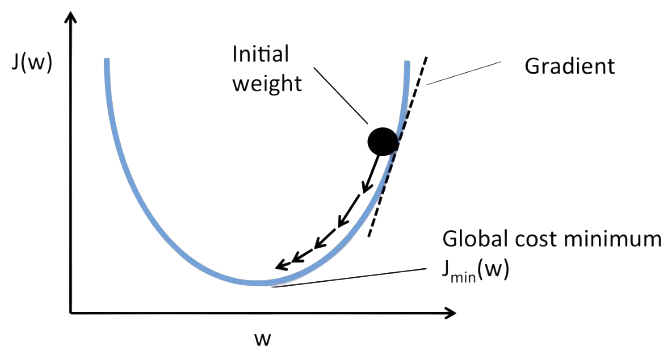
- Gradient Descent Is An Optimization Algorithm Used To Minimize Error In Machine Learning Models. It Updates Model Parameters Iteratively.
- The Algorithm Moves Toward The Lowest Error Point. Learning Rate Controls Update Size. Gradient Descent Is Widely Used In Deep Learning.
- It Helps Models Learn Efficiently. Proper Configuration Improves Convergence Speed. It Is Fundamental To Model Training.
49. What Is A Learning Rate?
Ans:
The Learning Rate Determines How Much Model Parameters Change During Training. It Controls The Speed Of Learning. A Very High Learning Rate May Miss Optimal Solutions. A Very Low Rate Can Slow Training. Choosing The Right Value Is Important. Learning Rate Influences Model Performance. It Is A Key Hyperparameter In Machine Learning. Proper Tuning Improves Training Efficiency.
50. What Is An Epoch?
Ans:
An Epoch Represents One Complete Pass Through The Entire Training Dataset. Models Often Require Multiple Epochs To Learn Effectively. Each Epoch Updates Model Parameters. More Epochs Can Improve Learning. Too Many Epochs May Cause Overfitting. Epoch Count Is An Important Training Parameter. Monitoring Performance Helps Determine The Right Number. Epochs Play A Major Role In Deep Learning.
51. What Is Batch Size?
Ans:
- Batch Size Refers To The Number Of Training Samples Processed Before Updating Model Parameters. Smaller Batches Use Less Memory.
- Larger Batches Improve Computational Efficiency. Batch Size Affects Training Speed And Accuracy. It Influences Convergence Behavior.
- Choosing The Right Batch Size Is Important. Different Models Require Different Settings. Proper Batch Selection Enhances Learning Performance.
52. What Is Stochastic Gradient Descent (SGD)?
Ans:
Stochastic Gradient Descent Updates Parameters Using One Training Example At A Time. It Is Faster Than Traditional Gradient Descent. SGD Can Escape Local Minima More Easily. The Method Is Efficient For Large Datasets. Predictions May Fluctuate During Training. Proper Learning Rates Improve Stability. SGD Is Common In Deep Learning Applications. It Helps Scale Training To Large Problems.
53. What Is Hyperparameter Tuning?
Ans:
Hyperparameter Tuning Is The Process Of Selecting The Best Model Settings. Hyperparameters Are Set Before Training Begins. Examples Include Learning Rate And Batch Size. Proper Tuning Improves Accuracy And Performance. Grid Search And Random Search Are Common Methods. Hyperparameter Optimization Enhances Results. It Is An Essential Part Of Model Development. Well-Tuned Models Generalize Better To New Data.
54. What Is Grid Search?
Ans:
Grid Search Is A Hyperparameter Optimization Technique. It Tests Multiple Parameter Combinations Systematically. The Best Combination Is Selected Based On Performance. Grid Search Is Easy To Implement. It Can Be Computationally Expensive. The Method Helps Improve Model Accuracy. It Is Commonly Used In Machine Learning Projects. Grid Search Provides A Structured Tuning Approach.
55. What Is Random Search?
Ans:
- Random Search Selects Hyperparameter Combinations Randomly Instead Of Testing Every Possibility. It Is Faster Than Grid Search.
- The Technique Often Produces Good Results Efficiently. Random Search Reduces Computational Costs. It Works Well For Large Search Spaces.
- The Method Is Easy To Implement. It Is Popular In Practical Applications. Random Search Balances Efficiency And Performance.
56. What Is Ensemble Learning?
Ans:
Ensemble Learning Combines Multiple Models To Improve Prediction Accuracy. Different Models Work Together To Produce Better Results. The Approach Reduces Errors And Variance. Random Forest Is A Common Example. Ensemble Methods Improve Robustness. They Often Outperform Individual Models. Ensemble Learning Is Widely Used In Competitions. Combining Models Leads To More Reliable Predictions.
57. Write A Python Program For Simple Linear Regression Using Scikit-Learn
Ans:
This Program Demonstrates A Basic Linear Regression Model. The Model Learns The Relationship Between Input And Output Data
- from sklearn.linear_model import LinearRegression
- X = [[1], [2], [3], [4]]
- y = [2, 4, 6, 8]
- model = LinearRegression()
- model.fit(X, y)
- print(model.predict([[5]]))
58. What Is Boosting?
Ans:
Boosting Is An Ensemble Method That Builds Models Sequentially. Each New Model Corrects Errors Made By Previous Models. The Technique Improves Prediction Accuracy. Popular Algorithms Include AdaBoost And XGBoost. Boosting Focuses On Difficult Examples. It Produces Strong Predictive Models. The Method Is Widely Used In Industry. Boosting Often Achieves State-Of-The-Art Results.
59. What Is AdaBoost?
Ans:
- AdaBoost Is A Boosting Algorithm That Combines Multiple Weak Learners. Each Model Focuses On Previously Misclassified Examples.
- The Final Prediction Is Based On Weighted Voting. AdaBoost Improves Classification Accuracy. It Works Well With Decision Trees.
- The Algorithm Reduces Prediction Errors. It Is Popular For Binary Classification Tasks. AdaBoost Creates Strong Models From Simple Learners.
60. What Is XGBoost?
Ans:
XGBoost Is An Advanced Gradient Boosting Algorithm Known For High Performance. It Is Fast And Efficient. XGBoost Includes Regularization To Prevent Overfitting. The Algorithm Handles Missing Data Effectively. It Is Widely Used In Data Science Competitions. XGBoost Provides Excellent Prediction Accuracy. The Method Scales Well For Large Datasets. It Is One Of The Most Popular ML Algorithms.

Learn Data Science Course Training with Advanced Concepts By Industry Experts
- Instructor-led Sessions
- Real-life Case Studies
- Assignments
61. What Is Natural Language Processing (NLP)?
Ans:
Natural Language Processing Is A Field Of AI That Enables Computers To Understand Human Language. NLP Processes Text And Speech Data. Applications Include Chatbots And Translation Systems. It Combines Linguistics And Machine Learning. NLP Helps Extract Meaning From Text. The Technology Improves Human-Computer Interaction. It Is Widely Used Across Industries. NLP Powers Many Modern AI Solutions.
62. What Is Tokenization?
Ans:
Tokenization Is The Process Of Breaking Text Into Smaller Units Called Tokens. Tokens May Be Words Or Sentences. It Is A Fundamental NLP Step. Tokenization Helps Analyze Language Structure. Proper Tokenization Improves Model Accuracy. Different Languages Require Different Approaches. The Technique Simplifies Text Processing. Tokenization Prepares Text For Machine Learning Models.
63. What Is The Difference Between AI And ML?
Ans:
| Feature | Artificial Intelligence (AI) | Machine Learning (ML) |
|---|---|---|
| Definition | AI Is A Broad Field Of Computer Science Focused On Creating Systems That Can Mimic Human Intelligence. | ML Is A Subset Of AI That Enables Systems To Learn From Data And Improve Automatically. |
| Goal | To Develop Intelligent Machines That Can Think, Reason, And Make Decisions | To Build Models That Learn Patterns From Data And Make Predictions. |
| Scope | AI Covers Machine Learning, Deep Learning, Robotics, Expert Systems, And More. | ML Focuses Specifically On Learning From Data Using Algorithms. |
| Dependency | AI Can Work With Or Without Machine Learning Techniques | ML Is One Of The Approaches Used To Achieve AI. |
64. What Is Lemmatization?
Ans:
Lemmatization Converts Words To Their Dictionary Base Form. It Uses Linguistic Knowledge For Accurate Results. The Technique Produces Meaningful Root Words. Lemmatization Is More Accurate Than Stemming. It Improves NLP Model Quality. The Process Requires Language Understanding. It Helps Standardize Text Data. Lemmatization Enhances Text Processing Accuracy.
65. What Is Computer Vision?
Ans:
Computer Vision Is A Branch Of AI That Enables Machines To Interpret Images And Videos. It Uses Machine Learning And Deep Learning Techniques. Applications Include Facial Recognition And Object Detection. Computer Vision Extracts Useful Information From Visual Data. The Technology Supports Automation. It Is Used In Healthcare And Security. Computer Vision Continues To Advance Rapidly.
66. What Is Image Classification?
Ans:
- Image Classification Is A Computer Vision Task That Assigns Labels To Images Based On Their Content. It Uses Machine Learning And Deep Learning Models.
- The System Learns Patterns From Training Images. Common Applications Include Medical Imaging And Object Recognition. Accuracy Depends On Data Quality And Model Design.
- Large Datasets Improve Classification Performance. Image Classification Is Widely Used In AI Solutions. It Helps Automate Visual Data Analysis Efficiently.
67. What Is Object Detection?
Ans:
Object Detection Identifies And Locates Objects Within Images Or Videos. It Combines Classification With Localization Techniques. The Model Draws Bounding Boxes Around Detected Objects. Applications Include Autonomous Vehicles And Surveillance Systems. Deep Learning Models Commonly Perform This Task. Object Detection Improves Situational Awareness. It Enables Real-Time Decision Making. The Technology Plays A Key Role In Computer Vision Applications.
68. What Is Transfer Learning?
Ans:
Transfer Learning Reuses Knowledge From A Pretrained Model For A New Task. It Reduces Training Time And Data Requirements. Pretrained Models Already Understand General Patterns. Fine-Tuning Adapts Them To Specific Problems. Transfer Learning Improves Accuracy On Small Datasets. It Is Popular In NLP And Computer Vision. The Approach Saves Computational Resources. It Accelerates The Development Of AI Solutions.
69. What Is A Convolutional Neural Network (CNN)?
Ans:
- A Convolutional Neural Network Is A Deep Learning Model Designed For Image Processing Tasks. CNNs Automatically Extract Visual Features From Images.
- They Use Convolution And Pooling Layers. CNNs Achieve High Accuracy In Computer Vision Applications. They Reduce The Need For Manual Feature Engineering.
- The Architecture Handles Complex Visual Data Efficiently. CNNs Are Widely Used In Industry. They Power Many Modern Image Recognition Systems.
70. What Is A Recurrent Neural Network (RNN)?
Ans:
A Recurrent Neural Network Is A Deep Learning Model Designed For Sequential Data. It Maintains Information From Previous Inputs Using Internal Memory. RNNs Are Useful For Language Modeling And Time-Series Analysis. They Capture Temporal Relationships In Data. Traditional RNNs Can Face Vanishing Gradient Problems. Variants Like LSTM Improve Performance. RNNs Are Important In NLP Applications. They Help Models Understand Sequence Dependencies.
71. What Is Long Short-Term Memory (LSTM)?
Ans:
LSTM Is A Special Type Of Recurrent Neural Network Designed To Handle Long-Term Dependencies. It Uses Memory Cells To Store Information. LSTMs Reduce The Vanishing Gradient Problem. They Are Effective For Text And Speech Processing. The Architecture Retains Relevant Information Over Time. LSTMs Improve Sequence Prediction Accuracy. They Are Widely Used In Deep Learning. LSTM Models Excel At Learning Complex Temporal Patterns.
72. What Is Generative AI?
Ans:
- Generative AI Refers To AI Systems That Create New Content Such As Text, Images, Audio, Or Code. These Models Learn Patterns From Existing Data.
- They Generate Outputs That Resemble Human-Created Content. Applications Include Chatbots And Content Creation. Generative AI Uses Advanced Deep Learning Techniques.
- The Technology Is Rapidly Growing Across Industries. It Enhances Productivity And Creativity. Generative AI Is Transforming Digital Experiences Worldwide.
73. What Is A Large Language Model (LLM)?
Ans:
A Large Language Model Is An AI Model Trained On Massive Amounts Of Text Data. It Understands And Generates Human-Like Language. LLMs Use Deep Learning Architectures Such As Transformers. They Support Tasks Like Summarization And Translation. Large Datasets Improve Their Knowledge Base. LLMs Can Answer Questions And Generate Content. They Are Widely Used In Modern AI Applications. These Models Drive Many Advanced Conversational Systems.
74. What Is A Transformer Model?
Ans:
- A Transformer Model Is A Deep Learning Architecture Designed For Processing Sequential Data. It Uses Self-Attention Mechanisms To Understand Context.
- Transformers Handle Long-Range Dependencies Efficiently. They Form The Foundation Of Modern NLP Systems. Models Like GPT And BERT Use Transformer Architectures.
- Transformers Enable Parallel Processing During Training. They Achieve High Performance Across Tasks. The Architecture Revolutionized Natural Language Processing.
75. What Is BERT?
Ans:
BERT Stands For Bidirectional Encoder Representations From Transformers. It Is A Transformer-Based Language Model Developed For NLP Tasks. BERT Understands Context From Both Directions In A Sentence. It Improves Performance In Question Answering And Classification. The Model Is Pretrained On Large Text Corpora. Fine-Tuning Adapts It To Specific Applications. BERT Achieves Strong Language Understanding Results. It Has Influenced Many Modern NLP Models
76. Write A Python Program To Count Word Frequency
Ans:
This Program Counts The Number Of Times Each Word Appears In A Sentence. Word Frequency Analysis Is A Fundamental Task In Natural Language Processing. The split() Function Separates Words, While count() Calculates Occurrences.
- text = “AI AI ML Data AI”
- words = text.split()
- for word in set(words):
- print(word, words.count(word))
77. What Is Prompt Engineering?
Ans:
Prompt Engineering Is The Process Of Designing Effective Inputs For Generative AI Models. Well-Structured Prompts Produce Better Outputs. It Helps Control Model Responses. Prompt Engineering Improves Accuracy And Relevance. Different Prompt Styles Suit Different Tasks. The Technique Is Important For AI Applications. It Enhances User Interaction With Models. Effective Prompting Maximizes The Value Of Generative AI Systems.
78. What Is Model Deployment?
Ans:
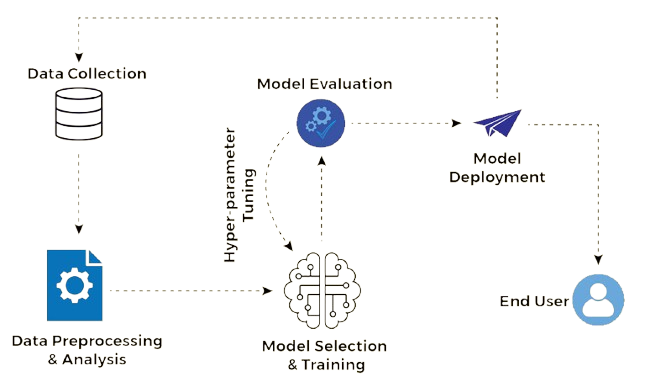
Model Deployment Is The Process Of Making A Trained Machine Learning Model Available For Real-World Use. It Integrates Models Into Applications Or Services. Deployment Allows Users To Access Predictions. The Process Requires Scalability And Reliability. Monitoring Is Essential After Deployment. Cloud Platforms Simplify Deployment Tasks. Successful Deployment Delivers Business Value. It Bridges The Gap Between Development And Production.
79. What Is Model Monitoring?
Ans:
Model Monitoring Tracks The Performance Of Machine Learning Models After Deployment. It Detects Accuracy Drops And Operational Issues. Monitoring Ensures Consistent Performance Over Time. Data Changes Can Affect Predictions. Continuous Evaluation Helps Maintain Reliability. Alerts Can Signal Potential Problems. Monitoring Supports Long-Term Model Success. It Is A Critical Part Of The ML Lifecycle.
80. What Is Data Drift?
Ans:
Data Drift Occurs When The Statistical Properties Of Input Data Change Over Time. These Changes Can Reduce Model Accuracy. Drift Happens Due To Evolving User Behavior Or Environments. Monitoring Helps Detect Data Drift Early. Retraining May Be Required To Restore Performance. Data Drift Impacts Production Systems. Organizations Must Manage Drift Carefully. It Is A Common Challenge In Machine Learning.
81. What Is Concept Drift?
Ans:
- Concept Drift Occurs When The Relationship Between Inputs And Outputs Changes Over Time. The Model’s Learned Patterns Become Less Relevant.
- This Can Reduce Prediction Accuracy. Concept Drift Is Common In Dynamic Environments. Regular Evaluation Helps Detect Changes.
- Retraining Models Can Address The Issue. Managing Concept Drift Improves Reliability. It Ensures Models Remain Effective In Changing Conditions
82. What Is Explainable AI (XAI)?
Ans:
Explainable AI Refers To Methods That Make AI Decisions Easier To Understand. It Improves Transparency And Trust In Models. XAI Helps Users Interpret Predictions. The Approach Is Important In Sensitive Domains Like Healthcare. Explainability Supports Regulatory Compliance. It Enables Better Decision Making. Organizations Use XAI To Build Confidence In AI Systems. Transparent Models Encourage Responsible AI Adoption.
83. What Is AI Ethics?
Ans:
AI Ethics Focuses On The Responsible Development And Use Of Artificial Intelligence. It Addresses Fairness, Transparency, And Accountability. Ethical AI Reduces Bias And Harm. Organizations Must Consider Privacy And Security. Ethical Guidelines Promote Responsible Innovation. AI Ethics Builds Public Trust. It Is An Important Topic In Modern Technology. Responsible AI Benefits Both Businesses And Society.
84. What Is Bias In AI?
Ans:
Bias In AI Occurs When Models Produce Unfair Or Unequal Outcomes. It Often Results From Biased Training Data. Bias Can Affect Decision Making. Detecting And Reducing Bias Is Important. Fairness Metrics Help Evaluate Models. Ethical AI Practices Address Bias Issues. Organizations Must Monitor AI Systems Carefully. Reducing Bias Leads To More Equitable Outcomes.
85. What Is Reinforcement Learning Agent?
Ans:
A Reinforcement Learning Agent Is An Entity That Learns By Interacting With An Environment. It Takes Actions And Receives Rewards Or Penalties. The Agent Improves Through Experience. Its Goal Is To Maximize Long-Term Rewards. Reinforcement Learning Is Used In Robotics And Gaming. Agents Continuously Adapt Their Strategies. Learning Occurs Through Repeated Interactions. Effective Agents Develop Intelligent Decision-Making Capabilities.
86. What Is A Reward Function?
Ans:
A Reward Function Defines The Feedback Given To A Reinforcement Learning Agent. It Measures The Quality Of Actions Taken. Positive Rewards Encourage Desired Behavior. Negative Rewards Discourage Poor Decisions. The Reward Function Guides Learning. Designing Effective Rewards Is Important. It Influences Agent Performance Significantly. A Well-Defined Reward Function Accelerates Learning Success.
87. What Is Azure Machine Learning?
Ans:
- Azure Machine Learning Is A Cloud-Based Service For Building, Training, And Deploying ML Models. It Provides Tools For End-To-End AI Development.
- The Platform Supports Collaboration And Automation. Azure ML Integrates With Other Azure Services. It Simplifies Model Management And Deployment.
- Data Scientists Use It For Scalable Solutions. Azure ML Supports Responsible AI Practices. It Is A Key Service In Microsoft’s AI Ecosystem.
88. Write A Python Program To Train A Decision Tree Classifier
Ans:
This Program Creates A Simple Decision Tree Classification Model. The Algorithm Learns Patterns From Labeled Training Data
- from sklearn.tree import DecisionTreeClassifier
- X = [[1], [2], [3], [4]]
- y = [0, 0, 1, 1]
- model = DecisionTreeClassifier()
- model.fit(X, y)
- print(model.predict([[3]]))
89. What Is Feature Selection?
Ans:
Feature Selection Is The Process Of Choosing The Most Relevant Features For A Machine Learning Model. It Removes Irrelevant Or Redundant Variables. Feature Selection Improves Accuracy And Efficiency. Smaller Feature Sets Reduce Complexity. The Technique Helps Prevent Overfitting. It Improves Model Interpretability. Feature Selection Supports Faster Training. Selecting Important Features Leads To Better Predictions.
90. What Is Feature Extraction?
Ans:
Feature Extraction Transforms Raw Data Into Meaningful Features For Machine Learning. It Reduces Data Complexity While Preserving Important Information. The Technique Improves Model Performance. Feature Extraction Is Common In Image And Text Processing. It Helps Represent Data More Effectively. Automated Extraction Is Common In Deep Learning. The Process Supports Better Predictions. Useful Features Enhance Learning Outcomes.
91. What Is ROC Curve?
Ans:
The ROC Curve Is A Graph Used To Evaluate Classification Models. It Plots True Positive Rate Against False Positive Rate. The Curve Shows Performance At Different Thresholds. A Better Model Produces A Curve Closer To The Top Left Corner. ROC Analysis Helps Compare Models. It Is Widely Used In Binary Classification. The Curve Provides Valuable Evaluation Insights. ROC Curves Support Better Model Selection Decisions.
92. What Is AUC?
Ans:
AUC Stands For Area Under The ROC Curve. It Measures The Overall Performance Of A Classification Model. Higher AUC Values Indicate Better Discrimination Ability. AUC Is Independent Of Classification Thresholds. The Metric Helps Compare Different Models. Values Range From Zero To One. A Higher Score Reflects Better Performance. AUC Is Widely Used In Machine Learning Evaluation.
93. What Is Time Series Analysis?
Ans:
- Time Series Analysis Involves Studying Data Collected Over Time. It Identifies Trends, Patterns, And Seasonal Effects. Time Series Models Predict Future Values.
- Applications Include Stock Forecasting And Demand Planning. Historical Data Plays A Critical Role. Specialized Algorithms Handle Temporal Dependencies.
- Accurate Forecasting Supports Better Decisions. Time Series Analysis Is Important In Many Industries.
94. What Is Forecasting?
Ans:
Forecasting Is The Process Of Predicting Future Outcomes Based On Historical Data. It Uses Statistical And Machine Learning Methods. Forecasting Supports Business Planning. Accurate Predictions Improve Decision Making. Common Applications Include Sales And Inventory Forecasting. Models Learn Patterns From Past Data. Forecasting Helps Organizations Prepare For Future Events. It Is A Key Use Case Of Data Science.
95. What Is Anomaly Detection?
Ans:
Anomaly Detection Identifies Unusual Patterns Or Outliers In Data. These Patterns May Indicate Fraud, Errors, Or Rare Events. The Technique Is Used In Security And Monitoring Systems. Machine Learning Helps Detect Hidden Anomalies. Early Detection Reduces Risks. Anomaly Detection Improves Operational Efficiency. It Supports Proactive Problem Resolution. Identifying Outliers Is Critical In Many Applications.
96. What Is Recommendation System?
Ans:
A Recommendation System Suggests Relevant Products, Services, Or Content To Users. It Analyzes User Preferences And Behavior. Recommendation Engines Improve User Experience. They Are Common In E-Commerce And Streaming Platforms. Collaborative And Content-Based Filtering Are Popular Methods. Recommendations Increase Engagement And Sales. The Systems Learn Continuously From Interactions. Personalized Suggestions Deliver Greater Value To Users.
97. What Is Collaborative Filtering?
Ans:
- Collaborative Filtering Is A Recommendation Technique Based On User Behavior And Preferences. It Identifies Similar Users Or Items.
- Recommendations Are Generated Using Shared Patterns. The Method Requires Historical Interaction Data. Collaborative Filtering Is Popular In E-Commerce.
- It Produces Personalized Suggestions. The Technique Enhances Customer Experience. It Is Widely Used In Recommendation Systems
98. What Is Content-Based Filtering?
Ans:
Content-Based Filtering Recommends Items Similar To Those A User Previously Liked. It Uses Item Features And Attributes. Recommendations Depend On Individual Preferences. The Method Does Not Require Data From Other Users. Content-Based Filtering Supports Personalization. It Works Well With Detailed Item Information. The Approach Improves Recommendation Quality. It Is Commonly Used In Modern Platforms.
99. What Is Federated Learning?
Ans:
Federated Learning Is A Machine Learning Approach That Trains Models Across Multiple Devices Without Sharing Raw Data. It Improves Privacy And Security. Data Remains On Local Devices. Only Model Updates Are Shared. Federated Learning Reduces Data Transfer Requirements. It Supports Distributed AI Systems. The Technique Is Useful For Sensitive Data Applications. It Enables Privacy-Preserving Machine Learning.
100. What Is MLOps?
Ans:
- MLOps Refers To The Practice Of Managing Machine Learning Lifecycles Using DevOps Principles. It Combines Development, Deployment, And Operations.
- MLOps Improves Collaboration Between Teams. It Automates Model Training And Monitoring Processes. The Approach Enhances Scalability And Reliability.
- MLOps Supports Continuous Improvement Of AI Systems. It Is Essential For Production-Ready Machine Learning Solutions. MLOps Helps Deliver AI Applications Efficiently And Consistently.