LMS
LMS
Last updated on 13th Jun 2026| 7683

SQL is one of the most important skills for freshers preparing for Infosys interviews. Infosys frequently asks SQL questions to evaluate a candidate’s understanding of databases, queries, joins, constraints, functions, and data manipulation techniques. These questions help interviewers assess problem-solving ability, logical thinking, and database management knowledge. Preparing commonly asked SQL interview questions can improve confidence and increase the chances of success in both technical and HR rounds. This collection of recently asked Infosys SQL interview questions and answers is designed to help freshers strengthen their SQL fundamentals and perform well in interviews.
1. What Is SQL?
Ans:
SQL (Structured Query Language) Is Used To Manage And Manipulate Data Stored In Relational Databases. It Allows Users To Create, Read, Update, And Delete Records Efficiently. SQL Is Widely Used By Organizations To Handle Business Data. It Supports Querying Large Datasets Quickly. SQL Also Helps In Database Administration And Reporting. Most Modern Database Systems Support SQL. It Is One Of The Most Important Skills For Data And Software Professionals.
2. What Is A Database?
Ans:
A Database Is An Organized Collection Of Data Stored Electronically. It Helps Store, Retrieve, And Manage Information Efficiently. Databases Reduce Data Redundancy And Improve Consistency. They Support Multiple Users Accessing Data Simultaneously. Businesses Use Databases For Customer, Sales, And Inventory Information. Databases Can Be Relational Or Non-Relational. Proper Database Design Improves Performance And Security.
3. What Is A Table In SQL?
Ans:
A Table Is A Structured Format Used To Store Data In Rows And Columns. Each Row Represents A Record While Each Column Represents An Attribute. Tables Are The Basic Building Blocks Of Relational Databases. Data Is Organized For Easy Access And Management. Relationships Can Exist Between Different Tables. SQL Queries Operate On Tables To Retrieve Information. Well-Designed Tables Improve Database Efficiency.
4. What Is A Primary Key?
Ans:
A Primary Key Is A Column Or Group Of Columns That Uniquely Identifies Each Record In A Table. It Does Not Allow Duplicate Or NULL Values. Primary Keys Ensure Data Integrity. Every Table Should Ideally Have A Primary Key. It Helps Establish Relationships Between Tables. Queries Become More Efficient With Proper Keys. Primary Keys Play A Vital Role In Database Design. It Ensures Each Record Can Be Accessed And Managed Uniquely. A Well-Defined Primary Key Improves Database Performance And Reliability.
5. Write A SQL Query To Retrieve Employees Whose Salary Is Greater Than 50000.
Ans:
This Query Filters Employees Based On Salary Conditions. The WHERE Clause Selects Only Records With Salary Greater Than 50000. It Helps Retrieve Specific Data Efficiently.
- SELECT EmpID, EmpName, Salary
- FROM Employee
- WHERE Salary > 50000;
6. What is the difference between DELETE and TRUNCATE?
Ans:
DELETE removes specific rows from a table based on a condition. It can be rolled back if used within a transaction. TRUNCATE removes all rows from a table quickly. TRUNCATE is faster because it does not log individual row deletions. DELETE can use a WHERE clause, while TRUNCATE cannot. TRUNCATE resets identity values in many databases. Both commands remove data but behave differently.
7. What is the difference between WHERE and HAVING?
Ans:
- WHERE filters rows before grouping occurs. It is used with SELECT, UPDATE, and DELETE statements. HAVING filters groups after the GROUP BY operation.
- WHERE cannot use aggregate functions directly. HAVING is mainly used with aggregate functions like COUNT and SUM.
- WHERE improves query performance by reducing rows early. HAVING is useful for filtering grouped results.
8. What is normalization?
Ans:
Normalization is the process of organizing data to reduce redundancy. It divides large tables into smaller related tables. Normalization improves data consistency and integrity. It minimizes duplicate data storage. Common normal forms include 1NF, 2NF, and 3NF. Proper normalization makes databases easier to maintain. However, excessive normalization can sometimes affect performance.
9. What is denormalization?
Ans:
Denormalization is the process of combining tables to improve query performance. It reduces the number of joins required in queries. Denormalization can increase data redundancy. It is often used in reporting and data warehousing systems. This approach speeds up read operations. However, it may make updates more complex. The choice depends on application requirements.
10. What is a NULL value?
Ans:
A NULL value represents missing or unknown data. It is not the same as zero or an empty string. NULL indicates that no value has been assigned. Special SQL functions are used to handle NULL values. Comparisons with NULL require IS NULL or IS NOT NULL. NULLs can affect aggregate calculations. Proper handling of NULL values is important in queries.
11. What is a unique constraint?
Ans:
- A unique constraint ensures that all values in a column are distinct. It prevents duplicate entries in the specified column.
- Unlike a primary key, it can allow one NULL value in some databases. A table can have multiple unique constraints.
- Unique constraints help maintain data accuracy. They are commonly used for fields like email addresses. This constraint improves data integrity.
12. What is the difference between CHAR and VARCHAR
Ans:
CHAR stores fixed-length character data. VARCHAR stores variable-length character data. CHAR always uses the defined storage size, even if the value is shorter. VARCHAR uses only the necessary storage space. CHAR can be faster for fixed-size values. VARCHAR is more efficient for varying-length text. Choosing the right type helps optimize storage.
13. What is a join in SQL?
Ans:
A join combines data from two or more tables based on related columns. Joins help retrieve meaningful information from multiple tables. Common types include INNER JOIN, LEFT JOIN, RIGHT JOIN, and FULL JOIN. INNER JOIN returns matching rows from both tables. LEFT JOIN returns all rows from the left table. RIGHT JOIN returns all rows from the right table. FULL JOIN returns all matching and non-matching rows.
14. What is an INNER JOIN?
Ans:
INNER JOIN returns only the rows that have matching values in both tables. It is the most commonly used join type. Non-matching rows are excluded from the result. INNER JOIN helps retrieve related data efficiently. It requires a condition that defines the relationship. The result contains only valid matches. This join is useful for combining connected records.
15. What is a LEFT JOIN?
Ans:
LEFT JOIN returns all rows from the left table and matching rows from the right table. If there is no match, NULL values are returned for the right table columns. It is useful when all records from the left table are needed. LEFT JOIN helps identify missing relationships. The left table is always fully included. Non-matching right-side data appears as NULL. This join is widely used in reporting queries.
16. What is a RIGHT JOIN?
Ans:
- RIGHT JOIN returns all rows from the right table and matching rows from the left table. If no match exists, NULL values appear for the left table columns.
- It is the opposite of LEFT JOIN. RIGHT JOIN is useful when all records from the right table are required. The right table is always fully included.
- Non-matching left-side data becomes NULL. It helps analyze relationships from the right table’s perspective
17. What is a FULL JOIN?
Ans:
FULL JOIN returns all rows from both tables. Matching rows are combined, while non-matching rows contain NULL values. It includes records that exist in either table. FULL JOIN is useful for identifying unmatched data. Not all database systems support FULL JOIN directly. It provides a complete view of both tables. This join is commonly used in data comparison tasks
18. What is a self join?
Ans:
A self join occurs when a table is joined with itself. It is useful for comparing rows within the same table. Aliases are used to differentiate the table instances. Self joins help represent hierarchical relationships. For example, employees and their managers can be stored in one table. The join condition defines how rows are related. This technique is common in organizational data structures.
19. What is an index?
Ans:
An index is a database object that improves query performance. It allows faster searching and retrieval of data. Indexes work similarly to an index in a book. They reduce the amount of data scanned during queries. However, indexes require additional storage space. Too many indexes can slow down insert and update operations. Proper indexing balances performance and storage efficiency.
20. What Is The Difference Between WHERE And HAVING?
Ans:
| Feature | WHERE | HAVING |
|---|---|---|
| Definition | WHERE Filters Individual Rows Before Grouping. | HAVING Filters Groups After Grouping Is Done. m |
| Usage | Used To Filter Records From A Table | Used To Filter Grouped Results |
| Execution Order | Executed Before GROUP BY | Executed After GROUP BY. |
| Aggregate Functions | Cannot Directly Use Aggregate Functions Like SUM(), AVG(), COUNT(). | Can Use Aggregate Functions. |

21. What is a non-clustered index?
Ans:
- A non-clustered index stores a separate structure containing indexed values and pointers to the actual data rows. A table can have multiple non-clustered indexes.
- It improves query performance for specific searches. Unlike a clustered index, it does not change the physical order of the table.
- Non-clustered indexes are useful for frequently searched columns. They require additional storage space. Proper use of non-clustered indexes can greatly speed up queries.
22. What is a view?
Ans:
A view is a virtual table based on the result of a SQL query. It does not store data physically. Views simplify complex queries by hiding underlying table details. They improve security by restricting access to specific columns or rows. Views can be queried like regular tables. Changes in the base tables are reflected in the view. They are useful for reporting and data abstraction.
23. What is a stored procedure?
Ans:
A stored procedure is a precompiled collection of SQL statements stored in the database. It can accept input parameters and return results. Stored procedures improve performance by reducing repeated query compilation. They enhance security by controlling access to database operations. Business logic can be centralized within procedures. They are reusable and easier to maintain. Stored procedures are widely used in enterprise applications.
24. What is a trigger?
Ans:
A trigger is a special database object that executes automatically when certain events occur. Events include INSERT, UPDATE, and DELETE operations. Triggers help enforce business rules and maintain data integrity. They can log changes or update related tables automatically. Triggers run behind the scenes without user intervention. However, excessive use can affect performance. Proper design is important when using triggers.
25. What is a transaction?
Ans:
- A transaction is a sequence of one or more SQL operations treated as a single unit of work. Transactions ensure data consistency and reliability.
- They follow the ACID properties. If all operations succeed, the transaction is committed. If any operation fails, the transaction is rolled back.
- Transactions are important in banking and financial systems. They prevent partial updates and maintain accuracy.
26. What are ACID properties?
Ans:
- ACID stands for Atomicity, Consistency, Isolation, and Durability. Atomicity ensures that all operations in a transaction succeed or fail together.
- Consistency keeps the database in a valid state. Isolation prevents transactions from interfering with each other. Durability guarantees that committed changes are permanently stored.
- These properties ensure reliable transaction processing. ACID is a fundamental concept in relational databases.
27. What is the difference between UNION and UNION ALL?
Ans:
UNION combines the results of multiple queries and removes duplicate rows. UNION ALL combines results but keeps duplicates. UNION requires additional processing to eliminate duplicates. UNION ALL is generally faster because it skips duplicate checking. Both queries must have the same number of columns. The column data types should also be compatible. Choosing between them depends on whether duplicates are needed.
28. What is GROUP BY?
Ans:
GROUP BY is used to arrange rows into groups based on one or more columns. It is commonly used with aggregate functions. GROUP BY helps summarize data, such as total sales per department. Each group produces a single result row. It makes reporting and analysis easier. The grouped columns must appear in the SELECT statement. GROUP BY is essential for data aggregation tasks.
29. Write A SQL Query To Display Duplicate Records In A Table.
Ans:
This Query Identifies Duplicate Email Values In The Employee Table. GROUP BY Groups Similar Records Together. HAVING Filters Only Those Groups Having More Than One Record. It Is Commonly Used For Data Validation Tasks.
- SELECT Email, COUNT(*)
- FROM Employee
- GROUP BY Email
- HAVING COUNT(*) > 1;
30. What is the COUNT function?
Ans:
The COUNT function returns the number of rows that match a query condition. COUNT(*) counts all rows, including those with NULL values. COUNT(column_name) counts only non-NULL values in the specified column. It is commonly used for reporting and analysis. COUNT can be combined with GROUP BY for grouped counts. The function helps measure data volume. It is one of the most frequently used aggregate functions.
31. What is the SUM function?
Ans:
The SUM function calculates the total of numeric values in a column. It ignores NULL values during calculation. SUM is often used to find total sales, salaries, or expenses. The function can be combined with GROUP BY to calculate totals for each group. It works only on numeric data types. SUM helps in financial and business reporting. It is a key aggregate function in SQL.
32. What is the AVG function?
Ans:
The AVG function calculates the average value of a numeric column. It ignores NULL values when computing the result. AVG is useful for finding average salaries, marks, or sales figures. The function can be used with GROUP BY for group-wise averages. It works only on numeric data types. AVG helps in statistical analysis and reporting. It is commonly used in business intelligence queries.
33. What is the MAX function?
Ans:
The MAX function returns the highest value in a column. It works with numeric, date, and text data types. MAX ignores NULL values during evaluation. It is useful for finding the maximum salary, latest date, or highest score. The function can be combined with GROUP BY for grouped results. MAX helps identify top values in a dataset. It is frequently used in reporting queries.
34. What is the MIN function?
Ans:
The MIN function returns the smallest value in a column. It works with numeric, date, and text data types. MIN ignores NULL values during calculation. It is useful for finding the lowest salary, earliest date, or minimum score. The function can be used with GROUP BY for group-wise minimums. MIN helps identify the smallest values in a dataset. It is a commonly used aggregate function.
35. What is a subquery?
Ans:
- A subquery is a query nested inside another SQL query. It can appear in SELECT, FROM, or WHERE clauses. Subqueries help break complex problems into smaller parts.
- They can return a single value, multiple values, or a table. Subqueries are useful for filtering and calculations.
- However, excessive nesting can affect performance. Proper indexing can improve subquery efficiency.
36. What is a correlated subquery?
Ans:
A correlated subquery is a subquery that depends on values from the outer query. It is executed once for each row processed by the outer query. Correlated subqueries are useful for row-by-row comparisons. They can be more complex and slower than regular subqueries. Proper indexing helps improve performance. They are commonly used in filtering and ranking scenarios. Understanding correlated subqueries is important for advanced SQL queries.
37. What is the difference between DROP and TRUNCATE?
Ans:
DROP removes the entire table, including its structure and data. After dropping a table, it no longer exists in the database. TRUNCATE removes all rows but keeps the table structure intact. TRUNCATE is faster because it does not log individual row deletions. DROP cannot be rolled back in many database systems. TRUNCATE may be rolled back if used within a transaction. The choice depends on whether the table structure is needed.
38. What is a composite key?
Ans:
A composite key is a primary key made up of two or more columns. It is used when a single column cannot uniquely identify a record. Composite keys ensure uniqueness across the combined columns. They are common in junction tables for many-to-many relationships. Proper indexing is important for performance. Composite keys help maintain data integrity. They are widely used in relational database design.
39. What is referential integrity?
Ans:
Referential integrity ensures that relationships between tables remain consistent. It prevents invalid references between related tables. Foreign keys enforce referential integrity. For example, a child record cannot reference a non-existent parent record. This helps maintain accurate and reliable data. Referential integrity reduces data inconsistencies. It is a key principle of relational databases.
40. What is the difference between PRIMARY KEY and UNIQUE KEY?
Ans:
- A PRIMARY KEY uniquely identifies each row and does not allow NULL values. A table can have only one primary key.
- A UNIQUE KEY also ensures unique values but may allow one NULL value in some databases. A table can have multiple unique keys.
- Primary keys are commonly used for table relationships. Unique keys are often used for fields like email addresses. Both constraints help maintain data integrity.

41. What is a candidate key?
Ans:
A candidate key is a column or combination of columns that can uniquely identify a row in a table. A table may have multiple candidate keys. One candidate key is chosen as the primary key. The remaining candidate keys are called alternate keys. Candidate keys cannot contain duplicate values. They help ensure data uniqueness. Identifying candidate keys is an important step in database design.
42. What is an alternate key?
Ans:
An alternate key is a candidate key that was not selected as the primary key. It still uniquely identifies records in the table. Alternate keys help maintain additional uniqueness constraints. They are often implemented using UNIQUE constraints. A table can have multiple alternate keys. They provide flexibility in database design. Alternate keys improve data integrity and validation.
43. What is a super key?
Ans:
A super key is any set of columns that uniquely identifies a row in a table. It may contain extra columns beyond what is necessary. Every candidate key is a super key, but not every super key is a candidate key. Super keys help define uniqueness in relational databases. They are used during database normalization. Understanding super keys helps in identifying candidate keys. They play an important role in database design concepts.
44. What is the difference between SQL and NoSQL?
Ans:
- SQL databases are relational and store data in tables. They use structured schemas and support SQL queries.
- NoSQL databases are non-relational and can store data as documents, key-value pairs, graphs, or columns. SQL databases are best for structured data and complex transactions.
- NoSQL databases are better for large-scale, flexible data storage. SQL follows ACID properties, while NoSQL often focuses on scalability. The choice depends on application requirements.
45. Write A SQL Query To Find The Second Highest Salary From An Employee Table.
Ans:
This Query Finds The Second Highest Salary In The Employee Table. The Inner Query Retrieves The Highest Salary. The Outer Query Returns The Maximum Salary Less Than The Highest Salary. It Is A Common Infosys SQL Interview Question For Freshers.
- SELECT MAX(Salary)
- FROM Employee
- WHERE Salary < (SELECT MAX(Salary) FROM Employee);
46. What is the difference between a database and a schema?
Ans:
A database is a collection of related data and database objects. A schema is a logical container within a database. A database can contain multiple schemas. Schemas help organize tables, views, and procedures. They improve security and management. Databases store the actual data, while schemas define its structure. Understanding this distinction is important in database administration.
47. What is a cursor?
Ans:
A cursor is a database object used to process query results row by row. It is useful when individual row operations are needed. Cursors provide more control than set-based queries. However, they are generally slower than regular SQL operations. Cursors are often used in stored procedures. Proper use of cursors is important for performance. They should be avoided when set-based solutions are possible.
48. What is the difference between a cursor and a set-based query?
Ans:
- A cursor processes rows one at a time, while a set-based query processes all rows together. Set-based queries are usually faster and more efficient.
- Cursors provide greater control for complex row-by-row operations. However, they consume more resources. Set-based operations are preferred in most SQL scenarios.
- Cursors should be used only when necessary. Understanding both approaches helps write optimized queries.
49. What is a sequence?
Ans:
A sequence is a database object that generates unique numeric values automatically. It is commonly used for primary key generation. Sequences can increment by a specified value. They are independent of any particular table. Multiple tables can use the same sequence. Sequences improve consistency in generating unique identifiers. They are widely supported in databases like Oracle and PostgreSQL.
50. What is an auto-increment column?
Ans:
An auto-increment column automatically generates a unique number for each new row. It is commonly used for primary keys. The database handles the value generation automatically. This reduces the need for manual key management. Auto-increment values usually increase sequentially. Different databases use different syntax for this feature. It simplifies record insertion and ensures uniqueness.
51. What is a check constraint?
Ans:
A check constraint ensures that values in a column satisfy a specified condition. It helps enforce business rules at the database level. For example, a salary column can be restricted to positive values. Invalid data is rejected automatically. Check constraints improve data accuracy and integrity. They can be applied to one or more columns. Using check constraints reduces errors during data entry.
52. What is a default constraint?
Ans:
A default constraint automatically assigns a value to a column when no value is provided during insertion. It helps maintain consistent data. For example, a status column can default to “Active”. Default values reduce the need for manual input. They improve data quality and simplify inserts. Different databases support default constraints with similar syntax. This feature is widely used in table design.
53. What is a not null constraint?
Ans:
A NOT NULL constraint ensures that a column cannot contain NULL values. It requires every row to have a valid value for that column. This helps maintain data completeness. Important fields like names and IDs often use NOT NULL constraints. The database rejects inserts or updates that violate the rule. NOT NULL improves data reliability. It is one of the most commonly used constraints.
54. What is the difference between DELETE, TRUNCATE, and DROP?
Ans:
- DELETE removes selected rows and can use a WHERE clause. TRUNCATE removes all rows quickly but keeps the table structure.
- DROP removes both the table structure and its data permanently. DELETE logs individual row deletions, making it slower.
- TRUNCATE is faster because it logs minimal information. DROP completely removes the table from the database. Choosing the correct command depends on the requirement.
55. What is the BETWEEN operator?
Ans:
The BETWEEN operator filters values within a specified range. It includes both the starting and ending values. BETWEEN can be used with numbers, dates, and text. It simplifies queries that check for ranges. For example, it can retrieve employees with salaries between two amounts. Using BETWEEN makes SQL queries more readable. It is commonly used in reporting and filtering tasks.
56. What is the IN operator?
Ans:
The IN operator checks whether a value matches any value in a list. It is a shorter alternative to multiple OR conditions. IN can be used with numbers, text, and subqueries. It improves query readability and maintainability. For example, it can filter employees from specific departments. The operator returns rows that match any listed value. It is widely used in SQL filtering conditions.
57. What is the LIKE operato
Ans:
The LIKE operator searches for patterns in text values. It is commonly used with wildcard characters. The percent sign (%) represents any number of characters. The underscore (_) represents a single character. LIKE is useful for partial text searches. For example, it can find names starting with a specific letter. This operator is frequently used in search features.
58. What is the difference between LIKE and IN?
Ans:
LIKE is used for pattern matching in text values. IN is used to match exact values from a list. LIKE supports wildcard characters such as % and _. IN checks whether a value exists in a specified set. LIKE is useful for partial searches, while IN is useful for exact matches. Both operators are commonly used in WHERE clauses. Choosing the right operator improves query accuracy.
59. What is the ORDER BY clause?
Ans:
ORDER BY is used to sort query results. It can sort data in ascending or descending order. The default order is ascending. Multiple columns can be used for sorting. ORDER BY helps present data in a meaningful sequence. It is commonly used in reports and user interfaces. Proper sorting improves data readability.
60. What Is The Difference Between DELETE And TRUNCATE?
Ans:
| Feature | DELETE | TRUNCATE |
|---|---|---|
| Definition | DELETE Removes Selected Rows From A Table | TRUNCATE Removes All Rows From A Table. |
| WHERE Clause | Supports WHERE Clause To Delete Specific Records. | Does Not Support WHERE Clause. |
| Row Removal | Removes Rows One By One. | Removes All Rows At Once. |
| Speed | Slower Compared To TRUNCATE. | Faster Because Minimal Logging Is Used |

Learn SQL Training with Advanced Concepts By Industry Experts
- Instructor-led Sessions
- Real-life Case Studies
- Assignments
61. What is the DISTINCT keyword?
Ans:
DISTINCT removes duplicate rows from query results. It returns only unique values. DISTINCT can be applied to one or more columns. It is useful for identifying unique records. However, using DISTINCT may increase query processing time. It is commonly used in reporting and analysis. Proper indexing can help improve performance when using DISTINCT.
62. What is the difference between DISTINCT and GROUP BY?
Ans:
DISTINCT removes duplicate rows from the result set. GROUP BY groups rows together for aggregation. DISTINCT is used when only unique values are needed. GROUP BY is used with aggregate functions like COUNT and SUM. Both can produce similar results in some cases. GROUP BY offers more flexibility for calculations. Understanding the difference helps write accurate queries.
63. What is a temporary table?
Ans:
- A temporary table is a table that exists only for a limited period. It is typically used to store intermediate query results.
- Temporary tables help simplify complex operations. They are automatically removed when the session ends. Temporary tables can improve query readability.
- They are useful in stored procedures and reporting tasks. Proper use can enhance performance and organization.
64. What is the difference between a temporary table and a permanent table?
Ans:
A permanent table remains in the database until it is explicitly dropped. A temporary table exists only for the duration of a session or transaction. Temporary tables are used for intermediate data processing. Permanent tables store long-term business data. Temporary tables are automatically removed when no longer needed. Permanent tables require manual management. Both serve different purposes in database operations
65. What is a common table expression (CTE)?
Ans:
A Common Table Expression (CTE) is a temporary named result set defined within a query. It improves readability and organization of complex SQL statements. CTEs are created using the WITH keyword. They can be referenced multiple times within the same query. Recursive CTEs are used for hierarchical data processing. CTEs do not permanently store data. They are widely used for simplifying complex queries.
66. What is the difference between a CTE and a subquery?
Ans:
A subquery is nested inside another query, while a CTE is defined separately using the WITH clause. CTEs improve readability and make complex queries easier to manage. A CTE can be referenced multiple times in the same query. Subqueries are usually used once within the query. Recursive operations are easier with CTEs. Both help break complex logic into smaller parts. The choice depends on readability and query requirements.
67. What is a recursive CTE?
Ans:
- A recursive CTE is a Common Table Expression that references itself. It is used to process hierarchical or tree-structured data.
- Examples include employee-manager relationships and category hierarchies. A recursive CTE has an anchor query and a recursive query.
- The recursion continues until a stopping condition is met. Recursive CTEs simplify hierarchical data processing. They are supported in many modern relational databases.
68. What is a database lock?
Ans:
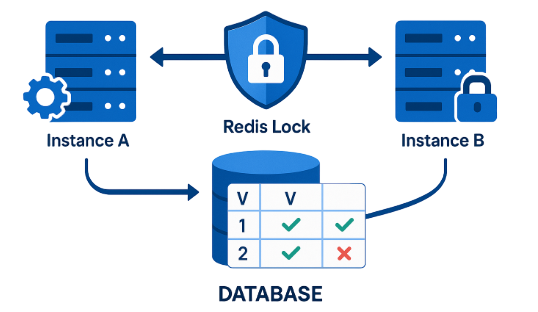
A database lock is a mechanism that controls access to data during transactions. It prevents multiple users from modifying the same data simultaneously. Locks help maintain data consistency and integrity. Common lock types include shared locks and exclusive locks. Excessive locking can reduce concurrency. Proper transaction design minimizes lock contention. Database systems automatically manage most locks.
69. Write A SQL Query To Fetch The Top 5 Highest Salaries.
Ans:
This Query Returns The Five Highest Salaries From The Employee Table. ORDER BY Sorts Salaries In Descending Order. TOP 5 Limits The Output To Five Records. It Demonstrates Knowledge Of Sorting And Limiting Results.
- SELECT TOP 5 Salary
- FROM Employee
- ORDER BY Salary DESC;
70. What is deadlock in SQL?
Ans:
Deadlock occurs when two or more transactions wait indefinitely for each other’s resources. Each transaction holds a lock that the other transaction needs. As a result, none of the transactions can proceed. Database systems detect deadlocks automatically. One transaction is usually terminated to resolve the deadlock. Proper transaction ordering helps prevent deadlocks. Understanding deadlocks is important for database performance.
71. What is normalization and why is it important?
Ans:
Normalization organizes data into smaller related tables to reduce redundancy. It improves data consistency and integrity. By eliminating duplicate data, updates become easier and more reliable. Normalization also saves storage space. Common normal forms include 1NF, 2NF, and 3NF. Well-normalized databases are easier to maintain. It is a fundamental concept in relational database design.
72. What is the first normal form (1NF)?
Ans:
First Normal Form (1NF) requires that each column contains atomic values. A table should not have repeating groups or multiple values in a single column. Each row must be uniquely identifiable. 1NF helps create a structured and consistent table design. It is the first step in normalization. Following 1NF reduces data complexity. This form improves query processing and data management.
73. What is the second normal form (2NF)?
Ans:
- Second Normal Form (2NF) requires that a table is already in 1NF and that all non-key columns depend on the entire primary key.
- It removes partial dependencies from tables with composite keys. This reduces redundancy and improves consistency. 2NF is useful when a table has multiple key columns.
- It ensures that each attribute is fully related to the primary key. Proper 2NF design simplifies maintenance. It is an important step toward efficient database structure.
.
74. What is the third normal form (3NF)?
Ans:
Third Normal Form (3NF) requires that a table is in 2NF and has no transitive dependencies. Non-key columns should depend only on the primary key. This further reduces redundancy and improves data integrity. 3NF helps create efficient and maintainable databases. It minimizes the risk of inconsistent data. Many practical database designs aim for 3NF. It is a widely accepted normalization standard.
75. What is denormalization and when is it used?
Ans:
Denormalization combines tables to reduce the number of joins required in queries. It improves read performance, especially in reporting systems. However, it increases data redundancy. Denormalization is commonly used in data warehouses and analytics applications. It can make updates more complex. The decision to denormalize depends on performance requirements. Balancing normalization and denormalization is important in database design.
76. What is a transaction log?
Ans:
A transaction log records all changes made to the database. It helps recover data in case of failures. The log stores information about inserts, updates, deletes, and transactions. Database systems use it for rollback and recovery operations. Transaction logs are essential for maintaining durability. They also support backup and restore processes. Proper log management is important for database performance.
77. What is the COMMIT command?
Ans:
COMMIT permanently saves all changes made during a transaction. Once committed, the changes become visible to other users. COMMIT marks the successful completion of a transaction. After a commit, the changes cannot be rolled back. It is an important part of transaction management. COMMIT helps maintain data consistency. Proper use ensures reliable database operations.
78. What is the ROLLBACK command?
Ans:
ROLLBACK cancels all changes made during a transaction. It restores the database to its previous state. ROLLBACK is used when an error occurs or when changes should not be saved. It helps maintain data integrity and consistency. Transactions that are rolled back leave no permanent changes. This command is essential for error handling. Proper use of ROLLBACK prevents incorrect data updates.
79. What is the SAVEPOINT command?
Ans:
- SAVEPOINT creates a checkpoint within a transaction. It allows partial rollback to a specific point instead of the entire transaction.
- Multiple savepoints can exist within a transaction. This provides greater control over transaction management. SAVEPOINT is useful in complex operations involving many steps.
- It helps recover from specific errors without losing all changes. Proper use improves flexibility and reliability.
80. What is the difference between COMMIT and ROLLBACK?
Ans:
COMMIT permanently saves transaction changes, while ROLLBACK cancels them. After a COMMIT, the changes become visible to other users. After a ROLLBACK, the database returns to its previous state. COMMIT is used when operations are successful. ROLLBACK is used when errors occur or changes should be undone. Both commands are essential for transaction control. Together they help maintain data integrity.
81. What is a scalar function?
Ans:
A scalar function returns a single value based on the input provided. It can perform calculations, string manipulation, or date operations. Examples include UPPER, LOWER, and ROUND. Scalar functions can be used in SELECT, WHERE, and other clauses. They simplify data processing within queries. These functions are executed for each row processed. Scalar functions are commonly used in everyday SQL tasks.
82. What is a table-valued function?
Ans:
A table-valued function returns a table instead of a single value. It can be used like a regular table in queries. These functions help encapsulate reusable query logic. They improve modularity and maintainability. Table-valued functions are useful for complex data retrieval operations. They can accept input parameters. Many database systems support both inline and multi-statement table-valued functions.
83. What is the difference between a function and a stored procedure?
Ans:
- A function returns a value and can be used within SQL expressions. A stored procedure performs actions and may or may not return values.
- Functions are generally used for calculations and transformations. Stored procedures are used for complex business logic and database operations.
- Functions cannot usually modify database state directly. Procedures can perform inserts, updates, and deletes. Both improve code reuse and maintainability.
84. Write A SQL Query To Join Employee And Department Tables.
Ans:
This Query Uses INNER JOIN To Combine Data From Employee And Department Tables. Matching Records Are Retrieved Based On Department ID. Joins Are Essential In Relational Databases.
- SELECT E.EmpName, D.DepartmentName
- FROM Employee E
- INNER JOIN Department D
- ON E.DeptID = D.DeptID;
85. What is the COALESCE function?
Ans:
The COALESCE function returns the first non-NULL value from a list of expressions. It is useful for handling missing data. COALESCE can replace NULL values with default values. It improves query results and readability. The function evaluates expressions from left to right. It is supported by most relational databases. COALESCE is commonly used in reporting and data transformation.
86. What is the difference between COALESCE and ISNULL?
Ans:
- Both COALESCE and ISNULL are used to handle NULL values. ISNULL is specific to certain database systems, while COALESCE follows the SQL standard.
- COALESCE can accept multiple expressions, whereas ISNULL usually accepts only two. COALESCE returns the first non-NULL value.
- ISNULL replaces NULL with a specified value. COALESCE is generally more portable across databases. Understanding both functions is useful for SQL development.
87. What is the CAST function?
Ans:
The CAST function converts a value from one data type to another. It is useful when different data types need to be compared or displayed. For example, numbers can be converted to strings or dates. CAST follows the SQL standard syntax. It improves data compatibility in queries. Proper type conversion helps avoid errors. CAST is commonly used in reporting and data formatting.
88. What is the CONVERT function?
Ans:
The CONVERT function also changes a value from one data type to another. It is commonly available in SQL Server and some other databases. CONVERT provides additional formatting options, especially for dates. It is useful when specific output formats are required. Like CAST, it improves data compatibility. The choice between CAST and CONVERT depends on the database system. Both functions are important for data transformation.
89. What is the difference between CAST and CONVERT?
Ans:
CAST is part of the SQL standard and works across many databases. CONVERT is database-specific and often provides additional formatting options. Both functions perform data type conversion. CAST is generally preferred for portability. CONVERT is useful when custom formatting is needed. The syntax differs slightly between the two functions. Understanding both helps in writing flexible SQL queries.
90. What is the LENGTH or LEN function?
Ans:
The LENGTH or LEN function returns the number of characters in a string. Different databases use different function names. It helps measure the size of text data. The function is useful for validation and formatting tasks. It ignores trailing spaces in some database systems. LENGTH or LEN is commonly used in text processing queries. Understanding string functions is important for SQL development.
91. What is the SUBSTRING function?
Ans:
- The SUBSTRING function extracts a portion of a string. It requires the starting position and the number of characters to return. SUBSTRING is useful for parsing text data.
- It can extract names, codes, or specific segments from strings. Different databases may have slight syntax variations.
- The function improves flexibility in string manipulation. It is widely used in data transformation tasks.
92. What is the difference between CHAR_LENGTH and LENGTH?
Ans:
- Both functions measure the length of a string, but their behavior can differ with multibyte characters. CHAR_LENGTH returns the number of characters.
- LENGTH may return the number of bytes used to store the string in some databases. This distinction is important for Unicode and multilingual data.
- Different database systems implement these functions differently. Understanding the difference helps avoid data processing issues. It is especially relevant for international applications
93. What is the CURRENT_DATE function?
Ans:
CURRENT_DATE returns the current date from the database system. It does not include the time portion. The function is useful for filtering and reporting based on today’s date. Different databases may have slightly different names for this function. CURRENT_DATE is evaluated when the query runs. It helps create dynamic queries. This function is commonly used in date-based operations.
94. What is the NOW or CURRENT_TIMESTAMP function?
Ans:
NOW or CURRENT_TIMESTAMP returns the current date and time. It is useful for recording transaction times and generating timestamps. The exact function name depends on the database system. The value is generated when the query executes. It is commonly used in audit and logging tables. CURRENT_TIMESTAMP follows the SQL standard. Understanding date-time functions is essential for database applications.
95. What is the difference between CURRENT_DATE and CURRENT_TIMESTAMP?
Ans:
- CURRENT_DATE returns only the date, while CURRENT_TIMESTAMP returns both the date and time. CURRENT_DATE is useful when time information is not needed.
- CURRENT_TIMESTAMP is used for precise event tracking. Both functions are generated dynamically by the database.
- They help create flexible date-based queries. Choosing the right function depends on the requirement. Understanding the difference improves query accuracy.
96. What is the EXPLAIN command?
Ans:
The EXPLAIN command shows how a database plans to execute a query. It provides information about indexes, joins, and table scans. EXPLAIN helps identify performance issues. Developers use it to optimize slow queries. The output varies between database systems. Understanding execution plans is important for database tuning. EXPLAIN is a valuable tool for SQL performance analysis.
97.Write A SQL Query To Find The Second Highest Salary From An Employee Table.
Ans:
This Query Finds The Second Highest Salary In The Employee Table. The Inner Query Retrieves The Highest Salary. The Outer Query Returns The Maximum Salary Less Than The Highest Salary. It Is A Common Infosys SQL Interview Question For Freshers.
- SELECT MAX(Salary)
- FROM Employee
- WHERE Salary < (SELECT MAX(Salary) FROM Employee);
98. What is an execution plan?
Ans:
An execution plan is a detailed description of how a database executes a query. It shows the sequence of operations performed by the optimizer. Execution plans include information about scans, joins, and index usage. They help identify bottlenecks and inefficiencies. Database administrators use them for performance tuning. Reading execution plans is an important troubleshooting skill. Proper analysis can significantly improve query performance.
99. What is indexing and why is it important?
Ans:
Indexing creates a structure that allows faster data retrieval. It reduces the amount of data scanned during queries. Indexes improve performance for search, join, and sorting operations. However, they require additional storage space. Too many indexes can slow down insert and update operations. Proper indexing balances read and write performance. Indexing is one of the most important database optimization techniques.
100. What are the advantages of SQL?
Ans:
- SQL is easy to learn and widely supported across database systems. It provides powerful commands for data retrieval and management.
- SQL ensures data consistency through constraints and transactions. It supports complex queries, joins, and aggregations.
- SQL is highly scalable and suitable for both small and large applications. It integrates well with programming languages and business tools. These advantages make SQL a fundamental skill for IT professionals
![Top Informatica Interview Questions & Answers – [UPDATED] Interview Question](https://www.acte.in/wp-content/uploads/2020/05/4-img-acte-1-400x218.jpeg)