LMS
LMS
Last updated on 07th Sep 2026| 8914

Infosys Workday Interview Questions And Selection Process Guide Provides A Structured Overview Of The Topics And Interview Rounds Candidates May Encounter When Applying For Workday-Related Roles. The Interview Generally Focuses On Workday HCM, Business Processes, Security, Reporting, Calculated Fields, EIB, Integrations, And Workday Studio. Candidates May Also Be Asked Scenario-Based Questions To Evaluate Their Problem-Solving And Troubleshooting Skills. The Selection Process Can Include Technical Discussions, Workday-Based Questions, Project Or Practical Discussions, And HR Or Managerial Rounds Depending On The Role. Freshers Are Usually Expected To Understand Core Workday Concepts And Explain Them Clearly, While Experienced Candidates May Face More Practical And Configuration-Oriented Questions. Preparing Workday Fundamentals, Real-Time Scenarios, Integration Concepts, Security, And Reporting Can Help Candidates Approach The Interview With Greater Confidence.
1. What Is Workday?
Ans:
Workday Is A Cloud-Based Enterprise Software Platform Used To Manage Human Resources, Finance, And Related Business Processes. It Provides Organizations With Applications For Human Capital Management, Payroll, Recruiting, Talent, And Financial Management. Workday Stores Business Information In A Centralized Cloud Environment. It Supports Real-Time Reporting, Analytics, Workflow Automation, And Business Process Management. The Platform Provides Role-Based Security To Control Access To Organizational Data. Workday Helps Organizations Simplify Business Operations And Manage Enterprise Information Efficiently.
2. What Is Workday HCM?
Ans:
- Workday HCM Is A Human Capital Management Solution Used To Manage Employee-Related Business Processes. It Supports Activities Such As Employee Information Management, Hiring, Compensation, Benefits, And Talent Management.
- Workday HCM Maintains Employee Data In A Centralized Cloud-Based System. It Provides Workflows For Automating Common Human Resource Processes.
- Managers And Employees Can Access Relevant Information Through Self-Service Features. Workday HCM Helps Organizations Manage Their Workforce Efficiently And Improve HR Operations.
3. What Is Workday Cloud?
Ans:
- Workday Cloud Is A Software-As-A-Service Environment That Delivers Workday Applications Through The Internet. Organizations Do Not Need To Maintain Traditional On-Premises Workday Application Servers.
- Workday Manages Infrastructure, Platform Maintenance, Updates, And Many Technical Operations. Users Can Access Workday Applications Through Supported Web Browsers And Devices.
- The Cloud Model Helps Organizations Scale Their Applications According To Business Requirements. Workday Cloud Provides A Centralized And Continuously Updated Environment For Enterprise Applications.
4. What Is A Workday Tenant?
Ans:
A Workday Tenant Is A Separate Instance Or Environment Used By An Organization To Configure And Run Workday Applications. Tenants Contain Organizational Data, Business Processes, Security Settings, And Configuration Information. Different Tenants Can Be Used For Development, Testing, Training, And Production Activities. The Production Tenant Generally Contains Live Business Data And Processes. Non-Production Tenants Are Commonly Used To Test Configuration Changes Before Deployment. Workday Tenants Help Organizations Manage Application Development, Testing, And Operational Activities Separately.
5. What Is Workday Business Process?
Ans:
A Workday Business Process Is A Configurable Workflow Used To Automate And Manage Business Activities. It Defines The Steps, Approvals, Conditions, And Actions Required To Complete A Business Transaction. Examples Include Hiring An Employee, Changing Compensation, Terminating Employment, And Requesting Leave. Business Processes Can Include Multiple Participants Based On Their Roles And Responsibilities. Workday Provides Notifications And Approvals As Part Of Business Process Execution. Business Processes Help Organizations Standardize And Automate Important Enterprise Operations.
6. What Is A Workday Organization?
Ans:
A Workday Organization Is A Structure Used To Represent Different Parts Of An Organization Within Workday. Organizations Can Represent Departments, Supervisory Units, Locations, Companies, Cost Centers, And Other Structures. They Help Organize Workers And Business Information In A Meaningful Hierarchy. Organizations Can Also Be Used For Reporting, Security, And Business Process Routing. Different Organization Types Support Different Business Requirements Within Workday. Proper Organization Configuration Helps Maintain Accurate Workforce And Organizational Data.
7. What Is A Supervisory Organization? Information Builder?
Ans:
A Supervisory Organization Is A Workday Organizational Structure Used To Group Workers Under A Manager Or Supervisory Hierarchy. It Represents A Management Structure Within An Organization. Workers Are Assigned To Supervisory Organizations And Usually Have A Manager Associated With Their Position Or Role. Supervisory Organizations Can Be Used For Hiring, Compensation, Performance, And Other HR Processes. They Also Help Determine Reporting Relationships And Business Process Responsibilities. Supervisory Organizations Are An Important Foundation For Managing Workforce Data In Workday.
8. What Is A Position In Workday?
Ans:
A Position In Workday Represents A Specific Job Slot Within An Organization. It Defines Information Such As Job Profile, Location, Supervisory Organization, And Other Position-Related Details. Positions Can Be Filled By Workers Through Hiring Or Staffing Processes. Organizations Can Use Positions To Control Workforce Planning And Staffing Requirements. Position Management Helps Maintain Clear Information About Available And Occupied Job Slots. It Supports Structured Workforce Administration And Organizational Planning.
9. What Is A Job Profile?
Ans:
- A Job Profile Is A Workday Configuration Object That Defines The General Characteristics Of A Job. It Can Include Information Such As Job Title, Job Description, Skills, Responsibilities, And Qualifications.
- Job Profiles Can Be Associated With Positions And Workers In The Organization. They Help Standardize Job Information Across Different Business Units.
- Job Profiles Can Also Support Recruiting, Compensation, Talent, And Workforce Management Processes. They Provide A Consistent Structure For Managing Different Types Of Jobs In Workday.
10. What Is A Worker In Workday?
Ans:
A Worker Is A Person Who Has A Work Relationship With An Organization And Is Represented In Workday. Workers Can Include Employees And Certain Types Of Contingent Workers. Workday Stores Information Such As Personal Details, Job Information, Compensation, And Organizational Assignments. Worker Information Can Be Updated Through Appropriate Business Processes. Security Controls Determine Which Worker Information Different Users Can View Or Modify. Worker Records Form An Important Part Of Workday Human Capital Management.
11. What Is The Difference Between Employee And Contingent Worker?
Ans:
| Aspect | Employee | Contingent Worker |
|---|---|---|
| Employment Type | Directly Employed By The Organization. | Hired Through A Staffing Agency Or As An Independent Worker |
| Benefits | May Be Eligible For Company Benefits Such As Insurance And Paid Leave. | Generally Does Not Receive The Same Benefits As Regular Employees. |
| Work Relationship | Includes servers, databases, middleware | Specific processes on application servers |
| Components | Has A Direct Employer-Employee Relationship With The Organization. | Has A Temporary Or Contractual Relationship With The Organization. |
12. What Is Workday Recruiting?
Ans:
- Workday Recruiting Is A Talent Acquisition Application Used To Manage The Hiring Process. It Supports Activities Such As Job Requisitions, Candidate Applications, Interviews, And Hiring.
- Recruiters And Hiring Managers Can Manage Candidate Information Through A Centralized System. Recruiting Processes Can Include Approvals, Notifications, Assessments, And Candidate Communication.
- The Application Can Integrate Recruiting Activities With Core HCM And Other Workday Modules. Workday Recruiting Helps Organizations Manage Recruitment Processes In A Structured And Efficient Manner.
13. What Is A Job Requisition?
Ans:
A Job Requisition Is A Request Created In Workday To Begin The Process Of Recruiting For A Position. It Contains Information Such As Job Profile, Hiring Organization, Location, Hiring Manager, And Recruiting Details. The Requisition Usually Goes Through An Approval Process Before Being Published. Once Approved, Recruiters Can Use It To Attract And Manage Candidates. Candidates Can Apply To Open Requisitions Through The Recruiting System. Job Requisitions Help Organizations Control And Standardize Their Hiring Activities.
14. What Is Workday Compensation?
Ans:
Workday Compensation Is A Function Used To Manage Employee Compensation And Related Processes. It Can Support Base Pay, Allowances, Bonuses, Merit Increases, And Other Compensation Components. Compensation Plans Can Be Configured According To Organizational Policies And Eligibility Rules. Managers Can Participate In Compensation Review And Planning Processes Through Workday. Approvals And Business Rules Help Ensure That Compensation Changes Follow Defined Policies. Workday Compensation Helps Organizations Manage Employee Pay Information In A Structured Way.
15. What Is Workday Payroll?
Ans:
Workday Payroll Is A Payroll Solution Used To Manage Employee Payroll Processes In Supported Regions. It Helps Organizations Calculate And Process Employee Pay Based On Configured Payroll Rules And Worker Information. Payroll Can Consider Compensation, Deductions, Taxes, Benefits, And Other Relevant Information. Payroll Processes Can Be Integrated With Core HCM And Time-Related Data. Organizations Can Use Payroll Reports And Controls To Monitor Payroll Activities. Workday Payroll Helps Automate Payroll Administration And Improve Payroll Data Management.
16. What Is Workday Benefits?
Ans:
Workday Benefits Is A Solution Used To Manage Employee Benefit Programs And Enrollment Processes. It Can Support Benefits Such As Health Insurance, Retirement Plans, And Other Organization-Specific Programs. Eligibility Rules Determine Which Benefits Are Available To Different Worker Groups. Employees Can Review And Select Eligible Benefits Through Self-Service Features. Benefits Information Can Be Connected With Other HR And Payroll Processes. Workday Benefits Helps Organizations Manage Employee Benefits In A Centralized And Consistent Manner.
17. What Is Workday Time Tracking?
Ans:
Workday Time Tracking Is A Feature Used To Record And Manage Worker Time Information. Employees Can Enter Or Submit Time According To Organizational Policies And Work Schedules. Managers Can Review And Approve Submitted Time Entries. Time Information Can Support Payroll, Absence, And Workforce Management Processes. Workday Can Apply Configured Rules To Validate And Process Time Data. Time Tracking Helps Organizations Maintain Accurate Records Of Worker Hours And Time-Related Activities..
18. What Is Workday Absence Management?
Ans:
- Workday Absence Management Is Used To Manage Employee Leave And Absence Processes. It Supports Different Types Of Absences Such As Vacation, Sick Leave, And Other Organization-Defined Leave Types.
- Eligibility And Accrual Rules Can Determine How Much Leave A Worker Can Receive. Employees Can Request Absence Through Self-Service Features.
- Managers Can Review And Approve Requests According To Configured Business Processes. Workday Absence Management Helps Organizations Track And Manage Employee Leave Efficiently.
19. What Is Workday Talent Management?
Ans:
Workday Talent Management Provides Tools For Managing Employee Talent And Career-Related Processes. It Can Support Performance Management, Goals, Skills, Career Development, And Succession Planning. Managers Can Track Employee Performance And Development Activities. Employees Can Participate In Goal Setting And Career Development Processes. Talent Information Can Be Connected With Other Workforce Management Data. Workday Talent Management Helps Organizations Develop Skills And Support Employee Growth.
20. What Is Workday Performance Management?
Ans:
- Workday Performance Management Is Used To Manage Employee Performance Evaluation And Related Activities. It Can Support Goal Setting, Performance Reviews, Feedback, And Development Discussions.
- Managers And Employees Can Participate In Performance-Related Business Processes. Organizations Can Configure Review Steps And Evaluation Criteria Based On Their Requirements.
- Performance Information Can Help Support Talent And Career Development Decisions. Workday Performance Management Helps Organizations Maintain Structured And Continuous Performance Processes.
21. What Is Workday Report?
Ans:
A Workday Report Is A Tool Used To Retrieve, Analyze, And Present Business Data From Workday. Reports Can Display Information About Workers, Organizations, Compensation, Recruiting, And Other Business Areas. Workday Provides Different Reporting Options Based On Business And Technical Requirements. Reports Can Be Used By Employees, Managers, Administrators, And Other Authorized Users. Security Rules Determine Which Data A User Can Access Through A Report. Workday Reporting Helps Organizations Make Business Decisions Using Centralized Enterprise Data.

22. What Is A Custom Report In Workday?
Ans:
A Custom Report Is A Report Created In Workday To Meet Specific Business Reporting Requirements. It Can Be Designed To Retrieve Information From A Selected Workday Business Object And Related Data Sources. Custom Reports Can Include Fields, Filters, Prompts, Sorting, And Calculations. They Can Be Used For Operational Reporting, Analysis, And Business Process Support. Security Permissions Control The Data Available To Users Running The Report. Custom Reports Help Organizations Generate Information That May Not Be Available Through Standard Reports.
23. What Is A Workday Calculated Field?
Ans:
A Calculated Field Is A Workday Configuration Used To Derive Or Transform Information From Existing Data. It Can Perform Calculations, Extract Values, Compare Data, Or Retrieve Related Information. Calculated Fields Are Frequently Used In Custom Reports And Other Workday Configurations. They Can Help Administrators Display Data In A More Useful Format. Different Calculated Field Types Support Different Business Requirements. Calculated Fields Reduce The Need For External Processing When Data Can Be Derived Within Workday.
24. What Is Workday Security?
Ans:
Workday Security Is The Set Of Controls Used To Protect Data And Manage Access To Workday Resources. It Determines Which Users Can View, Modify, Or Perform Actions On Specific Information. Security Can Be Configured Around Users, Roles, Organizations, Domains, And Business Processes. Role-Based Access Helps Provide Appropriate Permissions To Different Users. Workday Security Helps Protect Sensitive Employee, Financial, And Organizational Information. Proper Security Configuration Is Essential For Maintaining Confidentiality And Preventing Unauthorized Access.
25. What Is A Security Group In Workday?
Ans:
- A Security Group Is A Workday Configuration Used To Define A Set Of Users Who Receive Specific Access Or Responsibilities. Security Groups Can Be Used To Control Access To Data And Business Process Activities.
- Examples Can Include Role-Based, User-Based, Or Other Configured Security Groups. Users May Belong To One Or More Security Groups Depending On Their Responsibilities.
- Security Groups Work With Other Workday Security Controls To Determine Access. They Help Organizations Implement Structured And Role-Appropriate Security Policies.
26. What Is Domain Security Policy?
Ans:
A Domain Security Policy Controls Access To A Specific Category Of Workday Data Or Functionality. It Determines Which Security Groups Can View Or Modify Information Within A Particular Domain. For Example, Different Policies Can Control Access To Worker Data Or Compensation Information. Administrators Can Configure Permissions According To Organizational Security Requirements. Changes To Domain Security Policies Usually Require Appropriate Review And Activation. Domain Security Policies Help Protect Workday Data At A Detailed Functional Level.
27. What Is Business Process Security?
Ans:
Business Process Security Controls Who Can Initiate, Approve, Review, Or Perform Actions During A Workday Business Process. Different Steps In A Business Process Can Be Assigned To Specific Roles Or Security Groups. For Example, A Manager May Approve A Worker Transaction While HR Performs Another Step. Security Conditions Can Determine Which Users Are Allowed To Complete Specific Actions. This Helps Prevent Unauthorized Changes To Important Business Transactions. Business Process Security Supports Controlled And Auditable Workflow Execution In Workday.
28. What Is Workday Integration?
Ans:
- Workday Integration Is The Process Of Connecting Workday With External Applications And Systems. Integrations Can Exchange Data Between Workday And Systems Such As Payroll Providers, Financial Applications, And Identity Platforms.
- Workday Supports Various Integration Technologies And Frameworks For Different Business Requirements. Integrations Can Be Designed For Real-Time Or Scheduled Data Exchange.
- Security, Data Transformation, Error Handling, And Monitoring Are Important Integration Considerations. Workday Integrations Help Organizations Connect Enterprise Systems And Automate Data Movement.
29. What Is EIB In Workday?
Ans:
EIB Stands For Enterprise Interface Builder And Is A Workday Tool Used To Build Certain Integrations. It Can Support Inbound And Outbound Data Exchange Between Workday And External Systems. EIBs Can Be Used For Data Loads, File-Based Integrations, And Other Integration Requirements. They Can Include Configuration For Data Sources, Transformations, And Delivery Methods. EIBs Are Often Used For Relatively Straightforward Integration Scenarios. Enterprise Interface Builder Helps Workday Professionals Move Business Data Between Systems Efficiently.
30. What Is Workday Studio?
Ans:
Workday Studio Is An Integration Development Environment Used To Build More Complex Workday Integrations. It Provides Tools For Designing Integration Logic, Transforming Data, Handling Errors, And Managing Complex Workflows. Studio Can Be Used When Integration Requirements Go Beyond Simpler Configuration-Based Approaches. It Supports Advanced Integration Patterns And Connectivity With External Systems. Developers Can Use Components To Process And Route Data Between Different Systems. Workday Studio Is Commonly Used For Complex Enterprise Integration Scenarios.
31. What Is Workday Report Writer?
Ans:
Workday Report Writer Is A Reporting Capability Used To Create Reports Based On Workday Data. It Allows Users To Select Business Objects, Fields, Filters, Prompts, And Other Reporting Components. Reports Can Be Designed To Provide Operational And Analytical Information For Different Business Requirements. Report Writers Must Consider Workday Security When Selecting And Displaying Data. Reports Can Support Management Decisions And Day-To-Day Business Processes. Workday Reporting Capabilities Help Organizations Extract Useful Information From Enterprise Data.
32. What Is A Workday Business Object?
Ans:
- A Business Object Is A Structured Representation Of Business Information Within Workday. Examples Can Include Worker, Organization, Position, Job Requisition, And Compensation-Related Objects.
- Business Objects Contain Fields And Relationships That Represent Different Types Of Enterprise Data. Reports And Calculated Fields Can Use Business Objects To Retrieve Relevant Information.
- Understanding Business Objects Is Important For Workday Reporting And Integration Development. Business Objects Provide A Structured Foundation For Managing And Accessing Workday Information
33. What Is Workday Web Services?
Ans:
Workday Web Services Provide Interfaces That Allow External Applications To Interact With Workday Data And Processes. Workday Supports Web Service Technologies For Integrating External Systems With Workday. These Interfaces Can Be Used To Retrieve, Send, Or Process Business Information. Web Services Can Support Integration Requirements Such As Worker Data Exchange And Business Transactions. Authentication And Authorization Are Important When External Systems Access Workday Services. Workday Web Services Help Organizations Build Secure And Automated System Integrations.
34. What Is Workday API?
Ans:
A Workday API Is An Application Programming Interface That Allows Applications To Communicate With Workday. APIs Can Be Used To Access Certain Workday Data And Business Functions Programmatically. They Help External Applications Exchange Information With Workday In An Automated Manner. API Access Is Controlled Through Appropriate Authentication And Security Mechanisms. Developers Can Use APIs As Part Of Integration Solutions Based On Business Requirements. Workday APIs Help Connect Workday With Other Enterprise Applications And Digital Services.
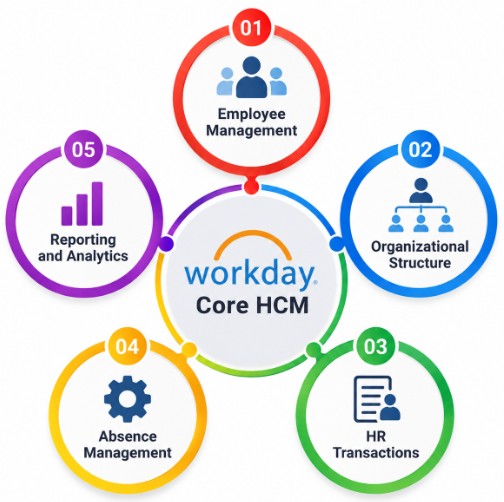
35. What Is Workday Core HCM?
Ans:
Workday Core HCM Is The Central Human Capital Management Foundation Of The Workday Platform. It Maintains Important Worker, Job, Organization, Position, And Employment Information. Core HCM Supports Processes Such As Hiring, Staffing, Transfers, Promotions, And Terminations. It Provides A Central Source Of Workforce Information For Other Workday Applications. Security And Business Processes Help Control How Worker Information Is Managed. Core HCM Provides The Foundation For Many HR And Workforce Management Activities In Workday.
36. What Is Workday Organization Hierarchy?
Ans:
Workday Organization Hierarchy Represents The Relationships Between Different Organizational Units. It Can Show How Companies, Departments, Supervisory Organizations, Cost Centers, And Locations Are Structured. The Hierarchy Helps Organizations Manage Reporting Relationships And Business Responsibilities. It Can Also Influence Security, Reporting, And Business Process Routing. Proper Hierarchical Configuration Helps Maintain Accurate Organizational Information. Workday Organization Hierarchies Support Workforce Management And Enterprise Reporting Requirements.
37. What Is Workday Staffing Model?
Ans:
A Workday Staffing Model Defines How An Organization Manages Workers And Positions Within Its Organizational Structure. Common Approaches Include Position Management And Job Management. The Selected Model Determines How Staffing Events And Worker Assignments Are Managed. Position Management Provides Specific Position Slots That Can Be Filled By Workers. Job Management Focuses More On Job-Based Staffing Without Requiring Individual Position Slots In The Same Way. Understanding Staffing Models Is Important For Configuring Workforce Management Processes Correctly.
38. What Is Workday Onboarding?
Ans:
- Workday Onboarding Is A Process Used To Help New Workers Complete Required Activities After Joining An Organization. It Can Include Tasks Related To Personal Information, Policies, Documents, Training, And System Access.
- Onboarding Activities Can Be Assigned Through Configured Business Processes And Workflows. Employees And HR Teams Can Track Required Tasks Through Workday.
- The Process Helps Ensure That New Workers Complete Important Joining Requirements. Workday Onboarding Supports A Structured And Consistent Employee Joining Experience.
39. What Is Workday Offboarding?
Ans:
Workday Offboarding Refers To Processes Used When A Worker Leaves An Organization. It Can Include Activities Such As Termination, Final Documentation, Access Changes, And Other Exit-Related Tasks. Business Processes Can Route Required Activities To HR, Managers, Payroll, And Other Responsible Teams. Worker Status And Related Information Are Updated As Part Of The Appropriate Process. Security And Access Changes Are Important During Employee Offboarding. Effective Offboarding Helps Organizations Complete Employee Exit Activities In A Controlled Manner.
40. What Is Workday Employee Self-Service?
Ans:
- Employee Self-Service Allows Employees To View And Manage Certain Personal And Work-Related Information Directly In Workday. Employees May Be Able To Update Personal Information, View Compensation, Request Leave, And Complete Assigned Tasks.
- Self-Service Reduces The Need For HR Teams To Handle Every Routine Employee Request. Access Is Controlled According To Workday Security And Organizational Policies.
- Employees Can Complete Authorized Activities Through A Web Or Supported Mobile Experience. Employee Self-Service Improves Efficiency And Provides Workers With Convenient Access To Relevant Information.

Get JOB Workday Integration Training for Beginners By MNC Experts
- Instructor-led Sessions
- Real-life Case Studies
- Assignments
41. What Is Workday Manager Self-Service?
Ans:
Manager Self-Service Allows Managers To Perform Authorized Workforce Management Activities Through Workday. Managers May Review Worker Information, Approve Requests, Initiate Staffing Actions, And Participate In Business Processes. The Available Actions Depend On Organizational Configuration And Security Permissions. Manager Self-Service Helps Reduce Manual HR Administration For Routine Management Activities. Workday Routes Relevant Tasks And Approvals To Authorized Managers. It Helps Managers Complete Workforce Responsibilities Efficiently Within A Centralized System.
42. What Is Workday Workflow?
Ans:
- A Workday Workflow Is A Sequence Of Configured Steps Used To Complete A Business Process. It Can Include Actions Such As Review, Approval, Data Entry, Notifications, And Automated Activities.
- Workflow Steps Can Be Assigned To Specific Roles Or Security Groups. Conditions Can Determine Which Steps Are Required For Different Transactions.
- Workflow Automation Helps Organizations Apply Consistent Procedures Across Business Operations. Workday Workflows Improve Process Control, Visibility, And Operational Efficiency.
43. What Is Workday Approval Process?
Ans:
A Workday Approval Process Is A Configured Step In Which An Authorized Person Reviews And Approves A Business Transaction. Approvals Can Be Required For Activities Such As Hiring, Compensation Changes, Expenses, Or Other Organizational Actions. The Appropriate Approver Can Be Determined Through Roles, Organizations, Or Business Rules. Approval Steps Help Prevent Unauthorized Transactions From Being Completed. Workday Can Send Notifications To Users When Approval Actions Are Required. Approval Processes Provide Better Control And Accountability Over Enterprise Transactions.
44. What Is Workday Report Security?
Ans:
Workday Report Security Controls Which Users Can Access And View Data Through Reports. A User May Have Access To A Report But Still Be Restricted From Certain Data Based On Security Policies. Report Security Works Together With Workday Domain And Business Process Security. Sensitive Information Should Only Be Available To Authorized Users. Administrators Need To Consider Both Report Access And Underlying Data Permissions. Proper Report Security Helps Prevent Unauthorized Exposure Of Employee And Business Information.
45. What Is Workday Calculated Field Used For?
Ans:
A Workday Calculated Field Is Used To Create Derived Information From Existing Workday Data. It Can Retrieve Related Values, Perform Calculations, Format Data, Or Apply Conditional Logic. Calculated Fields Are Commonly Used In Custom Reports And Integration Transformations. They Help Administrators Meet Business Requirements Without Directly Modifying The Underlying Database. Different Calculated Field Types Provide Different Functional Capabilities. Calculated Fields Make Workday Reporting More Flexible And Useful For Business Analysis.
46. What Is Workday Report Prompt?
Ans:
- A Report Prompt Allows A User To Enter Or Select Criteria Before Running A Workday Report. Prompts Can Help Users Filter Report Results According To Their Specific Requirements.
- For Example, A Report Can Ask The User To Select A Department, Location, Or Date Range. This Makes One Report Reusable For Multiple Business Scenarios.
- Prompt Values Can Also Be Controlled Through Security And Report Configuration. Report Prompts Improve Flexibility And Help Users Retrieve More Relevant Information.
47. What Is Workday Report Filter
Ans:
A Report Filter Is A Condition Used To Limit The Data Returned By A Workday Report. Filters Can Be Based On Fields Such As Worker Status, Organization, Location, Date, Or Job Profile. They Help Reduce Unnecessary Information In Report Results. Multiple Filters Can Be Combined To Create More Specific Reporting Conditions. Filters Can Be Static Or Designed To Work With User-Provided Prompts. Effective Filtering Helps Produce Accurate And Relevant Workday Reports.
48. What Is Workday Matrix Report?
Ans:
A Matrix Report Is A Workday Report Type Used To Present Data Across Multiple Dimensions. It Can Summarize Information Using Rows, Columns, And Calculated Values. Matrix Reports Are Useful For Analyzing Trends And Comparing Data Categories. They Can Provide More Structured Summaries Than Simple Tabular Reports. Organizations Can Use Matrix Reports For Workforce, Compensation, And Other Business Analysis. Matrix Reporting Helps Users Understand Large Amounts Of Workday Data More Easily.
49. What Is Workday Composite Report?
Ans:
A Composite Report Is A Reporting Structure Used To Combine Information From Multiple Report Components Or Sources. It Can Present Related Information Together To Provide A Broader View Of Business Data. Composite Reports Can Be Useful When A Single Data Source Does Not Meet The Reporting Requirement. They Can Support Complex Reporting And Analytical Requirements. Security Rules Still Apply To The Information Included In The Report. Composite Reporting Helps Organizations Build More Comprehensive Views Of Enterprise Data.
50. What Is Workday Report Data Source?
Ans:
A Report Data Source Defines The Primary Business Object Or Set Of Data From Which A Workday Report Retrieves Information. It Determines The Context In Which Fields And Related Business Objects Can Be Accessed. Selecting The Correct Data Source Is Important For Building Accurate Reports. Different Data Sources Provide Access To Different Types Of Workday Information. Report Designers Must Understand Business Object Relationships When Selecting Data Sources. A Proper Data Source Provides The Foundation For Effective Workday Reporting.
51. What Is Workday Integration System?
Ans:
A Workday Integration System Is A Configured Solution Used To Exchange Information Between Workday And An External System. It Defines How Data Is Retrieved, Transformed, Processed, And Delivered. Integration Systems Can Use Different Technologies Depending On The Business Requirement. They May Run On A Schedule Or Be Triggered By Specific Events. Error Handling, Security, Monitoring, And Data Validation Are Important Integration Considerations. Workday Integration Systems Help Automate Reliable Data Exchange Between Enterprise Applications.
52. What Is Inbound Integration?
Ans:
- An Inbound Integration Is A Process In Which Data Is Sent From An External System Into Workday. It Can Be Used To Load Or Update Information Such As Worker, Payroll, Benefits, Or Other Business Data.
- Inbound Integrations Can Use File-Based Or Web Service-Based Methods Depending On Requirements. Data Validation And Transformation May Be Required Before Information Is Loaded Into Workday.
- Security Controls Help Ensure That Only Authorized Systems Can Send Data. Inbound Integrations Help Keep Workday Information Synchronized With External Applications.
53. What Is Outbound Integration?
Ans:
An Outbound Integration Is A Process In Which Data Is Sent From Workday To An External System. It Can Be Used To Provide Worker, Payroll, Financial, Or Other Business Information To External Applications. Outbound Integrations Can Run On Schedules Or Based On Specific Business Events. Data Can Be Transformed Into A Format Required By The Receiving System. Security And Data Privacy Must Be Considered When Sending Information Outside Workday. Outbound Integrations Help Organizations Automate Data Distribution Across Enterprise Systems.
54. What Is Workday Integration Event?
Ans:
A Workday Integration Event Represents An Execution Of An Integration Or A Related Integration Process. It Contains Information About The Execution, Status, Processing Details, And Potential Errors. Integration Events Help Administrators Monitor Whether An Integration Completed Successfully. Failed Events Can Provide Information Useful For Troubleshooting And Corrective Actions. Monitoring Integration Events Is Important For Maintaining Reliable Data Exchange. Workday Professionals Use Integration Event Information To Support Integration Operations And Problem Resolution.
55. What Is Workday Error Handling?
Ans:
- Workday Error Handling Refers To The Methods Used To Detect, Record, And Manage Errors During Business Processes And Integrations. Errors Can Result From Invalid Data, Missing Information, Configuration Problems, Or External System Issues.
- Workday Can Provide Error Messages And Integration Event Details To Help Identify Problems. Administrators Can Review Errors And Correct The Underlying Configuration Or Data Issue.
- Proper Error Handling Prevents Failed Transactions From Going Unnoticed. Effective Error Management Helps Maintain Reliable Workday Processes And Integrations.
56. What Is Workday Data Conversion?
Ans:
Workday Data Conversion Is The Process Of Transforming Existing Data Into A Format Suitable For Loading Into Workday. It Is Commonly Required During Workday Implementations, Migrations, Or System Changes. Data May Need To Be Extracted, Cleansed, Mapped, Validated, And Transformed Before Loading. Incorrect Or Incomplete Data Can Cause Errors During The Conversion Process. Data Validation Helps Ensure That Converted Information Meets Workday Requirements. Effective Data Conversion Helps Organizations Move Accurate Business Information Into Workday.
57. What Is Workday Data Migration?
Ans:
Workday Data Migration Is The Process Of Moving Data From Existing Systems Into Workday. It Can Include Worker Information, Organizational Structures, Compensation, Benefits, And Other Required Data. Migration Usually Involves Data Extraction, Transformation, Validation, Loading, And Reconciliation. Data Quality Is Important Because Incorrect Information Can Affect Workday Processes. Migration Activities Are Often Tested In Non-Production Environments Before Production Deployment. Successful Data Migration Helps Establish Accurate And Reliable Information In The Workday System.
58. What Is Workday Implementation?
Ans:
- Workday Implementation Is The Process Of Configuring And Deploying Workday Applications To Meet An Organization’s Business Requirements.
- It Can Include Requirement Gathering, Design, Configuration, Integration, Data Migration, Testing, And Deployment. Implementation Teams Work With Business Stakeholders To Define Appropriate Processes And Security.
- Testing Helps Confirm That Configured Processes And Integrations Work As Expected. Training And Change Management Help Users Adopt The New System. A Successful Workday Implementation Provides A Structured Platform For Managing Enterprise Business Processes.
59. What Is Workday Testing?
Ans:
Workday Testing Is The Process Of Verifying That Workday Configuration, Business Processes, Reports, Integrations, And Security Work Correctly. Testing Can Include Unit Testing, System Testing, Integration Testing, Regression Testing, And User Acceptance Testing. Testers Validate Both Expected Results And Error Scenarios. Testing Helps Identify Configuration And Data Problems Before Production Deployment. Test Results Are Documented And Defects Are Tracked Until Resolution. Effective Testing Helps Ensure A Stable And Reliable Workday Implementation.
60. What Is Workday User Acceptance Testing?
Ans:
User Acceptance Testing, Or UAT, Is The Testing Phase In Which Business Users Validate Workday Functionality Against Business Requirements. Users Perform Realistic Business Scenarios To Confirm That Processes Work As Expected. UAT Can Cover Hiring, Compensation, Reporting, Security, Integrations, And Other Relevant Processes. Business Users Record Issues And Provide Feedback During Testing. Successful UAT Provides Greater Confidence Before A Solution Is Released To Production. User Acceptance Testing Helps Ensure That Workday Meets Actual Business And Operational Requirements.

Develop Your Skills with Workday Integration Certification Training
Weekday / Weekend BatchesSee Batch Details61. What Is Workday Organization?
Ans:
A Workday Organization Is A Structure Used To Represent Different Parts Of An Organization Within The Workday System. It Can Represent Departments, Companies, Cost Centers, Locations, Or Supervisory Structures. Organizations Help Arrange Workers And Business Information According To Organizational Requirements. They Can Also Be Used For Reporting, Security, And Business Process Routing. Different Organization Types Support Different Business Activities Within Workday. Proper Organization Configuration Helps Maintain Accurate Workforce And Business Information.
62. What Is A Cost Center In Workday?
Ans:
- A Cost Center Is An Organizational Structure Used To Track And Manage Business Costs Within Workday. It Can Represent A Department, Team, Business Unit, Or Other Area Responsible For Expenses.
- Workers And Financial Transactions Can Be Associated With Appropriate Cost Centers. Cost Centers Help Organizations Analyze Expenses And Prepare Financial Reports.
- They Can Also Support Budgeting, Accounting, And Financial Management Processes. Proper Cost Center Configuration Helps Maintain Accurate Financial And Organizational Information.
63. What Is A Workday Company?
Ans:
A Workday Company Represents A Legal Entity Or Business Organization That Is Maintained Within Workday. It Can Be Used To Manage Worker Employment, Payroll, Financial, And Organizational Information. Companies Can Have Different Legal, Tax, And Reporting Requirements Depending On The Organization. Workers Can Be Associated With A Company Through Their Employment And Staffing Information. Company Structures Can Also Influence Business Processes And Reporting. Workday Companies Help Organizations Manage Multiple Legal Entities In A Structured Manner.
64. What Is A Workday Location?
Ans:
A Workday Location Represents A Physical Or Organizational Place Where Business Activities Or Workers Are Associated. Locations Can Include Offices, Branches, Facilities, Or Other Work Sites. Location Information Can Be Used In Worker Management, Recruiting, Reporting, And Business Processes. Organizations Can Configure Location Details According To Their Operational Requirements. Location Data Can Also Support Security And Workforce Planning. Proper Location Configuration Helps Maintain Accurate Information About Where Work Is Performed.
65. What Is A Workday Pay Group?
Ans:
A Workday Pay Group Is A Structure Used To Group Workers For Payroll Processing. Workers In A Pay Group Can Share Certain Payroll-related Processing Requirements. Pay Groups Can Help Organize Payroll schedules, processing activities, And Related Payroll Information. They Can Be Configured According To An Organization’s Payroll Requirements. Pay Group Information Can Work With Other Payroll And Worker Data. Proper Pay Group Configuration Helps Support Consistent And Efficient Payroll Processing.
66. What Is A Workday Compensation Grade?
Ans:
A Compensation Grade Is A Structure Used To Define A Level Or Range For Employee Compensation Within Workday. It Can Represent Different Levels Of Responsibility, Experience, Or Job Classification. Compensation Grades Can Be Associated With Compensation Plans And Worker Roles. Organizations Can Use Them To Maintain Consistent Compensation Practices. They Can Also Support Compensation Analysis And Planning Activities. Compensation Grades Help Organizations Structure And Manage Employee Pay Information.
67. What Is A Compensation Grade Profile?
Ans:
A Compensation Grade Profile Defines Detailed Compensation Information Associated With A Compensation Grade. It Can Include Salary Ranges, Currency, Frequency, And Other Compensation-related details. Organizations Can Use Grade Profiles To Establish Consistent Pay Structures For Different Job Levels. Workers And Positions Can Be Associated With Appropriate Compensation Structures. These Profiles Can Support Compensation Planning And Review Processes. Compensation Grade Profiles Help Maintain Organized And Consistent Compensation Administration.
68. What Is A Workday Eligibility Rule?
Ans:
A Workday Eligibility Rule Is A Set Of Conditions Used To Determine Whether A Worker Qualifies For A Particular Program, Process, Or Benefit. Eligibility Can Depend On Factors Such As Worker Type, Organization, Location, Job, Or Other configured criteria. These Rules Can Be Used In Benefits, Compensation, Absence, And Other Workday Processes. Workday Applies The Configured Conditions To Determine Eligible Workers. Eligibility Rules Help Organizations Apply Business Policies Consistently. Proper Configuration Helps Ensure That Workers Receive Appropriate Programs And Benefits.
69. What Is Workday Time Off?
Ans:
Workday Time Off Is A Feature Used To Manage Employee Leave Or Time Away From Work. It Can Include Vacation, Sick Time, Personal Leave, And Other Organization-Defined Time-Off Types. Employees Can Request Time Off Through Self-Service Based On Their Eligibility. Managers Can Review And Approve Requests According To Configured Business Processes. Accrual And Eligibility Rules Can Determine Available Time-Off Balances. Workday Time Off Helps Organizations Track Employee Leave And Maintain Accurate Absence Information.
70. What Is Workday Absence Accrual?
Ans:
Workday Absence Accrual Is A Process Used To Calculate And Maintain Leave Balances For Eligible Workers. Accrual Rules Can Determine How Much Leave A Worker Earns During A Specific Period. Organizations Can Configure Accrual Rules Based On Worker Eligibility And Business Policies. Accrued Balances Can Be Used When Employees Request Time Off. Workday Can Apply Configured Rules To Update Leave Balances As Required. Absence Accrual Helps Organizations Manage Employee Leave In A Consistent And Automated Manner.
71. What Is Workday Payroll Input?
Ans:
- Workday Payroll Input Refers To Information Used As Part Of The Payroll Processing Cycle. It Can Include Compensation, Time, Benefits, Deductions, And Other Relevant Worker information.
- Payroll Inputs Need To Be Accurate Because They Can Affect Employee Pay Calculations. Workday Can Receive Payroll-related information From Core HCM And Other Workday Processes.
- Validation And Review Help Identify Incorrect Or Missing Payroll Information. Proper Payroll Input Management Supports Accurate And Timely Payroll Processing.
72. What Is Workday Report Scheduling?
Ans:
- Workday Report Scheduling Allows Reports To Be Automatically Generated Or Delivered At Defined Times. Users Can Configure A Report To Run According To A Specific Schedule And Business Requirement.
- Scheduled Reports Can Help Provide Regular Information To Managers And Authorized Users. Report Output Can Be Delivered Through Configured Methods Depending On The Report And Security Settings.
- Access To Scheduled Data Is Controlled By Appropriate Workday Security. Report Scheduling Helps Reduce Manual Reporting Activities And Improves Information Availability.
73. What Is Workday Report Sharing?
Ans:
Workday Report Sharing Is The Process Of Providing Authorized Users With Access To Reports Or Report Results. Sharing Can Be Controlled According To Workday Security And Organizational Requirements. Reports May Be Shared With Specific Users, Roles, Or Groups Depending On Configuration. Sensitive Business And Employee Information Must Only Be Shared With Authorized Users. Proper Report Sharing Helps Teams Access Required Information Without Exposing Restricted Data. It Supports Collaboration While Maintaining Appropriate Data Security.
74. What Is Workday Integration Security?
Ans:
Workday Integration Security Refers To Controls Used To Protect Data Exchanged Between Workday And External Systems. It Helps Ensure That Only Authorized Integration Processes And Users Can Access Required information. Security Can Include Integration System Users, Permissions, Authentication, Encryption, And Secure File Transfer Methods. Appropriate Security Controls Help Protect Sensitive Worker And Business Data. Integration Security Must Also Consider Data Privacy And Access Restrictions. Strong Integration Security Helps Maintain Safe And Reliable Communication Between Enterprise Systems.
75. What Is A Workday Integration System User?
Ans:
A Workday Integration System User, Or ISU, Is A Dedicated User Account Used For Running And Securing Integrations. It Allows An Integration To Access Workday Resources Without Using A Regular Employee’s Account. Appropriate Security Groups And Permissions Can Be Assigned To The ISU. Access Should Follow The Principle Of Providing Only The Permissions Required For The Integration. ISUs Help Separate Integration Activities From Individual User Activities. They Are Commonly Used To Support Secure And Controlled Workday Integration Processing.
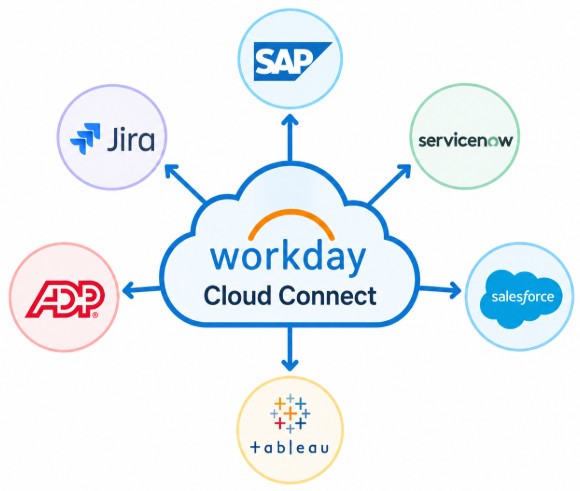
76. What Is Workday Cloud Connect?
Ans:
Workday Cloud Connect Refers To Prebuilt Integration Solutions And Connectors Designed To Connect Workday With Certain External Applications And Providers. These Solutions Can Reduce The Need To Build Every Integration Completely From Scratch. Cloud Connect Integrations Can Support Areas Such As Payroll, Benefits, Financial Services, And Other Business Requirements. They Can Help Standardize Data Exchange Between Workday And External Systems. Configuration And Security Still Need To Be Managed According To Business Requirements. Workday Cloud Connect Can Help Organizations Simplify Certain Integration Implementations.
77. What Is Workday PECI?
Ans:
Workday PECI Stands For Payroll Effective Change Interface And Is An Integration Method Used To Provide Payroll-related Worker Changes To External Payroll Systems. It Can Identify Relevant Changes To Worker And Payroll Information Within Workday. PECI Helps External Payroll Systems Receive Required Data For Payroll Processing. It Can Support Information Such As Compensation, Worker Status, And Other Payroll-Relevant Changes. Configuration And Security Determine Which Data Is Included In The Integration. PECI Helps Automate The Transfer Of Payroll Effective Changes Between Workday And External Payroll Systems..
78. What Is PGP Encryption In Workday Integration?
Ans:
PGP Encryption Is A Security Method That Can Be Used To Protect Files Exchanged During Workday Integrations. PGP Can Encrypt Data So That Unauthorized Users Cannot Easily Read The Information. It Can Also Support Digital Signatures To Help Verify The Source And Integrity Of Files. Encrypted Files Are Commonly Used When Sensitive Business Or Worker Data Is Transferred Between Systems. Proper Key Management Is Important For Secure Encryption And Decryption. PGP Encryption Helps Improve The Confidentiality And Integrity Of File-Based Integration Data.
79. What Is SFTP In Workday Integration?
Ans:
SFTP Stands For Secure File Transfer Protocol And Is Used To Transfer Files Securely Between Systems. Workday Integrations Can Use SFTP For Sending Or Receiving Files With External Applications. SFTP Encrypts Data During Transmission And Helps Protect Sensitive Information. Authentication Can Be Managed Through Appropriate Credentials Or Security Keys. SFTP Is Commonly Used For Scheduled File-Based Integration scenarios. Secure File Transfer Helps Organizations Exchange Workday Data Reliably With External Systems.
80. What Is Workday SOAP Web Service?
Ans:
A Workday SOAP Web Service Is A Web Service Interface That Allows External Applications To Communicate With Workday Using SOAP-Based Messages. It Can Support Operations Such As Retrieving Or Sending Workday Business Information. SOAP Services Can Be Used In Various Enterprise Integration Scenarios. Authentication And Authorization Are Required To Control Access To Workday Services. Developers Can Use Appropriate Workday Web Service Operations Based On Integration Requirements. SOAP Web Services Help Organizations Build Structured And Automated Integrations With Workday.
81. What Is Workday REST API?
Ans:
- A Workday REST API Is An Interface That Allows Applications To Communicate With Workday Using REST-Based Communication. It Can Provide Programmatic Access To Supported Workday Resources And Business Functions.
- REST APIs Commonly Use HTTP Methods And Structured Data Formats Such As JSON. Authentication And Security Controls Help Protect API Access.
- Developers Can Use REST APIs When They Meet The Requirements Of A Particular Integration Or Application. Workday REST APIs Help Connect Modern Applications And Services With Workday.
82. What Is Workday Prism Analytics?
Ans:
Workday Prism Analytics Is A Data And Analytics Capability Used To Bring External Data Together With Workday Data For Analysis. It Can Help Organizations Combine Data From Different Sources And Prepare It For Reporting And Analytics. External Data Can Be Transformed And Managed Within The Analytics Environment. Organizations Can Use The Combined Information To Create Broader Business Insights. Security Controls Help Determine Which Users Can Access Analytics Data. Workday Prism Analytics Helps Organizations Analyze Workforce And Business Information From Multiple Sources..
83. What Is Workday Extend?
Ans:
Workday Extend Is A Platform Used To Build Custom Applications And Experiences That Work With Workday. It Allows Organizations To Extend Workday Capabilities For Specific Business Requirements. Custom Applications Can Be Designed To Work With Workday Data And Business Processes In Supported Ways. Extend Helps Address Requirements That May Not Be Fully Covered By Standard Workday Functionality. Security And Application Design Are Important Considerations When Building Extensions. Workday Extend Provides Organizations With Additional Flexibility For Creating Business Applications.
84. What Is Workday Mobile?
Ans:
Workday Mobile Is A Mobile Experience That Allows Authorized Users To Access Workday Features Through Supported Mobile Devices. Employees Can Use Mobile Capabilities For Activities Such As Viewing Information, Completing Tasks, And Requesting Time Off. Managers Can Also Perform Certain Approvals And Workforce Activities Through Mobile Access. Available Features Depend On Workday Configuration, Security, And Supported functionality. Mobile Access Provides Greater Convenience For Users Working Outside A Traditional Desktop Environment. Workday Mobile Helps Improve Accessibility And Employee Engagement With Enterprise Applications
85. How Would Troubleshoot A Failed Integration?
Ans:
A Failed Workday Integration Can Be Troubleshooted By First Checking The Integration Event And Its Overall Status. The Integration System And Integration Process Should Be Reviewed To Identify The Exact Error Message Or Failure Point. The Integration Log And Error Report Can Then Be Checked For Issues Related To Data, Authentication, Transformation, Or Connectivity. If The Problem Is Related To Input Data, The Source Data Should Be Validated And Corrected Before Reprocessing. For EIB Or Workday Studio Integrations, The Transformation, Web Service, And Configuration Details Should Also Be Verified. After Making The Required Correction, The Integration Can Be Retested In A Suitable Tenant And Monitored For Successful Completion.
86. What Would Do If An Employee Cannot Access A Task?
Ans:
If An Employee Cannot Access A Task In Workday, The First Step Is To Identify The Business Process And Task That The Employee Is Trying To Access. The Employee’s Role, Security Group Membership, And Organization Assignment Should Then Be Checked. Domain Security Policies And Business Process Security Policies Should Be Reviewed To Confirm That The Employee Has The Required Permissions. The Business Process Configuration Should Also Be Checked To Determine Whether The Task Is Assigned To The Correct Role Or Security Group. If A Security Change Is Required, The Appropriate Configuration Should Be Updated And The Security Policy Activated As Needed. Finally, The Employee Should Retry The Task To Confirm That The Access Issue Has Been Resolved.
87. How Would Identify A Security Issue?
Ans:
- A Workday Security Issue Can Be Identified By First Determining What Data, Task, Or Business Process The User Cannot Access Or Can Access Unexpectedly. The User’s Security Group Memberships And Assigned Roles Should Be Reviewed To Understand Their Current Access.
- Domain Security Policies Should Be Checked For Data Access, While Business Process Security Policies Should Be Checked For Actions And Process Permissions.
- The Organization Context And Role Assignments Should Also Be Verified Because They Can Affect Access
88. How Would Troubleshoot A Report Showing Incorrect Data?
Ans:
When A Workday Report Shows Incorrect Data, The First Step Is To Verify The Report’s Data Source And Confirm That It Is Appropriate For The Required Information. The Report Fields, Filters, Prompts, And Sorting Conditions Should Then Be Reviewed To Identify Any Incorrect Configuration. Calculated Fields Used In The Report Should Also Be Checked Because An Incorrect Calculation Can Produce Unexpected Results. The Security Context Of The User Should Be Verified Since Workday Security Can Affect Which Records And Fields Are Visible. The Underlying Employee Or Business Data Should Be Compared With The Report Results To Locate The Difference. After Correcting The Configuration Or Source Data, The Report Should Be Run Again And Validated To Confirm That The Expected Results Are Displayed.
89. What Is The Difference Between Workday Production And Preview Tenant?
Ans:
| Aspect | Production Tenant | Preview Tenant |
|---|---|---|
| Purpose | Used For Live Business Operations And Real Employee Data. | Used For Testing New Features And Upcoming Workday Releases. |
| Data | Contains Current And Active Business Data. | Generally Contains A Copy Or Snapshot Of Production Data. |
| Updates | Updated According To The Organization’s Regular Workday Release Schedule. | Updated Earlier With Upcoming Features For Testing And Validation. |
90. How Can A Fresher Prepare For An Infosys Workday Interview?
Ans:
A Fresher Can Prepare For An Infosys Workday Interview By Building Strong Knowledge Of Workday HCM Fundamentals, Business Processes, Organizations, Security, Reporting, And Integrations. Important Topics Include Core HCM, Recruiting, Compensation, Absence, Time Tracking, Business Processes, EIB, Workday Studio, Reports, Calculated Fields, And Security. Basic Understanding Of Integration Concepts Such As Inbound, Outbound, APIs, Web Services, SFTP, And Data Migration Can Also Be Helpful. Interview Preparation Should Include Learning Common Workday Terminology And Understanding How Business Requirements Are Implemented In The Platform. Practicing Scenario-Based Questions Can Help Improve Technical Communication And Problem-Solving Skills