LMS
LMS
Last updated on 20th Apr 2026| 7587

The Wipro Limited technical test is a crucial step in the recruitment process for freshers and experienced candidates. It is designed to evaluate a candidate’s problem-solving ability, technical knowledge, and logical thinking skills.Understanding the test pattern and the types of questions asked can significantly improve your chances of success. The assessment typically includes sections such as aptitude, logical reasoning, verbal ability, and coding. In some roles, candidates may also be tested on core technical concepts like programming, databases, and operating systems.
1. What is a computer network?
Ans:
A computer network is a group of connected devices that share resources and information. It enables communication between different systems efficiently. Networks use protocols to transfer data securely and accurately. Common examples include LAN, WAN, and MAN networks. It improves data sharing, communication, and collaboration among users. It is essential for modern communication and digital connectivity
2. Define an operating system.
Ans:
An operating system is system software that manages computer hardware and software resources. It provides an interface between the user and the machine for interaction. It handles memory management, processes, and file systems efficiently. Examples include Windows, Linux, and macOS operating systems. It ensures smooth functioning of the entire system. It allows applications to run efficiently without conflicts.
3. What is a process?
Ans:
A process is a program that is currently in execution in a system. It has its own memory space and system resources allocated by the OS. Processes are managed and scheduled by the operating system. They can run independently or interact with other processes. Each process has a unique process ID for identification. It plays a key role in multitasking environment
4. Define a thread.
Ans:
A thread is a lightweight unit of execution within a process. Threads share the same memory space of the parent process. They help improve performance and efficiency of applications. Multiple threads can run concurrently within a process. Threads are faster and consume fewer resources than processes. They are widely used in multitasking and parallel processing systems.
5. What is a compiler?
Ans:
A compiler is a program that translates high-level programming code into machine code. It checks the entire code for syntax errors before execution. It generates an executable file after successful compilation. Compilers improve the performance of programs by optimizing code. Examples include GCC and Turbo C compilers. It is essential for developing and running programs efficiently.
6. What is an interpreter?
Ans:
An interpreter is a program that executes code line by line. It does not produce a separate executable file like a compiler. It is generally slower because it processes each line individually. It is commonly used in languages like Python and JavaScript. Errors are displayed immediately when encountered during execution. It is useful for debugging and testing code quickly.
7. Define RAM.
Ans:
RAM (Random Access Memory) is a temporary memory used by a computer system. It stores data and instructions for currently running processes. It is volatile, meaning data is lost when power is turned off. Increasing RAM improves system performance and speed. It allows faster access to frequently used data. It is essential for smooth multitasking operations.
8. Define ROM.
Ans:
ROM (Read Only Memory) is permanent memory used in a computer system. It stores firmware and essential instructions for booting the system. It is non-volatile, so data remains even after power is off. It plays a key role during the startup process of a computer. ROM data cannot be easily modified or erased. It ensures stable and reliable system initialization.
9. What is a database?
Ans:
A database is a structured collection of data stored electronically. It allows efficient storage, retrieval, and management of information. Databases are managed using DBMS software systems. Examples include MySQL, Oracle, and PostgreSQL databases. It ensures data consistency, accuracy, and integrity. It is widely used in applications for data handling.
10. Define DBMS.
Ans:
DBMS (Database Management System) is software used to manage databases. It allows users to create, read, update, and delete data easily. It ensures data security, integrity, and consistency across systems. It supports multiple users accessing data simultaneously. Examples include MySQL, Oracle, and SQL Server. It simplifies overall data management and organization.
11. What is SQL?
Ans:
SQL (Structured Query Language) is used to manage and manipulate databases. It is mainly used for querying and retrieving data from tables. It supports commands like SELECT, INSERT, UPDATE, and DELETE. It works with relational database management systems. It is easy to learn and widely used in the industry. It plays a key role in data-driven applications.
12. What is a primary key?
Ans:
A primary key is a field that uniquely identifies each record in a table. It ensures that no duplicate or null values exist in the column. It plays a crucial role in maintaining data integrity and helps organize records efficiently. Only one primary key is allowed per table, and it is essential in relational database design. Primary keys also improve the speed and accuracy of data retrieval operations. They help establish unique identification for every record in a database table.
13. What is a foreign key?
Ans:
A foreign key is a field used to link two tables in a database. It references the primary key of another table and ensures referential integrity between related tables. Foreign keys help avoid duplication of data and establish relationships among different database tables. They improve the overall structure and consistency of the database system. Foreign keys also help maintain accurate and reliable connections between related records.
14. What is normalization?
Ans:
Normalization is the process of organizing data in a database efficiently to reduce redundancy and eliminate duplicate data. It improves data integrity and consistency across multiple tables by using different normal forms such as 1NF, 2NF, and 3NF. Normalization simplifies database structure, improves maintainability, and enhances overall database performance. It also helps prevent anomalies during data insertion, deletion, and updating operations.
15. What is denormalization?
Ans:
- Denormalization is the process of combining tables in a database to reduce joins.It intentionally introduces redundancy to improve data retrieval speed.
- It improves performance for read-heavy applications.It reduces complex queries and speeds up data access.
- It is used in data warehousing and reporting systems.It may increase storage usage and require careful data management.
16. What is a data structure?
Ans:
- A data structure is a way of organizing and storing data.
- It helps in efficient access and modification of data. It enables better performance in programs.
- Choosing the right structure improves speed and efficiency. Examples include arrays, linked lists, stacks, and queues.
- Each structure is used based on specific requirements.
17. What is an array?
Ans:
- An array is a data structure that stores multiple values under a single name.It allows grouping of similar data types in a structured way.
- It stores elements in contiguous memory locations.This enables fast access using index positions.
- Arrays have a fixed size defined at the time of declaration.They are widely used for efficient data storage and processing.
18. What is a linked list?
Ans:
- A linked list is a linear data structure made up of nodes.
- Each node contains data and a pointer to the next node in the sequence. It uses dynamic memory allocation instead of fixed size.
- This allows the list to grow or shrink during program execution. It supports easy insertion and deletion of elements.
- Unlike arrays, it does not require shifting elements in memory.
19. What is a stack?
Ans:
- A stack is a linear data structure that follows the LIFO (Last In First Out) principle.
- The last element inserted is the first one to be removed from the stack. It supports basic operations like push and pop.
- Push adds an element to the top, while pop removes the top element. A stack is widely used in recursion and expression evaluation.
- It helps in memory management and function call handling.
20. What is a queue?
Ans:
- A queue is a linear data structure that follows FIFO (First In First Out).
- The element inserted first is removed first, similar to a real-life queue. It supports operations like enqueue and dequeue.
- Enqueue adds elements at the rear, while dequeue removes from the front. It is widely used in scheduling and buffering systems.
- It ensures orderly processing of tasks in applications like printers and CPUs.
21. What is an algorithm?
Ans:
An algorithm is a step-by-step procedure to solve a problem. It defines a clear sequence of instructions to achieve a result. Algorithms are used in programming and problem-solving. They must be finite, unambiguous, and efficient. Good algorithms improve performance and reduce complexity. They are essential for software development and logic building. They form the foundation of all computational processes
22. Describe a flowchart.
Ans:
A flowchart is a graphical representation of an algorithm or process. It uses symbols to show steps and decision points. It helps in understanding program logic easily. It improves clarity and communication among developers. It is useful in planning and designing programs. It simplifies complex processes visually. It acts as a blueprint before coding begins.
23. What is time complexity?
Ans:
Time complexity measures the execution time of an algorithm. It is expressed using Big-O notation. It helps in analyzing algorithm efficiency. Common complexities include O(n), O(log n), and O(n²). Lower complexity means better performance. It is important for optimizing programs. It helps developers choose efficient solutions.
24. What is space complexity?
Ans:
Space complexity measures memory usage of an algorithm. It includes variables, data structures, and recursion space. It helps in optimizing memory utilization. Efficient programs use less memory. It is crucial in systems with limited resources. It improves overall performance of applications. It ensures efficient use of available memory.
25. Define Big-O notation.
Ans:
Big-O notation is a mathematical representation used to describe the performance and efficiency of algorithms. It represents the worst-case time complexity and helps compare different algorithms. Common examples include O(1), O(n), and O(log n). Big-O notation ignores constants and lower-order terms to focus on overall growth rate. It is widely used in computer science to evaluate algorithm efficiency. Understanding Big-O notation helps developers build optimized and scalable applications.
26. What is object-oriented programming?
Ans:
Object-oriented programming, or OOP, is a programming paradigm based on objects, classes, and real-world modeling concepts. It promotes code reusability, modularity, and maintainability through concepts such as inheritance, polymorphism, encapsulation, and abstraction. OOP helps developers organize code efficiently and build scalable applications. It is widely used in modern programming languages like Java, Python, and C++. OOP simplifies software development by creating structured and reusable code components.
27. What is a class?
Ans:
A class is a blueprint or template used for creating objects in object-oriented programming. It defines the properties and methods that objects can have. Classes help organize code logically and support important OOP concepts such as encapsulation and abstraction. They improve code structure, readability, and reusability in software applications. Classes act as the foundation for object creation and application design. Proper use of classes makes programs more modular and maintainable.
28. Define an object.
Ans:
An object is an instance of a class that represents a real-world entity in programming. Objects contain data in the form of attributes and behavior in the form of methods. They interact with other objects through functions and help implement object-oriented programming concepts effectively. Objects make programs more realistic, modular, and dynamic. They improve code reusability and simplify application development. Objects are the basic building blocks of OOP-based systems.
29. What is inheritance?
Ans:
Inheritance is an object-oriented programming concept where one class acquires the properties and methods of another class. It promotes code reuse, reduces duplication, and supports hierarchical relationships between classes. The child class inherits features from the parent class and can also extend existing functionality. Inheritance improves maintainability and scalability of software applications. It is widely used in object-oriented design and development. Inheritance helps developers create organized and efficient code structures..
30. What is polymorphism?
Ans:
Polymorphism means “many forms” and allows methods or functions to behave differently based on the situation. It supports method overloading and method overriding in object-oriented programming. Polymorphism increases flexibility and helps developers write generic and reusable code. It improves adaptability and efficiency in program design. This concept is an important feature of OOP and simplifies software maintenance. Polymorphism allows the same interface to perform different tasks effectively.
31. What is encapsulation?
Ans:
Encapsulation is the process of combining data and methods into a single unit, usually a class. It restricts direct access to data and protects it using access modifiers. Encapsulation ensures data security, integrity, and hides implementation details from users. It improves modularity, maintainability, and code organization in applications. This concept is essential in object-oriented programming for protecting sensitive information. Encapsulation also helps create secure and reliable software systems
32. What is abstraction?
Ans:
Abstraction is the process of hiding internal implementation details and showing only essential features to users. It simplifies complex systems and improves code readability and usability. Abstraction is achieved using abstract classes and interfaces in object-oriented programming. It focuses on what an object does rather than how it works internally. This concept helps developers create organized and manageable applications. Abstraction also reduces complexity in software development.
33. What is a function?
Ans:
A function is a reusable block of code designed to perform a specific task in a program. Functions improve modularity and reduce repetition by allowing code reuse. They can accept inputs, process data, and return outputs as needed. Functions make programs easier to maintain, debug, and understand. They improve code readability and organization in software development. Functions are essential for creating efficient and structured applications.
34. What is recursion?
Ans:
Recursion is a programming technique where a function calls itself repeatedly to solve a problem. It is useful for solving complex and repetitive problems such as factorial calculations and tree traversal algorithms. Recursion requires a base condition to stop execution and avoid infinite calls. It simplifies code and provides elegant solutions for certain tasks. Recursive functions use stack memory during execution. Recursion is widely used in algorithm design and problem solving.
35. What is a pointer?
Ans:
A pointer is a variable that stores the memory address of another variable. It is widely used in programming languages like C and C++ for direct memory access and manipulation. Pointers help in dynamic memory allocation and improve performance in some applications. They are powerful tools but require careful handling to avoid memory-related errors. Pointers enable efficient memory management and advanced programming techniques. They are important for system-level and low-level programming tasks.
36. What is dynamic memory allocation?
Ans:
Dynamic memory allocation is the process of allocating memory during runtime instead of compile time. It is commonly performed using functions like malloc, calloc, realloc, and free in C programming. Dynamic memory allocation allows flexible memory usage when data size is unknown beforehand. It helps optimize memory utilization and prevents wastage of resources. This technique is widely used in C and C++ applications for efficient memory management. Dynamic memory allocation improves flexibility and scalability in software development.
37. Define structure?
Ans:
- A structure is a user-defined data type used to group different data types together.
- It allows combining variables like int, float, and char under one name. It helps organize complex data in a single unit.
- Each element in a structure is called a member and can be accessed individually. Structures are widely used in languages like C and C++.
- They improve data management and make programs more structured and readable.
38. Define a union?
Ans:
- A union is a user-defined data type in programming languages like C and C++.It allows storing different data types in the same memory location.
- Only one member of a union can hold a value at a time.All members share the same memory space, saving memory usage.
- The size of a union is equal to the size of its largest member.It is useful when working with limited memory or different data representations.
39. What is exception handling?
Ans:
- Exception handling is a mechanism to handle runtime errors in a program.It prevents program crashes and ensures smooth execution.
- It uses constructs like try, catch, and finally blocks.These blocks help detect and handle errors properly.
- It improves program reliability and robustness.It allows graceful handling of unexpected situations.
40. What is Java?
Ans:
Java is a high-level programming language that is object-oriented and platform-independent. It uses the Java Virtual Machine (JVM) to run programs on different systems. Java supports features like multithreading, security, and robustness, making it widely used in enterprise applications. It follows the “write once, run anywhere” principle, allowing applications to run on multiple platforms without modification. Java is popular for developing web, desktop, and mobile applications. It is also widely used for building scalable and secure software solutions.
41. Explain JVM?
Ans:
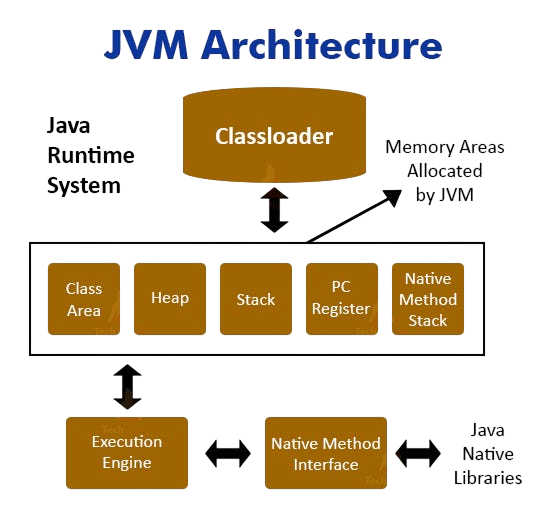
JVM, or Java Virtual Machine, is responsible for executing Java bytecode and providing platform independence. It converts bytecode into machine code that can run on any operating system. JVM manages memory allocation, garbage collection, and secure execution of Java programs. It is an essential component of Java architecture and ensures smooth execution across multiple platforms. JVM also improves portability and reliability of Java applications. It plays a key role in making Java platform-independent.
42. What is JDK?
Ans:
JDK, or Java Development Kit, is a software package used for developing Java applications. It includes essential tools such as the Java compiler, debugger, and libraries required for development. JDK also contains JRE and JVM, which help in running Java programs. It provides a complete development environment for writing, compiling, testing, and debugging applications. JDK is necessary for Java developers to create and manage Java projects. It supports efficient development of robust and scalable applications.
43. What is JRE?
Ans:
JRE, or Java Runtime Environment, provides the necessary environment to run Java applications. It includes JVM and standard libraries required for executing Java programs. JRE does not contain development tools like compilers, making it mainly useful for end users. It ensures proper execution of Java applications on different systems. JRE simplifies running Java programs without requiring development setup. It plays an important role in delivering Java applications to users.
44. Define method overloading?
Ans:
Method overloading is a feature in Java where multiple methods can have the same name but different parameters. It improves code readability and flexibility by allowing developers to perform similar tasks with different inputs. Method overloading is an example of compile-time polymorphism in object-oriented programming. It enhances usability and reduces the need for multiple method names. This feature is widely used in Java applications for efficient coding. Method overloading also improves code maintainability and organization.
45. What is method overriding?
Ans:
Method overriding occurs when a child class provides a specific implementation of a method already defined in the parent class. It is an important concept in inheritance and supports runtime polymorphism in Java. Method overriding allows developers to customize behavior according to application requirements. It improves flexibility and supports dynamic method dispatch during execution. This feature plays a key role in object-oriented design. Method overriding helps create more adaptable and extensible applications.
46. Define interface?
Ans:
An interface in Java is a blueprint of a class that contains abstract methods and constants. It defines behavior without providing implementation details. Interfaces support multiple inheritance in Java and improve abstraction in applications. They ensure consistency across classes by enforcing common method definitions. Interfaces are widely used in software design to build flexible and scalable systems. They help developers achieve loose coupling and better code organization.
47. What is a package in Java?
Ans:
A package in Java is a collection of related classes, interfaces, and sub-packages used to organize code efficiently. Packages help avoid naming conflicts and improve code reusability and access protection. They simplify project management by grouping related components together. Packages are widely used in Java projects to maintain clean and structured codebases. They also make applications easier to maintain and scale. Proper package organization improves readability and collaboration among developers.
48. What is multithreading?
Ans:
Multithreading is a process where multiple threads execute simultaneously within a program. It improves application performance and responsiveness by enabling parallel processing of tasks. Threads share resources efficiently and help reduce execution time. Multithreading is widely used in modern applications such as games, browsers, and real-time systems. It improves CPU utilization and supports multitasking capabilities. Multithreading also helps applications perform complex operations smoothly.
49. How does synchronization?
Ans:
Synchronization is a technique used to control access to shared resources in multithreaded applications. It ensures that only one thread accesses a resource at a time, preventing data inconsistency and race conditions. Synchronization improves reliability, accuracy, and stability of concurrent systems. It is essential for maintaining correct execution when multiple threads work on shared data. Proper synchronization helps avoid unexpected behavior in programs. It also improves thread safety in multithreaded environments.
50. What is garbage collection?
Ans:
Garbage collection is an automatic memory management process in Java that removes unused objects from memory. It helps prevent memory leaks and improves efficient utilization of system resources. Garbage collection simplifies programming because developers do not need to manually free memory. It enhances application performance and stability by managing unused data effectively. This feature is handled automatically by the JVM during program execution. Garbage collection also improves reliability and efficiency in Java applications.
51. What is an operating system kernel?
Ans:
The kernel is the core component of an operating system. It manages system resources like CPU and memory. It acts as a bridge between hardware and software. It handles process scheduling and device control. It ensures secure and efficient execution of programs. It operates at a low level in the system. It is essential for system stability and performance. It controls all fundamental system operations.
52. Explain virtual memory?
Ans:
- Virtual memory is a memory management technique used by operating systems.It allows a computer to use hard disk space as an extension of RAM.
- It enables running large programs even if physical memory is limited.It divides memory into pages and loads only required data into RAM.
- It improves system efficiency and multitasking capability.It reduces memory overload and ensures smooth program execution.
53. What is paging?
Ans:
- Paging is a memory management technique used in operating systems.
- It divides memory into fixed-size blocks called pages and frames. It allows non-contiguous memory allocation for processes.
- This helps in efficient use of memory and avoids fragmentation issues. Paging uses a page table to map logical addresses to physical addresses.
- It improves memory access and supports virtual memory implementation.
54. What is segmentation?
Ans:
Segmentation is a memory management technique that divides memory into variable-sized segments based on logical units such as functions, arrays, or data structures. It improves memory organization and supports modular programming by separating programs into meaningful sections. Segmentation allows efficient memory access and provides flexibility in memory allocation. It is widely used in modern operating systems to align memory with program structure. This technique also improves memory protection and sharing between processes. Segmentation helps manage complex programs more effectively and efficiently
55. Define deadlock?
Deadlock is a situation in which two or more processes are unable to proceed because each process is waiting for resources held by another process. It causes the system to halt and reduces overall performance and reliability. Deadlocks occur due to resource conflicts and improper allocation of shared resources. Operating systems use prevention, avoidance, and detection techniques to handle deadlocks effectively. Proper deadlock management is important for maintaining stable system performance. Deadlocks can significantly affect multitasking and resource utilization in computer systems.
56. What is starvation?
Ans:
Starvation is a condition where a process waits indefinitely for CPU time or resources because higher-priority processes continue to receive attention. It occurs due to unfair resource allocation and scheduling policies. Starvation reduces system efficiency and may delay the execution of low-priority tasks for a long time. Scheduling techniques such as aging are used to prevent starvation and ensure fair resource allocation. Proper scheduling improves balance and system performance. Starvation highlights the importance of fairness in operating system scheduling algorithms.
57. What is scheduling?
Ans:
Scheduling is the process of selecting and managing processes for execution by the operating system. It ensures efficient CPU utilization and balanced workload distribution among processes. Scheduling algorithms such as FCFS, Round Robin, and Priority Scheduling help improve system performance and responsiveness. It also manages process priorities and execution order effectively. Proper scheduling ensures smooth system operation and multitasking capabilities. Scheduling plays a vital role in maximizing system efficiency and productivity.
58. What is FCFS scheduling?
FCFS, or First Come First Serve, is a scheduling algorithm in which processes are executed in the order they arrive in the queue. It is simple, easy to implement, and follows a non-preemptive approach. However, FCFS may cause long waiting times, especially when large processes occupy the CPU for extended periods. It is commonly used in simple and batch processing systems. FCFS scheduling provides straightforward process management and execution flow. Despite its simplicity, it may not always provide optimal system performance.
59. How Does Round Robin scheduling?
Ans:
Round Robin is a time-sharing CPU scheduling algorithm where each process is assigned a fixed time slice called a quantum. Processes are executed one after another in a circular order, improving fairness and responsiveness in multitasking systems. It is a preemptive scheduling technique that reduces waiting time and ensures balanced CPU allocation among processes. Round Robin is widely used in modern operating systems for interactive applications. It improves overall system responsiveness and multitasking efficiency. This algorithm is especially useful in time-sharing environments.
60. What is priority scheduling?
Ans:
Priority scheduling is a CPU scheduling algorithm in which processes are executed based on their priority levels. Higher-priority processes are executed before lower-priority ones, making it useful for critical and real-time tasks. Priority scheduling can be preemptive or non-preemptive depending on system requirements. However, it may lead to starvation of low-priority processes if not managed properly. This scheduling method improves responsiveness for important tasks and enhances overall system efficiency. Priority scheduling is commonly used in systems that require urgent task execution.
61. What is a file system?
Ans:
- A file system is a method used to store and organize data on storage devices.
- It manages how files are named, stored, and retrieved efficiently. It provides a structure for organizing files into directories and folders.
- It helps users and applications easily locate and manage data. It controls access, permissions, and storage allocation of files.
- It ensures data security, integrity, and efficient disk usage.
62. Explain file allocation?
Ans:
- File allocation is the method of storing files on a storage device.
- It determines how data blocks are assigned and organized on disk. It includes techniques like contiguous, linked, and indexed allocation.
- Each method differs in performance, access speed, and memory usage. It helps in efficient file storage and retrieval.
- Proper allocation improves disk utilization and reduces access time.
63. What is a network protocol?
Ans:
- A network protocol is a set of rules that governs data communication between devices.
- It defines how data is transmitted, received, and processed over a network. It ensures reliable and standardized communication between different systems.
- Protocols like TCP/IP and HTTP enable devices to understand each other. It helps in error handling, data formatting, and transmission control.
- It ensures secure and efficient data exchange across networks.
64. What is TCP/IP?
Ans:
- TCP/IP is a set of communication protocols used for networking.
- It enables data exchange between computers over the internet. It consists of two main protocols: Transmission Control Protocol (TCP) and Internet Protocol (IP).
- TCP ensures reliable data delivery, while IP handles addressing and routing. TCP/IP is the foundation of the internet and modern networks.
- It allows different devices and systems to communicate efficiently.
65. What is an IP address?
Ans:
- An IP address is a unique identifier assigned to each device on a network.
- It helps devices recognize and communicate with each other over the internet. It enables data to be sent and received between devices.
- It acts like a digital address that ensures data reaches the correct destination. IP addresses are of two types: IPv4 and IPv6.
- IPv4 uses 32-bit format, while IPv6 uses 128-bit format for more addresses.
66. Explain DNS?
Ans:
DNS (Domain Name System) translates domain names into IP addresses to help users access websites easily. It eliminates the need to remember numerical IP addresses and works like a phonebook of the internet. DNS ensures fast and efficient access to websites by resolving domain names quickly. It is essential for smooth web navigation and simplifies internet usage for users. DNS also improves the reliability and accessibility of online services.
67. What is HTTP?
Ans:
HTTP (HyperText Transfer Protocol) is a communication protocol used for transferring web pages and data between clients and servers. It works on a request-response model and is stateless in nature. HTTP enables web browsing and supports data exchange across the internet. It forms the foundation of communication on the World Wide Web. HTTP also allows efficient interaction between web browsers and web servers.
68. What is HTTPS?
Ans:
HTTPS is the secure version of HTTP that uses encryption to protect data during transmission. It uses SSL/TLS protocols to ensure confidentiality and secure communication between users and websites. HTTPS protects sensitive information such as passwords and banking details from cyber threats. It is widely used in secure websites and online transactions. HTTPS also builds trust and improves user confidence while browsing websites.
69. What is a firewall?
Ans:
A firewall is a network security system that monitors and controls incoming and outgoing network traffic. It acts as a protective barrier between trusted and untrusted networks to prevent unauthorized access. Firewalls can be hardware-based or software-based and help protect systems from cyber attacks and malicious traffic. They improve overall network security and system safety. Firewalls also help organizations secure sensitive data and resources effectively.
70. What is encryption?
Ans:
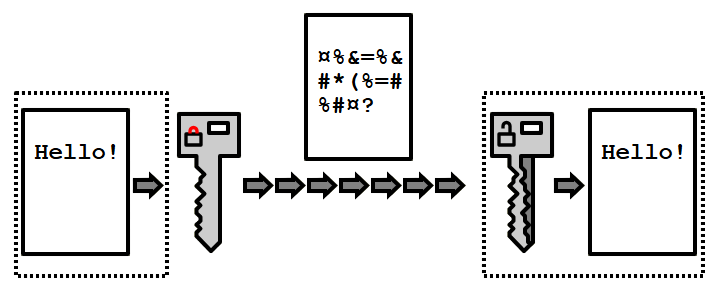
Encryption is the process of converting readable data into a secure coded format to prevent unauthorized access. It uses algorithms and encryption keys to protect sensitive information during storage and communication. Encryption ensures data confidentiality and is widely used in banking, messaging, and online security systems. It safeguards digital information from hackers and cyber threats. Encryption also plays a major role in maintaining privacy and secure communication.
71. Define software engineering?
Ans:
Software engineering is the systematic process of designing, developing, testing, and maintaining software applications. It follows structured methodologies such as Agile and Waterfall to ensure software quality and reliability. Software engineering improves project management, scalability, and efficiency in application development. It helps developers create robust and maintainable software solutions for different industries. Software engineering also supports continuous improvement and innovation in technology development.
72. What is SDLC?
Ans:
- SDLC stands for Software Development Lifecycle.
- It is a structured process used to develop software systematically. It includes phases like planning, design, development, testing, and deployment.
- Each phase has specific tasks to ensure quality and efficiency. SDLC helps in delivering reliable and high-quality software.
- It improves project management and reduces risks during development.
73. What is testing?
Ans:
- Testing is the process of checking software for errors and bugs.It ensures that the application works as expected. It helps identify defects before release.
- It verifies whether the software meets the given requirements.It compares actual results with expected results. It improves software quality and reliability.
- It is used to ensure the performance and stability of the system.It helps deliver a bug-free product to users. It increases user satisfaction and trust.
74. Describe unit testing?
Ans:
Unit testing is a software testing technique used to test individual components or modules of an application separately. It ensures that each unit works correctly according to the expected behavior. Unit testing is usually performed by developers during the coding phase to detect bugs early. It improves code quality, simplifies debugging, and supports maintainable software development. Unit testing also increases confidence in the reliability of program modules. It helps reduce future errors during integration and deployment stages.
75. What is integration testing?
Ans:
Integration testing is the process of testing combined software modules to ensure they work together properly. It focuses on checking interactions, data flow, and communication between integrated components. Integration testing helps detect interface errors and improves overall system consistency and reliability. It is usually performed after unit testing is completed successfully. This testing validates whether modules function correctly as a complete system. It also ensures smooth coordination between different software components
76. What is system testing?
Ans:
System testing evaluates the complete and integrated software system to verify that it meets specified requirements. It checks overall functionality, performance, security, and system behavior in real-world scenarios. System testing is performed after integration testing to identify remaining defects before deployment. It validates end-to-end workflows and ensures the application is ready for production use. System testing improves software quality and user satisfaction. It also helps confirm that all business and technical requirements are fulfilled.
77. What is acceptance testing?
Ans:
Acceptance testing is the final phase of software testing performed to validate whether the application meets user and business requirements. It is usually conducted by end users or clients before releasing the software to production. Acceptance testing ensures system readiness, usability, and overall customer satisfaction. It confirms whether the software behaves correctly in real-world conditions. This testing helps determine if the product is ready for deployment. It also reduces the chances of failure after software release.
78. Explain debugging?
Ans:
Debugging is the process of identifying, analyzing, and fixing errors or bugs in software code. It helps improve program functionality and ensures smooth and correct execution of applications. Developers use debugging tools and techniques to locate logical, syntax, or runtime errors efficiently. Debugging improves software quality, reliability, and performance. It is an essential part of software development and maintenance. Effective debugging helps create stable and error-free applications.
79. What is version control?
Ans:
Version control is a system used to manage and track changes made to source code over time. It helps developers collaborate efficiently while maintaining the history of modifications. Version control systems like Git allow branching, merging, and rollback of changes when necessary. It prevents data loss and improves teamwork in software development projects. Version control also helps manage multiple versions of applications effectively. It ensures organized and efficient project tracking throughout development.
80. What is Git?
Ans:
Git is a distributed version control system used to track changes in source code during software development. It supports collaboration by allowing multiple developers to work on the same project simultaneously. Git provides features like branching, merging, and maintaining complete project history. It improves teamwork, code management, and project organization. Git is widely used in modern software development environments. It also helps developers manage backups and recover previous versions of code easily.
81. What is cloud computing?
Ans:
Cloud computing is the delivery of computing services such as storage, servers, databases, and software over the internet. It reduces infrastructure costs and provides scalability and flexibility for businesses and users. Cloud computing supports remote access to resources and enables efficient data management. Popular cloud platforms include AWS, Microsoft Azure, and Google Cloud. It is widely used in modern IT industries for hosting applications and services. Cloud computing also improves business continuity and resource optimization
82. How Does SaaS?
Ans:
SaaS, or Software as a Service, is a cloud computing model where software applications are delivered over the internet. Users can access applications through web browsers without installing them on local systems. SaaS reduces maintenance costs and provides easy accessibility from anywhere with an internet connection. Popular examples include Google Docs, Microsoft 365, and Zoom. It simplifies software usage and updates for users and organizations. SaaS also supports subscription-based business models for software delivery.
83. What is PaaS?
Ans:
PaaS, or Platform as a Service, is a cloud computing model that provides a platform and tools for application development. It helps developers build, test, and deploy applications without managing underlying infrastructure. PaaS simplifies the development process and speeds up software delivery. Examples include Heroku, Google App Engine, and Microsoft Azure App Services. It supports rapid application deployment and efficient collaboration among developers. PaaS also reduces infrastructure management complexity for organizations.
84. What is IaaS?
Ans:
IaaS, or Infrastructure as a Service, provides virtualized computing resources such as servers, storage, and networking over the internet. It allows users to manage applications while cloud providers handle the infrastructure. IaaS offers scalability, flexibility, and cost savings by reducing the need for physical hardware. Popular examples include AWS EC2 and Microsoft Azure Virtual Machines. It supports on-demand infrastructure usage for businesses and developers. IaaS also improves resource management and operational efficiency.
85. What is cybersecurity?
Ans:
Cybersecurity is the practice of protecting systems, networks, and data from cyber attacks and unauthorized access. It uses security measures such as encryption, firewalls, and authentication to safeguard digital assets. Cybersecurity is essential for maintaining privacy, confidentiality, and system integrity in the digital world. It helps organizations reduce cyber threats and prevent data breaches. Cybersecurity also ensures safe online communication and business operations. Strong cybersecurity practices improve trust and reliability in digital systems.
86. What is malware?
Ans:
Malware is malicious software designed to damage systems, steal data, or disrupt computer operations. It includes viruses, worms, ransomware, spyware, and trojans that spread through networks and infected files. Malware poses serious security risks and can negatively impact system performance and reliability. Protecting systems with antivirus software and security measures helps prevent malware attacks. Malware is one of the major threats in cybersecurity today. Awareness and regular updates are important for preventing malware infections.
87. Define virus?
Ans:
A virus is a type of malware that replicates itself and infects files or computer systems. It spreads through downloads, removable devices, or network connections and can cause damage to software and data. Viruses reduce system performance and may disrupt normal operations. Antivirus software and security practices are used to detect and remove viruses effectively. Computer viruses are a major concern in information security. Regular system updates help reduce the risk of virus attacks.
88. What is phishing?
Ans:
Phishing is a cyber attack technique used to trick users into sharing sensitive information such as passwords and banking details. Attackers often use fake emails, websites, or messages that appear genuine to gain user trust. Phishing can lead to financial loss, identity theft, and security breaches. User awareness and cybersecurity measures help prevent phishing attacks. Phishing exploits human mistakes rather than technical vulnerabilities. Organizations conduct security training to protect users from phishing threats
89. What is AI?
Ans:
Artificial Intelligence, or AI, is a technology that enables machines to simulate human intelligence and decision-making abilities. AI includes capabilities such as learning, reasoning, problem-solving, and automation. It is widely used in industries like healthcare, finance, robotics, and customer service to improve efficiency and innovation. AI powers applications such as virtual assistants, recommendation systems, and autonomous vehicles. It is transforming modern technology and business operations rapidly. AI also helps solve complex real-world problems efficiently.
90. What is machine learning?
Ans:
Machine learning is a subset of Artificial Intelligence that allows systems to learn from data and improve performance automatically. It uses algorithms and statistical models to identify patterns and make predictions without explicit programming. Machine learning is widely used in recommendation systems, fraud detection, healthcare, and automation. It improves accuracy and supports intelligent decision-making over time. Machine learning powers many modern AI applications and services. It also helps organizations make data-driven business decisions effectively.
91. Explain data mining?
Ans:
Data mining is the process of extracting useful information, patterns, and trends from large datasets. It uses analytical techniques and algorithms to support decision-making and business intelligence. Data mining helps organizations understand customer behavior, predict outcomes, and improve operational efficiency. It is widely used in finance, healthcare, marketing, and e-commerce industries. Data mining supports strategic planning and advanced analytics. It also helps businesses gain valuable insights from complex data.
92. What is big data?
Ans:
Big data refers to extremely large and complex datasets that cannot be processed using traditional data management tools. It includes structured, semi-structured, and unstructured data generated from various sources. Big data technologies help organizations analyze information for better decision-making and business insights. It supports advanced analytics, machine learning, and predictive modeling. Big data plays a major role in digital transformation and innovation. It also helps businesses improve customer experience and operational efficiency.
93. What is IoT?
Ans:
IoT, or Internet of Things, is a technology that connects physical devices to the internet for communication and data exchange. It uses sensors, software, and networks to automate tasks and improve efficiency. IoT is widely used in smart homes, healthcare, transportation, and industrial automation systems. It connects the physical and digital worlds to create intelligent environments. IoT improves monitoring, control, and decision-making capabilities. It also supports the development of smart cities and connected systems.
94. What is blockchain?
Ans:
Blockchain is a distributed and decentralized ledger technology used to record transactions securely and transparently. It stores data in blocks that are linked together and protected using cryptography. Blockchain prevents data tampering and enhances trust in digital systems and financial transactions. It is widely used in cryptocurrencies, supply chain management, and secure record keeping. Blockchain improves transparency, security, and accountability in modern applications. It also supports secure peer-to-peer digital transactions without intermediaries.
95. Explain web server?
Ans:
A web server is a system or software that stores, processes, and delivers web content to users over the internet. It handles client requests and sends responses using protocols such as HTTP and HTTPS. Web servers host websites and ensure their availability and accessibility to users worldwide. Popular examples of web servers include Apache and Nginx. Web servers play a major role in enabling internet services and online communication. They also help manage website traffic and improve web performance.
96. What is an API?
Ans:
- API stands for Application Programming Interface.
- It is a set of rules that allows different software systems to communicate. It defines how requests and responses should be made between applications. It enables integration between different applications and services.
- APIs help software systems share data and functionality easily. They are widely used in web, mobile, and cloud applications. It simplifies software development and improves reusability.
- Developers can use existing services instead of building everything from scratch. It saves time and reduces development effort.
97. What is a REST API?
Ans:
- REST API follows REST (Representational State Transfer) architecture.
- It is a standard way of designing web services. It uses simple and scalable communication rules between client and server. It uses HTTP methods like GET, POST, PUT, and DELETE.
- Each method performs a specific operation on data. It is widely used for web and mobile applications. It is stateless and uses formats like JSON or XML.
- Each request is independent and contains all required information. It improves scalability and performance of applications.
98. What is a compiler error?
Ans:
- A compiler error is an error that occurs during compilation of a program.
- It happens when the source code violates language rules. The compiler detects it before the program runs. It is caused by syntax mistakes or incorrect code structure.
- Examples include missing semicolons, undeclared variables, or wrong keywords. These errors must be fixed before execution. It prevents the program from being successfully compiled.
- The program will not generate an executable file until errors are resolved. It ensures code correctness before running.
99. What does runtime error?
Ans:
A runtime error occurs while a program is executing and is usually caused by logical mistakes or unexpected conditions. It may crash the program or stop execution unexpectedly, affecting overall performance and stability. Runtime errors are often difficult to detect during compilation and require proper debugging techniques to identify and fix them. Handling runtime errors correctly improves software reliability and user experience. Common examples include division by zero and invalid memory access. Proper exception handling helps reduce the impact of runtime errors in applications.
100. What is logical error?
Ans:
A logical error occurs when a program contains incorrect logic that produces wrong output even though the program runs successfully. Unlike syntax or runtime errors, logical errors do not crash the program, making them harder to identify. They usually require careful testing and debugging to detect and correct. Logical errors can significantly affect the correctness and reliability of software results. These errors often occur due to incorrect conditions, formulas, or algorithm design. Proper planning and testing help minimize logical errors in programming.
![Top Informatica Interview Questions & Answers – [UPDATED] Interview Question](https://www.acte.in/wp-content/uploads/2020/05/4-img-acte-1-400x218.jpeg)