LMS
LMS
Last updated on 02nd Sep 2026| 4158

Accenture Salesforce Interview Questions And Selection Process Is Designed To Assess A Candidate’s Knowledge Of Salesforce Administration, Development, Configuration, Integration, And Real-Time Problem-Solving Skills. Accenture’s Salesforce Practice Works With Salesforce Technologies Across Marketing, Sales, Service, Commerce, Data, And AI-Enabled Customer Experiences, Making Salesforce Knowledge Valuable For Technical Roles.For Salesforce Developer And Application Roles, Interview Preparation Should Focus On Important Topics Such As Salesforce Objects, Relationships, Security, Profiles, Permission Sets, Validation Rules, Flows, Apex, Triggers, SOQL, SOSL, Governor Limits, Lightning Web Components, Integrations, Testing, And Deployment. Recent candidate experiences also indicate that practical and scenario-based discussions can be important, particularly around Apex, LWC, Flows, SOQL, And Salesforce Security.
1. What Is Salesforce?
Ans:
Salesforce Is A Cloud-Based Customer Relationship Management Platform Used To Manage Business Operations And Customer Data. It Provides Applications For Sales, Service, Marketing, Commerce, Analytics, And Customer Engagement. Salesforce Stores Business Information In A Structured And Secure Cloud Environment. It Supports Custom Objects, Fields, Workflows, Flows, Reports, Dashboards, And Automation. Developers Can Extend Salesforce Using Apex, SOQL, Lightning Web Components, And APIs. Salesforce Also Provides Security Features For Controlling Access To Business Data. Its Cloud-Based Architecture Makes It A Widely Used Platform For Modern Enterprise Applications.
2. What Is CRM In Salesforce?
Ans:
CRM Stands For Customer Relationship Management And Refers To Managing Customer Interactions And Business Relationships. Salesforce Provides CRM Features For Managing Leads, Accounts, Contacts, Opportunities, And Customer Service. CRM Helps Organizations Store Customer Information In A Centralized Platform. Sales Teams Can Track Sales Activities, Customer Communication, And Business Opportunities. Service Teams Can Manage Customer Cases, Support Requests, And Service Processes. Marketing Teams Can Use Customer Data For Campaigns And Personalized Engagement. Salesforce CRM Helps Organizations Improve Customer Relationships, Productivity, And Business Growth
3. What Is A Salesforce Object?
Ans:
A Salesforce Object Is A Database Structure Used To Store And Organize Business Information. Objects Are Similar To Tables In A Relational Database System. Standard Objects Include Account, Contact, Lead, Opportunity, Case, And Campaign. Custom Objects Can Be Created To Store Organization-Specific Business Information. Objects Contain Fields That Store Individual Pieces Of Data And Records That Represent Business Entries. Relationships Can Be Created Between Objects To Connect Related Business Information. Salesforce Objects Form The Foundation For Data Storage And Application Development.
4. What Is The Difference Between Standard And Custom Objects?
Ans:
Standard Objects Are Predefined By Salesforce For Common Business Requirements And Processes. Examples Of Standard Objects Include Account, Contact, Lead, Opportunity, And Case. Custom Objects Are Created By Administrators Or Developers For Specific Business Requirements. Custom Objects Can Contain Custom Fields, Relationships, Validation Rules, And Automation. Standard Objects Usually Provide Built-In Features That Support Common CRM Processes. Custom Objects Provide Greater Flexibility For Organization-Specific Data Models. Both Object Types Can Be Used Together To Build Complete Salesforce Applications.
5. What Is A Salesforce Record?
Ans:
A Salesforce Record Represents A Single Instance Of Data Stored Inside An Object. For Example, An Account Object Can Contain Individual Records For Different Companies. A Contact Object Can Contain Individual Records Representing Different Customers Or Employees. Each Record Contains Values Stored In Various Fields Defined For The Object. Records Can Be Created, Updated, Viewed, Deleted, And Retrieved Through Salesforce Features. Access To Records Can Be Controlled Through Salesforce Security And Sharing Settings. Records Form The Actual Business Data Managed Within A Salesforce Organization.
6. What Is A Salesforce Field?
Ans:
A Salesforce Field Is Used To Store A Specific Piece Of Information Within A Record. Examples Include Name, Email, Phone, Amount, Date, Status, And Description Fields. Salesforce Provides Standard Fields And Allows Creation Of Custom Fields. Different Field Types Include Text, Number, Currency, Date, Picklist, Checkbox, And Formula. Fields Can Have Validation Rules And Security Settings Applied To Them. Fields Help Define The Data Structure Of Salesforce Objects. Proper Field Design Is Important For Maintaining Accurate And Usable Salesforce Data.
7. What Is A Picklist In Salesforce?
Ans:
A Picklist Is A Field Type That Allows Users To Select Values From A Predefined List. Examples Include Lead Status, Opportunity Stage, Account Type, And Case Status. Picklists Help Maintain Consistent Data By Limiting Available Values. A Standard Picklist Is Provided By Salesforce For Many Common Business Processes. A Custom Picklist Can Be Created According To Specific Organizational Requirements. Dependent Picklists Can Restrict Available Values Based On Another Picklist Field. Picklists Improve Data Quality, Reporting Accuracy, And User Experience.
8. What Is A Formula Field?
Ans:
A Formula Field Automatically Calculates A Value Based On Other Fields Or Expressions. Formula Fields Can Perform Mathematical Calculations, Text Manipulation, And Logical Operations. They Can Reference Fields From The Same Record And Certain Related Objects. Formula Fields Are Read-Only Because Their Values Are Automatically Calculated. Examples Include Calculating Discounts, Customer Age, Profit Margins, Or Status Values. They Eliminate The Need To Manually Maintain Derived Information. Formula Fields Are Useful For Displaying Dynamic Calculated Values Throughout Salesforce.
9. What Is A Validation Rule?
Ans:
A Validation Rule Ensures That Data Meets Specific Business Requirements Before A Record Is Saved. It Uses A Formula Expression That Evaluates To True Or False. When The Formula Returns True, Salesforce Prevents The Record From Being Saved. Validation Rules Can Check Required Conditions, Field Values, Dates, And Business Relationships. They Help Prevent Incorrect Or Incomplete Data From Entering The System. Validation Rules Can Be Applied To Standard And Custom Objects. They Are An Important Salesforce Feature For Maintaining Data Quality And Business Compliance.
10. What Is A Record Type?
Ans:
A Record Type Allows Different Business Processes, Picklist Values, And Page Layouts For The Same Object. For Example, An Organization Can Use Different Record Types For Business And Individual Customers. Each Record Type Can Provide Different Picklist Values And Page Layout Configurations. Record Types Help Support Multiple Business Processes Within A Single Salesforce Object. They Can Be Assigned To Profiles And Permission Sets According To Business Requirements. Users Can Select Appropriate Record Types When Creating Certain Records. Record Types Provide Flexibility For Managing Different Operational Processe
11. What Is A Page Layout?
Ans:
A Page Layout Controls The Arrangement And Visibility Of Fields, Buttons, Related Lists, And Sections On A Record Page. Administrators Can Create Different Page Layouts For Different User Groups Or Business Processes. Page Layouts Can Define Whether Fields Are Required, Read-Only, Or Editable. They Can Also Control The Placement Of Related Lists And Standard Buttons. Page Layout Assignment Can Be Managed Through Profiles And Record Types. Page Layouts Mainly Control The User Interface Rather Than Object-Level Security. They Help Provide Users With A Relevant And Organized Record Management Experience.
12. What Is A Profile In Salesforce?
Ans:
A Profile Defines The Basic Permissions And Access Settings Assigned To A Salesforce User. It Controls Object Permissions, Field-Level Security, System Permissions, And Application Access. Profiles Can Determine Whether Users Can Create, Read, Edit, Or Delete Records. They Can Also Control Access To Tabs, Apex Classes, Visualforce Pages, And Other Features. Every Salesforce User Must Have One Profile. Profiles Provide A Baseline Level Of Access For Each User. Additional Permissions Can Be Granted Using Permission Sets.
13. What Is A Permission Set?
Ans:
A Permission Set Is Used To Provide Additional Permissions To Salesforce Users Without Changing Their Profile. It Can Grant Access To Objects, Fields, Applications, Apex Classes, And Other Salesforce Features. Multiple Permission Sets Can Be Assigned To The Same User. Permission Sets Are Useful When Certain Users Need Extra Access Beyond Their Profile. They Reduce The Need To Create Many Different Profiles For Small Permission Differences. Permission Set Groups Can Combine Multiple Permission Sets For Easier Administration. Permission Sets Support Flexible And Scalable Salesforce Security Management.
14. What Is A Role In Salesforce?
Ans:
A Role Determines A User’s Position Within The Salesforce Organizational Hierarchy. Roles Primarily Help Control Record Visibility Through The Role Hierarchy. Users Higher In The Hierarchy Can Often Access Records Owned By Users Below Them. Roles Are Different From Profiles Because Profiles Control Functional Permissions. A Role Hierarchy Can Represent Structures Such As Sales Manager, Regional Manager, And Sales Representative. Sharing Rules Can Extend Access Beyond The Access Provided By The Role Hierarchy. Roles Help Organizations Model Reporting Relationships And Record-Level Visibility.
15. What Is The Role Hierarchy?
Ans:
- The Role Hierarchy Is A Salesforce Security Feature Used To Control Record-Level Access Based On Organizational Structure. Users Higher In The Hierarchy Can Generally Access Records Owned By Users Below Them.
- The Hierarchy Can Be Designed According To Management And Reporting Relationships. It Does Not Control Object Permissions Such As Create, Read, Edit, Or Delete.
- Profiles And Permission Sets Handle Functional Permissions Separately. Role Hierarchy Settings Can Differ Depending On Object And Organization Requirements. It Provides An Important Layer Of Record-Level Security In Salesforce.
16. What Is A Sharing Rule?
Ans:
A Sharing Rule Automatically Provides Additional Record Access To Specific Users Or Groups. Sharing Rules Can Be Based On Record Ownership Or Specific Criteria. They Are Useful When The Organization Needs To Share Records Beyond The Default Access Model. For Example, Records Owned By One Region Can Be Shared With Another Business Group. Sharing Rules Can Grant Read-Only Or Read/Write Access Depending On Configuration. They Work With Roles, Public Groups, Territories, And Other Salesforce Security Features. Sharing Rules Help Organizations Build Flexible Record-Level Access Models.
17. What Is Organization-Wide Default Setting?
Ans:
Organization-Wide Defaults Define The Baseline Level Of Record Access For Salesforce Objects. They Can Restrict Records To Private, Public Read Only, Or Public Read/Write Access. OWD Settings Are Commonly Used As The Starting Point For Salesforce Record-Level Security. Additional Access Can Then Be Provided Through Roles, Sharing Rules, Teams, Or Manual Sharing. More Restrictive OWD Settings Generally Provide Greater Control Over Sensitive Data. OWD Settings Do Not Replace Object-Level Permissions Provided By Profiles And Permission Sets. They Form A Fundamental Part Of Salesforce Security Architecture.
18. What Is A Lookup Relationship?
Ans:
A Lookup Relationship Creates A Flexible Relationship Between Two Salesforce Objects. The Child Record References A Parent Record Through A Lookup Field. Lookup Relationships Usually Have Less Dependency Between The Parent And Child Records. Deleting The Parent Does Not Normally Require Deleting The Child Record. Lookup Relationships Can Be Created Between Standard Objects And Custom Objects. They Are Useful When Two Objects Need To Be Associated Without Strong Ownership Dependency. Lookup Relationships Provide Flexible Data Modeling Options In Salesforce.
19. What Is A Master-Detail Relationship?
Ans:
A Master-Detail Relationship Creates A Strong Parent-Child Relationship Between Two Salesforce Objects. The Detail Record Is Closely Dependent On The Master Record. The Detail Record Inherits Certain Security And Sharing Characteristics From The Master. Deleting The Master Record Can Cause Related Detail Records To Be Deleted. Master-Detail Relationships Support Roll-Up Summary Fields On The Master Object. The Detail Object Cannot Normally Exist Independently Of Its Master. This Relationship Is Useful For Strongly Dependent Business Data Structures.
20. What Is A Many-To-Many Relationship In Salesforce?
Ans:
- A Many-To-Many Relationship Allows Multiple Records From One Object To Relate To Multiple Records From Another Object. Salesforce Commonly Implements This Relationship Using A Junction Object.
- The Junction Object Contains Two Master-Detail Relationships With The Related Objects. For Example, Students And Courses Can Be Connected Through A Student-Course Junction Object.
- Each Student Can Be Related To Multiple Courses And Each Course Can Have Multiple Students. Junction Objects Provide A Flexible Way To Model Complex Business Relationships. Many-To-Many Relationships Are Frequently Used In Custom Salesforce Applications.
21. What Is A Junction Object In Salesforce?
Ans:
A Junction Object Is A Custom Object Used To Create A Many-To-Many Relationship Between Two Salesforce Objects. It Usually Contains Two Master-Detail Relationships That Connect The Junction Object With The Two Parent Objects. For Example, A Student-Course Junction Object Can Connect Multiple Students With Multiple Courses. Each Junction Record Represents A Specific Relationship Between A Student And A Course. Junction Objects Can Also Contain Additional Fields To Store Information About The Relationship. They Are Useful For Representing Complex Business Relationships In A Salesforce Data Model. Junction Objects Provide A Flexible And Structured Way To Manage Many-To-Many Relationships.

22. What Is Apex In Salesforce?
Ans:
Apex Is A Programming Language Used On The Salesforce Platform To Implement Custom Business Logic. It Uses Syntax Similar To Java And Is Designed To Work Directly With Salesforce Data And Platform Features. Apex Can Be Used To Create Classes, Methods, Triggers, Controllers, And Asynchronous Processes. It Supports Database Operations Through SOQL And DML Statements. Apex Also Provides Exception Handling And Governor Limit Controls For Secure Platform Execution. Developers Use Apex When Declarative Features Cannot Fully Meet A Business Requirement. Apex Is An Important Development Skill For Building Customized Salesforce Applications.
23. What Is SOQL In Salesforce?
Ans:
SOQL Stands For Salesforce Object Query Language And Is Used To Retrieve Data From Salesforce Objects. It Allows Developers To Select Specific Fields From One Or More Related Objects. SOQL Supports Filtering Records Using WHERE Conditions And Sorting Results Using ORDER BY. It Can Also Be Used With Aggregate Functions Such As COUNT, SUM, MIN, And MAX. Relationship Queries Allow Data To Be Retrieved From Parent And Child Objects. SOQL Is Commonly Used Inside Apex Classes, Triggers, And Other Salesforce Development Components. Efficient SOQL Usage Is Important For Avoiding Governor Limit Issues And Improving Application Performance.
24.What Is A Salesforce Record Type?
Ans:
A Salesforce Record Type Is Used To Provide Different Business Processes, Picklist Values, And Page Layouts For Different Types Of Records Within The Same Object. It Allows Organizations To Customize How Users Work With Records Based On Their Roles Or Business Requirements. For Example, An Organization Can Create Separate Record Types For Business Customers And Individual Customers. Each Record Type Can Have Different Picklist Values And Page Layout Assignments. Record Types Can Be Assigned To Users Through Profiles And Permission Sets Depending On The Salesforce Configuration
25. What Is DML In Salesforce?
Ans:
- DML Stands For Data Manipulation Language And Is Used To Perform Operations On Salesforce Records. Common DML Operations Include Insert, Update, Delete, Undelete, Upsert, And Merge.
- DML Statements Allow Apex Code To Create And Modify Salesforce Data Programmatically. Multiple Records Can Be Processed Together To Support Bulk Data Operations. DML Operations Are Subject To Salesforce Governor Limits And Should Be Used Efficiently.
- Exception Handling Can Be Used To Manage Errors That Occur During DML Processing. Proper DML Usage Helps Developers Build Reliable And Scalable Salesforce Applications.
26. What Is A Trigger In Salesforce?
Ans:
A Trigger Is Apex Code That Automatically Executes Before Or After Specific Data Operations On A Salesforce Object. Triggers Can Run During Events Such As Insert, Update, Delete, And Undelete. Before Triggers Are Commonly Used To Modify Field Values Before Records Are Saved. After Triggers Are Useful When Processing Requires Access To Records After They Have Been Saved. A Trigger Can Be Used To Implement Business Logic That Cannot Be Easily Achieved Through Declarative Automation. Trigger Code Should Be Designed To Handle Multiple Records At The Same Time. Proper Trigger Design Helps Maintain Performance, Data Integrity, And Scalability.
27. What Is The Difference Between Before And After Triggers?
Ans:
| Aspect | Before Trigger | After Trigger |
|---|---|---|
| Execution Time | Executes Before The Record Is Saved To The Database. | Executes After The Record Is Saved To The Database. |
| Common Use | Used To Validate Or Modify Field Values Before Saving. | Used To Perform Actions Using The Saved Record And Its Related Data |
| Record ID | Can Be Used Before The Record Is Committed, But The ID May Not Be Available For New Records. | The Record Has Been Saved, So The Record ID Is Available. |
| Example | Updating A Field Value Or Performing Validation Before Saving A Record. | Creating Related Records, Sending Notifications, Or Updating Other Records After Saving. |
28. What Are Governor Limits In Salesforce?
Ans:
Governor Limits Are Runtime Limits Applied By Salesforce To Ensure That Shared Platform Resources Are Used Efficiently. They Restrict Operations Such As SOQL Queries, DML Statements, CPU Time, And Heap Size During A Transaction. These Limits Help Prevent One Application Or Process From Consuming Excessive System Resources. Apex Code That Exceeds A Governor Limit Can Result In A Runtime Exception. Developers Must Design Code Carefully To Stay Within The Applicable Limits. Techniques Such As Bulkification, Efficient Queries, And Proper Collection Usage Help Reduce Limit Consumption. Understanding Governor Limits Is Essential For Developing Scalable Salesforce Applications.
29. What Is Bulkification In Salesforce?
Ans:
Bulkification Is The Practice Of Designing Salesforce Code To Process Multiple Records Efficiently In A Single Transaction. Salesforce Frequently Processes Records In Groups Rather Than One Record At A Time. Bulkified Code Avoids Placing SOQL Queries Or DML Statements Inside Loops Whenever Possible. Collections Such As Lists, Sets, And Maps Are Commonly Used To Process Multiple Records Efficiently. Bulkification Helps Prevent Governor Limit Exceptions During Large Data Operations. It Also Improves The Performance And Scalability Of Apex Code. Bulkified Development Is Considered An Important Best Practice For Salesforce Triggers And Classes.
30. What Is A Wrapper Class In Salesforce?
- A Wrapper Class Is A Custom Apex Class Used To Combine Different Types Of Data Into A Single Structure. It Can Contain Salesforce Records, Variables, And Additional Information Required By An Application.
- Wrapper Classes Are Commonly Used In Visualforce Pages, Lightning Components, And Custom Interfaces. They Can Help Present Related Information In A Convenient Format For The User Interface.
- A Wrapper Class Can Also Store Processing Statuses, Selection Flags, Or Calculated Values. This Approach Makes It Easier To Transfer Complex Data Between Apex And Front-End Components. Wrapper Classes Provide A Flexible Way To Organize Data For Custom Salesforce Applications.
31. What Is A Future Method In Salesforce?
Ans:
A Future Method Is An Asynchronous Apex Method Used To Execute A Task At A Later Time. It Is Commonly Used For Operations That Do Not Need To Be Completed Immediately Within The Current Transaction. Future Methods Can Be Useful For Callouts To External Systems And For Processing Operations That Can Run Independently. They Execute In A Separate Transaction After The Original Transaction Is Completed. A Future Method Is Defined Using The @future Annotation And Must Follow Specific Salesforce Restrictions. It Can Help Reduce Processing Time In Synchronous Transactions And Support Asynchronous Processing. Future Methods Should Be Used Carefully When Designing Reliable And Scalable Salesforce Applications.
32. What Is Queueable Apex In Salesforce?
Ans:
- Queueable Apex Is An Asynchronous Apex Framework Used To Execute Long-Running Or Resource-Intensive Processing In The Background. It Provides More Flexibility Than Traditional Future Methods Because Complex Apex Types Can Be Passed As Parameters.
- Queueable Jobs Can Also Be Chained To Execute Additional Queueable Jobs After One Job Completes. Each Queueable Job Runs Asynchronously And Receives Its Own Transaction Context.
- Developers Can Monitor Queueable Jobs Through Salesforce Setup And AsyncApexJob Information. Queueable Apex Is Useful For Data Processing, Integration Tasks, And Background Business Logic. It Provides A Powerful And Flexible Approach For Implementing Asynchronous Salesforce Processing.
33. What Is Batch Apex In Salesforce?
Ans:
Batch Apex Is An Asynchronous Apex Framework Used To Process Large Volumes Of Salesforce Records. It Divides Large Data Sets Into Smaller Batches And Processes Each Batch Separately. Batch Apex Helps Handle Data That May Exceed The Processing Limits Of A Normal Synchronous Transaction. It Commonly Uses The start, execute, And finish Methods To Control Batch Processing. The Execute Method Processes Records In Manageable Groups During Each Batch Transaction. Batch Apex Is Useful For Data Cleanup, Mass Updates, Calculations, And Large-Scale Data Processing. It Provides A Scalable Solution For Handling Large Amounts Of Salesforce Data.
34. What Is Scheduled Apex In Salesforce?
Ans:
Asynchronous Apex refers to a programming paradigm in the Salesforce Scheduled Apex Is Used To Execute Apex Code Automatically At A Specific Time Or On A Recurring Schedule. It Is Useful For Business Processes That Need To Run Without Manual User Interaction. A Schedulable Apex Class Implements The Schedulable Interface And Defines The Required Execute Method. Administrators Or Developers Can Schedule The Apex Job Through Salesforce Features Or Apex Code. Scheduled Apex Can Be Used For Periodic Data Processing, Maintenance Tasks, And Automated Business Operations. It Can Also Be Combined With Batch Apex When Large Amounts Of Data Need To Be Processed Regularly. Scheduled Apex Helps Organizations Automate Repetitive Tasks According To Defined Time Requirements.
35. What Is Lightning Experience In Salesforce?
Ans:
Lightning Experience Is The Modern User Interface Provided By Salesforce For Managing CRM Applications And Business Data. It Provides A Responsive Interface With Features Designed To Improve Productivity And User Experience. Lightning Experience Includes Lightning Pages, Components, Dashboards, Reports, Record Pages, And Workspace Features. Administrators Can Customize The Interface According To Different Business Requirements And User Roles. Developers Can Extend Lightning Experience Using Lightning Web Components, Apex, And Other Salesforce Technologies. It Provides A Modern Alternative To The Older Salesforce Classic Interface. Lightning Experience Is Widely Used For Building And Managing Modern Salesforce Applications.
36. What Is Lightning Web Component In Salesforce?
Ans:
Lightning Web Component, Commonly Called LWC, Is A Modern Framework Used To Build Custom User Interface Components On Salesforce. LWC Uses Standard Web Technologies Such As JavaScript, HTML, And CSS. Components Can Interact With Salesforce Data Through Lightning Data Service, Wire Service, Apex, And Other Platform Features. LWC Provides A Lightweight And Efficient Approach For Developing Interactive Salesforce Interfaces. Components Can Be Reused Across Different Lightning Pages And Applications. LWC Also Supports Component Communication Through Properties, Events, And Public Methods. Lightning Web Components Are Commonly Used For Modern Salesforce Front-End Development.
37. What Is Aura Component In Salesforce?
Ans:
Aura Component Is A Salesforce Framework Used To Build Dynamic And Reusable User Interface Components. It Provides Component-Based Development For Lightning Applications And Supports Client-Side And Server-Side Processing. Aura Components Can Communicate With Apex Controllers To Retrieve Or Modify Salesforce Data. They Use Components, Attributes, Events, Controllers, And Helper Functions To implement Application Logic. Aura Was Widely Used Before Lightning Web Components Became The Preferred Modern Framework. Existing Salesforce Applications May Still Contain Aura Components That Require Maintenance And Enhancement. Understanding Aura Components Can Be Useful When Working With Existing Salesforce Lightning Applications.
38. What Is Lightning Data Service?
Ans:
- Lightning Data Service Is A Salesforce Framework That Allows Lightning Components To Access And Manage Salesforce Records Without Writing Custom Apex For Many Common Operations.
- It Provides Standardized Access To Salesforce Data Through Supported Lightning Components And APIs. Lightning Data Service Can Handle Record Retrieval, Creation, Updating, And Deletion For Supported Use Cases.
- It Also Helps Maintain Data Consistency Between Components By Using Shared Client-Side Data Management. Security And Sharing Rules Are Respected When Data Is Accessed Through Supported Salesforce Services.
39. What Is The Wire Service In Lightning Web Components?
Ans:
The Wire Service Is A Lightning Web Components Feature Used To Retrieve Salesforce Data Reactively. It Can Connect A Component Property Or Function To A Salesforce Data Source Such As An Apex Method Or Lightning Data Service Adapter. When Reactive Parameters Change, The Wire Service Can Automatically Request Updated Data. This Helps Components Respond Dynamically To Changes In Input Values And Application State. Wired Apex Methods Generally Need To Be Designed According To Salesforce Requirements For Reactive Data Access. The Wire Service Can Reduce Manual Data Retrieval Logic In Lightning Components. It Is An Important Feature For Building Responsive And Data-Driven LWC Applications
40. What Is @AuraEnabled In Salesforce?
Ans:
@AuraEnabled Is An Apex Annotation Used To Make Certain Apex Methods Accessible From Lightning Components. It Can Be Used With Apex Methods Called From Lightning Web Components And Aura Components. The Annotation Allows Salesforce To Expose Supported Server-Side Logic To The Client-Side Component. Apex Methods Exposed Through Lightning Components Must Follow Salesforce Security And Platform Requirements. The Method Can Retrieve, Process, Or Modify Salesforce Data According To The Implemented Logic. Proper Authorization, Sharing, And Data Validation Should Be Considered When Exposing Apex Methods. @AuraEnabled Is Commonly Used To Connect Custom Lightning Interfaces With Apex Business Logic.

Enhance Your Career with Salesforce Training By MNC Experts
- Instructor-led Sessions
- Real-life Case Studies
- Assignments
41. What Is Salesforce Flow?
Ans:
Salesforce Flow Is A Declarative Automation Tool Used To Automate Business Processes Without Writing Extensive Apex Code. It Can Be Used To Create, Update, Delete, And Retrieve Salesforce Records Based On Defined Business Requirements. Flows Can Also Display Screens To Users And Collect Information During Business Processes. Record-Triggered Flows Can Automatically Run When A Record Is Created, Updated, Or Deleted. Flow Builder Provides A Visual Interface That Makes Automation Easier To Design And Maintain. Salesforce Flow Can Handle Complex Business Logic, Approvals, Notifications, And Record Updates. It Is A Powerful Tool For Building Scalable And Maintainable Salesforce Automation.
42. What Is A Record-Triggered Flow?
Ans:
- A Record-Triggered Flow Is A Salesforce Flow That Automatically Executes When A Record Is Created, Updated, Or Deleted. The Flow Can Evaluate Conditions And Perform Actions Based On Changes To The Record.
- It Can Create Or Update Related Records, Send Notifications, And Execute Other Business Processes. Record-Triggered Flows Can Run Before Or After A Record Is Saved Depending On The Required Processing.
- Before-Save Flows Are Generally Used For Updating Fields On The Same Record. After-Save Flows Are Useful For Related Record Updates And Other Actions After The Record Is Saved.
43. What Is A Screen Flow In Salesforce?
Ans:
A Screen Flow Is A Type Of Salesforce Flow That Provides An Interactive User Interface For Collecting Information. It Can Display Screens Containing Fields, Questions, Picklists, Buttons, And Other Input Components. Users Can Enter Information And Navigate Through Different Steps Of The Business Process. The Collected Information Can Then Be Used To Create Or Update Salesforce Records. Screen Flows Can Be Started From Lightning Pages, Buttons, Utility Items, Or Other Supported Locations. They Are Useful For Guided Processes Where User Interaction Is Required. Screen Flows Help Organizations Build User-Friendly Business Processes Without Developing A Fully Custom Application.
44. What Is Process Builder In Salesforce?
Ans:
Process Builder Is A Salesforce Automation Tool That Was Used To Automate Business Processes Based On Record Changes And Defined Conditions. It Could Perform Actions Such As Updating Records, Sending Emails, Creating Records, And Invoking Other Processes. Process Builder Provided A Visual Interface For Creating Automation Without Writing Apex Code. It Was Commonly Used For Automating Simple And Moderately Complex Business Requirements. Salesforce Has Shifted Automation Development Toward Flow As The Preferred Declarative Automation Framework. Existing Organizations May Still Have Process Builder Automations That Need To Be Maintained Or Migrated. Understanding Process Builder Is Useful When Working With Older Salesforce Implementations And Automation Migrations.
45. What Is A Workflow Rule In Salesforce?
Ans:
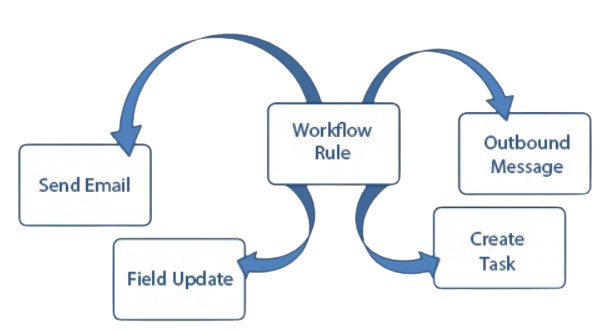
A Workflow Rule Is A Salesforce Automation Feature That Automatically Performs Actions When Defined Conditions Are Met. It Can Be Triggered When A Record Is Created Or Updated According To The Configured Evaluation Criteria. Workflow Rules Can Perform Actions Such As Field Updates, Email Alerts, Tasks, And Outbound Messages. They Were Commonly Used For Simple Automation Requirements In Salesforce. Modern Salesforce Implementations Generally Prefer Flow For New Automation Development. Existing Workflow Rules May Still Be Present In Older Salesforce Organizations. Understanding Workflow Rules Is Important For Maintaining Existing Automation And Planning Migration To Flow.
46. What Is An Approval Process In Salesforce?
Ans:
An Approval Process Is A Salesforce Feature Used To Automate The Review And Approval Of Records According To Defined Business Rules. It Can Route Records To Specific Users, Managers, Queues, Or Other Approvers. Approval Processes Can Define Entry Criteria, Approval Steps, Approval Actions, And Final Approval Or Rejection Actions. For Example, A Discount Request Can Be Submitted For Manager Approval Before It Is Accepted. Email Notifications And Field Updates Can Be Included As Part Of The Approval Process. Approval Processes Help Organizations Maintain Consistent Control Over Important Business Decisions. They Are Useful For Managing Requests That Require Formal Review And Authorization.
47. What Is A Salesforce Report?
Ans:
A Salesforce Report Is A Structured View Of Salesforce Data Used For Analysis, Monitoring, And Business Decision-Making. Reports Can Display Records From Standard Or Custom Objects Based On Selected Report Types. Filters Can Be Applied To Show Only The Records That Meet Specific Business Conditions. Reports Can Group, Sort, Summarize, And Calculate Data To Provide Useful Business Insights. Different Report Formats Include Tabular, Summary, Matrix, And Joined Reports. Reports Can Also Be Used As Data Sources For Salesforce Dashboards. Salesforce Reports Help Users Understand Business Performance And Make Data-Driven Decisions.
48. What Is A Salesforce Dashboard?
Ans:
A Salesforce Dashboard Provides A Visual Representation Of Business Data Through Charts, Graphs, Tables, Metrics, And Other Components. Dashboard Components Usually Use Salesforce Reports As Their Underlying Data Sources. Different Components Can Display Information Such As Sales Performance, Case Volumes, Revenue, And Customer Trends. Dashboards Can Be Customized According To Business Roles And Reporting Requirements. They Allow Managers And Teams To Monitor Important Key Performance Indicators In A Centralized View
49. What Is A Report Type In Salesforce?
Ans:
- A Report Type Defines Which Salesforce Objects And Records Can Be Included In A Salesforce Report. It Determines The Relationships Between Objects And The Fields Available For Reporting.
- Standard Report Types Are Provided By Salesforce For Common Business Objects And Relationships. Custom Report Types Can Be Created When Standard Report Types Do Not Meet Specific Reporting Requirements.
- Report Types Can Define Whether Records Must Exist In Related Objects Or Can Be Optional. They Provide Greater Control Over The Data Available To Report Users. Proper Report Type Design Helps Users Create Accurate And Meaningful Salesforce Reports.
50. What Is Data Loader In Salesforce?
Ans:
Data Loader Is A Salesforce Client Application Used To Import, Export, Update, Delete, And Manage Large Volumes Of Salesforce Data. It Supports Common Data Operations Through CSV Files And Salesforce Objects. Data Loader Can Be Used For Both Data Migration And Routine Data Management Tasks. It Provides Features For Insert, Update, Upsert, Delete, Export, And Export All Operations. The Tool Is Useful When The Amount Of Data Is Too Large Or Complex For The Data Import Wizard. Data Loader Can Also Be Used Through A Command-Line Interface For Automated Data Operations. It Is An Important Tool For Salesforce Administrators And Data Migration Teams.
51. What Is Data Import Wizard In Salesforce?
Ans:
Data Import Wizard Is A Salesforce Tool Used To Import Data Into Standard And Custom Objects. It Provides A Simple Browser-Based Interface For Uploading Data From CSV Files. The Tool Can Be Used To Insert New Records And Update Existing Records For Supported Objects. It Is Suitable For Smaller And Moderately Sized Data Import Requirements. Data Import Wizard Provides Mapping Options To Match CSV Columns With Salesforce Fields. It Is Easier To Use Than Data Loader For Basic Import Activities. Data Import Wizard Helps Administrators Maintain Salesforce Data Without Complex Technical Configuration.
52. What Is An External ID In Salesforce?
Ans:
An External ID Is A Salesforce Field Used To Store A Unique Identifier From An External System. It Is Commonly Used During Data Migration And Integration Projects. External ID Fields Can Help Salesforce Match Existing Records With Records From Another Application. They Are Frequently Used With Upsert Operations To Insert New Records Or Update Existing Records. External ID Fields Can Also Improve Data Matching And Integration Processes. Administrators Can Configure Suitable Text, Number, Or Email Fields As External IDs Based On Salesforce Requirements. External IDs Provide An Effective Way To Connect Salesforce Records With External System Identifiers.
53. What Is Upsert In Salesforce?
Ans:
Upsert Is A Salesforce Data Operation That Combines Insert And Update Functionality Into A Single Operation. It Determines Whether A Record Already Exists Based On The Salesforce Record ID Or A Configured External ID. If A Matching Record Is Found, Salesforce Updates That Record. If No Matching Record Is Found, Salesforce Creates A New Record. Upsert Is Commonly Used During Data Migration And External System Integration. It Helps Reduce The Need To Perform Separate Insert And Update Operations. Upsert Is Useful For Synchronizing Data Between Salesforce And Other Business Applications.
54. What Is Salesforce API?
Ans:
Salesforce API Provides Programmatic Methods For External Applications To Communicate With Salesforce. APIs Allow Applications To Retrieve, Create, Update, Delete, And Synchronize Salesforce Data. Different Salesforce APIs Are Designed For Different Integration And Data Processing Requirements. REST API Is Commonly Used For Lightweight Web-Based Integrations, While SOAP API Supports Structured Enterprise Integrations. Bulk API Is Designed For Processing Large Volumes Of Data Efficiently. Metadata API Can Be Used To Manage Salesforce Configuration And Metadata. Salesforce APIs Enable Integration Between CRM Data And External Business Systems.
55. What Is REST API In Salesforce?
Ans:
- Salesforce REST API Is A Web-Based API Used To Access Salesforce Data Through HTTP Requests. It Uses Standard HTTP Methods Such As GET, POST, PATCH, And DELETE For Different Data Operations.
- REST API Typically Exchanges Data Using JSON And Can Be Used By Web, Mobile, And External Applications.
- It Is Suitable For Lightweight Integrations That Require Flexible And Easy-To-Use Communication. Authentication Is Required To Ensure That Only Authorized Applications Can Access Salesforce Resources.
56. What Is SOAP API In Salesforce?
Ans:
Salesforce SOAP API Is A Web Service API Used For Structured Integration Between Salesforce And External Applications. It Uses SOAP-Based Messaging And Typically Exchanges Data Through XML Documents. SOAP API Is Useful For Enterprise Integrations That Require Strongly Defined Service Contracts. It Supports Operations Such As Creating, Updating, Deleting, And Querying Salesforce Records. External Applications Can Use SOAP API To Communicate With Salesforce Through Authenticated Requests. It Is Often Selected When Existing Enterprise Systems Depend On SOAP-Based Integration Standards. SOAP API Provides A Reliable Option For Structured Salesforce Data Integration.
57. What Is Bulk API In Salesforce?
Ans:
Bulk API Is A Salesforce API Designed To Process Large Volumes Of Data Efficiently. It Is Commonly Used For Data Migration, Data Synchronization, Mass Updates, And Large-Scale Data Processing. Instead Of Processing Individual Records Through Separate Requests, Bulk API Allows Data To Be Submitted In Larger Jobs Or Batches. This Approach Helps Improve Efficiency When Working With Large Data Sets. Bulk API Supports Operations Such As Insert, Update, Upsert, Delete, And Query. It Is Particularly Useful When Data Volumes Are Too Large For Normal Interactive API Processing. Bulk API Helps Organizations Perform High-Volume Salesforce Data Operations More Efficiently.
58. What Is Metadata API In Salesforce?
Ans:
Metadata API Is A Salesforce API Used To Manage Configuration And Customization Components Rather Than Normal Business Records. It Can Be Used To Deploy And Retrieve Components Such As Objects, Fields, Profiles, Permission Sets, Apex Classes, And Other Metadata. Metadata API Is Commonly Used During Salesforce Development And Deployment Activities. It Allows Configuration Changes To Be Moved Between Salesforce Environments. Developers And Administrators Can Use Metadata API As Part Of Automated Deployment Processes. It Supports Salesforce Development Practices Involving Version Control And Continuous Integration. Metadata API Is Important For Managing Salesforce Application Configuration Across Different Environments.
59. What Is Change Data Capture In Salesforce?
Ans:
Change Data Capture Is A Salesforce Event-Based Feature Used To Notify External Systems About Changes To Salesforce Records. It Can Publish Change Events When Supported Salesforce Records Are Created, Updated, Deleted, Or Undeleted. External Applications Can Subscribe To These Events And Process Changes In Near Real Time. This Helps Reduce The Need For Continuous Polling Of Salesforce Data. Change Data Capture Is Useful For Data Synchronization, Integration, Analytics, And Event-Driven Architectures. It Provides Information About Record Changes That External Systems Can Use For Processing. Change Data Capture Helps Build Responsive And Efficient Salesforce Integration Solutions.
60. What Are Platform Events In Salesforce?
Ans:
Platform Events Are Salesforce Event Messaging Features Used To Implement Event-Driven Communication Between Salesforce And External Systems. They Allow Applications To Publish And Subscribe To Business Events Through A Defined Event Structure. Platform Events Can Be Used To Communicate That A Business Action Has Occurred Without Requiring Direct Synchronous Communication. For Example, An Order Processing Event Can Notify Another Application That A New Order Has Been Created. Apex, Lightning Components, And External Applications Can Participate In Supported Platform Event Communication.

Learn Hands-On Experience with Salesforce Certification Course
Weekday / Weekend BatchesSee Batch Details61. What Is A Custom Metadata Type In Salesforce?
Ans:
A Custom Metadata Type Is A Salesforce Configuration Feature Used To Store Reusable Application Metadata. It Allows Administrators And Developers To Define Custom Fields And Records That Represent Application Configuration. Custom Metadata Records Can Be Referenced By Apex, Flows, And Other Salesforce Components. They Are Useful For Storing Values Such As Business Rules, Configuration Options, And Processing Parameters. Custom Metadata Can Be Deployed Between Salesforce Environments Along With Other Metadata Components. This Makes It Easier To Maintain Configuration Without Hard-Coding Values Directly In Apex Code. Custom Metadata Types Support Flexible, Maintainable, And Scalable Salesforce Application Design.
62. What Is A Custom Setting In Salesforce?
Ans:
- A Custom Setting Is A Salesforce Feature Used To Store Custom Configuration Data That Can Be Accessed By Applications. Custom Settings Can Store Values That Control Application Behavior Without Requiring Changes To Apex Code.
- There Are Different Types Of Custom Settings, Including List Settings And Hierarchy Settings. Hierarchy Custom Settings Can Provide Different Values Based On Organization, Profile, Or User Context.
- Apex Code Can Access Custom Setting Values Efficiently During Application Execution. Custom Settings Are Useful For Storing Configuration Information That May Change Based On Business Requirements.
63. What Is A Sandbox In Salesforce?
Ans:
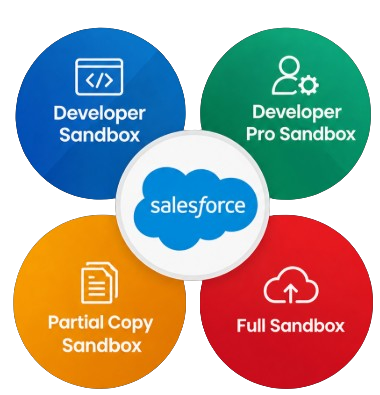
A Sandbox Is A Separate Salesforce Environment Used For Development, Testing, Training, And Quality Assurance Activities. It Provides An Isolated Copy Of Salesforce Configuration And, Depending On The Sandbox Type, Some Or All Production Data. Developers Can Build And Test Customizations In A Sandbox Without Directly Affecting The Production Organization. Different Sandbox Types Provide Different Levels Of Data And Storage Capacity. Sandboxes Are Commonly Used For Developing Apex, Lightning Components, Flows, Integrations, And Other Salesforce Features. Testing Changes In A Sandbox Helps Reduce The Risk Of Problems During Production Deployment. Sandboxes Are An Important Part Of A Controlled Salesforce Development And Release Process.
64. What Is A Change Set In Salesforce?
Ans:
- A Change Set Is A Salesforce Deployment Tool Used To Move Configuration Components From One Salesforce Organization To Another Related Organization.
- It Can Be Used To Deploy Components Such As Custom Objects, Fields, Apex Classes, Flows, And Other Supported Metadata.
- Change Sets Are Commonly Used To Move Changes From Sandbox Environments To Production. An Outbound Change Set Is Created In The Source Organization And An Inbound Change Set Is Received By The Target Organization
65. What Is Salesforce DX?
Ans:
“Salesforce DX Is A Set Of Tools And Development Practices Designed To Improve Salesforce Application Development And Deployment. It Supports Source-Driven Development, Version Control, Automated Testing, And Modern Development Workflows. Salesforce DX Can Be Used With Salesforce CLI, Scratch Orgs, Source Format, And Version Control Systems. Developers Can Manage Salesforce Metadata As Source Code And Track Changes More Effectively. It Supports Modern Software Development Practices Such As Continuous Integration And Continuous Delivery. Salesforce DX Helps Development Teams Collaborate More Efficiently Across Different Salesforce Projects. It Provides A Modern Foundation For Building, Testing, And Deploying Salesforce Application
66. What Is A Scratch Org In Salesforce?
Ans:
A Scratch Org Is A Temporary And Configurable Salesforce Environment Used For Development And Testing. It Is Commonly Created Through Salesforce DX And Salesforce CLI Based On A Defined Configuration. Scratch Orgs Allow Developers To Build Features Without Depending Completely On Long-Lived Shared Environments. They Can Be Created, Configured, Tested, And Deleted As Needed During Development. Scratch Orgs Support Source-Driven Development And Help Developers Work With Version-Controlled Salesforce Metadata. They Are Particularly Useful For Agile Development And Continuous Integration Workflows. Scratch Orgs Provide Flexible And Reproducible Development Environments For Salesforce Teams.
67. What Is Salesforce CLI?
Ans:
Salesforce CLI Is A Command-Line Interface Used To Perform Salesforce Development, Administration, Testing, And Deployment Tasks. It Allows Developers To Create Projects, Authenticate Organizations, Manage Scratch Orgs, Run Tests, And Deploy Metadata. Salesforce CLI Can Be Integrated With Development Tools And Automated Build Pipelines. It Provides Commands For Working With Salesforce Organizations Without Performing Every Task Through The Web Interface. Developers Can Use It Together With Version Control Systems And Continuous Integration Platforms.
68. What Is A Test Class In Salesforce?
Ans:
A Test Class Is An Apex Class Used To Verify That Salesforce Code Works Correctly Under Different Conditions. Test Classes Can Test Apex Classes, Methods, Triggers, And Other Supported Application Logic. They Help Developers Identify Errors Before Code Is Deployed To Production. Salesforce Requires Appropriate Apex Test Coverage Before Production Deployment Of Apex Code. Test Methods Can Create Test Data And Execute Application Logic Without Depending On Real Production Records.
69. What Is Test.startTest() And Test.stopTest() In Salesforce?
Ans:
Test.startTest() And Test.stopTest() Are Apex Test Methods Used To Define A Specific Testing Context Within A Test Method. Test.startTest() Resets Certain Governor Limits For The Code That Needs To Be Tested. Test.stopTest() Ends The Test Context And Ensures That Asynchronous Operations Started During The Test Are Executed before The Test Continues. These Methods Help Isolate The Actual Business Logic From Test Data Setup Activities. They Are Particularly Useful When Testing Queueable Apex, Future Methods, Batch Apex, And Scheduled Apex
70. What Is A SOQL Relationship Query In Salesforce?
Ans:
A SOQL Relationship Query Is Used To Retrieve Data From Related Salesforce Objects In A Single Query. It Can Query Parent Information From A Child Record Or Child Records Related To A Parent. For Example, A Contact Query Can Retrieve Fields From Its Related Account. Parent-To-Child Queries Can Retrieve Related Child Records Through A Subquery. Relationship Queries Reduce The Need For Multiple Separate Queries When Related Data Is Required. They Are Useful For Building Efficient Apex Logic And Lightning Applications. Proper Use Of Relationship Queries Can Improve Code Performance And Help Reduce SOQL Governor Limit Consumption.
71. What Is A Salesforce Validation Rule?
Ans:
A Salesforce Validation Rule Is Used To Ensure That Data Entered By Users Meets Specific Business Requirements And Follows Defined Data Quality Standards. It Uses A Formula Expression To Evaluate The Values Entered In A Record And Determines Whether The Information Is Valid. When The Formula Evaluates To True, Salesforce Displays A Configured Error Message And Prevents The Record From Being Saved. Validation Rules Can Be Applied To Both Standard And Custom Objects And Can Check Required Fields, Date Conditions, Numeric Values, And Other Business Rules
72. What Is A Salesforce Workflow Rule?
Ans:
- A Salesforce Workflow Rule Is An Automation Feature That Automatically Performs Specific Actions When Defined Business Conditions Are Satisfied.
- It Uses Evaluation Criteria To Determine When A Record Should Trigger The Workflow And Can Perform Actions Such As Updating Fields, Sending Email Alerts, Creating Tasks, Or Sending Outbound Messages.
- Workflow Rules Can Be Configured To Evaluate Records When They Are Created Or Updated According To The Selected Criteria.
73. What Is Salesforce Flow?
Ans:
Salesforce Flow Is A Powerful Declarative Automation Tool Used To Automate Business Processes Without Requiring Traditional Programming For Many Common Requirements. It Can Collect User Information, Query Salesforce Records, Create Records, Update Records, Delete Records, And Perform Conditional Logic. Record-Triggered Flows Can Automatically Execute When Records Are Created, Updated, Or Deleted Based On Configured Conditions. Screen Flows Can Provide Users With Guided Interfaces For Completing Multi-Step Business Processes. Flows Can Also Invoke Apex Code And Work With External Services When Advanced Processing Or Integration Is Required
74. What Is An Approval Process In Salesforce?
Ans:
An Approval Process In Salesforce Is Used To Automate The Process Of Submitting Records For Review And Obtaining Approval From Authorized Users. It Defines The Conditions Under Which A Record Can Be Submitted And Specifies The Users Or Groups Responsible For reviewing And Approving The Record. An Approval Process Can Include Multiple Approval Steps Along With Initial Submission Actions, Approval Actions, Rejection Actions, And Final Approval Actions. For Example, A Discount Request Can Automatically Be Sent To A Sales Manager When The Requested Discount Exceeds A Defined Percentage
75. What Is The Difference Between Profile And Permission Set?
Ans:
| Feature | Profile | Permission Set |
|---|---|---|
| Purpose | Defines The Basic Access And Permissions For A Salesforce User. | Provides Additional Permissions To A User Without Changing The Profile. |
| Assignment | Every Salesforce User Must Have One Profile. | Multiple Permission Sets Can Be Assigned To One User. |
| Access Level | Provides Baseline Object, Field, App, And System Permissions. | Extends Existing User Permissions With Additional Access |
| Usages | Used To Establish The User’s Standard Access Level. | Used To Provide Extra Access For Specific Business Requirements. |
76. What Is Role Hierarchy In Salesforce?
Ans:
Role Hierarchy Is A Salesforce Security Feature Used To Control Record-Level Access Based On The Organizational Structure Of Users. Users Higher In The Role Hierarchy Can Generally Access Records Owned By Users Below Them, Depending On The Organization’s Sharing Configuration And Object Settings. It Is Commonly Used To Represent Reporting Relationships Such As Sales Representatives Reporting To Sales Managers And Managers Reporting To Regional Directors. For Example, A Sales Manager May Be Able To Access Records Owned By Sales Representatives Who Report To That Manager.
77. What Is A Sharing Rule In Salesforce?
Ans:
A Salesforce Sharing Rule Is Used To Automatically Provide Additional Record-Level Access To Specific Users, Roles, Groups, Or Other Configured Groups Of Users. Sharing Rules Are Particularly Useful When Organization-Wide Defaults Restrict Record Access More Than The Business Requires. They Can Share Records Based On Record Ownership Or Specific Criteria Defined By Administrators. For Example, Records Owned By One Regional Sales Team Can Be Automatically Shared With Another Team That Requires Access To Those Records.
78. What Is Apex In Salesforce?
Ans:
- Apex Is Salesforce’s Server-Side Programming Language Used To Implement Custom Business Logic That Cannot Be Easily Achieved Through Declarative Salesforce Features.
- Its Syntax Is Similar To Java And It Is Specifically Designed To Work With Salesforce Objects, Database Records, And The Salesforce Platform.
- Apex Can Be Used To Develop Triggers, Classes, Controllers, Batch Processes, Scheduled Jobs, And Other Custom Applications.
79. What Is A Trigger In Salesforce?
Ans:
A Salesforce Trigger Is Apex Code That Automatically Executes Before Or After Specific Database Operations On Salesforce Records. Triggers Can Run During Operations Such As Insert, Update, Delete, And Undelete And Can Be Used To Implement Custom Business Logic. Before Triggers Are Commonly Used To Validate Or Modify Field Values Before Records Are Saved To The Database. After Triggers Are Useful When Processing Requires Information From Records That Have Already Been Saved, Such As Their Record IDs.
80. What Is Bulkification In Salesforce?
Ans:
Bulkification In Salesforce Is The Practice Of Designing Apex Code To Process Multiple Records Efficiently Within A Single Transaction Instead Of Processing Each Record Individually. Salesforce Frequently Processes Records In Groups, So Apex Code Must Be Designed To Handle Multiple Records Without Exceeding Governor Limits. Non-Bulkified Code Often Places SOQL Queries Or DML Statements Inside Loops, Which Can Quickly Consume Available Platform Resources. Bulkified Code Typically Uses Collections Such As Lists, Sets, And Maps To Gather Required Data And Perform Database Operations Efficiently.
81. What Is SOQL In Salesforce?
Ans:
SOQL Stands For Salesforce Object Query Language And Is Used To Retrieve Data From Salesforce Objects. It Allows Developers To Select Specific Fields From Standard And Custom Objects And Apply Conditions To Identify The Required Records. SOQL Supports Features Such As Filtering, Sorting, Grouping, Record Limits, And Relationship Queries Between Related Salesforce Objects. For Example, A SOQL Query Can Retrieve Account Records Where The Industry Field Is Equal To Banking. SOQL Is Different From Traditional SQL Because It Is Specifically Designed For Salesforce’s Object-Based Data Model And Platform Architecture
82. What Is SOSL In Salesforce?
Ans:
SOSL Stands For Salesforce Object Search Language And Is Used To Search For Text And Keywords Across Multiple Salesforce Objects At The Same Time. Unlike SOQL, Which Is Generally Used To Query Specific Objects And Their Related Records, SOSL Can Search Across Multiple Objects And Fields Using A Single Search Expression. It Is Useful When The Exact Object Containing The Required Information Is Not Known. For Example, A SOSL Search Can Find A Customer Name Across Accounts, Contacts, Leads, And Other Supported Objects. When Used In Apex, SOSL Returns Search Results In A List Of Lists Structure Based On The Objects Containing Matching Records.
83. What Is The Difference Between SOQL And SOSL?
Ans:
- SOQL And SOSL Are Both Salesforce Query Languages, But They Are Designed For Different Data Retrieval Requirements.
- SOQL Is Mainly Used To Retrieve Records From A Specific Salesforce Object Or Related Objects Using Structured Conditions And Relationship Queries. SOSL Is Mainly Used To Search For Text Or Keywords Across Multiple Salesforce Objects And Fields.
- SOQL Supports Detailed Filtering, Sorting, Grouping, And Relationship-Based Queries, Making It Suitable When The Required Object And Data Structure Are Known. SOSL Is More Useful When A Keyword Needs To Be Searched Across Different Objects Without Knowing Exactly Where The Information Is Stored
84. What Is A Salesforce Governor Limit?
Ans:
Salesforce Governor Limits Are Runtime Limits That Control The Amount Of Shared Platform Resources That Can Be Consumed During A Transaction. These Limits Help Salesforce Maintain Performance, Stability, And Fair Resource Usage Across Its Multi-Tenant Environment. Governor Limits Apply To Resources Such As SOQL Queries, DML Statements, CPU Time, Heap Size, And Other Platform Operations. For Example, Apex Code Has Limits On The Number Of Database Queries And DML Statements That Can Be Performed Within A Transaction.
85. What Is A Salesforce Sandbox?
Ans:
A Salesforce Sandbox Is A Separate Salesforce Environment Used For Development, Testing, Configuration, Training, And Quality Assurance Activities. It Allows Developers And Administrators To Make And Test Changes Without Directly Affecting The Production Environment And Its Active Users. Salesforce Provides Sandbox Types Such As Developer, Developer Pro, Partial Copy, And Full Sandbox, With Different Data, Storage, And Refresh Capabilities. Developers Can Use Sandboxes To Test Apex Code, Flows, Lightning Web Components, Configurations, Integrations, And Other Salesforce Features.
86. What Is Change Set In Salesforce?
Ans:
A Change Set In Salesforce Is A Deployment Mechanism Used To Move Metadata Components Between Related Salesforce Organizations. It Can Transfer Components Such As Custom Objects, Custom Fields, Apex Classes, Flows, Permission Sets, Lightning Components, And Other Supported Metadata. An Outbound Change Set Is Created In The Source Organization And Sent To The Target Organization, Where It Appears As An Inbound Change Set. The Components Can Be Reviewed, Validated, And Deployed In The Target Environment According To Salesforce Deployment Requirements
87. What Is Lightning Web Component In Salesforce?
Ans:
Lightning Web Component, Commonly Called LWC, Is A Modern Salesforce Framework Used To Build Reusable And Interactive User Interfaces. LWC Uses Standard Web Technologies Such As HTML, JavaScript, And CSS, Making It Familiar To Developers With Modern Web Development Experience. LWC Components Can Access Salesforce Data Through Lightning Data Service, Apex Methods, APIs, And Other Salesforce Platform Services. Components Are Designed To Be Modular, Reusable, Efficient, And Easy To Maintain Across Salesforce Applications.
88. What Is Aura Component In Salesforce?
Ans:
Aura Component Is A Salesforce Component Framework Used To Build Dynamic, Interactive, And Reusable User Interfaces In The Lightning Platform. It Uses Components, Attributes, Events, Controllers, And Client-Side JavaScript To Create Customized Lightning Applications. Aura Components Can Communicate With Apex Classes To Retrieve, Process, And Modify Salesforce Data According To Business Requirements. They Can Be Used On Lightning Pages And Within Salesforce Applications Where Existing Aura-Based Solutions Are Maintained.
89. What Is Salesforce Integration?
Ans:
Salesforce Integration Is The Process Of Connecting Salesforce With External Applications, Databases, Services, And Enterprise Systems To Exchange Data And Business Information. Integration Allows Organizations To Synchronize Information Between Salesforce And Systems Such As ERP, Marketing, Finance, E-Commerce, Or Customer Support Platforms. Salesforce Provides Several Integration Technologies And APIs, Including REST API, SOAP API, Bulk API, And Platform Events, Depending On The Integration Requirement. Integrations Can Be Synchronous Or Asynchronous And Should Be Designed According To Data Volume, Performance, Security, And Business Needs. Authentication, Authorization, Data Mapping, Error Handling, Logging, Monitoring, And Data Consistency Are Important Considerations During Integration Development.
90. How Does Prepare For An Accenture Salesforce Interview?
Ans:
Preparation For An Accenture Salesforce Interview Should Cover Salesforce Fundamentals, Administration Concepts, Development Skills, Integration Knowledge, And Practical Scenario-Based Questions. Important Areas Include Salesforce Objects, Fields, Relationships, Security, Profiles, Permission Sets, Roles, Sharing Rules, Validation Rules, Flows, Apex, Triggers, SOQL, SOSL, Governor Limits, Testing, Deployment, And Lightning Web Components. Preparation Should Also Include Real-Time Scenarios Related To Automation, Record-Level Security, Data Migration, Integration, Performance Optimization, And Troubleshooting
![Read [BEST] SalesForce ADMIN Interview Questions and Answers Interview Question](https://www.acte.in/wp-content/uploads/2020/06/19-img-acte-400x218.jpeg)