LMS
LMS
Last updated on 02nd Sep 2026| 7607

Cognizant Oracle SQL Developer Interviews Focus On Evaluating Knowledge Of Oracle Database, SQL Queries, PL/SQL Programming, Database Concepts, And Problem-Solving Skills. Candidates Are Commonly Asked Questions Related To Joins, Subqueries, Functions, Constraints, Indexes, Views, Sequences, Transactions, And Data Manipulation Statements. PL/SQL Topics Such As Procedures, Functions, Packages, Triggers, Cursors, And Exception Handling Are Also Important For Technical Discussions. Interviewers May Ask Candidates To Write SQL Queries For Real-World Scenarios Such As Finding Duplicate Records, Retrieving Top Salaries, And Comparing Data Between Tables. Performance-Related Topics Such As Indexing, Execution Plans, Query Optimization, And Efficient SQL Writing Can Also Be Covered. Strong Understanding Of Oracle-Specific Features Along With Practical SQL Knowledge Can Help Candidates Handle Technical Interview Rounds Confidently. This Collection Of Cognizant Oracle SQL Developer Interview Questions And Answers Helps Freshers And Experienced Candidates Prepare For Common Database Development And Problem-Solving Discussions.
1. What Is Oracle SQL?
Ans:
Oracle SQL Is A Structured Query Language Used To Manage And Manipulate Data Stored In Oracle Databases. It Provides Commands For Creating, Reading, Updating, And Deleting Database Data. Oracle SQL Supports Various Database Objects Such As Tables, Views, Indexes, Sequences, And Synonyms. It Provides Powerful Features For Filtering, Sorting, Grouping, Joining, And Aggregating Data. SQL Statements Can Be Used To Retrieve Information From One Or Multiple Tables. Oracle SQL Is Widely Used In Enterprise Applications, Reporting Systems, And Data Management. Its Rich Features Make It An Important Skill For Oracle SQL Developers.
2. What Is The Difference Between SQL And PL/SQL?
Ans:
SQL Is A Declarative Language Primarily Used For Querying And Manipulating Data In A Database. PL/SQL Is Oracle’s Procedural Extension To SQL That Supports Variables, Conditions, Loops, And Exception Handling. SQL Generally Executes Individual Statements For Performing Specific Database Operations. PL/SQL Can Combine Multiple SQL Statements Into A Single Program Unit. PL/SQL Supports Procedures, Functions, Packages, Triggers, And Anonymous Blocks. SQL Is Commonly Used For Data Retrieval While PL/SQL Is Used For Complex Database Programming. Both SQL And PL/SQL Are Important For Oracle Database Development.
3. What Is A Database?
Ans:
A Database Is An Organized Collection Of Data Stored Electronically For Easy Access And Management. Oracle Database Stores Data In Structures Such As Tables, Indexes, Views, And Other Database Objects. A Database Allows Applications And Users To Store, Retrieve, Modify, And Delete Information. Database Management Systems Provide Security, Concurrency, Backup, And Recovery Features. Oracle Database Supports Large Volumes Of Structured And Transactional Data. SQL Is Used To Communicate With The Database And Perform Data Operations. Databases Are Essential For Enterprise Applications And Business Information Systems.
4. What Is A Table In Oracle?
Ans:
- A Table Is A Database Object Used To Store Data In Rows And Columns. Each Column Represents A Specific Attribute Or Property Of The Data.
- Each Row Represents A Record Containing Values For The Defined Columns. Tables Can Be Created Using The CREATE TABLE Statement In Oracle SQL.
- Constraints Can Be Applied To Tables To Maintain Data Accuracy And Integrity. SQL Queries Can Retrieve, Insert, Update, And Delete Records From Tables. Tables Form The Basic Storage Structure For Relational Database Systems.
5. What Is A Primary Key?
Ans:
A Primary Key Is A Column Or Combination Of Columns That Uniquely Identifies Each Row In A Table. It Does Not Allow Duplicate Values Within The Table. A Primary Key Normally Does Not Allow NULL Values. A Table Can Have Only One Primary Key Constraint, Although It Can Contain Multiple Columns. Primary Keys Help Maintain Entity Integrity And Provide Unique Identification Of Records. They Are Frequently Used When Establishing Relationships Between Tables. Oracle Automatically Creates A Unique Index For A Primary Key Constraint Unless An Appropriate Index Already Exists.
6. What Is A Foreign Key?
Ans:
A Foreign Key Is A Column Or Set Of Columns That References A Primary Key Or Unique Key In Another Table. It Helps Establish A Relationship Between Two Related Tables. Foreign Keys Maintain Referential Integrity By Preventing Invalid References. For Example, An Employee Table Can Reference A Department Table Through A Department ID. A Foreign Key Can Contain Duplicate Values Because Multiple Records May Reference The Same Parent Record. Foreign Key Constraints Can Control Insert, Update, And Delete Operations. They Are Commonly Used In Relational Database Design.
7. What Is A Unique Key?
Ans:
A Unique Key Constraint Ensures That Values In A Column Or Combination Of Columns Are Not Duplicated. Unlike A Primary Key, A Table Can Have Multiple Unique Key Constraints. Oracle Allows NULL Values In Columns With A Unique Constraint, Subject To Oracle’s NULL Handling Rules. Unique Keys Are Useful For Attributes Such As Email Addresses, Employee Codes, Or Account Numbers. Oracle Can Create A Unique Index To Enforce The Constraint. Unique Keys Help Maintain Data Integrity And Prevent Duplicate Business Values. They Are Frequently Used Along With Primary And Foreign Keys.
8. What Is A NOT NULL Constraint?
Ans:
A NOT NULL Constraint Ensures That A Column Must Contain A Value For Every Inserted Or Updated Record. It Prevents NULL Values From Being Stored In The Specified Column. NOT NULL Is Commonly Applied To Mandatory Business Information Such As Employee Names Or Identification Numbers. The Constraint Can Be Defined During Table Creation Or Added Later. It Helps Maintain Completeness And Consistency Of Database Data. Oracle Rejects An Insert Or Update That Attempts To Store NULL In A NOT NULL Column. It Is One Of The Most Common Data Integrity Constraints.
9. What Is A CHECK Constraint?
Ans:
A CHECK Constraint Restricts Values In A Column According To A Defined Logical Condition. It Helps Ensure That Stored Data Meets Specific Business Rules. For Example, A Salary Column Can Require Values Greater Than Zero. A CHECK Constraint Can Be Defined During Table Creation Or Added Using ALTER TABLE. Oracle Evaluates The Condition When Data Is Inserted Or Updated. Invalid Values Cause The Database Operation To Fail. CHECK Constraints Help Maintain Data Quality Directly At The Database Level.
10. What Is A DEFAULT Constraint?
Ans:
- A DEFAULT Value Automatically Provides A Value When An INSERT Statement Does Not Specify A Value For A Column. It Helps Reduce The Need To Explicitly Provide Common Or Standard Values.
- For Example, An Employee Status Column Can Have A Default Value Such As ‘ACTIVE’. DEFAULT Values Can Be Defined When Creating Or Altering A Table.
- The Default Is Applied When The Column Is Omitted From The INSERT Statement. It Does Not Normally Replace An Explicitly Supplied NULL Value. DEFAULT Values Help Simplify Data Entry And Improve Consistency.
11. What Is A JOIN In Oracle SQL?
Ans:
A JOIN Is Used To Combine Data From Two Or More Tables Based On A Related Column Or Condition. Joins Allow Developers To Retrieve Related Information Stored In Separate Tables. Common Join Types Include INNER JOIN, LEFT JOIN, RIGHT JOIN, FULL OUTER JOIN, And CROSS JOIN. The JOIN Condition Usually Uses Matching Columns Between Tables. Proper Joins Help Avoid Unnecessary Data Duplication And Produce Meaningful Results. Joins Are Frequently Used In Business Reports And Application Queries. Understanding Joins Is Essential For Oracle SQL Developer Interviews.
12. What Is An INNER JOIN?
Ans:
An INNER JOIN Returns Only The Rows That Have Matching Values In Both Joined Tables. It Is Commonly Used When Only Related Records Are Required From Multiple Tables. For Example, Employee And Department Tables Can Be Joined Using Department ID. Records Without A Matching Department Are Excluded From The Result. INNER JOIN Can Be Written Using Explicit JOIN Syntax Or Older Oracle Join Syntax. Multiple Tables Can Also Be Combined Using Several INNER JOIN Operations. It Is One Of The Most Frequently Used Join Types In SQL.
13. What Is A LEFT OUTER JOIN?
Ans:
A LEFT OUTER JOIN Returns All Rows From The Left Table And Matching Rows From The Right Table. When No Matching Right-Side Record Exists, Oracle Returns NULL Values For The Right Table Columns. It Is Useful When All Records From The Primary Table Must Be Displayed. For Example, All Employees Can Be Displayed Even If Some Employees Have No Department Record. LEFT JOIN Is Commonly Used In Reporting And Data Analysis Queries. The Join Condition Determines Which Records Are Considered Matching. It Helps Identify Both Matching And Unmatched Data.
14. What Is A RIGHT OUTER JOIN?
Ans:
A RIGHT OUTER JOIN Returns All Rows From The Right Table And Matching Rows From The Left Table. If A Matching Left-Side Record Does Not Exist, NULL Values Are Returned For The Left Table Columns. It Is Functionally Similar To A LEFT OUTER JOIN With The Table Order Reversed. RIGHT JOIN Can Be Useful When The Right Table Is Considered The Primary Source Of Required Records. The Join Condition Controls How Rows Are Matched Between The Tables. It Can Help Identify Missing Relationships In Database Data. LEFT JOIN Is Often Preferred For Readability Because It Is More Commonly Used.
15. What Is A FULL OUTER JOIN?
Ans:
A FULL OUTER JOIN Returns Matching Rows And Unmatched Rows From Both Tables. When A Row Has No Matching Record On The Other Side, NULL Values Are Returned For The missing columns. It Is Useful When Complete Information From Both Tables Is Required. FULL OUTER JOIN Can Help Identify Records Existing In Only One Of Two Data Sets. The JOIN Condition Determines Which Rows Match Each Other. It Is Often Used For Data Comparison And Reconciliation Tasks. Oracle Supports FULL OUTER JOIN As Part Of Its SQL Join Features.
16. What Is A CROSS JOIN?
Ans:
A CROSS JOIN Produces The Cartesian Product Of Two Tables. Every Row From The First Table Is Combined With Every Row From The Second Table. If One Table Contains Ten Rows And Another Contains Five Rows, The Result Can Contain Fifty Rows. CROSS JOIN Does Not Require A Matching Join Condition. It Can Be Useful For Generating All Possible Combinations Of Data. However, Unnecessary CROSS JOINs Can Produce Very Large Result Sets. Careful Usage Is Important To Avoid Performance And Memory Problems.
17. What Is A SELF JOIN?
Ans:
A SELF JOIN Is A Join In Which A Table Is Joined With Itself. It Is Useful When Rows Within The Same Table Have Relationships With Other Rows In That Table. For Example, An Employee Table Can Store Both Employee And Manager IDs. A Self Join Can Be Used To Display Each Employee Along With The Corresponding Manager Name. Table Aliases Are Required To Distinguish The Different References To The Same Table. Self Joins Are Common In Hierarchical Or Relationship-Based Data. They Provide A Simple Way To Compare Related Records Within One Table.
18. What Is A Subquery?
Ans:
- A Subquery Is A Query Written Inside Another SQL Statement. It Can Be Used In SELECT, INSERT, UPDATE, DELETE, Or Other SQL Clauses. A Subquery Can Return A Single Value, Multiple Values, Or A Result Set Depending On Its Structure.
- It Is Commonly Used For Filtering Data Based On Results From Another Query. Subqueries Can Be Nested Multiple Levels Deep, Although Excessive Nesting May Reduce Readability.
- Oracle Supports Correlated And Non-Correlated Subqueries. Properly Designed Subqueries Can Simplify Complex Data Retrieval Requirements.
19. What Is A Correlated Subquery?
Ans:
A Correlated Subquery Is A Subquery That References A Column From The Outer Query. It Is Evaluated In Relation To Each Candidate Row Of The Outer Query. This Makes It Different From A Normal Subquery That Can Often Be Executed Independently. Correlated Subqueries Are Useful For Comparing Each Record With Related Data. They Are Commonly Used To Find Employees Whose Salary Is Greater Than Their Department Average. Depending On The Query And Data Size, Correlated Subqueries May Be More Expensive. Proper Indexing And Alternative Query Designs Can Improve Performance.
20. What Is The Difference Between WHERE And HAVING?
Ans:
| Aspect | WHERE | HAVING |
|---|---|---|
| Purpose | Filters Individual Rows Before Grouping. | Filters Groups After Grouping. |
| Aggregate Functions | Generally Cannot Directly Filter Using Aggregate Functions. | Can Filter Using Aggregate Functions Like COUNT, SUM, And AVG. |
| Execution | Applied Before GROUP BY. | Applied After GROUP BY |
| Example | WHERE Salary > 50000 Filters Individual Employees. | HAVING AVG(Salary) > 50000 Filters Departments Based On Average Salary. |
21. What Is GROUP BY?
Ans:
GROUP BY Is Used To Arrange Rows Into Groups Based On One Or More Columns. It Is Commonly Used With Aggregate Functions Such As COUNT, SUM, AVG, MIN, And MAX. For Example, GROUP BY Department ID Can Calculate The Total Salary For Each Department. Columns In The SELECT List Generally Need To Be Grouped Or Used Within An Aggregate Function. GROUP BY Performs Logical Grouping Before The HAVING Clause Filters Groups. It Is Widely Used In Reporting And Data Analysis. Correct GROUP BY Usage Helps Produce Meaningful Summary Information.

22. What Is ORDER BY?
Ans:
- ORDER BY Is Used To Sort Query Results According To One Or More Columns. The Default Sort Direction Is Ascending, Represented By ASC. DESC Can Be Used To Sort Values In Descending Order.
- Multiple Columns Can Be Specified To Create Secondary And Subsequent Sorting Rules. ORDER BY Can Sort Character, Numeric, Date, And Calculated Values.
- It Is Usually Placed Near The End Of A SELECT Statement. Sorting Is Useful For Reports, Rankings, And User-Friendly Data Presentation.
23. What Is DISTINCT?
Ans:
DISTINCT Is Used To Remove Duplicate Rows From A Query Result. It Can Be Applied To One Or More Selected Columns. Oracle Compares The Values Of The Selected Columns To Determine Duplicate Combinations. DISTINCT Is Useful When Only Unique Values Are Required From A Data Set. For Example, DISTINCT Department ID Can Return Each Department ID Only Once. Excessive Use Of DISTINCT Can Add Processing Cost For Large Result Sets. It Should Be Used When Duplicate Elimination Is Actually Required.
24. What Is The Difference Between DELETE, TRUNCATE, And DROP?
Ans:
- DELETE Removes Selected Rows From A Table And Can Use A WHERE Clause To Control Which Records Are Deleted. TRUNCATE Removes All Rows From A Table And Does Not Support A WHERE Clause.
- DROP Removes The Entire Table Structure Along With Its Data And Dependent Object Definitions As Applicable. DELETE Is A DML Operation While TRUNCATE And DROP Are DDL Operations In Oracle.
- DELETE Can Be Rolled Back Before Commit, While TRUNCATE And DROP Have Different Transaction Behavior. TRUNCATE Is Generally Faster Than Deleting Every Row Individually. DROP Should Be Used Carefully Because It Removes The Database Object Itself.
25. What Is An Index?
Ans:
An Index Is A Database Object That Helps Oracle Locate Rows More Efficiently. It Can Improve Query Performance When Columns Used In Search Conditions Are Properly Indexed. Common Index Types Include B-tree And Bitmap Indexes. Oracle Maintains Index Entries Separately From The Table Data. Indexes Can Improve SELECT Performance But May Increase Storage And DML Maintenance Costs. Choosing Appropriate Columns And Index Types Is Important For Performance. Indexes Should Be Designed Based On Actual Query And Workload Requirements.
26. What Is A B-Tree Index?
Ans:
A B-tree Index Is A Common Oracle Index Structure Designed For Efficient Searching And Range Queries. It Organizes Index Entries In A Tree-Like Structure To Quickly Locate Relevant rows. B-tree Indexes Work Well For Columns With Many Distinct Values. They Are Commonly Used On Primary Keys, Foreign Keys, And Frequently Searched Columns. They Can Support Equality And Range Conditions Efficiently. Index Maintenance Occurs When Related Table Data Is Inserted, Updated, Or Deleted. Proper B-tree Index Design Can Significantly Improve Query Performance.
27. What Is A Composite Index?
Ans:
A Composite Index Is An Index Created On Two Or More Columns. It Can Improve Queries That Frequently Filter Or Sort Using The Indexed Column Combination. The Order Of Columns In A Composite Index Is Important For Determining Its Effectiveness. Queries Using The Leading Column Or Appropriate Leading Columns Can Often Benefit Most. Composite Indexes Can Reduce The Need For Multiple Single-Column Indexes In Some Workloads. However, Unnecessary Indexes Increase Storage And DML Overhead. Index Design Should Be Based On Actual Query Patterns And Execution Plans.
28. What Is A View?
Ans:
A View Is A Logical Database Object That Stores A SQL Query Rather Than Physical Data In Most Normal Cases. It Provides A Simplified Or Restricted Representation Of Data From One Or More Tables. Views Can Hide Complex Joins And Calculations From Application Users. They Can Also Help Provide Controlled Access To Specific Columns Or Rows. Data Changes Through A View Depend On The View Definition And Oracle’s Updatability Rules. Views Can Improve Security, Reusability, And Query Simplicity. They Are Commonly Used In Enterprise Database Applications.
29. What Is A Materialized View?
Ans:
A Materialized View Stores The Result Of A Query Physically For Faster Data Retrieval. Unlike A Normal View, It Contains Stored Data That Can Be Refreshed When Required. Materialized Views Are Useful For Complex Queries, Aggregations, And Reporting Workloads. Refresh Strategies Can Include ON COMMIT, ON DEMAND, And Other Configurations Depending On Requirements. They Can Reduce The Cost Of Repeatedly Executing Expensive Queries. Additional Storage Is Required Because The Query Result Is Persisted. Materialized Views Are Commonly Used In Data Warehousing And Analytical Systems.
30. What Is A Sequence In Oracle?
Ans:
A Sequence Is A Database Object Used To Generate Numeric Values Automatically. It Is Commonly Used To Generate Unique Identifiers For Table Records. NEXTVAL Retrieves The Next Value From A Sequence, While CURRVAL Retrieves Its Current Value Within The Session After NEXTVAL Has Been referenced. Sequences Can Be Configured With START WITH, INCREMENT BY, CACHE, NOCACHE, CYCLE, And Other Options. Sequence Values Are Not Guaranteed To Be Gap-Free. They Are Frequently Used For Primary Key Generation. Sequences Help Avoid Manual Number Generation In Multi-User Applications.
31. What Is A Synonym?
Ans:
- A Synonym Is A Database Object That Provides An Alternative Name For Another Database Object. It Can Simplify SQL Statements By Hiding The Owner Or Schema Name.
- Synonyms Can Be Created For Tables, Views, Sequences, Procedures, And Other Supported Objects. Private Synonyms Are Available To A Specific User, While Public Synonyms Can Be Accessible More Broadly.
- They Can Improve Convenience When Accessing Objects Across Schemas. Synonyms Do Not Store Separate Copies Of The Referenced Object Data. They Are Commonly Used In Enterprise Oracle Database Environments.
32. What Is A Schema?
Ans:
A Schema Is A Collection Of Database Objects Owned By A Database User. It Can Contain Tables, Views, Indexes, Sequences, Procedures, Functions, Packages, And Other Objects. In Oracle, A User And Its Corresponding Schema Are Closely Related Concepts. Schema Names Help Organize And Separate Database Objects. Permissions Can Control Which Users Can Access Objects In Another Schema. Schema Design Supports Security And Logical Organization. Proper Schema Management Is Important For Large Enterprise Database Systems.
33. What Is A Constraint?
Ans:
A Constraint Is A Rule Applied To Database Data To Maintain Integrity And Validity. Oracle Supports Constraints Such As PRIMARY KEY, FOREIGN KEY, UNIQUE, NOT NULL, And CHECK. Constraints Prevent Invalid Or Inconsistent Data From Being Stored. They Can Be Defined During Table Creation Or Added Later Using ALTER TABLE. Constraints Can Be Enabled Or Disabled Depending On Administrative Requirements. They Help Move Important Data Validation Rules Into The Database Layer. Proper Constraint Design Improves Data Quality And Reliability.
34. What Is Normalization?
Ans:
Normalization Is The Process Of Organizing Database Data To Reduce Redundancy And Improve Data Integrity. It Divides Data Into Related Tables According To Defined Rules. Common Normal Forms Include First Normal Form, Second Normal Form, And Third Normal Form. Normalization Helps Prevent Update, Insert, And Delete Anomalies. Properly Normalized Tables Usually Avoid Unnecessary Duplication Of Data. Excessive Normalization Can Sometimes Increase The Number Of Joins Required. Database Designers Balance Normalization With Performance And Application Requirements.
35. What Is Denormalization?
Ans:
Denormalization Is The Intentional Addition Of Redundant Data To Improve Query Performance Or Simplify Data Retrieval. It Can Reduce The Number Of Joins Required For Frequently Used Queries. Denormalization Is Common In Reporting, Data Warehousing, And Read-Heavy Systems. It May Improve Read Performance But Can Increase Storage Requirements. Redundant Data Also Creates Additional Challenges For Maintaining Consistency. Careful Design And Controlled Data Update Processes Are Required. Denormalization Should Be Used When Performance Benefits Justify The Additional Complexity.
36. What Is A NULL Value In Oracle?
Ans:
NULL Represents Missing, Unknown, Or Inapplicable Data Rather Than A Specific Numeric Or Character Value. NULL Is Different From Zero, An Empty String, Or A Blank In Conceptual Database Terms. Oracle Treats A Zero-Length Character String As NULL In VARCHAR2 And CHAR Contexts. Standard Equality Operators Such As = And <> Do Not Properly Test For NULL. IS NULL And IS NOT NULL Are Used To Check NULL Values. Functions Such As NVL And COALESCE Can Be Used To Provide Alternative Values. Understanding NULL Behavior Is Essential For Writing Correct Oracle Queries.
37. What Is NVL Function?
Ans:
NVL Is An Oracle SQL Function Used To Replace A NULL Value With Another Specified Value. It Accepts Two Arguments, Where The Second Argument Is Returned If The First Argument Is NULL. For Example, NVL(Salary,0) Can Display Zero When Salary Is NULL. The Replacement Value Should Be Compatible With The Data Type Of The First Expression. NVL Is Commonly Used In Reports And Calculations To Avoid NULL-Related Results. It Can Also Be Used In SELECT Statements And Expressions. Proper Use Of NVL Helps Produce More Consistent Query Results.
38. What Is COALESCE Function?
Ans:
COALESCE Returns The First Non-NULL Expression From A List Of Expressions. It Can Accept More Than Two Arguments, Making It More Flexible Than NVL. For Example, COALESCE(Phone, Mobile, HomePhone) Can Return The First Available Contact Number. Oracle Evaluates The Expressions In Order Until A Non-NULL Value Is Found. COALESCE Is Based On Standard SQL And Is Useful For Portable Query Design. It Can Be Used In SELECT, WHERE, ORDER BY, And Other SQL Expressions. It Is Helpful When Multiple Possible Sources Of Data Need To Be Checked.
39. What Is CASE Statement In SQL?
Ans:
- CASE Is A Conditional Expression Used To Return Different Values Based On Specified Conditions. It Provides IF-THEN-ELSE-Like Logic Directly Inside SQL Queries.
- CASE Can Be Used In SELECT, WHERE, ORDER BY, GROUP BY, And Other Expressions. It Is Useful For Categorizing Data Or Applying Conditional Calculations.
- For Example, Salary Values Can Be Classified Into Low, Medium, And High Categories. CASE Improves Query Flexibility Without Requiring Separate Application Logic. It Is Frequently Used In Reporting And Business Rule Implementations.
40. What Is DECODE Function?
Ans:
- DECODE Is An Oracle-Specific Function Used For Conditional Value Comparisons. It Compares An Expression With One Or More Search Values And Returns The Corresponding Result.
- It Can Be Used For Simple Equality-Based Conditional Logic. DECODE Can Often Be Replaced With A CASE Expression For More Complex Conditions.
- It Is Commonly Found In Older Oracle Applications And Legacy SQL Code. DECODE Supports A Default Result When No Matching Search Value Exists. Understanding DECODE Is Useful When Maintaining Existing Oracle Database Applications.

41. What Is RANK Function?
Ans:
RANK Is An Analytical Function Used To Assign Rankings To Rows Based On Specified Ordering. Rows With Equal Values Receive The Same Rank. When Ties Occur, The Next Rank Values Can Contain Gaps. RANK Is Useful For Finding Top Salaries, Product Rankings, Or Performance Positions. It Uses An OVER Clause With An ORDER BY Specification. PARTITION BY Can Be Used To Generate Separate Rankings Within Groups. RANK Is Commonly Used In Analytical And Reporting Queries.
42. What Is DENSE_RANK?
Ans:
DENSE_RANK Is An Analytical Function That Assigns Rankings Without Gaps After Tied Values. Rows With Equal Ordering Values Receive The Same Rank. Unlike RANK, The Next Distinct Value Receives The Immediately Following Rank. DENSE_RANK Is Useful When Continuous Ranking Numbers Are Required. PARTITION BY Can Be Used To Create Rankings Within Separate Groups. It Is Frequently Used For Department-Wise Or Category-Wise Top-N Analysis. Understanding The Difference Between RANK And DENSE_RANK Is Common In Oracle Interviews.
43. What Is ROW_NUMBER?
Ans:
ROW_NUMBER Is An Analytical Function That Assigns A Unique Sequential Number To Each Row. The Numbering Is Determined By The ORDER BY Clause Within The OVER Expression. Unlike RANK And DENSE_RANK, Tied Values Still Receive Different Row Numbers. ROW_NUMBER Is Frequently Used To Identify The First Or Latest Record Per Group. PARTITION BY Can Restart Numbering For Each Group. It Is Very Useful For Pagination, Duplicate Detection, And Top-Record Selection. Proper Ordering Is Important To Produce Deterministic Results.
44. What Are Aggregate Functions?
Ans:
- Aggregate Functions Perform Calculations On Multiple Rows And Return A Single Result For A Group Or Entire Result Set. Common Oracle Aggregate Functions Include COUNT, SUM, AVG, MIN, And MAX.
- They Are Frequently Used With GROUP BY To Generate Summary Information. COUNT Can Count Rows Or Non-NULL Values Depending On The Expression. SUM And AVG Are Commonly Used For Numeric Business Metrics.
- Aggregate Functions Help Build Reports And Analytical Queries. Understanding Their NULL Handling And Grouping Behavior Is Important For Accurate Results.
45. What Is COUNT Function??
Ans:
COUNT Is An Aggregate Function Used To Count Rows Or Non-NULL Values. COUNT() Counts Rows In The Result Set Including Rows Containing NULL Values In Individual Columns. COUNT(ColumnName) Counts Only Rows Where The Specified Column Is Not NULL. COUNT(DISTINCT ColumnName) Counts Unique Non-NULL Values. It Is Commonly Used To Calculate Employee Counts, Transaction Counts, And Other Business Metrics. COUNT Can Be Used With GROUP BY To Generate Counts For Different Categories. Understanding The Difference Between COUNT() And COUNT(ColumnName) Is Important In Oracle SQL.
46. What Is The Difference Between UNION And UNION ALL?
Ans:
| Aspect | UNION | UNION ALL |
|---|---|---|
| Duplicate Rows | Removes Duplicate Rows From The Result. | Includes Duplicate Rows In The Result. |
| Performance | Generally Slower Because It Removes Duplicates. | Generally Faster Because It Does Not Remove Duplicates. |
| Use Case | Used When A Unique Result Set Is Required. | Used When All Records, Including Duplicates, Are Required. |
| Processing | Performs Additional Processing For Duplicate Elimination. | Directly Combines The Results Without Duplicate Elimination. |
47. What Is EXISTS Operator?
Ans:
EXISTS Tests Whether A Subquery Returns At Least One Row. It Returns TRUE When The Subquery Produces A Matching Result. EXISTS Is Often Used With Correlated Subqueries To Check Related Records. It Can Be More Efficient Than IN In Certain Data And Query Conditions, Especially For Existence Checks. EXISTS Does Not Need To Retrieve All Matching Rows Once A qualifying row is found conceptually. It Is Commonly Used For Checking Related Records Before Performing An Operation. Proper Indexing Can Improve EXISTS Query Performance.
48. What Is IN Operator?
Ans:
The IN Operator Checks Whether A Value Matches Any Value In A List Or Subquery Result. It Provides A Convenient Alternative To Writing Multiple OR Conditions. For Example, A Department ID Can Be Checked Against Several Specific Department Values. IN Can Also Use A Subquery That Returns Multiple Values. NULL Values In The Compared Data Can Produce Important Three-Valued Logic Behavior. IN Is Commonly Used In Filtering And Data Selection Queries. Proper Understanding Of NULL And Subquery Behavior Helps Avoid Unexpected Results.
49. What Is BETWEEN Operator?
Ans:
BETWEEN Is Used To Check Whether A Value Falls Within An Inclusive Range. It Is Commonly Used With Numeric, Date, And Character Values. For Numeric Values, BETWEEN 10 AND 20 Includes Both 10 And 20. For Dates, Time Components Should Be Considered Carefully When Defining Range Conditions. BETWEEN Can Make Queries More Readable Than Using Multiple Comparison Operators. It Is Often Used For Salary Ranges, Date Ranges, And Transaction Amounts. Correct Boundary Handling Is Important For Accurate Results.
50. What Is LIKE Operator?
Ans:
- LIKE Is Used For Pattern Matching In Character Data. The Percent Symbol Represents Zero Or More Characters, While The Underscore Represents Exactly One Character.
- For Example, LIKE ‘A%’ Finds Values Starting With The Letter A. LIKE ‘%SQL%’ Finds Values Containing The Text SQL Anywhere In The String.
- Pattern Matching Can Become Expensive When A Leading Wildcard Prevents Effective Index Usage. LIKE Is Frequently Used In Search Screens And Filtering Queries. Proper Pattern Design Helps Balance Flexibility And Query Performance.
51. What Is A Stored Procedure
Ans:
A Stored Procedure Is A Named PL/SQL Program Unit Stored Inside The Oracle Database. It Can Contain SQL Statements, Variables, Conditions, Loops, And Exception Handling. Procedures Can Accept IN, OUT, And IN OUT Parameters. They Are Useful For Encapsulating Reusable Business Logic Near The Database. Stored Procedures Can Be Called By Applications Or Other PL/SQL Programs. They Can Reduce Repeated Code And Centralize Database Operations. Properly Designed Procedures Improve Reusability And Maintainability.
52. What Is A Function In PL/SQL?
Ans:
A PL/SQL Function Is A Named Program Unit That Performs Processing And Returns A Value. Functions Can Accept Parameters And Include SQL And Procedural Logic. A RETURN Statement Is Required To Provide The Function Result. Functions Can Be Called From PL/SQL And, Under Appropriate Conditions, From SQL Statements. They Are Useful For Reusable Calculations And Business Rules. Database Functions Can Help Centralize Frequently Required Logic. Proper Function Design Should Consider Performance And Side Effects.
53. What Is A Package In Oracle?
Ans:
A Package Is A PL/SQL Object That Groups Related Procedures, Functions, Variables, Constants, Cursors, And Other declarations. It Normally Contains A Package Specification And A Package Body. The Specification Defines Public Elements That Can Be Accessed By Other Programs. The Body Contains The Implementation Of The Package Logic. Packages Improve Organization, Modularity, Reusability, And Encapsulation. Package State Can Also Persist For A Session When Applicable. Packages Are Widely Used In Large Oracle Applications.
54. What Is A Trigger?
Ans:
A Trigger Is A Stored PL/SQL Program Unit That Automatically Executes When A Specified Database Event Occurs. Triggers Can Respond To INSERT, UPDATE, DELETE, DDL, Or Other Supported Events. They Can Be Defined At Statement Or Row Level Depending On The Requirement. Triggers Are Commonly Used For Auditing, Validation, And Automatic Actions. Excessive Trigger Usage Can Make Application Behavior Difficult To Understand. Trigger Logic Should Be Kept Simple And Carefully Documented. Properly Designed Triggers Can Enforce Certain Database-Level Business Requirements.
55. What Is A BEFORE Trigger?
Ans:
A BEFORE Trigger Executes Before The Triggering DML Or Database Event Is Completed. It Can Be Used To Validate Data Or Modify Values Before They Are Stored. Row-Level BEFORE Triggers Can Access :NEW And :OLD Values Where Applicable. They Are Commonly Used For Setting Derived Values Or Performing Pre-Insert Validation. BEFORE Triggers Can Help Centralize Certain Database Rules. However, Complex Trigger Logic Can Increase Maintenance Difficulty. They Should Be Used Carefully To Avoid Unexpected Side Effects.
56. What Is An AFTER Trigger?
Ans:
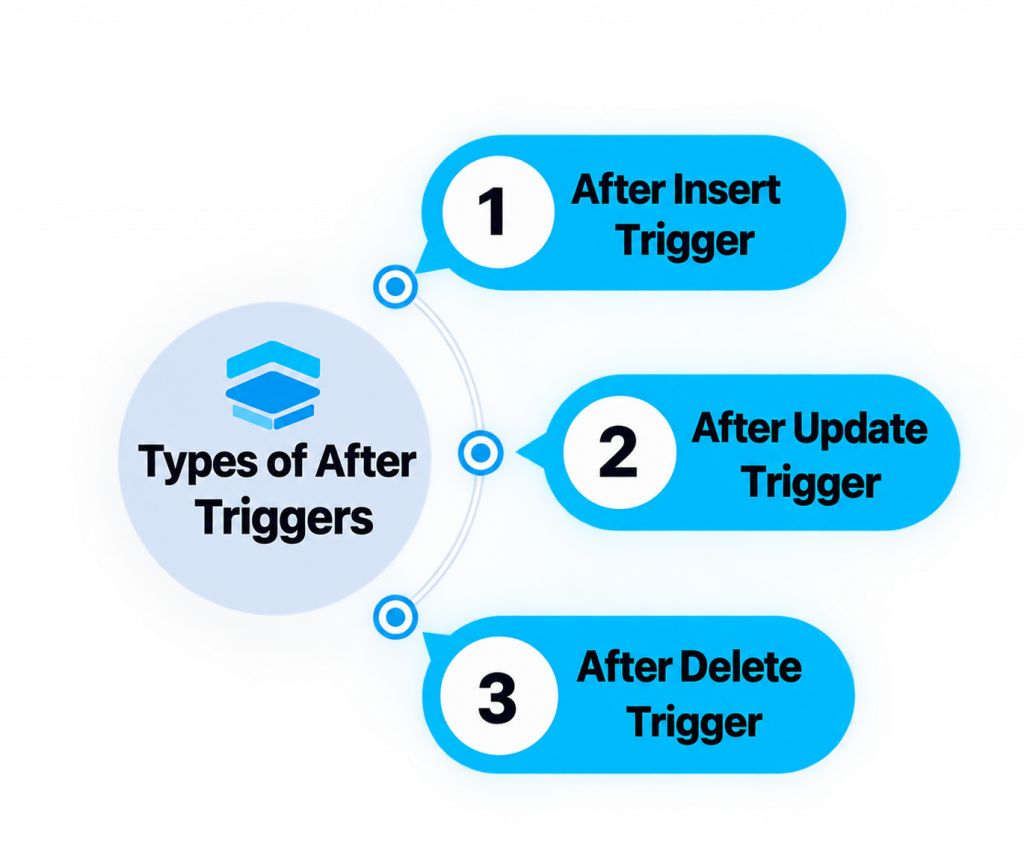
- An AFTER Trigger Executes After The Triggering DML Event Has Occurred. It Is Often Used For Auditing Or Performing Actions Based On A Completed Database operation. Row-Level AFTER Triggers Can Access :
- NEW And :OLD Values As Appropriate. They Are Useful When The Trigger Logic Should Execute After The Data Modification. AFTER Triggers Can Record Changes In Audit Tables Or Maintain Related Information.
- Trigger execution occurs as part of the transaction and is subject to transaction behavior. Careful design is required to prevent performance and dependency problems.
57. What Is An Anonymous Block In PL/SQL?
Ans:
An Anonymous Block Is A PL/SQL Program Block That Does Not Have A Stored Name In The Database. It Can Contain DECLARE, BEGIN, EXCEPTION, And END Sections. Anonymous Blocks Are Commonly Used For Testing, One-Time Processing, And Administrative Tasks. Variables, cursors, conditions, loops, And exception handling Can Be Included. The Block Is Compiled And Executed When Submitted. It Is Not Stored As A Named Database Program Unit After Execution. Anonymous Blocks Are Useful For Learning And Testing PL/SQL Logic.
58. What Is Exception Handling In PL/SQL?
Ans:
Exception Handling Allows PL/SQL Programs To Respond To Runtime Errors And Exceptional Conditions. The EXCEPTION Section Contains Handlers For Specific Or General Errors. Common predefined exceptions Include NO_DATA_FOUND, TOO_MANY_ROWS, And ZERO_DIVIDE. The OTHERS Handler Can Catch Errors That Are Not Explicitly Handled. SQLCODE And SQLERRM Can Provide Error Information During Exception Processing. Proper Exception Handling Prevents Unexpected Program Termination And Supports Better Error Management. Meaningful Logging And Appropriate Recovery Logic Should Be Used Where Required.
59. What Is A Cursor In PL/SQL?
Ans:
A Cursor Is A Mechanism Used To Process Query Results Within PL/SQL. Implicit Cursors Are Automatically Created By Oracle For Certain SQL Statements. Explicit Cursors Are Declared And Controlled By The Developer For Multi-Row Processing. Cursor Attributes Include %FOUND, %NOTFOUND, %ROWCOUNT, And %ISOPEN. Cursor FOR Loops Provide A Convenient Way To Process Query Results. Cursors Are Useful When Row-by-Row Processing Is Required. Set-Based SQL Should Generally Be Preferred When It Can Perform The Operation More Efficiently.
60. What Is An Explicit Cursor?
Ans:
An Explicit Cursor Is A Developer-Defined Cursor Used To Process Multiple Rows From A Query. It Can Be Declared, Opened, Fetched, And Closed Explicitly. The FETCH Operation Retrieves Individual Rows From The Cursor Result. Cursor Attributes Can Be Used To Determine Processing Status. Explicit Cursors Provide Detailed Control Over Row-by-Row Processing. They Are Useful When Complex Per-Row Logic Cannot Easily Be Expressed With A Single SQL Statement. Proper Cursor Management Is Important To Avoid Unnecessary Resource Usage.
61. What Is An Implicit Cursor?
Ans:
An Implicit Cursor Is Automatically Managed By Oracle For SQL Statements Executed By PL/SQL. It Is Commonly Used For INSERT, UPDATE, DELETE, And SELECT INTO Statements. Oracle Provides Cursor Attributes Such As SQL%ROWCOUNT And SQL%FOUND For These Operations. Developers Do Not Need To Explicitly Declare Or Open An Implicit Cursor. Implicit Cursors Simplify Processing For Statements That Do Not Require Manual Row Handling. They Are Generally Convenient For Single-Row Or DML Operations. Understanding Their Attributes Helps Developers Verify SQL Execution Results.

Get JOB Oriented Oracle Training for Beginners By MNC Experts
- Instructor-led Sessions
- Real-life Case Studies
- Assignments
62. What Is COMMIT?
Ans:
COMMIT Permanently Makes The Current Transaction’s Changes Visible And Releases Relevant Transaction Resources. It Is Used After Successful INSERT, UPDATE, Or DELETE Operations When Changes Should Be Saved. COMMIT Ends The Current Transaction And Begins The Context For Subsequent Work. Once Committed, The Changes Normally Cannot Be Undone Using ROLLBACK. Applications Should Commit At Appropriate Transaction Boundaries. Frequent Unnecessary Commits Can Affect Performance And Transaction Design. Proper Commit Management Is Essential For Data Consistency
63. What Is ROLLBACK?
Ans:
- ROLLBACK Undoes Uncommitted Changes Made During The Current Transaction. It Can Be Used When An Error Occurs Or When Changes Should Not Be Saved.
- ROLLBACK Returns Affected Data To Its Previous Transactionally Consistent State. It Is Commonly Used Together With Exception Handling In Transactional Programs.
- Changes That Have Already Been Committed Cannot Normally Be Undone By ROLLBACK. ROLLBACK Can Also Be Used With SAVEPOINTS To Undo Part Of A Transaction. Proper Transaction Control Helps Maintain Database Consistency.
64. What Is SAVEPOINT?
Ans:
A SAVEPOINT Marks A Specific Point Within A Transaction To Which A Partial Rollback Can Be Performed. It Allows A Transaction To Undo Some Changes Without Rolling Back Everything. The SAVEPOINT Command Creates A Named Savepoint Within The Current Transaction. ROLLBACK TO SAVEPOINT Can Undo Changes Made After That Savepoint. This Feature Is Useful For Complex Multi-Step Transactions. Savepoints Can Help Applications Recover From Partial Errors. They Provide More Granular Transaction Control Than A Complete ROLLBACK.
65. What Is A Transaction?
Ans:
A Transaction Is A Logical Unit Of Database Work Consisting Of One Or More SQL Operations. It Ends When A COMMIT Or ROLLBACK Is Performed Or When Certain Database Events Cause Transaction Boundaries. Transactions Help Maintain Data Consistency During Related Operations. Oracle Supports Transactional Properties Commonly Associated With Atomicity, Consistency, Isolation, And Durability. Multiple DML Statements Can Belong To A Single Transaction. Proper Transaction Design Prevents Partial And Inconsistent Updates. Transactions Are Fundamental To Reliable Database Applications.
66. What Is ACID Property?
Ans:
ACID Represents Atomicity, Consistency, Isolation, And Durability In Database Transactions. Atomicity Means A Transaction Is Treated As A Complete Unit Of Work. Consistency Ensures That Database Rules Remain Valid Before And After The Transaction. Isolation Controls How Concurrent Transactions Interact With Each Other. Durability Ensures That Committed Changes Are Persisted According To Database Recovery Guarantees. These Properties Help Maintain Reliable And Consistent Transaction Processing. ACID Concepts Are Important For Oracle Database Application Development.
67. What Is A Sequence NEXTVAL?
Ans:
NEXTVAL Is A Pseudocolumn Used To Obtain The Next Value Generated By An Oracle Sequence. Each NEXTVAL Reference Advances The Sequence According To Its Increment Configuration. It Is Commonly Used When Inserting New Records With Generated Identifiers. NEXTVAL Can Be Used In INSERT Statements And Other Supported SQL Contexts. Sequence Values Can Have Gaps Because Transactions Can Roll Back After Obtaining A Value. NEXTVAL Helps Provide Efficient Number Generation In Multi-User Environments. It Is Frequently Used With Primary Key Columns.
68. What Is CURRVAL?
Ans:
CURRVAL Returns The Current Value Of A Sequence Within The Current Database Session. NEXTVAL Must Generally Be Referenced First In The Session Before CURRVAL Can Be Used. CURRVAL Does Not Advance The Sequence To Another Value. It Is Useful When The Current Generated Sequence Value Is Needed Again. Sequence Values Are Session-Aware In Their CURRVAL Usage. CURRVAL Is Commonly Used When Related Operations Need The Same Generated identifier. Understanding NEXTVAL And CURRVAL Is Important For Oracle Sequence Management.
69. What Is MERGE Statement?
Ans:
MERGE Is A SQL Statement Used To Perform INSERT And UPDATE Operations Based On A Matching Condition. It Is Commonly Called An UPSERT Operation When Existing Rows Are Updated And Missing Rows Are Inserted. MERGE Compares Source Data With Target Data Using A specified ON Condition. The WHEN MATCHED Clause Can Define Update Logic. The WHEN NOT MATCHED Clause Can Define Insert Logic. MERGE Is Useful For Data Synchronization And ETL Processes. It Can Simplify Operations That Would Otherwise Require Multiple SQL Statements.
70. What Is The Difference Between CHAR And VARCHAR2?
Ans:
CHAR Is A Fixed-Length Character Data Type In Oracle. VARCHAR2 Is A Variable-Length Character Data Type That Stores Only The Required Character Data. CHAR Values Are Blank-Padded To Their Defined Length When Appropriate. VARCHAR2 Generally Uses Storage Based On The Actual Value Length. VARCHAR2 Is Commonly Preferred For Variable-Length Text Such As Names And Addresses. CHAR Can Be Useful For Truly Fixed-Length Values Such As Certain Codes. Choosing The Correct Data Type Helps Optimize Storage And Data Semantics.
71. What Is The Difference Between VARCHAR2 And VARCHAR?
Ans:
VARCHAR2 Is Oracle’s Commonly Recommended Variable-Length Character Data Type. VARCHAR Exists In Oracle But Is Currently Reserved For Potential Future Semantic Changes And Is Generally Not Recommended For Application Columns. VARCHAR2 Stores Variable-Length Character Data According To Oracle’s Database Rules. Developers Usually Use VARCHAR2 Instead Of VARCHAR In Oracle Database Applications. Using VARCHAR2 Helps Avoid Potential Compatibility Issues With Future Oracle Changes. The Maximum Size Depends On Database Configuration And Context. Oracle SQL Developers Should Prefer VARCHAR2 For Standard Variable-Length Character Storage.
72. What Is DATE Data Type?
Ans:
The Oracle DATE Data Type Stores Date And Time Information Including Year, Month, Day, Hour, Minute, And Second. It Does Not Store Time Zone Information. DATE Values Are Frequently Used For Employee Joining Dates, Transactions, And Business Events. Functions Such As SYSDATE And TO_DATE Are Commonly Used With DATE Values. Date arithmetic Can Be Used To Calculate Differences And Add Or Subtract Days. Proper Formatting Is Important When Displaying DATE Values. Understanding DATE Behavior Is Essential For Oracle SQL Development.
73. What Is SYSDATE?
Ans:
SYSDATE Returns The Current Database Server Date And Time. It Is Commonly Used When Applications Need The Current Database System Date. SYSDATE Returns A Value Of Oracle DATE Data Type. It Can Be Used In SELECT Statements, INSERT Statements, And Other SQL Expressions. SYSDATE Is Useful For Setting Creation Dates, Update Dates, And Time-Based Conditions. The Value Reflects The Database Server Environment Rather Than The Client’s Local Clock. Applications Requiring Time Zone-Aware Data May Need Appropriate Timestamp Types And Functions.
74. What Is TO_DATE Function?
Ans:
- TO_DATE Converts A Character String Into An Oracle DATE Value Using A Specified Format Model. It Helps Ensure That Date Strings Are Interpreted According To The Intended Format.
- For Example, A String Representing Day, Month, And Year Can Be Converted Using An Appropriate Format Mask. Explicit Format Models Reduce Dependence On Session Date Formatting Settings.
- TO_DATE Is Commonly Used When Loading Or Filtering Data Stored As Text. Invalid Input Can Cause Conversion Errors. Consistent Date Handling Is Important For Reliable Oracle Applications.
75. What Is TO_CHAR Function?
Ans:
TO_CHAR Converts Dates, Numbers, And Other Supported Values Into Character Strings Using A Format Model. It Is Commonly Used To Format Dates For Reports And User-Friendly Output. For Example, A DATE Can Be Displayed With A Specific Day-Month-Year Format. TO_CHAR Can Also Format Numeric Values With Currency, Decimal, Or Other Formatting Rules. Formatting Should Generally Be Done At The Presentation Layer When Appropriate. However, SQL Reports Frequently Require TO_CHAR For Display Formatting. Proper Format Models Help Produce Consistent Output.
76. What Is TO_NUMBER Function?
Ans:
TO_NUMBER Converts A Character String Into A Numeric Value. It Can Use A Format Model When The Input Contains Specific Numeric Formatting. TO_NUMBER Is Useful When Numeric Data Has Been Stored As Character Data And Needs Mathematical Processing. It Can Be Used In SELECT Statements, Calculations, And Data Conversion Operations. Invalid Character Input Can Cause Conversion Errors. Storing Numeric Information Using Appropriate Numeric Data Types Is Generally Preferable. TO_NUMBER Is Especially Useful During Data Migration And Data Cleansing.
77. What Is A CTE?
Ans:
A Common Table Expression, Or CTE, Is A Temporary Named Result Set Defined Using The WITH Clause. It Exists For The Duration Of A Single SQL Statement. CTEs Help Break Complex Queries Into More Readable And Manageable Components. They Can Be Referenced Like Logical Tables Within The Main Query. CTEs Can Also Support Recursive Queries In Oracle Versions And Features That Allow Them. They Improve Query Organization Without Creating Permanent Database Objects. CTEs Are Widely Used In Modern SQL Development And Complex Reporting Queries
78. What Is A Recursive Query?
Ans:
A Recursive Query Is A Query That Repeatedly Processes Data Based On A Relationship Between Rows. It Is Useful For Hierarchical Data Such As Employee-Manager Structures And Organizational Trees. Oracle Provides Hierarchical Query Features Such As CONNECT BY For Many Traditional hierarchical requirements. Recursive WITH Queries Can Also Be Used In Supported Oracle Versions. Recursive Queries Need Proper Conditions To Avoid Infinite Processing. They Can Retrieve Parent-Child Relationships Across Multiple Levels. Understanding Hierarchical And Recursive Queries Is Valuable For Oracle SQL Development..
79. What Is CONNECT BY?
Ans:
CONNECT BY Is An Oracle SQL Feature Used To Query Hierarchical Data. It Defines Parent-Child Relationships Between Rows In A Table. PRIOR Is Commonly Used To Identify The Relationship Between Parent And Child Rows. START WITH Can Specify The Root Rows From Which The Hierarchy Begins. CONNECT BY Is Useful For Employee Hierarchies, Folder Structures, And Organizational Trees. Pseudocolumns And Functions Such As LEVEL Can Provide Hierarchy Information. It Is An Important Oracle-Specific Feature For Hierarchical Data Retrieval.
80. What Is EXPLAIN PLAN?
Ans:
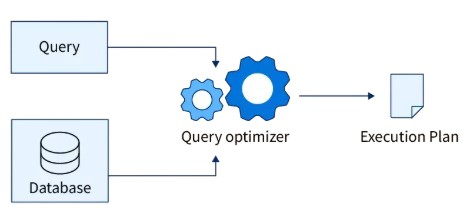
- EXPLAIN PLAN Shows The Execution Strategy That Oracle Optimizer May Use For A SQL Statement. It Provides Information About Operations Such As Table Access, Index Access, Joins, And Sorting.
- Developers Can Use It To Investigate Why A Query May Be Performing Slowly. The plan can show whether Oracle is using a full table scan or an index access path. EXPLAIN PLAN Is An Important Tool For Query Performance Analysis.
- Actual runtime behavior can differ from an estimated plan depending on execution conditions. SQL Developers Use Execution Plans Along With Statistics And Runtime Monitoring For Effective Tuning.
81. What Is Query Optimization?
Ans:
- Query Optimization Is The Process Of Improving SQL Performance While Maintaining Correct Results. Oracle’s Cost-Based Optimizer Evaluates Different Execution Strategies And Selects An Appropriate Plan.
- Developers Can Improve Queries Through Proper Joins, Indexes, Filtering, Statistics, And SQL Design. Avoiding Unnecessary Columns And Rows Can Reduce Processing Requirements.
- Execution Plans Help Identify Expensive Operations And Inefficient Access Paths. Performance Tuning Should Consider Both SQL Design And Database Environment. Optimization Is Especially Important For Large Tables And High-Transaction Applications.
82. What Is A Full Table Scan?
Ans:
A Full Table Scan Reads A Large Portion Or All Of The Blocks Of A Table To Find Matching Rows. Oracle May Choose A Full Table Scan When A Significant Percentage Of Rows Is Required. It Can Also Occur When No Suitable Index Exists For A Query Condition. Full Table Scans Are Not Always Bad And Can Be Efficient For Large Result Sets. Performance Depends On Table Size, Selectivity, Statistics, And Storage Characteristics. Execution Plans Can Help Determine Why Oracle Selected This Access Method. Developers Should Optimize Only When The Access Path Actually Causes A Performance Problem.
83. What Is Index Scan?
Ans:
An Index Scan Uses An Index To Locate Relevant Data Instead Of Reading Every Table Row. It Can Reduce The Number Of Data Blocks Oracle Needs To Access For Selective queries. Different Index Access Methods Can Be Chosen Depending On The Query And Index Structure. Index Scans Are Often Beneficial When Search Conditions Return A Small Percentage Of Rows. Poorly Designed Indexes May Not Provide A Performance Benefit. Index Usage Should Be Evaluated Through Execution Plans And Runtime Performance. Proper Statistics Help Oracle Make Better Access Path Decisions..
84. What Is Data Dictionary?
Ans:
The Oracle Data Dictionary Contains Metadata About Database Objects And Database Environment Information. It Includes Information About Tables, Columns, Constraints, Users, Privileges, Indexes, And Other Objects. Data Dictionary Views Such As USER_TABLES, USER_TAB_COLUMNS, ALL_TABLES, And DBA_TABLES Provide Different Levels Of Access. Developers Frequently Query These Views To Understand Database Structures. Access Depends On The User’s Privileges And The Specific Dictionary View. Data Dictionary Information Is Useful For Database Administration And Development. It Helps Developers Inspect And Troubleshoot Oracle Database Objects.
85. What Is USER_TABLES?
Ans:
USER_TABLES Is An Oracle Data Dictionary View That Provides Information About Tables Owned By The Current User. It Can Contain Metadata Such As Table Names, Storage Information, Statistics-Related Information, And Other Attributes. Developers Can Query USER_TABLES To Find Tables Available In Their Own Schema. It Is Useful For Database Object Inspection And Development Tasks. USER_TABLES Does Not Normally Show Tables Owned By Other Users Unless Access Is Provided Through Other Views. Similar Views Include ALL_TABLES And DBA_TABLES. Understanding Dictionary Views Helps Oracle Developers Work Efficiently With Database Metadata.
86. What Is ALL_TABLES?
Ans:
ALL_TABLES Is An Oracle Data Dictionary View That Shows Tables Accessible To The Current User. It Can Include Tables Owned By The User And Tables To Which The User Has Appropriate Access. It Provides Metadata About Accessible tables and their owners. The OWNER Column Can Help Identify Which Schema Owns A Particular Table. ALL_TABLES Is Useful When Applications Access Objects Across Multiple Schemas. The Exact Available Information Depends On Oracle Version And Privileges. It Is Frequently Used For Database Structure Analysis And Troubleshooting.
87. What Is SQL Injection?.
Ans:
- SQL Injection Is A Security Vulnerability That Occurs When Untrusted Input Is Improperly Incorporated Into SQL Statements. Attackers May Manipulate Input To Alter The Intended SQL Command.
- It Can Lead To Unauthorized Data Access, Data Modification, Or Other Security Problems. Using Bind Variables Is A Major Technique For Preventing SQL Injection In Database Applications.
- Input Validation And Proper Application Security Controls Also Help Reduce Risk. Dynamic SQL Should Be Carefully Designed And Avoid Directly Concatenating Untrusted Input. Secure SQL Development Is An Important Responsibility For Database Developers.
88. What Are Bind Variables?
Ans:
Bind Variables Are Placeholders Used To Supply Values To SQL Statements Separately From The SQL Text. They Help Prevent SQL Injection When Used Correctly In Application And Dynamic SQL Development. Bind Variables Can Also Improve Performance By Allowing Oracle To Reuse SQL Statements More Effectively. They Reduce The Need To Generate Different SQL Text For Different input values. Bind Variables Are Commonly Used In PL/SQL, Dynamic SQL, And Application Database APIs. They Can Improve Security, Parsing Efficiency, And Resource Usage. Proper Bind Variable Usage Is An Important SQL Development Best Practice.
89. What Is Dynamic SQL?
Ans:
Dynamic SQL Is SQL That Is Constructed And Executed At Runtime Instead Of Being Completely Fixed In The Source Code. Oracle PL/SQL Provides EXECUTE IMMEDIATE For Many Dynamic SQL Requirements. Dynamic SQL Is Useful When Table Names, Column Names, Or SQL Structures Need To Be Determined Dynamically. Bind Variables Should Be Used For Data Values Whenever Possible To Improve Security And Performance. Dynamic SQL Requires Careful Validation Because SQL Text May Be Constructed At Runtime. Poorly Designed Dynamic SQL Can Introduce SQL Injection And Maintenance Problems. It Should Be Used Only When Static SQL Cannot Satisfy The Requirement.
90. How Does Optimize A Slow SQL Query In Oracle?
Ans:
A Slow SQL Query Can Be Optimized By First Examining Its Execution Plan And Identifying Expensive Operations. Query Conditions, Joins, Indexes, Statistics, Sorting, And Unnecessary Data Retrieval Should Then Be Reviewed. Appropriate Indexes Can Improve Selective Searches, While Poor Indexes Can Increase DML And Storage Costs. Reducing Unnecessary Columns, Rows, Joins, And Repeated Calculations Can Improve Efficiency. Bind Variables And Proper SQL Design Can Also Improve Parsing And Security. Performance Should Be Measured Before And After Changes To Confirm The Actual Improvement. Effective Oracle SQL Tuning Combines Query Analysis, Database Statistics, Index Design, And Execution Plan Evaluation.