LMS
LMS
Last updated on 20th Aug 2026| 13046

- Introduction to UI/UX Career Opportunities at IBM
- Understanding UI/UX Roles and Responsibilities at IBM
- Eligibility Criteria for IBM UI/UX Careers
- Essential UI Design Skills for IBM Professionals
- UX Research and User-Centered Design Skills
- Figma, Prototyping, and Design System Knowledge
- Building a Strong UI/UX Portfolio for IBM
- IBM UI/UX Interview and Selection Preparation
- Career Growth and Opportunities in IBM Design Teams
- Conclusion: Building a Successful UI/UX Career at IBM
Introduction to UI/UX Career Opportunities at IBM
UI/UX career opportunities at IBM provide professionals and freshers with the chance to work on user-centered digital products, enterprise applications, and technology solutions. UI/UX professionals focus on understanding user needs and transforming complex requirements into simple, accessible, and engaging experiences. Career paths can include UI Designer, UX Designer, Product Designer, UX Researcher, Visual Designer, and related design roles. Professionals may collaborate with developers, product managers, researchers, and business teams throughout the design process. Building knowledge of user research, wireframing, prototyping, usability testing, interaction design, and visual design can help candidates prepare for these opportunities. A strong portfolio demonstrating practical projects and problem-solving abilities is particularly valuable. Candidates looking to strengthen these skills can explore UI/UX Design Training to develop practical knowledge relevant to design careers. As IBM develops enterprise and AI-driven solutions, UI/UX professionals can contribute by creating experiences that combine usability, accessibility, functionality, and consistent design.

Understanding UI/UX Roles and Responsibilities at IBM
UI/UX roles at IBM can involve researching users, defining problems, creating user journeys, developing wireframes, building prototypes, and evaluating designs through usability testing. UI-focused professionals may concentrate on layouts, typography, visual hierarchy, components, responsive interfaces, and design consistency, while UX professionals may focus more heavily on research, information architecture, interaction flows, and user behavior. Depending on the position, designers may work closely with engineering, product, research, and business teams to convert requirements into effective digital experiences. For a broader understanding of the responsibilities associated with these roles, explore the UI/UX Designer Job Description guide. Responsibilities can also include presenting design concepts, collecting stakeholder feedback, documenting design decisions, and contributing to reusable design systems. Professionals should be comfortable balancing user requirements with technical and business constraints. Strong communication and collaboration skills are important because designers frequently explain their decisions to multidisciplinary teams and refine solutions based on research, feedback, and product requirements.
Get Your UI/UX Design Certification by Learning from Industry-Leading Experts and Advancing Your Career with ACTE’s UI/UX Design Course.
Eligibility Criteria for IBM UI/UX Careers
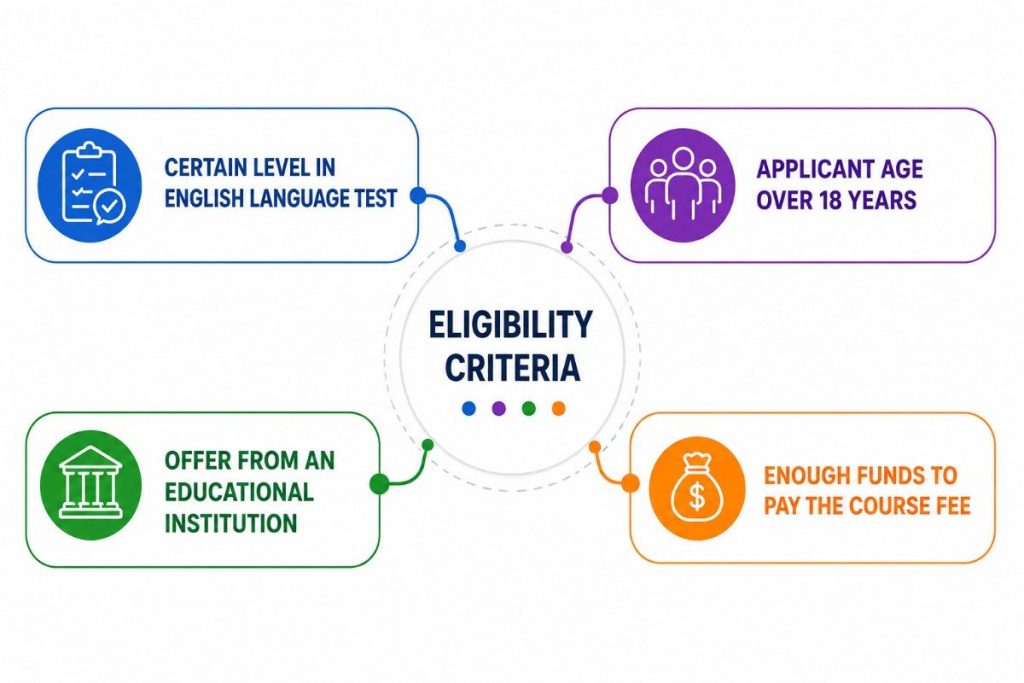
Eligibility for UI/UX careers at IBM varies depending on the specific position, experience level, location, and project requirements. Candidates may come from backgrounds such as interaction design, visual communication, graphic design, human-computer interaction, product design, computer science, or related disciplines. However, practical design ability and a strong portfolio can be particularly important when demonstrating job readiness. Candidates should understand core concepts such as user-centered design, wireframing, prototyping, usability testing, information architecture, accessibility, responsive design, and visual communication. Familiarity with modern design and collaboration tools can further strengthen a candidate’s profile.
Essential UI Design Skills for IBM Professionals
| UI Design Skill | Description |
|---|---|
| Visual Design | Ability to create clear and attractive interfaces using appropriate colors, typography, spacing, icons, and visual hierarchy while maintaining consistency across digital products. |
| Wireframing | Skills in creating structured layouts that define content placement, navigation, functionality, and user interactions before detailed visual design begins. |
| Prototyping | Ability to develop interactive prototypes that demonstrate user flows, screen transitions, and interface behavior before development and implementation. |
| Responsive Design | Knowledge of designing interfaces that provide consistent and usable experiences across desktops, tablets, smartphones, and different screen sizes. |
| Design Systems | Understanding reusable components, patterns, guidelines, and standards that help maintain consistency and improve efficiency across products. |
| Typography and Color Theory | Knowledge of selecting readable typography and effective color combinations that strengthen visual communication, hierarchy, accessibility, and brand consistency. |
| Interaction Design | Ability to design intuitive buttons, menus, forms, navigation elements, feedback states, and other interactions that improve the overall user experience. |
| Accessibility Design | Understanding accessibility principles to create inclusive interfaces that can be effectively used by people with different abilities and accessibility needs. |
| UI Design Tools | Practical knowledge of tools such as Figma for creating layouts, components, prototypes, collaborative designs, and developer-ready interface specifications. |
| Collaboration and Communication | Ability to communicate design decisions and collaborate effectively with UX researchers, developers, product managers, and other stakeholders throughout projects. |

UX Research and User-Centered Design Skills
- User Research Techniques User research involves understanding user needs, behaviors, challenges, and expectations through interviews, surveys, observations, and other research methods. These insights help designers identify real problems and create solutions based on user requirements rather than assumptions.
- User Personas and Journey Mapping Personas represent key user groups, while journey maps illustrate how users interact with a product across different stages. These techniques help UI/UX professionals understand motivations, pain points, expectations, and opportunities for improving the overall experience.
- Usability Testing Usability testing evaluates how easily users can complete tasks with a digital product. Designers observe user interactions, identify navigation or interface problems, collect feedback, and refine designs to create more intuitive, accessible, and efficient experiences. Learning more about UI/UX Testing can help candidates understand how testing contributes to better user experiences.
- Information Architecture Information Architecture focuses on organizing and structuring content so users can easily find information and complete tasks. Designers create logical navigation systems, content hierarchies, categories, and user flows that improve usability and simplify complex digital experiences.
- User-Centered Design Process User-Centered Design places user requirements at the center of the design process. It involves researching problems, developing ideas, creating prototypes, testing solutions, and continuously improving designs based on feedback to deliver useful and meaningful experiences.
Figma, Prototyping, and Design System Knowledge
- Figma Design Skills Figma enables designers to create interfaces, wireframes, components, layouts, and interactive prototypes within a collaborative environment. Professionals should understand frames, components, Auto Layout, reusable styles, libraries, and collaboration features for efficient design workflows. Familiarity with UI/UX Design Tools can further help candidates understand how different tools support modern design workflows.
- Wireframing and Prototyping Wireframing establishes the basic structure of a digital interface, while prototyping demonstrates how users interact with it. Designers use these techniques to validate navigation, functionality, and user flows before investing significant effort in final development.
- Interactive Prototype Development Interactive prototypes simulate real product experiences using clickable elements, transitions, navigation, and user flows. They help designers communicate ideas clearly, conduct usability tests, collect stakeholder feedback, and identify design problems before development begins.
- Design System Fundamentals Design systems provide reusable components, patterns, guidelines, and standards for building consistent digital products. Understanding component libraries, typography, spacing, accessibility, and interaction patterns helps designers create scalable and unified user experiences.
- Developer Collaboration UI/UX designers work closely with developers to ensure designs are implemented accurately. Clear specifications, reusable components, design documentation, prototypes, and collaborative tools help communicate layouts, interactions, responsive behavior, and design requirements effectively.

Get JOB Oriented UI/UX Design Course for Beginners By MNC Experts
- Instructor-led Sessions
- Real-life Case Studies
- Assignments
Building a Strong UI/UX Portfolio for IBM
- Selecting Relevant Projects A strong portfolio should feature projects that demonstrate a range of UI/UX capabilities, including user research, wireframing, interaction design, prototyping, accessibility, and usability evaluation. Choosing relevant and well-executed projects allows employers to assess a candidate’s practical design abilities and problem-solving approach.
- Creating Detailed Case Studies Each case study should clearly describe the design problem, target audience, research approach, key challenges, design decisions, proposed solution, and final results. Well-structured case studies help recruiters understand how candidates analyze problems and develop user-focused solutions.
- Presenting the Portfolio Professionally A professional portfolio should offer clear navigation, readable content, consistent visual presentation, and concise project descriptions. Candidates should make their work easy to explore while emphasizing their individual contributions, design expertise, measurable outcomes, and lessons learned. For additional guidance, candidates can explore this UI/UX Designer Portfolio Guide to understand how to build and present an effective portfolio.
- Showing the Design Process A portfolio should present more than polished final interfaces. Including research insights, personas, journey maps, sketches, wireframes, prototypes, usability findings, and design iterations demonstrates how ideas developed from user needs and project requirements.
- Demonstrating Problem-Solving Skills Candidates should explain the reasoning behind important design decisions and show how their solutions addressed specific user challenges. Highlighting alternatives considered, testing outcomes, improvements, and lessons learned demonstrates critical thinking, creativity, adaptability, and user-centered problem solving.
Want to Master UI/UX Design? Explore the UI/UX Design Master Program Offered at ACTE Today!
IBM UI/UX Interview and Selection Preparation
Preparing for an IBM UI/UX interview requires a strong understanding of design fundamentals, user-centered design principles, research methods, prototyping, accessibility, and problem-solving techniques. Candidates should be prepared to explain their portfolio projects clearly, including the problem, research process, design decisions, challenges, testing methods, and final outcomes. Depending on the specific role, the selection process may assess visual design, UX research, interaction design, communication, collaboration, and practical design abilities. Candidates should practice presenting case studies and explaining why particular design decisions were made rather than focusing only on final screens. Reviewing usability principles, responsive design, information architecture, design systems, and prototyping concepts can strengthen interview preparation. Practical experience with tools such as Figma can also help candidates demonstrate job-ready skills. Candidates can further strengthen their practical knowledge through UI/UX Design Training before preparing for interviews. Researching IBM’s products, design approach, and role requirements before applying can help candidates better connect their portfolio and experience with the position.
Preparing for UI/UX Design Job Interviews? Have a Look at Our Blog on UI/UX Design Interview Questions and Answers To Ace Your Interview!
Career Growth and Opportunities in IBM Design Teams
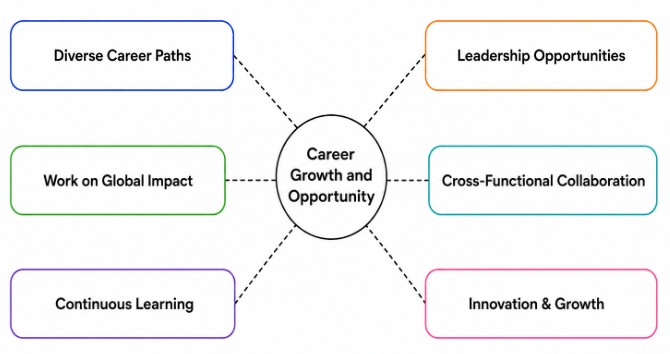
UI/UX professionals working in IBM design teams can develop their careers across areas such as user experience design, visual design, product design, UX research, content design, service design, and design leadership. Career progression depends on professional experience, technical capabilities, project contributions, communication skills, and the ability to solve increasingly complex design problems. Entry-level professionals can strengthen their expertise by participating in real-world projects, collaborating with multidisciplinary teams, conducting user research, and contributing to design systems.
Conclusion: Building a Successful UI/UX Career at IBM
Building a successful UI/UX career at IBM requires a combination of creative design ability, user research knowledge, technical skills, problem-solving capabilities, and effective communication. Candidates should develop strong foundations in user-centered design, wireframing, prototyping, usability testing, interaction design, accessibility, responsive interfaces, and design systems. Practical experience is equally important, and aspiring designers can strengthen their profiles through internships, personal projects, redesign challenges, freelance assignments, and detailed portfolio case studies. A professional portfolio should demonstrate not only attractive interfaces but also the reasoning, research, testing, and iteration behind each solution. Learning tools such as Figma and understanding collaboration between designers, developers, researchers, and product teams can improve job readiness. Candidates can also build their practical skills through UI/UX Design Training, which can support their preparation for professional design roles. Candidates should also continuously follow changes in design practices, AI-enabled products, accessibility standards, and emerging technologies. By combining continuous learning with practical experience and a user-focused mindset, aspiring professionals can prepare themselves for rewarding UI/UX opportunities and long-term career development at IBM.