LMS
LMS
Last updated on 28th Apr 2026| 7392

Wipro Limited Java OOP interview questions are very important for freshers who want to start their career in software development. These questions help candidates understand the core concepts of Object-Oriented Programming such as classes, objects, inheritance, polymorphism, abstraction, and encapsulation. In Wipro interviews, recruiters often check both technical knowledge and problem-solving ability through Java OOP concepts. Freshers should prepare basic definitions, real-time examples, and practical applications of OOP principles.
1. What is Object-Oriented Programming (OOP)?
Ans:
Object-Oriented Programming is a programming paradigm based on objects and classes. It helps in organizing code into reusable components.OOP focuses on concepts like encapsulation, inheritance, polymorphism, and abstraction. It improves code readability and maintainability. It allows real-world modeling in software development. Java is a fully object-oriented programming language.
2. What is a class?
Ans:
A class is a blueprint or template used to create objects. It defines properties (variables) and behaviors (methods). Classes help in structuring programs efficiently. They support data encapsulation and abstraction. A class does not occupy memory until an object is created. It is a fundamental concept in OOP. Classes can contain constructors to initialize objects. They improve code reusability and organization.
3. What is an object?
Ans:
An object is an instance of a class. It represents a real-world entity with state and behavior. Objects occupy memory when created. They interact with each other through methods. Each object has its own copy of variables. Objects make programs dynamic and flexible. They help in implementing real-time systems effectively. Objects enable communication between different parts of a program.
4. What is encapsulation?
Ans:
Encapsulation is the process of wrapping data and methods into a single unit. It helps in hiding internal details from the user. Data is accessed using getter and setter methods. It improves security and control over data. Encapsulation follows data hiding principles. It is achieved using access modifiers. It prevents unauthorized access to variables. It enhances maintainability of the code.
5. What is inheritance?
Ans:
- Inheritance allows one class to acquire properties of another class. It promotes code reuse and reduces duplication.
- The parent class is called superclass, and child is subclass. It supports hierarchical classification.
- It improves maintainability. Java supports single, multilevel, and hierarchical inheritance. It enables method overriding for dynamic behavior. It helps in building scalable applications.
6. What is polymorphism?
Ans:
Polymorphism means one method having multiple forms. It allows methods to behave differently based on input. It is achieved using method overloading and overriding. It improves flexibility in programming. It enables dynamic behavior at runtime. It is a key feature of OOP. It simplifies code by using a single interface. It enhances code extensibility.
7. What is abstraction?
Ans:
Abstraction hides implementation details and shows only essential features. It reduces complexity in code. It is achieved using abstract classes and interfaces. Users interact with only relevant functionality. It improves system design. It focuses on “what” rather than “how”. It enhances code maintainability. It supports better program structure.
8. What is method overloading?
Ans:
Method overloading allows multiple methods with the same name but different parameters. It improves code readability. It is resolved at compile time. It increases flexibility in method usage. Parameters must differ in type or number. It is an example of compile-time polymorphism. It reduces the need for multiple method names. It improves code clarity and usability.
9. What is method overriding?
Ans:
Method overriding occurs when a subclass provides a specific implementation of a parent class method. It supports runtime polymorphism. The method signature must be the same. It enables dynamic method dispatch. It improves flexibility and extensibility. It requires inheritance. It allows customization of inherited behavior. It improves runtime decision-making.
10. What is a constructor?
Ans:
A constructor is a special method used to initialize objects. It has the same name as the class. It is called automatically when an object is created. It does not have a return type. Constructors can be overloaded. It helps in initializing variables. It ensures objects are created with proper values. It improves object initialization efficiency.
11. What is a default constructor?
Ans:
A default constructor is provided by Java if no constructor is defined. It has no parameters. It initializes objects with default values. It ensures object creation without errors. It is automatically generated by the compiler. It helps in basic initialization. It assigns default values like 0, null, or false. It simplifies object creation when no data is provided.
12. What is a parameterized constructor?
Ans:
A parameterized constructor accepts arguments during object creation. It allows initializing objects with specific values. It improves flexibility. It avoids multiple setter calls. It enhances object initialization. It is widely used in real-world applications. It helps in setting initial values efficiently. It improves readability and reduces code length.
13. What is the ‘this’ keyword?
The ‘this’ keyword refers to the current object. It is used to access instance variables and methods. It helps in resolving naming conflicts. It can call another constructor. It improves code clarity. It is commonly used in constructors. It can be used to pass current object as a parameter. It helps in method chaining.
14.What is the ‘super’ keyword?
Ans:
The ‘super’ keyword refers to the parent class object. It is used to access parent class variables and methods. It can call parent constructors. It helps in method overriding. It ensures proper inheritance usage. It improves code clarity. It is useful when parent and child have same method names. It must be the first statement in constructor calls.
15. What is an interface?
Ans:
An interface is a blueprint of a class with abstract methods. It supports multiple inheritance. It defines what a class should do. It cannot have method implementation (before Java 8). It improves abstraction. It is widely used in large applications. It allows loose coupling between components. It supports default and static methods in modern Java.
16. What is an abstract class?
Ans:
An abstract class cannot be instantiated. It may contain abstract and non-abstract methods. It is used to provide partial abstraction. Subclasses must implement abstract methods. It helps in code reuse. It improves design flexibility. It can have constructors and instance variables. It supports method overriding in subclasses.
17. Difference between interface and abstract class?
Ans:
An interface contains only abstract methods (mostly), while abstract class can have both. Interface supports multiple inheritance. Abstract class supports single inheritance. Interfaces are fully abstract. Abstract classes provide partial abstraction. Both are used for abstraction. Interfaces are implemented using ‘implements’ keyword. Abstract classes are extended using ‘extends’ keyword
18. What is access modifier?
Ans:
- Access modifiers define visibility of variables and methods. They control access levels. Types include public, private, protected, and default.
- They improve security. They enforce encapsulation. They restrict unauthorized access. They help in maintaining data integrity.
- They define scope within packages and classes. They ensure proper access control in large applications. They help in designing secure and maintainable code.
19. What is static keyword?
Ans:
- Static keyword is used for memory management. Static variables are shared among objects. Static methods belong to the class.
- It does not require object creation. It improves efficiency. It is commonly used for constants. Static blocks are used for initialization
- It reduces memory usage by sharing data. Static methods cannot access non-static members directly. It is widely used in utility classes.
20. What is final keyword?
Ans:
Final keyword is used to restrict modification. Final variables cannot be changed. Final methods cannot be overridden. Final classes cannot be inherited. It improves security. It ensures immutability. It is used to create constant values. It prevents accidental changes in code. It enhances code reliability. It is commonly used in immutable class design.

21. What is aggregation?
Ans:
Aggregation represents a “has-a” relationship. It defines association between classes. Objects can exist independently. It improves code reusability. It is a weak relationship. It models real-world relationships. It allows flexible object usage. It is commonly used in large systems. It supports loose coupling between objects. It allows independent lifecycle management.
22. What is composition?
Ans:
- Composition is a strong relationship between objects. One object depends on another. If parent is destroyed, child is also destroyed. It represents ownership
- It improves data integrity. It is stronger than aggregation. It ensures tight coupling between objects.
- It is used when objects have strong dependency. It provides better control over object lifecycle. It enhances system reliability.
23. What is method overloading vs overriding?
Ans:
- Overloading occurs in the same class with different parameters. Overriding occurs in subclass with same method. Overloading is compile-time.
- Overriding is runtime. Overloading increases readability. Overriding supports dynamic behavior. Overloading does not require inheritance.
- Overriding requires inheritance. Overloading improves method flexibility. Overriding enables runtime decision making.
24. What is runtime polymorphism?
Ans:
Runtime polymorphism is achieved through method overriding. Method call is resolved at runtime. It supports dynamic method dispatch. It improves flexibility. It depends on object type. It is widely used in Java. It allows late binding of methods. It enhances dynamic program behavior. It improves scalability of applications. It enables flexible code execution
25. What is compile-time polymorphism?
Ans:
Compile-time polymorphism is achieved using method overloading. Method call is resolved at compile time. It improves performance. It increases flexibility. It is also called static polymorphism. It depends on method signature. It allows multiple method definitions. It enhances code readability and efficiency. It reduces execution overhead. It simplifies method usage in programs.
26. What is JVM?
Ans:
- JVM stands for Java Virtual Machine. It is responsible for running Java bytecode. It converts bytecode into machine code. It provides platform independence.
- It manages memory and execution. It includes components like class loader and garbage collector. It ensures security during execution.
- It enables Java’s “write once, run anywhere” feature. It performs bytecode verification for safety. It optimizes performance using Just-In-Time compilation.
27.What is JDK?
Ans:
JDK stands for Java Development Kit. It is a complete package for Java development. It includes JRE, compiler, and tools. It is used to write and run Java programsIt provides development utilities. It supports debugging and documentation. It is essential for Java developers.It enables application development and testing. It includes tools like javac and javadoc. It helps in building and packaging Java applications.
28. What is JRE?
Ans:
JRE stands for Java Runtime Environment. It provides environment to run Java programs. It includes JVM and libraries. It does not include compiler. It is used for execution only. It ensures proper program functioning. It provides necessary runtime files. It supports Java application deployment. It includes core class libraries required for execution. It acts as a bridge between JVM and operating system.
29. What is garbage collection?
Ans:
Garbage collection is automatic memory management in Java. It removes unused objects from memory. It prevents memory leaks. It improves performance. It is handled by JVM. It runs in background. It frees heap memory. It ensures efficient memory utilization. It uses algorithms like mark and sweep. It reduces the need for manual memory management..
30. What is a package?
Ans:
A package is a namespace that groups related classes. It helps in organizing code. It avoids naming conflicts. It improves maintainability. It supports access protection. It enhances reusability. It is similar to folders. It simplifies large project management. It supports hierarchical structure. It improves code readability and management.
31. What is exception handling?
Ans:
Exception handling manages runtime errors. It prevents program crash. It uses try, catch, finally blocks. It improves reliability. It handles unexpected situations. It separates error-handling code. It ensures smooth execution. It enhances program stability. It allows graceful program termination. It improves debugging and troubleshooting.
32. What is try-catch block?
Ans:
Try-catch block is used to handle exceptions. The try block contains risky code. The catch block handles errors. It prevents abrupt termination. Multiple catch blocks are allowed. It improves error management. It ensures program continuity. It helps in debugging. It allows handling of specific exceptions. It improves program robustness.
33. What is finally block?
Ans:
Finally block executes after try-catch. It runs regardless of exception. It is used for cleanup code. It closes resources. It ensures execution of important code. It improves reliability. It is optional. It runs even if exception occurs. It is commonly used to close files or database connections. It ensures resource deallocation properly.
34. What is throw keyword?
Ans:
Throw keyword is used to explicitly throw exceptions. It is used inside methods. It transfers control to catch block. It helps in custom error handling. It improves clarity. It works with exception objects. It allows user-defined exceptions. It enhances error reporting. It can throw both checked and unchecked exceptions. It helps in validating input conditions.
35. What is throws keyword?
Ans:
Throws keyword declares exceptions in method signature. It informs caller about possible exceptions. It is used for checked exceptions. It improves code clarity. It avoids try-catch in method. It supports exception propagation. It helps in handling multiple exceptions. It ensures proper error handling. It shifts responsibility to the calling method. It improves exception management structure.
36.What is multithreading?
Ans:
Multithreading allows multiple threads to run simultaneously. It improves performance. It enables parallel execution. It is useful for multitasking. It reduces CPU idle time. It enhances responsiveness. It is widely used in real-time systems. It improves resource utilization. It allows concurrent processing of tasks. It improves application efficiency.

Enroll in Java Certification Course and UPGRADE Your Skills
Weekday / Weekend BatchesSee Batch Details37. What is thread?
Ans:
A thread is a lightweight process. It is a unit of execution. Multiple threads share memory. It improves performance. Threads run independently. It supports concurrency. It reduces execution time. It is part of multithreading. It allows efficient CPU utilization. It helps in performing multiple operations simultaneously.
38. What is synchronization?
Ans:
Synchronization controls access to shared resources. It prevents data inconsistency. It avoids race conditions. It ensures thread safety. It is used in multithreading. It improves reliability. It uses synchronized keyword. It controls thread execution. It prevents thread interference. It ensures correct program output.
39. What is deadlock?
Ans:
Deadlock occurs when threads wait for each other. It blocks program execution. It happens due to resource locking. It causes system freeze. It is difficult to detect. It must be avoided. It reduces performance. It affects system stability. It can occur in multithreaded environments. It requires careful resource management to prevent.
40. What is String class?
Ans:
String class represents sequence of characters. It is immutable. It is widely used in Java. It supports many methods. It improves security. It is stored in string pool. It enhances performance. It is part of java.lang package. It reduces memory usage through string reuse. It ensures data consistency.
41. Difference between String and StringBuilder?
Ans:
String is immutable, StringBuilder is mutable. String creates new object on modification. StringBuilder modifies same object. String is slower. StringBuilder is faster. String is thread-safe. StringBuilder is not thread-safe. StringBuilder improves performance in loops. String is used for constant data. StringBuilder is used for frequent modifications.
42. What is wrapper class?
Ans:
Wrapper classes convert primitives into objects. Examples include Integer and Double. They are part of java.lang package. They support object operations. They are used in collections. They enable autoboxing and unboxing. They improve flexibility. They help in data conversion. They allow null values unlike primitives. They support utility methods for data handling.
43. What is autoboxing?
Ans:
Autoboxing converts primitive to object automatically. It is done by compiler. It simplifies coding. It reduces manual conversion. It improves readability. It is used with wrapper classes. It enhances code efficiency. It avoids explicit casting. It is commonly used in collections. It improves developer productivity
44. What is unboxing?
Ans:
Unboxing converts object to primitive. It is automatic. It simplifies operations. It improves performance. It reduces code complexity. It works with wrapper classes. It avoids manual conversion. It enhances readability. It is used in arithmetic operations. It improves execution efficiency. It reduces unnecessary object handling. It helps in faster computation.
45. What is collection framework?
Ans:
Collection framework provides data structures. It includes List, Set, Map. It improves data handling. It supports dynamic storage. It provides algorithms. It enhances performance. It simplifies coding. It is widely used in Java. It provides reusable classes. It improves code efficiency. It offers sorting and searching utilities. It reduces development time
46. What is List interface?
Ans:
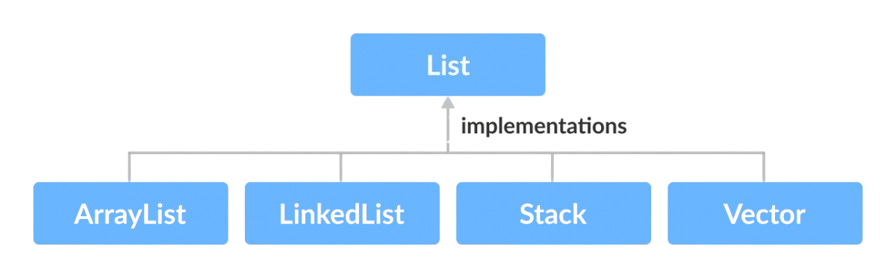
- List is an ordered collection. It allows duplicates. It maintains insertion order. It supports indexing. Examples include ArrayList and LinkedList.
- It is part of collection framework. It allows null values. It is widely used. It provides positional access to elements.
- It supports iteration and manipulation. It enables element replacement operations. It is useful for ordered data processing.
47. What is Set interface?
Ans:
- Set is a collection that does not allow duplicates. It does not maintain order. It ensures uniqueness. Examples include HashSet.
- It improves data integrity. It is part of collection framework. It allows one null value. It is used for unique data storage
- It supports fast lookup operations. It is useful for removing duplicates. It prevents redundant data storage. It improves performance in search operations.
48. What is Map interface?
Ans:
Map stores key-value pairs. It does not allow duplicate keys. It allows duplicate values. Examples include HashMap. It is not part of Collection interface. It provides fast access. It is widely used. It improves data mapping. It supports efficient data retrieval. It is used in caching and indexing. It allows null keys and values (in some implementations). It supports key-based searching.
49. What is ArrayList?
Ans:
ArrayList is a dynamic array. It allows resizing. It maintains insertion order. It allows duplicates. It provides fast access. It is part of List interface. It is not synchronized. It is widely used. It allows random access of elements. It is best for read operations. It has slower insertion compared to LinkedList. It is memory efficient for storing elements.
50. What is LinkedList?
Ans:
- LinkedList is a doubly linked list. It allows dynamic memory allocation. It provides fast insertion and deletion. It allows duplicates. It maintains order.
- It is part of List interface. It is not synchronized. It is used for frequent modifications. It supports efficient memory usage.
- It is suitable for insertion-heavy operations. It provides better performance for add/remove operations. It does not support fast random access
51.What is difference between == and equals()?
Ans:
- The == operator compares memory references. The equals() method compares content or values. == checks if two objects point to same location.
- equals() checks logical equality. It is defined in Object class. It can be overridden. == is faster than equals(). equals() is more meaningful for objects.
- It is commonly used in String comparisons. It improves accuracy in comparisons. It is important in object comparison logic. It avoids incorrect equality checks.
52. What is immutable class?
Ans:
An immutable class cannot be modified after creation. All variables are final. No setters are provided. It ensures thread safety. String is an example. It improves security. It avoids data inconsistency. It is widely used in Java. It helps in caching values. It simplifies concurrent programming. It prevents accidental data modification. It ensures consistent object state.
53. How to create immutable class?
Ans:
Declare class as final. Make all fields private and final. Do not provide setters. Initialize values through constructor. Return copies of mutable objects. Prevent modification after creation. Ensure no subclass can override behavior. It improves security. It ensures data consistency. It is best for multi-threaded environments. It avoids shared data issues. It enhances application reliability.
54. What is marker interface?
Ans:
A marker interface is an empty interface. It does not contain methods. It is used to mark a class. JVM checks it at runtime. Example is Serializable. It provides special behavior. It improves flexibility. It is used for tagging classes. It influences object processing. It is lightweight. It helps in enabling specific features. It simplifies runtime decision-making.
55. What is Serializable interface?
Ans:
Serializable interface allows object conversion to byte stream. It is used for saving objects. It supports data transfer. It is a marker interface. It has no methods. It is used in file handling. It helps in network communication. It improves persistence. It enables object storage. It supports object reconstruction. It is widely used in distributed systems. It ensures data can be transferred across networks.
56. What is transient keyword?
Ans:
Transient keyword is used with variables. It prevents serialization of variables. It protects sensitive data. It is used in Serializable classes. It improves security. It avoids unnecessary data storage. It works during serialization. It is ignored during object saving. It ensures data privacy. It reduces storage size. It is useful for confidential information. It prevents exposure of sensitive fields.
57. What is volatile keyword?
Ans:
Volatile keyword ensures visibility of variables. It is used in multithreading. It prevents caching of variables. It ensures latest value is used. It improves thread communication. It avoids inconsistency. It is lighter than synchronization. It is used for shared variables. It ensures data consistency. It improves reliability. It guarantees visibility across threads. It avoids stale data issues.
58. What is clone() method?
Ans:
Clone() method is used to create object copy. It belongs to Object class. It performs shallow copy by default. It requires Cloneable interface. It avoids manual copying. It improves performance. It copies object values. It is used for duplication. It simplifies object cloning. It reduces coding effort. It provides quick object duplication. It is useful in prototype design pattern.
59. What is shallow copy?
Ans:
Shallow copy copies object references. It does not copy nested objects. Changes affect original object. It is faster. It uses same memory references. It is default in clone(). It is not safe for mutable objects. It is simple to implement. It shares data between objects. It may cause data inconsistency. It is memory efficient. It is suitable for simple objects.
60. What is deep copy?
Ans:
Deep copy creates new object with new memory. It copies all nested objects. Changes do not affect original. It is safer than shallow copy. It consumes more memory. It is used for complete duplication. It ensures data independence. It improves data integrity. It avoids shared references. It is useful in complex applications. It ensures full object separation. It prevents unintended data modification.
61. What is instanceof operator?
Ans:
Instanceof checks object type at runtime. It returns boolean value. It verifies class or interface. It is used before type casting. It prevents ClassCastException. It improves safety. It works with inheritance. It checks compatibility. It is widely used. It ensures type correctness. It helps in safe downcasting. It avoids runtime errors.
62. What is type casting?
Ans:
Type casting converts one type to another. It is of two types: implicit and explicit. Upcasting is automatic. Downcasting requires casting. It is used in inheritance. It improves flexibility. It must be done carefully. It may cause runtime errors. It is used with objects. It ensures type compatibility. It helps in object conversion. It supports polymorphic behavior.
63. What is upcasting?
Ans:
Upcasting converts subclass to superclass. It is done automatically. It is safe. It allows generalization. It supports polymorphism. It restricts access to subclass methods. It improves flexibility. It is widely used. It works with inheritance. It simplifies code. It promotes code reusability. It enables dynamic method binding.
64. What is downcasting?
Ans:
- Downcasting converts superclass to subclass. It requires explicit casting. It may cause ClassCastException.
- It allows access to subclass methods. It is used carefully. It requires instanceof check. It improves flexibility. It is used in runtime.
- It restores original object type. It enables specific functionality. It is useful in runtime type identification. It allows access to specialized behavior.
65. What is anonymous class?
Ans:
- Anonymous class is a class without name. It is declared and instantiated at same time. It is used for one-time use
- It reduces code length. It is used with interfaces. It improves readability. It avoids creating separate class. It is commonly used in event handling.
- It simplifies implementation. It supports quick coding. It is useful for short implementations. It improves inline coding efficiency.
66. What is lambda expression?
Ans:
Lambda expression is a short way to write functions. It is introduced in Java 8. It reduces code complexity. It is used with functional interfaces. It improves readability. It supports functional programming. It replaces anonymous classes. It simplifies iteration. It enhances code clarity. It improves performance. It reduces boilerplate code. It supports concise coding style.
67. What is functional interface?
Ans:
Functional interface has one abstract method. It is used with lambda expressions. Example is Runnable. It can have default methods. It simplifies coding. It improves flexibility. It supports functional programming. It is annotated with @FunctionalInterface. It ensures single method structure. It enhances readability. It supports method references. It is widely used in Java streams.
68. What is stream API?
Ans:
Stream API processes data in functional style. It is introduced in Java 8. It supports filtering and mapping. It improves performance. It allows parallel processing. It simplifies data operations. It reduces code length. It works with collections. It enhances readability. It supports lazy evaluation. It enables efficient data processing. It improves scalability of applications.
69. What is optional class?
Ans:
Optional class is used to avoid null values. It prevents NullPointerException. It is introduced in Java 8. It provides methods to handle null. It improves code safety. It enhances readability. It is used in return types. It reduces null checks. It improves robustness. It simplifies null handling. It encourages better coding practices. It improves program reliability.
70. What is method reference?
Ans:
Method reference is a shorthand for lambda. It refers to existing methods. It uses :: operator. It improves readability. It reduces code length. It works with functional interfaces. It simplifies lambda expressions. It enhances clarity. It is used in streams. It improves code reuse. It makes code more concise. It improves maintainability.
71. What is default method in interface?
Ans:
- Default method has implementation in interface. It is introduced in Java It uses default keyword. It allows method addition without breaking code.
- It supports backward compatibility. It improves flexibility. It is optional to override. It enhances interface usage. It reduces need for abstract classes.
- It improves maintainability. It helps in extending existing interfaces. It supports multiple inheritance of behavior.
72. What is static method in interface?
Ans:
Static method belongs to interface. It cannot be overridden. It is called using interface name. It is introduced in Java 8. It improves code organization. It is used for utility methods. It enhances flexibility. It avoids duplication. It improves readability. It supports better design. It provides common functionality across implementations. It improves modular programming.
73. What is diamond problem?
Ans:
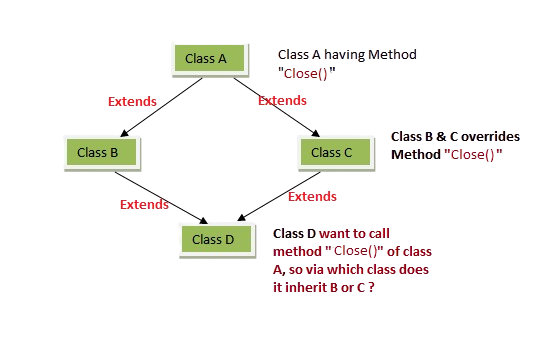
Diamond problem occurs in multiple inheritance. It causes ambiguity. Java avoids it using interfaces. Default methods may create conflict. It is resolved using override. It improves clarity. It avoids ambiguity in method calls. It ensures proper implementation. It is handled at compile time. It maintains consistency. It requires explicit method definition. It avoids multiple inheritance issues in classes.
74. What is method hiding?
Ans:
Method hiding occurs with static methods. Subclass hides parent method. It is not overriding. It is resolved at compile time. It depends on reference type. It does not support polymorphism. It is different from overriding. It improves understanding of static behavior. It ensures correct method usage. It avoids confusion. It is related to class-level methods. It does not involve runtime binding.
75. What is object cloning vs copy constructor?
Ans:
Cloning uses clone() method. Copy constructor creates new object using constructor. Cloning is faster. Copy constructor is flexible. Cloning requires Cloneable interface. Copy constructor is easier to control. Cloning performs shallow copy by default. Copy constructor allows deep copy. It improves object duplication. Both are used for copying objects. Copy constructor provides better customization. Cloning is useful for quick duplication.
76. What Is The Role Of Trust In The Workplace?
Ans:
Trust Is Essential For Building Strong Professional Relationships And Teamwork. It Encourages Open Communication And Transparency Among Team Members. Trust Helps Improve Collaboration And Workplace Efficiency. Reliable Behavior Strengthens Confidence Between Colleagues And Management. A Trustworthy Environment Supports Innovation And Knowledge Sharing. Employees Feel More Comfortable Contributing Ideas And Feedback. Trust Creates A Positive And Productive Workplace Culture.
77. What Is The Importance Of Communication In The Workplace?
Ans:
Communication Is Essential For Sharing Information Clearly And Accurately. Effective Communication Reduces Misunderstandings And Improves Collaboration. Strong Communication Skills Help Build Professional Relationships. Timely Information Exchange Supports Better Decision-Making Processes. Active Listening Encourages Understanding And Mutual Respect. Clear Communication Enhances Productivity And Team Performance. It Plays A Significant Role In Organizational Success.
78. What Makes A Good Team Player?
Ans:
A Good Team Player Demonstrates Cooperation, Respect, And Effective Communication. Sharing Knowledge And Supporting Colleagues Helps Achieve Common Objectives. Reliability And Accountability Build Trust Within The Team. Active Listening Encourages Better Understanding And Collaboration. Flexibility Helps Adapt To Different Working Styles And Situations. Positive Attitudes Contribute To A Healthy Work Environment. Strong Teamwork Often Leads To Improved Productivity And Success.
79. How does stay updated with technology?
Ans:
Stay updated by reading articles and blogs. Follow technology trends. Take online courses. Practice coding regularly. Participate in discussions. Explore new tools attend webinars. Learn from peers. Apply new knowledge practically. stay curious and motivated and follow industry experts and communities. Continuously upgrade technical skills.
80. What is leadership style?
Ans:
- Leadership style is collaborative. Believe in teamwork and communication. To support team members. Encourage ideas and innovation.
- Take responsibility. To Guide the team effectively.Focus on achieving goals. Motivate others. Maintain transparency. Ensure a positive work environment
- Promote trust and mutual respect among team members. Help the team grow and succeed together.

Learn Java Training with Advanced Concepts By Industry Experts
- Instructor-led Sessions
- Real-life
- Assignments
81. How does handle conflicts in a team?
Ans:
Handle conflicts by staying calm and listening to others. Try to understand different perspectives. Focus on finding a solution. Communicate clearly. Avoid personal arguments. Maintain professionalism. Encourage teamwork. Work towards a common goal. Ensure mutual respect. Help resolve issues effectively.
82. How does Handle New Responsibilities?
Ans:
New Responsibilities Should Be Approached With Enthusiasm And A Learning Mindset. Understanding Expectations Helps Ensure Effective Performance. Seeking Information Improves Knowledge And Confidence. Proper Planning Supports Successful Execution Of Tasks. Adaptability Helps Manage New Challenges Efficiently. Continuous Learning Encourages Professional Growth. Taking On Responsibilities Builds Experience And Capability.
83. What is biggest failure?
Ans:
Biggest failure was not managing time effectively in a project. It affected performance.Learned the importance of planning. Improved a time management skills. Started prioritizing tasks better. Took feedback seriously. Worked on weaknesses. It helped to grow. Became more organized. It turned into a learning experience
84. How does manage time?
Ans:
Manage time by planning tasks in advance. Prioritize important work and set clear deadlines. To avoid distractions. Stay organized. break tasks into smaller parts. Track progress regularly.Focus on efficiency. To ensure timely completion of work. Continuously improve the time management skills.
85. Why Is Team Collaboration Important?
Ans:
Team Collaboration Combines Diverse Skills And Perspectives To Achieve Common Goals. Effective Collaboration Improves Productivity And Problem-Solving. Sharing Knowledge Supports Learning And Innovation. Communication Helps Ensure Alignment And Coordination. Team Members Can Support Each Other During Challenges. Collaboration Builds Strong Professional Relationships. Successful Teams Contribute Significantly To Organizational Growth..
86. What is debugging?
Ans:
Debugging is the process of finding and fixing errors in code. It helps identify bugs. It improves program correctness. It involves testing and analysis. It ensures proper execution. It enhances code quality. It uses debugging tools. It helps in troubleshooting. It reduces errors. It improves performance. It ensures smooth program flow. It increases software reliability.
87. What is code optimization?
Ans:
Code optimization improves performance of code. It makes programs faster. It reduces execution time. It minimizes memory usage. It improves efficiency. It enhances scalability. It simplifies logic. It removes unnecessary code. It improves user experience. It ensures better performance. It makes applications more responsive. It supports handling larger workloads.
88. What is API?
Ans:
API allows communication between systems. It defines request-response structure. It enables integration of services. It simplifies development. It improves functionality. It is widely used in applications. It supports data exchange. It enhances interoperability. It connects different systems. It improves efficiency. It enables modular development. It supports scalability of applications.
89. What is REST API?
Ans:
REST API follows REST architecture. It uses HTTP methods like GET and POST. It is stateless. It supports CRUD operations. It is simple and scalable. It improves performance. It is widely used in web services. It enables communication between client and server. It enhances interoperability. It is easy to implement. It supports JSON and XML formats. It is widely used in modern web applications.
90. What is database?
Ans:
A database stores structured data. It organizes information efficiently. It allows easy retrieval. It supports data management. It ensures data consistency. It is used in applications. It supports queries. It improves data handling. It ensures data security. It helps in storing large data. It supports backup and recovery. It enables efficient data analysis.
91. What is SQL?
Ans:
SQL is Structured Query Language. It is used to manage databases. It performs operations like insert and delete. It retrieves data efficiently. It supports data manipulation. It is widely used in applications. It ensures data accuracy. It is easy to learn. It improves data management. It supports database operations. It is used in relational database systems. It helps in handling large datasets efficiently.
92. What is normalization?
Ans:
Normalization organizes data in database. It reduces redundancy. It improves data integrity. It divides tables into smaller ones. It removes duplication. It improves efficiency. It ensures consistency. It simplifies updates. It enhances database design. It supports better data structure. It follows normal forms like 1NF, 2NF, and 3NF. It reduces data anomalies.
93. What is primary key?
Ans:
Primary key uniquely identifies records. It cannot be null. It ensures uniqueness. It improves data integrity. It is used in tables. It supports relationships. It helps in indexing. It improves retrieval speed. It avoids duplicate entries. It ensures proper data identification. It acts as a unique identifier for each row. It is essential in relational databases.
94. What is foreign key?
Ans:
Foreign key links two tables. It refers to primary key. It ensures referential integrity. It maintains relationships. It prevents invalid data. It supports data consistency. It is used in relational databases. It improves data structure. It connects tables logically. It ensures proper linking. It helps in maintaining data relationships. It prevents orphan records.
95. What is join in SQL?
Ans:
Join combines data from multiple tables. It uses common columns. It retrieves related data. Types include inner and outer join. It improves data retrieval. It simplifies queries. It supports relational data. It enhances data analysis. It connects tables. It improves efficiency. It is useful in complex queries. It helps in combining large datasets.
96. What is software testing?
Ans:
Software testing checks program correctness. It finds bugs. It ensures quality. It validates functionality. It improves reliability. It includes manual and automated testing. It ensures user satisfaction. It reduces errors. It improves performance. It ensures proper working. It verifies requirements are met. It enhances product quality.
97. What is SDLC?
Ans:
SDLC is Software Development Life Cycle. It defines development process. It includes planning and design. It involves coding and testing. It ensures quality software. It improves efficiency. It provides structured approach. It reduces risks. It ensures timely delivery. It supports project management. It includes phases like deployment and maintenance. It ensures systematic developmen
98. What is Agile methodology?
Ans:
Agile is an iterative development approach. It focuses on flexibility. It delivers work in small parts. It improves collaboration. It adapts to changes. It enhances productivity. It involves continuous feedback. It improves quality. It ensures faster delivery. It supports teamwork. It encourages customer involvement. It supports continuous improvement.
99. What are short-term goals?
Ans:
- Short-term goal is to start career in a reputed organization. Want to apply technical skills in real projects. To learn new technologies and improve knowledge.
- Want to gain practical experience. Focus on building a strong foundation. Plan to improve my communication skills. To perform well in my role.
- Want to contribute effectively to the team. Seek continuous learning opportunities. To grow professionally.
100. What is greatest achievement?
Ans:
- Greatest achievement is completing a challenging project successfully. worked hard to meet deadlines. Overcame obstacles effectively.
- Applied my skills practically. Gained valuable experience. It boosted confidence. It improved problem-solving skills.
- Learned teamwork and coordination. It was recognized by mentors. It motivated to achieve more.