LMS
LMS
Last updated on 10th Jun 2026| 11277

- Introduction to SAP End-User Tutorial
- SAP System Navigation Basics
- Understanding Master Data
- Executing Transactions in SAP
- Generating and Viewing Reports
- Step-by-Step Data Entry Process
- User Roles and Authorizations
- Tips for Efficient SAP Usage
- Integration with Other SAP Modules
- Conclusion and Career Path for End-Users
Introduction to SAP End-User Tutorial
SAP End-User Tutorial is one of the most widely used ERP systems, and end-users form the backbone of its daily operations. This tutorial introduces freshers to SAP from a practical perspective, focusing on how employees interact with the system to perform business tasks. End-users are responsible for entering data, executing transactions, and generating reports that support organizational processes in our SAP ABAP Training. The tutorial begins with an overview of SAP’s importance in streamlining workflows across finance, logistics, sales, and procurement. Learners discover how SAP ensures accuracy, transparency, and compliance in business operations. The introduction emphasizes the difference between technical consultants and end-users, clarifying that end-users focus on functional usage rather than configuration. Freshers are guided through the SAP GUI interface, learning how to navigate menus, transaction codes, and shortcuts. The section highlights the importance of master data, which forms the foundation for all transactions. It also explains how end-users contribute to data integrity by ensuring correct entries. The tutorial stresses the role of reports in decision-making and how end-users generate insights for managers. security framework and authorization concepts are introduced to explain why different users have different access levels. The introduction also touches on integration, showing how end-user actions in one module affect others. Finally, learners are motivated with career opportunities, as SAP end-user skills are highly valued across industries. By the end of this section, freshers understand the scope of their responsibilities and the importance of mastering SAP basics.

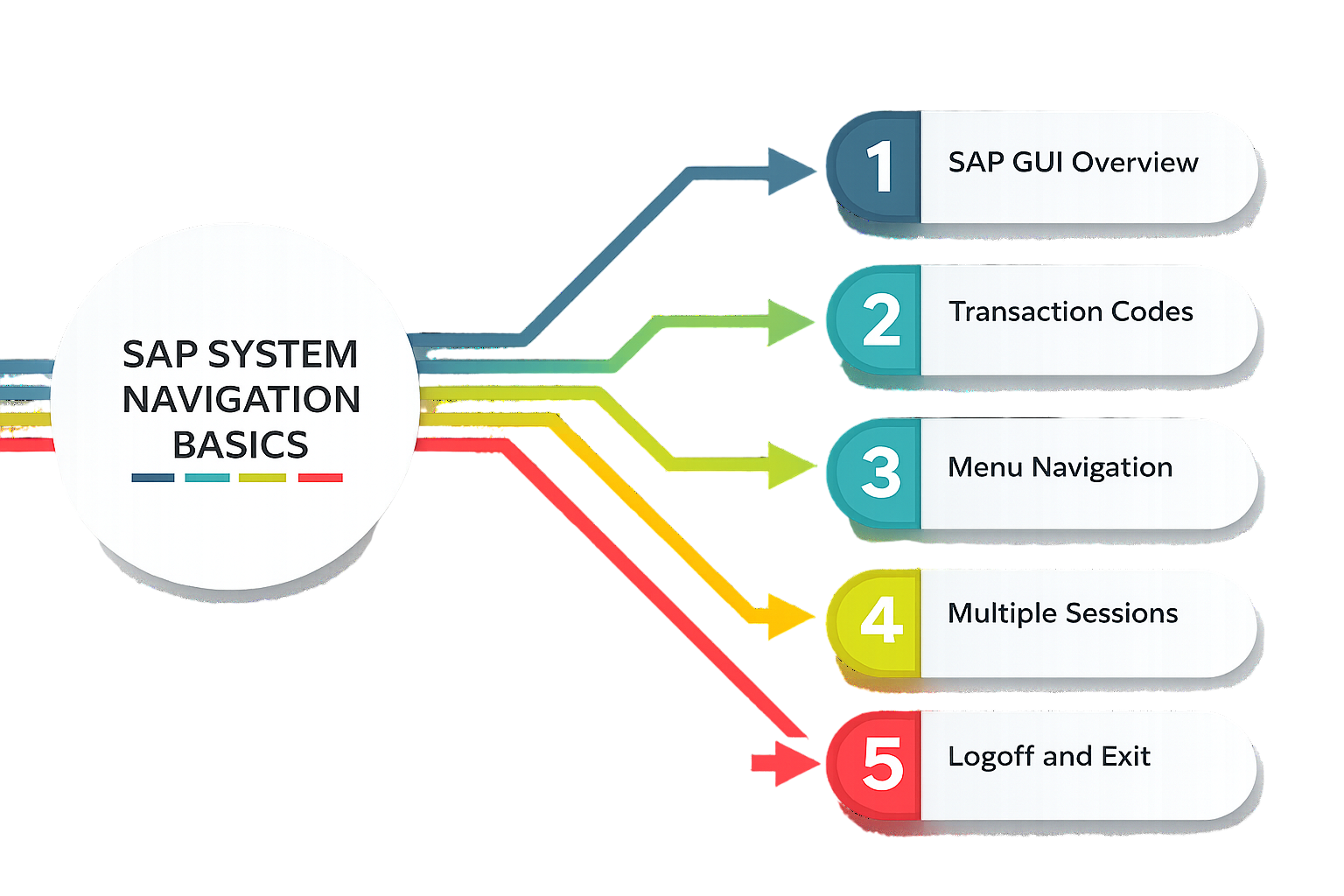
SAP System Navigation Basics
- Login Process: End-users begin by logging into SAP with unique credentials. This ensures secure access and personalized authorization. Freshers learn about client numbers, user IDs, and passwords. The tutorial explains multiple sessions and common login errors. Troubleshooting steps are also covered for smooth entry.
- SAP GUI Overview: The Graphical User Interface is the main workspace. Learners explore menus, toolbars, and transaction fields. Customization options improve efficiency. Icons and shortcuts simplify navigation in our SAP ABAP Training. Freshers practice moving between screens and modules to build confidence.
- Transaction Codes: T-codes are shortcuts to specific tasks. End-users learn codes like ME21N for purchase orders or VA01 for sales orders. The tutorial explains how T-codes save time compared to menus. Freshers practice entering codes directly. Error messages are explained to avoid mistakes.
- Menu Navigation: SAP menus organize tasks by modules. Learners explore folder hierarchies. The tutorial explains locating transactions without T-codes. Freshers practice expanding and collapsing menus. Bookmarking tips are shared for smoother usage.
- Favorites Setup: Favorites personalize the workspace. Learners add frequently used transactions. The tutorial explains organizing favorites for quick access. Freshers practice adding, removing, and renaming favorites. This improves productivity and comfort.
- Multiple Sessions: SAP allows multiple sessions. Freshers learn to manage parallel tasks like creating orders while checking reports. The tutorial explains session limits and best practices. Learners practice switching efficiently. Warnings about unsaved data are highlighted.
- Logoff and Exit: Proper logoff ensures data integrity and security. Freshers learn the difference between closing a window and logging off. The tutorial explains risks of unsaved work and SAP Security Tutorial . Learners practice safe exit procedures. Tips for avoiding mistakes reinforce professional habits.
Ready to earn your SAP HANA Professional Certification? Discover the SAP ABAP Training now available at ACTE!
Understanding Master Data
Master data is the foundation of all SAP transactions. It includes key records such as customer, vendor, and material data. End-users must understand that master data ensures consistency across modules like Sales, Procurement, and Finance. This section explains how master data is created, maintained, and validated, Learn More in SAP HANA Administration Tutorial. Freshers learn the importance of accuracy, since incorrect master data can disrupt entire business processes. Examples include customer addresses, vendor payment terms, and material specifications. The tutorial highlights how master data reduces redundancy and improves reporting. End-users are shown how to access master records and verify details before transactions. The section also explains the difference between one-time data entry and recurring updates. By mastering this concept, freshers gain confidence in handling SAP’s most critical information assets.
Get Your SAP HANA Certification by Learning from Industry-Leading Experts and Advancing Your Career with ACTE’s SAP ABAP Training.
Executing Transactions in SAP
- Sales Orders: End-users create sales orders using transaction VA01. This involves entering customer details, materials, and quantities. The tutorial explains mandatory fields and validation checks. Freshers practice saving and reviewing orders. Error handling is emphasized for accuracy.
- Purchase Orders: Using ME21N, end-users generate purchase orders. Vendor details, materials, and delivery dates are entered. The tutorial explains approval workflows. Freshers learn how purchase orders integrate with inventory and finance. This builds procurement knowledge.
- Goods Receipt: Transaction MIGO is used for goods receipt. End-users confirm delivery of materials. The tutorial explains matching receipts with purchase orders. Freshers practice posting entries and SAP End-User Tutorial for Freshers. This ensures stock accuracy and financial updates.
- Invoice Posting: End-users use MIRO for invoice posting. Vendor invoices are matched with purchase orders and receipts. The tutorial explains tax codes and payment terms. Freshers practice posting invoices correctly. This ensures financial compliance.
- Customer Payments: Transaction F-28 is used for incoming payments. End-users record customer payments against invoices. The tutorial explains reconciliation processes. Freshers practice handling partial and full payments. This builds financial accuracy.
- Vendor Payments: Using F-53, end-users process vendor payments. Bank details and payment methods are entered. The tutorial explains approval steps. Freshers practice posting payments securely and SAP EWM Tutorial. This ensures vendor relationships are maintained.
- Stock Transfers: Transaction MB1B is used for stock transfers. End-users move materials between storage locations. The tutorial explains movement types. Freshers practice posting transfers. This ensures inventory accuracy across plants.

Generating and Viewing Reports
Reports are vital for decision-making in SAP. End-users generate standard reports to track sales, procurement, and finance activities. This section explains how to access reports using transaction codes and menu paths. Freshers learn how to filter data using selection criteria. The tutorial highlights common reports such as vendor balances, customer aging, and material stock levels. End-users practice exporting reports to Excel or PDF for analysis. The importance of real-time reporting is emphasized, showing how managers rely on accurate data and SAP-Business Objects Tutorial. Freshers also learn how to schedule reports for regular updates. The section explains how reports integrate across modules, ensuring consistency. By mastering reporting, end-users contribute to better business insights and performance tracking.
Step-by-Step Data Entry Process
- Customer Details: Entering customer master data ensures accurate sales transactions. Freshers learn mandatory fields like name, address, and payment terms. Validation checks prevent errors. This builds confidence in handling customer records.
- Vendor Details: Vendor master data supports procurement. End-users enter vendor codes, bank details, and tax information. The tutorial explains approval workflows. Freshers practice creating and updating vendor records. This ensures smooth purchasing processes.
- Material Data: Material master records define product specifications. End-users enter descriptions, units, and pricing. The tutorial explains how materials integrate with inventory. Freshers practice creating material records. This builds product management skills.
- Sales Orders: Data entry for sales orders involves customer, material, and quantity details. End-users practice entering orders step by step. Validation ensures accuracy. Freshers learn how sales orders trigger delivery and billing processes.
- Purchase Orders: End-users enter vendor, material, and delivery details. The tutorial explains mandatory fields and SAP ERP Tutorial for Beginners. Freshers practice creating purchase orders. This builds procurement knowledge and accuracy.
- Goods Receipt: Data entry for goods receipt confirms material delivery. End-users enter purchase order references. The tutorial explains posting entries. Freshers practice handling receipts. This ensures inventory accuracy.
- Invoices: End-users enter vendor invoice details. The tutorial explains tax codes and payment terms. Freshers practice posting invoices. This builds financial accuracy and compliance.

Get JOB Oriented SAP ABAP Training for Beginners By MNC Experts
- Instructor-led Sessions
- Real-life Case Studies
- Assignments
User Roles and Authorizations
SAP ensures security framework and controlled access through user roles and authorizations. End-users are assigned specific roles that define what transactions and data they can access. SAP Modules section explains how authorizations prevent unauthorized activities and protect sensitive information. Freshers learn the importance of segregation of duties,
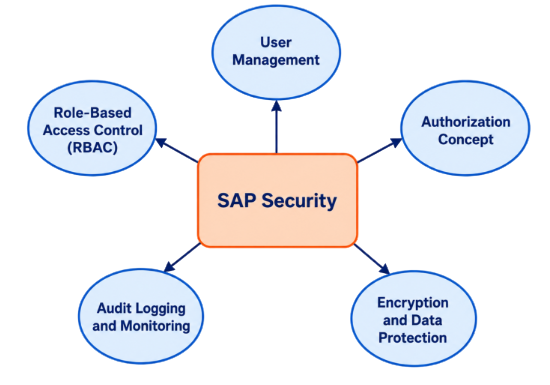
where different users handle different tasks to avoid conflicts and Learn More in SAP EWM Step by Step Tutorial For Beginners. The tutorial highlights how administrators assign roles based on job responsibilities. End-users are shown how to check their authorization levels and request additional access if needed. The section also explains common authorization errors and how to resolve them. By understanding roles and authorizations, freshers gain awareness of SAP’s security framework and their responsibilities in maintaining compliance.
Set to Ace Your AWS Job Interview? Check Out Our Blog on SAP ABAP Interview Questions & Answer
Tips for Efficient SAP Usage
- Use Shortcuts: Learn transaction codes and keyboard shortcuts to save time and SAP Analytics Cloud Tutorial For Beginners . This reduces dependency on menus and speeds up navigation.
- Organize Favorites: Add frequently used transactions to your favorites list. This ensures quick access and improves productivity.
- Validate Data: Always double-check entries before saving. Validation prevents errors that can disrupt processes.
- Leverage Reports: Use standard reports regularly to monitor activities and SAP Ariba Tutorial for Freshers. This helps in identifying issues early.
- Stay Updated: Keep track of SAP updates and new features. Continuous learning improves efficiency and adaptability.
- Manage Sessions: Use multiple sessions wisely to multitask. Avoid unsaved data loss by closing sessions properly.
- Seek Help: Use SAP help documentation and support channels. This builds confidence and resolves issues faster.
Integration with Other SAP Modules
SAP End-User Tutorial modules are interconnected, and end-user actions in one module often impact others. For example, creating a sales order in SD triggers updates in MM for inventory and FI for financial postings. This section explains how integration ensures seamless data flow across departments. Freshers learn how procurement, sales, finance, and inventory modules work together in our SAP ABAP Training. The tutorial highlights real-world scenarios where integration improves efficiency, such as automatic stock updates after goods receipt. End-users are shown how their tasks contribute to the larger business process. By understanding integration, freshers appreciate the importance of accuracy and collaboration in SAP usage.
Conclusion and Career Path for End-Users
The journey of learning SAP End-User Tutorial as an end-user equips freshers with practical skills that are highly valued across industries. By mastering system navigation, data entry, transaction execution, and reporting, end-users become integral to daily business operations and SAP PP Tutorial with Real-Time Scenarios . SAP Modules highlights how accuracy, efficiency, and compliance are essential qualities for SAP usage, and how these skills directly contribute to organizational success. Beyond technical know-how, end-users also develop a strong sense of collaboration, working closely with consultants, managers, and other departments to ensure smooth workflows in our SAP ABAP Training. As SAP continues to evolve, continuous learning and adaptability remain critical for career growth. With experience, end-users can progress into advanced roles such as key users, process specialists, or even transition into consulting and module specialization. The career path for SAP end-users is diverse, offering opportunities in finance, logistics, procurement, and sales, with global demand for professionals who can effectively operate SAP systems. Ultimately, this tutorial not only prepares freshers for immediate job responsibilities but also lays the foundation for long-term career development in the SAP ecosystem.