LMS
LMS
Last updated on 06th Jun 2026| 11264

- Introduction to SAP CRM
- CRM Architecture Overview
- Master Data Management
- Business Partner Setup
- Sales Process Management
- Marketing Campaigns
- Service Management
- Activity and Interaction Management
- Reporting and Analytics
- Conclusion and Best Practices
Introduction to SAP CRM
SAP Customer Relationship Management (SAP CRM) is a comprehensive solution designed to help organizations manage and improve customer interactions across sales, marketing, and service operations. It enables businesses to centralize customer information, streamline communication, and build stronger customer relationships through a unified platform. SAP CRM supports the complete customer lifecycle, from lead generation and opportunity management to customer support and retention activities in SAP CRM Training. By providing real-time access to customer data, the system helps organizations make informed decisions, improve customer satisfaction, and increase business efficiency. SAP CRM can be integrated with other SAP and third-party systems, ensuring seamless data flow across the enterprise. Organizations use SAP CRM to automate processes, enhance collaboration between departments, and gain valuable insights through reporting and analytics. Understanding the fundamentals of SAP CRM is essential for businesses seeking to improve customer engagement, optimize sales performance, and deliver consistent customer experiences.

CRM Architecture Overview
- Presentation Layer: The presentation layer serves as the user interface through which employees interact with SAP CRM. It provides access to customer information, sales activities, service requests, and marketing campaigns through web-based or mobile applications. This layer ensures users can efficiently perform daily tasks and access relevant business data.
- Application Layer: The application layer contains the core business logic of SAP CRM. It processes transactions, manages workflows, executes business rules, and supports key CRM functions such as sales, marketing, and service management. This layer acts as the central processing component of the CRM system and lrean more SAP End-User Tutorial for Freshers.
- Database Layer: The database layer stores all CRM-related information, including customer records, transactions, activities, opportunities, and service data. It ensures secure storage, quick retrieval, and consistent management of business information across the organization.
- Middleware Integration: Middleware facilitates communication between SAP CRM and other systems such as SAP ERP, SAP S/4HANA, and external applications and SAP ABAP Programming Basics Tutorial for Freshers . It enables seamless data exchange, synchronization, and process integration, ensuring information remains consistent across multiple platforms.
- Security Framework: The security framework protects CRM data through authentication, authorization, and role-based access controls. It ensures users have appropriate access to business information while maintaining data confidentiality, integrity, and compliance with organizational policies.
Ready to earn your SAP CRM Professional Certification? Discover the SAP CRM Training now available at ACTE!
Master Data Management
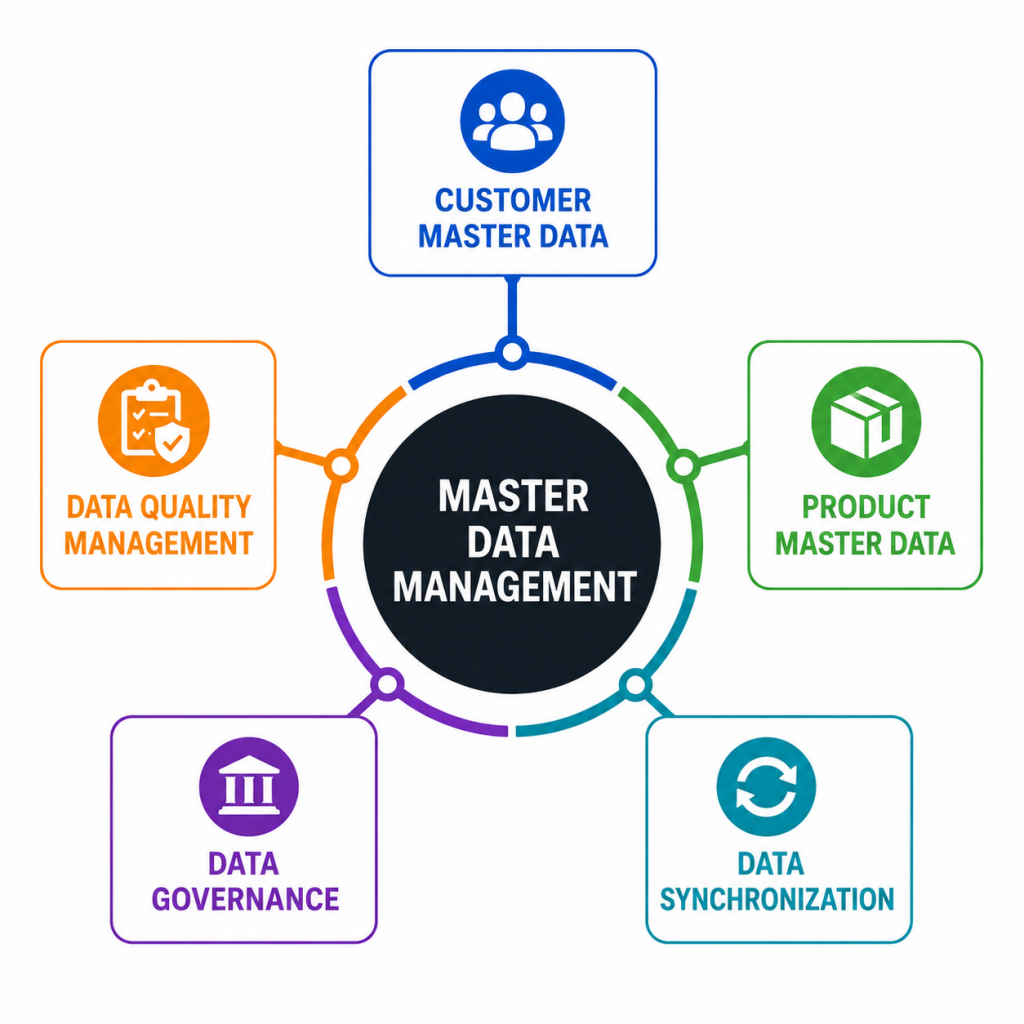
- Customer Master Data: Customer master data contains essential information about customers, including names, addresses, contact details, and business relationships and learn more in SAP ERP Tutorial for Beginners . Accurate customer data helps organizations deliver personalized services and maintain strong customer relationships.
- Product Master Data: Product master data stores information about products and services offered by the organization. This data includes product descriptions, categories, pricing details, and specifications that support sales and marketing activities.
- Data Quality Management: Data quality management focuses on maintaining accurate, complete, and consistent master data. Regular validation and cleansing activities help eliminate duplicate records and improve overall business efficiency.
- Data Governance: Data governance establishes standards, policies, and responsibilities for managing master data. It ensures that information is maintained consistently across departments and supports effective decision-making and SAP EWM Step by Step Tutorial For Beginners.
- Data Synchronization: Data synchronization ensures that master data remains consistent between SAP CRM and connected systems. Automated synchronization reduces manual effort and minimizes the risk of data inconsistencies.
Get Your SAP CRM Certification by Learning from Industry-Leading Experts and Advancing Your Career with ACTE’s SAP CRM Training.
Business Partner Setup
- Business Partner Concept: The business partner framework serves as the central repository for managing customers, prospects, vendors, and other business relationships within SAP CRM.
- Partner Categories: Business partners can be classified into categories such as organizations, groups, and individuals. These categories help structure and manage relationship information efficiently and Expolre mor inSAP Ariba Tutorial for Freshers
- Partner Roles: Partner roles define the function of a business partner within a business process, such as customer, contact person, prospect, or employee.
- Relationship Management: Relationship management allows organizations to define and track connections between business partners, supporting effective communication and collaboration inSAP CRM Training .
- Partner Maintenance: Regular maintenance of business partner records ensures information remains accurate, up-to-date, and useful for business operations and customer interactions.

Sales Process Management
- Lead Management: Lead management helps organizations capture, track, and qualify potential customers before converting them into sales opportunities.
- Opportunity Management: Opportunity management enables sales teams to monitor potential deals, assess revenue potential, and manage sales activities throughout the sales cycle.
- Quotation Management: Quotation management supports the creation and tracking of customer quotations, helping sales teams provide accurate pricing and product information and learn more in SAP Analytics Cloud Tutorial For Beginners.
- Sales Order Processing: Sales order processing manages customer orders from creation through fulfillment, ensuring efficient transaction handling and customer satisfaction.
- Sales Performance Tracking: Sales performance tracking provides visibility into sales activities, revenue generation, and team productivity through reports and dashboards.
Marketing Campaigns
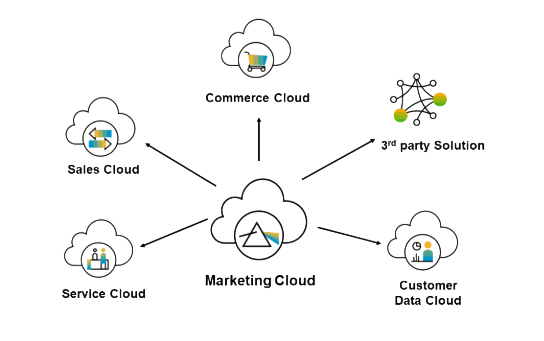
Marketing Campaigns in SAP CRM enable organizations to plan, execute, manage, and analyze marketing initiatives effectively. The module helps businesses identify target audiences, create customer segments, and develop personalized marketing strategies that align with organizational objectives. Marketing teams can manage campaign budgets, schedules, promotional activities, and communication channels from a centralized platform. SAP CRM supports multiple campaign types, including email marketing, telemarketing, direct mail, and digital promotions, allowing businesses to reach customers through their preferred channels and SAP Projects Tutorial: Real-World Implementation Guide. The system tracks customer responses, campaign performance, and conversion rates, providing valuable insights into marketing effectiveness. By automating repetitive tasks and delivering real-time analytics, SAP CRM helps improve campaign efficiency, reduce operational costs, and maximize return on investment. Organizations can use campaign results to refine future marketing strategies, strengthen customer relationships, and increase brand awareness. Effective marketing campaign management ultimately supports business growth by attracting new customers and retaining existing ones through targeted and data-driven engagement activities.
Service Management
Service Management in SAP CRM is designed to help organizations deliver efficient and high-quality customer support throughout the customer lifecycle. The module provides tools for managing service requests, customer complaints, warranty claims, service contracts, maintenance activities, and technical support operations. Service representatives can access complete customer histories, product information, and previous interactions from a single interface, enabling faster and more accurate issue resolution and SAP PP Tutorial with Real-Time Scenarios. SAP CRM supports service scheduling, resource allocation, escalation management, and service order processing to ensure that customer issues are handled efficiently. The system also enables organizations to monitor service performance through key performance indicators and reporting tools. By automating service workflows and maintaining detailed service records, businesses can improve response times, enhance customer satisfaction, and reduce operational inefficiencies. Effective service management strengthens customer trust, increases customer retention, and contributes to long-term business success by ensuring consistent and reliable support experiences.

Get JOB Oriented SAP CRM Training for Beginners By MNC Experts
- Instructor-led Sessions
- Real-life Case Studies
- Assignments
Activity and Interaction Management
Activity and Interaction Management in SAP CRM helps organizations track, record, and manage all customer-related communications and activities in a structured manner. Customer interactions such as phone calls, emails, meetings, appointments, follow-ups, tasks, and visits can be documented and monitored within the system. This centralized approach ensures that all teams have access to a complete history of customer engagements, improving collaboration and communication across departments and Complete SAP Internship Tutorial for Freshers. Sales, marketing, and service professionals can use interaction records to understand customer needs, monitor relationship progress, and plan future activities more effectively. SAP CRM also provides reminders, scheduling tools, and activity tracking features that help users stay organized and maintain consistent customer communication. Detailed interaction histories support better decision-making, improve customer service quality, and enable personalized engagement strategies. By maintaining accurate records of every customer touchpoint, organizations can strengthen relationships, improve customer satisfaction, and create a more customer-centric business environment.
Are You Considering Pursuing a SAP CRM Master’s Degree? Enroll For SAP CRM Expert Masters Program Training Course Today!
Reporting and Analytics
Reporting and Analytics in SAP CRM provide organizations with powerful tools to measure performance, analyze customer behavior, and support strategic decision-making. The system collects data from sales, marketing, service, and customer interaction processes and transforms it into meaningful reports and dashboards. Managers can monitor key performance indicators such as sales revenue, campaign effectiveness, customer satisfaction, service response times, and employee productivity through real-time reporting capabilities and SAP S/4HANA Tutorial for Beginners . SAP CRM analytics help identify trends, evaluate business performance, and uncover opportunities for improvement. Advanced reporting features enable users to generate customized reports based on specific business requirements and organizational goals. The insights gained from analytics support better planning, resource allocation, and process optimization. By leveraging accurate and timely business information, organizations can make informed decisions, improve operational efficiency, and respond more effectively to changing market conditions. Reporting and analytics play a critical role in helping businesses achieve continuous improvement and long-term success.
Set to Ace Your AWS Job Interview? Check Out Our Blog on SAP CRM Interview Questions & Answer
Conclusion and Best Practices
SAP CRM is a comprehensive customer relationship management solution that helps organizations improve customer engagement, streamline business processes, and enhance operational efficiency. By integrating sales, marketing, service, and customer interaction activities into a single platform, SAP CRM provides a complete view of customer relationships and supports better decision-making inSAP CRM Training. Successful implementation and utilization of SAP CRM require clear business objectives, strong stakeholder involvement, accurate data management, and effective user training. Organizations should regularly monitor system performance, maintain data quality, and continuously optimize processes to maximize the value of their CRM investment. Encouraging user adoption and leveraging reporting and analytics capabilities can further improve business outcomes and customer satisfaction. Integration with other enterprise systems ensures seamless information flow and supports end-to-end business operations. By following industry best practices and continuously adapting to customer needs, organizations can use SAP CRM to build stronger customer relationships, increase productivity, improve service quality, and achieve sustainable business growth.
Conclusion
SAP Production Planning (SAP PP) plays a vital role in helping manufacturing organizations plan, execute, monitor, and optimize their production processes. Throughout this tutorial, we explored the key components of SAP PP, including master data management, Bill of Materials, Work Centers, Routings, Demand Management, Material Requirements Planning, Capacity Planning, Production Orders, Production Confirmation, Goods Receipt, and system integration. Each of these elements contributes to creating an efficient and well-controlled manufacturing environment. SAP PP enables businesses to improve resource utilization, reduce production costs, minimize inventory issues, and ensure timely product delivery. Its integration with other SAP modules such as MM, SD, QM, and WM provides a comprehensive solution for managing end-to-end manufacturing operations in SAP CRM Training. In today’s competitive business landscape, organizations must respond quickly to changing customer demands while maintaining operational efficiency and product quality. SAP PP supports these objectives by providing real-time visibility, automation, and data-driven decision-making capabilities. As manufacturing continues to evolve with technologies such as Industry 4.0, IoT, Artificial Intelligence, and Smart Factories, SAP PP remains a critical tool for digital transformation. Organizations that effectively utilize SAP PP can achieve greater productivity, improved customer satisfaction, and sustainable business growth in an increasingly dynamic manufacturing environment.