LMS
LMS
Last updated on 17th Apr 2026| 7491

IBM Off-Campus Interview Questions and Answers in Chennai is a valuable guide for freshers preparing to attend recruitment drives conducted by IBM. It covers frequently asked aptitude, logical reasoning, coding, and technical questions along with clear and simple answers to help candidates understand the overall selection process. This resource helps applicants gain confidence, improve problem-solving abilities, and get familiar with the exam pattern and interview rounds, making it easier to perform well in both online assessments and technical interviews.
1. What is an off-campus interview?
Ans:
An off-campus interview is a recruitment process conducted outside college placements where candidates apply directly to companies. It allows organizations to hire talent from a wider pool without campus restrictions. The process usually includes aptitude, technical, and HR rounds. It provides opportunities for candidates to secure jobs independently.
2. What are stages of IBM interview process?
Ans:
- The aptitude round evaluates logical reasoning, numerical ability, and verbal skills, helping assess problem-solving capabilities required for technical roles. It is often the first elimination stage in the hiring process. Strong speed and accuracy are important here.
- The technical round focuses on programming knowledge, core subjects, and practical understanding of concepts related to the job role. Interviewers check whether fundamentals are clear and usable. Strong basics create confidence.
- The coding or assessment round tests the ability to solve problems efficiently using programming languages and logical thinking. Correct output with optimized logic is highly valued. Practice improves performance greatly.
- The HR round evaluates communication skills, personality, and alignment with company values and workplace expectations. This round checks confidence and professional behavior carefully. Good communication creates positive impressions.
3. What is IBM known for?
Ans:
IBM is a global technology company known for innovation in software, hardware, and consulting services. It focuses on areas like cloud computing, artificial intelligence, and enterprise solutions. The company has a strong presence across multiple industries worldwide. It is recognized for its research contributions and technological advancements.
4. What are key values of IBM?
Ans:
- Innovation is a core value, emphasizing continuous development of new technologies and solutions to address complex business challenges. It helps the company stay competitive in changing markets. Innovation drives long-term growth.
- Trust and responsibility ensure ethical practices, transparency, and accountability in all organizational activities and client interactions. These values strengthen business reputation globally. Trust is essential in corporate success.
- Client success focuses on delivering value-driven solutions that meet customer needs and improve business performance effectively. Customer satisfaction creates long relationships. Strong service builds loyalty.
- Diversity and inclusion promote equal opportunities, collaboration, and a supportive work environment across global teams. Different perspectives improve creativity and decision quality. Inclusion strengthens teamwork.
5. What is communication skill?
Ans:
Communication skill refers to the ability to convey information clearly and effectively in professional settings. It includes verbal, written, and non-verbal communication methods. Strong communication ensures better collaboration and understanding. It is essential for teamwork and workplace success.
6. What are types of communication?
Ans:
- Verbal communication involves spoken words used during meetings, discussions, and presentations to convey ideas clearly and effectively. It is important for interviews and teamwork. Clear speech improves understanding.
- Non-verbal communication includes gestures, body language, and facial expressions that support and enhance verbal messages. Positive body language builds confidence. It influences impressions strongly.
- Written communication involves emails, reports, and documentation that provide clear and structured information for professional use. Good writing avoids confusion in workplaces. Accuracy is important.
- Visual communication includes charts, graphs, and diagrams that help represent information in an easy-to-understand format. Visual tools simplify complex information quickly. They improve presentations.
7. What is teamwork?
Ans:
Teamwork refers to individuals working together collaboratively to achieve shared goals. It involves coordination, communication, and mutual support among team members. Effective teamwork improves productivity and efficiency. It also helps in solving problems more effectively. Teamwork builds trust and creates a positive work environment among employees. It encourages creativity by combining different ideas and skills of team members.
8. What are qualities of a good team player?
Ans:
- A good team player communicates clearly and listens actively, ensuring effective interaction and understanding among all team members. Good communication prevents confusion during tasks. It improves cooperation.
- Adaptability allows individuals to adjust to different roles and responsibilities, contributing positively to team success. Flexible people support changing project needs. Adaptability is highly valued.
- Responsibility ensures tasks are completed on time with quality, supporting overall team objectives and performance. Dependable members strengthen team trust. Accountability matters greatly.
- Positive attitude and cooperation help maintain a healthy work environment and encourage better collaboration. Supportive behavior improves morale naturally. Teams perform better together.
9. What is problem-solving?
Ans:
Problem-solving is the process of identifying issues and finding effective solutions using logical thinking. It involves analyzing situations and evaluating possible outcomes. Strong problem-solving skills improve decision-making. It is essential in technical and professional roles. It helps employees handle challenges confidently and complete tasks efficiently. Good problem-solving skills also support innovation and continuous improvement in the workplace.
10. Write a program for employee salary calculation.
Ans:
This example calculates total salary by adding basic pay and bonus.
- #include <stdio.h>
- int main() {
- float basic = 25000, bonus = 5000, total;
- total = basic + bonus;
- printf(“Total Salary = %.2f”, total);
- return 0;
- }
In this example, the program calculates employee total salary.
11. What is time management?
Ans:
Time management is the ability to plan and organize tasks efficiently within a given timeframe. It helps improve productivity and reduce stress. Proper time management ensures timely completion of work. It is essential for maintaining performance and quality. Good time management helps in balancing multiple responsibilities effectively. It also increases discipline and supports achieving personal and professional goals.
12. What are time management techniques?
Ans:
- Prioritizing tasks based on urgency and importance ensures that critical work is completed first without delays. Important tasks should receive early attention. Priorities improve efficiency.
- Creating schedules and maintaining task lists helps organize activities and track progress effectively. Written plans reduce missed deadlines. Planning builds discipline.
- Avoiding distractions improves focus and allows efficient completion of tasks within deadlines. Concentration increases output quality significantly. Focus saves time.
- Reviewing and adjusting plans regularly helps improve productivity and manage workload effectively. Flexible planning handles changing demands better. Review supports consistency.
13. What is leadership?
Ans:
Leadership is the ability to guide and motivate individuals to achieve goals effectively. It involves decision-making, communication, and responsibility. Strong leadership improves team performance and coordination. It plays an important role in organizational success. Good leadership builds trust and confidence among team members. It also encourages innovation and helps organizations achieve long-term growth.
14. What are leadership qualities?
Ans:
- Strong communication skills help leaders convey ideas clearly and guide teams efficiently toward achieving objectives. Clear direction reduces confusion in teams. Communication is a leadership pillar.
- Decision-making ability ensures quick and effective handling of challenges and opportunities in the workplace. Timely decisions maintain momentum. Strong judgment is valuable.
- Responsibility and accountability build trust among team members and improve overall performance. Teams follow leaders who own outcomes. Accountability creates respect.
- Motivation and encouragement help improve morale and productivity within teams. Positive leadership inspires better effort naturally. Encouragement boosts confidence.
15. What is adaptability?
Ans:
Adaptability refers to the ability to adjust to changes in the workplace effectively. It helps in handling new situations and challenges without affecting productivity. Adaptability supports continuous learning and growth. It is essential in dynamic work environments. It enables employees to respond positively to new technologies and processes. Good adaptability also improves confidence during unexpected changes.
16. What are benefits of adaptability?
Ans:
- Adaptability helps in managing unexpected changes efficiently, ensuring consistent performance in dynamic work environments. Flexible employees recover faster from disruptions. This supports stability.
- It improves flexibility in learning new skills and technologies required for professional growth. Continuous learning is vital in modern careers. Adaptability accelerates growth.
- Adaptable individuals can work in diverse environments and collaborate effectively with different teams. They adjust quickly to new people and tasks. This improves teamwork.
- It supports career growth by enabling individuals to take on new roles and responsibilities confidently. Broader capability creates more opportunities naturally. Growth becomes easier.
17. What is professionalism?
Ans:
Professionalism refers to maintaining proper behavior, ethics, and discipline in the workplace. It includes punctuality, responsibility, and respect for others. Professionalism builds trust and credibility. It is essential for career growth. It creates a positive work environment and improves teamwork among employees. Good professionalism also enhances the reputation of both the individual and the organization.
18. What are professional ethics?
Ans:
- Honesty and integrity ensure transparency in work and build trust among colleagues and clients in professional environments. Ethical behavior creates strong reputation. Trust supports teamwork.
- Accountability helps individuals take responsibility for tasks and deliver quality results consistently. Owning outcomes improves reliability. Accountability is respected.
- Respect for others promotes a positive work environment and effective collaboration within teams. Respect reduces conflict significantly. Healthy culture grows through respect.
- Following organizational rules and standards ensures discipline and professionalism in all activities. Policies maintain fairness and order. Discipline improves consistency.
19. What is stress management?
Ans:
Stress management refers to handling pressure effectively without affecting performance. It involves maintaining a calm mindset and focusing on tasks. Proper stress management improves productivity. It is important for maintaining efficiency in work environments. It helps employees make better decisions during challenging situations. Good stress management also supports mental well-being and job satisfaction.
20. What are ways to manage stress?
Ans:
- Prioritizing tasks and managing workload helps reduce pressure and ensures efficient completion of work responsibilities. Clear priorities lower confusion greatly. Planning reduces stress.
- Taking regular breaks helps maintain focus and improves mental clarity during work. Short breaks refresh energy levels naturally. Rest supports productivity.
- Maintaining a positive mindset helps in handling challenges effectively without stress. Optimism improves resilience in difficult situations. Attitude matters greatly.
- Proper planning and organization reduce workload pressure and improve productivity. Organized work feels more manageable. Structure builds calmness.
21. What is goal setting?
Ans:
Goal setting is the process of defining objectives and planning steps to achieve them. It helps in maintaining focus and direction. Proper goal setting improves motivation and performance. It is essential for personal and professional growth. It allows individuals to track progress and measure achievements effectively. Good goal setting also increases confidence and supports long-term success.
22. What are SMART goals?
Ans:
- Specific goals clearly define objectives and provide direction for achieving desired outcomes effectively. Clear targets reduce confusion during execution. Specificity improves focus.
- Measurable goals allow tracking of progress and evaluating success accurately over time. Numbers help judge improvement clearly. Measurement supports motivation.
- Achievable goals ensure realistic expectations and improve motivation in completing tasks. Realistic targets prevent discouragement. Balanced goals improve consistency.
- Time-bound goals help maintain deadlines and ensure timely completion of objectives. Deadlines create urgency and discipline naturally. Timelines improve execution.
23. What is decision making?
Ans:
Decision making is the process of selecting the best option among available alternatives. It involves analysis and logical thinking. Effective decision making improves outcomes. It is essential in professional environments. It helps organizations solve problems quickly and achieve goals efficiently. Good decision making also reduces risks and increases confidence in actions taken.
24. What are types of decisions?
Ans:
- Strategic decisions focus on long-term planning and organizational goals, ensuring sustainable growth and success. They are usually taken by senior management. These decisions shape direction.
- Tactical decisions involve short-term planning and execution of specific tasks and activities. They convert strategy into action effectively. Mid-level planning is common here.
- Operational decisions deal with routine activities and ensure smooth functioning of daily work processes. These decisions maintain regular efficiency. Daily management depends on them.
- Programmed and non-programmed decisions help handle both routine and complex situations effectively. Different situations need different approaches. Flexibility improves results.
25. What is learning ability?
Ans:
Learning ability refers to the capacity to acquire new knowledge and skills efficiently. It helps in adapting to new technologies and environments. Strong learning ability supports career growth. It is essential in fast-changing industries. It improves confidence when handling new tasks and responsibilities. Good learning ability also increases innovation and problem-solving skills in the workplace.
26. What is a job role?
Ans:
A job role refers to the defined set of responsibilities, duties, and expectations assigned to an individual within an organization based on business requirements and functional needs. It clearly outlines the tasks that must be performed and the objectives that need to be achieved within a specific position or department. A well-defined job role helps maintain clarity, accountability, and proper alignment between employee contributions and organizational goals. It ensures efficient workflow by assigning the right responsibilities to the right individuals based on their skills and expertise. Understanding a job role properly helps in improving performance, productivity, and overall professional growth in a structured work environment.
27. What are responsibilities in a job role?
Ans:
- Responsibilities in a job role include completing assigned tasks with accuracy and efficiency while ensuring adherence to organizational standards, timelines, and quality expectations in every stage of execution. Reliable execution builds trust. Quality work matters greatly.
- It involves taking accountability for outcomes, managing time effectively, and ensuring that deliverables are completed within deadlines without compromising on performance or productivity. Ownership improves professional image. Deadlines are important.
- Clear communication with team members and managers is essential to understand requirements, provide updates, and maintain smooth workflow across different levels of the organization. Good communication prevents delays. Coordination supports success.
- Continuous improvement, adaptability to new technologies, and willingness to learn are also key responsibilities that contribute to long-term career development and organizational success. Growth mindset creates future opportunities. Learning adds value.
28. What is work culture?
Ans:
Work culture refers to the shared values, beliefs, attitudes, and practices that define how employees interact, communicate, and perform within an organization on a daily basis. It influences behavior, teamwork, productivity, and the overall working environment, shaping how individuals contribute to organizational objectives. A positive work culture promotes respect, collaboration, transparency, and innovation, ensuring a supportive and engaging workplace. It also plays a significant role in employee satisfaction, retention, and motivation by creating a healthy balance between work expectations and well-being. Strong work culture enhances organizational performance and helps maintain consistency in achieving both short-term and long-term goals.
29. What are characteristics of a good work culture?
Ans:
- A good work culture encourages open communication and transparency, allowing employees to express ideas, provide feedback, and participate in decision-making processes without hesitation or fear. Openness builds trust. Communication improves engagement.
- It promotes teamwork and mutual respect among employees, ensuring a collaborative environment where individuals support each other to achieve common organizational objectives effectively. Respect strengthens relationships. Teamwork improves output.
- Opportunities for continuous learning, skill development, and career advancement are provided, helping employees grow professionally and stay competitive in dynamic industries. Growth opportunities improve retention. Learning motivates employees.
- Recognition of achievements, work-life balance, and employee well-being are prioritized, which improves motivation, productivity, and long-term engagement within the organization. Balanced workplaces create loyalty naturally. Well-being matters.
30. What is organizational behavior?
Ans:
Organizational behavior is the study of how individuals and groups interact within a workplace environment and how these interactions influence performance and productivity. It focuses on understanding employee behavior, attitudes, and motivation to improve workplace efficiency and satisfaction. This concept helps organizations design better management strategies, communication processes, and team structures. It also plays a key role in resolving conflicts, improving collaboration, and enhancing overall work dynamics. Understanding organizational behavior helps create a positive work environment that supports both employee growth and organizational success.
31. What are elements of organizational behavior?
Ans:
- Individual behavior focuses on personality, perception, and attitude, which influence how employees perform tasks and respond to workplace situations and challenges. Understanding people improves management quality. Individual factors matter.
- Group behavior examines how teams interact, communicate, and collaborate, helping organizations improve teamwork and overall efficiency in completing projects. Strong groups achieve better results. Collaboration is essential.
- Organizational structure defines hierarchy, roles, and responsibilities, ensuring clarity in operations and effective coordination across departments. Clear structure reduces confusion. Roles support accountability.
- Organizational culture reflects shared values and beliefs that guide behavior, influencing employee engagement, motivation, and overall workplace environment. Healthy culture improves satisfaction greatly. Culture shapes performance.
32. What is productivity?
Ans:
Productivity refers to the efficiency with which tasks are completed and goals are achieved using available resources such as time, skills, and tools. It measures the output produced in relation to the input used, indicating overall performance effectiveness in a professional setting. High productivity reflects proper time management, strong skills, and the ability to complete tasks accurately within deadlines. It contributes significantly to organizational growth, profitability, and operational efficiency. Improving productivity is essential for achieving both individual performance goals and broader business objectives effectively.
33. How to improve productivity?
Ans:
- Setting clear priorities and focusing on high-impact tasks ensures that important work is completed first, improving efficiency and reducing unnecessary delays in task execution. Priorities create better results. Focus is powerful.
- Eliminating distractions and maintaining a structured work environment enhances concentration and helps achieve better results within shorter timeframes. Organized spaces improve consistency. Focus increases speed.
- Using efficient tools, techniques, and automation reduces manual effort and increases accuracy, contributing to higher productivity levels. Smart tools save time greatly. Efficiency improves quality.
- Continuous learning and performance evaluation help identify areas of improvement, enabling better work strategies and consistent growth in productivity. Feedback supports progress naturally. Growth improves performance.
34. What is a positive attitude?
Ans:
A positive attitude refers to maintaining an optimistic and solution-oriented mindset while handling tasks, challenges, and workplace situations effectively. It helps in overcoming difficulties, reducing stress, and maintaining motivation even in demanding conditions. A positive attitude improves relationships with colleagues and contributes to a healthy work environment. It encourages better problem-solving and decision-making by focusing on opportunities rather than obstacles. Developing a positive attitude is essential for long-term success, personal growth, and professional excellence.
35. What are benefits of a positive attitude?
Ans:
- A positive attitude improves problem-solving abilities by encouraging individuals to focus on solutions rather than challenges, leading to better decision-making outcomes. Optimism improves clarity. Solutions become easier to find.
- It enhances teamwork and collaboration, as positivity creates a supportive and motivating environment for all team members. Good energy influences others strongly. Teams work better together.
- Maintaining a positive mindset helps in managing stress effectively, ensuring consistent performance even under pressure. Calm thinking improves resilience. Pressure becomes manageable.
- It increases confidence and motivation, contributing to personal development and improved professional performance over time. Confidence supports growth naturally. Motivation drives success.
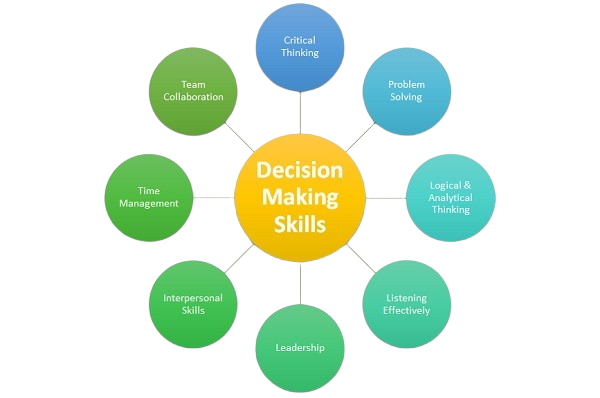
36. What is decision-making skill?
Ans:
Decision-making skill refers to the ability to analyze situations, evaluate options, and choose the most effective course of action. It involves logical thinking, problem analysis, and understanding the potential outcomes of each alternative. Strong decision-making skills improve efficiency, reduce risks, and support better outcomes in professional environments. It plays a crucial role in handling challenges and achieving organizational objectives effectively. Developing this skill is essential for leadership, problem-solving, and overall career growth.
37. What are steps in decision making?
Ans:
- Identifying the problem clearly ensures a proper understanding of the situation and helps define the objective for making an effective decision. Clear problem definition prevents confusion and saves time during evaluation. Strong clarity improves decision quality.
- Gathering relevant information and analyzing different options helps in evaluating possible solutions based on feasibility and impact. Better information leads to smarter and more balanced choices significantly. Analysis reduces unnecessary risks.
- Selecting the most suitable solution ensures that decisions are made logically and aligned with organizational goals. Good selection improves results and supports long-term success effectively. Alignment with goals is essential.
- Implementing the decision and reviewing outcomes helps in measuring effectiveness and making improvements when necessary. Follow-up ensures learning from outcomes and better future decisions naturally. Review creates continuous improvement.
38. Write a program for palindrome number check.
Ans:
This example checks whether a number is palindrome or not.
- #include <stdio.h>
- int main() {
- int n=121, temp, rev=0, rem;
- temp=n;
- while(n>0){
- rem=n%10;
- rev=rev*10+rem;
- n=n/10;
- }
- if(temp==rev)
- printf(“Palindrome”);
- else
- printf(“Not Palindrome”);
- return 0;
- }
In this example, 121 is checked and identified as palindrome.
39. What is the difference between on-campus and off-campus interviews?
Ans:
| Criteria | On-Campus Interview | Off-Campus Interview |
|---|---|---|
| Location | Conducted through colleges or universities. | Conducted outside campus through direct company applications. |
| Eligibility | Only students of that institution can participate. | Open to candidates from different colleges and backgrounds. |
| Competition | Limited competition within campus students. | Higher competition due to larger applicant pool. |
| Application Process | Managed by college placement cell. | Candidates apply directly through company websites or job portals. |
40. What is accountability?
Ans:
Accountability refers to taking responsibility for actions, decisions, and outcomes in a professional environment. It involves owning tasks and ensuring they are completed accurately and efficiently. Accountability builds trust and reliability among team members and managers. It encourages transparency and improves overall work performance. Maintaining accountability is essential for achieving organizational goals and sustaining professional integrity.
41. What are benefits of accountability?
Ans:
- Accountability improves trust and credibility, as responsible individuals consistently deliver quality work and meet expectations within deadlines. Reliable behavior strengthens professional reputation over time. Trust is valuable in every workplace.
- It enhances performance by encouraging individuals to take ownership of tasks and focus on achieving better results. Ownership creates stronger commitment and higher productivity significantly. Responsibility drives success.
- Accountability promotes transparency and clarity in roles, reducing confusion and improving coordination among team members. Clear expectations make teamwork smoother and more efficient naturally. Coordination improves outcomes.
- It supports personal growth by encouraging learning from mistakes and continuous improvement in performance. Honest reflection helps people develop professionally over time. Growth mindset is important.
42. What is self-motivation?
Ans:
Self-motivation refers to the ability to stay driven and focused on goals without external influence or pressure. It helps individuals maintain consistency, overcome challenges, and achieve desired outcomes effectively. Self-motivated individuals show initiative and dedication in their work. It contributes to improved productivity and performance in professional environments. Developing self-motivation is essential for long-term career growth and success.
43. How to develop self-motivation?
Ans:
- Setting clear and achievable goals provides direction and helps maintain focus on consistent progress toward desired outcomes. Goals create purpose and measurable milestones clearly. Direction improves motivation.
- Maintaining a positive mindset and celebrating small achievements encourages continued effort and boosts confidence. Small wins create momentum and stronger enthusiasm significantly. Positivity supports persistence.
- Learning from failures and challenges helps build resilience and strengthens determination to succeed. Setbacks become lessons when handled constructively effectively. Resilience is essential for growth.
- Creating a disciplined routine and staying committed to tasks ensures long-term consistency and self-motivation. Habits reduce procrastination and improve reliability naturally. Discipline builds success.
44. What is professional growth?
Ans:
Professional growth refers to the continuous improvement of skills, knowledge, and experience in a chosen career path. It involves learning new concepts, gaining expertise, and adapting to industry changes. Professional growth enhances performance and opens new opportunities for advancement. It supports long-term career success and stability. Continuous development is essential for staying competitive in dynamic work environments.
45. What are ways to achieve professional growth?
Ans:
- Continuous learning through courses, certifications, and practical experience helps in improving knowledge and staying updated with industry trends. Ongoing learning increases confidence and professional value clearly. Growth depends on learning.
- Seeking feedback and working on areas of improvement enhances performance and builds stronger professional capabilities. Constructive feedback helps identify blind spots significantly. Improvement becomes faster.
- Setting clear career goals and tracking progress ensures consistent development and achievement of long-term objectives. Measured progress keeps motivation strong naturally. Goals guide success.
- Building professional relationships and networking helps in gaining opportunities and expanding career prospects effectively. Strong networks create learning and job opportunities over time. Connections matter greatly.
46. What is skill development?
Ans:
Skill development refers to the continuous process of improving existing abilities and acquiring new competencies required for professional success. It includes technical, analytical, communication, and interpersonal skills that are essential for performing tasks efficiently in a work environment. Consistent skill development helps individuals adapt to changing technologies and industry requirements effectively. It enhances performance, productivity, and confidence in handling responsibilities and challenges. Developing skills regularly is essential for long-term career growth and achieving organizational objectives successfully.
47. What is the difference between technical skills and soft skills?
Ans:
| Criteria | Technical Skills | Soft Skills |
|---|---|---|
| Meaning | Technical skills are job-specific abilities required to perform specialized tasks. | Soft skills are personal qualities that help in communication and teamwork. |
| Examples | Programming, data analysis, software tools, and technical knowledge. | Leadership, communication, adaptability, and time management. |
| Usage | Used to complete technical work accurately and efficiently. | Used to manage relationships and improve workplace collaboration. |
| Importance | Important for performing core job responsibilities. | Important for career growth and professional success. |
48. What is learning attitude?
Ans:
Learning attitude refers to the willingness and enthusiasm to acquire new knowledge and continuously improve skills in a professional environment. It encourages curiosity, adaptability, and openness to feedback, which are essential for growth and development. A strong learning attitude helps individuals stay updated with industry trends and technological advancements. It also improves problem-solving ability and enhances overall performance in tasks and responsibilities. Developing a positive learning attitude is crucial for achieving long-term success and career progression.
49. What are ways to improve learning attitude?
Ans:
- Staying curious and actively seeking new knowledge helps in understanding concepts deeply and encourages continuous improvement in skills and professional capabilities. Curiosity keeps learning enjoyable and consistent clearly. Interest drives progress.
- Practicing regularly and applying learned concepts in real scenarios improves retention and enhances practical understanding of various subjects. Application converts theory into usable skill significantly. Practice builds mastery.
- Seeking feedback from experienced professionals helps identify gaps in knowledge and provides direction for improvement and growth. Guidance saves time and improves learning quality effectively. Mentorship is valuable.
- Setting learning goals and tracking progress ensures consistency, motivation, and effective development of skills over time. Clear targets keep learning structured naturally. Tracking supports discipline.
50. What is work efficiency?
Ans:
Work efficiency refers to the ability to complete tasks with optimal use of time, effort, and resources while maintaining high quality. It focuses on maximizing output and minimizing errors and unnecessary effort in task execution. Efficient work practices improve productivity and ensure timely completion of responsibilities. It also contributes to better resource management and organizational performance. Maintaining work efficiency is essential for achieving both individual and team objectives effectively.
51. How to improve work efficiency?
Ans:
- Planning tasks in advance and prioritizing important activities helps in managing workload effectively and ensures timely completion of responsibilities. Good planning reduces stress and confusion clearly. Priorities improve results.
- Using appropriate tools, automation, and technology reduces manual effort and improves accuracy and speed of task execution. Smart tools save time significantly. Technology increases productivity.
- Maintaining focus and avoiding distractions enhances concentration, allowing tasks to be completed efficiently within deadlines. Strong focus improves quality and consistency naturally. Concentration matters greatly.
- Continuous learning and performance evaluation help refine work methods and improve efficiency consistently over time. Better methods produce stronger outcomes effectively. Improvement should be ongoing.
52. What is workplace communication?
Ans:
Workplace communication refers to the exchange of information among employees within an organization through various channels and methods. It includes verbal, written, and non-verbal communication that ensures clarity and understanding in tasks and processes. Effective communication reduces misunderstandings and improves coordination among team members. It plays a vital role in building strong relationships and ensuring smooth workflow. Strong workplace communication contributes to productivity, teamwork, and organizational success.
53. What is the difference between formal and informal communication?
Ans:
| Criteria | Formal Communication | Informal Communication |
|---|---|---|
| Meaning | Formal communication follows official channels and organizational structure. | Informal communication happens casually between employees. |
| Examples | Emails, reports, meetings, and official notices. | Friendly discussions, casual talks, and personal chats. |
| Purpose | Used for official information sharing and work-related decisions. | Used for relationship building and quick interaction. |
| Record | Usually documented and maintained for future reference. | Normally not recorded officially. |
54. What is work-life balance?
Ans:
Work-life balance refers to maintaining a healthy relationship between professional responsibilities and personal life activities. It helps reduce stress and ensures overall well-being and satisfaction in both personal and professional aspects. A proper balance improves productivity, focus, and job performance. It also supports mental and physical health, preventing burnout and fatigue. Maintaining work-life balance is essential for long-term success and happiness in a career.
55. How to maintain work-life balance?
Ans:
- Planning schedules effectively and setting boundaries between work and personal time helps maintain a balanced and organized routine. Clear boundaries reduce stress and confusion clearly. Planning creates stability.
- Taking regular breaks and engaging in personal activities improves mental health and reduces stress levels significantly. Recovery time improves long-term productivity effectively. Breaks are important.
- Managing workload efficiently and avoiding overcommitment ensures that tasks are completed without affecting personal well-being. Balanced commitments prevent burnout naturally. Limits are necessary.
- Practicing time management and prioritizing tasks helps achieve professional goals while maintaining personal responsibilities effectively. Good time use supports harmony in life. Priorities improve balance.
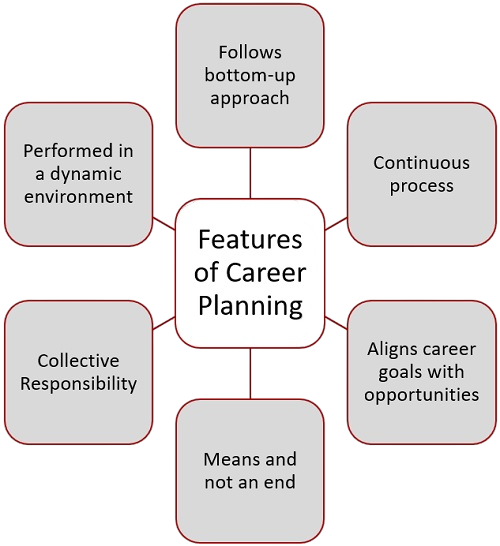
56. What is career planning?
Ans:
Career planning is the process of setting professional goals and identifying the steps required to achieve them effectively. It involves understanding strengths, interests, and opportunities available in a chosen field. Proper career planning helps in making informed decisions and staying focused on long-term objectives. It also supports continuous learning and skill development aligned with career goals. Effective career planning ensures growth, stability, and success in a professional journey.
57. What are steps in career planning?
Ans:
- Identifying strengths, interests, and skills helps in selecting a suitable career path aligned with personal and professional aspirations. Self-awareness is the first step toward wise choices clearly. It improves direction.
- Setting clear short-term and long-term goals provides direction and helps in tracking progress effectively over time. Goals keep effort focused and measurable significantly. Planning improves success.
- Acquiring required qualifications, skills, and experience ensures readiness for opportunities and enhances employability. Preparation increases confidence and competitiveness naturally. Skills create opportunities.
- Continuously reviewing and updating the career plan helps adapt to changes and achieve better outcomes in professional growth. Flexible planning supports long-term success effectively. Review keeps plans relevant.
58. What is professionalism in workplace?
Ans:
Professionalism in the workplace refers to maintaining proper conduct, ethics, and discipline while performing assigned responsibilities. It includes punctuality, respect, accountability, and adherence to organizational standards and policies. Professional behavior builds trust and credibility among colleagues and managers. It contributes to a positive work environment and effective collaboration. Maintaining professionalism is essential for career growth and long-term success.
59. What are characteristics of professionalism?
Ans:
- Maintaining punctuality and meeting deadlines consistently reflects discipline, commitment, and reliability in professional responsibilities. Timely work completion creates trust with managers and teammates. Discipline supports long-term career growth.
- Demonstrating respect, ethical behavior, and integrity helps in building strong relationships and trust within the organization. Professional ethics improve workplace harmony significantly. Respectful conduct creates a positive image.
- Taking responsibility for tasks and delivering quality work ensures accountability and improves overall performance. Ownership mindset is highly valued in every company. Reliable output supports team success.
- Continuous improvement and willingness to learn contribute to professional growth and adaptability in dynamic work environments. Learning new skills increases future opportunities naturally. Adaptability strengthens long-term success.
60. What is workplace discipline?
Ans:
Workplace discipline refers to following rules, regulations, and organizational guidelines while performing tasks. It ensures smooth functioning and order within the workplace environment. Discipline improves productivity, reduces errors, and enhances efficiency. It also promotes accountability and responsibility among employees. Maintaining discipline is essential for achieving organizational goals and maintaining professionalism.
61. What are benefits of workplace discipline?
Ans:
- Workplace discipline ensures consistency in performance by encouraging employees to follow structured processes and complete tasks efficiently within deadlines. Organized habits reduce confusion and delays greatly. Consistency improves productivity.
- It helps maintain order and reduces conflicts, leading to a more organized and productive work environment. Clear rules guide employee behavior effectively. Better order supports teamwork.
- Discipline improves accountability and responsibility, ensuring tasks are handled professionally and accurately. Responsible employees gain management trust significantly. Accuracy reduces rework.
- It contributes to organizational success by promoting reliability, efficiency, and a strong work culture among employees. Strong culture improves long-term business growth naturally. Discipline benefits everyone.
62. What is work commitment?
Ans:
Work commitment refers to the dedication and responsibility towards completing assigned tasks effectively and consistently. It involves staying focused, motivated, and determined to achieve professional objectives. Strong commitment improves performance and reliability in the workplace. It also builds trust and credibility among team members and management. Maintaining work commitment is essential for achieving organizational goals and career success.
63. How to show work commitment?
Ans:
- Completing tasks on time with accuracy and consistency demonstrates dedication and reliability in a professional environment. Timely results create confidence among managers. Consistency builds a strong reputation.
- Taking initiative and being proactive in handling responsibilities reflects strong commitment toward work and organizational goals. Initiative shows leadership potential clearly. Proactive employees are highly valued.
- Maintaining a positive attitude and willingness to contribute helps build trust and improve team performance. Positive energy strengthens collaboration significantly. Good attitude supports workplace morale.
- Continuously improving skills and adapting to changes shows long-term commitment and supports professional growth. Learning mindset keeps employees relevant naturally. Growth improves career opportunities.
64. What is workplace responsibility?
Ans:
Workplace responsibility refers to fulfilling assigned duties with accountability, sincerity, and efficiency. It involves understanding expectations and delivering quality results within deadlines. Responsibility builds trust and strengthens professional relationships in the workplace. It also ensures smooth workflow and coordination among team members. Maintaining responsibility is essential for effective performance and organizational success.
65. What is the difference between individual responsibility and team responsibility?
Ans:
| Criteria | Individual Responsibility | Team Responsibility |
|---|---|---|
| Meaning | Focuses on completing personal tasks with accountability and efficiency. | Focuses on working together to achieve shared team objectives. |
| Ownership | One person is responsible for assigned work. | All members share responsibility for common results. |
| Performance | Measured based on individual output and quality. | Measured based on group coordination and collective success. |
| Importance | Builds self-discipline and reliability. | Improves collaboration and teamwork. |
66. What is work performance?
Ans:
Work performance refers to the effectiveness and quality with which tasks and responsibilities are completed within a professional environment. It includes accuracy, efficiency, consistency, and the ability to meet deadlines while maintaining organizational standards. High performance reflects strong skills, dedication, and proper understanding of job responsibilities. It contributes to overall team productivity and organizational success by ensuring reliable outcomes. Maintaining high work performance is essential for career growth, recognition, and long-term professional development.
67. What is the difference between high performance and low performance at work?
Ans:
| Criteria | High Performance | Low Performance |
|---|---|---|
| Quality | Tasks are completed accurately with fewer errors. | Tasks may contain mistakes and lower quality output. |
| Productivity | Work is completed efficiently within deadlines. | Work is often delayed or incomplete. |
| Attitude | Shows motivation, commitment, and initiative. | Shows lack of interest or poor consistency. |
| Result | Supports career growth and recognition. | May reduce opportunities and trust. |
68. What is continuous learning?
Ans:
Continuous learning refers to the ongoing process of acquiring new knowledge, skills, and competencies throughout a professional career. It helps individuals stay updated with evolving technologies, industry trends, and changing work requirements. This approach enhances adaptability and improves the ability to handle new challenges effectively. Continuous learning contributes to personal growth and improves overall job performance significantly. Maintaining a learning mindset is essential for long-term success and sustainability in dynamic industries.
69. What are benefits of continuous learning?
Ans:
- Continuous learning improves knowledge and technical expertise, enabling individuals to handle complex tasks and challenges more effectively in professional environments. Better skills increase confidence greatly. Knowledge creates stronger performance.
- It enhances adaptability to new technologies, tools, and processes, ensuring relevance in rapidly changing industries. Adaptability helps employees stay competitive significantly. Growth supports long careers.
- Learning new skills increases confidence and performance, contributing to career advancement and better opportunities. Skilled professionals gain promotions faster naturally. Learning expands possibilities.
- It supports innovation and problem-solving by encouraging creative thinking and application of updated knowledge. Fresh ideas improve workplace results effectively. Innovation drives success.
70. What is workplace collaboration?
Ans:
Workplace collaboration refers to individuals working together and sharing ideas to achieve common organizational goals effectively. It involves communication, coordination, and mutual support among team members in completing tasks. Collaboration improves efficiency and helps in solving problems through collective effort and diverse perspectives. It strengthens relationships and promotes a positive and productive work environment. Effective collaboration is essential for achieving better results and maintaining organizational success.
71. What is the difference between collaboration and competition in workplace?
Ans:
| Criteria | Collaboration | Competition |
|---|---|---|
| Meaning | Employees work together to achieve common goals. | Employees compete individually for better results or rewards. |
| Focus | Focuses on teamwork and shared success. | Focuses on individual achievement and ranking. |
| Work Environment | Creates supportive and cooperative relationships. | Creates challenging and performance-driven atmosphere. |
| Outcome | Improves coordination and collective productivity. | Can improve individual performance and motivation. |
72. Write a program for largest of three numbers.
Ans:
This example finds the largest number among three values.
- #include <stdio.h>
- int main() {
- int a=25, b=40, c=18;
- if(a>b && a>c)
- printf(“Largest = %d”, a);
- else if(b>c)
- printf(“Largest = %d”, b);
- else
- printf(“Largest = %d”, c);
- return 0;
- }
In this example, the program prints the largest value among 25, 40, and 18.
73. How to improve communication skills?
Ans:
- Practicing clear and structured communication helps in conveying ideas effectively and avoiding confusion in professional interactions. Clear speaking improves confidence greatly. Structure makes messages easier to understand.
- Active listening improves understanding of information and enhances response quality in discussions and meetings. Listening prevents misunderstandings significantly. Good listeners communicate better.
- Using simple and precise language ensures clarity and avoids unnecessary complexity in communication. Simplicity saves time and improves understanding naturally. Precision is highly valuable.
- Regular practice through presentations, discussions, and feedback helps improve overall communication abilities consistently. Repetition strengthens speaking skills effectively. Feedback accelerates growth.
74. What is work consistency?
Ans:
Work consistency refers to maintaining a steady level of performance and quality in completing tasks over time. It ensures reliability and predictability in professional output and behavior. Consistent performance builds trust among team members and management. It also improves productivity and reduces errors in task execution. Maintaining consistency is essential for achieving long-term professional success and stability.
75. What are ways to maintain consistency?
Ans:
- Following a structured routine and maintaining discipline ensures tasks are completed regularly with consistent quality and performance. Good habits create dependable results clearly. Routine improves productivity.
- Setting clear goals and tracking progress helps maintain focus and improve consistency in achieving objectives. Measurement supports better discipline significantly. Goals provide direction.
- Regular practice and continuous improvement help refine skills and maintain steady performance levels. Improvement prevents stagnation naturally. Practice strengthens confidence.
- Avoiding distractions and maintaining focus ensures that tasks are completed efficiently and consistently over time. Strong focus reduces mistakes effectively. Attention improves quality.
76. What is workplace innovation?
Ans:
Workplace innovation refers to introducing new ideas, methods, or technologies to improve processes and outcomes. It encourages creativity and helps organizations stay competitive in evolving industries. Innovation improves efficiency, productivity, and overall performance in professional environments. It also supports problem-solving and development of better solutions for challenges. Promoting innovation is essential for growth, advancement, and long-term organizational success.
77. What are benefits of innovation?
Ans:
- Innovation improves efficiency by introducing better methods and tools that reduce effort and enhance productivity significantly. Smarter systems save time greatly. Efficiency supports profitability.
- It supports problem-solving by encouraging creative thinking and development of effective solutions. New ideas solve challenges faster effectively. Creativity drives progress.
- Innovation helps organizations stay competitive by adapting to changing market trends and technologies. Adaptation protects long-term growth naturally. Competitive strength is essential.
- It enhances growth opportunities by improving products, services, and overall performance in the workplace. Better offerings attract success significantly. Growth creates future opportunities.
78. What is workplace planning?
Ans:
Workplace planning refers to organizing tasks, resources, and schedules effectively to achieve objectives within a given timeframe. It helps in managing workload and ensuring efficient use of time and resources. Proper planning reduces delays and improves productivity in professional tasks. It also supports better decision-making and coordination among team members. Effective planning is essential for achieving goals and maintaining performance consistency.
79. What are steps in workplace planning?
Ans:
- Identifying objectives and defining tasks clearly helps in setting direction and understanding requirements effectively. Clear goals prevent confusion greatly. Direction improves execution.
- Allocating resources and assigning responsibilities ensures proper execution of tasks without confusion or delays. Ownership increases accountability significantly. Good allocation saves effort.
- Creating schedules and timelines helps manage time efficiently and ensures timely completion of work. Deadlines improve discipline naturally. Scheduling supports productivity.
- Monitoring progress and making adjustments helps improve efficiency and achieve better results consistently. Reviews detect problems early effectively. Adjustments keep plans successful.
80. What is workplace efficiency?
Ans:
Workplace efficiency refers to completing tasks using optimal resources while maintaining high quality and accuracy. It focuses on reducing waste, minimizing effort, and maximizing output in professional activities. Efficient work practices improve productivity and overall performance in the organization. It also contributes to better time management and resource utilization. Maintaining efficiency is essential for achieving organizational goals and sustaining growth.
81. What is the difference between efficiency and productivity?
Ans:
| Criteria | Efficiency | Productivity |
|---|---|---|
| Meaning | Efficiency means completing tasks with minimum time, cost, and resources. | Productivity means producing more output within a given period. |
| Focus | Focuses on doing work in the best possible way. | Focuses on quantity and results of completed work. |
| Measurement | Measured by resource utilization and reduced waste. | Measured by output produced over time. |
| Importance | Improves quality and cost-effectiveness. | Improves performance and overall output. |
82. What is workplace growth?
Ans:
Workplace growth refers to the progress and development of individuals within an organization over time. It involves gaining new skills, experience, and responsibilities that enhance professional capabilities. Growth improves performance and opens opportunities for advancement in career paths. It also contributes to organizational success by improving employee productivity. Continuous growth is essential for achieving long-term professional success and stability.
83. What are ways to achieve workplace growth?
Ans:
- Continuous learning and skill development help improve knowledge and enhance professional capabilities effectively. Learning keeps employees updated with changing industry demands regularly. Strong skills create better career opportunities.
- Setting clear career goals and working consistently towards achieving them ensures steady progress and growth. Defined goals provide direction and motivation in daily work clearly. Focused effort leads to advancement.
- Seeking feedback and improving performance helps identify areas of improvement and strengthen skills. Constructive feedback reveals weaknesses that can be corrected quickly. Improvement builds confidence and credibility.
- Building professional relationships and networking helps in gaining opportunities and expanding career prospects. Good connections often provide guidance, referrals, and support naturally. Networking supports long-term success.
84. What is workplace discipline?
Ans:
Workplace discipline refers to following rules, regulations, and organizational standards consistently. It ensures order, efficiency, and proper functioning within the work environment. Discipline improves productivity and reduces errors in task execution. It also promotes accountability and responsibility among employees. Maintaining discipline is essential for achieving organizational goals and maintaining professionalism.
85. What are benefits of discipline?
Ans:
- Discipline ensures consistent performance by encouraging employees to follow structured processes and complete tasks efficiently. Organized work habits reduce confusion and delays significantly. Consistency improves results.
- It reduces errors and improves quality of work by maintaining proper standards and procedures. Standard methods create reliable outcomes in daily operations clearly. Quality increases through discipline.
- Discipline enhances accountability and responsibility, ensuring tasks are handled professionally. Employees become more dependable when responsibilities are followed seriously. Trust grows within teams.
- It contributes to organizational success by promoting reliability, efficiency, and a strong work culture. Disciplined environments usually perform better over time naturally. Culture becomes more professional.
86. What is workplace responsibility?
Ans:
Workplace responsibility refers to completing assigned tasks with accountability and dedication. It involves understanding expectations and delivering quality work within deadlines. Responsibility builds trust and strengthens professional relationships. It ensures smooth workflow and coordination among team members. Maintaining responsibility is essential for achieving organizational objectives effectively.
87. What are types of workplace responsibilities?
Ans:
- Individual responsibility involves completing assigned tasks accurately while maintaining accountability for outcomes and performance. Personal ownership improves reliability and trust in the workplace clearly. Strong responsibility builds reputation.
- Team responsibility includes collaborating with colleagues and contributing effectively to shared goals and objectives. Team success depends on cooperation and mutual support significantly. Shared effort improves productivity.
- Organizational responsibility focuses on following company policies and aligning work with business objectives. Employees support company success when work matches larger goals clearly. Alignment improves results.
- Professional responsibility includes continuous learning, ethical behavior, and maintaining high standards in work. Long-term growth depends on professional conduct and improvement naturally. Standards create career success.
88. What is career success?
Ans:
Career success refers to achieving professional goals and growth over time through consistent effort and learning. It includes skill development, recognition, and advancement in a chosen field. Success is achieved through dedication, discipline, and continuous improvement. It contributes to personal satisfaction and professional stability. Career success is essential for long-term growth and fulfillment.
89. What are keys to career success?
Ans:
- Continuous learning and skill development ensure adaptability and improvement, which are essential for long-term success. Industries change regularly and updated skills remain valuable clearly. Learning protects future growth.
- Maintaining discipline and consistency in work helps achieve goals and build a strong professional reputation. Reliable performers are often trusted with bigger responsibilities significantly. Consistency drives recognition.
- Effective communication and teamwork improve collaboration and contribute to better performance. Strong relationships help projects run smoothly and efficiently naturally. Good communication supports leadership growth.
- Setting clear goals and staying focused ensures steady progress and long-term career growth. Clear direction helps prioritize efforts wisely over time. Focus increases achievement.
90. Write a program for final interview score calculation.
Ans:
This example calculates average score from three interview rounds.
- #include <stdio.h>
- int main() {
- int round1=80, round2=85, round3=90;
- float avg;
- avg = (round1 + round2 + round3) / 3.0;
- printf(“Final Score = %.2f”, avg);
- return 0;
- }
In this example, the program calculates final interview average score.
91. What are principles of workplace ethics?
Ans:
- Honesty and integrity ensure transparency and trust in professional relationships and work activities. Ethical truthfulness creates strong credibility over time clearly. Trust is valuable in every workplace.
- Accountability helps individuals take responsibility for actions and deliver quality results consistently. Accepting ownership improves maturity and dependability significantly. Responsible people earn respect.
- Respect for others promotes a positive and collaborative work environment. Respectful behavior reduces conflict and improves teamwork naturally. Healthy culture supports performance.
- Following rules and standards ensures discipline and professionalism in the workplace. Policies guide fair behavior and smooth operations clearly. Standards maintain order.
92. What is professional development?
Ans:
Professional development refers to continuous improvement of skills and knowledge required for career growth. It involves learning new concepts, gaining experience, and adapting to industry changes. Development enhances performance and opens new opportunities for advancement. It supports long-term success and stability in professional life. Continuous professional development is essential for staying competitive and relevant.
93. What are methods of professional development?
Ans:
- Training programs and certifications help improve technical knowledge and enhance professional skills effectively. Recognized certifications can increase career opportunities significantly. Structured learning builds expertise.
- Practical experience and real-world application strengthen understanding and improve performance. Hands-on work converts theory into useful capability clearly. Experience develops confidence.
- Seeking feedback and learning from experts helps identify areas of improvement and growth. Guidance from experienced professionals speeds progress naturally. Mentorship is highly valuable.
- Continuous learning through resources and practice ensures long-term development and career advancement. Regular improvement keeps professionals competitive over time significantly. Growth becomes sustainable.
94. What is workplace success?
Ans:
Workplace success refers to achieving goals and performing effectively in professional responsibilities. It includes productivity, quality of work, and contribution to organizational objectives. Success is achieved through dedication, skill development, and consistent effort. It also involves maintaining positive relationships and professionalism. Workplace success is essential for career growth and organizational performance.
95. What is the difference between workplace success and career success?
Ans:
| Criteria | Workplace Success | Career Success |
|---|---|---|
| Meaning | Success achieved in current job responsibilities and workplace performance. | Long-term success achieved throughout the professional journey. |
| Focus | Focuses on daily productivity, teamwork, and goals. | Focuses on promotions, growth, recognition, and achievements. |
| Time Period | Usually short-term or role-based success. | Usually long-term professional development. |
| Result | Builds reputation within the organization. | Builds overall career growth and personal fulfillment. |
![Top Informatica Interview Questions & Answers – [UPDATED] Interview Question](https://www.acte.in/wp-content/uploads/2020/05/4-img-acte-1-400x218.jpeg)