LMS
LMS
Last updated on 20th Jul 2026| 4853

- Introduction to Google Colab
- Getting Started with Google Colab Environment
- Python Programming Basics in Google Colab
- Data Loading and Data Preparation
- Data Analysis Using Python Libraries
- Data Visualization with Google Colab
- Building Machine Learning Projects in Google Colab
- Using AI and Deep Learning Frameworks
- Saving, Sharing, and Collaborating with Google Colab
- Conclusion and Next Steps in Google Colab
Introduction to Google Colab
Google Colab Tutorial provides a complete introduction to Google Colaboratory, a cloud-based development environment that allows users to write and execute Python code directly through a web browser without requiring any local software installation. Google Colab for Data Science is widely used by data scientists, machine learning engineers, students, and researchers for developing Data Science Projects Using Google Colab, performing data analysis, and building artificial intelligence applications. Google Colab provides a Jupyter Notebook-based interactive environment where users can combine Python code, documentation, images, and visualizations within a single workspace. One of the major advantages of Google Colab is its free access to cloud computing resources such as GPUs and TPUs, which help accelerate AI and Machine Learning tasks. It supports popular Python libraries including NumPy, Pandas, Matplotlib, Scikit-learn, TensorFlow, and PyTorch, making it an ideal platform for beginners and professionals. Users can upload datasets, connect Google Drive, share Google Colab Notebook files, and collaborate with team members in real time. Learning Google Colab provides a strong foundation for Python Programming, Python Data Analysis, and building practical Beginner Data Science Projects. Learners looking to strengthen these skills can also enroll in Data Science Training to gain hands-on experience with real-world analytics and machine learning tools. With its flexible environment and powerful features, Google Colab helps learners develop real-world skills required for advanced data analytics, Machine Learning Projects, and modern data science workflows.

Getting Started with Google Colab Environment
Getting started with Google Colab is simple and requires only a Google account and an internet connection. In this Google Colab Tutorial, learners understand how to create notebooks, execute Python programs, manage files, and work with interactive coding environments. Google Colaboratory provides a cloud-based workspace similar to Jupyter Notebook, making it easier for beginners to learn programming, data analysis, and machine learning concepts. The Google Colab interface includes important features such as code cells, text cells, runtime settings, file management options, output areas, and visualization panels. Users can customize the runtime environment, install additional Python packages, upload datasets, and connect notebooks with external storage platforms like Google Drive. Through Python Programming, learners can perform data processing, analysis, and visualization tasks efficiently within a Google Colab Notebook. Google Colab also provides GPU and TPU support to accelerate Machine Learning Projects and advanced AI and Machine Learning workflows. To better understand these concepts, learners can explore the Machine Learning Basics Tutorial for Data Science Interns, which explains the core machine learning techniques commonly implemented in Google Colab. Understanding the Google Colab environment helps learners manage workflows effectively and develop professional Data Science Projects Using Google Colab. This knowledge forms an important foundation for building Beginner Data Science Projects and gaining practical experience in modern data science applications.
Get Your Data Science Certification by Learning from Industry-Leading Experts and Advancing Your Career with ACTE’s Data Science Course.
Python Programming Basics in Google Colab
Python programming is the foundation of data science, machine learning, and artificial intelligence development. Google Colab for Data Science provides an interactive platform where beginners can learn Python concepts and practice coding without requiring complex software installation. This Data Science Tutorial introduces essential Python programming concepts required for real-world analytics, automation, and AI applications. Learners can practice variables, data types, operators, conditional statements, loops, functions, lists, tuples, dictionaries, and object-oriented programming using a Google Colab Notebook. The Jupyter Notebook-based environment in Google Colab allows users to write, execute, and test Python code interactively while understanding programming concepts effectively. Python libraries such as NumPy support numerical computing, Pandas enables data handling and Python Data Analysis, Matplotlib helps in Data Visualization, and Scikit-learn provides machine learning capabilities for developing Machine Learning Projects. Learners can further strengthen these practical skills by enrolling in Data Science Training, which provides hands-on experience with Python, analytics, and AI tools. Developing Python Programming skills through Google Colab helps beginners build confidence and prepare for advanced AI and Machine Learning applications, Data Science Projects Using Google Colab, and real-world data analytics workflows.
Data Loading and Data Preparation
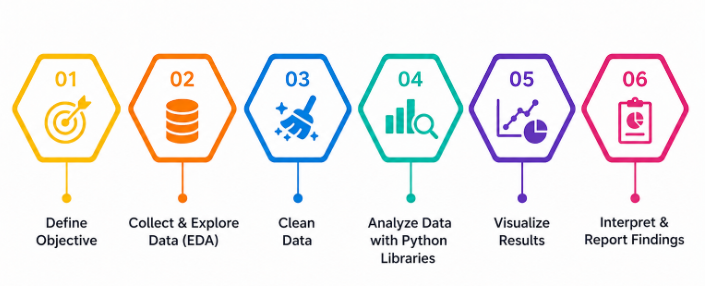
Data analysis is a key component of data science that helps users discover patterns, identify trends, and generate meaningful insights from datasets. In this Google Colab Tutorial, learners explore how to perform Python Data Analysis using powerful libraries such as NumPy, Pandas, Matplotlib, and Seaborn. Google Colab for Data Science provides an interactive environment where users can write Python code, analyze datasets, and develop practical analytical solutions without requiring complex software installation.

Data Analysis Using Python Libraries
Getting started with Google Colab is simple and requires only a Google account and an internet connection. In this Google Colab Tutorial, learners understand how to create notebooks, execute Python programs, manage files, and work with interactive coding environments. The Google Colab interface is similar to Jupyter Notebook, making it easier for beginners to learn programming, data analysis, and machine learning concepts. The Google Colab workspace includes important features such as code cells, text cells, runtime settings, file management options, output areas, and visualization panels. Users can customize the runtime environment, install additional Python packages, upload datasets, and connect notebooks with external storage platforms like Google Drive. Google Colab also provides GPU and TPU support for faster execution of Machine Learning Projects and advanced AI and Machine Learning workflows. Using a Google Colab Notebook, learners can practice Python Programming, perform Python Data Analysis, and develop practical Data Science Projects Using Google Colab. These hands-on projects can also be included in a How to Build a Data Science Internship Portfolio to showcase technical skills and real-world experience to recruiters. Understanding the Google Colab environment helps learners efficiently manage workflows, experiment with datasets, and build professional solutions for real-world Beginner Data Science Projects.

Get JOB Oriented Data Science Training for Beginners By MNC Experts
- Instructor-led Sessions
- Real-life Case Studies
- Assignments
Data Visualization with Google Colab
- Introduction to Data Visualization in Python: In this Google Colab Tutorial, learners understand the importance of data visualization in data science and analytics. Google Colab for Data Science provides an interactive environment to create meaningful charts and graphs using Python visualization libraries. Data visualization helps identify patterns, trends, relationships, and insights within datasets, making complex information easier to understand. Using a Google Colab Notebook, beginners can explore visualization techniques that are essential for Python Data Analysis, reporting, and decision-making. These concepts are highly valuable for developing Beginner Data Science Projects and professional Data Science Projects Using Google Colab.
- Creating Charts Using Matplotlib: Matplotlib is one of the most popular Python libraries used for creating data visualizations. In this Data Science Tutorial, learners explore how to use Matplotlib in Google Colab to create different types of charts, including line charts, bar charts, histograms, scatter plots, and customized graphs. Through Python Programming, users can transform raw data into visual representations that support better analysis. Creating effective charts using Matplotlib helps learners strengthen their Data Visualization skills and prepare for advanced Machine Learning Projects.
- Visualizing Data with Seaborn: Seaborn is a powerful Python visualization library used for creating advanced statistical charts and analytical graphics. In Google Colab for Data Science, learners explore Seaborn features such as heatmaps, distribution plots, pair plots, and correlation analysis. These visualization techniques help identify hidden patterns, relationships, and trends within datasets. Using Seaborn with Python Data Analysis allows learners to perform detailed exploratory data analysis and improve the quality of insights generated from Data Science Projects Using Google Colab.
- Interactive Visualizations with Python Libraries: Interactive visualization improves data exploration by allowing users to analyze information dynamically. In this Google Colab Tutorial, learners explore Python libraries such as Plotly and Bokeh for creating interactive charts and dashboards. These tools help users analyze complex datasets, highlight important information, and improve data storytelling. Interactive Data Visualization techniques are widely used in AI and Machine Learning, business analytics, and real-world Beginner Data Science Projects.
- Data Visualization Best Practices: Effective data visualization requires selecting the right chart type, maintaining readability, using proper labels, and presenting information clearly. This Data Science Tutorial helps learners understand visualization principles required for creating professional reports and dashboards. Learners who want to expand their dashboard-building skills can also explore the Power BI Tutorial to understand how visual analytics is applied in business intelligence. By following best practices in Google Colab, users can improve their Python Data Analysis workflow and create impactful visual solutions for Data Science Projects Using Google Colab.
Want to Master Data Science? Explore the Data Science Master Program Offered at ACTE Today!
Building Machine Learning Projects in Google Colab
- Introduction to Machine Learning Workflows: Google Colab for Data Science provides an excellent platform for developing complete machine learning workflows. In this Google Colab Tutorial, learners understand the machine learning process, including data collection, preparation, model selection, training, evaluation, and deployment. Using a Google Colab Notebook, beginners can practice building practical Machine Learning Projects with real-world datasets and gain hands-on experience in AI and Machine Learning applications.
- Preparing Data for Machine Learning Models: Data preparation is an essential step in creating accurate machine learning models. Through Python Programming, learners understand techniques such as feature selection, data cleaning, handling missing values, encoding categorical variables, and splitting datasets into training and testing sets. These skills help improve model performance and are important for successful Data Science Projects Using Google Colab.
- Building Machine Learning Models with Scikit-Learn: Scikit-learn provides powerful tools for developing machine learning applications in Google Colab. In this Data Science Tutorial, learners explore regression, classification, clustering algorithms, and model evaluation techniques. By practicing with Scikit-learn, users can create practical Machine Learning Projects and gain hands-on experience in developing advanced AI and Machine Learning solutions.
- Training and Evaluating Machine Learning Models: Model training and evaluation are important stages in machine learning development. In this Google Colab Tutorial, learners understand how to train models, measure accuracy, analyze performance, and improve results using evaluation metrics such as accuracy score, precision, recall, and mean squared error. These techniques help create reliable models for real-world Data Science Projects.
- Creating Real-World Machine Learning Projects: Google Colab enables learners to build practical projects such as customer prediction systems, sales forecasting models, sentiment analysis applications, and recommendation systems. Learners looking for more hands-on ideas can also explore the Top 10 Data Science Projects Tutorial to Get Internships to expand their project portfolio and strengthen their practical skills. Developing these Beginner Data Science Projects helps users apply theoretical concepts, improve Python Data Analysis skills, and gain practical experience in AI and Machine Learning workflows.
Want to Learn About Data Science? Explore Our Data Science Interview Questions and Answers Featuring the Most Frequently Asked Questions in Job Interviews.
Using AI and Deep Learning Frameworks
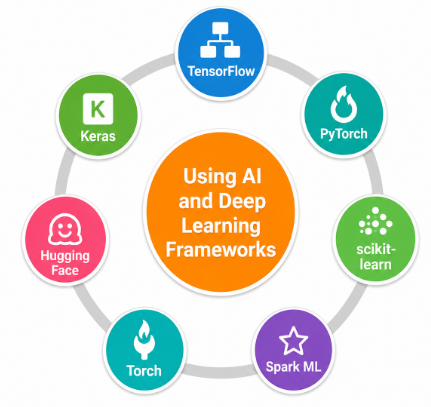
- Introduction to Artificial Intelligence in Google Colab: In this Google Colab Tutorial, learners explore the fundamentals of artificial intelligence and understand how Google Colaboratory supports AI development using Python-based frameworks. Google Colab provides cloud-based computing resources that help users build, test, and experiment with advanced AI applications efficiently. These concepts are valuable for developing Data Science Projects Using Google Colab and understanding modern AI workflows.
- Working with TensorFlow and Keras: TensorFlow and Keras are widely used frameworks for developing deep learning applications. Through Google Colab for Data Science, learners understand how to create, train, and evaluate deep learning models using neural networks. These frameworks support advanced AI and Machine Learning projects and help users develop practical solutions using Python Programming.
- Developing Neural Network Models: Neural networks are the foundation of deep learning applications. In this Data Science Tutorial, learners explore artificial neural networks, layers, activation functions, loss functions, and optimization techniques. These concepts help users create intelligent solutions using Google Colab Notebook environments and gain practical experience with Machine Learning Projects.
- Using GPU and TPU Acceleration: Google Colab provides GPU and TPU acceleration to improve deep learning performance and handle complex computational tasks. Learners understand how to enable hardware acceleration and use cloud resources for advanced AI workloads. These capabilities make Google Colab an effective platform for developing AI and Machine Learning applications and deep learning models.
- Building AI and Deep Learning Applications: Learners can build real-world AI applications such as image classification, natural language processing, chatbot development, and predictive analytics using Google Colab frameworks. To gain a broader understanding of emerging AI innovations, learners can also explore the Artificial Intelligence and Future Technology of AI, which covers modern AI trends and future advancements. Developing these Beginner Data Science Projects helps users strengthen Python Data Analysis skills, improve Data Visualization knowledge, and prepare for professional careers in data science and artificial intelligence.
Saving, Sharing, and Collaborating with Google Colab
- Saving Google Colab Notebooks: In this Google Colab Tutorial, learners understand how to save notebooks automatically, download files, manage versions, and organize projects using Google Drive integration. Proper notebook management helps maintain efficient Data Science Projects Using Google Colab and ensures better workflow management for Python Programming and Data Analysis tasks.
- Connecting Google Drive with Colab: Google Drive integration allows users to access datasets, store outputs, and manage project resources easily. Using Google Colaboratory, learners can connect cloud storage and improve their workflow for Python Data Analysis, Machine Learning Projects, and AI-based application development.
- Sharing Notebooks with Others: Google Colab allows users to share notebooks with individuals and teams by managing access permissions. Collaboration features make it easier to work together on Beginner Data Science Projects, Data Science Tutorial exercises, and professional analytics solutions using a Google Colab Notebook.
- Real-Time Collaboration Features: Real-time collaboration enables multiple users to edit, comment, and develop projects together. These features make Google Colab an effective platform for teamwork, learning, and developing Data Science Projects Using Google Colab with improved productivity. Learners can further enhance these practical skills through Data Science Training with hands-on industry projects.
- Managing and Publishing Data Science Projects: Managing completed projects requires proper organization, documentation, and presentation. Learners understand best practices for maintaining notebooks, documenting Python code, sharing results, and presenting professional solutions. These skills are essential for building a strong portfolio in Data Science, Machine Learning Projects, Data Visualization, and AI and Machine Learning careers.
Conclusion and Next Steps in Google Colab
This Google Colab Tutorial has provided a complete understanding of how Google Colaboratory supports programming, data analysis, machine learning, and artificial intelligence development. Google Colab for Data Science offers an accessible cloud-based environment where beginners and professionals can write Python code, analyze datasets, create visualizations, and develop advanced applications without requiring complex software installations. Throughout this Data Science Tutorial, learners explored essential concepts such as setting up the Colab environment, working with Python Programming, using Jupyter Notebook features, loading and preparing datasets, performing Python Data Analysis, and building practical Data Science Projects Using Google Colab. By using a Google Colab Notebook, learners can gain hands-on experience with real-world datasets and develop valuable skills required for modern data science careers. Google Colab supports popular Python libraries such as NumPy, Pandas, Matplotlib, Scikit-learn, TensorFlow, and PyTorch, making it an ideal platform for creating Machine Learning Projects, performing Data Visualization, and developing AI and Machine Learning applications. Beginners can easily practice coding, experiment with algorithms, and build Beginner Data Science Projects while gaining confidence in analytics and artificial intelligence workflows. To further advance these skills and work on industry-oriented projects, learners can enroll in Data Science Training.