LMS
LMS
Last updated on 03rd Sep 2026| 4916

- Introduction to Building a Data Analyst Portfolio
- Why a Strong Data Analyst Portfolio Is Important
- How to Choose Data Analyst Projects for Your Portfolio
- Key Data Analytics Skills to Showcase in Your Portfolio
- Essential Tools and Technologies to Include in a Data Analyst Portfolio
- How to Structure and Present Data Analyst Projects
- How to Use GitHub to Build and Showcase a Data Analyst Portfolio
- How to Connect Your Data Analyst Portfolio With Your Resume and LinkedIn
- Best Practices and Common Mistakes in Data Analyst Portfolio Building
- Conclusion and Next Steps for Building a Strong Data Analyst Portfolio
Introduction to Building a Data Analyst Portfolio
A well-structured Data Analyst portfolio can help candidates demonstrate their analytical abilities, technical knowledge, and practical experience to potential employers. A portfolio provides an opportunity to showcase projects that involve data collection, cleaning, analysis, visualization, and interpretation using real-world or relevant datasets. Aspiring Data Analysts can include projects created with tools such as Excel, SQL, Python, Power BI, Tableau, and other analytics technologies to highlight their problem-solving capabilities. Candidates looking to strengthen their foundation can also explore a Data Analytics Course to develop practical skills across different stages of data analysis. Each project should clearly explain the business problem, dataset, analysis process, tools used, key findings, and insights generated. Maintaining projects on platforms such as GitHub and presenting dashboards or visualizations through a professional portfolio can make the work easier for recruiters and hiring managers to evaluate. Whether you are a fresher building your first projects or an experienced professional strengthening your profile, a focused and organized Data Analyst portfolio can support your career development and job search.

Why a Strong Data Analyst Portfolio Is Important
A strong Data Analyst portfolio helps candidates demonstrate their practical abilities beyond academic qualifications and theoretical knowledge. It gives recruiters and hiring managers a clear view of how a candidate works with datasets, identifies patterns, solves analytical problems, and communicates insights. Including projects that showcase data cleaning, SQL queries, statistical analysis, Python programming, and dashboard development can highlight relevant technical skills. A well-organized portfolio can also demonstrate familiarity with tools such as Excel, Power BI, Tableau, and other data analytics platforms. For freshers, a portfolio can provide evidence of hands-on experience when professional experience is limited, while experienced professionals can use it to showcase advanced projects and industry-specific expertise. Candidates can also strengthen their understanding of essential analytical skills by exploring Data Analytics from Scratch and applying those concepts while developing portfolio projects. Regularly updating the portfolio with meaningful projects and clear documentation can strengthen a candidate’s professional presence and support better opportunities in the data analytics field.
Get Your Data Analytics Certification by Learning from Industry-Leading Experts and Advancing Your Career with ACTE’s Data Analytics Course.
How to Choose Data Analyst Projects for Your Portfolio
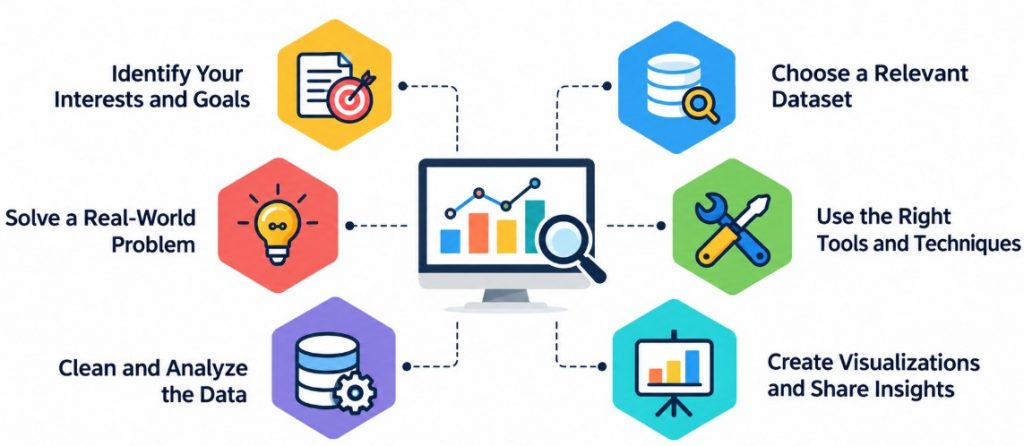
Choosing the right projects is an important step when building a Data Analyst portfolio because each project should demonstrate practical analytical skills and the ability to solve real-world problems. Candidates can select projects based on areas such as sales analysis, customer behavior, finance, marketing, healthcare, e-commerce, or business operations. Beginners can start with projects that involve data cleaning, exploratory analysis, basic SQL queries, and simple dashboards before progressing to more advanced analytical tasks. Those looking to strengthen their practical knowledge can also explore a Data Analytics Course to build relevant skills and gain hands-on exposure. A good project should have a clear objective, a relevant dataset, meaningful questions to answer, and measurable insights.

Learn Advanced Data Analytics Certification Training Course to Build Your Skills
Weekday / Weekend BatchesSee Batch DetailsKey Data Analytics Skills to Showcase in Your Portfolio
A Data Analyst portfolio should highlight the technical and analytical skills that demonstrate a candidate’s ability to work with data and generate meaningful insights. Candidates should showcase their knowledge of data cleaning, data transformation, exploratory data analysis, statistical analysis, and data visualization through practical projects. SQL skills can be demonstrated through queries involving filtering, joins, aggregations, subqueries, and window functions. Python projects can highlight the use of libraries such as Pandas, NumPy, and Matplotlib for data analysis and visualization. Experience with Excel, Power BI, and Tableau can be presented through interactive dashboards and business reports. Candidates can also demonstrate skills in identifying trends, interpreting results, creating data-driven recommendations, and communicating findings clearly. For a broader understanding of essential analytical topics, candidates can explore Data Analytics Concepts and Importance while developing projects that demonstrate these skills. Including these skills within well-documented projects can help recruiters understand the candidate’s practical capabilities and readiness for Data Analyst roles.
Essential Tools and Technologies to Include in a Data Analyst Portfolio
- Microsoft Excel: Showcase projects using data cleaning, formulas, pivot tables, charts, lookup functions, conditional formatting, and reports to demonstrate practical analytical skills.
- SQL: Include projects demonstrating database querying, joins, filtering, aggregations, subqueries, CTEs, and data extraction techniques to highlight strong database analysis skills.
- Python: Highlight projects using Pandas, NumPy, Matplotlib, and Seaborn for data cleaning, transformation, analysis, automation, visualization, and generating meaningful insights.
- Power BI: Add interactive dashboards showcasing data modeling, DAX calculations, visualizations, calculated measures, KPI tracking, and professional business reporting skills.
- Tableau: Showcase interactive dashboards and analytical reports using charts, filters, calculated fields, and visual storytelling to clearly communicate valuable business insights.
- Jupyter Notebook: Use notebooks to present Python analysis, data preparation, code explanations, visualizations, observations, findings, and conclusions in a clear organized format.
- GitHub: Maintain SQL scripts, Python notebooks, datasets, project documentation, dashboards, and other portfolio resources in well-organized repositories for easy professional access.
- Data Visualization: Demonstrate skills in selecting suitable charts, designing clear dashboards, identifying trends, comparing metrics, and communicating analytical findings effectively.
- Statistical Analysis: Include projects using descriptive statistics, correlation, distributions, trend analysis, hypothesis testing, and other methods to demonstrate analytical capabilities.
- Cloud and Database Technologies: Showcase familiarity with cloud platforms, databases, and data warehouses to demonstrate your ability to store, manage, query, and analyze large datasets efficiently.

Get JOB Oriented Data Analytics Training for Beginners By MNC Experts
- Instructor-led Sessions
- Real-life Case Studies
- Assignments
How to Structure and Present Data Analyst Projects
Each Data Analyst project in a portfolio should be presented in a clear and organized format so recruiters can quickly understand the candidate’s analytical approach and results. Start by describing the business problem or objective and clearly mention the dataset used for the analysis. Explain the steps involved in data collection, cleaning, transformation, exploration, and analysis, followed by the tools and technologies used. Candidates looking to strengthen their practical knowledge can explore a Data Analytics Course to develop relevant analytical skills through structured learning and practical exercises. Include relevant SQL queries, Python analysis, Excel calculations, or Power BI and Tableau dashboards to demonstrate practical skills. The project should highlight important findings, trends, and insights identified from the data and explain how these insights can support business decisions. Candidates should also include the final outcome or recommendations generated from the analysis. Adding screenshots, visualizations, project documentation, and links to the source code can make the portfolio more informative and easier to evaluate.
Want to Master Data Analytics? Explore the Data Analytics Master Program Offered at ACTE Today!
How to Use GitHub to Build and Showcase a Data Analyst Portfolio
GitHub can help Data Analyst candidates organize, document, and showcase their projects in a professional manner. Candidates can create separate repositories for projects involving SQL, Python, Excel, Power BI, Tableau, or other analytics tools. Each repository should include a clear README file describing the project objective, dataset, tools used, analysis process, key findings, and business recommendations. Python notebooks, SQL scripts, cleaned datasets, dashboard files, screenshots, and supporting documentation can be organized into appropriate folders for easy access. Candidates should use meaningful repository names and maintain a consistent structure across their projects. Regularly updating repositories with new projects and improvements can demonstrate continuous learning and practical experience. Candidates preparing for their career can also review this Data Analyst Job Role guide to understand how portfolio projects and technical skills can support their job applications. Adding the GitHub profile link to a resume and LinkedIn profile can also make it easier for recruiters to review the candidate’s Data Analyst portfolio and technical work.
How to Connect Your Data Analyst Portfolio With Your Resume and LinkedIn
Connecting a Data Analyst portfolio with your resume and LinkedIn profile can help recruiters easily explore your practical skills and project experience. Candidates should add a direct portfolio or GitHub link to the contact or projects section of their resume so hiring teams can quickly review their work. The resume should highlight the most relevant portfolio projects along with the tools, analytical techniques, and business outcomes involved. On LinkedIn, candidates can add portfolio links to the Featured section and describe selected projects in the Projects or Experience sections. Each project should use a clear title and briefly explain the problem, tools used, analysis performed, and key findings. Candidates can also refer to this guide on Data Analyst Job at Google for additional guidance on presenting relevant skills and project experience during job applications. Keeping the resume, LinkedIn profile, and portfolio consistent can create a professional personal brand and make it easier for recruiters to understand the candidate’s Data Analyst capabilities.
Want to Learn About Data Analytics? Explore Our Data Analytics Interview Questions and Answers Featuring the Most Frequently Asked Questions in Job Interviews.
Best Practices and Common Mistakes in Data Analyst Portfolio Building
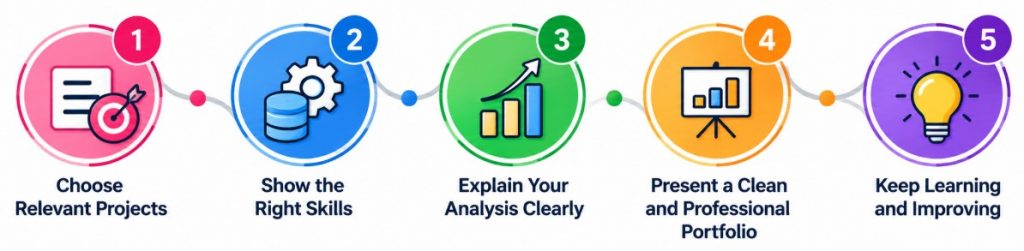
- Choose Relevant Projects: Include projects that highlight data cleaning, SQL, visualization, statistics, dashboards, and practical problem-solving skills required for Data Analyst roles.
- Focus on Quality: Select a few complete, well-structured, and clearly documented projects that demonstrate your analytical abilities rather than adding many repetitive projects.
- Use Realistic Datasets: Choose meaningful datasets based on real-world business scenarios that allow you to analyze trends, identify patterns, solve problems, and generate useful insights.
- Document the Process: Clearly describe each project’s objective, dataset, tools, methodology, analysis steps, key findings, challenges, and recommendations for easy understanding.
- Showcase Business Insights: Explain what your analytical findings mean, highlight important trends and patterns, and show how insights can support practical business decisions.
- Keep Projects Organized: Use clear folder structures, descriptive file names and organized GitHub repositories to make projects easy to review.
- Check for Errors: Carefully review calculations, SQL queries, datasets and project links to ensure your portfolio is accurate and professional. Candidates can also explore Google Data Analyst Interviews to understand how practical skills and project knowledge can be relevant when preparing for Data Analyst interviews.
- Avoid Repetitive Projects: Include projects covering different datasets, tools, industries, and analytical techniques instead of repeating similar analyses that provide limited additional value.
- Avoid Poor Visualizations: Select suitable charts, clear labels, meaningful titles, and simple dashboard layouts that communicate insights effectively without unnecessary visual elements.
- Keep the Portfolio Updated: Regularly add new projects, improve existing analyses, update documentation, and explore emerging tools and techniques to demonstrate continuous skill development.
Conclusion and Next Steps for Building a Strong Data Analyst Portfolio
Building a strong Data Analyst portfolio requires a combination of practical projects, relevant technical skills, clear documentation, and professional presentation. Candidates should showcase projects that demonstrate their ability to clean, analyze, visualize, and interpret data using tools such as Excel, SQL, Python, Power BI, and Tableau. Each project should clearly explain the objective, methodology, tools used, key findings, and business insights. Candidates who want to strengthen their analytical knowledge can explore a Data Analytics Course to develop practical skills and improve their understanding of industry-relevant tools. Maintaining organized repositories on GitHub and connecting the portfolio with a professional resume and LinkedIn profile can make the work easier for recruiters to evaluate. Freshers can begin with simple projects and gradually develop more advanced analytical solutions as their skills improve. Regularly updating the portfolio, learning new technologies, and focusing on real-world business problems can help candidates strengthen their profile and prepare for Data Analyst career opportunities.