LMS
LMS
Last updated on 19th May 2026| 4608

- Introduction to Claude Tutorial for Beginners
- Getting Started
- Interface Overview<
- Core Features
- Text Generation Basics
- Real Use Cases in Writing
- Coding and Debugging Assistance
- Business and Productivity Applications<
- Ethics and Responsible AI Use
- Conclusion
Introduction to Claude Tutorial for Beginners
Claude is an advanced AI assistant developed to help users with conversations, content generation, coding, research, and productivity tasks. It uses natural language processing and deep learning technologies to understand prompts and generate human-like responses. Claude is designed to provide safe, helpful, and context-aware interactions for students, professionals, developers, and businesses in Gen AI Course . The platform supports writing assistance, summarization, brainstorming, debugging, and document analysis efficiently. Its intelligent capabilities help users save time and improve workflow productivity across multiple industries. Learning Claude helps freshers understand modern AI systems and practical applications of conversational artificial intelligence.

Getting Started
- Account Setup: Claude can be accessed through its supported web platform and applications with a simple sign-up process. After creating an account, users can immediately begin using AI-powered features for writing, coding, research, and productivity tasks.
- Exploring Features: Claude offers conversational AI, text generation, document summarization, coding assistance, data analysis, and question answering. Exploring these features helps beginners understand how AI can improve both personal and professional workflows.
- Prompt Writing: Writing clear, detailed prompts enables Claude to generate more accurate, relevant, and context-aware responses. Learning prompt engineering is an essential skill for maximizing AI productivity. To strengthen your knowledge, explore the Generative AI Tutorial.
- Learning Workflow: Start with basic tasks such as content generation, document summarization, and question answering before progressing to coding, research, data analysis, and workflow automation. Regular hands-on practice helps build practical AI skills.
- Productivity Benefits: Claude automates repetitive tasks, streamlines communication, supports research, assists with coding, and improves overall productivity. Students, developers, researchers, and business professionals use Claude to save time, enhance creativity, and make informed decisions.
Get Your Gen AI Certification by Learning from Industry-Leading Experts and Advancing Your Career with ACTE’s Gen AI Course.
Interface Overview
Claude provides a clean, intuitive, and user-friendly interface designed to simplify AI-powered communication and improve overall productivity. The platform features well-organized chat windows, responsive prompt input sections, conversation history panels, and file interaction capabilities that allow users to manage tasks efficiently. Its minimalistic and distraction-free design helps users focus on conversations while navigating the platform with ease, even without advanced technical expertise. Claude supports continuous and context-aware conversations, enabling users to maintain the flow of discussions across multiple interactions without repeatedly providing the same information. The interface is optimized for both desktop and mobile devices, ensuring a seamless experience regardless of screen size or operating system in Gen AI Course. Users can upload and interact with documents, making it suitable for research, content creation, analysis, and business-related tasks. The platform emphasizes accessibility, readability, and smooth performance, allowing users to work comfortably for extended periods. Features such as organized conversation management, responsive design, and efficient navigation contribute to a highly productive environment. By combining simplicity, functionality, and modern design principles, Claude delivers a reliable and engaging user experience that supports effective communication, collaboration, and task management across various professional and personal use cases.
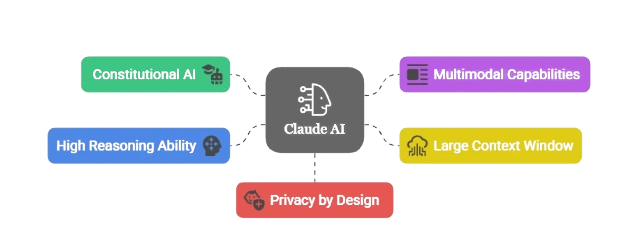
Core Features
- Conversational AI: Claude delivers natural, context-aware conversations by understanding user intent, maintaining context across interactions, and generating accurate, human-like responses. It is widely used for customer support, research assistance, coding, and business communication.
- Summarization: Claude efficiently summarizes lengthy documents, research papers, reports, emails, and articles into concise, easy-to-understand insights, helping users save time and improve productivity. To strengthen your AI fundamentals, explore the Artificial Neural Network Tutorial.
- Content Generation: Claude generates high-quality blogs, emails, reports, technical documentation, social media posts, and creative content while adapting its tone, style, and format to meet different user requirements for professional and personal use.
- Coding Assistance: Claude helps developers with coding and debugging, explaining logic and identifying errors. It supports multiple languages and frameworks, boosting productivity and aiding beginners in learning technical concepts.
- Task Automation: Claude automates repetitive workflow activities, improving productivity and reducing workload. Organizations use it for communication and content management, allowing users to focus on strategic and creative responsibilities.

Text Generation Basics
Claude uses advanced large language models (LLMs) and artificial intelligence to generate natural, human-like text based on user prompts and contextual understanding. It can create blogs, articles, emails, reports, summaries, product descriptions, technical documentation, marketing copy, social media content, and creative writing while maintaining grammatical accuracy, coherence, and consistency. Claude adapts its writing style, tone, and format to suit different audiences, making it valuable for students, educators, researchers, developers, businesses, and content creators. It also supports editing, proofreading, paraphrasing, content expansion, and brainstorming, helping users improve communication and reduce the time required for content creation. To strengthen your understanding of AI-powered computer vision, explore the Object Detection Tutorial. By combining effective prompt engineering with Claude’s advanced language capabilities, users can generate accurate, context-aware, and high-quality content that improves productivity across academic, professional, and creative workflows.

Get JOB Oriented Gen AI Training for Beginners By MNC Experts
- Instructor-led Sessions
- Real-life Case Studies
- Assignments
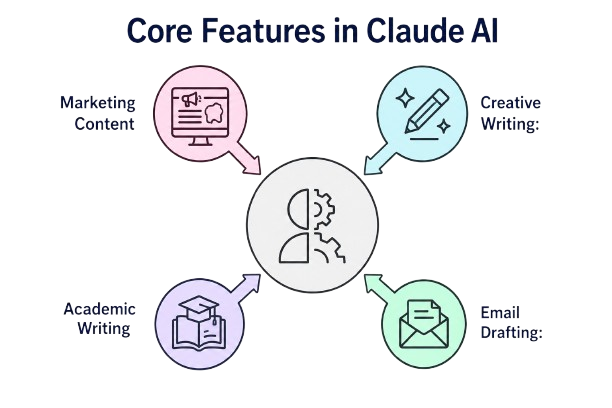
Real Use Cases in Writing
- Blog Writing: Claude helps users generate blog topics, create SEO-friendly articles, improve content structure, and rewrite existing content with greater clarity and readability. Businesses, marketers, and content creators use Claude to streamline content production and maintain consistency across digital platforms.
- Email Drafting: Claude generates professional emails, business proposals, customer responses, follow-up messages, and communication templates in seconds, helping users save time and improve workplace productivity. To explore more AI-powered application development, visit the Intelligent Apps Tutorial.
- Academic Writing: Students use Claude for summaries, assignments, and research explanations. It organizes information into clear academic structures, enhancing learning and productivity. Freshers gain exposure to AI-supported educational tools and study material generation.
- Creative Writing: Claude assists with storytelling, brainstorming, and idea generation. Writers overcome creative blocks and produce engaging narratives quickly. This support increases innovation and artistic exploration using AI technologies.
- Marketing Content: Businesses use Claude for advertisements and social media content. AI-generated marketing text improves engagement and branding consistency and expolre more in ROBOTICS Tutorial For Beginners. Content automation saves time for marketing teams, helping freshers understand practical business applications of AI writing.
Want to Master Gen AI? Explore the Gen AI Master Program Offered at ACTE Today!
Coding and Debugging Assistance
Claude provides coding support by helping developers write, analyze, and debug software programs efficiently. It explains programming concepts, identifies errors, and suggests optimized solutions for various tasks in our Gen AI Course . Debugging assistance supports multiple programming languages and frameworks commonly used in development. Developers can generate code snippets, understand algorithms, and improve workflows. Beginners benefit from simplified explanations and guided coding support, reducing troubleshooting time and enhancing programming accuracy significantly.
Want to Learn About DevOps? Explore Our DevOps Interview Questions and Answers Featuring the Most Frequently Asked Questions in Job Interviews.
Business and Productivity Applications
- Workflow Automation: Claude automates repetitive tasks such as content creation, email drafting, report generation, meeting summaries, and documentation, allowing employees to focus on strategic work while improving productivity and operational efficiency.
- Customer Support: Claude enhances customer service by generating instant responses, resolving common queries, and assisting support teams with accurate information. Learn more about AI-powered automation in the Artificial Intelligence Tutorial.
- Data Summarization: Claude summarizes lengthy reports, research papers, business documents, and meeting notes into concise, actionable insights, helping organizations make faster and more informed decisions.
- Team Collaboration: Claude supports collaboration by generating meeting notes, project updates, action items, and shared documentation, improving communication and coordination across distributed teams.
- Productivity Enhancement: Claude streamlines daily workflows by assisting with writing, research, coding, brainstorming, and document management, enabling students, professionals, and businesses to complete tasks more efficiently.
Ethics and Responsible AI Use
- Transparency in AI: AI systems should clearly explain how responses and recommendations are generated so users understand when they are interacting with AI, promoting trust, accountability, and responsible adoption.
- Avoiding Bias: Developers should train AI models using diverse, representative datasets and regularly evaluate them for fairness to reduce bias and discrimination. To learn more about responsible AI development, explore the OpenAI Tools Tutorial for Beginners.
- Privacy and Security: Claude is designed to process user prompts and documents securely. Organizations should implement strong security measures, protect sensitive information, and follow applicable data privacy regulations when using AI systems.
- Preventing Misuse: Responsible AI practices include preventing the generation of misinformation, harmful content, and malicious use cases through content moderation, governance policies, and ethical guidelines.
- Human Supervision: Human oversight remains essential for AI-assisted decision-making, particularly in healthcare, finance, education, and other critical domains. Reviewing AI-generated outputs helps improve accuracy, accountability, and responsible use.
Conclusion
Claude Tutorial for Beginners is a powerful AI assistant that supports communication, content generation, coding, research, and productivity enhancement across multiple industries. Its intelligent capabilities such as summarization, conversational AI, debugging support, and workflow automation help users complete tasks efficiently and accurately. The platform’s beginner-friendly interface and context-aware responses make AI technology accessible for students, professionals, developers, and businesses alike in our Gen AI Course. Claude also highlights the importance of ethical AI practices including transparency, fairness, privacy protection, and responsible usage. Freshers learning Claude can develop valuable AI skills while understanding practical applications of conversational artificial intelligence in real-world environments. With continuous advancements in AI technology, Claude will continue improving digital productivity, intelligent collaboration, and creative problem-solving in the future.