LMS
LMS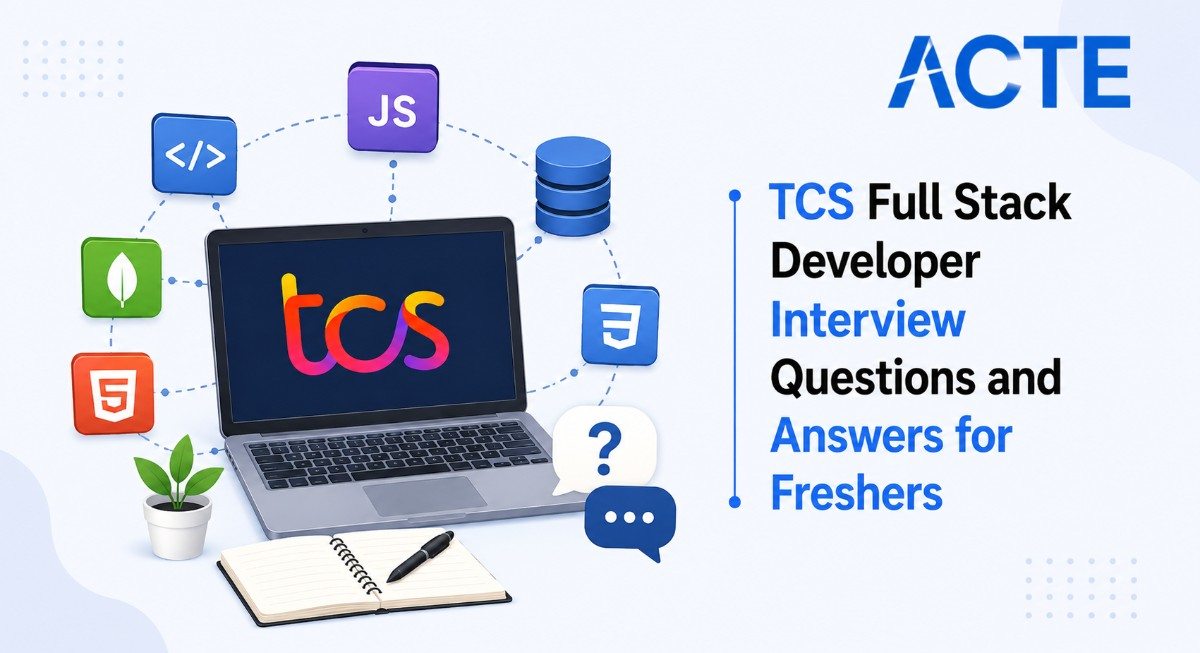
Last updated on 20th Aug 2026| 7568

TCS Full Stack Developer Interviews For Freshers Generally Focus On Programming Fundamentals, Frontend Development, Backend Technologies, Databases, APIs, And Problem-Solving Skills. Candidates May Be Asked Questions On HTML, CSS, JavaScript, React, Angular, Java, Python, Node.js, SQL, And Object-Oriented Programming. The Interview Can Also Include Coding Problems To Evaluate Logical Thinking And Programming Ability. Questions On REST APIs, Git, Authentication, Database Concepts, And Software Development Practices May Also Be Included. This Collection Covers Commonly Asked TCS Full Stack Developer Interview Questions And Answers To Help Freshers Understand Important Concepts. Regular Practice With Technical Questions And Coding Problems Can Improve Confidence And Interview Performance.
1. What Is Full Stack Development?
Ans:
Full Stack Development Involves Working On Both Frontend And Backend Components Of An Application. The Frontend Handles The User Interface And User Interactions, While The Backend Manages Business Logic, APIs, Authentication, And Server-Side Operations. Databases Are Used To Store And Manage Application Data Required By The Application. A Full Stack Developer Connects The Frontend, Backend, And Database Components To Build Complete Applications. Common Technologies Used In Full Stack Development Include HTML, CSS, JavaScript, React, Node.js, Java, Python, And SQL. Full Stack Development Helps Developers Understand And Manage Different Layers Of A Modern Web Application.
2. What Are The Responsibilities Of A Full Stack Developer?
Ans:
A Full Stack Developer Develops And Maintains Both Client-Side And Server-Side Applications. The Role Includes Designing Responsive User Interfaces And Developing Backend Services According To Application Requirements. It Also Involves Creating APIs And Connecting Applications With Databases For Storing And Retrieving Information. Developers Are Responsible For Debugging Errors, Improving Application Performance, And Maintaining Application Functionality. Version Control Tools Such As Git Are Commonly Used For Managing Source Code And Collaborating With Other Developers. A Full Stack Developer Also Works With Different Teams To Deliver Reliable And Maintainable Software Solutions.
3. What Is HTML?
Ans:
HTML Stands For HyperText Markup Language And Is Used To Structure The Content Of Web Pages. It Defines Elements Such As Headings, Paragraphs, Images, Tables, Forms, Links, And Other Web Page Components. HTML Uses Tags To Tell The Browser How Different Pieces Of Content Should Be Structured And Displayed. Semantic HTML Elements Can Improve Accessibility And Help Search Engines Understand The Structure Of A Web Page. HTML Works Together With CSS For Styling And JavaScript For Adding Interactivity And Dynamic Behavior. It Forms The Basic Structure Of Almost Every Modern Website And Web Application.
4. What Is CSS?
Ans:
- CSS Stands For Cascading Style Sheets And Is Used To Control The Appearance And Presentation Of Web Pages. It Controls Properties Such As Colors, Fonts, Spacing, Borders, Layouts, And Responsive Designs.
- CSS Can Be Applied Using Inline Styles, Internal Stylesheets, Or External Stylesheets Depending On Application Requirements. Modern CSS Provides Features Such As Flexbox And Grid For Creating Flexible And Structured Page Layouts.
- Media Queries Help Applications Adapt Their Layouts To Different Screen Sizes And Devices. CSS Improves The Visual Appearance, Accessibility, Responsiveness, And Overall Usability Of Web Applications.
5. What Is JavaScript?
Ans:
JavaScript Is A Programming Language Commonly Used To Add Interactivity And Dynamic Behavior To Web Applications. It Can Manipulate HTML Elements, Handle Browser Events, Validate Forms, And Respond To User Actions. JavaScript Supports Variables, Functions, Objects, Arrays, Classes, Modules, And Other Programming Features. It Can Communicate With Backend Services Through APIs And Can Retrieve Or Submit Application Data. Modern JavaScript Supports Asynchronous Programming Through Promises, Async, And Await. It Is Widely Used With Libraries And Frameworks Such As React, Angular, And Vue For Building Modern Web Applications.
6. What Is The Difference Between HTML, CSS, And JavaScript?
Ans:
HTML Defines The Structure And Content Of A Web Page And Provides Elements Such As Headings, Paragraphs, Forms, Images, And Links. CSS Controls The Presentation, Styling, Layout, Colors, Fonts, Spacing, And Responsive Behavior Of The Web Page. JavaScript Adds Logic, Interactivity, And Dynamic Behavior To The Application. HTML Can Be Compared To The Structure Of A Building, While CSS Represents The Design And Appearance Of The Building. JavaScript Represents The Functional Behavior That Allows Users To Interact With The Application. Together, HTML, CSS, And JavaScript Form The Basic Technologies Used To Develop Modern Web Applications.
7. What Is DOM?
Ans:
DOM Stands For Document Object Model And Represents An HTML Document As A Tree-Like Structure. Each HTML Element In A Web Page Is Represented As A Node Within The DOM Structure. JavaScript Can Access, Modify, Add, Or Remove These Nodes Dynamically During Application Execution. DOM Manipulation Can Be Used To Change Text, Attributes, Styles, And Other Elements On A Web Page. Browser Events Such As Click, Submit, Change, And Mouse Events Can Also Be Handled Through The DOM. The DOM Allows Web Applications To Respond Dynamically To User Interactions And Update Content Without Reloading The Entire Page.
8. What Is Responsive Web Design?
Ans:
Responsive Web Design Is An Approach That Allows A Website Or Web Application To Adapt To Different Screen Sizes And Devices. It Ensures That Applications Work Properly On Mobile Phones, Tablets, Laptops, And Desktop Computers. CSS Media Queries Are Commonly Used To Apply Different Styles Based On Screen Size And Device Characteristics. Flexible Grids, Responsive Images, Flexbox, And CSS Grid Can Also Be Used To Create Adaptive Layouts. Responsive Design Improves User Experience By Making Content Easy To Read And Navigate Across Different Devices..
9. What Is Bootstrap?
Ans:
Bootstrap Is A Popular Frontend Framework Used For Developing Responsive And Mobile-Friendly Web Interfaces. It Provides Ready-Made Components Such As Buttons, Forms, Cards, Modals, Navigation Bars, Alerts, And Other UI Elements. Bootstrap Includes A Grid System That Helps Developers Create Structured And Responsive Page Layouts. It Reduces The Amount Of Custom CSS Required And Allows Developers To Build Interfaces More Quickly. Bootstrap Components Can Also Be Customized According To The Design And Requirements Of An Application.
10. What Is React?
Ans:
- React Is A JavaScript Library Used For Building User Interfaces And Modern Web Applications. It Uses Reusable Components To Organize Frontend Development And Reduce Duplicate Code.
- React Applications Commonly Manage Data Using Props And State, Which Help Components Communicate And Update Dynamically. The Virtual DOM Helps React Efficiently Update The Required Parts Of The User Interface When Data Changes.
- React Also Supports Features Such As Hooks, Context, And Component-Based Application Development. It Is Widely Used For Creating Interactive Single Page Applications And Modern Frontend Solutions.
11. What Is A React Component?
Ans:
A React Component Is A Reusable Building Block Used To Create The User Interface Of A React Application. A Component Can Contain UI Structure, Application Logic, Event Handling, And Data Management. Functional Components Are Commonly Used In Modern React Applications And Can Use Hooks For Managing State And Other Features. Components Can Receive Data From Parent Components Through Props And Can Display That Data In The User Interface. They Can Also Maintain Local Data Using State And React Hooks When Required. Reusable Components Improve Maintainability, Organization, Scalability, And Reduce Duplicate Code In React Applications.
12. What Are Props In React?
Ans:
Props Are Properties Used To Pass Data From A Parent Component To A Child Component In React. They Are Read-Only Values And Should Not Be Directly Modified By The Child Component. Props Can Contain Different Types Of Data Such As Strings, Numbers, Objects, Arrays, Functions, Or Other Values. They Help Components Become Reusable And Configurable By Allowing Different Data To Be Passed Into The Same Component. A Parent Component Can Provide Different Props To The Same Child Component Based On Application Requirements. Props Are An Important Mechanism For Communication And Data Flow Between React Components.
13. What Is State In React?
Ans:
State Represents Data That Can Change During The Lifetime Of A React Component. When State Changes, React Can Re-Render The Component To Reflect The Updated Information In The User Interface. The useState Hook Is Commonly Used To Create And Manage State In Functional Components. State Can Store Values Such As Form Inputs, User Information, Selected Items, Counters, And UI Conditions. State Should Be Updated Using The Appropriate State Setter Function Rather Than Being Modified Directly. Proper State Management Helps Developers Build Interactive, Dynamic, And Responsive React Applications..
14. What Is useEffect In React?
Ans:
useEffect Is A React Hook Used To Perform Side Effects In Functional Components. Side Effects Can Include API Calls, Timers, Event Listeners, Subscriptions, And Other Operations Outside Normal Rendering. The Dependency Array Determines When The Effect Should Execute Based On Changes To Its Dependencies. An Empty Dependency Array Generally Causes The Effect To Run After The Initial Rendering Of The Component. A Cleanup Function Can Be Returned From The Effect To Remove Event Listeners, Timers, Or Subscriptions When Necessary. useEffect Helps Developers Manage External Operations And Synchronize Components With External Systems.
15. What Is Angular?
Ans:
Angular Is A TypeScript-Based Framework Used For Building Modern Web Applications. It Provides Features Such As Components, Services, Routing, Forms, Dependency Injection, And HTTP Communication. Angular Supports Structured Development And Is Suitable For Large And Complex Applications. It Provides Tools And Features For Building Single Page Applications With Organized Project Architecture. Angular Applications Can Communicate With Backend Services Through HTTP APIs To Retrieve And Submit Data. It Is Commonly Used For Enterprise-Level Frontend Development Where Maintainability And Structured Architecture Are Important.
16. What Is Node.js?
Ans:
Node.js Is A JavaScript Runtime Environment Used To Execute JavaScript Outside A Web Browser. It Is Built On The V8 JavaScript Engine And Uses An Event-Driven, Non-Blocking I/O Model. Node.js Is Commonly Used For Developing Backend Services, Web Servers, REST APIs, And Network Applications. Its Asynchronous Architecture Allows Applications To Handle Many I/O Operations Efficiently. The npm Ecosystem Provides Thousands Of Packages That Developers Can Use To Add Functionality To Node.js Projects. Node.js Is Popular For Building Scalable Backend Applications And Full Stack Solutions Using JavaScript.
17. What Is Express.js?
Ans:
Express.js Is A Lightweight Web Framework Built For Node.js And Is Commonly Used To Develop Backend Applications. It Simplifies The Creation Of Web Servers And REST APIs By Providing Routing And Request Handling Features. Express Supports Middleware That Can Be Used For Authentication, Logging, Validation, Error Handling, And Other Backend Operations. It Can Process Client Requests And Send Appropriate Responses Based On Application Requirements. Express Applications Can Also Connect With Databases, External Services, And Other APIs. It Is Widely Used For Developing Fast, Flexible, And Maintainable Backend Applications With JavaScript.
18. What Is NPM?
Ans:
- NPM Stands For Node Package Manager And Is Used To Manage Packages And Dependencies In Node.js Projects. It Allows Developers To Install, Update, Remove, And Manage Libraries Required By An Application.
- The package.json File Stores Project Metadata, Dependencies, Scripts, And Other Configuration Information. NPM Commands Can Also Be Used To Run Development, Testing, Build, And Other Project Scripts.
- Developers Can Access Thousands Of Open-Source Packages Through The NPM Ecosystem To Extend Application Functionality. NPM Helps Simplify Dependency Management And Makes Node.js Project Development More Organized And Efficient.
19. What Is A REST API?
Ans:
A REST API Is An Application Programming Interface Based On Representational State Transfer Principles. It Allows Different Applications Or Components To Communicate With Each Other Through HTTP Requests And Responses. Common HTTP Methods Used In REST APIs Include GET, POST, PUT, PATCH, And DELETE. REST APIs Commonly Exchange Data Using JSON Format Between Frontend Applications And Backend Services. Resources Are Usually Identified Through URLs Or API Endpoints That Represent Specific Data Or operations. REST APIs Provide A Standard And Flexible Way To Connect Frontend Interfaces With Backend Applications And Databases.
20. What Is JSON?
Ans:
JSON Stands For JavaScript Object Notation And Is A Lightweight Format Used For Exchanging Data Between Applications. It Represents Information Using Objects And Arrays In A Structured And Human-Readable Format. JSON Is Easy For Both Humans To Read And Applications To Process, Which Makes It Popular For Web Communication. It Is Commonly Used To Transfer Data Between Frontend Applications And Backend APIs. Most Modern REST APIs Use JSON For Sending Request Data And Returning Response Data. JSON Supports Data Types Such As Strings, Numbers, Booleans, Arrays, Objects, And Null Values.
21. What Is HTTP?
Ans:
HTTP Stands For HyperText Transfer Protocol And Is Used For Communication Between Clients And Servers Over A Network. A Client Sends An HTTP Request To A Server To Retrieve Or Modify A Resource. The Server Processes The Request And Returns An HTTP Response Containing Data Or Information About The Operation. HTTP Uses Methods Such As GET, POST, PUT, PATCH, And DELETE For Different Types Of Operations. HTTP Status Codes Help Indicate Whether A Request Was Successful, Redirected, Or Failed. HTTPS Is The Secure Version Of HTTP And Uses Encryption To Protect Data During Communication.

22. What Are HTTP Methods?
Ans:
- HTTP Methods Define The Type Of Operation That A Client Wants To Perform On A Server Resource. GET Is Commonly Used To Retrieve Data From A Server Without Intending To Modify It.
- POST Is Generally Used To Create New Resources Or Submit Data To The Server. PUT And PATCH Are Used To Update Existing Resources, With PATCH Commonly Used For Partial Updates.
- DELETE Is Used To Remove A Resource From The Server. Selecting Appropriate HTTP Methods Helps Create Clear, Predictable, And Standard REST APIs.
23. What Are HTTP Status Codes?
Ans:
HTTP Status Codes Indicate The Result Of A Request Sent By A Client To A Server. Status Codes In The 200 Range Generally Indicate Successful Operations Such As 200 OK And 201 Created. Status Codes In The 300 Range Are Related To Redirection And Additional Request Processing. Status Codes In The 400 Range Usually Indicate Client-Side Problems Such As Invalid Requests Or Missing Authentication. Status Codes In The 500 Range Generally Indicate Server-Side Errors. Common Examples Include 200, 201, 400, 401, 403, 404, And 500.
24. What Is Middleware In Node.js?
Ans:
- Middleware Is A Function That Executes During The Request And Response Processing Cycle In A Node.js Application. It Can Access The Request Object, Response Object, And A Function Used To Pass Control To The Next Middleware.
- Middleware Is Commonly Used For Logging, Authentication, Authorization, Input Validation, And Error Handling. Multiple Middleware Functions Can Be Applied Globally, To Specific Routes, Or To Specific Requests.
- Middleware Helps Separate Different Responsibilities And Keeps Backend Code Organized. It Is An Important Feature Of Express.js Applications And Supports Modular Backend Development.
25. What Is Authentication?
Ans:
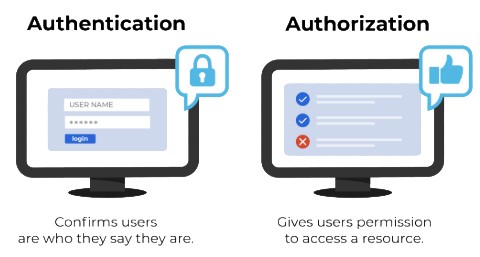
Authentication Is The Process Of Verifying The Identity Of A User Or System Accessing An Application. Users Commonly Authenticate Through Credentials Such As Usernames, Email Addresses, And Passwords. Modern Applications Can Also Use Sessions, Tokens, JSON Web Tokens, Or External Identity Providers. Passwords Should Be Stored Using Secure Password-Hashing Techniques Rather Than Plain Text. Authentication Confirms Whether A User Is Genuine Before Access To Protected Resources Is Provided. It Is Different From Authorization, Which Determines What An Authenticated User Is Allowed To Do.
26. What Is Authorization?
Ans:
Authorization Is The Process Of Determining Which Resources Or Actions An Authenticated User Is Allowed To Access. It Usually Takes Place After The User Has Successfully Completed Authentication. Applications Can Assign Permissions Based On Roles, User Attributes, Or Specific Access Policies. For Example, An Administrator May Have Permission To Manage Users While A Normal User May Have Limited Access. Authorization Rules Should Be Enforced On The Backend Because Client-Side Restrictions Can Be Bypassed. Proper Authorization Helps Prevent Unauthorized Access To Sensitive Application Resources.
27. What Is JWT?
Ans:
JWT Stands For JSON Web Token And Is Commonly Used For Token-Based Authentication In Web Applications. A JWT Contains Encoded Information And A Digital Signature That Allows A Server To Verify Its Integrity. After Successful Login, A Server Can Issue A Token To The Authenticated Client. The Client Can Send The Token With Subsequent Requests To Access Protected API Resources. The Server Validates The Token Before Processing Requests That Require Authentication. JWTs Should Be Stored, Transmitted, And Configured Carefully To Reduce Security Risks.
28. What Is SQL?
Ans:
SQL Stands For Structured Query Language And Is Used To Communicate With Relational Databases. It Supports Operations Such As Selecting, Inserting, Updating, And Deleting Data From Database Tables. SQL Can Also Perform Filtering, Sorting, Grouping, Aggregation, And Joining Of Related Tables. Popular Relational Databases That Use SQL Include MySQL, PostgreSQL, Oracle, And SQL Server. SQL Is An Important Skill For Full Stack Developer Because Backend Applications Frequently Interact With Databases. Efficient SQL Queries Help Maintain Data Accuracy And Improve Application Performance.
29. What Is A Relational Database?
Ans:
A Relational Database Stores Data In Structured Tables Consisting Of Rows And Columns. Tables Can Be Connected To Each Other Through Relationships Created Using Keys Such As Primary Keys And Foreign Keys. A Primary Key Uniquely Identifies Records Within A Table, While A Foreign Key Can Reference A Record In Another Table. SQL Is Commonly Used To Query, Insert, Update, And Delete Data In Relational Databases. Relational Databases Help Maintain Data Consistency And Support Structured Data Relationships. They Are Widely Used In Enterprise Applications And Transaction-Based Systems.
30. What Is A Primary Key?
Ans:
A Primary Key Is A Column Or Combination Of Columns That Uniquely Identifies Each Record In A Database Table. Each Value In A Primary Key Must Uniquely Identify A Specific Row Within The Table. A Primary Key Generally Should Not Contain NULL Values Because Every Record Requires A Valid Identifier. A Table Can Have Only One Primary Key, Although That Key Can Contain Multiple Columns In A Composite Key. Primary Keys Help Maintain Data Integrity And Make It Easier To Identify Individual Records. Common Examples Include Employee ID, Customer ID, Product ID, And Order ID..
31. What Is A Foreign Key?
Ans:
- A Foreign Key Is A Column Or Set Of Columns Used To Establish A Relationship Between Two Database Tables. It Usually References A Primary Key Or Unique Key In Another Table.
- For Example, An Orders Table Can Contain A Customer ID That References The Customer ID In A Customers Table. Foreign Keys Help Maintain Referential Integrity And Prevent Invalid Relationships Between Records.
- They Also Make It Possible To Retrieve Related Data Using SQL Joins. Foreign Keys Are An Important Part Of Designing Well-Structured Relational Database Systems.
32. What Is Normalization?
Ans:
Normalization Is A Database Design Technique Used To Organize Data And Reduce Unnecessary Data Redundancy. It Divides Data Into Related Tables Based On Logical Relationships And Dependencies. Normalization Helps Prevent Insert, Update, And Delete Anomalies That Can Occur In Poorly Designed Databases. Common Normal Forms Include First Normal Form, Second Normal Form, And Third Normal Form. A Properly Normalized Database Can Improve Data Consistency And Make Maintenance Easier. However, Excessive Normalization Can Increase The Number Of Joins Required For Some Queries.
33. What Is A Database Join?
Ans:
A Database Join Is Used To Combine Data From Two Or More Tables Based On Related Columns. INNER JOIN Returns Records That Have Matching Values In Both Related Tables. LEFT JOIN Returns All Records From The Left Table And Matching Records From The Right Table. RIGHT JOIN Returns All Records From The Right Table And Matching Records From The Left Table. FULL JOIN Returns Matching And Non-Matching Records From Both Tables In Databases That Support It. Joins Are Essential For Retrieving Related Information From Normalized Relational Databases.
34. What Is The Difference Between WHERE And HAVING?
Ans:
| Aspect | WHERE | HAVING |
|---|---|---|
| Purpose | Filters Individual Rows Before Grouping. | Filters Groups After Grouping. |
| Usage | Used With SELECT, UPDATE, And DELETE Queries. | Mainly Used With GROUP BY And Aggregate Functions. |
| Example | WHERE salary > 50000 | HAVING COUNT(*) > 5 |
35. What Is GROUP BY In SQL?
Ans:
GROUP BY Is A SQL Clause Used To Combine Rows Having The Same Values In One Or More Columns. It Is Commonly Used With Aggregate Functions Such As COUNT, SUM, AVG, MIN, And MAX. For Example, Sales Records Can Be Grouped By Product, Department, Or Region To Generate Summary Results. The Query Usually Produces One Result Row For Each Group Created By The GROUP BY Clause. The HAVING Clause Can Be Used To Filter The Groups After Aggregation Has Been Performed. GROUP BY Is Frequently Used For Reports, Business Analysis, And Summary Calculations.
36. What Is An Index In A Database?
Ans:
An Index Is A Database Structure Used To Improve The Speed Of Searching And Retrieving Records. It Allows The Database Engine To Locate Matching Data More Efficiently Without Always Scanning Every Row. Indexes Can Be Created On One Or More Columns Depending On Query Requirements. Although Indexes Improve Read Performance, They Require Additional Storage And Can Increase The Cost Of Insert, Update, And Delete Operations. Creating Too Many Indexes Can Therefore Reduce Overall Database Performance. Indexes Should Be Designed Carefully Based On Frequently Used Queries And Application Workloads.
37. What Is A Transaction?
Ans:
A Transaction Is A Logical Unit Of Database Operations That Should Be Treated As A Single Complete Operation. Transactions Are Commonly Explained Using The ACID Properties Of Atomicity, Consistency, Isolation, And Durability. Atomicity Ensures That All Operations In A Transaction Are Completed Or None Are Applied. Consistency Ensures That Database Rules And Constraints Remain Valid After The Transaction. Isolation Controls How Concurrent Transactions Interact, While Durability Ensures That Committed Changes Persist. Transactions Are Important For Maintaining Reliable And Consistent Data In Applications
38. What Is MongoDB?
Ans:
MongoDB Is A NoSQL Database That Stores Data In Document-Oriented Structures Instead Of Traditional Relational Tables. Documents Are Stored In BSON Format, Which Is Similar To JSON And Supports Flexible Data Structures. Related Documents Are Organized Into Collections Within A MongoDB Database. MongoDB Provides Flexible Schemas And Can Be Useful When Application Data Changes Frequently Or Has Complex Document Structures. It Supports Queries, Indexes, Aggregation, And Other Features For Managing Application Data. MongoDB Is Commonly Used With Node.js In Full Stack JavaScript Applications.
39. What Is NoSQL?
Ans:
- NoSQL Refers To Database Systems That Use Data Models Other Than Traditional Relational Tables. Common NoSQL Types Include Document Databases, Key-Value Databases, Column-Family Databases, And Graph Databases.
- NoSQL Databases Often Provide Flexible Schemas And Can Support Horizontal Scaling For Certain Workloads. They Can Be Useful For Applications With Large Volumes Of Data Or Rapidly Changing Data Structures.
- MongoDB, Redis, Cassandra, And DynamoDB Are Examples Of NoSQL Technologies. The Choice Between SQL And NoSQL Should Depend On Data Structure, Query Requirements, Consistency Needs, And Application Architecture.
40. What Is Git?
Ans:
- Git Is A Distributed Version Control System Used To Track Changes In Source Code And Other Project Files. Developers Can Create Commits To Record Different Versions Of Their Work Over Time.
- Branches Allow Developers To Work On Features Or Fixes Without Directly Changing The Main Development Branch. Git Also Supports Merging Changes From Multiple Developers Into A Shared Codebase.
- It Helps Teams Maintain Project History, Review Changes, And Recover Earlier Versions When Necessary. Git Is One Of The Most Common Version Control Tools Used In Full Stack Software Development.

Learn Advanced Software Testing Certification Training Course to Build Your Skills
Weekday / Weekend BatchesSee Batch Details41. What Is GitHub?
Ans:
GitHub Is A Cloud-Based Platform Used For Hosting, Managing, And Collaborating On Git Repositories. It Allows Developers To Store Source Code Remotely And Work Together On Software Projects. GitHub Provides Features Such As Pull Requests, Code Reviews, Issues, Branch Management, And Repository Management. Developers Can Push Local Git Changes To GitHub And Pull Changes Made By Other Team Members. GitHub Also Supports Automation Through Features Such As GitHub Actions For Building And Testing Applications. It Is Widely Used For Individual Projects, Open-Source Development, And Enterprise Software Collaboration.
42. What Is A Git Branch?
Ans:
A Git Branch Represents An Independent Line Of Development Within A Git Repository. Developers Can Create Separate Branches To Develop New Features, Fix Bugs, Or Experiment With Changes Without Directly Modifying The Main Branch. Once Development Is Completed, The Branch Can Be Reviewed And Merged Into Another Branch. Branches Allow Multiple Developers To Work On Different Features At The Same Time. A Proper Branching Strategy Helps Keep Development Organized And Reduces Conflicts Between Team Members. Git Branches Are Therefore Important For Collaborative Software Development.
43. What Is A Pull Request?
Ans:
A Pull Request Is A Request To Merge Changes From One Git Branch Into Another Branch. It Allows Team Members To Review Code Before The Changes Become Part Of The Target Branch. Reviewers Can Add Comments, Suggest Improvements, And Request Changes Before Approval. Automated Tests And Build Checks Can Also Run During The Pull Request Process. After Required Reviews And Checks Are Completed, The Changes Can Be Merged Into The Target Branch. Pull Requests Improve Code Quality, Collaboration, And Transparency In Software Development Teams.
44. What Is Agile Methodology?
Ans:
- Agile Is A Software Development Approach That Focuses On Iterative And Incremental Development. Development Work Is Usually Divided Into Smaller Tasks Or User Stories That Can Be Completed Within Short Development Cycles.
- Teams Frequently Review Progress, Gather Feedback, And Adapt To Changing Requirements. Scrum Is One Of The Most Popular Agile Frameworks Used In Software Development.
- Regular Meetings Such As Daily Stand-Ups, Sprint Planning, And Retrospectives Help Teams Coordinate Their Work. Agile Helps Organizations Deliver Software More Frequently While Responding To Changing Business Requirements.
45. What Is A Single Page Application?
Ans:
A Single Page Application Is A Web Application That Loads A Main Page And Dynamically Updates Its Content Without Requiring A Complete Page Reload For Every Navigation. Frameworks And Libraries Such As React, Angular, And Vue Are Commonly Used To Build SPAs. Client-Side Routing Allows Users To Navigate Between Different Application Views. Backend APIs Usually Provide The Data Required By The Frontend Application. SPAs Can Provide Smooth And Responsive User Experiences After The Initial Application Load. Proper Performance Optimization Is Important Because Large JavaScript Bundles Can Affect Initial Loading Time.
46. What Is Client-Side Rendering?
Ans:
Client-Side Rendering Is An Approach Where The Browser Uses JavaScript To Generate Or Update The User Interface. The Server Usually Sends The Required HTML Structure, JavaScript Files, CSS, And Application Data Or An Application Shell. The Browser Executes JavaScript And Creates The Required Dynamic Content. React And Angular Applications Can Commonly Use Client-Side Rendering. CSR Can Provide Smooth Navigation And Dynamic Interactions After The Application Has Loaded. However, Large JavaScript Bundles And Complex Client-Side Processing Can Affect Initial Page Performance.
47. What Is Server-Side Rendering?
Ans:
Server-Side Rendering Is An Approach Where The Server Generates HTML Content Before Sending It To The Browser. The Browser Receives More Completely Rendered HTML For The Initial Page Request. SSR Can Improve Initial Page Loading And Can Support Better Search Engine Visibility For Suitable Applications. Frameworks Such As Next.js Provide Server-Side Rendering Capabilities For React Applications. The Server Must Perform Additional Work To Generate The HTML For Requested Pages Or Data. SSR Requires Appropriate Architecture Because Increased Server Processing And Caching Requirements Can Affect Application Performance.
48. What Is CORS?
Ans:
CORS Stands For Cross-Origin Resource Sharing And Controls Whether A Browser Allows Certain Requests Between Different Origins. Browsers Apply Same-Origin Security Rules That Restrict Many Cross-Origin Requests By Default. A Server Can Use Specific CORS Headers To Allow Requests From Approved Origins. Express.js Applications Can Configure CORS Policies Through Middleware Or Server Configuration. CORS Settings Should Be Carefully Designed To Avoid Unnecessary Cross-Origin Access. CORS Is A Browser Security Mechanism And Should Not Be Considered A Replacement For Authentication Or Authorization.
49. What Is AJAX?
Ans:
AJAX Stands For Asynchronous JavaScript And XML And Refers To Techniques Used To Communicate With A Server Without Reloading The Entire Web Page. Modern Applications Commonly Exchange JSON Data Instead Of XML When Using AJAX-Style Communication. JavaScript Can Send Requests To Backend APIs And Update Specific Parts Of The User Interface. The Fetch API Is A Modern Browser Feature Commonly Used For Making Such Asynchronous Requests. AJAX Helps Create Faster And More Interactive Web Applications. It Is Frequently Used For Loading Data, Submitting Forms, And Updating Dynamic Page Content.
50. What Is Fetch API?
Ans:
- The Fetch API Is A Modern JavaScript Interface Used To Make Network Requests From Web Applications. It Can Be Used To Send HTTP Requests Such As GET, POST, PUT, PATCH, And DELETE To Backend APIs.
- Fetch Returns A Promise That Can Be Handled Using then() And catch() Or Through Async And Await. The Response Can Be Converted Into JSON Using The json() Method When The Server Returns JSON Data.
- Developers Should Check HTTP Response Statuses Because Fetch Does Not Automatically Reject Promises For All HTTP Error Statuses. Fetch Is Commonly Used To Connect Frontend Applications With REST APIs.
51. What Is Async And Await?
Ans:
Async And Await Are JavaScript Features Used To Work With Promises In A More Readable And Structured Way. A Function Declared With The async Keyword Always Returns A Promise. The await Keyword Can Be Used Inside An Async Function To Wait For A Promise To Settle Before Continuing Execution. Try And Catch Blocks Can Be Used To Handle Errors From Asynchronous Operations. Async And Await Make Code Easier To Read Compared With Deeply Nested Callbacks Or Long Promise Chains. They Are Commonly Used For API Requests, Database Operations, File Processing, And Other Asynchronous Tasks.
52. What Is A Promise In JavaScript?
Ans:
A Promise Is An Object That Represents The Eventual Completion Or Failure Of An Asynchronous Operation. A Promise Can Exist In Three Main States: Pending, Fulfilled, Or Rejected. The then() Method Can Be Used To Process A Successful Result From A Promise. The catch() Method Can Be Used To Handle A Rejected Promise Or Error. Promises Help Developers Manage Asynchronous Tasks Such As API Requests, Timers, And File Operations. Async And Await Provide A More Convenient Syntax For Working With Promise-Based Operations.
53. What Is Event Loop In Node.js?
Ans:
The Event Loop Is A Core Mechanism That Allows Node.js To Handle Asynchronous Operations Without Blocking The Main JavaScript Execution Flow. Node.js Uses An Event-Driven Architecture To Process Many I/O Operations Efficiently. Operations Such As Network Requests And File Access Can Be Handled Asynchronously. When An Asynchronous Operation Completes, Its Callback Or Promise Continuation Can Be Processed By The Runtime. Long-Running CPU-Bound Operations Can Still Block The Event Loop And Reduce Application Responsiveness. Understanding The Event Loop Helps Developers Build Efficient And Scalable Node.js Applications.
54. What Is Error Handling In Node.js?
Ans:
Error Handling In Node.js Helps Applications Detect, Manage, And Respond To Unexpected Problems During Execution. Synchronous Errors Can Commonly Be Handled Using Try And Catch Blocks. Asynchronous Errors Should Be Handled Through Appropriate Callback, Promise, Or Async/Await Patterns. Express Applications Can Use Centralized Error-Handling Middleware To Process Backend Errors Consistently. Errors Should Be Logged With Useful Information For Troubleshooting Without Exposing Sensitive Data. Proper Error Handling Helps Improve Application Reliability, Debugging, Security, And User Experience.
55. What Is Input Validation?
Ans:
Input Validation Is The Process Of Checking Whether User-Provided Data Meets The Expected Rules And Requirements. Validation Can Check Required Fields, Data Types, Lengths, Formats, Ranges, And Allowed Values. Client-Side Validation Can Provide Immediate Feedback To Users Before Data Is Submitted. Backend Validation Is Essential Because Client-Side Validation Can Be Bypassed By Malicious Or Modified Requests. Validation Helps Prevent Invalid Or Unexpected Data From Entering Application Systems. Proper Input Validation Also Supports Application Security, Data Quality, Reliability, And Better User Experience.
56. What Is SQL Injection?
Ans:
- SQL Injection Is A Security Vulnerability That Can Occur When Untrusted User Input Is Unsafely Included In SQL Queries. An Attacker May Manipulate Input In A Way That Changes The Intended Meaning Of A Database Query.
- Parameterized Queries And Prepared Statements Are Important Techniques For Preventing SQL Injection. Backend Applications Should Avoid Building SQL Statements By Directly Concatenating Untrusted Input.
- Database Accounts Should Also Use The Minimum Permissions Required For Their Application Tasks. Secure Query Construction Helps Protect Databases From Unauthorized Data Access Or Manipulation.
57. What Is The Difference Between Primary Key And Foreign Key?
Ans:
| Aspect | Primary Key | Foreign Key |
|---|---|---|
| Purpose | Uniquely Identifies Each Record In A Table. | Establishes A Relationship Between Two Tables. |
| Duplicate Values | Does Not Allow Duplicate Values. | Can Allow Duplicate Values |
| NULL Values | Does Not Allow NULL Values. | Can Allow NULL Values. |
| Example | student_id In The Student Table. | student_id In The Enrollment Table. |
58. What Is Encryption?
Ans:
Encryption Is The Process Of Converting Readable Data Into A Protected Form Using An Encryption Algorithm And Key. The Encrypted Data Can Be Decrypted By An Authorized Party Using The Appropriate Key Or Cryptographic Mechanism. HTTPS Uses Encryption To Protect Data Transmitted Between A Browser And A Server. Sensitive Information May Also Need Encryption When Stored Depending On Security Requirements. Encryption Keys Must Be Managed Carefully And Should Not Be Exposed In Source Code Or Public Repositories. Proper Encryption Helps Protect Confidential Data From Unauthorized Access During Storage And Transmission.
59. What Is Password Hashing?
Ans:
Password Hashing Is The Process Of Converting A Password Into A One-Way Cryptographic Hash For Secure Storage. Passwords Should Not Normally Be Stored As Plain Text Because A Database Compromise Could Expose User Credentials. Algorithms Such As bcrypt And Argon2 Are Commonly Designed For Secure Password Hashing. A Unique Salt Can Be Used With Password Hashing To Help Protect Against Certain Precomputed Attacks. During Login, The Entered Password Is Verified Against The Stored Hash Using The Appropriate Password-Verification Mechanism. Strong Password Hashing Is An Important Security Practice For Applications That Manage User Accounts.
60. What Is MVC Architecture?
Ans:
MVC Stands For Model, View, And Controller And Is A Software Architecture Pattern Used To Separate Application Responsibilities. The Model Represents Application Data And Related Business Or Data Access Operations. The View Represents The User Interface Or Presentation Layer That Displays Information To Users. The Controller Handles Requests And Coordinates The Appropriate Application Operations. Separating These Responsibilities Can Make Applications Easier To Understand, Test, Maintain, And Extend. MVC Concepts Are Used In Many Web Frameworks And Can Help Developers Organize Full Stack Applications Effectively.
61. What Is Dependency Injection?
Ans:
Dependency Injection Is A Design Technique In Which Required Dependencies Are Provided To A Class Or Component Instead Of Being Created Directly Inside It. This Approach Reduces Tight Coupling Between Different Parts Of An Application. Dependencies Can Be Provided Through Constructors, Parameters, Or Framework-Specific Mechanisms. Angular Provides A Built-In Dependency Injection System For Managing Services And Other Dependencies. Dependency Injection Makes Code Easier To Test, Reuse, Maintain, And Extend. It Is An Important Concept For Designing Flexible And Well-Organized Full Stack Applications..

Get JOB Oriented Software Testing Training for Beginners By MNC Experts
- Instructor-led Sessions
- Real-life Case Studies
- Assignments
62. What Is Object-Oriented Programming?
Ans:
Object-Oriented Programming Is A Programming Approach That Organizes Software Around Objects And Classes. Important OOP Concepts Include Encapsulation, Inheritance, Polymorphism, And Abstraction. A Class Defines Properties And Behaviors That Can Be Used By Its Objects. Encapsulation Helps Protect Internal Data, While Inheritance Supports Reuse Of Common Functionality. Polymorphism Allows Different Objects To Provide Different Implementations Through Common Interfaces Or Methods. OOP Is Widely Used In Languages Such As Java, C#, Python, TypeScript, And Other Programming Languages.
63. What Is Encapsulation?
Ans:
- Encapsulation Is An Object-Oriented Programming Principle That Combines Data And Related Methods Within A Controlled Unit. It Helps Restrict Direct Access To Internal Data And Allows Access Through Defined Methods Or Interfaces.
- Access Modifiers Such As Private, Protected, And Public Can Be Used In Many Programming Languages To Control Visibility. Encapsulation Helps Protect Application Data And Prevent Unintended Changes From Other Components.
- It Also Improves Code Organization By Keeping Related Data And Operations Together. Proper Encapsulation Helps Create Secure, Maintainable, And Modular Software Applications.
64. What Is Inheritance?
Ans:
Inheritance Is An Object-Oriented Programming Concept That Allows One Class To Acquire Properties And Methods From Another Class. The Existing Class Is Commonly Called The Parent Class, Superclass, Or Base Class. The New Class Is Commonly Called The Child Class, Subclass, Or Derived Class. Inheritance Helps Reduce Duplicate Code By Allowing Common Functionality To Be Reused. A Child Class Can Add New Features Or Override Certain Behaviors When Supported By The Programming Language. It Is Useful For Representing Suitable Relationships Between Related Classes And Objects.
65. What Is Polymorphism?
Ans:
Polymorphism Is An Object-Oriented Programming Concept In Which The Same Interface Or Method Concept Can Have Different Implementations. It Allows Different Objects To Be Treated Through A Common Interface While Providing Their Own Specific Behavior. Method Overriding Is A Common Example Of Runtime Polymorphism. Method Overloading Is Commonly Associated With Compile-Time Polymorphism In Programming Languages That Support It. Polymorphism Can Reduce Complex Conditional Logic And Make Applications Easier To Extend. It Is An Important Principle For Designing Flexible And Maintainable Object-Oriented Software..
66. What Is TypeScript?
Ans:
TypeScript Is A Superset Of JavaScript That Adds Static Typing And Additional Development Features. It Supports Features Such As Interfaces, Generics, Type Annotations, Classes, Enums, And Advanced Type Checking. TypeScript Can Detect Certain Programming Errors During Development Before The Application Is Executed. TypeScript Code Is Transpiled Into JavaScript That Can Run In Browsers Or JavaScript Runtime Environments. Angular Uses TypeScript As Its Primary Programming Language For Application Development. TypeScript Helps Developers Build Large Applications With Better Code Organization, Maintainability, And Type Safety.
67. What Is Type Inference?
Ans:
Type Inference Is A Feature That Allows A Programming Language Or Compiler To Determine The Type Of A Variable From Its Assigned Value Or Usage. TypeScript Can Automatically Infer Types In Many Common Programming Situations. For Example, A Variable Assigned A Number Can Usually Be Identified As A Number Without Explicitly Writing Its Type. Type Inference Reduces The Need For Repetitive Type Declarations In Source Code. Developers Can Still Provide Explicit Types When Additional Clarity Or Specific Type Constraints Are Required. Type Inference Improves Development Productivity While Maintaining Many Benefits Of Static Type Checking.
68. What Is Object-Oriented Programming In Java?
Ans:
Java Is A Programming Language That Strongly Supports Object-Oriented Programming Concepts. It Provides Classes, Objects, Encapsulation, Inheritance, Polymorphism, And Abstraction For Organizing Application Code. Classes Define Data And Behaviors, While Objects Represent Instances Of Those Classes. Java Also Supports Interfaces That Can Define Contracts For Classes To Implement. Java Source Code Is Compiled Into Bytecode That Can Run On The Java Virtual Machine. Java Is Widely Used For Enterprise Backend Development And Is Frequently Used In Full Stack Applications With Frameworks Such As Spring Boot
69. What Is Spring Boot?
Ans:
Spring Boot Is A Java Framework Used To Build Production-Ready Backend Applications And REST APIs. It Simplifies Spring Application Development Through Features Such As Auto-Configuration And Convention-Based Defaults. Spring Boot Applications Can Integrate With Databases, Security Frameworks, Testing Tools, Messaging Systems, And Other Services. Embedded Servers Allow Applications To Run As Standalone Applications Without Requiring Complex External Server Configuration. Spring Boot Supports The Development Of Scalable And Maintainable Enterprise Applications. It Is Widely Used For Building Backend Services In Modern Full Stack And Microservice Architectures.
70. What Is A Microservice?
Ans:
A Microservice Is A Small, Independently Deployable Application Service That Focuses On A Specific Business Capability. A Large Application Can Be Divided Into Multiple Services That Perform Different Business Functions. Each Service Can Have Its Own Business Logic, Data Management, Deployment Process, And Scaling Requirements. Microservices Commonly Communicate With Each Other Through REST APIs, Messaging Systems, Or Other Communication Mechanisms. They Can Allow Teams To Develop And Deploy Services Independently. However, Microservices Also Introduce Additional Complexity Related To Networking, Monitoring, Deployment, Security, And Distributed System Management.
71. What Is Monolithic Architecture?
Ans:
Monolithic Architecture Is A Software Architecture In Which Major Application Components Are Combined Into A Single Deployable Application. Business Logic, Data Access, Authentication, And Other Application Functions May Exist Within The Same Application Unit. Monolithic Applications Can Be Easier To Develop, Test, And Deploy For Small Or Medium-Sized Projects. As The Application Grows, The Codebase And Deployment Process Can Become More Difficult To Manage. Scaling A Monolithic Application Often Requires Scaling The Application As A Whole. Microservices Architecture Is One Alternative When Independent Service Development And Scaling Are Required.
72. What Is Docker?
Ans:
Docker Is A Platform Used To Package Applications And Their Dependencies Into Portable Containers. A Container Provides A Consistent Runtime Environment So That An Application Can Behave Similarly Across Different Systems. Docker Images Contain The Application Code, Dependencies, And Configuration Needed To Create Containers. Containers Can Be Started, Stopped, Recreated, And Deployed Efficiently. Docker Helps Reduce Environment-Related Problems Between Development, Testing, And Production. It Is Commonly Used In Full Stack Development, Cloud Deployment, CI/CD Pipelines, And Microservice Architectures..
73. What Is A Dockerfile?
Ans:
A Dockerfile Is A Text File That Contains Instructions For Building A Docker Image. It Can Specify A Base Image, Working Directory, Application Files, Dependencies, Environment Variables, And Startup Commands. Common Dockerfile Instructions Include FROM, WORKDIR, COPY, RUN, EXPOSE, And CMD. Docker Uses These Instructions To Build An Image Layer By Layer. A Well-Designed Dockerfile Can Help Produce Smaller, More Efficient, And Reproducible Application Images. Dockerfiles Make It Easier To Standardize How Applications Are Packaged And Deployed Across Different Environments.
74. What Is Kubernetes?
Ans:
- Kubernetes Is An Open-Source Container Orchestration Platform Used To Deploy, Manage, And Scale Containerized Applications. It Helps Manage Containers Across A Cluster Of Machines And Maintains The Desired Application State.
- Kubernetes Uses Objects Such As Pods, Deployments, Services, ConfigMaps, And Secrets To Manage Applications. It Can Restart Failed Containers And Support Automated Scaling According To Application Requirements.
- Kubernetes Also Provides Service Discovery, Load Distribution, And Deployment Management Features. It Is Commonly Used For Large-Scale Cloud-Native And Microservice-Based Applications.
75. What Is CI/CD?
Ans:
CI/CD Refers To Continuous Integration And Continuous Delivery Or Continuous Deployment Practices Used In Modern Software Development. Continuous Integration Involves Frequently Integrating Code Changes And Automatically Running Builds And Tests. Continuous Delivery Keeps Validated Software Ready For Release To Target Environments. Continuous Deployment Can Automatically Release Validated Changes To Production Without Manual Deployment Steps. Tools Such As Jenkins, GitHub Actions, GitLab CI, And Azure DevOps Can Support CI/CD Pipelines. CI/CD Helps Improve Development Speed, Software Quality, Release Consistency, And Deployment Reliability.
76. What Is Cloud Computing?
Ans:
Cloud Computing Provides Computing Resources And Services Over The Internet Instead Of Requiring Organizations To Manage All Physical Infrastructure Directly. Cloud Services Can Include Virtual Servers, Storage, Databases, Networking, Security, Monitoring, And Application Services. Resources Can Often Be Provisioned And Scaled According To Application Requirements. Popular Cloud Providers Include Amazon Web Services, Microsoft Azure, And Google Cloud. Cloud Computing Can Help Organizations Reduce Infrastructure Management Effort And Improve Scalability. It Is Widely Used For Hosting, Deploying, Monitoring, And Scaling Modern Full Stack Applications.
77. What Is AWS?
Ans:
AWS Stands For Amazon Web Services And Is A Cloud Computing Platform That Provides A Large Collection Of Infrastructure And Application Services. Developers Can Use AWS For Computing, Storage, Databases, Networking, Security, Monitoring, And Deployment. EC2 Provides Virtual Computing Instances For Running Applications And Services. S3 Provides Object Storage For Files, Documents, Images, Backups, And Other Data. RDS Provides Managed Relational Database Services For Supported Database Engines. AWS Can Be Used To Host, Scale, Secure, And Manage Full Stack Applications In Cloud Environments.
78. What Is AWS EC2?
Ans:
Amazon EC2 Stands For Elastic Compute Cloud And Provides Virtual Computing Capacity In The AWS Cloud. Developers Can Launch Virtual Servers Called Instances To Run Web Applications, APIs, Backend Services, And Other Software. Different Instance Types Can Be Selected According To Requirements Such As CPU, Memory, Storage, And Network Performance. Security Groups Can Be Used To Control Network Traffic Allowed To And From EC2 Instances. EC2 Instances Can Be Started, Stopped, Configured, And Scaled According To Application Requirements. EC2 Is Commonly Used For Hosting Backend Services And Full Stack Applications..
79. What Is AWS S3?
Ans:
Amazon S3 Is An Object Storage Service Used To Store And Retrieve Files And Other Types Of Data. Data Is Stored As Objects Inside Containers Called Buckets. S3 Can Store Images, Videos, Documents, Backups, Static Website Assets, And Application Files. Applications Can Access S3 Through APIs, SDKs, Or Configured Cloud Services. Access Permissions Should Be Carefully Configured To Prevent Unauthorized Access To Stored Objects. S3 Is Commonly Used In Full Stack Applications For Scalable And Durable File Storage.
80. What Is Deployment?
Ans:
- Deployment Is The Process Of Making A Software Application Available In A Target Environment Such As Development, Testing, Staging, Or Production. It Can Include Building Application Code, Installing Dependencies, Configuring Servers, Migrating Databases, And Starting Required Services.
- Modern Applications Often Use Automated CI/CD Pipelines To Perform Deployment Steps Consistently. Proper Deployment Processes Should Include Testing, Configuration Management, Security Checks, And Monitoring.
- Monitoring And Logging Help Identify Problems After An Application Is Released. A Reliable Deployment Process Helps Reduce Downtime And Makes Software Releases More Predictable.
81. How Can Application Performance Be Improved??
Ans:
- Application Performance Can Be Improved By Optimizing The Frontend, Backend, Database, And Network Communication.
- Frontend Optimization Can Include Image Compression, Lazy Loading, Code Splitting, Caching, And Reducing Unnecessary JavaScript.
- Backend Performance Can Be Improved Through Efficient Algorithms, Asynchronous Processing, Caching, And Proper Resource Management. Database Queries Should Be Optimized And Appropriate Indexes Should Be Created For Frequently Accessed Data.
82. What Is Caching?IN And OUTER JOIN?
Ans:
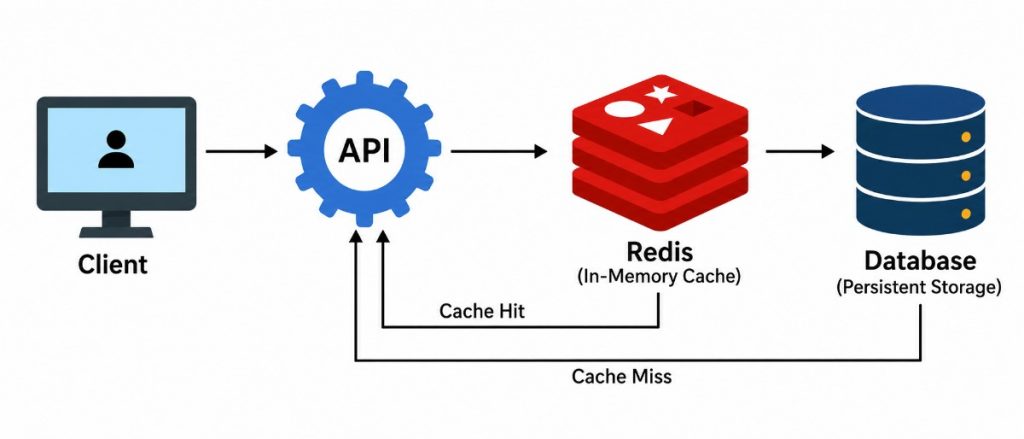
Caching Is A Technique Used To Temporarily Store Frequently Accessed Data So That It Can Be Retrieved More Quickly. It Can Reduce Repeated Database Queries, Network Requests, And Backend Processing. Browser Caches, Server-Side Caches, CDN Caches, And Tools Such As Redis Can Be Used For Different Caching Requirements. Cached Data Should Have Appropriate Expiration And Invalidation Rules To Prevent Unwanted Stale Information. Poorly Designed Caching Can Cause Applications To Display Outdated Or Incorrect Data. Effective Caching Can Improve Application Response Time And Reduce The Overall Load On Application Infrastructure.
83. What Is Redis?
Ans:
Redis Is An In-Memory Data Store Commonly Used For Caching And Fast Data Access In Application Systems. It Supports Data Structures Such As Strings, Lists, Sets, Sorted Sets, And Hashes. Redis Can Be Used For Application Caching, Session Storage, Counters, Queues, And Other Fast Data Access Requirements. Because Data Is Primarily Stored In Memory, Redis Can Provide Very Fast Read And Write Operations. Persistence Options Are Also Available When Data Recovery Requirements Need To Be Considered. Redis Is Frequently Used Alongside Backend Applications To Improve Performance And Reduce Repeated Database Operation.
84. What Is Load Balancing?
Ans:
Load Balancing Is The Process Of Distributing Incoming Network Requests Across Multiple Servers Or Application Instances. It Helps Prevent A Single Server From Receiving More Traffic Than It Can Efficiently Handle. Load Balancers Can Improve Application Availability, Scalability, And Reliability. Different Distribution Strategies Can Be Used Depending On Application Requirements And Infrastructure Design. Health Checks Can Help Prevent Requests From Being Sent To Unhealthy Or Unavailable Servers. Load Balancing Is Especially Useful For High-Traffic Applications That Need To Support Many Simultaneous Users.
85. What Is Unit Testing?
Ans:
Unit Testing Is A Software Testing Technique Used To Test Individual Functions, Methods, Classes, Or Small Components In Isolation. It Helps Verify That Specific Pieces Of Application Logic Produce The Expected Results. Unit Tests Are Generally Fast And Can Be Executed Frequently During Software Development. Mocking Or Stubbing Can Be Used To Isolate The Unit Under Test From External Dependencies. Frameworks Such As Jest, JUnit, NUnit, And Other Testing Tools Support Unit Testing. Good Unit Tests Help Detect Errors Early And Reduce The Risk Of Regression When Application Code Is Changed.
86. What Is Integration Testing?
Ans:
Integration Testing Is Used To Verify That Multiple Application Components Work Correctly When They Interact With Each Other. It Can Test Communication Between APIs, Databases, Services, Modules, And Other Application Components. Integration Tests Cover More Of The Application Than Individual Unit Tests And Can Detect Interaction Problems. Test Databases, Mock Services, Or Controlled External Systems Can Be Used During Integration Testing. These Tests Help Verify That Different Parts Of The Application Work Together According To Requirements. Integration Testing Is Important For Applications That Depend On Multiple Connected Services Or Components.
87. What Is End-To-End Testing?
Ans:
- End-To-End Testing Verifies Complete Application Workflows From The User’s Perspective. It Can Test The Interaction Between The Browser, Frontend, Backend APIs, Database, And Other Required Services.
- Tools Such As Selenium, Cypress, And Playwright Can Be Used To Automate End-To-End Tests. For Example, A Test Can Verify A Complete User Registration, Login, Product Selection, And Checkout Workflow.
- End-To-End Tests Provide Broad Coverage But Can Take More Time To Execute Than Unit Tests. They Are Particularly Useful For Validating Important Business Workflows Across The Complete Application.
88. What Is Selenium?
Ans:
Selenium Is An Open-Source Framework Used To Automate Web Browsers For Software Testing. It Supports Multiple Browsers And Programming Languages Through Tools Such As Selenium WebDriver. Selenium Can Automate Actions Such As Clicking Buttons, Entering Text, Navigating Pages, And Verifying Web Elements. It Is Commonly Used For Functional Testing, Regression Testing, And Automated Browser-Based Testing. Test Scripts Can Be Created To Verify That Web Applications Behave Correctly Under Different Conditions. Selenium Helps Reduce Repetitive Manual Testing And Supports Automated Quality Assurance Processes.
89. What Is Postman?
Ans:
Postman Is A Tool Commonly Used For Developing, Testing, And Debugging APIs. It Allows Developers To Send HTTP Requests To Backend Endpoints And Inspect The Responses Returned By The Server. Requests Can Include Headers, Query Parameters, Request Bodies, Authentication Information, And Other Configuration. Developers Can Verify Response Status Codes, Headers, JSON Data, And Other API Behavior Using Postman. Collections Can Be Created To Organize Multiple API Requests For A Project. Postman Is Useful For Backend Developers And Full Stack Developer When Testing REST APIs Before Frontend Integration.
90. What Is Swagger?
Ans:
Swagger Refers To A Set Of Tools Commonly Used For Designing, Documenting, And Testing APIs Based On The OpenAPI Specification. API Documentation Can Describe Endpoints, HTTP Methods, Parameters, Request Bodies, Authentication, And Response Structures. Swagger UI Can Provide An Interactive Interface Where Developers Can Explore And Test API Endpoints. Clear API Documentation Helps Frontend And Backend Developers Understand How Different Services Should Communicate. It Also Makes API Integration Easier For Developers And Testing Teams. Swagger And OpenAPI Are Commonly Used In Professional Backend And Full Stack Development Projects.