LMS
LMS
Last updated on 07th Sep 2026| 9411

ServiceNow Is A Cloud-Based Digital Workflow Platform Used By Organizations To Manage IT Services, Business Processes, And Enterprise Workflows. A ServiceNow Developer Works With The Platform To Create, Customize, And Maintain Applications, Forms, Workflows, Business Rules, Client Scripts, UI Policies, And Integrations. Freshers Preparing For ServiceNow Developer Interviews Should Understand Core Concepts Such As Tables, Forms, Lists, ACLs, Business Rules, Client Scripts, UI Policies, Script Includes, Workflows, And Glide APIs. Interviewers May Also Ask Scenario-Based Questions To Evaluate Problem-Solving And Platform Knowledge. This Collection Covers 90 Important ServiceNow Developer Interview Questions And Answers For Freshers, Helping Candidates Build Strong Fundamentals And Prepare Confidently For Technical Interviews.
1. What Is ServiceNow?
Ans:
ServiceNow Is A Cloud-Based Digital Workflow Platform Used To Manage IT Services, Business Processes, And Enterprise Operations. It Provides Applications For IT Service Management, Customer Service, Human Resources, Security, And Other Business Functions. ServiceNow Helps Organizations Automate Manual Processes And Manage Requests Through Centralized Workflows. The Platform Provides Tools For Creating Applications, Forms, Reports, Dashboards, And Automated Processes. ServiceNow Uses A Web-Based Interface And Stores Business Information In Structured Tables.
2. What Is ServiceNow Developer?
Ans:
A ServiceNow Developer Is A Technical Professional Who Builds, Configures, Customizes, And Maintains Applications On The ServiceNow Platform. Developers Work With Tables, Forms, Business Rules, Client Scripts, UI Policies, Workflows, And Other Platform Components. They Use JavaScript To Implement Server-Side And Client-Side Logic. Developers Also Create Integrations Between ServiceNow And External Applications When Required. They Follow Platform Best Practices To Maintain Performance, Security, And Maintainability. ServiceNow Developers Help Organizations Automate Business Processes And Deliver Customized Digital Workflows.
3. What Is ServiceNow Platform?
Ans:
- ServiceNow Platform Is A Cloud-Based Application Platform That Provides Tools For Building And Managing Digital Workflows.
- It Supports IT Service Management, IT Operations Management, Customer Service Management, Human Resources, Security, And Custom Applications.
- The Platform Provides Common Components Such As Tables, Forms, Lists, Scripts, Workflows, And Security Rules.
4. What Is A Table In ServiceNow?
Ans:
- A Table In ServiceNow Is A Database Structure Used To Store Records And Their Related Information. Each Table Contains Fields That Define The Type Of Data Stored In Its Records.
- Tables Can Be Standard Tables Provided By ServiceNow Or Custom Tables Created For Specific Business Requirements.
- Records In Tables Can Represent Incidents, Requests, Users, Problems, Changes, Or Other Business Information.
5. What Is A Record In ServiceNow?
Ans:
A Record In ServiceNow Represents A Single Set Of Related Information Stored In A Table. For Example, An Incident Record Can Contain Information About A Specific IT Issue. A Record Contains Multiple Fields That Store Different Types Of Information. Users And Applications Can Create, Read, Update, Or Delete Records Based On Their Permissions. Records Are Identified Through Unique Identifiers Such As System IDs. ServiceNow Uses Records To Manage Business Transactions And Operational Information
6. What Is A Field In ServiceNow?
Ans:
A Field In ServiceNow Is A Data Element Used To Store Specific Information Within A Record. Examples Of Fields Include Short Description, Assigned To, Priority, State, Description, And Created Date. Different Field Types Are Available For Storing Text, Numbers, Dates, References, Choices, And Other Data. Fields Can Be Configured To Control Their Behavior On Forms And Lists. Developers Can Use Fields In Scripts, Business Rules, Reports, And Workflows. Proper Field Configuration Helps Maintain Accurate And Structured Data.
7. What Is A Form In ServiceNow?
Ans:
A Form In ServiceNow Is A User Interface Used To Display And Manage Individual Records. It Contains Fields That Allow Users To View, Enter, Or Modify Record Information. Forms Can Be Configured By Adding, Removing, Arranging, Or Making Fields Mandatory. Developers Can Use Client Scripts And UI Policies To Control Form Behavior. Forms Can Also Contain Related Lists That Display Associated Records From Other Tables. ServiceNow Forms Provide An Important Interface For Managing Business Data.
8. What is Integration with LDAP?
Ans:
- A List In ServiceNow Displays Multiple Records From A Table In A Structured Format. It Allows Users To View, Sort, Filter, Search, And Manage Multiple Records At The Same Time.
- Lists Can Display Selected Fields Based On User And Application Requirements. Users Can Create Filters To Display Only Records Matching Specific Conditions.
- Developers Can Configure List Layouts And Related Behaviors. Lists Help Users Efficiently Monitor And Manage Large Amounts Of ServiceNow Data.
9. What Is GlideRecord?
Ans:
GlideRecord Is A Server-Side ServiceNow API Used To Query, Insert, Update, And Delete Records In Database Tables. Developers Commonly Use GlideRecord In Business Rules, Script Includes, Scheduled Jobs, And Other Server-Side Scripts. It Provides Methods For Retrieving Records Based On Specific Conditions. Developers Can Modify Field Values And Save Changes Using Appropriate GlideRecord Methods. GlideRecord Helps Server-Side Scripts Interact With ServiceNow Data Programmatically. It Is One Of The Most Common APIs Used In ServiceNow Development.
10. What Is GlideAjax?
Ans:
GlideAjax Is A ServiceNow API Used To Allow Client-Side Scripts To Communicate With Server-Side Script Includes. It Helps Retrieve Server-Side Information Without Directly Accessing Database Logic From The Browser. A Client Script Can Send Parameters To A Script Include Through GlideAjax. The Server-Side Script Processes The Request And Returns The Required Information. GlideAjax Helps Reduce Unnecessary Data Transfer And Supports Controlled Server-Side Processing. It Is Commonly Used When Client-Side Logic Requires Information From The Server.
11. What Is A Business Rule?
Ans:
- A Business Rule Is A Server-Side Script That Runs When Specific Database Operations Or Conditions Occur. Business Rules Can Execute During Insert, Update, Delete, Query, Or Other supported processing stages.
- They Are Commonly Used To Enforce Business Logic And Automatically Update Record Information. Business Rules Can Validate Data, Set Field Values, Or Perform Additional Processing.
- They Execute On The Server And Therefore Should Be Designed Carefully For Performance. Business Rules Help Automate And Enforce Organizational Business Requirements
12. What Is A Client Script?
Ans:
- A Client Script Is A JavaScript-Based Script That Runs On The User’s Browser. It Is Used To Control Form Behavior And Improve The User Experience.
- Client Scripts Can Run During Form Loading, Field Changes, Or Form Submission. They Can Make Fields Mandatory, Visible, Read-Only, Or Dynamically Set Field Values.
- Client Scripts Should Generally Be Used For Client-Side Behavior Rather Than Server-Side Data Processing. They Help Create Interactive And User-Friendly ServiceNow Forms.
13. What Is A UI Policy?
Ans:
A UI Policy Is A Configuration Used To Dynamically Control Form Fields Without Requiring Extensive JavaScript. It Can Make Fields Mandatory, Visible, Or Read-Only Based On Conditions. UI Policies Generally Provide A Simpler Alternative For Common Form Behavior Requirements. They Can Be Applied When A Record Meets Specific Conditions. UI Policy Actions Define The Changes Applied To Individual Fields. They Help Developers Configure Form Behavior With Less Custom Code.
14. What Is A UI Action?
Ans:
A UI Action Is A Button, Link, Or Menu Option Used To Perform A Specific Action On A ServiceNow Record. UI Actions Can Be Displayed On Forms, Lists, Or Other Supported User Interfaces. They Can Execute Client-Side Or Server-Side JavaScript Depending On Their Configuration. Examples Include Creating Related Records, Changing Record States, Or Performing Custom Operations. Conditions Can Be Used To Control When A UI Action Is Available To Users. UI Actions Help Provide Convenient Controls For Performing Business Operations.
15. What Is A Script Include?
Ans:
- A Script Include Is A Reusable Server-Side JavaScript Code Component In ServiceNow. It Allows Developers To Store Functions And Logic That Can Be Called From Other Server-Side Scripts.
- Script Includes Help Avoid Repeating The Same Code In Multiple Places. They Can Be Used With Business Rules, Scheduled Jobs, APIs, And GlideAjax Depending On Their Configuration.
- Script Includes Improve Code Reusability, Maintainability, And Organization. They Are Commonly Used To Build Modular And Reusable ServiceNow Applications.
16. What Is A Data Policy??
Ans:
A Data Policy Is A Server-Side Configuration Used To Enforce Data Requirements On Records. It Can Make Fields Mandatory Or Enforce Certain Data Conditions During Data Operations. Data Policies Can Help Apply Data Rules Beyond The User Interface. They Can Be Useful When Data Is Inserted Or Updated Through Imports Or Other Interfaces. Data Policies Help Maintain Data Quality Across Different Methods Of Record Creation And Modification. They Provide A Consistent Way To Enforce Certain Data Requirements.
17. What Is An ACL In ServiceNow?
Ans:
An ACL, Or Access Control List, Is A Security Mechanism Used To Control Access To ServiceNow Data. ACL Rules Determine Whether Users Can Read, Create, Write, Or Delete Specific Records Or Fields. Access Decisions Can Depend On Roles, Conditions, And Script Logic. ACLs Help Protect Sensitive Business Information From Unauthorized Access. Developers Need To Configure ACLs Carefully To Follow The Principle Of Least Privilege. ACLs Are An Important Part Of ServiceNow Application Security.
18. What Is A Role In ServiceNow?
Ans:
A Role Is A Permission-Based Identifier Used To Control What Users Can Access Or Perform In ServiceNow. Roles Can Provide Access To Applications, Modules, Records, Tables, And Specific Functions. Users Can Receive Roles Directly Or Through Groups And Other Access Mechanisms. Common Roles May Support Activities Such As Administration, Incident Management, Or Application Development. Security Rules Can Check Whether A User Has A Required Role. Roles Help Organizations Implement Structured And Controlled Access.
19. What Is A Group In ServiceNow?
Ans:
- A Group Is A Collection Of Users Who Share A Common Responsibility Or Function Within ServiceNow. Groups Are Commonly Used For Assignment, Notifications, Approvals, And Access Management.
- For Example, An Incident Can Be Assigned To A Specific Support Group For Resolution. Users Can Belong To Multiple Groups Depending On Their Responsibilities.
- Groups Help Organizations Organize Teams And Route Work Efficiently. They Are Widely Used In IT Service Management And Workflow Processes.
20. What Is An Assignment Group?
Ans:
An Assignment Group Is A ServiceNow Group Responsible For Handling Specific Work Or Records. Incidents, Requests, Problems, And Changes Can Be Assigned To Appropriate Assignment Groups. The Group Represents A Team Rather Than A Single Individual. Assignment Groups Help Route Work To The Correct Support Team. Individual Members Of The Group Can Then Take Responsibility For Specific Records. This Structure Helps Organizations Improve Work Distribution And Service Management.

21. What Is ServiceNow Incident Management?
Ans:
ServiceNow Incident Management Is A Process Used To Record, Track, Manage, And Resolve IT Incidents. An Incident Represents An Unplanned Interruption Or Reduction In The Quality Of An IT Service. ServiceNow Provides Workflows For Incident Assignment, Investigation, Communication, Escalation, And Resolution. Incidents Can Be Prioritized Based On Impact And Urgency. Support Teams Can Track Incident Progress Through States And Related Activities. Incident Management Helps Restore Normal Service As Quickly As Possible.
22. What Is A Problem In ServiceNow?
Ans:
- A Problem In ServiceNow Represents The Underlying Cause Of One Or More Incidents. Problem Management Focuses On Identifying And Removing The Root Cause Of Recurring Or Significant Issues.
- A Problem Record Can Include Investigation Details, Root Cause Information, Workarounds, And Related Incidents. Support Teams Can Analyze Trends To Identify Problems That Need Permanent Solutions.
- Problem Records Can Be Linked With Changes Used To Implement Fixes. Problem Management Helps Reduce Repeated Incidents And Improve Service Stability.
23. What Is Change Management In ServiceNow?
Ans:
Change Management In ServiceNow Is A Process Used To Plan, Assess, Approve, Implement, And Review Changes To IT Services Or Infrastructure. A Change Record Contains Information About The Proposed Modification And Its Potential Impact. Changes Can Follow Approval And Risk Assessment Processes Before Implementation. ServiceNow Supports Different Types Of Changes Based On Organizational Requirements. Change Activities Can Be Scheduled And Assigned To Responsible Teams. Change Management Helps Reduce Risks And Service Disruptions During IT Changes.
24. What Is A Service Catalog?
Ans:
- Service Catalog Is A ServiceNow Feature Used To Provide Users With A Centralized List Of Services And Requestable Items. Users Can Select Items Such As Hardware, Software, Access, Or Business Services Based On Available Catalog Configuration.
- Catalog Items Can Contain Variables, Approvals, Workflows, And Fulfillment Activities. Requests Can Be Automatically Routed To Appropriate Teams.
- Service Catalog Helps Standardize And Automate The Request Fulfillment Process. It Provides A Convenient Self-Service Experience For Employees And Customers.
25. What Is A Catalog Item?
Ans:
A Catalog Item Is A Requestable Product Or Service Available Through The ServiceNow Service Catalog. It Can Contain Questions Or Variables Used To Collect Information From The Requester. Catalog Items Can Trigger Workflows, Approvals, Tasks, And Notifications After Submission. Examples Include Requesting A Laptop, Software Access, Or A New User Account. Developers Can Configure Catalog Items According To Business Requirements. Catalog Items Help Automate The Delivery Of Common Organizational Service
26. What Is A Catalog Client Script?
Ans:
A Catalog Client Script Is A Client-Side Script Used To Control The Behavior Of Variables In Service Catalog Forms. It Can Run When A Catalog Item Loads, When A Variable Changes, Or When The Form Is Submitted. Developers Can Use It To Set Values, Make Variables Mandatory, Or Control Visibility. Catalog Client Scripts Improve The User Experience During Request Submission. They Are Similar To Regular Client Scripts But Are Designed For Catalog Items And Variables. They Help Create Dynamic And Interactive Service Catalog Forms.
27. What Is A Catalog UI Policy?
Ans:
A Catalog UI Policy Controls The Behavior Of Variables On ServiceNow Catalog Items. It Can Make Variables Visible, Hidden, Mandatory, Or Read-Only Based On Conditions. Catalog UI Policies Provide A Configuration-Based Approach For Managing Catalog Form Behavior. They Can Reduce The Need For Custom JavaScript In Common Scenarios. Developers Can Define Conditions And Actions According To Business Requirements. Catalog UI Policies Help Make Catalog Requests Easier And More Consistent For Users.
28. What Is A Workflow In ServiceNow?
Ans:
A Workflow Is A Process Automation Mechanism Used To Define And Automate A Sequence Of Activities. It Can Include Approvals, Notifications, Tasks, Conditions, And Other Actions. Workflows Help Move Records Through Defined Business Processes Automatically. For Example, A Service Request Can Trigger Approval And Fulfillment Tasks Through A Workflow. Workflow Activities Can Be Connected To Represent Different Process Steps. Workflows Help Reduce Manual Effort And Improve Process Consistency.
29. What Is Flow Designer?
Ans:
Flow Designer Is A ServiceNow Tool Used To Create Automated Workflows With A Low-Code Or No-Code Approach. It Provides Triggers, Actions, Conditions, And Flow Logic For Automating Business Processes. Developers And Administrators Can Use Flow Designer To Automate Tasks Across ServiceNow Applications. Flows Can Respond To Record Changes, Requests, Events, Or Other Supported Triggers. Reusable Actions And Subflows Can Help Standardize Automation. Flow Designer Helps Organizations Build Automation With Less Custom Scripting.
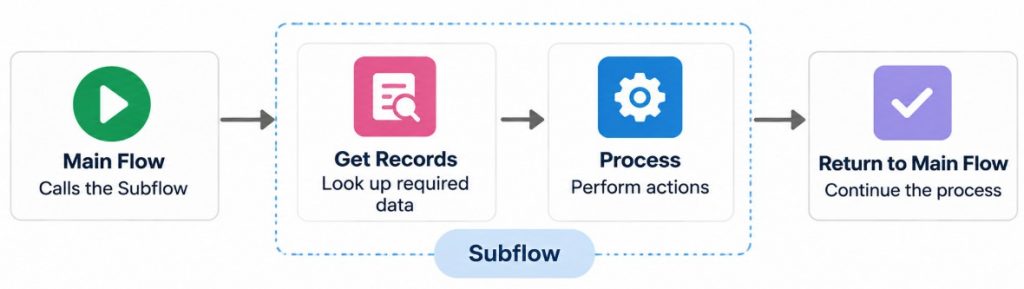
30. What Is A Subflow?
Ans:
A Subflow Is A Reusable Set Of Actions Within ServiceNow Flow Designer. It Allows Common Process Logic To Be Created Once And Reused In Multiple Flows. Subflows Can Accept Inputs And Produce Outputs Based On Their Configuration. They Help Avoid Repeating The Same Automation Logic In Different Flows. Developers Can Use Subflows To Build Modular And Maintainable Automations. Subflows Improve Reusability And Simplify The Management Of Complex Business Processes.
31. What Is An Update Set?
Ans:
An Update Set Is A Collection Of Configuration Changes That Can Be Captured And Moved Between ServiceNow Instances. Developers Commonly Use Update Sets To Transfer Customizations From Development To Test And Production Environments. They Can Capture Changes Such As Business Rules, Client Scripts, UI Policies, And Other configuration records. Update Sets Help Maintain A Controlled Deployment Process. Developers Should Review Update Sets Before Moving Them Between Instances. Proper Update Set Management Helps Reduce Deployment Errors.
32. What Is An Application In ServiceNow?
Ans:
An Application In ServiceNow Is A Collection Of Components Designed To Provide Specific Business Functionality. An Application Can Contain Tables, Forms, Scripts, Modules, Security Rules, And Other Configuration Elements. Applications Can Be Built For Standard ServiceNow Processes Or Custom Business Requirements. Developers Can Use Application Development Tools To Create And Manage Custom Applications. Application Scope Helps Control Which Components And Data Can Be Accessed. Applications Help Organize Related Functionality Into Maintainable Solutions.
33. What Is Application Scope?
Ans:
Application Scope Defines The Boundary Within Which ServiceNow Application Components And Data Operate. It Helps Prevent Unintended Changes Between Different Applications. Scoped Applications Can Control Access To Tables, Scripts, APIs, And Other resources. Developers Can Use Scope To Organize Custom Applications And Protect Application Components. Cross-Scope Access Can Be Controlled Through Appropriate Permissions And Configuration. Application Scope Supports Better Security, Organization, And Maintainability.
34. What Is A Scoped Application?
Ans:
A Scoped Application Is A ServiceNow Application That Operates Within Its Own Application Scope. It Helps Isolate Custom Tables, Scripts, Business Logic, And Other Application Components. Scoped Applications Can Control How Their Components Interact With Other Applications. They Support Better Application Organization And Reduce The Risk Of Unintended Platform Changes. Developers Can Create Scoped Applications For Specific Business Requirements. Scoped Development Is Commonly Used For Building Maintainable Custom Solutions.
35. What Is ServiceNow Studio?
Ans:
ServiceNow Studio Is A Development Environment Used To Create And Manage Applications On The ServiceNow Platform. It Provides Tools For Working With Application Files And Development Components. Developers Can Use Studio To Create Tables, Scripts, Modules, And Other application elements. It Helps Organize Application Development Within A Defined Scope. Studio Supports Structured Development And Maintenance Of ServiceNow Applications. It Is Useful For Developers Building Custom Platform Solutions.
36. What Is Application Repository?
Ans:
- Application Repository Is A ServiceNow Mechanism Used To Store And Distribute Applications Across ServiceNow Instances. It Helps Organizations Manage Application Versions And Deployment Between Environments.
- Developers Can Publish Applications And Install Them On Other Instances When Appropriate. Application Repository Supports More Structured Application Lifecycle Management.
- It Can Be Used For Sharing Custom Applications Within Supported ServiceNow Environments. It Helps Simplify The Distribution And Management Of Application Packages.
37. What Is A Dictionary Entry?
Ans:
A Dictionary Entry Defines Metadata About A Field Or Table In ServiceNow. It Can Contain Information Such As Field Type, Length, Default Value, And Other Configuration Properties. Developers Can Use Dictionary Entries To Understand And Control How Data Elements Behave. Dictionary Configuration Forms An Important Part Of ServiceNow’s Data Model. Dictionary Entries Can Also Support Attributes That Influence Field Behavior. They Help Define The Structure And Characteristics Of ServiceNow Data.
38. What Is A Reference Field?
Ans:
A Reference Field Is A ServiceNow Field Type Used To Create A Relationship Between Records In Different Tables. It Stores A Reference To A Record In Another Table Instead Of Simply Storing Independent Text. For Example, An Assigned To Field Can Reference A User Record. Reference Fields Help Maintain Relationships And Improve Data Consistency. Developers Can Use Reference Qualifiers To Control Which Records Are Available For Selection. Reference Fields Are Commonly Used Throughout ServiceNow Applications.
39. What Is A Reference Qualifier?
Ans:
A Reference Qualifier Is A Configuration Used To Filter The Records Available In A Reference Field. It Helps Users Select Only Relevant Records From A Referenced Table. Reference Qualifiers Can Be Static, Dynamic, Or Script-Based Depending On The Requirement. For Example, A Reference Field Can Display Only Active Users From A Specific Department. They Improve Data Accuracy And Make Reference Selection Easier. Reference Qualifiers Are Useful For Creating Context-Based Record Selection.
40. What Is A Choice Field?
Ans:
- A Choice Field Is A ServiceNow Field That Allows Users To Select A Value From A Predefined List Of Options.
- Examples Include State, Priority, Impact, And Urgency Fields. Choice Values Help Standardize Data Entry Across Records.
- Developers Can Configure Choice Labels And Values According To Application Requirements. Choice Fields Can Also Be Used In Conditions, Scripts, Reports, And Workflows. They Help Maintain Consistent And Structured Business Data.

Get JOB ServiceNow Admin Training for Beginners By MNC Experts
- Instructor-led Sessions
- Real-life Case Studies
- Assignments
41. What Is A Dictionary Override?
Ans:
A Dictionary Override Allows Certain Field Properties To Be Changed For A Specific Table Without Changing The Original Definition Globally. It Can Be Used When A Field Requires Different Behavior On A Child Table. Developers Can Override Properties Such As Mandatory Status, Default Value, Or Reference Qualifier. This Provides Flexibility While Preserving The Base Dictionary Configuration. Dictionary Overrides Are Useful In Table Inheritance Scenarios. They Help Customize Field Behavior For Specific Business Requirements..
42. What Is Table Inheritance?
Ans:
Table Inheritance Allows One ServiceNow Table To Extend Another Table And Reuse Its Fields And Functionality. The Parent Table Contains Common Fields And Behaviors That Can Be Inherited By Child Tables. A Child Table Can Add Additional Fields Specific To Its Business Requirement. For Example, Specialized Tables Can Extend Common Platform Tables. Table Inheritance Helps Reduce Duplicate Configuration And Promotes Reusability. It Provides A Structured Way To Model Related Business Data.
43. What Is A Parent Table?
Ans:
A Parent Table Is A Table That Provides Common Fields And Functionality To One Or More Child Tables Through Table Inheritance. Child Tables Can Inherit Fields And Behaviors From The Parent Table. The Parent Table Helps Define Shared Data Structures For Related Records. Developers Can Add Specific Fields To Child Tables When Additional information Is Required. This Approach Helps Reduce Repeated Configuration Across Related Tables. Parent Tables Support A More Organized And Reusable Data Model.
44. What Is A Child Table?
Ans:
- A Child Table Is A Table That Extends Another Table Through ServiceNow Table Inheritance. It Automatically Receives Certain Fields And Functionality From Its Parent Table.
- Additional Fields And Business Logic Can Be Added To Meet Specific Requirements. Child Tables Allow Developers To Represent Specialized Types Of Records.
- They Help Reuse Common Data Structures While Supporting Additional functionality. Child Tables Are An Important Part Of ServiceNow Data Modeling.
45. What Is A Data Source?
Ans:
A Data Source Defines Where External Or Imported Data Comes From Before It Is Loaded Into ServiceNow. It Can Represent Sources Such As Files, Databases, Or Other Supported Data Providers. Data Sources Are Commonly Used With Import Sets To Bring External Information Into ServiceNow. Developers Can Configure Data Source Properties Based On The Source Format And Connection Method. Proper Data Source Configuration Helps Ensure Reliable Data Import. Data Sources Support Data Integration And Migration Activities.
46. What Is An Import Set?
Ans:
An Import Set Is A Temporary Staging Area Used To Import External Data Into ServiceNow. External Data Is First Loaded Into An Import Set Table Before Being Transformed Into Target Tables. Import Sets Help Separate Raw Imported Data From Production Data Structures. They Can Be Used With Transform Maps To Control How Data Is Processed. Import Sets Are Commonly Used For Data Migration And Integration. They Provide A Controlled Method For Bringing External Data Into ServiceNow.
47. What Is A Transform Map?
Ans:
- A Transform Map Defines How Data From An Import Set Table Is Mapped And Transformed Into A Target ServiceNow Table. It Specifies Which Source Fields Correspond To Target Fields.
- Transform Maps Can Include Field Maps, Scripts, And Conditions For Data Processing. They Can Also Identify Existing Records To Update Instead Of Creating Duplicates.
- Developers Use Transform Maps To Control Data Conversion During Import. They Help Ensure That Imported Data Is Correctly Stored In Target Tables.
48. What Is Coalesce In ServiceNow?
Ans:
- Coalesce Is A Transform Map Feature Used To Determine Whether An Imported Record Matches An Existing Record. When A Coalesce Field Matches An Existing Target Record, ServiceNow Can Update That Record Instead Of Creating A New One.
- This Helps Prevent Duplicate Records During Data Import. One Or More Fields Can Be Used For Coalescing Depending On The Requirement.
- Developers Should Select Appropriate Unique Or Reliable Fields For Coalescing. Coalesce Is Important For Maintaining Data Quality During Import Operations.
49. What Is An Integration In ServiceNow?
Ans:
An Integration Connects ServiceNow With External Systems To Exchange Data Or Trigger Business Processes. Integrations Can Use Technologies Such As REST, SOAP, APIs, Web Services, MID Server, Or File-Based Transfers. ServiceNow Can Send Data To External Systems Or Receive Data From Them. Integration Design Depends On Business Requirements, Security, Data Format, And System Capabilities. Developers Need To Handle Authentication, Error Handling, And Data Validation Carefully. Integrations Help Connect ServiceNow With Enterprise Applications And External Services.
50. What Is REST API?
Ans:
REST API Is A Web-Based Interface That Allows Applications To Communicate Using HTTP Methods. ServiceNow Supports REST APIs For Sending And Receiving Data Between ServiceNow And External Applications. Common HTTP Methods Include GET, POST, PUT, PATCH, And DELETE. REST APIs Commonly Use Structured Data Formats Such As JSON. Authentication And Authorization Are Used To Secure API Communication. REST APIs Are Widely Used For Modern Application Integration.
51. What Is SOAP Web Service?
Ans:
- SOAP Web Service Is A Protocol-Based Method Used For Exchanging Structured Information Between Applications. ServiceNow Supports SOAP-Based Communication For Certain Integration Requirements.
- SOAP Messages Commonly Use XML To Represent Requests And Responses. Developers Can Use SOAP Web Services To Expose Or Consume Supported ServiceNow Operations.
- Authentication And Security Controls Help Protect SOAP Communications. SOAP Remains Useful For Enterprise Integrations That Require Structured Web Service Communication.
52. What Is Scripted REST API?
Ans:
Scripted REST API Is A ServiceNow Feature Used To Create Custom REST Endpoints With Server-Side JavaScript. Developers Can Define Resources, HTTP Methods, Request Parameters, And Response Processing. It Allows External Applications To Interact With Custom ServiceNow Business Logic. Developers Can Validate Inputs And Control The Data Returned By The Endpoint. Scripted REST APIs Provide Flexibility When Standard APIs Do Not Meet Specific Requirements. They Are Commonly Used For Custom Application Integrations.
53. What Is An Outbound REST Message?
Ans:
An Outbound REST Message Is A ServiceNow Configuration Used To Send REST Requests To An External System. It Defines The Endpoint, HTTP Method, Authentication, Headers, And Other Request Information. Developers Can Use REST Messages From Scripts Or Other Platform Components. External Systems Can Return Responses That ServiceNow Can Process. Outbound REST Messages Help Automate Data Exchange With External Applications. They Are Commonly Used For API-Based Integrations.
54. What Is A MID Server?
Ans:
A MID Server Is A ServiceNow Component That Enables Communication Between A ServiceNow Instance And Systems Within A Private Network. It Acts As A Secure Communication Bridge For Supported Discovery, Integration, Or Orchestration Activities. The MID Server Runs Within The Organization’s Network Environment. ServiceNow Sends Instructions To The MID Server, Which Communicates With Internal Systems. It Helps ServiceNow Access Resources That Cannot Be Directly Reached Over The Public Internet. MID Servers Are Commonly Used For Enterprise Integration And Infrastructure Management.
55. What Is GlideSystem?
Ans:
GlideSystem, Commonly Accessed Through The gs Object, Is A Server-Side API Used For Various ServiceNow System Operations. It Provides Methods For Logging Messages, Accessing User Information, Getting System Properties, And Working With Session Data. Developers Frequently Use GlideSystem In Business Rules And Script Includes. It Helps Server-Side Scripts Interact With The ServiceNow Platform Environment. Common Methods Include Logging Information And Retrieving Current User Details. GlideSystem Is An Important API For Server-Side ServiceNow Development.
56. What Is GlideUser?
Ans:
- GlideUser Is A ServiceNow API Used To Access Information About The Current User In Server-Side Scripts. It Can Help Developers Determine User Roles, Groups, And Other User-Related Information.
- GlideUser Functionality Is Commonly Accessed Through The GlideSystem User Object. It Can Be Used In Business Rules, Script Includes, And Other Server-Side Logic.
- Developers Can Use User Information To Apply Conditional Business Logic. It Helps Implement User-Specific Processing And Access Requirements.
57. What Is A Scheduled Job?
Ans:
A Scheduled Job Is A ServiceNow Configuration Used To Automatically Execute A Task At A Defined Time Or Frequency. Scheduled Jobs Can Run Server-Side Scripts Or Perform Other Supported Automated Operations. They Can Be Scheduled To Run Daily, Weekly, Monthly, Or According To Other supported schedules. Developers Can Use Scheduled Jobs For Data Maintenance, Notifications, Synchronization, And Automation. Proper Scheduling Helps Reduce Manual Administrative Work. Scheduled Jobs Are Useful For Repetitive Background Processing.
58. What Is An Event In ServiceNow?
Ans:
An Event Is A System Notification Mechanism Used To Trigger Actions Or Processes In ServiceNow. Events Can Be Generated By Scripts, Business Rules, Scheduled Jobs, Or Other platform activities. Notifications Can Listen For Specific Events And Send Messages To Appropriate Users. Events Help Separate The Triggering Logic From The Notification Or Processing Logic. This Provides A Flexible Way To Automate Communication And Background Actions. Events Are Commonly Used For Notifications And Workflow-Related Automation.
59. What Is A Notification?
Ans:
- A Notification Is A ServiceNow Message Used To Inform Users About Changes Or Activities Related To Records. Notifications Can Be Sent Through Supported Communication Channels Based On Configuration.
- They Can Be Triggered By Record Conditions, Events, Or Other supported mechanisms. Notifications Can Include Dynamic Record Information Using Notification Variables.
- Developers Can Configure Recipients, Conditions, Content, And Delivery Options. Notifications Help Keep Users Informed About Important Business Processes.
60. What Is A Knowledge Base?
Ans:
A Knowledge Base Is A Centralized Collection Of Articles Used To Store And Share Useful Information. ServiceNow Knowledge Management Allows Organizations To Provide Solutions, Instructions, FAQs, And Troubleshooting Information. Users Can Search Knowledge Articles To Find Answers Without Creating New Support Requests. Articles Can Be Organized Into Knowledge Bases And Categories. Access To Knowledge Content Can Be Controlled Through Appropriate Permissions. Knowledge Bases Help Improve Self-Service And Reduce Repeated Support Activities.

Develop Your Skills with ServiceNow Admin Certification Training
Weekday / Weekend BatchesSee Batch Details61. What Is A Knowledge Article?
Ans:
A Knowledge Article Is A Documented Piece Of Information Stored In A ServiceNow Knowledge Base. It Can Provide Instructions, Troubleshooting Steps, Frequently Asked Questions, Or Business Information. Knowledge Articles Can Be Reviewed, Updated, Published, And Retired Through Defined Processes. Users Can Search Articles To Resolve Common Issues Without Contacting Support Teams. Article Visibility Can Be Controlled Based On User Access And Knowledge Configuration. Knowledge Articles Help Improve Self-Service And Support Efficiency.
62. What Is ServiceNow Reporting?
Ans:
ServiceNow Reporting Is A Feature Used To Analyze And Present Information Stored In ServiceNow Tables. Reports Can Display Data In Formats Such As Lists, Charts, Graphs, And Other supported visualizations. Users Can Apply Filters And Conditions To Focus On Relevant Information. Reports Can Help Monitor Incidents, Requests, Changes, Problems, And Other business activities. They Support Operational Monitoring And Decision-Making. ServiceNow Reporting Helps Organizations Understand Trends And Measure Process Performance.
63. What Is A Dashboard?
Ans:
A Dashboard Is A Visual Workspace That Displays Multiple Reports And Information Components In One Location. It Helps Users Monitor Important Business And Operational Metrics. Dashboards Can Contain Charts, Lists, Performance Indicators, And Other supported widgets. Different Dashboards Can Be Created For Different Teams And Roles. Access To Dashboards Can Be Controlled According To Security Requirements. Dashboards Provide A Convenient Way To Monitor ServiceNow Data And Trends.
64. What Is A Filter In ServiceNow?
Ans:
- A Filter Is A Condition Used To Display Only Records That Match Specific Criteria. Users Can Create Filters Based On Fields Such As State, Priority, Assignment Group, Date, Or Category.
- Filters Help Reduce Large Data Sets To Relevant Records. Developers Can Also Use Conditions In Scripts, Reports, Business Rules, And Other configurations.
- Multiple Conditions Can Be Combined Using Logical Operators. Filters Help Users And Applications Work With Relevant Data Efficiently.
65. What Is A Data Query?
Ans:
A Data Query Is A Request Used To Retrieve Specific Records From A ServiceNow Table. Developers Can Use APIs Such As GlideRecord To Build Queries Programmatically. Queries Can Include Conditions That Determine Which Records Should Be Returned. Efficient Queries Help Improve Script Performance And Reduce Unnecessary Database Processing. Developers Should Retrieve Only The Data Required For The Business Requirement. Proper Data Query Design Is Important For Maintaining ServiceNow Performance.
66. What Is ServiceNow Debugging?
Ans:
ServiceNow Debugging Is The Process Of Finding And Resolving Errors Or Unexpected Behavior In ServiceNow Applications. Developers Can Use System Logs, Script Debuggers, Error Messages, And Other Platform Tools To Identify Problems. Debugging Can Be Required For Client Scripts, Business Rules, Script Includes, Integrations, And Workflows. Developers Usually Reproduce The Issue And Analyze The Related Configuration Or Code. Logging Useful Information Can Help Identify The Source Of An Error. Effective Debugging Helps Maintain Reliable And Stable ServiceNow Applications.
67. What Is A System Log?
Ans:
- A System Log Contains Messages And Information Generated By ServiceNow During Platform Operations. Developers Can Use Logs To Investigate Errors, Warnings, Debug Messages, And Other runtime activities.
- Server-Side Scripts Can Write Messages To Logs Using Appropriate Logging Methods. Logs Help Developers Understand What Happened During Script Execution.
- They Are Useful For Troubleshooting Business Rules, Integrations, Scheduled Jobs, And Other processes. Proper Logging Helps Developers Diagnose And Resolve Application Issues.
68. What Is The Difference Between Client-Side And Server-Side Scripting?
Ans:
| Aspect | Client-Side Scripting | Server-Side Scripting |
|---|---|---|
| Execution | Runs In The User’s Web Browser | Runs On The Web Server. |
| Common Languages | JavaScript, HTML, And CSS Are Commonly Used. | PHP, Python, Java, C#, And Node.js Are Commonly Used |
| Main Purpose | Used For User Interface Changes, Validation, And Interactive Features. | Used For Database Operations, Authentication, Business Logic, And Data Processing. |
| Security | Code Can Be Viewed Or Inspected By The User. | Code Generally Remains Hidden From The User And Runs On The Server. |
69. What Is The Difference Between Business Rule And Client Script?
Ans:
A Business Rule Is A Server-Side Script Used To Process Records And Enforce Business Logic On The ServiceNow Server. A Client Script Runs In The User’s Browser And Mainly Controls Form Behavior. Business Rules Can Perform Database Operations Through Server-Side APIs. Client Scripts Can Dynamically Change Fields And Validate User Input On Forms. Business Rules Are Better Suited For Server-Side Data Processing And Enforcement. Choosing The Correct Component Helps Improve Security, Performance, And Maintainability.
70. What Is The Difference Between UI Policy And Client Script?
Ans:
| Feature | UI Policy | Client Script |
|---|---|---|
| Purpose | Controls Field Visibility, Mandatory, And Read-Only Properties On A Form. | Performs Custom Client-Side Logic And Form Actions. |
| Complexity | Easier To Configure And Requires Little Or No Scripting | Usually Requires JavaScript To Implement Custom Logic. |
| Execution | Runs When Conditions Defined In The UI Policy Are Met. | Can Run During Form Load, Field Change, Or Form Submission |
| Example | Making A Field Mandatory When A Particular Field Has A Specific Value. | Automatically Setting A Field Value Or Displaying A Custom Message. |
71. What Is ServiceNow ITSM?
Ans:
ServiceNow ITSM Is A Set Of Capabilities Used To Manage IT Services And Support Processes. It Includes Processes Such As Incident Management, Problem Management, Change Management, Request Management, And Knowledge Management. ITSM Helps Organizations Standardize Service Delivery And Support Activities. ServiceNow Provides Workflows And Automation To Manage These Processes Efficiently. Teams Can Track Service Requests, Issues, Changes, And Related activities In One Platform. ITSM Helps Improve Service Quality, Productivity, And Customer Experience.
72. What Is ServiceNow CMDB?
Ans:
- ServiceNow CMDB, Or Configuration Management Database, Stores Information About Configuration Items And Their Relationships. Configuration Items Can Include Servers, Applications, Databases, Network Devices, And Other IT Components.
- CMDB Helps Organizations Understand How Technology Components Are Connected. This Information Can Support Incident, Problem, Change, And Impact Analysis.
- Accurate CMDB Data Helps Improve IT Service Visibility And Decision-Making. CMDB Is An Important Component Of ServiceNow IT Operations And Service Management.
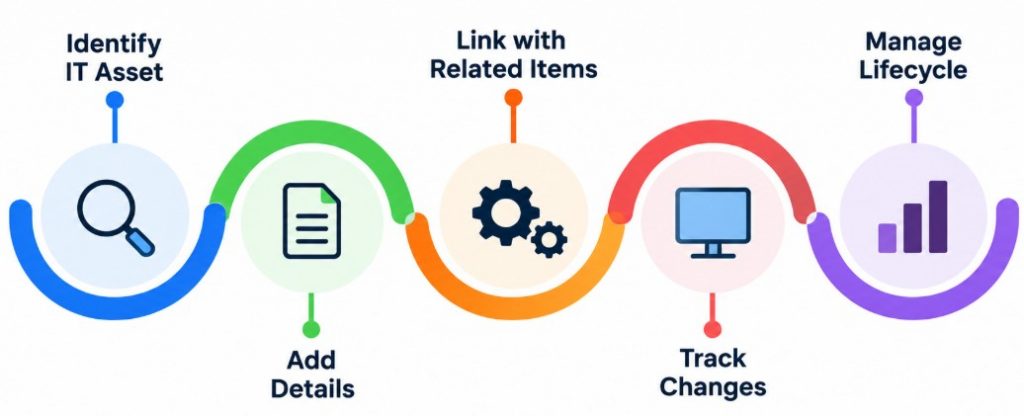
73. What Is A Configuration Item?
Ans:
A Configuration Item, Or CI, Is A Component That Needs To Be Managed To Deliver An IT Service. Examples Include Servers, Applications, Databases, Network Devices, And Software Components. Configuration Items Are Stored And Managed In The ServiceNow CMDB. Each CI Can Contain Attributes And Relationships With Other Configuration Items. CI Information Can Be Used During Incident, Change, And Problem Management. Configuration Items Help Organizations Understand Their IT Environment And Service Dependencies.
74. What Is ServiceNow Discovery?
Ans:
ServiceNow Discovery Is A Capability Used To Identify And Collect Information About IT Infrastructure. It Can Discover Supported Devices, Servers, Applications, And Other Technology Components. Discovery Uses Appropriate Network Communication And The MID Server To Collect Configuration Information. The Collected Information Can Be Used To Create Or Update Configuration Items In The CMDB. Discovery Helps Organizations Maintain Better Visibility Into Their Technology Environment. Accurate Discovery Data Supports Configuration Management And Impact Analysis.
75. What Is ServiceNow Service Portal?
Ans:
- ServiceNow Service Portal Is A User Interface Framework Used To Provide Self-Service Experiences. It Allows Users To Access Catalog Items, Knowledge Articles, Requests, And Other Service Information.
- Developers Can Configure Pages, Widgets, Themes, And Other components To create customized experiences. Service Portal Can Provide Different Content Based On User Roles And Requirements.
- It Helps Organizations Provide A Convenient Self-Service Interface. Service Portal Supports Better User Engagement And Service Accessibility.
76. What Is A Widget In Service Portal?
Ans:
A Widget Is A Reusable User Interface Component Used To Display Information Or Provide Functionality In ServiceNow Service Portal. Widgets Can Contain HTML, CSS, Client-Side JavaScript, And Server-Side Logic. Developers Can Create Custom Widgets Or Use Existing Widgets Based On Requirements. Widgets Can Retrieve And Display ServiceNow Data For Portal Users. They Can Also Provide Interactive Features Such As Forms, Lists, Or Buttons. Widgets Are Fundamental Building Blocks Of Service Portal Pages.
77. What Is AngularJS In ServiceNow?
Ans:
AngularJS Is A JavaScript Framework That Has Been Used In ServiceNow Service Portal For Building Dynamic User Interfaces. It Supports Data Binding, Controllers, Templates, And Interactive UI Components. ServiceNow Widgets Can Use AngularJS Features For Client-Side Behavior. Developers Can Combine AngularJS With ServiceNow Widget APIs To Build Portal Experiences. Understanding AngularJS Can Help Developers Customize Existing Service Portal Widgets. Its Usage Depends On The ServiceNow UI Framework And Version Being Used.
78. What Is GlideForm?
Ans:
GlideForm, Commonly Accessed Through The g_form Object, Is A Client-Side API Used To Interact With Fields On A ServiceNow Form. Developers Can Use It To Set Field Values, Make Fields Mandatory, Hide Fields, And Change Read-Only Status. GlideForm Is Commonly Used In Client Scripts And UI Policies. It Helps Developers Dynamically Control Form Behavior Based On User Actions Or Conditions. GlideForm Methods Work With Fields Available On The Current Form. It Is One Of The Most Important APIs For Client-Side ServiceNow Development.
79. What Is GlideList?
Ans:
- GlideList Is A ServiceNow Client-Side API Used To Work With List-Type Fields In Certain ServiceNow Interfaces. It Can Help Developers Manage Multiple Values Stored In A List Field.
- List Fields Can Contain References To Multiple Records. GlideList Functionality Can Be Used To Read Or Modify Values Depending On The Context.
- Developers Should Use Supported APIs Appropriate To The ServiceNow Interface And Requirement. It Helps Manage Multi-Value Reference Information In Client-Side Scenarios.
80. What Is GlideAggregate?
Ans:
GlideAggregate Is A Server-Side API Used To Perform Aggregate Queries On ServiceNow Data. It Can Calculate Values Such As Counts, Sums, Minimums, And Maximums. Developers Can Use It When Summary Information Is Required Instead Of Retrieving Every Individual Record. Aggregate Queries Can Help Reduce Unnecessary Data Processing. GlideAggregate Is Commonly Used In Reports, Business Rules, And Server-Side Scripts. It Provides An Efficient Way To Perform Certain Database-Level Calculations.
81. What Is GlideDateTime?
Ans:
GlideDateTime Is A ServiceNow Server-Side API Used To Work With Date And Time Values. It Provides Methods For Creating, Comparing, Formatting, And Manipulating Date-Time Information. Developers Can Use GlideDateTime In Business Rules, Script Includes, And Other Server-Side Scripts. It Helps Handle Date Calculations According To ServiceNow’s Date-Time Model. Correct Date-Time Handling Is Important For Scheduling, Reporting, And Business Processes. GlideDateTime Supports Many Common Date And Time Operations In ServiceNow Development..
82. What Is A Scripted REST API Resource?
Ans:
A Scripted REST API Resource Defines A Specific Endpoint And HTTP Operation Within A Scripted REST API. It Can Process Requests Such As GET, POST, PUT, PATCH, Or DELETE. Developers Can Write Server-Side JavaScript To Validate Inputs And Generate Responses. Resources Can Receive Parameters From External Applications And Return Structured information. Access To Resources Can Be Protected Through Authentication And Authorization. Scripted REST API Resources Help Build Custom Integration Endpoints.
83. What Is Authentication In ServiceNow?
Ans:
- Authentication Is The Process Of Verifying The Identity Of A User Or System Accessing ServiceNow. ServiceNow Supports Different Authentication Methods Depending On The User And Integration Requirement.
- Authentication Can Involve Credentials, Single Sign-On, Tokens, Or Other Supported Mechanisms. Strong Authentication Helps Prevent Unauthorized Access To ServiceNow Resources.
- Integrations Also Require Appropriate Authentication Between ServiceNow And External Systems. Proper Authentication Is An Essential Part Of ServiceNow Security.
84. What Is Single Sign-On In ServiceNow?
Ans:
Single Sign-On, Or SSO, Allows Users To Access ServiceNow Through An External Identity Provider Without Repeatedly Entering Separate ServiceNow Credentials. The Identity Provider Authenticates The User And Provides The Required Authentication Information To ServiceNow. SSO Can Improve User Convenience And Centralize Identity Management. It Can Also Support Organizational Security Policies And Access Controls. ServiceNow Can Be Configured To Work With Supported SSO Technologies. SSO Helps Simplify Authentication Across Enterprise Applications.
85. What Is Data Security In ServiceNow?
Ans:
Data Security In ServiceNow Includes Controls Used To Protect Business Information From Unauthorized Access Or Modification. ACLs, Roles, Groups, Authentication, And Other Security Mechanisms Can Be Used To Control Access. Developers Need To Ensure That Users Can Access Only The Data Required For Their Responsibilities. Sensitive Fields May Require Additional Security Controls. Security Rules Should Be Tested Carefully To Prevent Unintended Data Exposure. Strong Data Security Helps Maintain Confidentiality, Integrity, And Availability Of ServiceNow Information.
86. What Is ServiceNow ATF?
Ans:
ServiceNow ATF, Or Automated Test Framework, Is A Testing Tool Used To Automate Functional Testing Of ServiceNow Applications. It Allows Developers And Administrators To Create Automated Tests For Supported Platform Processes. Tests Can Validate Forms, Data, Workflows, And Other Application Behaviors. Automated Testing Helps Reduce Repetitive Manual Testing Effort. ATF Can Support Regression Testing When Applications Or Configurations Are Changed. It Helps Improve Application Quality And Deployment Confidence
87. What Is Performance Optimization In ServiceNow?
Ans:
Performance Optimization In ServiceNow Involves Improving Application And Script Efficiency To Reduce Processing Time And Resource Usage. Developers Should Avoid Unnecessary Database Queries And Repeated Processing. Efficient GlideRecord Queries And Proper Filtering Can Improve Server-Side Performance. Client-Side Scripts Should Also Be Kept Simple To Avoid Slow Form Loading. Large Data Operations Should Be Designed Carefully To Prevent Performance Issues. Performance Optimization Helps Maintain A Responsive And Reliable ServiceNow Environment.
88. What Is Best Practice In ServiceNow Development?
Ans:
ServiceNow Development Best Practices Include Using Configuration Before Customization When Possible And Writing Simple, Reusable, And Maintainable Code. Developers Should Follow Naming Standards, Security Requirements, And Application Scope Rules. Scripts Should Be Efficient And Avoid Unnecessary Database Operations. Changes Should Be Developed And Tested In Appropriate Non-Production Environments Before Deployment. Update Sets Or Other Supported Application Deployment Methods Should Be Managed Carefully. Following Best Practices Helps Build Secure, Scalable, Maintainable, And Reliable ServiceNow Applications..
89. How Can A Fresher Prepare For A ServiceNow Developer Interview?
Ans:
A Fresher Can Prepare For A ServiceNow Developer Interview By Understanding ServiceNow Fundamentals, Tables, Forms, Lists, Fields, And Platform Architecture. Important Development Topics Include Business Rules, Client Scripts, UI Policies, UI Actions, Script Includes, GlideRecord, GlideForm, And GlideAjax. Basic Knowledge Of ITSM Processes Such As Incident, Problem, Change, And Service Catalog Is Also Useful. Integration Concepts Such As REST API, SOAP, Import Sets, Transform Maps, And MID Server Should Be Practiced
90. Why Should A Fresher Choose ServiceNow Development As A Career?
Ans:
ServiceNow Development Provides Opportunities To Work With Cloud Platforms, Application Development, Workflow Automation, And Enterprise Technology. The Platform Is Used By Organizations To Automate IT And Business Processes Across Different Departments. ServiceNow Developers Can Work With JavaScript, APIs, Integrations, Databases, Security, And Low-Code Development Tools. The Role Provides Opportunities To Learn Both Technical Development And Business Process Automation. Knowledge Of ServiceNow Can Support Career Paths In Development, Administration, ITSM, Integration, And Platform Engineering.