LMS
LMS
Last updated on 25th Oct 2025| 11985

- What is Spyware?
- How Does Spyware Work
- Types of Spyware
- How Spyware Affects Your Device
- Signs Your Device Is Infected with Spyware
- How to Protect Yourself from Spyware
- What to Do if Your Device Gets Infected
- Spyware vs Other Malware
- Conclusion
What is Spyware?
Spyware is a class of malicious software. It secretly tracks information regarding any person or organization without permission from the victim. This kind of software usually finds its place inside other innocent-looking programs or sites and may also run in the background of any computer system undetected. To learn how to uncover, analyze, and neutralize such hidden threats, explore Cyber Security Training a comprehensive course that equips professionals with the skills to detect stealthy malware, secure vulnerable systems, and implement proactive defense mechanisms against covert cyber intrusions. Spyware might be used for tracing your surfing pattern or for pilfering critical personal data, such as passwords, login, credit card details, and others. Spyware works without your permission and is usually downloaded onto your computer while downloading certain applications, clicking malicious links, or visiting compromised websites. Once it is installed, it may start collecting data, logging keystrokes, tracking browsing activity, or accessing private files.
How Does Spyware Work
Spyware usually runs in the background silently, gathering information about your device and activities. It might record keystrokes, meaning everything you type, such as password inputs, usernames, and more. Informed data then gets sent to the attacker or the one behind the spyware, where it could be used for various things that could be destructive for you. To learn how ethical hackers uncover and report such threats responsibly, explore Bug Bounty Programs Explained a practical guide to vulnerability disclosure, reward structures, and the global ecosystem that incentivizes secure software development through community-driven testing. Spyware will also capture things like your browser history, the search queries you entered, and where you visited online. It uses this to generate targeted ads; however, with more serious uses, it might be used in identity theft or financial fraud.
Interested in Obtaining Your Cyber Security Certificate? View The Cyber Security Online Training Offered By ACTE Right Now!
Types of Spyware
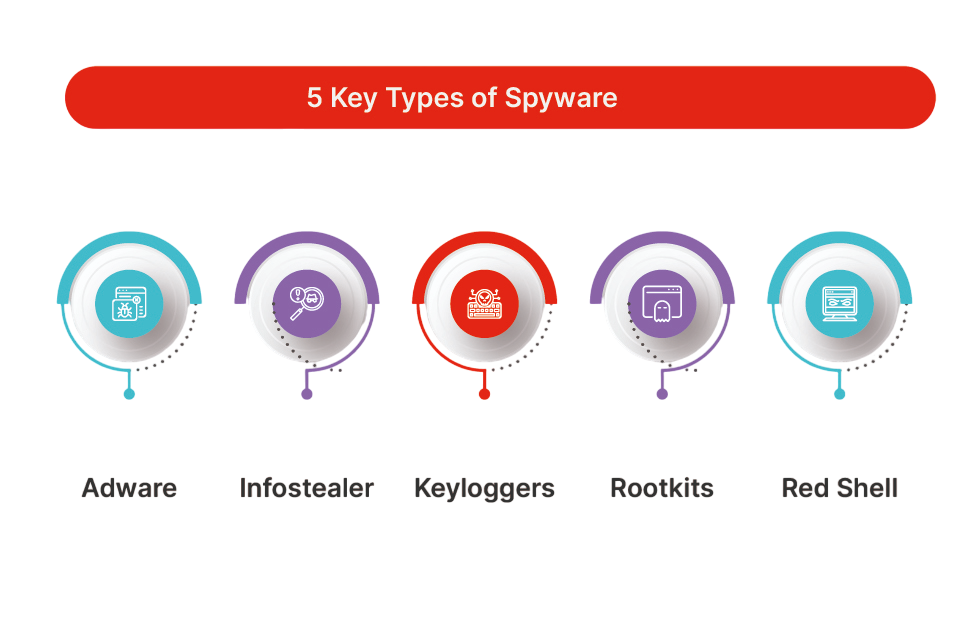
There are numerous types of spyware. Depending on how it works and the purpose for doing so, every type has a different methodology. Here are some of the common types of spyware:
- Adware: Adware is a type of spyware that mainly shows unwanted advertisements on your computer or device. Although adware itself is not necessarily malicious, it can still track your browsing habits and collect information about your interests, which can be used for targeted advertising. In some cases, adware may redirect your browser to malicious websites or install other forms of malware.
- Trojans: Trojans are also known as Trojan horses. They are spyware but come in the form of legitimate software. They can appear in the form of a free download, for instance, an update for software or some free program. Once installed, your data may be stolen or hackers can get unauthorized access to your computer. Keyloggers install other spyware or malware in your computer without your knowledge.
- Keyloggers: This category involves spyware with a more serious effect to be placed with hackers as well since they key in your records that include information entered when operating keyboards, whereby your login names, passwords, and other private message keys can find themselves being revealed by such spyware known as a keylogger.
- Tracking Cookies: Tracking cookies are small pieces of data stored on your device while browsing the internet. They track your browsing activity, preferences, and behavior. While cookies are often used by websites for legitimate purposes like remembering your login details or customizing content, they can also be used by third-party advertisers to monitor your activity across different sites, creating a detailed profile of your interests.
- Use Anti-Spyware Software: Reliable anti-spyware or antivirus software is the best way to prevent spyware from infecting your device. Such tools detect, block, and remove spyware from the system. Remember to update the software regularly to be safe and sound.
- Software Updates: Ensure your operating system, browsers, and other software are always updated with the latest patches, as software developers issue these patches periodically to cover identified security vulnerabilities that spyware may take advantage of.
- Avoid downloads and clicking on suspicious links: Avoid downloading any software from dubious websites and clicking on any links within an email or SMS because spyware can be installed through this method disguised as a legitimate file or update.
- Firewall protection: A firewall acts as a barrier between your device and the internet, blocking malicious traffic from entering your system. It can help keep spyware out of your system in the first place.
- Use Strong Passwords: Use unique, strong passwords for your accounts to prevent spyware and other malware from getting access to your sensitive information. Consider using a password manager to generate and store complex passwords securely.
- Spyware vs. Viruses: A virus replicates itself and spreads across devices, while spyware is focused on tracking and stealing data without spreading.
- Spyware vs. Trojans: Trojans are deceptive programs that trick you into downloading them, whereas spyware can often sneak onto your device through other means, such as bundled software.
- Spyware vs. Ransomware: Ransomware locks or encrypts your files and demands payment for their release, while spyware quietly collects data without necessarily causing immediate disruption.
To Explore Cybersecurity in Depth, Check Out Our Comprehensive Cyber Security Online Training To Gain Insights From Our Experts!
How Spyware Affects Your Device
Spyware can have several negative impacts on your device and online experience. Here are a few of the most common consequences: Slower Performance Spyware often runs in the background, using up system resources like memory and processing power. As a result, your device may become sluggish or unresponsive, as the spyware is constantly working to gather and transmit data. Privacy Breaches The most troubling effect of spyware is the likelihood of privacy breaches. To understand how attackers manipulate trust and identity to deliver such threats, explore Spoofing vs Phishing a comparative guide that breaks down impersonation tactics, delivery mechanisms, and defense strategies used to counter deceptive cyberattacks targeting individuals and organizations. Spyware might collect personal details such as log-in credentials, browsing history, and even some financial information. This information could be used to commit identity theft, fraud, or other types of malicious behavior. Data Theft Another risk of spyware is direct data theft. In this regard, keyloggers may capture such sensitive information as passwords that help hackers get unauthorized access to your bank accounts or social media accounts. This poses a great danger to your financial security and personal privacy.

Signs Your Device Is Infected with Spyware
Spyware typically runs in stealth mode, which makes it hard to detect. Still, some signs may indicate that your device is infected. Increased Pop-ups and Ads: If you find that there are too many pop-ups, banners, or advertisements appearing on your screen while browsing the internet, it is probably a sign that adware or spyware is running on your computer. To learn how to detect, analyze, and remove such threats effectively, explore Cyber Security Training a practical course that equips professionals with the skills to identify malicious software, secure endpoints, and implement proactive defense strategies against intrusive cyber threats. Such unwanted ads may slow down your browsing and redirect you to malicious websites. Slow System Performance If your computer is slowing down, and it only happens when you are running tasks that were smooth before, the culprit could be spyware hogging up the system resources. Spyware can run quietly in the background and can slow up your computer noticeably. Unexplained Changes to Settings Spyware can alter your browser settings, homepage, or default search engine on your computer without asking. If your browser changes that you didn’t make, it’s worthwhile to dig deeper to see if spyware or another type of malware is present.
Looking to Master Cybersecurity? Discover the Cyber Security Expert Masters Program Training Course Available at ACTE Now!
How to Protect Yourself from Spyware
There are several ways that you can help keep Protect Yourself safe from spyware and other types of malware: using updated antivirus software, avoiding suspicious downloads, and securing your communications. To ensure your sensitive data remains unreadable even if intercepted, explore Encryption and Decryption a foundational guide that explains how cryptographic techniques protect information in transit and at rest, forming the backbone of modern cybersecurity practices.
Preparing for Cyber Security Job Interviews? Have a Look at Our Blog on Cyber Security Interview Questions and Answers To Ace Your Interview!
What to Do If Your Device is Infected
If you suspect that your device is infected with spyware, follow these steps: Disconnect from the Internet Disconnect your device from the Internet to prevent the spyware from transmitting data. Run a Full System Scan to Use antivirus or anti-spyware software to scan your system and remove any detected spyware. Update Your Software is to ensure your operating system and applications are fully updated to fix any security vulnerabilities. To understand how this practice fits into a broader strategy for identifying, prioritizing, and mitigating risks, explore Vulnerability Management Explained a structured guide that covers scanning methodologies, patch management workflows, and continuous monitoring techniques essential for maintaining a secure IT environment. Change your passwords If spyware has stolen login credentials, change your passwords immediately for all important accounts. Restore your device If necessary, restore your device to a previous backup or perform a factory reset to remove any remaining malware.
Spyware vs Other Malware
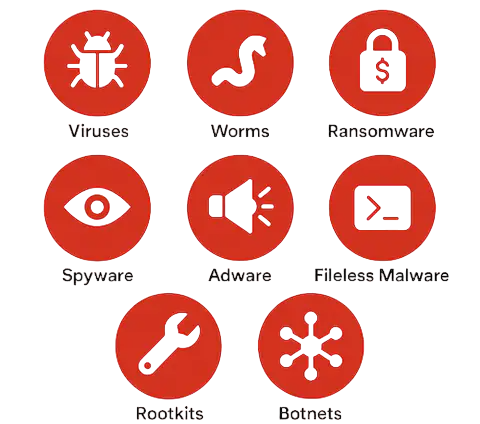
While spyware is often confused with other types of malware, it has its distinct features. Here is a quick comparison: spyware silently monitors user activity, whereas other malware types may corrupt files, encrypt data, or disrupt system operations. To understand how ethical hackers uncover such threats before they cause damage, explore Penetration Testing Key Insights a practical guide that reveals testing methodologies, toolkits, reporting strategies, and real-world scenarios used to evaluate and strengthen cybersecurity defenses.
Conclusion
Spyware is a critical security threat, which may expose your private life, steal personal information, and slow down your device. With the knowledge of how spyware works and knowing the signs of an infection, you can be proactive in securing your devices. To build deeper expertise in identifying, analyzing, and neutralizing such threats, explore Cyber Security Training a hands-on program that empowers professionals to detect spyware behaviors, implement protective measures, and respond effectively to real-world cyber incidents. Reliable anti-spyware software, keeping your system updated, and being cautious with downloads are all steps toward safeguarding your online activities and personal data. Remember, vigilance and knowledge of cybersecurity threats are the way to a safe and secure digital presence.