LMS
LMS
Last updated on 25th Oct 2025| 12258

- Intro to Virtual Private Network (VPN)
- What is a VPN?
- How Does a VPN Work?
- Why Do You Need a VPN?
- Types of VPNs
- Choosing the Right VPN
- Benefits of Using a VPN
- Limitations and Drawbacks of VPNs
- Common VPN Protocols
- Conclusion
Intro to Virtual Private Network (VPN)
The growth of Virtual Private Network (VPN) usage is partly fueled by concerns regarding privacy and security in today’s world of digitization. If you are worried about the protection of your online activity or need to bypass internet censorship, a VPN can be helpful. To understand how VPNs enhance privacy, encrypt traffic, and support secure remote access, explore Cyber Security Training a hands-on course that equips professionals with the skills to configure VPNs, defend against surveillance threats, and implement secure communication protocols across networks. But what is a Virtual Private Network (VPN), and how does it work? In this blog, we’re going to clarify the concept of VPNs, how they function, and why you should start using one to enjoy enhanced online network privacy and security.
What is a VPN?
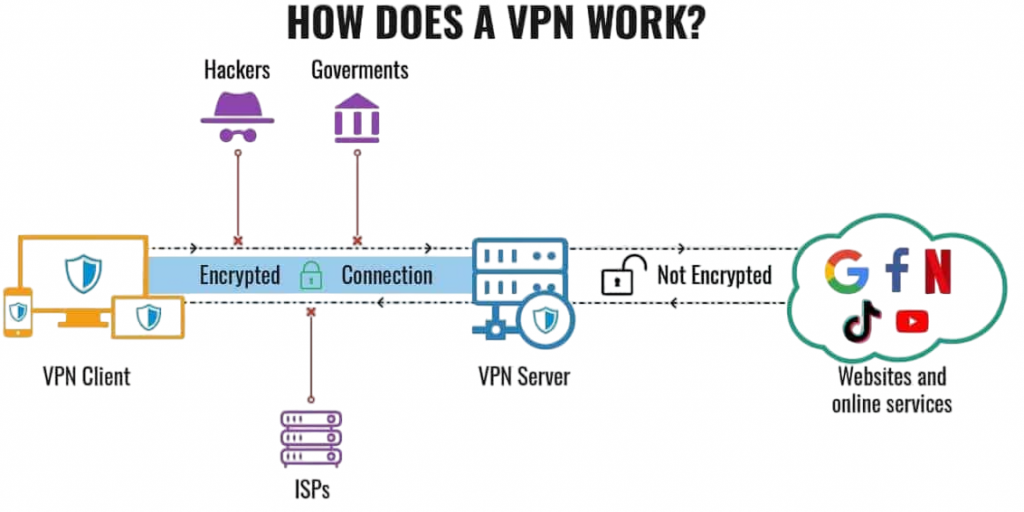
A Virtual Private Network is a technology that creates a secure, encrypted connection over the internet. It lets anyone send and receive data securely regardless of network type, whether unsecured public Wi-Fi or otherwise. It works by redirecting all internet traffic from a device to a remote server operated by the VPN service provider where your IP address is masked and your data encrypted as it protects online activities. To understand the underlying framework that enables such secure tunneling and authentication, explore Ipsec Internet Security Protocol a technical guide that explains encryption standards, key exchange mechanisms, and transport vs tunnel mode configurations used to safeguard data across IP networks. In simple words, a VPN acts like a tunnel for your internet traffic, making sure it’s safe from hackers, government surveillance, and other third-party entities.
Interested in Obtaining Your Cyber Security Certificate? View The Cyber Security Online Training Offered By ACTE Right Now!
How Does a VPN Work?
A VPN works through the following mechanisms:
- Encryption: Encryption is the conversion of data into unreadable code to prevent access by unauthorized persons. When connecting to a VPN, your internet traffic is encrypted, and this makes it unreadable to any person who may be trying to intercept it. Therefore, this encryption ensures that all your browsing history, personal information, and communications remain private in Online security.
- Tunneling Protocols: A VPN uses tunneling protocols to create a secure “tunnel” for your data to travel through. These protocols define the method for securely encrypting and transmitting your data across the network. Several types of tunneling protocols vary in terms of speed and security.
- IP Address Masking: Masking your IP address is one of the primary functions of a VPN in IP masking. When you connect to a VPN server, it assigns you a new IP address based on the server’s location. This way, it seems like you are browsing the internet from another location, helping you stay anonymous and access region-restricted content.
- Privacy Protection: A VPN hides your real IP address, preventing websites and third parties from tracking your online behavior in privacy protection.
- Security: It encrypts your data, making it harder for cybercriminals to intercept sensitive information, cyber threats, especially on public networks.
- Bypassing Restrictions: VPNs allow users to access content restricted by geographic location, like streaming services or websites blocked by governments.
- Secure Remote Access: Businesses use VPNs to allow employees to access corporate networks securely from remote locations.
- Remote Access VPN: This kind of VPN is often used by individuals or employees who want to connect remotely to a remote network. When you access a website or service from home using a VPN, that’s an example of a remote access VPN. This is the most common solution for workers accessing company resources while working remotely.
- Site-to-Site VPN: Site-to-site VPNs are used by organizations to connect entire networks, such as offices or branches, securely. These VPNs allow different locations to communicate with each other over the internet, providing a secure connection between various offices or data centers.
- Mobile VPN: Mobile VPNs are designed for mobile devices, including smartphones and tablets. These are particularly useful for users who require constant internet access and need their connection to remain secure while on the move.
- Reduced Speeds: Encrypting and routing traffic through a remote server can slow down your internet connection.
- Compatibility Issues: Some websites and services may block VPN traffic, preventing access.
- Legal Restrictions: In some countries, using a VPN may be restricted or illegal, so be sure to check local laws before using one.
- OpenVPN: OpenVPN is an open-source protocol that gives high security with flexibility. This is widely used for personal as well as business VPNs since it has robust encryption and configurability.
- IKEv2/IPSec: IKEv2 (Internet Key Exchange Version 2) is a secure protocol that is fast and stable, especially for mobile devices. It works perfectly with IPSec encryption to offer strong security.
- L2TP/IPSec: L2TP is usually used with IPSec for maximum security. Though secure, it’s slower than OpenVPN and IKEv2.
- PPTP: PPTP stands for Point-to-Point Tunneling Protocol. This is one of the oldest VPN protocols. PPTP is fast but not that much secure, and many experts believe it is old-fashioned.
To Explore Cybersecurity in Depth, Check Out Our Comprehensive Cyber Security Online Training To Gain Insights From Our Experts!
Why Do You Need a VPN?
There are several reasons why individuals and businesses use VPNs, including: protecting sensitive data, bypassing geo-restrictions, and maintaining anonymity online. To evaluate how well these security measures distinguish between legitimate and malicious traffic, explore Receiver Operating Characteristic a machine learning concept that visualizes the trade-off between true positive and false positive rates, helping analysts assess the effectiveness of classification models in cybersecurity applications.

Types of VPNs
There are different types of VPNs suited for various use cases:
Looking to Master Cybersecurity? Discover the Cyber Security Expert Masters Program Training Course Available at ACTE Now!
Choosing the Right VPN
Selecting a VPN service requires attention to several details to get the best result. Speed is very important. Pick a VPN that gives fast connection speeds, especially if you want to stream videos or play games online, as these need a reliable and quick internet . Security is also a main thing to think about. Look for a VPN that uses strong encryption methods and has a strict no-logs rule. This keeps your online actions private and safe. Make sure the VPN has servers in lots of places. This lets you get to content that’s only available in certain parts of the world. Check if the VPN works with all the devices you use, like computers, phones, and routers. It is also suggested to compare the costs of different plans to find one that fits your budget and still has the features you need. To understand how VPNs support secure access, cross-device compatibility, and cost-effective privacy solutions, explore Cyber Security Training a practical course that equips professionals with the skills to configure VPNs, evaluate service plans, and implement encrypted communication across diverse platforms. By looking closely at speed, security, server locations, device compatibility, and price, you can pick a VPN service that suits your needs for fast and safe Meanwhile,it can provide accessible to content and is worth the money. VPN should support various devices, including desktop computers, cell phones, and routers, to protect all online actions. A no-logs policy is also very important. By examining these aspects, people can choose a service that balances speed, security, accessibility, compatibility and cost.
Preparing for Cyber Security Job Interviews? Have a Look at Our Blog on Cyber Security Interview Questions and Answers To Ace Your Interview!
Benefits of Using a VPN
Choosing a VPN requires thinking about a few things so you get what you want. Speed matters a lot. A VPN should have fast connections, especially if you watch videos or play online games. These activities need a steady, quick internet link. Security is very important, too. Find a VPN that uses strong methods to scramble your data and keeps no record of what you do online. This keeps your information safe and private. Having many server locations is also helpful. It lets you see content that is only available in certain areas of the world. To ensure that this content is securely transmitted across regions, explore Data Encryption Standard Algorithm a foundational cryptographic method that explains how symmetric key encryption protects data in transit, enabling secure communication across distributed networks and global infrastructures. Make sure the VPN works with all your devices computers, phones, and routers. Check the price to find a VPN that fits what you can spend and still has the things you need. If you look at these things, you can pick a VPN that works well in terms of speed, security, access to different content, and price. A VPN is great for keeping your online activity private and secure. It scrambles your internet traffic and hides your IP address. This stops hackers, internet companies, and others from seeing your personal information and what you do online.
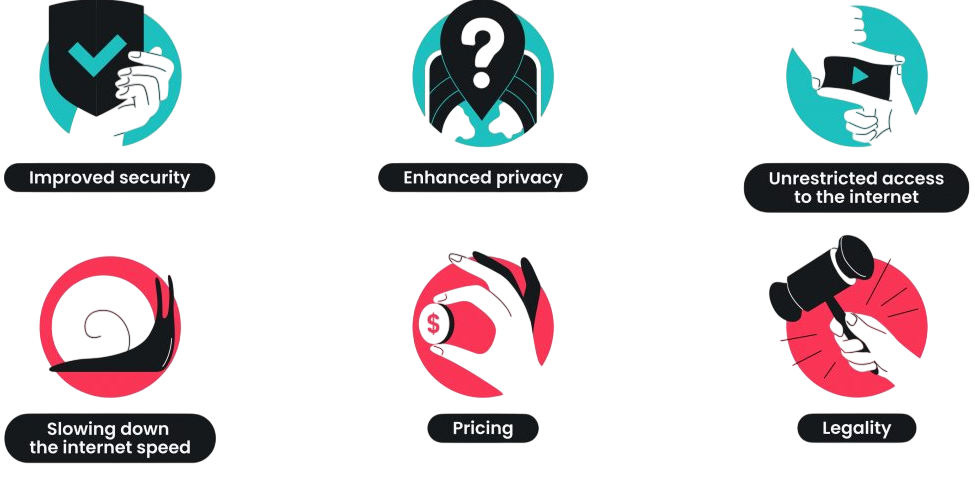
A VPN is good for getting to content that you cannot normally see. It helps you get around blocks that are put on content in your region. If a video is not available where you are, you can connect to a VPN server in another country to view it. VPNs also help with avoiding censorship. They let you go around limits set by governments and connect to servers that allow you to see websites and services that are blocked. When you use public Wi-Fi in places like coffee shops, a VPN keeps your link safe from hacks. This keeps your private information protected, even when the network is not secure. Using a VPN makes your online experience better by protecting your privacy, giving you access to restricted content, and securing your data when you are on public Wi-Fi.
Limitations and Drawbacks of VPNs
While VPNs provide many benefits, there are some limitations: they can reduce connection speed, may not protect against all types of malware, and often don’t prevent phishing or social engineering attacks. To build a more comprehensive defense beyond VPNs, explore Guide to Web Security a complete resource covering secure browsing practices, HTTPS protocols, browser hardening, and layered strategies to protect users from evolving online threats.
Common VPN Protocols
There are multiple VPN protocols, each with its characteristics, and each serves a little different benefit than the other. Some of these popular VPN protocols include OpenVPN, IKEv2/IPSec, and WireGuard. To explore how these protocols integrate with broader protective measures, explore Network Security Tools a curated guide to firewalls, intrusion detection systems, VPNs, and endpoint defenses that collectively safeguard digital infrastructure from evolving cyber threats.
Conclusion
A Virtual Private Network (VPN) is a powerful tool for ensuring online privacy, security, and freedom. Whether you want to protect your sensitive data, access region-blocked content, or safeguard your browsing activities on public Wi-Fi, a VPN is a reliable solution. To understand how VPNs enhance digital privacy, secure data transmission, and support safe browsing across networks, explore Cyber Security Training a hands-on course that equips professionals with the skills to configure VPNs, defend against interception threats, and implement encrypted communication protocols in real-world environments. With an understanding of how VPNs work, the types available, and their benefits, you can make an informed decision about whether a VPN is right for you. As internet security and privacy become more of a concern, using a Virtual Private Network (VPN) is one of the easiest ways to secure your online presence and stay safe in the digital world.